Operating systems
UNT-2-PART-1: PROCESS MANAGEMENT
Program Vs Process:
 A program in execution is called a process.
 Process needs computer resources for its execution
There may exist more than one process in the system which may require the
same resource at the same time.
 The operating system has to manage all the processes and the resources in a
convenient and efficient way.
Some resources may need to be executed by one process at one time to
maintain the consistency otherwise the system can become inconsistent, and
deadlock may occur.
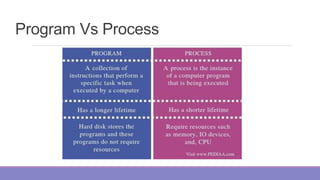
Program Vs Process
OS as a Process Manager:
The operating system is responsible for the following activities in connection with
Process Management:
 Scheduling processes and threads on the CPUs.
 Creating and deleting both user and system processes.
 Suspending and resuming processes.
 Providing mechanisms for process synchronization.
 Providing mechanisms for process communication.
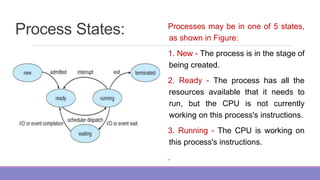
Process States: Processes may be in one of 5 states,
as shown in Figure:
1. New - The process is in the stage of
being created.
2. Ready - The process has all the
resources available that it needs to
run, but the CPU is not currently
working on this process's instructions.
3. Running - The CPU is working on
this process's instructions.
.
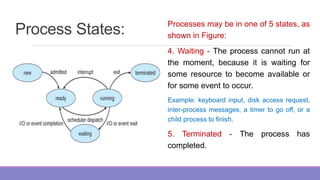
Process States: Processes may be in one of 5 states, as
shown in Figure:
4. Waiting - The process cannot run at
the moment, because it is waiting for
some resource to become available or
for some event to occur.
Example: keyboard input, disk access request,
inter-process messages, a timer to go off, or a
child process to finish.
5. Terminated - The process has
completed.
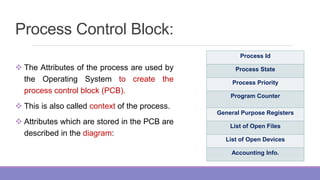
Process Control Block:
 The Attributes of the process are used by
the Operating System to create the
process control block (PCB).
 This is also called context of the process.
 Attributes which are stored in the PCB are
described in the diagram:
Process Id
Process State
Process Priority
Program Counter
General Purpose Registers
List of Open Files
List of Open Devices
Accounting Info.
Process Control Block
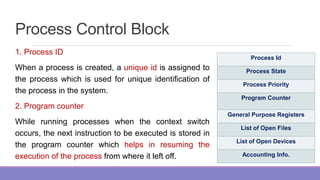
1. Process ID
When a process is created, a unique id is assigned to
the process which is used for unique identification of
the process in the system.
2. Program counter
While running processes when the context switch
occurs, the next instruction to be executed is stored in
the program counter which helps in resuming the
execution of the process from where it left off.
Process Id
Process State
Process Priority
Program Counter
General Purpose Registers
List of Open Files
List of Open Devices
Accounting Info.
Process Control Block
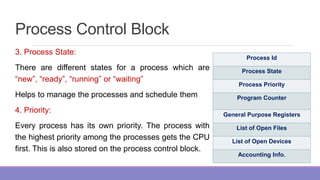
3. Process State:
There are different states for a process which are
“new”, “ready”, “running” or “waiting”
Helps to manage the processes and schedule them
4. Priority:
Every process has its own priority. The process with
the highest priority among the processes gets the CPU
first. This is also stored on the process control block.
Process Id
Process State
Process Priority
Program Counter
General Purpose Registers
List of Open Files
List of Open Devices
Accounting Info.
Process Control Block
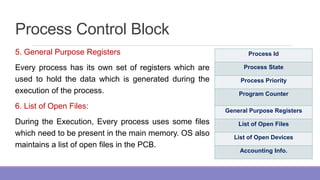
5. General Purpose Registers
Every process has its own set of registers which are
used to hold the data which is generated during the
execution of the process.
6. List of Open Files:
During the Execution, Every process uses some files
which need to be present in the main memory. OS also
maintains a list of open files in the PCB.
Process Id
Process State
Process Priority
Program Counter
General Purpose Registers
List of Open Files
List of Open Devices
Accounting Info.
Process Control Block
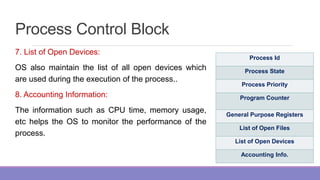
7. List of Open Devices:
OS also maintain the list of all open devices which
are used during the execution of the process..
8. Accounting Information:
The information such as CPU time, memory usage,
etc helps the OS to monitor the performance of the
process.
Process Id
Process State
Process Priority
Program Counter
General Purpose Registers
List of Open Files
List of Open Devices
Accounting Info.
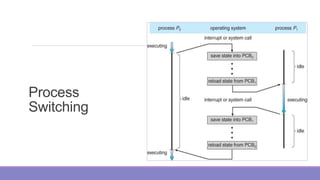
Process
Switching

OS-Unit-2-Part-1.pptx

  • 1.
  • 2.
    Program Vs Process: A program in execution is called a process.  Process needs computer resources for its execution There may exist more than one process in the system which may require the same resource at the same time.  The operating system has to manage all the processes and the resources in a convenient and efficient way. Some resources may need to be executed by one process at one time to maintain the consistency otherwise the system can become inconsistent, and deadlock may occur.
  • 3.
  • 4.
    OS as aProcess Manager: The operating system is responsible for the following activities in connection with Process Management:  Scheduling processes and threads on the CPUs.  Creating and deleting both user and system processes.  Suspending and resuming processes.  Providing mechanisms for process synchronization.  Providing mechanisms for process communication.
  • 5.
    Process States: Processesmay be in one of 5 states, as shown in Figure: 1. New - The process is in the stage of being created. 2. Ready - The process has all the resources available that it needs to run, but the CPU is not currently working on this process's instructions. 3. Running - The CPU is working on this process's instructions. .
  • 6.
    Process States: Processesmay be in one of 5 states, as shown in Figure: 4. Waiting - The process cannot run at the moment, because it is waiting for some resource to become available or for some event to occur. Example: keyboard input, disk access request, inter-process messages, a timer to go off, or a child process to finish. 5. Terminated - The process has completed.
  • 7.
    Process Control Block: The Attributes of the process are used by the Operating System to create the process control block (PCB).  This is also called context of the process.  Attributes which are stored in the PCB are described in the diagram: Process Id Process State Process Priority Program Counter General Purpose Registers List of Open Files List of Open Devices Accounting Info.
  • 8.
    Process Control Block 1.Process ID When a process is created, a unique id is assigned to the process which is used for unique identification of the process in the system. 2. Program counter While running processes when the context switch occurs, the next instruction to be executed is stored in the program counter which helps in resuming the execution of the process from where it left off. Process Id Process State Process Priority Program Counter General Purpose Registers List of Open Files List of Open Devices Accounting Info.
  • 9.
    Process Control Block 3.Process State: There are different states for a process which are “new”, “ready”, “running” or “waiting” Helps to manage the processes and schedule them 4. Priority: Every process has its own priority. The process with the highest priority among the processes gets the CPU first. This is also stored on the process control block. Process Id Process State Process Priority Program Counter General Purpose Registers List of Open Files List of Open Devices Accounting Info.
  • 10.
    Process Control Block 5.General Purpose Registers Every process has its own set of registers which are used to hold the data which is generated during the execution of the process. 6. List of Open Files: During the Execution, Every process uses some files which need to be present in the main memory. OS also maintains a list of open files in the PCB. Process Id Process State Process Priority Program Counter General Purpose Registers List of Open Files List of Open Devices Accounting Info.
  • 11.
    Process Control Block 7.List of Open Devices: OS also maintain the list of all open devices which are used during the execution of the process.. 8. Accounting Information: The information such as CPU time, memory usage, etc helps the OS to monitor the performance of the process. Process Id Process State Process Priority Program Counter General Purpose Registers List of Open Files List of Open Devices Accounting Info.
  • 12.