Operating System 19
Interacting Processes and IPC
Prof Neeraj Bhargava
Vaibhav Khanna
Department of Computer Science
School of Engineering and Systems Sciences
Maharshi Dayanand Saraswati University Ajmer
Multiprocess Architecture – Chrome Browser
• Many web browsers ran as single process (some still
do)
– If one web site causes trouble, entire browser can hang or
crash
• Google Chrome Browser is multiprocess with 3
different types of processes:
– Browser process manages user interface, disk and
network I/O
– Renderer process renders web pages, deals with HTML,
Javascript. A new renderer created for each website
opened
• Runs in sandbox restricting disk and network I/O, minimizing
effect of security exploits
– Plug-in process for each type of plug-in
Interprocess Communication
• Processes within a system may be independent or
cooperating
• Cooperating process can affect or be affected by other
processes, including sharing data
• Reasons for cooperating processes:
– Information sharing
– Computation speedup
– Modularity
– Convenience
• Cooperating processes need interprocess communication
(IPC)
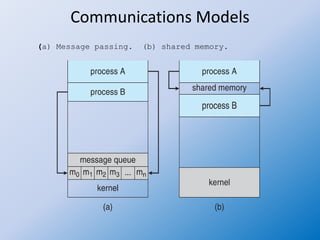
• Two models of IPC
– Shared memory
– Message passing
Communications Models
(a) Message passing. (b) shared memory.
Cooperating Processes
• Independent process cannot affect or be
affected by the execution of another process
• Cooperating process can affect or be
affected by the execution of another process
• Advantages of process cooperation
– Information sharing
– Computation speed-up
– Modularity
– Convenience
Producer-Consumer Problem
• Paradigm for cooperating processes, producer
process produces information that is
consumed by a consumer process
– unbounded-buffer places no practical limit on the
size of the buffer
– bounded-buffer assumes that there is a fixed
buffer size
Bounded-Buffer –
Shared-Memory Solution
• Shared data
#define BUFFER_SIZE 10
typedef struct {
. . .
} item;
item buffer[BUFFER_SIZE];
int in = 0;
int out = 0;
• Solution is correct, but can only use BUFFER_SIZE-1 elements
Bounded-Buffer – Producer
item next_produced;
while (true) {
/* produce an item in next produced */
while (((in + 1) % BUFFER_SIZE) == out)
; /* do nothing */
buffer[in] = next_produced;
in = (in + 1) % BUFFER_SIZE;
}
Bounded Buffer – Consumer
item next_consumed;
while (true) {
while (in == out)
; /* do nothing */
next_consumed = buffer[out];
out = (out + 1) % BUFFER_SIZE;
/* consume the item in next consumed */
}
Interprocess Communication –
Shared Memory
• An area of memory shared among the
processes that wish to communicate
• The communication is under the control of the
users processes not the operating system.
• Major issues is to provide mechanism that will
allow the user processes to synchronize their
actions when they access shared memory.
• Synchronization is discussed in great details in
Chapter 5.
Interprocess Communication –
Message Passing
• Mechanism for processes to communicate and
to synchronize their actions
• Message system – processes communicate
with each other without resorting to shared
variables
• IPC facility provides two operations:
– send(message)
– receive(message)
• The message size is either fixed or variable
Message Passing (Cont.)
• If processes P and Q wish to communicate, they need
to:
– Establish a communication link between them
– Exchange messages via send/receive
• Implementation issues:
– How are links established?
– Can a link be associated with more than two processes?
– How many links can there be between every pair of
communicating processes?
– What is the capacity of a link?
– Is the size of a message that the link can accommodate
fixed or variable?
– Is a link unidirectional or bi-directional?
Message Passing (Cont.)
• Implementation of communication link
– Physical:
• Shared memory
• Hardware bus
• Network
– Logical:
• Direct or indirect
• Synchronous or asynchronous
• Automatic or explicit buffering
Direct Communication
• Processes must name each other explicitly:
– send (P, message) – send a message to process P
– receive(Q, message) – receive a message from
process Q
• Properties of communication link
– Links are established automatically
– A link is associated with exactly one pair of
communicating processes
– Between each pair there exists exactly one link
– The link may be unidirectional, but is usually bi-
directional
Indirect Communication
• Messages are directed and received from mailboxes
(also referred to as ports)
– Each mailbox has a unique id
– Processes can communicate only if they share a mailbox
• Properties of communication link
– Link established only if processes share a common
mailbox
– A link may be associated with many processes
– Each pair of processes may share several communication
links
– Link may be unidirectional or bi-directional
Indirect Communication
• Operations
– create a new mailbox (port)
– send and receive messages through mailbox
– destroy a mailbox
• Primitives are defined as:
send(A, message) – send a message to
mailbox A
receive(A, message) – receive a message
from mailbox A
Indirect Communication
• Mailbox sharing
– P1, P2, and P3 share mailbox A
– P1, sends; P2 and P3 receive
– Who gets the message?
• Solutions
– Allow a link to be associated with at most two
processes
– Allow only one process at a time to execute a
receive operation
– Allow the system to select arbitrarily the
receiver. Sender is notified who the receiver
was.
Synchronization
• Message passing may be either blocking or non-blocking
• Blocking is considered synchronous
– Blocking send -- the sender is blocked until the message is
received
– Blocking receive -- the receiver is blocked until a message is
available
• Non-blocking is considered asynchronous
– Non-blocking send -- the sender sends the message and
continue
– Non-blocking receive -- the receiver receives:
 A valid message, or
 Null message
 Different combinations possible
 If both send and receive are blocking, we have a rendezvous
Synchronization (Cont.)
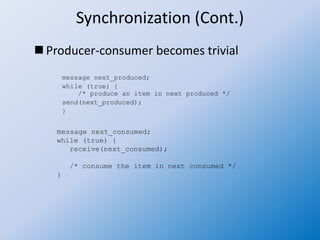
 Producer-consumer becomes trivial
message next_produced;
while (true) {
/* produce an item in next produced */
send(next_produced);
}
message next_consumed;
while (true) {
receive(next_consumed);
/* consume the item in next consumed */
}
Buffering
• Queue of messages attached to the link.
• implemented in one of three ways
1.Zero capacity – no messages are queued on a link.
Sender must wait for receiver (rendezvous)
2.Bounded capacity – finite length of n messages
Sender must wait if link full
3.Unbounded capacity – infinite length
Sender never waits
Assignment
• Explain the concept of IPC for Interacting
Processes.

Operating system 19 interacting processes and ipc

  • 1.
    Operating System 19 InteractingProcesses and IPC Prof Neeraj Bhargava Vaibhav Khanna Department of Computer Science School of Engineering and Systems Sciences Maharshi Dayanand Saraswati University Ajmer
  • 2.
    Multiprocess Architecture –Chrome Browser • Many web browsers ran as single process (some still do) – If one web site causes trouble, entire browser can hang or crash • Google Chrome Browser is multiprocess with 3 different types of processes: – Browser process manages user interface, disk and network I/O – Renderer process renders web pages, deals with HTML, Javascript. A new renderer created for each website opened • Runs in sandbox restricting disk and network I/O, minimizing effect of security exploits – Plug-in process for each type of plug-in
  • 3.
    Interprocess Communication • Processeswithin a system may be independent or cooperating • Cooperating process can affect or be affected by other processes, including sharing data • Reasons for cooperating processes: – Information sharing – Computation speedup – Modularity – Convenience • Cooperating processes need interprocess communication (IPC) • Two models of IPC – Shared memory – Message passing
  • 4.
    Communications Models (a) Messagepassing. (b) shared memory.
  • 5.
    Cooperating Processes • Independentprocess cannot affect or be affected by the execution of another process • Cooperating process can affect or be affected by the execution of another process • Advantages of process cooperation – Information sharing – Computation speed-up – Modularity – Convenience
  • 6.
    Producer-Consumer Problem • Paradigmfor cooperating processes, producer process produces information that is consumed by a consumer process – unbounded-buffer places no practical limit on the size of the buffer – bounded-buffer assumes that there is a fixed buffer size
  • 7.
    Bounded-Buffer – Shared-Memory Solution •Shared data #define BUFFER_SIZE 10 typedef struct { . . . } item; item buffer[BUFFER_SIZE]; int in = 0; int out = 0; • Solution is correct, but can only use BUFFER_SIZE-1 elements
  • 8.
    Bounded-Buffer – Producer itemnext_produced; while (true) { /* produce an item in next produced */ while (((in + 1) % BUFFER_SIZE) == out) ; /* do nothing */ buffer[in] = next_produced; in = (in + 1) % BUFFER_SIZE; }
  • 9.
    Bounded Buffer –Consumer item next_consumed; while (true) { while (in == out) ; /* do nothing */ next_consumed = buffer[out]; out = (out + 1) % BUFFER_SIZE; /* consume the item in next consumed */ }
  • 10.
    Interprocess Communication – SharedMemory • An area of memory shared among the processes that wish to communicate • The communication is under the control of the users processes not the operating system. • Major issues is to provide mechanism that will allow the user processes to synchronize their actions when they access shared memory. • Synchronization is discussed in great details in Chapter 5.
  • 11.
    Interprocess Communication – MessagePassing • Mechanism for processes to communicate and to synchronize their actions • Message system – processes communicate with each other without resorting to shared variables • IPC facility provides two operations: – send(message) – receive(message) • The message size is either fixed or variable
  • 12.
    Message Passing (Cont.) •If processes P and Q wish to communicate, they need to: – Establish a communication link between them – Exchange messages via send/receive • Implementation issues: – How are links established? – Can a link be associated with more than two processes? – How many links can there be between every pair of communicating processes? – What is the capacity of a link? – Is the size of a message that the link can accommodate fixed or variable? – Is a link unidirectional or bi-directional?
  • 13.
    Message Passing (Cont.) •Implementation of communication link – Physical: • Shared memory • Hardware bus • Network – Logical: • Direct or indirect • Synchronous or asynchronous • Automatic or explicit buffering
  • 14.
    Direct Communication • Processesmust name each other explicitly: – send (P, message) – send a message to process P – receive(Q, message) – receive a message from process Q • Properties of communication link – Links are established automatically – A link is associated with exactly one pair of communicating processes – Between each pair there exists exactly one link – The link may be unidirectional, but is usually bi- directional
  • 15.
    Indirect Communication • Messagesare directed and received from mailboxes (also referred to as ports) – Each mailbox has a unique id – Processes can communicate only if they share a mailbox • Properties of communication link – Link established only if processes share a common mailbox – A link may be associated with many processes – Each pair of processes may share several communication links – Link may be unidirectional or bi-directional
  • 16.
    Indirect Communication • Operations –create a new mailbox (port) – send and receive messages through mailbox – destroy a mailbox • Primitives are defined as: send(A, message) – send a message to mailbox A receive(A, message) – receive a message from mailbox A
  • 17.
    Indirect Communication • Mailboxsharing – P1, P2, and P3 share mailbox A – P1, sends; P2 and P3 receive – Who gets the message? • Solutions – Allow a link to be associated with at most two processes – Allow only one process at a time to execute a receive operation – Allow the system to select arbitrarily the receiver. Sender is notified who the receiver was.
  • 18.
    Synchronization • Message passingmay be either blocking or non-blocking • Blocking is considered synchronous – Blocking send -- the sender is blocked until the message is received – Blocking receive -- the receiver is blocked until a message is available • Non-blocking is considered asynchronous – Non-blocking send -- the sender sends the message and continue – Non-blocking receive -- the receiver receives:  A valid message, or  Null message  Different combinations possible  If both send and receive are blocking, we have a rendezvous
  • 19.
    Synchronization (Cont.)  Producer-consumerbecomes trivial message next_produced; while (true) { /* produce an item in next produced */ send(next_produced); } message next_consumed; while (true) { receive(next_consumed); /* consume the item in next consumed */ }
  • 20.
    Buffering • Queue ofmessages attached to the link. • implemented in one of three ways 1.Zero capacity – no messages are queued on a link. Sender must wait for receiver (rendezvous) 2.Bounded capacity – finite length of n messages Sender must wait if link full 3.Unbounded capacity – infinite length Sender never waits
  • 21.
    Assignment • Explain theconcept of IPC for Interacting Processes.