FREEZERBackup & Restore & DR
Agenda
Onboarding – You, me, … WEPart 1
What kind of business use-cases can
Freezer offer you today?
Part 2
Ideas - What can Freezer offer in the
future
Part 3
https://bit.ly/bos-freezer
Part 1
• Onboarding – You, me, … WE
https://bit.ly/bos-freezer
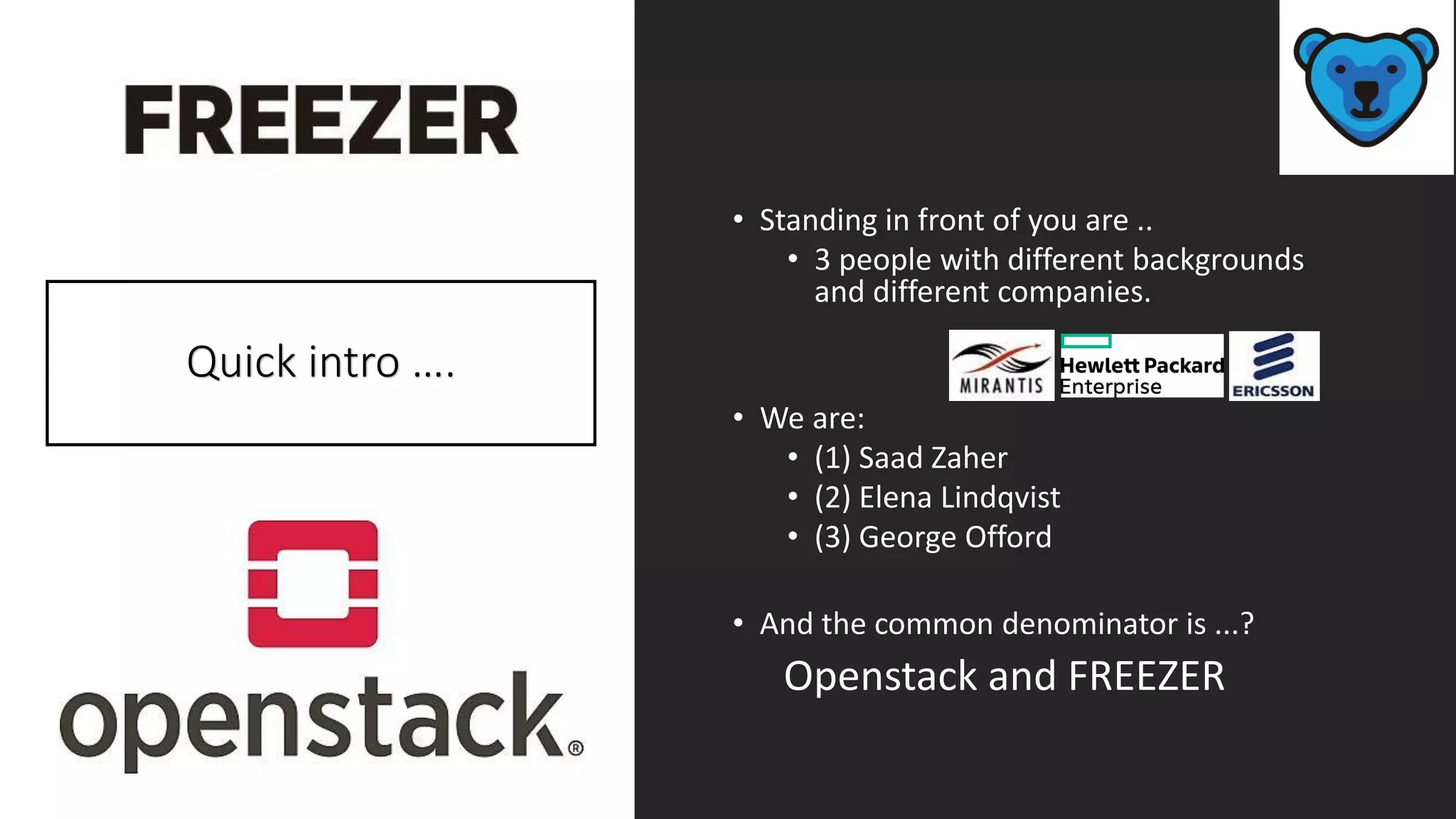
• Standing in front of you are ..
• 3 people with different backgrounds
and different companies.
• We are:
• (1) Saad Zaher
• (2) Elena Lindqvist
• (3) George Offord
• And the common denominator is ...?
Openstack and FREEZER
Quick intro ….
.. And who are you?
• what are you most interested in?
• Private clouds?
• Hybrid clouds?
• Public clouds?
• What is your Industry background?
• How much do you already know?
• Novice?
• Experienced?
• Expert?
• What useful takeaways can we share with you
today?
https://bit.ly/bos-freezer
Create strong support for your Business Cases
• Think carefully, plan carefully … and then do it again! Cost savings are
calculated according to many different parameters.
• You have to pay attention to the fact that the actual challenge is to define
and calculate the savings from an e2e perspective.
• It is necessary to take into consideration transformation costs as well!
• Below are listed some strategic important decisions which will drive the
TCO from the operator perspective.
• 1. Do we go for an infrastructure convergence model or not?
• 2. How can we FULLY automate the service, control the network and
guarantee continuous operational status?
• 3. Among the many additional building blocks we have the question
about which product should we choose, and which vendor?
• 5. Which technology should we invest in? ... Open source or not?
What is the licensing model ?
• 6. What is the support model? What do we have to pay for support?
• .... what SLAs do we need in order to cover the entire Cloud environment,
while at the same time insuring that the SLAs share responsibility between
virtualization, real hardware, and VNF suppliers?
https://bit.ly/bos-freezer
So, why
backups??
• Backups are needed to protect information
from being lost. The causes for information loss
can be : data deletion or corruption, theft,
hacking, fire , etc ...
• In case of an incident, a backup needs to be
restored quickly which means minimizing
system downtime.
• Lack of a proper backup and restore system
means long system downtime, which results in
significant $$$ loss.
… other reasons for having a Backup?
Application bugs
Power failure
Legal requirements
Compliance
*Let's bring some numbers into the picture; see the next slide.
https://bit.ly/bos-freezer
…the average
cost of
downtime is
$5,000 per
minute
• Average Outage Period 
resolution time per outage is around 200 minutes
(@ 5000/min=$1,000,000).
• Downtime: Impact on Reputation and Loyalty  What is
your reputation worth?
• Impact to Employee Productivity  Downtime cost
impacts employee productivity
• Cost of Downtime  Calculate it Yourself!
• How much do you lose from unexpected downtime of
your servers & business applications?
• The simplest way to calculate potential revenue losses
during an outage is with the equation:
• LOST REVENUE = (GR/TH) x I x H
• GR = gross yearly revenue
• TH = total yearly business hours
• I = percentage impact
• H = number of hours of outage
Part 2
• What kind of business use-cases can Freezer
offer you today?
https://bit.ly/bos-freezer
Business Use-Case 01
• Besides being an efficient working system,
the customer wants a modular system that
can be easily maintained and supported if
necessary.
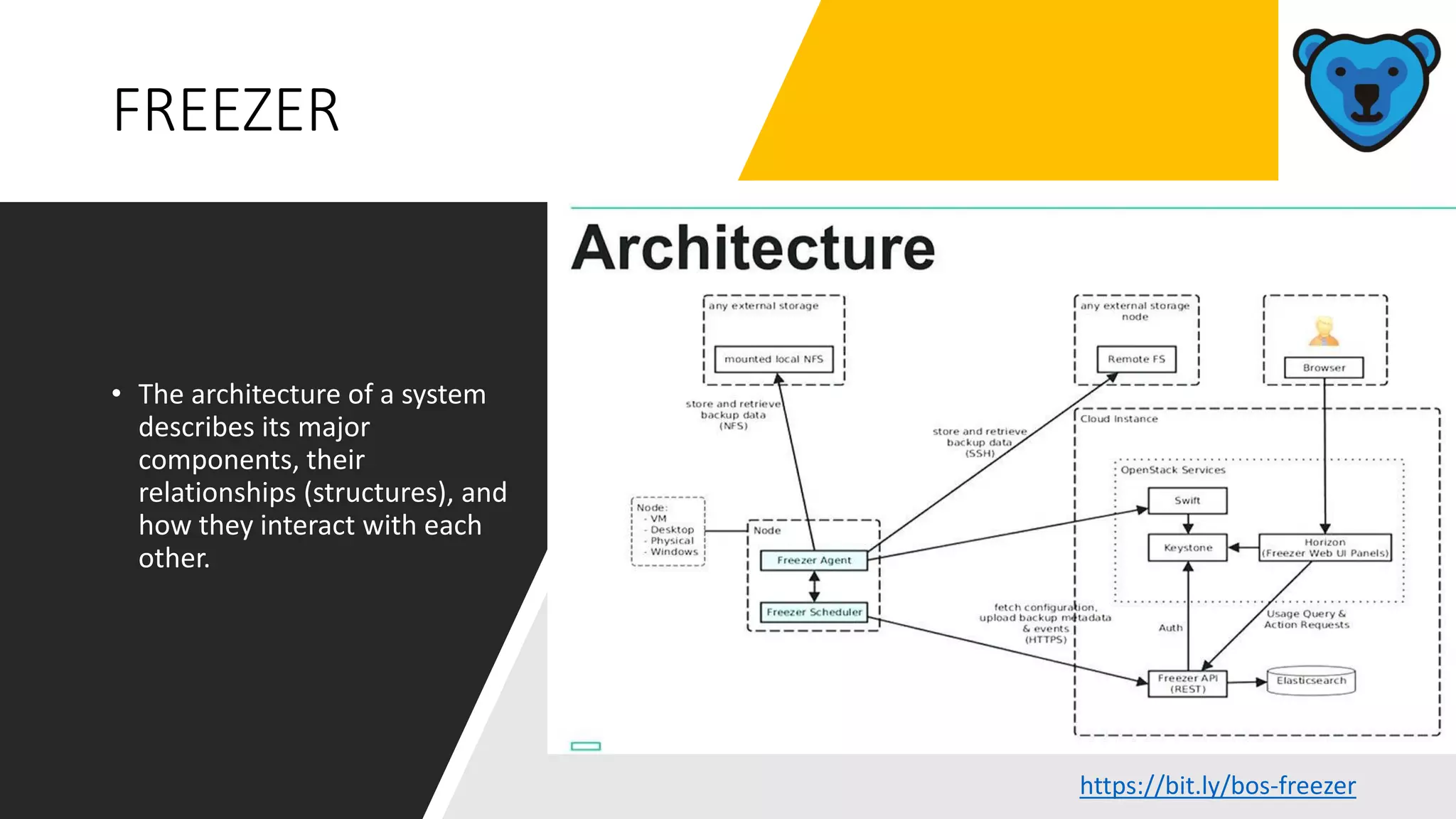
• Freezer offers such a logical hierarchical
architecture making use of well known
established Openstack modules.
https://bit.ly/bos-freezer
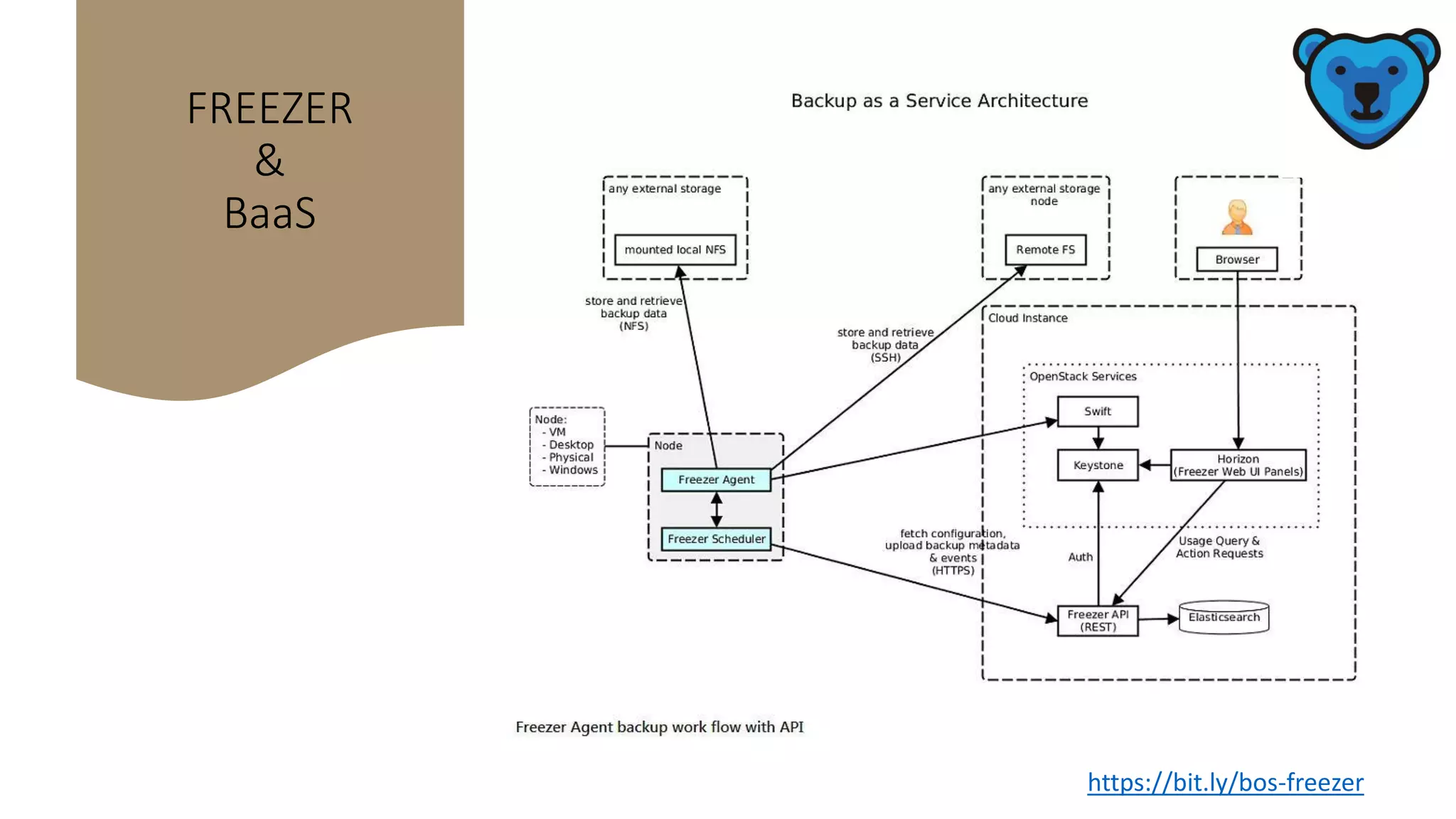
FREEZER
• The architecture of a system
describes its major
components, their
relationships (structures), and
how they interact with each
other.
https://bit.ly/bos-freezer
Business Use-Case 02
• Freezer is an enabler, helping to enable a
smooth transition towards digital
transformation
https://bit.ly/bos-freezer
Soft migration of Legacy
backups
• Legacy backup & cloud backup - A soft
migration from the old backup to the new
cloud backup
• This is done by putting a Freezer agent on
the Legacy backup HW.
• Every time you do a backup on the Legacy
HW, it will also be backed-up in the cloud.
• The Legacy backup is being added to your
cloud backup in runtime, in the end you
will have backed up all your legacy volume
backup to the cloud backup.
• So why is this good for the customer?
• Freezer is an enabler for migrating backups in a soft and easy way from native to cloud
(simplicity = $ saved).
• Backups for the native solution can be stored in one place in Freezer. One storage place
for backups means less overhead for admin of the backups.
(less admin overhead = $$ saved).
• All Licensing connected with the Legacy system for backups can be quickly discontinued.
(fewer licenses = $$$ saved).
https://bit.ly/bos-freezer
What sets
Freezer apart
from the
others?
• TECHNICAL INFORMATION
• Freezer uses ‘rsync’ instead of ‘tar’ for updating backups
• Why? And what does this mean for performance?
• Background.
• Before rsync, Freezer had only one type of engine to backup files – the TAR engine.
This type of an engine allowed the user to preinstall the tar binary for backup and
restore of local files.
• There are Pros & Cons for using “rsync” instead of “tar”
• PRO:
• Rsync engine description. The main feature of this engine is block-based
incremental support. It means that in case a file was changed freezer will backup
only the changed blocks in the file. In this way, it enables use of less space for
writing the incremental backups.
• This is to be seen in comparison to the tar engine which rewrites the entire file
even if there is only a minor incremental change found in the entire file.
• In specific cases rsync is way faster than tar, when there are only small incremental
data changes in a large volume of data because it only transfers the modified
blocks
• CON:
• But rsync needs to do fstats on each file, so rsync is therefore 30% slower than tar.
In the scenario where large volumes of data with many changes in the data need to
be backed-up, the 30% slower factor will have a negative impact!
Business Use-Case 03
•Freezer is a single solution that may be used
for all your backups
https://bit.ly/bos-freezer
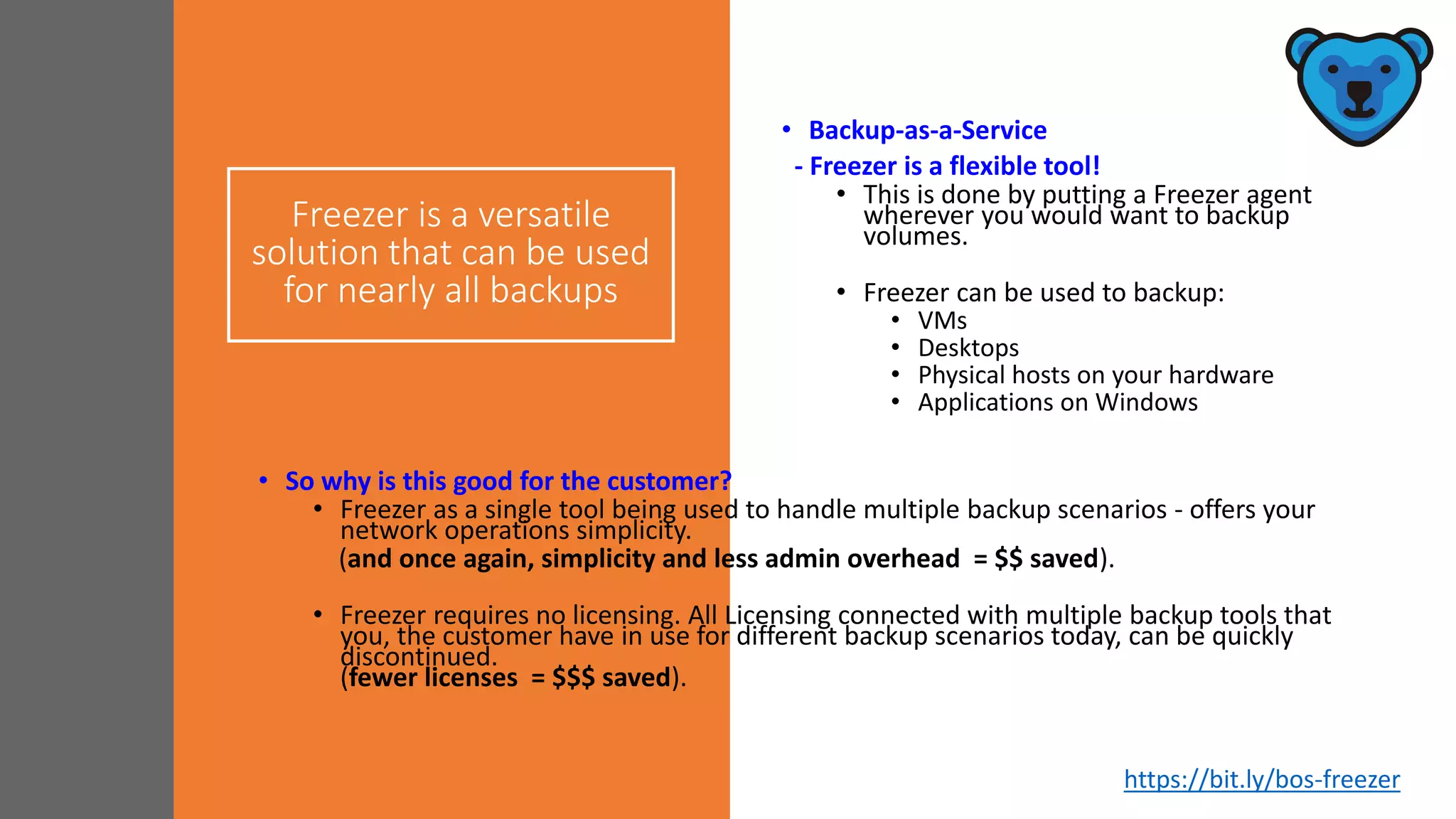
Freezer is a versatile
solution that can be used
for nearly all backups
• Backup-as-a-Service
- Freezer is a flexible tool!
• This is done by putting a Freezer agent
wherever you would want to backup
volumes.
• Freezer can be used to backup:
• VMs
• Desktops
• Physical hosts on your hardware
• Applications on Windows
• So why is this good for the customer?
• Freezer as a single tool being used to handle multiple backup scenarios - offers your
network operations simplicity.
(and once again, simplicity and less admin overhead = $$ saved).
• Freezer requires no licensing. All Licensing connected with multiple backup tools that
you, the customer have in use for different backup scenarios today, can be quickly
discontinued.
(fewer licenses = $$$ saved).
https://bit.ly/bos-freezer
FREEZER
&
BaaS
https://bit.ly/bos-freezer
Business Use-Case 04
•And even yet another scenario when the
customer wants to leverage solutions to other
clients, multiple clients ………..
•Freezer can then be offered as a Backup-as-a-
Service ...
https://bit.ly/bos-freezer
Freezer a BaaS platform for
Openstack cloud instances
• It provides a Web UI panel in
Horizon, API endpoints to store
meta data and backup
configurations.
• The client component saves you
time and money by executing
efficiently data backup and
restore, leveraging Swift
Storage.
• It supports Windows and Linux
https://bit.ly/bos-freezer
Incremental encrypted
backup
• A very important feature of
Freezer is that when it performs
backup it performs incremental
encrypted backup!
• This enables Freezer to achieve
a high level of integrity and
consistency for backups of the
main data base technologies
(i.e. MySQL, MongoDB,
MSSQL).
https://bit.ly/bos-freezer
FREEZER in
action –
Backup &
Restore
DEMO
https://youtu.be/8phin9J3-0U
Freezer in Production
USE-CASE
Freezer is used in every Helion
deployment to backup
• Mysql Database every 12 hours
• Lifecycle Manager’s information every 48 hours
• Swift rings every 24 hours
Backups are stored by default in Swift
and optionally in a remote SSH server
Everything (including jobs) is deployed
through Ansible
https://bit.ly/bos-freezer
Part 3
• Ideas - What can Freezer offer in the future
https://bit.ly/bos-freezer
Scenario: Disaster Recovery
The Business Case for a DRaaS Solution
https://bit.ly/bos-freezer
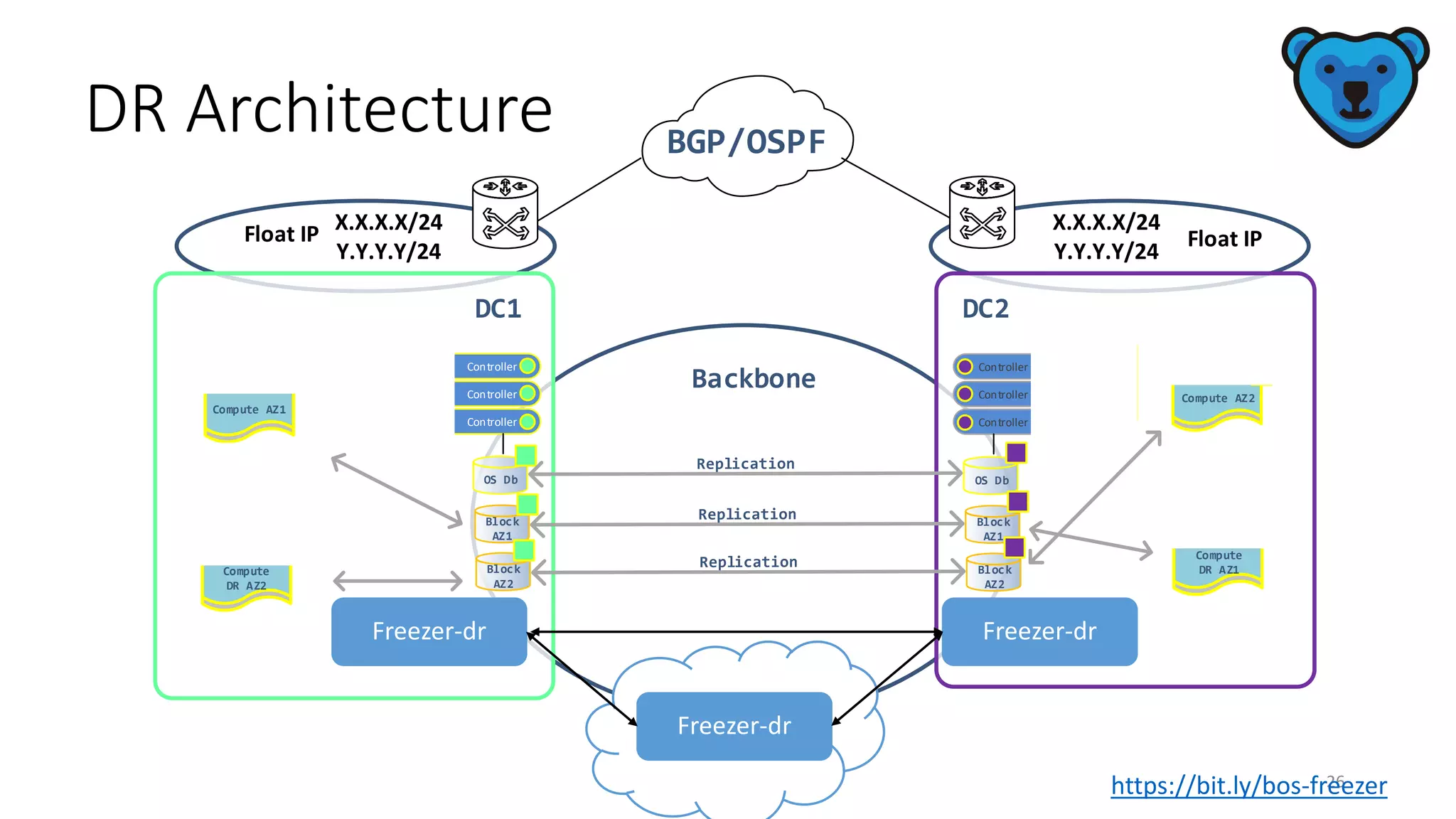
DR Architecture
26
Compute AZ2
OS Db OS Db
Freezer-dr-agent
Backbone
Compute AZ1
Freezer-dr-Agent
Block
AZ1
Block
AZ1
Block
AZ2
Block
AZ2
DC1 DC2
Freezer-api Controller
Freezer-api
Freezer-api Controller
Controller
Freezer-api
Freezer-api
Freezer-api
Controller
Controller
Controller
Compute
DR AZ2
Freezer-dr-agent
Compute
DR AZ1
Freezer-dr-agent
BGP/OSPF
X.X.X.X/24
Y.Y.Y.Y/24
X.X.X.X/24
Y.Y.Y.Y/24
Float IP Float IP
Freezer-dr Freezer-dr
Freezer-dr
https://bit.ly/bos-freezer
Disaster Recovery
• The impact to your business from
unexpected downtime is
immeasurable. Almost half of small to
medium businesses that incur a
major technology catastrophe never
recover.
• The effectiveness of employees and
loyalty of your customers all hangs on
the technology choices you make.
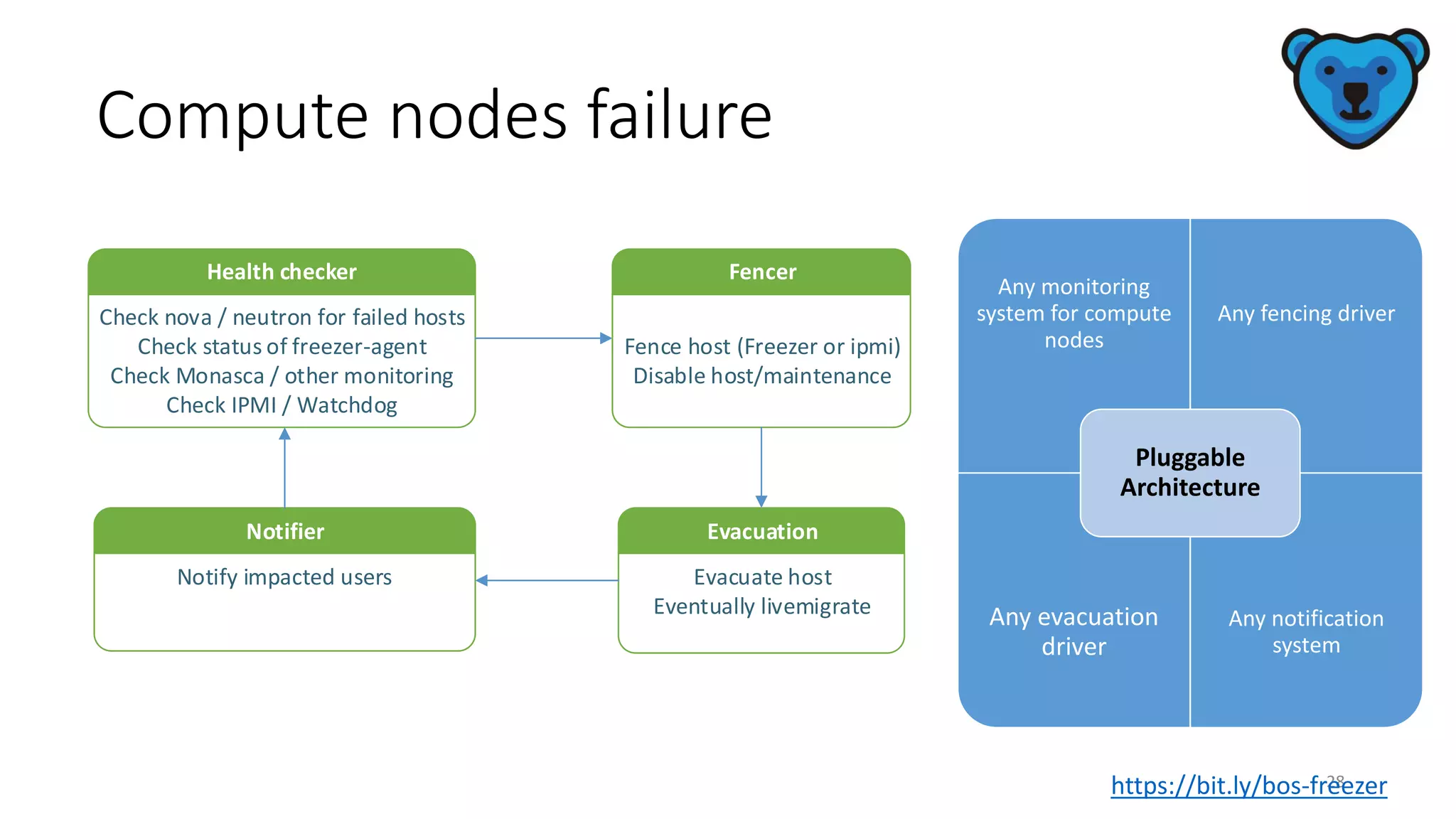
Compute nodes failure
28
Any monitoring
system for compute
nodes
Any fencing driver
Any evacuation
driver
Any notification
system
Pluggable
Architecture
Health checker
Check nova / neutron for failed hosts
Check status of freezer-agent
Check Monasca / other monitoring
Check IPMI / Watchdog
Fencer
Fence host (Freezer or ipmi)
Disable host/maintenance
Evacuation
Evacuate host
Eventually livemigrate
Notifier
Notify impacted users
https://bit.ly/bos-freezer
Think ahead …..…
• In order to be successful there is criteria that must be met.
• You must be able to fully automate on all layers, if this is not in
place this will accrue an extra cost for service integration.
• The architecture must be standardized otherwise you risk end up
with CLOUD solutions living in Silo architectures.
• If that happens you’ll end up paying more for licenses and
services. It might also make it impossible to reach the
expected/wanted NFV/SDN goals of reducing costs and adding
agility to the network.
• Remember that everything is driven by TCO and without a clear vision
from the operator's side there can’t be guaranteed cost savings; this
will become apparent as soon as target goals are missed.
• BUT, if everything is planned correctly by creating a clear roadmap that takes into
account service consolidation - cost savings are absolutely guaranteed (> 30% and
even more..)
https://bit.ly/bos-freezer
Think ahead …..…
Three out of four companies worldwide,
are failing in terms of disaster readiness.
They are scoring ratings of either a D or F
grade. Only 28 percent scored an A, B or C
passing grade, with the remaining 72
percent of respondents at risk.
• "54 % of disasters are caused by
software or network failure."
• A key part of almost every disaster
recovery plan is backups.
https://bit.ly/bos-freezer
Useful LINKS
• Repo:
https://github.com/openstack/freezer
• Launchpad:
https://launchpad.net/freezer
• The package:
https://pypi.python.org/pypi/freezer
• Wiki:
https://wiki.openstack.org/wiki/Freezer
• Roadmap:
https://wiki.openstack.org/wiki/FreezerRoadmap
• Chat with the team: #openstack-freezer IRC
channel on chat.freenode.net
https://bit.ly/bos-freezer
Thank you for joining today’s
presentation!
https://bit.ly/bos-freezer

OpenStack Backup, Restore, DR (Freezer)

  • 1.
  • 2.
    Agenda Onboarding – You,me, … WEPart 1 What kind of business use-cases can Freezer offer you today? Part 2 Ideas - What can Freezer offer in the future Part 3 https://bit.ly/bos-freezer
  • 3.
    Part 1 • Onboarding– You, me, … WE https://bit.ly/bos-freezer
  • 4.
    • Standing infront of you are .. • 3 people with different backgrounds and different companies. • We are: • (1) Saad Zaher • (2) Elena Lindqvist • (3) George Offord • And the common denominator is ...? Openstack and FREEZER Quick intro ….
  • 5.
    .. And whoare you? • what are you most interested in? • Private clouds? • Hybrid clouds? • Public clouds? • What is your Industry background? • How much do you already know? • Novice? • Experienced? • Expert? • What useful takeaways can we share with you today? https://bit.ly/bos-freezer
  • 6.
    Create strong supportfor your Business Cases • Think carefully, plan carefully … and then do it again! Cost savings are calculated according to many different parameters. • You have to pay attention to the fact that the actual challenge is to define and calculate the savings from an e2e perspective. • It is necessary to take into consideration transformation costs as well! • Below are listed some strategic important decisions which will drive the TCO from the operator perspective. • 1. Do we go for an infrastructure convergence model or not? • 2. How can we FULLY automate the service, control the network and guarantee continuous operational status? • 3. Among the many additional building blocks we have the question about which product should we choose, and which vendor? • 5. Which technology should we invest in? ... Open source or not? What is the licensing model ? • 6. What is the support model? What do we have to pay for support? • .... what SLAs do we need in order to cover the entire Cloud environment, while at the same time insuring that the SLAs share responsibility between virtualization, real hardware, and VNF suppliers? https://bit.ly/bos-freezer
  • 7.
    So, why backups?? • Backupsare needed to protect information from being lost. The causes for information loss can be : data deletion or corruption, theft, hacking, fire , etc ... • In case of an incident, a backup needs to be restored quickly which means minimizing system downtime. • Lack of a proper backup and restore system means long system downtime, which results in significant $$$ loss.
  • 8.
    … other reasonsfor having a Backup? Application bugs Power failure Legal requirements Compliance *Let's bring some numbers into the picture; see the next slide. https://bit.ly/bos-freezer
  • 9.
    …the average cost of downtimeis $5,000 per minute • Average Outage Period  resolution time per outage is around 200 minutes (@ 5000/min=$1,000,000). • Downtime: Impact on Reputation and Loyalty  What is your reputation worth? • Impact to Employee Productivity  Downtime cost impacts employee productivity • Cost of Downtime  Calculate it Yourself! • How much do you lose from unexpected downtime of your servers & business applications? • The simplest way to calculate potential revenue losses during an outage is with the equation: • LOST REVENUE = (GR/TH) x I x H • GR = gross yearly revenue • TH = total yearly business hours • I = percentage impact • H = number of hours of outage
  • 10.
    Part 2 • Whatkind of business use-cases can Freezer offer you today? https://bit.ly/bos-freezer
  • 11.
    Business Use-Case 01 •Besides being an efficient working system, the customer wants a modular system that can be easily maintained and supported if necessary. • Freezer offers such a logical hierarchical architecture making use of well known established Openstack modules. https://bit.ly/bos-freezer
  • 12.
    FREEZER • The architectureof a system describes its major components, their relationships (structures), and how they interact with each other. https://bit.ly/bos-freezer
  • 13.
    Business Use-Case 02 •Freezer is an enabler, helping to enable a smooth transition towards digital transformation https://bit.ly/bos-freezer
  • 14.
    Soft migration ofLegacy backups • Legacy backup & cloud backup - A soft migration from the old backup to the new cloud backup • This is done by putting a Freezer agent on the Legacy backup HW. • Every time you do a backup on the Legacy HW, it will also be backed-up in the cloud. • The Legacy backup is being added to your cloud backup in runtime, in the end you will have backed up all your legacy volume backup to the cloud backup. • So why is this good for the customer? • Freezer is an enabler for migrating backups in a soft and easy way from native to cloud (simplicity = $ saved). • Backups for the native solution can be stored in one place in Freezer. One storage place for backups means less overhead for admin of the backups. (less admin overhead = $$ saved). • All Licensing connected with the Legacy system for backups can be quickly discontinued. (fewer licenses = $$$ saved). https://bit.ly/bos-freezer
  • 15.
    What sets Freezer apart fromthe others? • TECHNICAL INFORMATION • Freezer uses ‘rsync’ instead of ‘tar’ for updating backups • Why? And what does this mean for performance? • Background. • Before rsync, Freezer had only one type of engine to backup files – the TAR engine. This type of an engine allowed the user to preinstall the tar binary for backup and restore of local files. • There are Pros & Cons for using “rsync” instead of “tar” • PRO: • Rsync engine description. The main feature of this engine is block-based incremental support. It means that in case a file was changed freezer will backup only the changed blocks in the file. In this way, it enables use of less space for writing the incremental backups. • This is to be seen in comparison to the tar engine which rewrites the entire file even if there is only a minor incremental change found in the entire file. • In specific cases rsync is way faster than tar, when there are only small incremental data changes in a large volume of data because it only transfers the modified blocks • CON: • But rsync needs to do fstats on each file, so rsync is therefore 30% slower than tar. In the scenario where large volumes of data with many changes in the data need to be backed-up, the 30% slower factor will have a negative impact!
  • 16.
    Business Use-Case 03 •Freezeris a single solution that may be used for all your backups https://bit.ly/bos-freezer
  • 17.
    Freezer is aversatile solution that can be used for nearly all backups • Backup-as-a-Service - Freezer is a flexible tool! • This is done by putting a Freezer agent wherever you would want to backup volumes. • Freezer can be used to backup: • VMs • Desktops • Physical hosts on your hardware • Applications on Windows • So why is this good for the customer? • Freezer as a single tool being used to handle multiple backup scenarios - offers your network operations simplicity. (and once again, simplicity and less admin overhead = $$ saved). • Freezer requires no licensing. All Licensing connected with multiple backup tools that you, the customer have in use for different backup scenarios today, can be quickly discontinued. (fewer licenses = $$$ saved). https://bit.ly/bos-freezer
  • 18.
  • 19.
    Business Use-Case 04 •Andeven yet another scenario when the customer wants to leverage solutions to other clients, multiple clients ……….. •Freezer can then be offered as a Backup-as-a- Service ... https://bit.ly/bos-freezer
  • 20.
    Freezer a BaaSplatform for Openstack cloud instances • It provides a Web UI panel in Horizon, API endpoints to store meta data and backup configurations. • The client component saves you time and money by executing efficiently data backup and restore, leveraging Swift Storage. • It supports Windows and Linux https://bit.ly/bos-freezer
  • 21.
    Incremental encrypted backup • Avery important feature of Freezer is that when it performs backup it performs incremental encrypted backup! • This enables Freezer to achieve a high level of integrity and consistency for backups of the main data base technologies (i.e. MySQL, MongoDB, MSSQL). https://bit.ly/bos-freezer
  • 22.
    FREEZER in action – Backup& Restore DEMO https://youtu.be/8phin9J3-0U
  • 23.
    Freezer in Production USE-CASE Freezeris used in every Helion deployment to backup • Mysql Database every 12 hours • Lifecycle Manager’s information every 48 hours • Swift rings every 24 hours Backups are stored by default in Swift and optionally in a remote SSH server Everything (including jobs) is deployed through Ansible https://bit.ly/bos-freezer
  • 24.
    Part 3 • Ideas- What can Freezer offer in the future https://bit.ly/bos-freezer
  • 25.
    Scenario: Disaster Recovery TheBusiness Case for a DRaaS Solution https://bit.ly/bos-freezer
  • 26.
    DR Architecture 26 Compute AZ2 OSDb OS Db Freezer-dr-agent Backbone Compute AZ1 Freezer-dr-Agent Block AZ1 Block AZ1 Block AZ2 Block AZ2 DC1 DC2 Freezer-api Controller Freezer-api Freezer-api Controller Controller Freezer-api Freezer-api Freezer-api Controller Controller Controller Compute DR AZ2 Freezer-dr-agent Compute DR AZ1 Freezer-dr-agent BGP/OSPF X.X.X.X/24 Y.Y.Y.Y/24 X.X.X.X/24 Y.Y.Y.Y/24 Float IP Float IP Freezer-dr Freezer-dr Freezer-dr https://bit.ly/bos-freezer
  • 27.
    Disaster Recovery • Theimpact to your business from unexpected downtime is immeasurable. Almost half of small to medium businesses that incur a major technology catastrophe never recover. • The effectiveness of employees and loyalty of your customers all hangs on the technology choices you make.
  • 28.
    Compute nodes failure 28 Anymonitoring system for compute nodes Any fencing driver Any evacuation driver Any notification system Pluggable Architecture Health checker Check nova / neutron for failed hosts Check status of freezer-agent Check Monasca / other monitoring Check IPMI / Watchdog Fencer Fence host (Freezer or ipmi) Disable host/maintenance Evacuation Evacuate host Eventually livemigrate Notifier Notify impacted users https://bit.ly/bos-freezer
  • 29.
    Think ahead …..… •In order to be successful there is criteria that must be met. • You must be able to fully automate on all layers, if this is not in place this will accrue an extra cost for service integration. • The architecture must be standardized otherwise you risk end up with CLOUD solutions living in Silo architectures. • If that happens you’ll end up paying more for licenses and services. It might also make it impossible to reach the expected/wanted NFV/SDN goals of reducing costs and adding agility to the network. • Remember that everything is driven by TCO and without a clear vision from the operator's side there can’t be guaranteed cost savings; this will become apparent as soon as target goals are missed. • BUT, if everything is planned correctly by creating a clear roadmap that takes into account service consolidation - cost savings are absolutely guaranteed (> 30% and even more..) https://bit.ly/bos-freezer
  • 30.
    Think ahead …..… Threeout of four companies worldwide, are failing in terms of disaster readiness. They are scoring ratings of either a D or F grade. Only 28 percent scored an A, B or C passing grade, with the remaining 72 percent of respondents at risk. • "54 % of disasters are caused by software or network failure." • A key part of almost every disaster recovery plan is backups. https://bit.ly/bos-freezer
  • 31.
    Useful LINKS • Repo: https://github.com/openstack/freezer •Launchpad: https://launchpad.net/freezer • The package: https://pypi.python.org/pypi/freezer • Wiki: https://wiki.openstack.org/wiki/Freezer • Roadmap: https://wiki.openstack.org/wiki/FreezerRoadmap • Chat with the team: #openstack-freezer IRC channel on chat.freenode.net https://bit.ly/bos-freezer
  • 32.
    Thank you forjoining today’s presentation! https://bit.ly/bos-freezer