OOppeenn SSoouurrccee DDaattaabbaassee 
MMaannaaggeemmeenntt SSooffttwwaarree 
aavvaaiillaabbllee oonn tthhee NNeett 
UUmmeesshhaa NNaaiikk 
aanndd 
PPrrooff.. DD SShhiivvaalliinnggaaiiaahh 
Department of Studies in Library and Information 
Science, Mangalore University, Mangalore -574 199, 
Karnataka, India 
umeshai@yahoo.com d_shivaling@yahoo.com
IInnttrroodduuccttiioonn 
Online databases are organized collections of 
computerized information or data such as 
periodical articles, books, graphics and 
multimedia that can be searched to retrieve 
information. Databases can be general or 
subject oriented with bibliographic citations, 
abstracts, and or full text. Online databases 
that are retrieved on the World Wide Web are 
generally non-fee based, lack in-depth 
indexing, and do not index proprietary 
resources.
IInnttrroodduuccttiioonn 
Databases are programs that store 
information that needs to be accessed and 
reproduced in many different ways. Database 
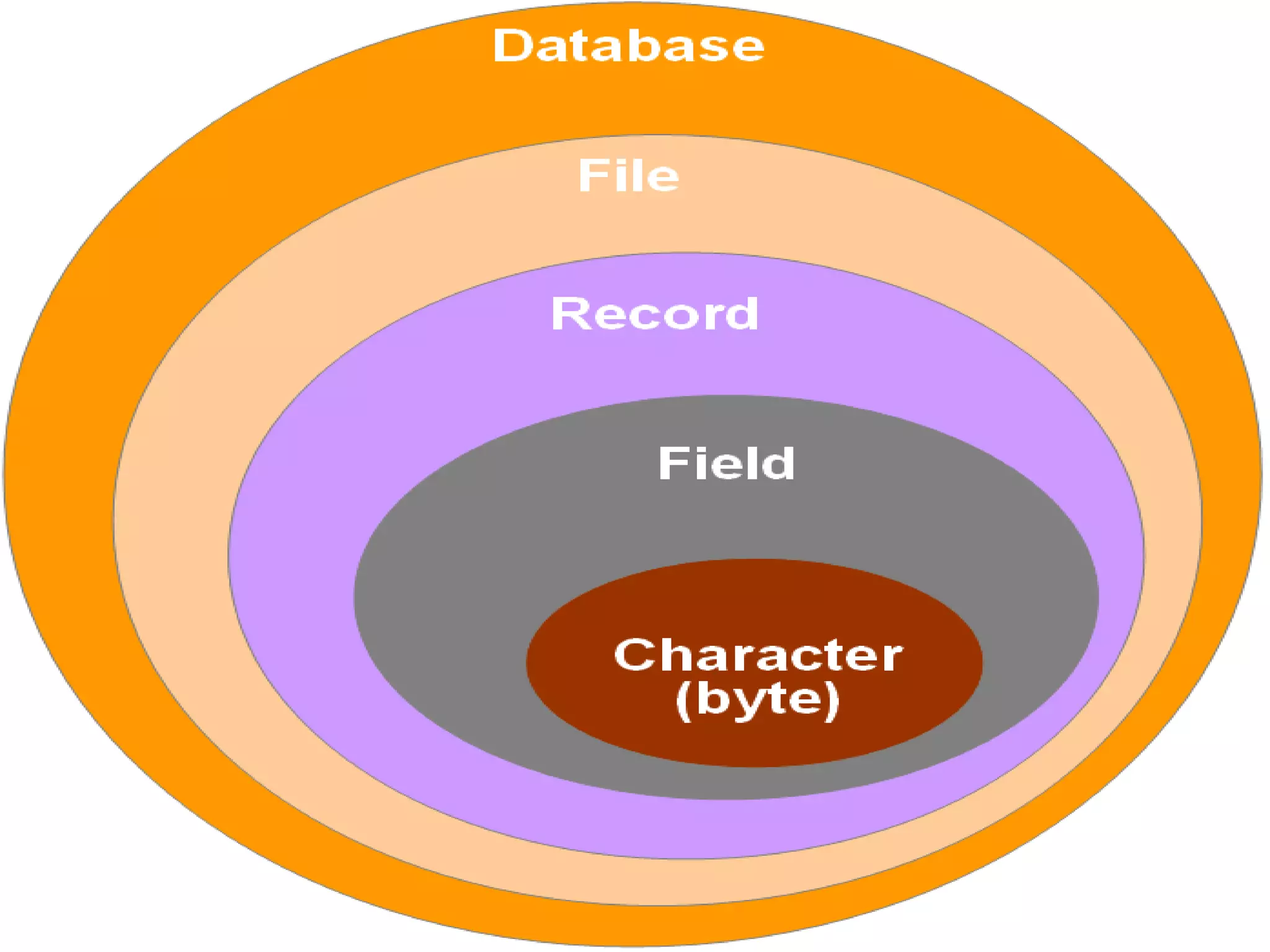
is a structured collection of records or data 
that is stored in a computer system. The 
structure is achieved by organizing the data 
according to a database model. The model in 
most common use today is the relational 
model. Other models such as the hierarchical 
model and the network model use a more 
explicit representation of relationships.
Database MMaannaaggeemmeenntt SSyysstteemm 
((DDBBMMSS)) 
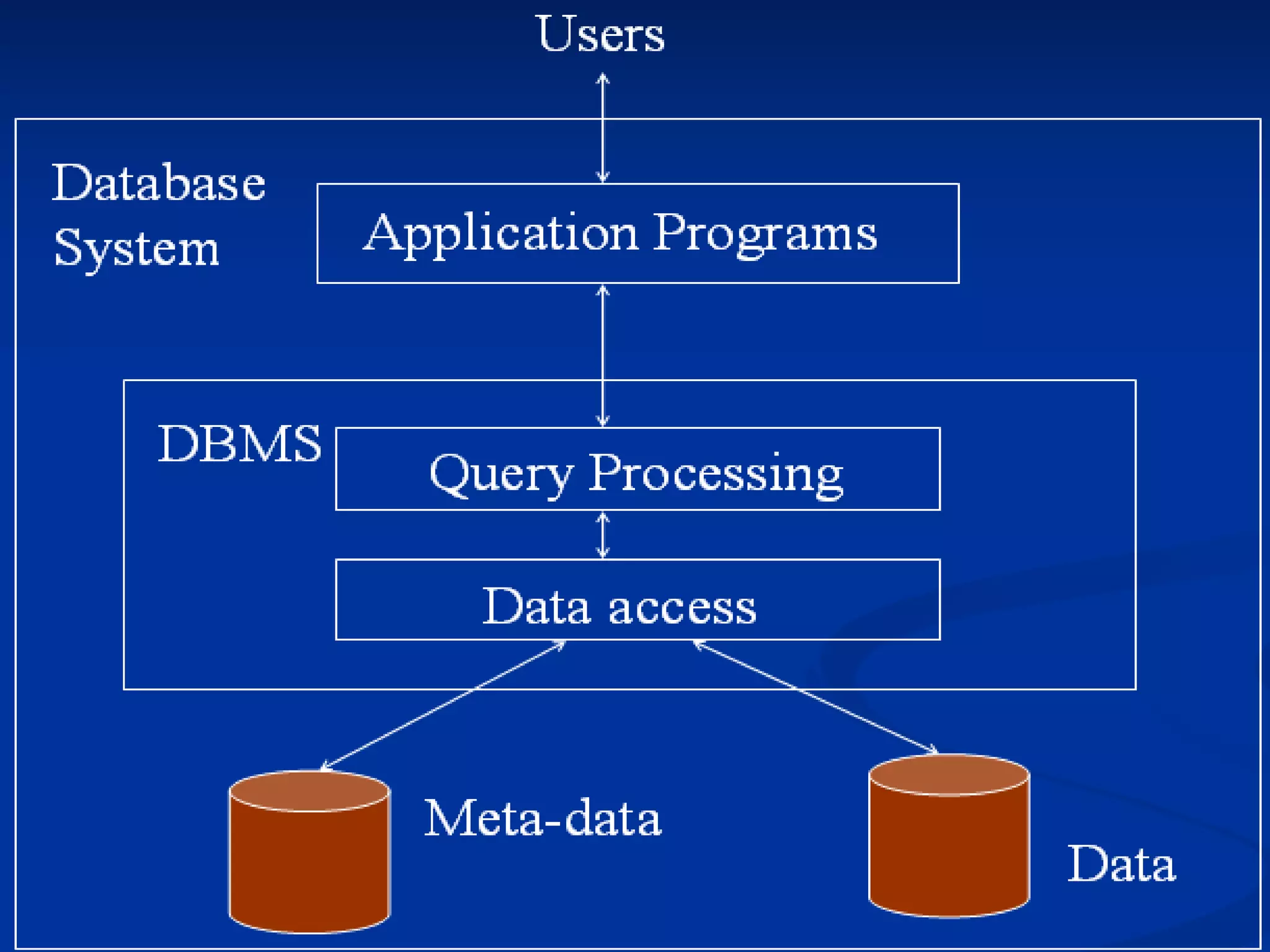
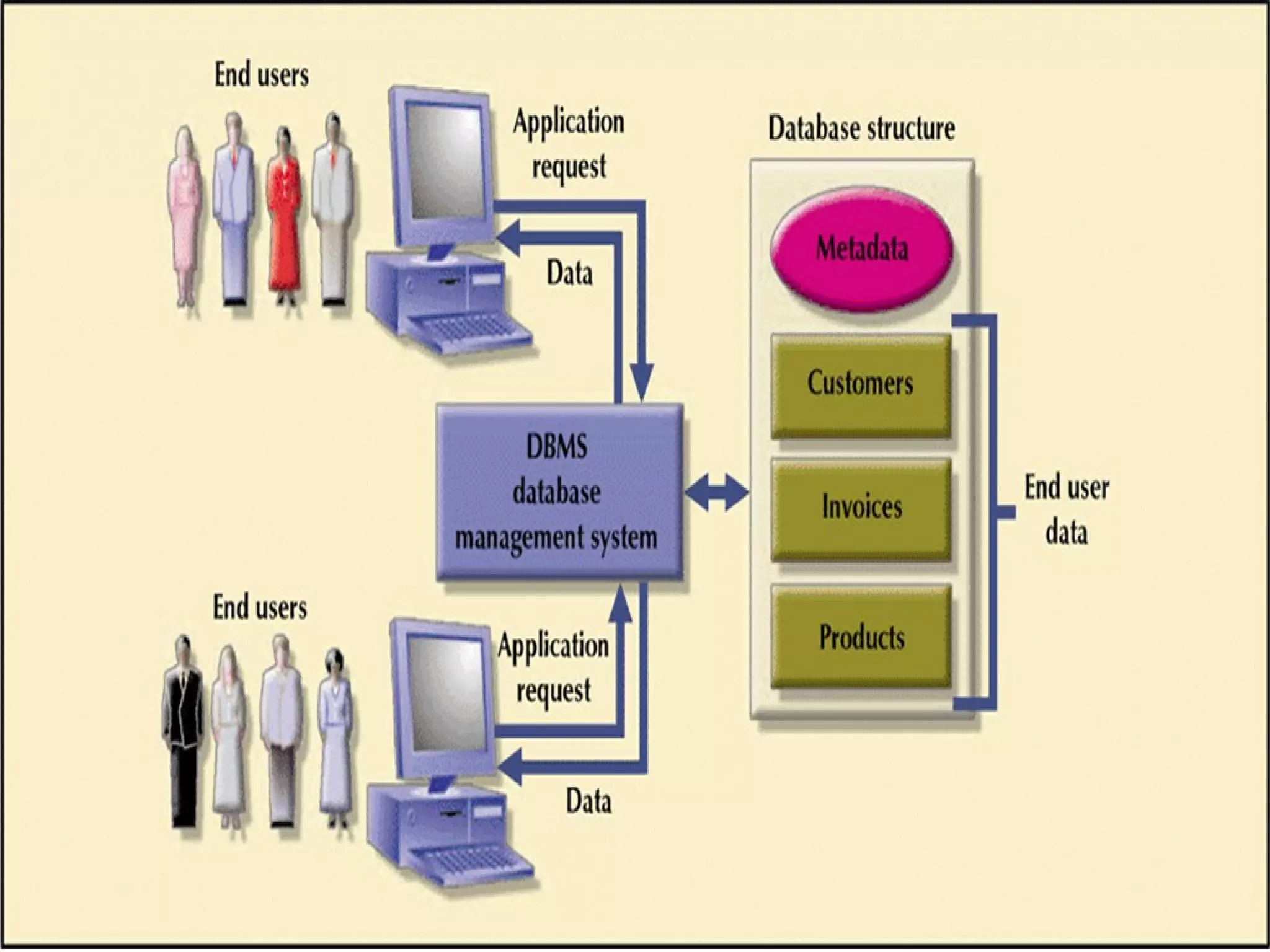
A DBMS is a set of software programs that controls 
the organization, storage, management, and retrieval 
of data in a database. DBMS are categorized 
according to their data structures or types. It is a set 
of prewritten programs that are used to store, 
update and retrieve a Database. The DBMS accepts 
requests for data from the application program and 
instructs the operating system to transfer the 
appropriate data. When a DBMS is used, information 
systems can be changed much more easily as the 
organization's information requirements change. 
New categories of data can be added to the database 
without disruption to the existing system.
History of Database Systems 
• 1940's, 50's Initial use of computers as 
calculators. Limited data focus on 
algorithms. Science, military applications 
• 1960's Business uses. Organizational data, 
customer data, sales, inventory, 
accounting, etc. File system based, high 
emphasis on applications programs to 
extract and assimilate data. Larger 
amounts of data, relatively simple 
calculations 
• 1970's The relational model. Data separated 
into individual tables. Related by keys. 
Initially required heavy system resources. 
Examples: Oracle, Sybase, Informix, IBM 
DB2
History of Database Systems 
• 1980's Microcomputers - the IBM PC, Apple 
Macintosh. Database program such as 
DBase, Paradox, FoxPro, MS Access. 
Individual user can create, maintain small 
databases 
• Late- 1980's Local area networks. 
Workgroups sharing resources such as 
files, printers, e-mail 
• Client/Server Database resides on a central 
server, applications programs run on client 
PCs attached to the server over a LAN 
• 1990's Internet and World Wide Web make 
databases of all kinds available from a 
single type of client - the Web Browser
SSttrruuccttuurree ooff ddaattaabbaasseess 
• Understanding the structure of a database 
will help you locate and retrieve information 
more efficiently. 
• The information about each item in a 
database is called a record. For example, the 
Library Catalog has a record for each item 
(each book, journal, newspaper, video, map, 
etc.) located in the library. 
• A record is composed of individual elements 
of information called fields. All the records in 
a given database are composed of a common 
set of fields. These fields can be used as 
access points when searching a database.
Types of databases 
• Bibliographic databases - provide citations 
(a listing of information about the item), and 
sometimes include abstracts (summaries) 
or descriptions of the items. 
• Full-text databases - contain the full text of 
a work. 
• Numeric databases - provide mostly 
numeric data (numbers) such as statistics 
or financial data.
Types of databases 
• Image databases - could include art prints, 
photos, animations, and other types of 
images 
• Audio/Video databases - could include 
audio clips of sound effects and music 
samples or video excerpts from speeches, 
television shows, or other broadcast 
media. 
• Mixed databases - combine two or more of 
the other database types.
Evolution of the database technology 
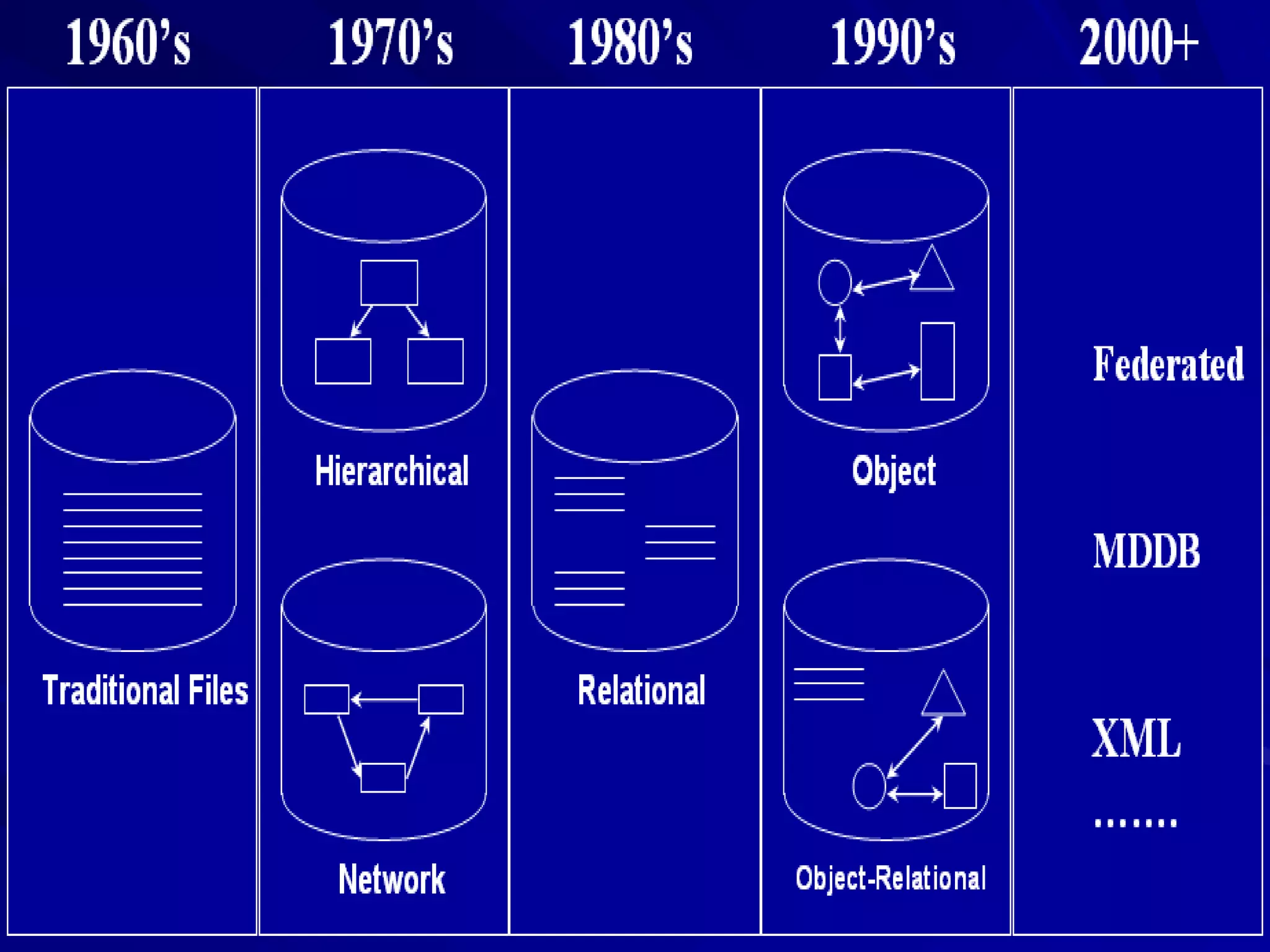
During the past three decades, the database 
technology for information systems has 
undergone four generations of evolution. The 
transition from one generation to the next has 
always been necessitated by the ever-increasing 
complexity of database applications and the cost 
of implementing, maintaining, and extending 
these applications. The first generation was file 
system, such as ISAM and VSAM. The second 
generation was hierarchical database systems, 
such as IMS and System 2000. The third 
generation was CODASYL database systems, 
such as IDS, TOTAL, ADABAS, IDMS, etc.
RDBMS 
A RDBMS is a DBMS that is based on the 
relational model as introduced by E. F. Codd. 
A RDBMS may be a DBMS in which data is 
stored in the form of tables and the 
relationship among the data is also stored in 
the form of tables. Relational Database is a 
database that groups of data using common 
attributes found in the data set. The resulting 
"clumps" of organized data are much easier 
for people to understand. The software used 
to do this grouping is called a RDBMS. The 
term "relational database" often refers to this 
type of software.
RDBMS 
DBMS is computer software that manages 
databases. DBMS may use any of a variety of 
database models, such as the network model 
or relational model. In large systems, a 
DBMS allows users and other software to 
store and retrieve data in a structured way. A 
DBMS is a computer program (or more 
typically, a suite of them) designed to 
manage a database, a large set of structured 
data, and run operations on the data 
requested by numerous users.
Web Database 
A web database is a data store or information 
repository that can be accessed via a query 
language or on application program. Unlike 
conventional database systems a web 
database access is not typically performed 
using queries typed at a command line or 
through custom designed programming 
interfaces. Web databases are accessed via 
other Web applications; especially forms that 
are developed using standardized HTML tags. 
HTML form interfaces enable is to create 
applications that integrate database 
functionality and provide access to 
organizational data repositories on behalf of 
Web clients.
Web Database 
A web database is designed for: 
•better management of large document-based 
information repositories to internal and/or 
external users of the information. 
•better use of legacy database systems, the 
information they contain, and existing 
applications.
Web Database 
•unlocking the potential of unused information 
held within organizational databases. 
Information from databases within various 
parts of an organization, such as information 
relating to finance, human resources, project 
management etc, can be consolidated using 
Web-based applications and served to users 
as though it is available from a single source. 
•extending the functionality of the Web server 
so that the information is made available to 
internal and external users
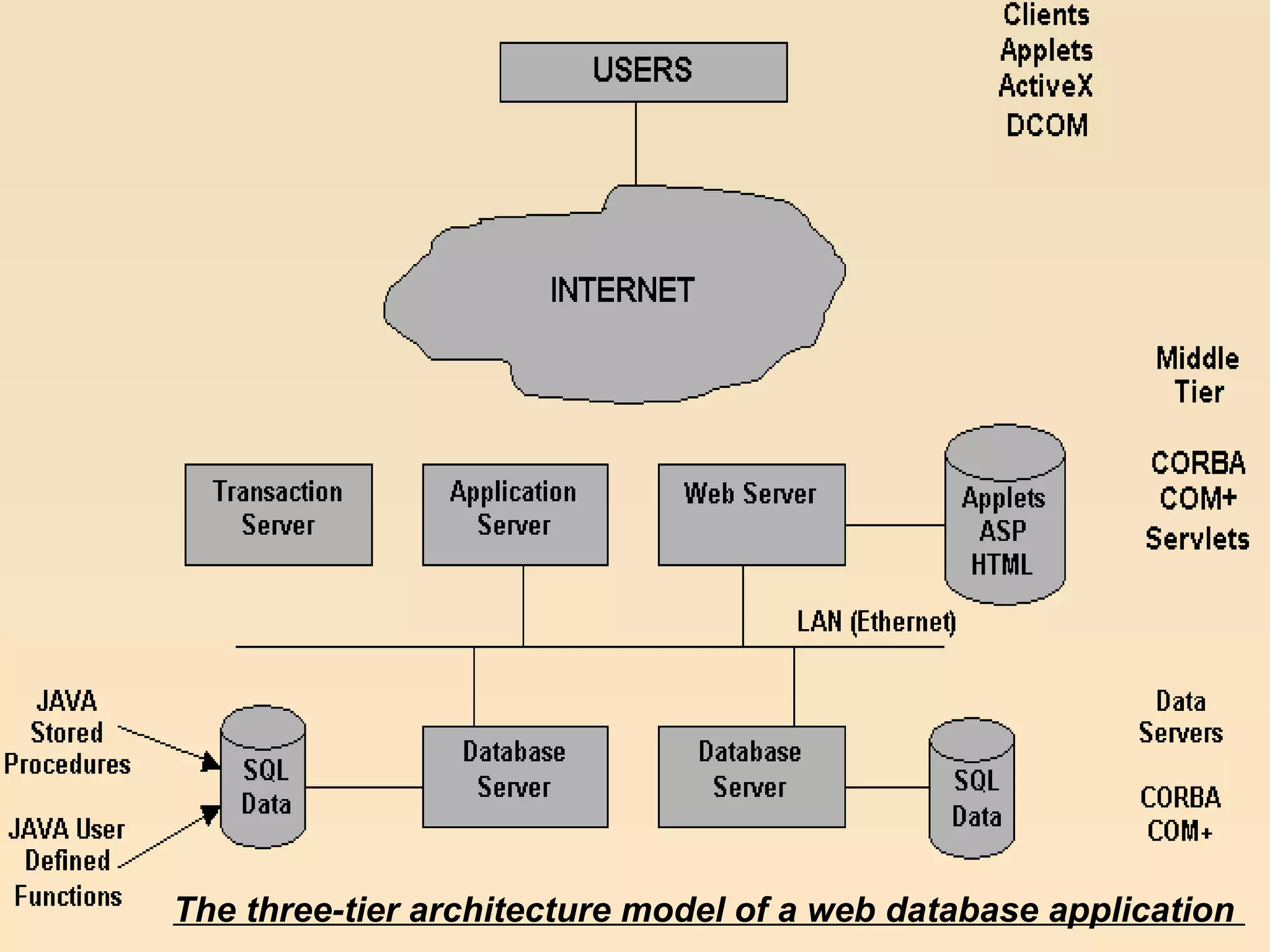
The three-tier arc hitecture model of a web database application
Conclusion 
Advancement of Web technologies over the 
last decade has moved the database 
technology from close doors to outdoors. 
Presently most of the websites require some 
basic level support at the backend through 
the databases. This process is also known as 
publishing database content through a Web 
server. The most basic feature a DBMS has is 
the underlying data schema.
Conclusion 
This paper discusses the advantages of open 
source DBMS software and its availability, 
use, features, supporting interfaces, type of 
software. It is suggested that a database 
website offers many advantages over one 
built from static HTML pages. These include a 
consistency of style and content, the ability 
to present different views of the same data, 
devolved editing and enhanced security.

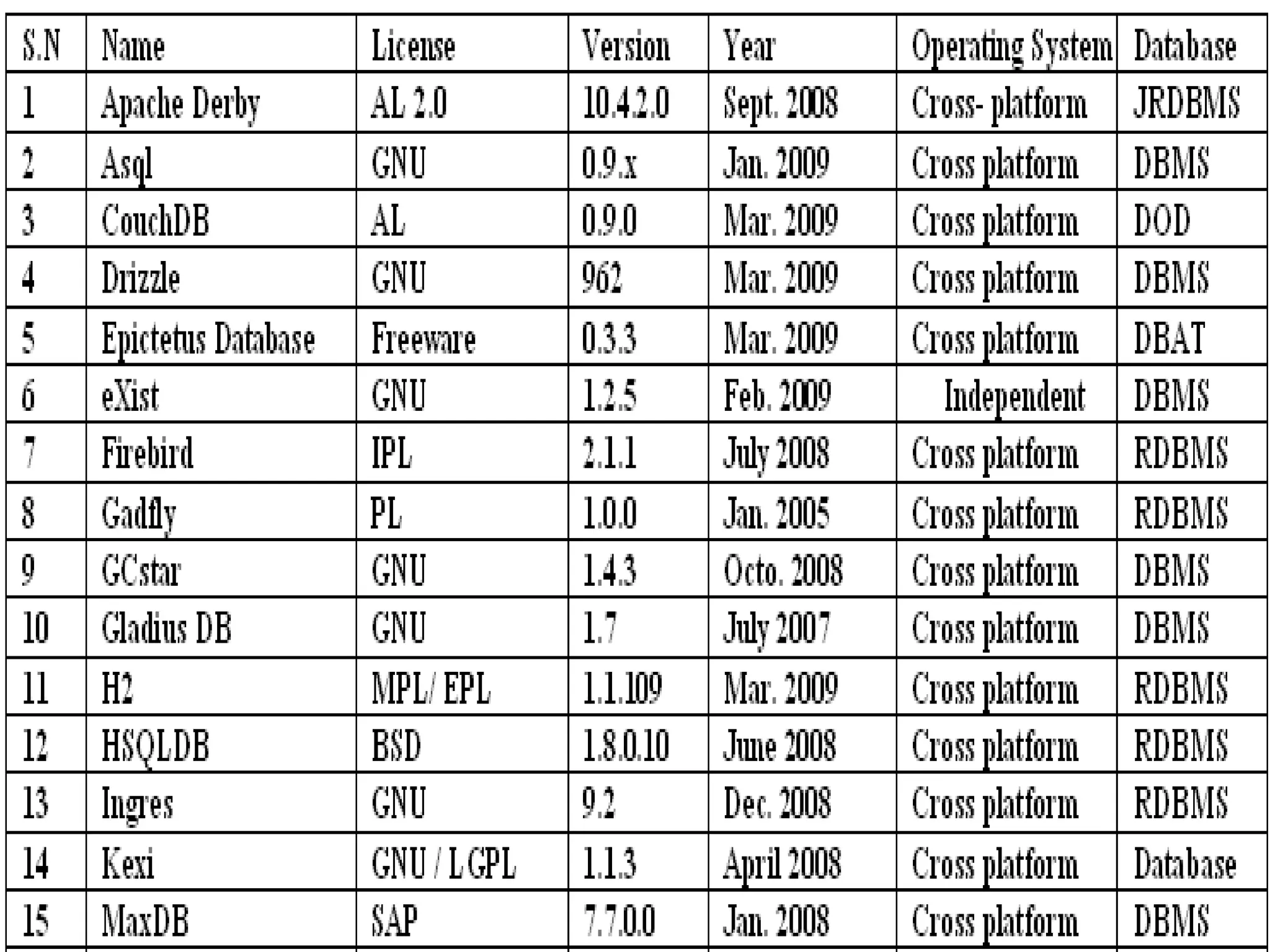
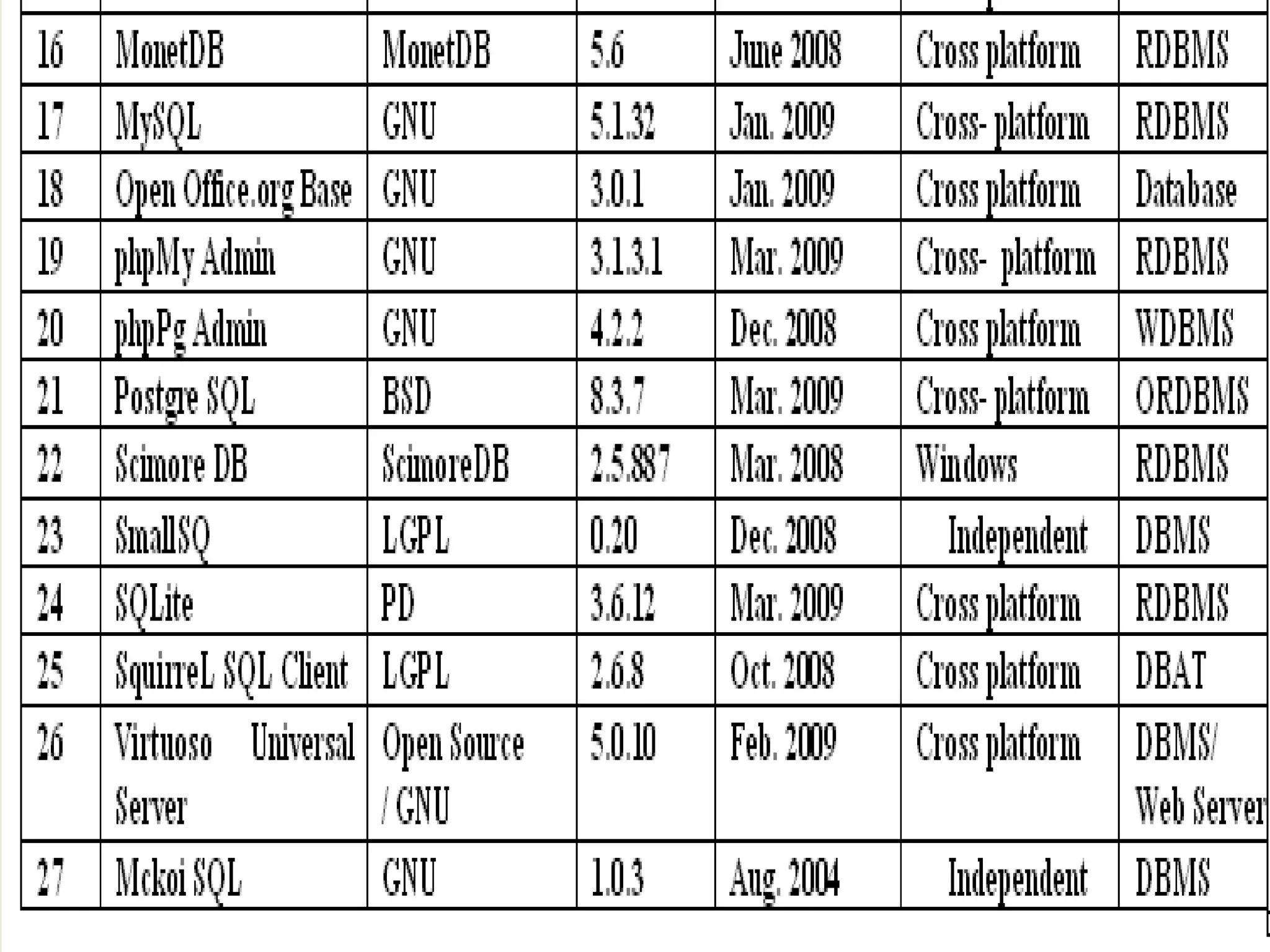
Open Source Database Management Software available on the Net

  • 1.
    OOppeenn SSoouurrccee DDaattaabbaassee MMaannaaggeemmeenntt SSooffttwwaarree aavvaaiillaabbllee oonn tthhee NNeett UUmmeesshhaa NNaaiikk aanndd PPrrooff.. DD SShhiivvaalliinnggaaiiaahh Department of Studies in Library and Information Science, Mangalore University, Mangalore -574 199, Karnataka, India umeshai@yahoo.com d_shivaling@yahoo.com
  • 2.
    IInnttrroodduuccttiioonn Online databasesare organized collections of computerized information or data such as periodical articles, books, graphics and multimedia that can be searched to retrieve information. Databases can be general or subject oriented with bibliographic citations, abstracts, and or full text. Online databases that are retrieved on the World Wide Web are generally non-fee based, lack in-depth indexing, and do not index proprietary resources.
  • 3.
    IInnttrroodduuccttiioonn Databases areprograms that store information that needs to be accessed and reproduced in many different ways. Database is a structured collection of records or data that is stored in a computer system. The structure is achieved by organizing the data according to a database model. The model in most common use today is the relational model. Other models such as the hierarchical model and the network model use a more explicit representation of relationships.
  • 6.
    Database MMaannaaggeemmeenntt SSyysstteemm ((DDBBMMSS)) A DBMS is a set of software programs that controls the organization, storage, management, and retrieval of data in a database. DBMS are categorized according to their data structures or types. It is a set of prewritten programs that are used to store, update and retrieve a Database. The DBMS accepts requests for data from the application program and instructs the operating system to transfer the appropriate data. When a DBMS is used, information systems can be changed much more easily as the organization's information requirements change. New categories of data can be added to the database without disruption to the existing system.
  • 7.
    History of DatabaseSystems • 1940's, 50's Initial use of computers as calculators. Limited data focus on algorithms. Science, military applications • 1960's Business uses. Organizational data, customer data, sales, inventory, accounting, etc. File system based, high emphasis on applications programs to extract and assimilate data. Larger amounts of data, relatively simple calculations • 1970's The relational model. Data separated into individual tables. Related by keys. Initially required heavy system resources. Examples: Oracle, Sybase, Informix, IBM DB2
  • 8.
    History of DatabaseSystems • 1980's Microcomputers - the IBM PC, Apple Macintosh. Database program such as DBase, Paradox, FoxPro, MS Access. Individual user can create, maintain small databases • Late- 1980's Local area networks. Workgroups sharing resources such as files, printers, e-mail • Client/Server Database resides on a central server, applications programs run on client PCs attached to the server over a LAN • 1990's Internet and World Wide Web make databases of all kinds available from a single type of client - the Web Browser
  • 9.
    SSttrruuccttuurree ooff ddaattaabbaasseess • Understanding the structure of a database will help you locate and retrieve information more efficiently. • The information about each item in a database is called a record. For example, the Library Catalog has a record for each item (each book, journal, newspaper, video, map, etc.) located in the library. • A record is composed of individual elements of information called fields. All the records in a given database are composed of a common set of fields. These fields can be used as access points when searching a database.
  • 10.
    Types of databases • Bibliographic databases - provide citations (a listing of information about the item), and sometimes include abstracts (summaries) or descriptions of the items. • Full-text databases - contain the full text of a work. • Numeric databases - provide mostly numeric data (numbers) such as statistics or financial data.
  • 11.
    Types of databases • Image databases - could include art prints, photos, animations, and other types of images • Audio/Video databases - could include audio clips of sound effects and music samples or video excerpts from speeches, television shows, or other broadcast media. • Mixed databases - combine two or more of the other database types.
  • 12.
    Evolution of thedatabase technology During the past three decades, the database technology for information systems has undergone four generations of evolution. The transition from one generation to the next has always been necessitated by the ever-increasing complexity of database applications and the cost of implementing, maintaining, and extending these applications. The first generation was file system, such as ISAM and VSAM. The second generation was hierarchical database systems, such as IMS and System 2000. The third generation was CODASYL database systems, such as IDS, TOTAL, ADABAS, IDMS, etc.
  • 14.
    RDBMS A RDBMSis a DBMS that is based on the relational model as introduced by E. F. Codd. A RDBMS may be a DBMS in which data is stored in the form of tables and the relationship among the data is also stored in the form of tables. Relational Database is a database that groups of data using common attributes found in the data set. The resulting "clumps" of organized data are much easier for people to understand. The software used to do this grouping is called a RDBMS. The term "relational database" often refers to this type of software.
  • 15.
    RDBMS DBMS iscomputer software that manages databases. DBMS may use any of a variety of database models, such as the network model or relational model. In large systems, a DBMS allows users and other software to store and retrieve data in a structured way. A DBMS is a computer program (or more typically, a suite of them) designed to manage a database, a large set of structured data, and run operations on the data requested by numerous users.
  • 17.
    Web Database Aweb database is a data store or information repository that can be accessed via a query language or on application program. Unlike conventional database systems a web database access is not typically performed using queries typed at a command line or through custom designed programming interfaces. Web databases are accessed via other Web applications; especially forms that are developed using standardized HTML tags. HTML form interfaces enable is to create applications that integrate database functionality and provide access to organizational data repositories on behalf of Web clients.
  • 18.
    Web Database Aweb database is designed for: •better management of large document-based information repositories to internal and/or external users of the information. •better use of legacy database systems, the information they contain, and existing applications.
  • 19.
    Web Database •unlockingthe potential of unused information held within organizational databases. Information from databases within various parts of an organization, such as information relating to finance, human resources, project management etc, can be consolidated using Web-based applications and served to users as though it is available from a single source. •extending the functionality of the Web server so that the information is made available to internal and external users
  • 20.
    The three-tier architecture model of a web database application
  • 23.
    Conclusion Advancement ofWeb technologies over the last decade has moved the database technology from close doors to outdoors. Presently most of the websites require some basic level support at the backend through the databases. This process is also known as publishing database content through a Web server. The most basic feature a DBMS has is the underlying data schema.
  • 24.
    Conclusion This paperdiscusses the advantages of open source DBMS software and its availability, use, features, supporting interfaces, type of software. It is suggested that a database website offers many advantages over one built from static HTML pages. These include a consistency of style and content, the ability to present different views of the same data, devolved editing and enhanced security.