Jaladhi Bhatt
Drupal
Drupal is a powerful, developer-friendly tool for building complex sites. Like
most powerful tools, it requires some expertise and experience to operate.
Drupal requires the most technical expertise of the three CMSs. However,
it also is capable of producing the most advanced sites. With each release,
it is becoming easier to use. If you’re unable to commit to learning the
software or can’t hire someone who knows it, it may not be the best
choice.
Its powerful taxonomy and ability to tag, categorize and organize complex
content.
For complex, advanced and versatile sites; for sites that require complex
data organization; for community platform sites with multiple users; for
online stores
Joomla
Joomla offers middle ground between the developer-oriented, extensive
capabilities of Drupal and user-friendly but more complex site development
options than Wordpress offers.
Less complex than Drupal, more complex than Wordpress. Relatively
uncomplicated installation and setup. With a relatively small investment of
effort into understanding Joomla’s structure and terminology, you have the
ability to create fairly complex sites.
Designed to perform as a community platform, with strong social
networking features.
Joomla allows you to build a site with more content and structure flexibility
than Wordpress offers, but still with fairly easy, intuitive usage. Supports Ecommerce, social networking and more.
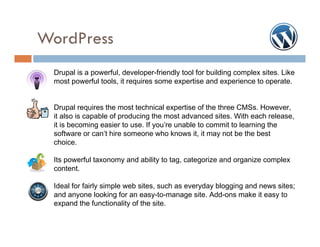
WordPress
Drupal is a powerful, developer-friendly tool for building complex sites. Like
most powerful tools, it requires some expertise and experience to operate.
Drupal requires the most technical expertise of the three CMSs. However,
it also is capable of producing the most advanced sites. With each release,
it is becoming easier to use. If you’re unable to commit to learning the
software or can’t hire someone who knows it, it may not be the best
choice.
Its powerful taxonomy and ability to tag, categorize and organize complex
content.
Ideal for fairly simple web sites, such as everyday blogging and news sites;
and anyone looking for an easy-to-manage site. Add-ons make it easy to
expand the functionality of the site.
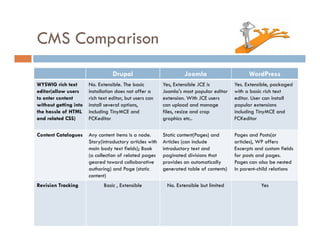
CMS Comparison
Drupal

Joomla

WordPress

WYSWIG rich text
editor(allow users
to enter content
without getting into
the hassle of HTML
and related CSS)

No. Extensible. The basic
installation does not offer a
rich text editor, but users can
install several options,
including TinyMCE and
FCKeditor

Yes, Extensible JCE is
Joomla's most popular editor
extension. With JCE users
can upload and manage
files, resize and crop
graphics etc..

Yes. Extensible, packaged
with a basic rich text
editor. User can install
popular extensions
including TinyMCE and
FCKeditor

Content Catalogues

Any content items is a node.
Story(introductory articles with
main body text fields); Book
(a collection of related pages
geared toward collaborative
authoring) and Page (static
content)

Static content(Pages) and
Articles (can include
introductory text and
paginated divisions that
provides an automatically
generated table of contents)

Pages and Posts(or
articles), WP offers
Excerpts and custom fields
for posts and pages.
Pages can also be nested
in parent-child relations

Basic , Extensible

No. Extensible but limited

Yes

Revision Tracking
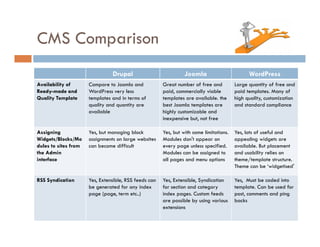
CMS Comparison
Drupal

Joomla

WordPress

Availability of
Ready-made and
Quality Template

Compare to Joomla and
WordPress very less
templates and in terms of
quality and quantity are
available

Great number of free and
paid, commercially viable
templates are available. the
best Joomla templates are
highly customizable and
inexpensive but, not free

Large quantity of free and
paid templates. Many of
high quality, customization
and standard compliance

Assigning
Widgets/Blocks/Mo
dules to sites from
the Admin
interface

Yes, but managing block
assignments on large websites
can become difficult

Yes, but with some limitations.
Modules don't appear on
every page unless specified.
Modules can be assigned to
all pages and menu options

Yes, lots of useful and
appealing widgets are
available. But placement
and usability relies on
theme/template structure.
Theme can be ā€˜widgetised'

RSS Syndication

Yes, Extensible, RSS feeds can
be generated for any index
page (page, term etc..)

Yes, Extensible, Syndication
for section and category
index pages. Custom feeds
are possible by using various
extensions

Yes, Must be coded into
template. Can be used for
post, comments and ping
backs
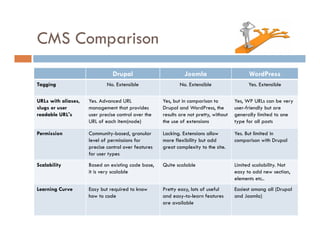
CMS Comparison
Drupal
Tagging

Joomla

WordPress

No. Extensible

No. Extensible

Yes. Extensible

URLs with aliases,
slugs or user
readable URL's

Yes. Advanced URL
management that provides
user precise control over the
URL of each item(node)

Yes, but in comparison to
Drupal and WordPress, the
results are not pretty, without
the use of extensions

Yes, WP URLs can be very
user-friendly but are
generally limited to one
type for all posts

Permission

Community-based, granular
level of permissions for
precise control over features
for user types

Lacking. Extensions allow
more flexibility but add
great complexity to the site.

Yes. But limited in
comparison with Drupal

Scalability

Based on existing code base,
it is very scalable

Quite scalable

Limited scalability. Not
easy to add new section,
elements etc..

Learning Curve

Easy but required to know
how to code

Pretty easy, lots of useful
and easy-to-learn features
are available

Easiest among all (Drupal
and Joomla)
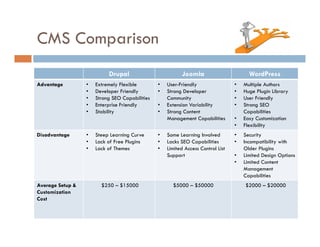
CMS Comparison
Drupal
Advantage

Disadvantage

Average Setup &
Customization
Cost

•
•
•
•
•

•
•
•

Extremely Flexible
Developer Friendly
Strong SEO Capabilities
Enterprise Friendly
Stability

Steep Learning Curve
Lack of Free Plugins
Lack of Themes

$250 – $15000

Joomla
•
•
•
•

•
•
•

WordPress

User-Friendly
Strong Developer
Community
Extension Variability
Strong Content
Management Capabilities

•
•
•
•

Some Learning Involved
Lacks SEO Capabilities
Limited Access Control List
Support

•
•

$5000 – $50000

•
•

•
•

Multiple Authors
Huge Plugin Library
User Friendly
Strong SEO
Capabilities
Easy Customization
Flexibility
Security
Incompatibility with
Older Plugins
Limited Design Options
Limited Content
Management
Capabilities
$2000 – $20000
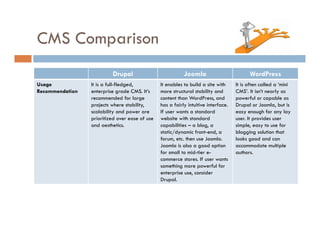
CMS Comparison
Drupal
Usage
Recommendation

Joomla

It is a full-fledged,
enterprise grade CMS. It’s
recommended for large
projects where stability,
scalability and power are
prioritized over ease of use
and aesthetics.

It enables to build a site with
more structural stability and
content than WordPress, and
has a fairly intuitive interface.
If user wants a standard
website with standard
capabilities – a blog, a
static/dynamic front-end, a
forum, etc. then use Joomla.
Joomla is also a good option
for small to mid-tier ecommerce stores. If user wants
something more powerful for
enterprise use, consider
Drupal.

WordPress
It is often called a ā€˜mini
CMS’. It isn’t nearly as
powerful or capable as
Drupal or Joomla, but is
easy enough for any lay
user. It provides user
simple, easy to use for
blogging solution that
looks good and can
accommodate multiple
authors.
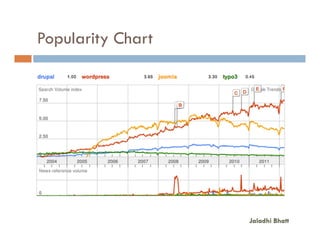
Popularity Chart

Jaladhi Bhatt
Jaladhi Bhatt

Open source cms-presentation-v1

  • 1.
  • 2.
    Drupal Drupal is apowerful, developer-friendly tool for building complex sites. Like most powerful tools, it requires some expertise and experience to operate. Drupal requires the most technical expertise of the three CMSs. However, it also is capable of producing the most advanced sites. With each release, it is becoming easier to use. If you’re unable to commit to learning the software or can’t hire someone who knows it, it may not be the best choice. Its powerful taxonomy and ability to tag, categorize and organize complex content. For complex, advanced and versatile sites; for sites that require complex data organization; for community platform sites with multiple users; for online stores
  • 3.
    Joomla Joomla offers middleground between the developer-oriented, extensive capabilities of Drupal and user-friendly but more complex site development options than Wordpress offers. Less complex than Drupal, more complex than Wordpress. Relatively uncomplicated installation and setup. With a relatively small investment of effort into understanding Joomla’s structure and terminology, you have the ability to create fairly complex sites. Designed to perform as a community platform, with strong social networking features. Joomla allows you to build a site with more content and structure flexibility than Wordpress offers, but still with fairly easy, intuitive usage. Supports Ecommerce, social networking and more.
  • 4.
    WordPress Drupal is apowerful, developer-friendly tool for building complex sites. Like most powerful tools, it requires some expertise and experience to operate. Drupal requires the most technical expertise of the three CMSs. However, it also is capable of producing the most advanced sites. With each release, it is becoming easier to use. If you’re unable to commit to learning the software or can’t hire someone who knows it, it may not be the best choice. Its powerful taxonomy and ability to tag, categorize and organize complex content. Ideal for fairly simple web sites, such as everyday blogging and news sites; and anyone looking for an easy-to-manage site. Add-ons make it easy to expand the functionality of the site.
  • 5.
    CMS Comparison Drupal Joomla WordPress WYSWIG richtext editor(allow users to enter content without getting into the hassle of HTML and related CSS) No. Extensible. The basic installation does not offer a rich text editor, but users can install several options, including TinyMCE and FCKeditor Yes, Extensible JCE is Joomla's most popular editor extension. With JCE users can upload and manage files, resize and crop graphics etc.. Yes. Extensible, packaged with a basic rich text editor. User can install popular extensions including TinyMCE and FCKeditor Content Catalogues Any content items is a node. Story(introductory articles with main body text fields); Book (a collection of related pages geared toward collaborative authoring) and Page (static content) Static content(Pages) and Articles (can include introductory text and paginated divisions that provides an automatically generated table of contents) Pages and Posts(or articles), WP offers Excerpts and custom fields for posts and pages. Pages can also be nested in parent-child relations Basic , Extensible No. Extensible but limited Yes Revision Tracking
  • 6.
    CMS Comparison Drupal Joomla WordPress Availability of Ready-madeand Quality Template Compare to Joomla and WordPress very less templates and in terms of quality and quantity are available Great number of free and paid, commercially viable templates are available. the best Joomla templates are highly customizable and inexpensive but, not free Large quantity of free and paid templates. Many of high quality, customization and standard compliance Assigning Widgets/Blocks/Mo dules to sites from the Admin interface Yes, but managing block assignments on large websites can become difficult Yes, but with some limitations. Modules don't appear on every page unless specified. Modules can be assigned to all pages and menu options Yes, lots of useful and appealing widgets are available. But placement and usability relies on theme/template structure. Theme can be ā€˜widgetised' RSS Syndication Yes, Extensible, RSS feeds can be generated for any index page (page, term etc..) Yes, Extensible, Syndication for section and category index pages. Custom feeds are possible by using various extensions Yes, Must be coded into template. Can be used for post, comments and ping backs
  • 7.
    CMS Comparison Drupal Tagging Joomla WordPress No. Extensible No.Extensible Yes. Extensible URLs with aliases, slugs or user readable URL's Yes. Advanced URL management that provides user precise control over the URL of each item(node) Yes, but in comparison to Drupal and WordPress, the results are not pretty, without the use of extensions Yes, WP URLs can be very user-friendly but are generally limited to one type for all posts Permission Community-based, granular level of permissions for precise control over features for user types Lacking. Extensions allow more flexibility but add great complexity to the site. Yes. But limited in comparison with Drupal Scalability Based on existing code base, it is very scalable Quite scalable Limited scalability. Not easy to add new section, elements etc.. Learning Curve Easy but required to know how to code Pretty easy, lots of useful and easy-to-learn features are available Easiest among all (Drupal and Joomla)
  • 8.
    CMS Comparison Drupal Advantage Disadvantage Average Setup& Customization Cost • • • • • • • • Extremely Flexible Developer Friendly Strong SEO Capabilities Enterprise Friendly Stability Steep Learning Curve Lack of Free Plugins Lack of Themes $250 – $15000 Joomla • • • • • • • WordPress User-Friendly Strong Developer Community Extension Variability Strong Content Management Capabilities • • • • Some Learning Involved Lacks SEO Capabilities Limited Access Control List Support • • $5000 – $50000 • • • • Multiple Authors Huge Plugin Library User Friendly Strong SEO Capabilities Easy Customization Flexibility Security Incompatibility with Older Plugins Limited Design Options Limited Content Management Capabilities $2000 – $20000
  • 9.
    CMS Comparison Drupal Usage Recommendation Joomla It isa full-fledged, enterprise grade CMS. It’s recommended for large projects where stability, scalability and power are prioritized over ease of use and aesthetics. It enables to build a site with more structural stability and content than WordPress, and has a fairly intuitive interface. If user wants a standard website with standard capabilities – a blog, a static/dynamic front-end, a forum, etc. then use Joomla. Joomla is also a good option for small to mid-tier ecommerce stores. If user wants something more powerful for enterprise use, consider Drupal. WordPress It is often called a ā€˜mini CMS’. It isn’t nearly as powerful or capable as Drupal or Joomla, but is easy enough for any lay user. It provides user simple, easy to use for blogging solution that looks good and can accommodate multiple authors.
  • 10.
  • 11.