Drupal: The Basics & More Walter Nelson RAND Corporation walternelson.com
Disclaimer RAND Corporation does not use Drupal All my Drupal experience has been extra-curricular  Non-profits, movie theater, personal site etc. I am self taught and there is much I don’t know
Open Source Content Management Systems Drupal Joomla! WordPress I know Drupal, so that’s what I will discuss Search “Drupal vs. Joomla vs. WordPress” for informed comparisons
About Drupal Creates database driven website/Content Management System  Open Source Currently at version 7 Uses PHP and MySQL
Database Driven? Content and format are separate Internal search engine is a standard feature Self-organizing (if you are organized) Content can be entered in once place, and appear in many
Some Advantages Easier to add content – no need for Dreamweaver etc. Multiple contributors with VERY granular permissions Contributors can’t break it – unless you let them Format changes are instantaneous
The Down Side of a CMS Initial setup is a lot of work – to include wrapping your head around the architecture of your information  Performance may be slow You can destroy the whole website with a single mistake (back up your database) You can’t make format changes to specific pages
Open Source Advantages Not owned by anyone Developed by a huge community Constantly growing and expanding Amazing variety of capabilities No cost to acquire
Open Source Disadvantages It’s a jungle out there! Constant changes are hard to keep up with New modules or versions may not be compatible with key pieces of your installation Existing modules may not be compatible with each other Modules may be abandoned by their developers If there’s a problem there is no patient chap in Mumbai to whine to
An option to consider 3 rd  party vendor They run your Drupal for you They usually want to host it for you, so they can manage it properly
Installation Step by step videos  Helpful “Fix this to continue” messages The easiest web application I have ever installed
Some Problems Your server’s PHP installation may not support all modules ( e.g. graphics issues ) Insufficient memory allotted to application or database Performance issues if resources are constrained  Caching is imperfect fix
Modules Drupal has hundreds of modules which do almost anything you want to do Download and unzip Upload to server Activate via Admin page Set appropriate permissions Use it
Selected Modules Date + Calendar MARC (turn your OPAC records into web pages) Contact form Image uploader RSS feeds (lots of them) Feed Aggregator Commenting “ CAPTCHA” spam reducer
Taxonomies – be still my librarian heart Each term creates aggregated pages, each with RSS feed Fixed vocabulary with sub-headings Free form “tags” do the same “ Book” format with “child pages” creates menu tree Affiliates pages hierarchically and menu is created automatically Easy to change location in hierarchy
Permissions Everything on the site, including the ability to see a thing, is permission driven Every module has its own set of permissions You can create special content types with unique permissions Permissions are bundled in admin-defined “Groups” Users are assigned to Groups
Some screen shots The interfaces at work
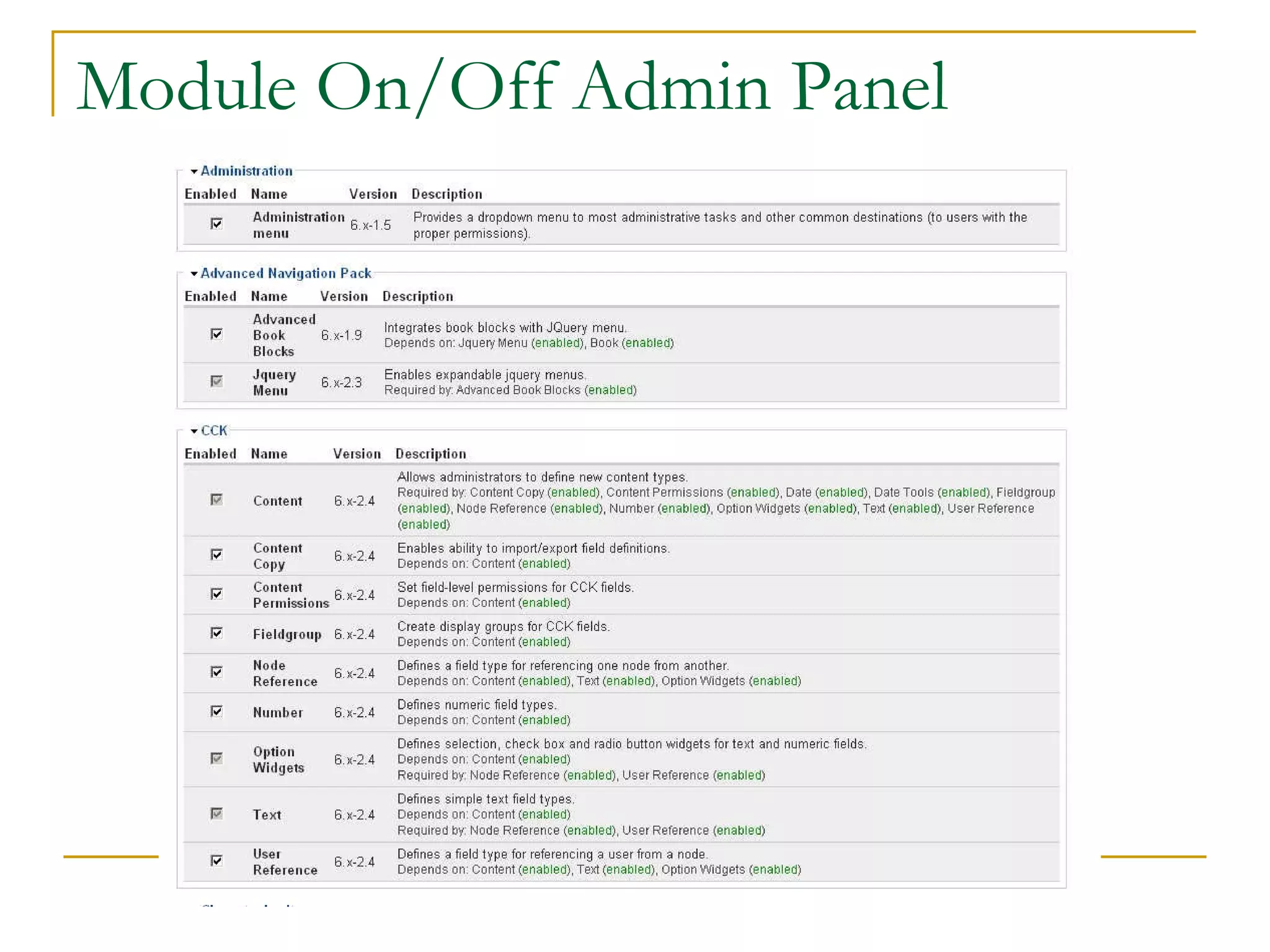
Module On/Off Admin Panel
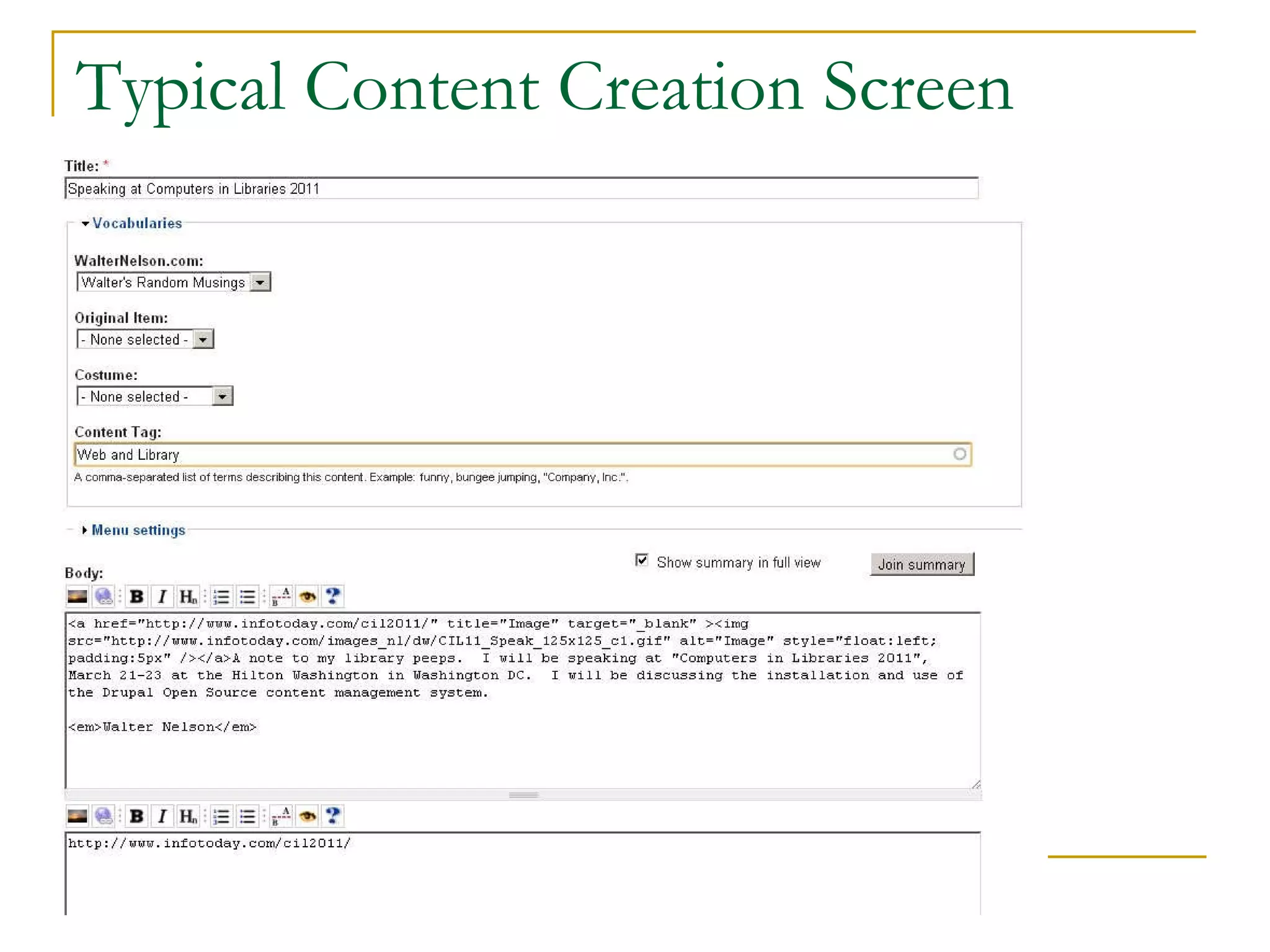
Typical Content Creation Screen
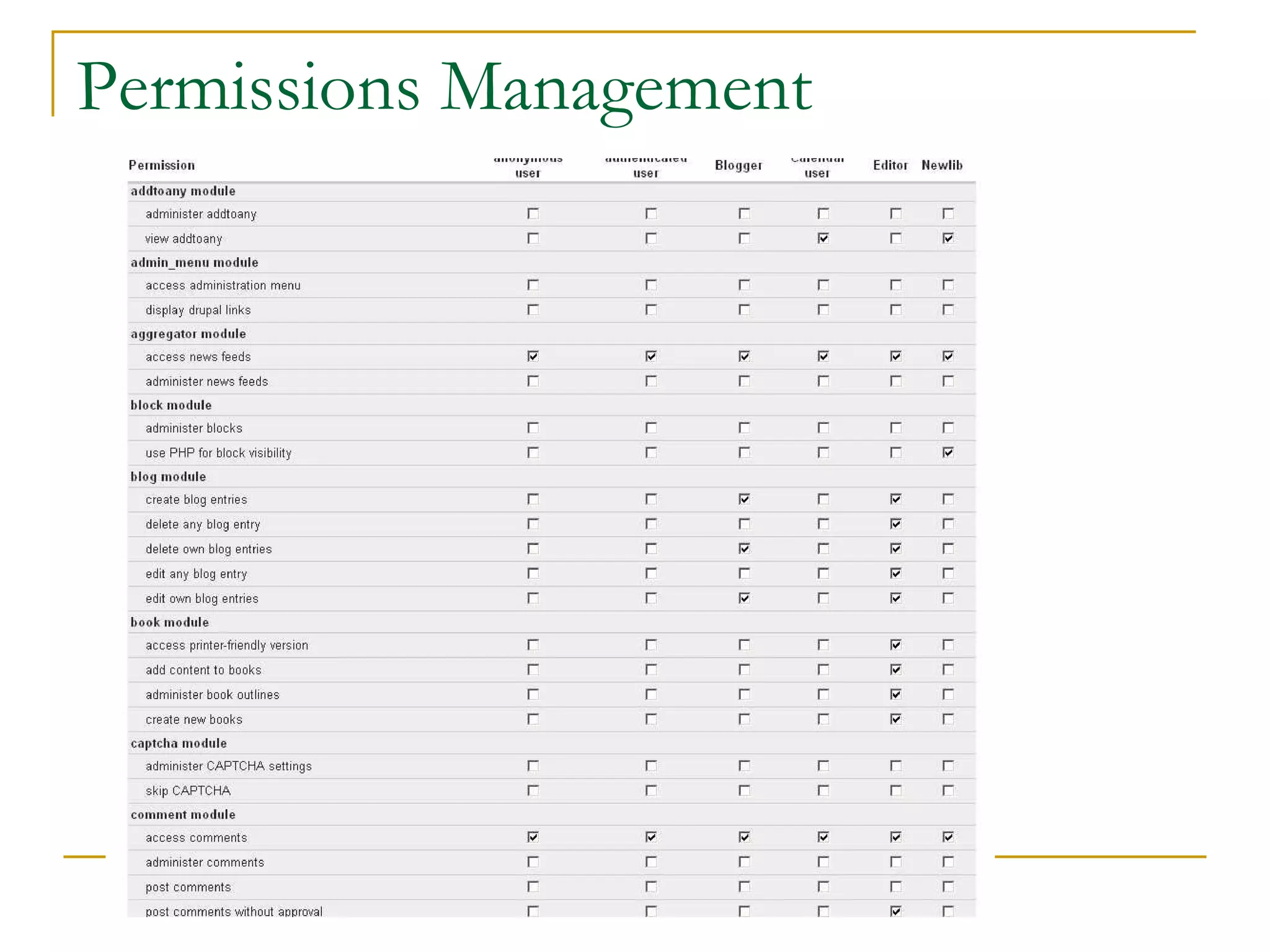
Permissions Management
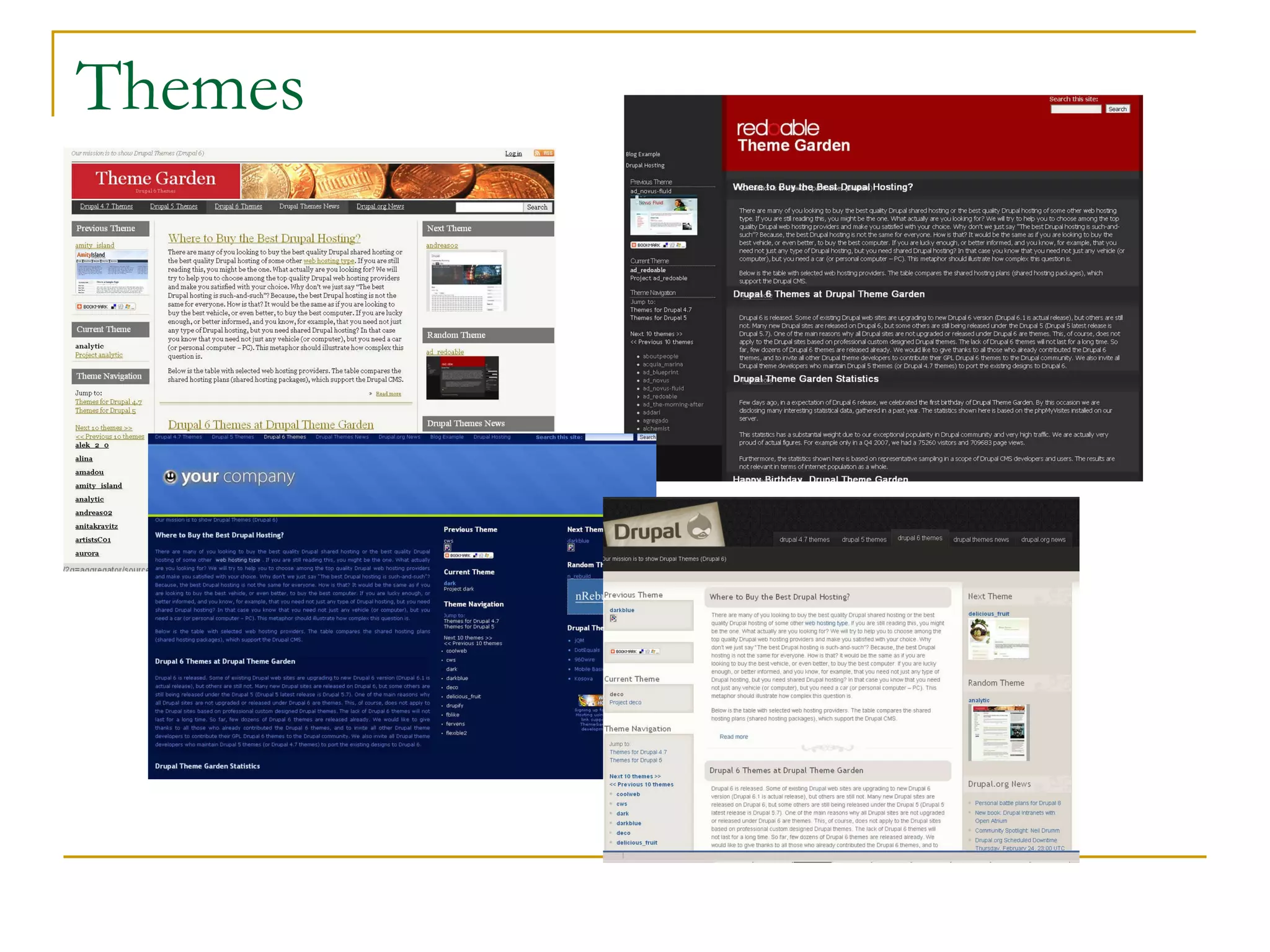
Themes
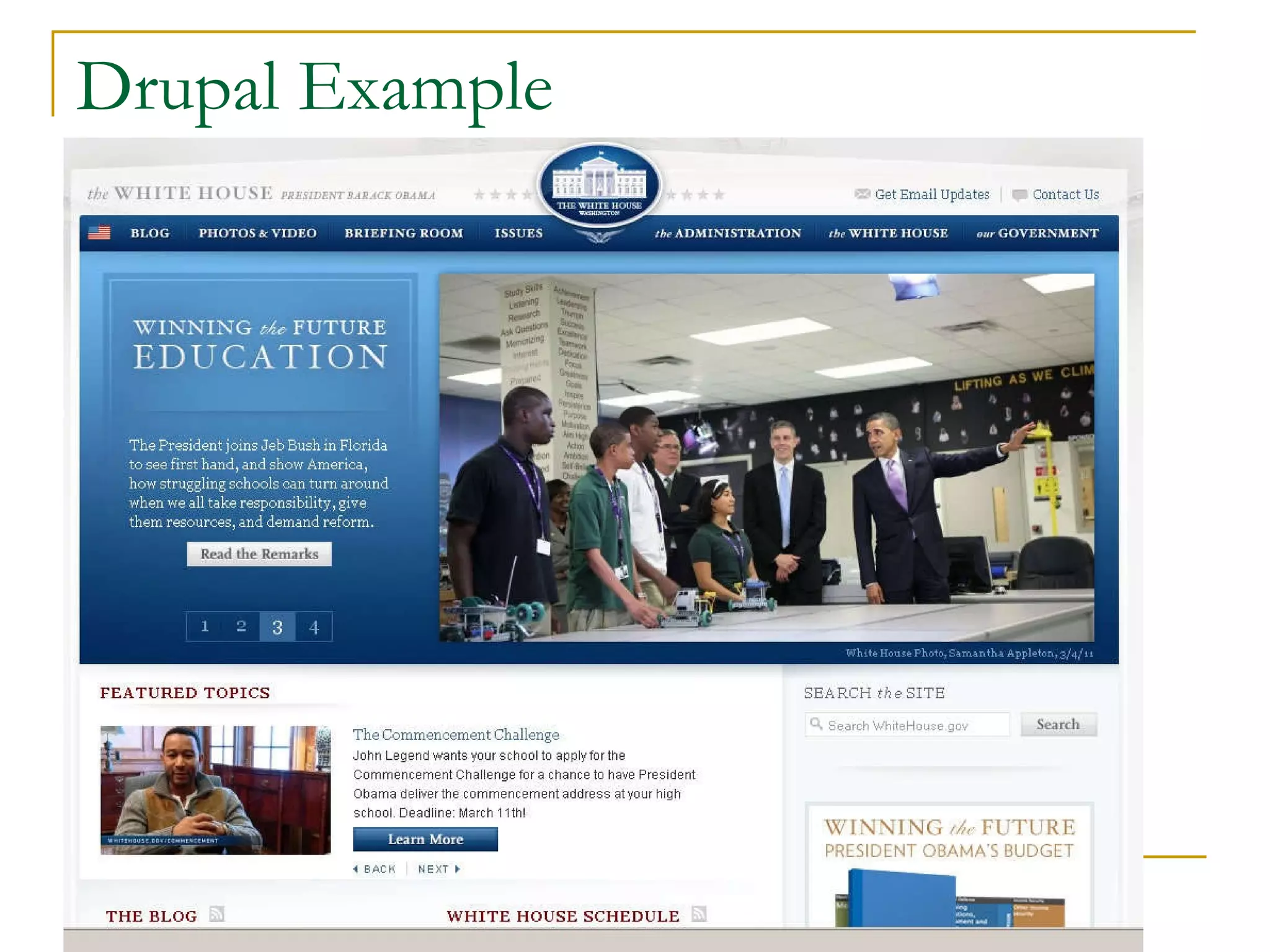
Drupal Example
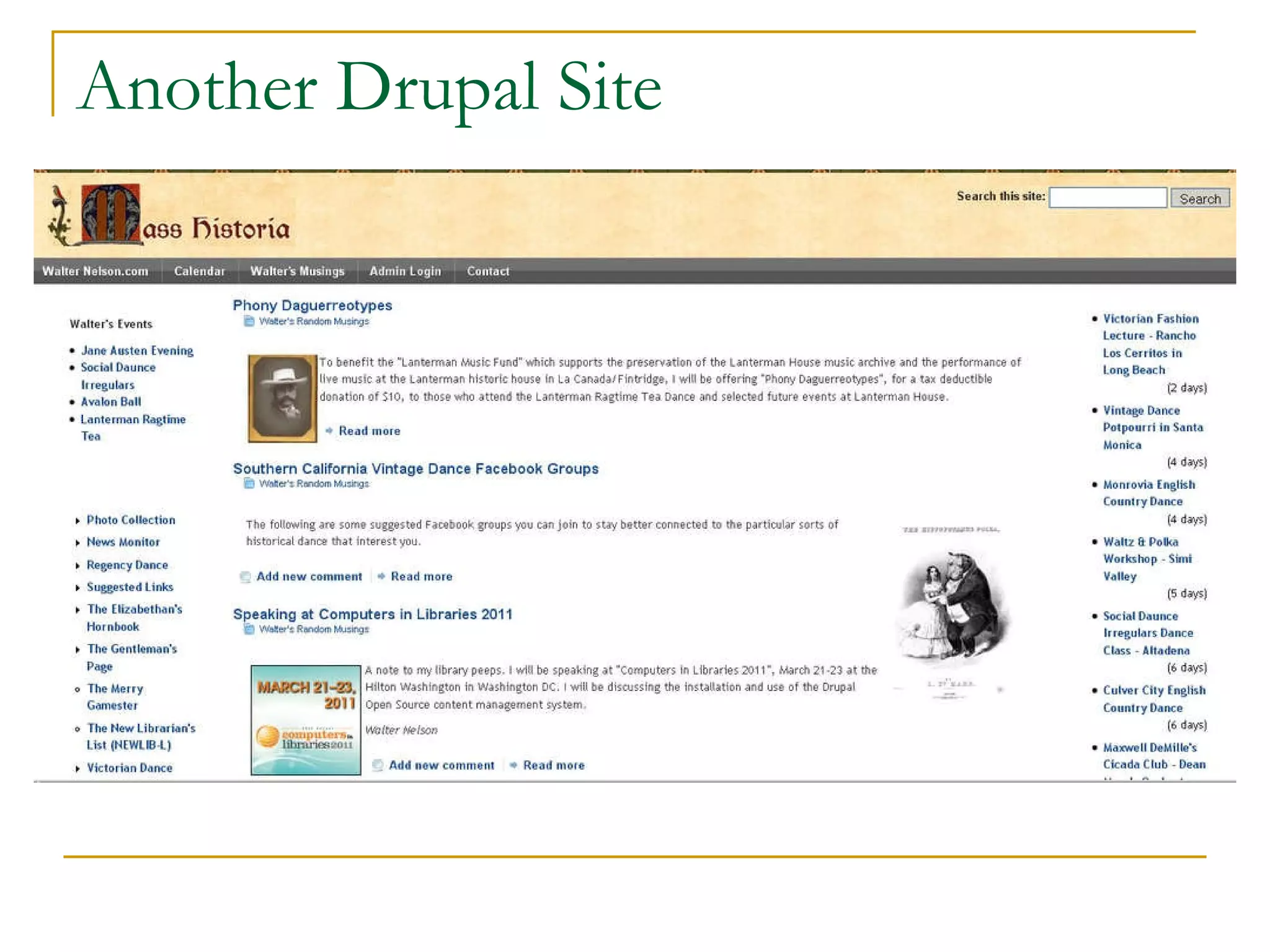
Another Drupal Site
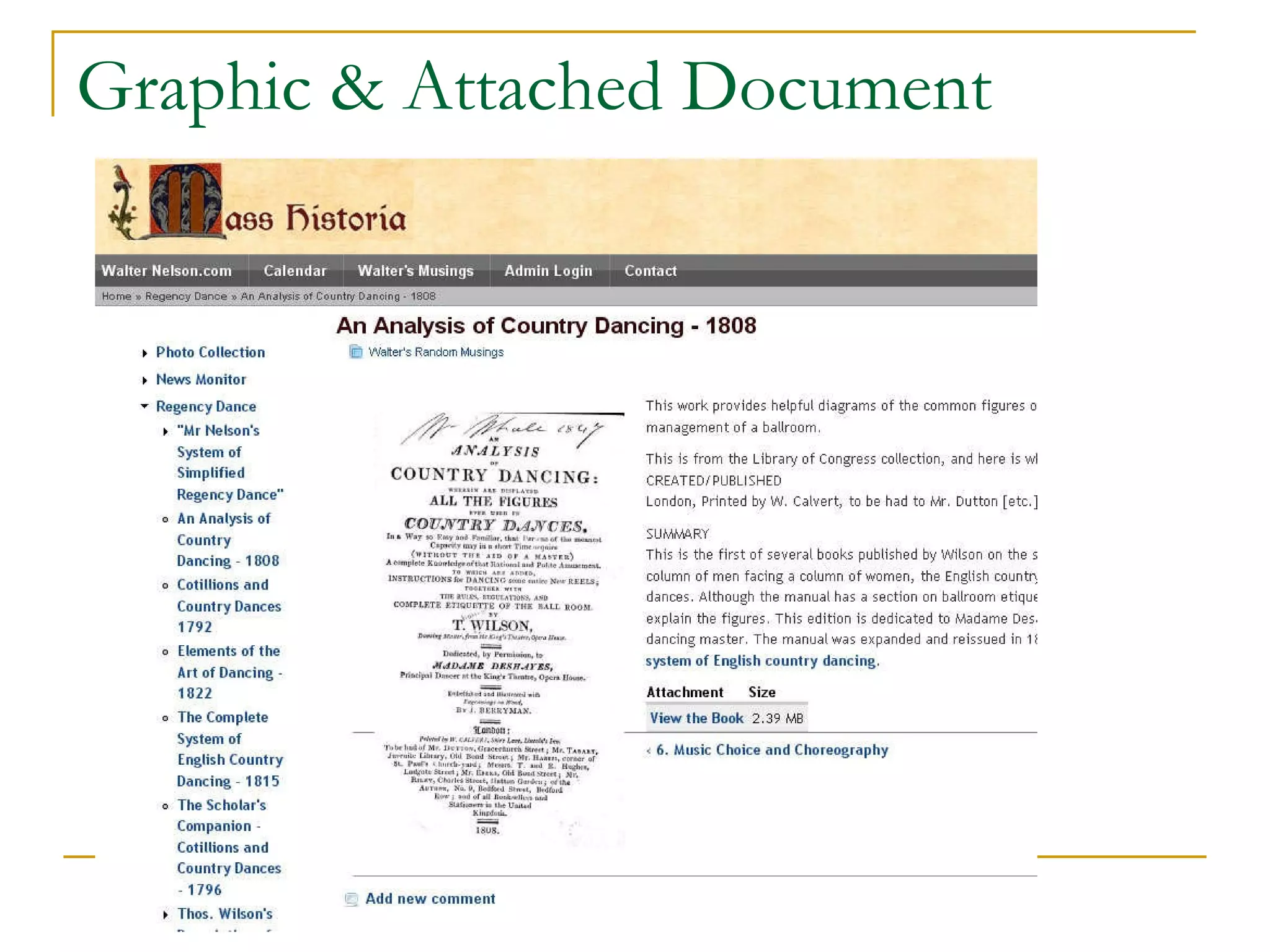
Graphic & Attached Document
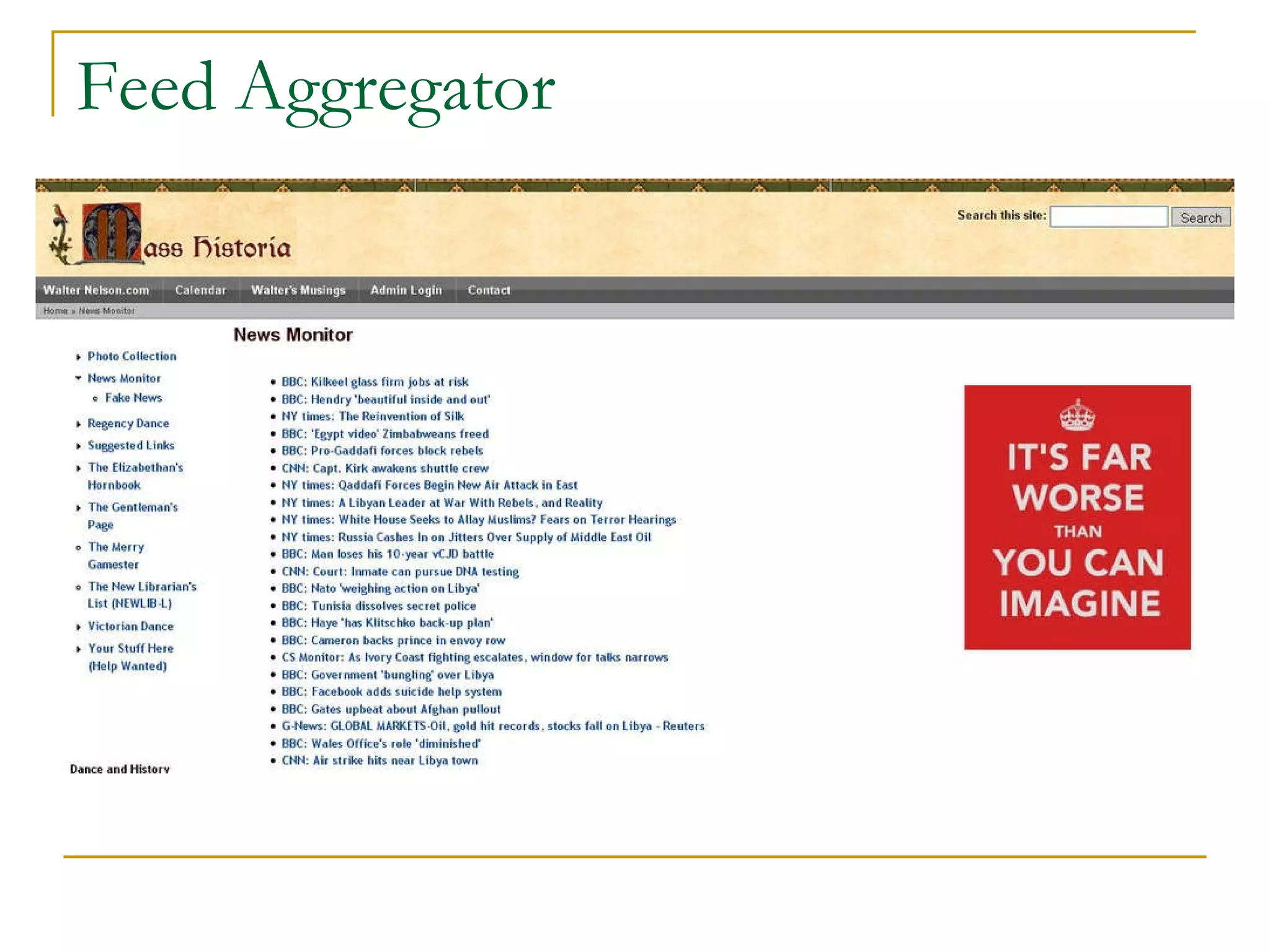
Feed Aggregator
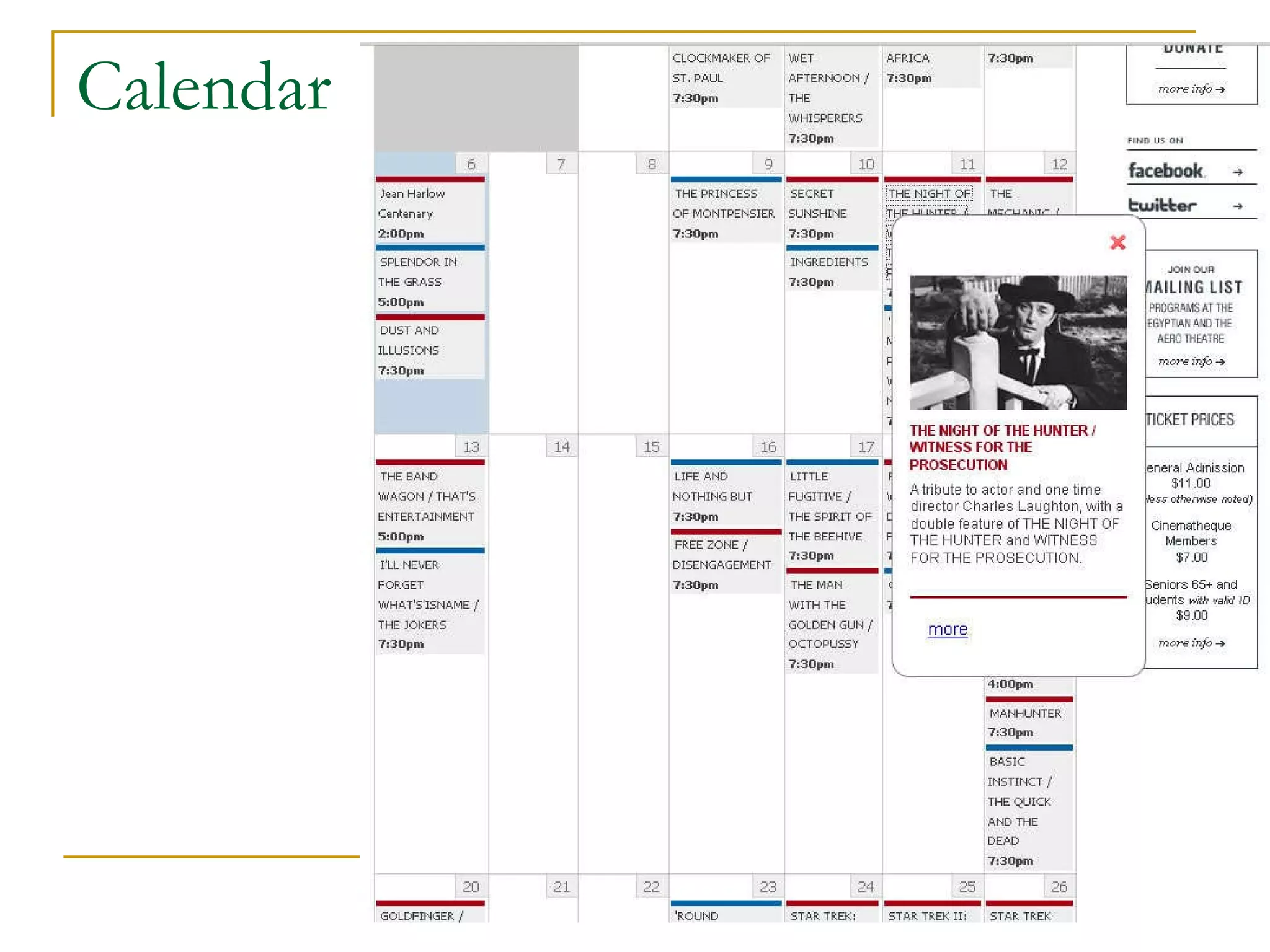
Calendar
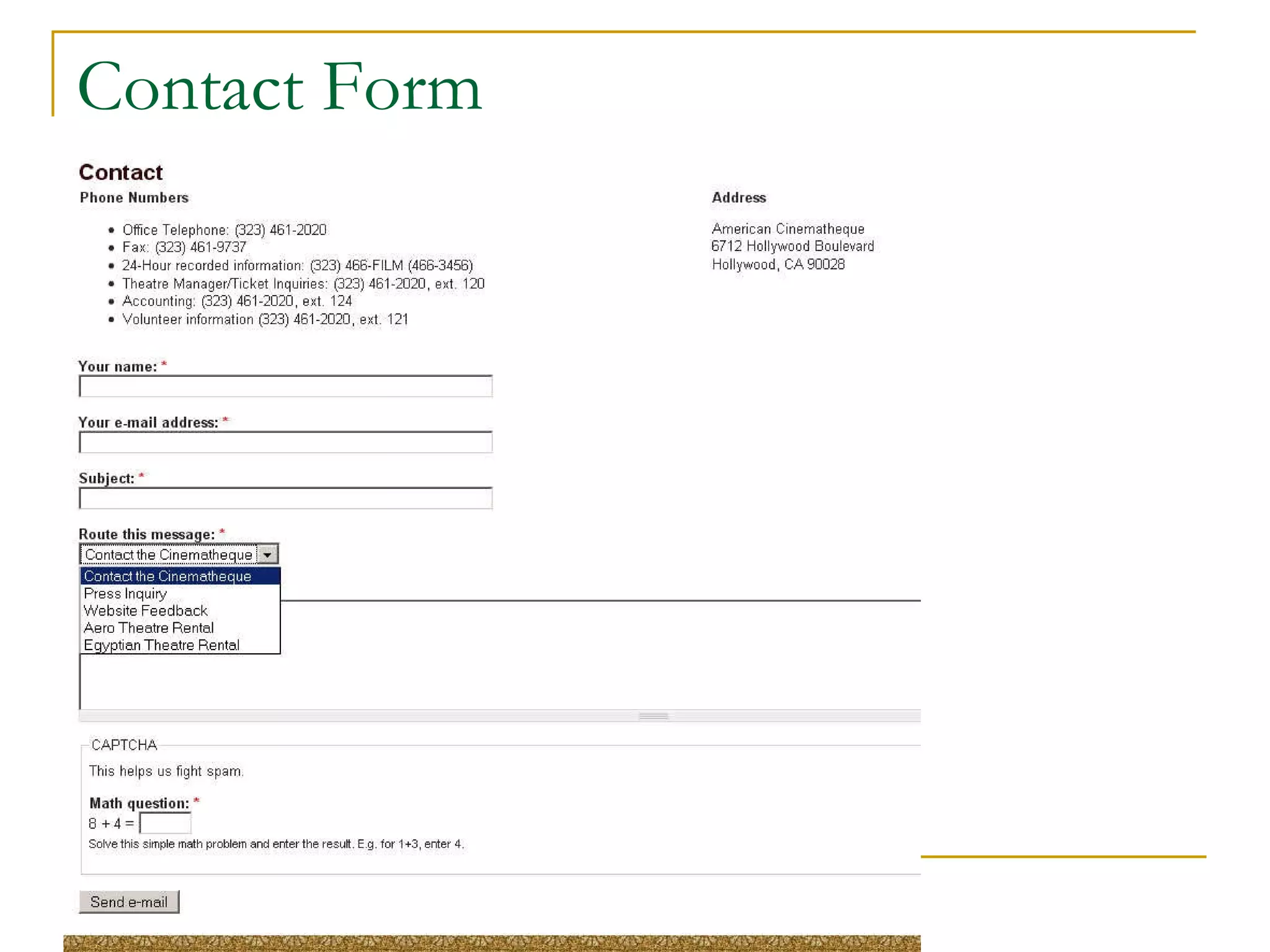
Contact Form
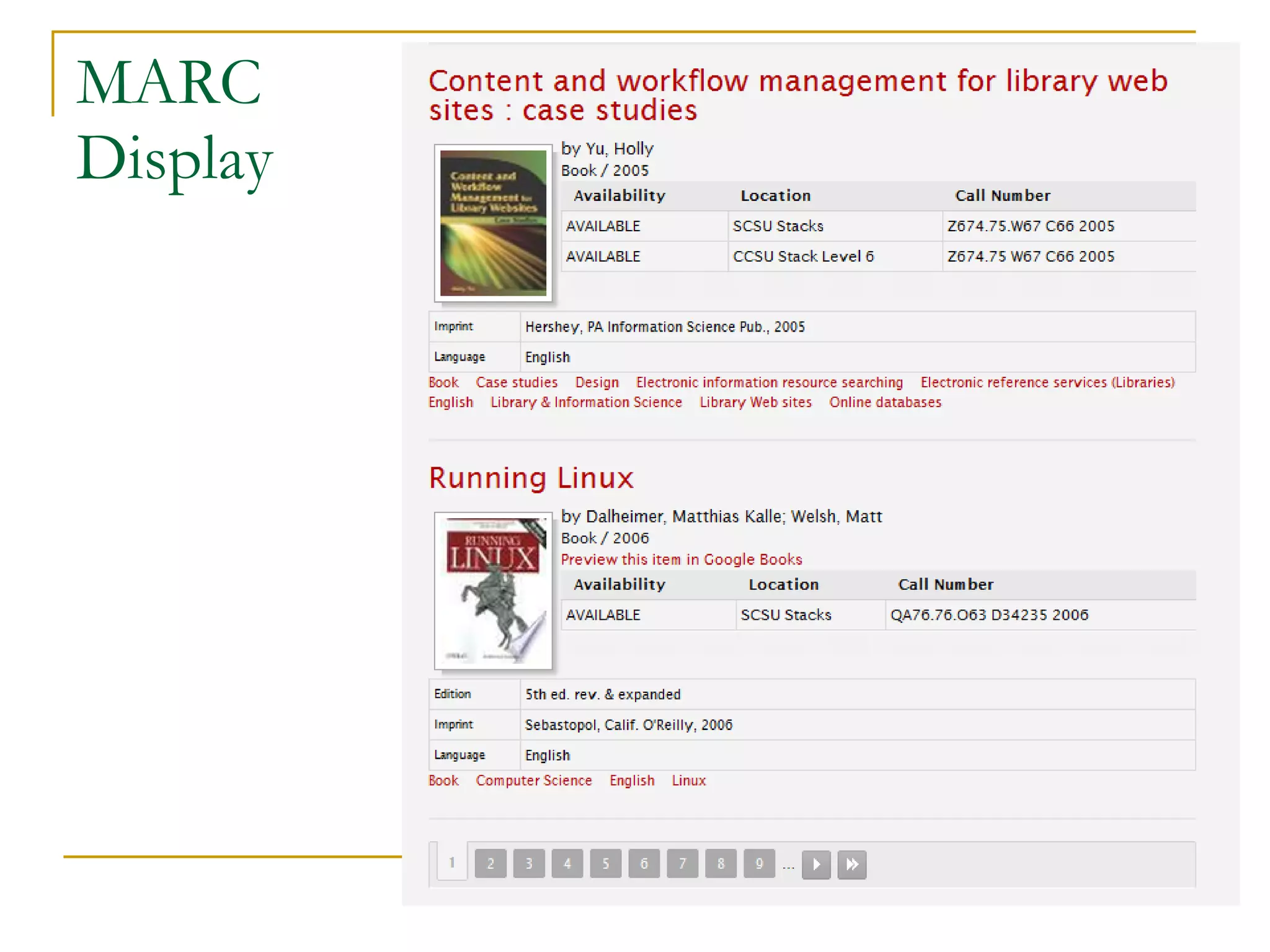
MARC Display
Conclusion Drupal gives those without the resources or skill set the power to create a real CMS driven website Collaborative community provides resources beyond anything an individual or small organization could create Drupal can do the job
A Final Observation Drupal is the real deal It is not “Content Management” lite It is a real CMS, and it is as good as your understanding of data architecture can make it

Drupal Basics

  • 1.
    Drupal: The Basics& More Walter Nelson RAND Corporation walternelson.com
  • 2.
    Disclaimer RAND Corporationdoes not use Drupal All my Drupal experience has been extra-curricular Non-profits, movie theater, personal site etc. I am self taught and there is much I don’t know
  • 3.
    Open Source ContentManagement Systems Drupal Joomla! WordPress I know Drupal, so that’s what I will discuss Search “Drupal vs. Joomla vs. WordPress” for informed comparisons
  • 4.
    About Drupal Createsdatabase driven website/Content Management System Open Source Currently at version 7 Uses PHP and MySQL
  • 5.
    Database Driven? Contentand format are separate Internal search engine is a standard feature Self-organizing (if you are organized) Content can be entered in once place, and appear in many
  • 6.
    Some Advantages Easierto add content – no need for Dreamweaver etc. Multiple contributors with VERY granular permissions Contributors can’t break it – unless you let them Format changes are instantaneous
  • 7.
    The Down Sideof a CMS Initial setup is a lot of work – to include wrapping your head around the architecture of your information Performance may be slow You can destroy the whole website with a single mistake (back up your database) You can’t make format changes to specific pages
  • 8.
    Open Source AdvantagesNot owned by anyone Developed by a huge community Constantly growing and expanding Amazing variety of capabilities No cost to acquire
  • 9.
    Open Source DisadvantagesIt’s a jungle out there! Constant changes are hard to keep up with New modules or versions may not be compatible with key pieces of your installation Existing modules may not be compatible with each other Modules may be abandoned by their developers If there’s a problem there is no patient chap in Mumbai to whine to
  • 10.
    An option toconsider 3 rd party vendor They run your Drupal for you They usually want to host it for you, so they can manage it properly
  • 11.
    Installation Step bystep videos Helpful “Fix this to continue” messages The easiest web application I have ever installed
  • 12.
    Some Problems Yourserver’s PHP installation may not support all modules ( e.g. graphics issues ) Insufficient memory allotted to application or database Performance issues if resources are constrained Caching is imperfect fix
  • 13.
    Modules Drupal hashundreds of modules which do almost anything you want to do Download and unzip Upload to server Activate via Admin page Set appropriate permissions Use it
  • 14.
    Selected Modules Date+ Calendar MARC (turn your OPAC records into web pages) Contact form Image uploader RSS feeds (lots of them) Feed Aggregator Commenting “ CAPTCHA” spam reducer
  • 15.
    Taxonomies – bestill my librarian heart Each term creates aggregated pages, each with RSS feed Fixed vocabulary with sub-headings Free form “tags” do the same “ Book” format with “child pages” creates menu tree Affiliates pages hierarchically and menu is created automatically Easy to change location in hierarchy
  • 16.
    Permissions Everything onthe site, including the ability to see a thing, is permission driven Every module has its own set of permissions You can create special content types with unique permissions Permissions are bundled in admin-defined “Groups” Users are assigned to Groups
  • 17.
    Some screen shotsThe interfaces at work
  • 18.
  • 19.
  • 20.
  • 21.
  • 22.
  • 23.
  • 24.
  • 25.
  • 26.
  • 27.
  • 28.
  • 29.
    Conclusion Drupal givesthose without the resources or skill set the power to create a real CMS driven website Collaborative community provides resources beyond anything an individual or small organization could create Drupal can do the job
  • 30.
    A Final ObservationDrupal is the real deal It is not “Content Management” lite It is a real CMS, and it is as good as your understanding of data architecture can make it

Editor's Notes

  • #19 The Module Admin panel allows you to activate and deactivate the modules you have uploaded. A word of caution: some modules are dependent on one another. Also, if you deactivate a core module (it will let you) you could crash your whole website.
  • #20 This is a typical content creation screen. This is not the only possibility, as content input can be customized with additional modules. Note the pull down menus, which are driven by the “Taxonomy” feature. The “Content Tag” field is a free text field (though it does suggest words as you type from existing tags). This behaves much like the Taxonomy, but allows a lot of flexibility in sorting and defining your content. Both taxonomy terms and tags produce aggregated pages and RSS feeds.
  • #21 The Permissions Management screen presents a matrix of every feature you have enabled and every type of user you have defined (including “anonymous”). You can control who can do what, and what every sort of user can see. There is no separate public and production interface. Each user just sees and can use the fraction of the whole suite of features that you have assigned to his or her group.
  • #22 Themes are pre-designed formats for your website which you can activate, just like modules, by simply downloading them from the web, uploading them to your site and activating them. You are supposed to be able to define which users can see which themes, but my experience in that area has been less than satisfactory. Maybe that has been improved. You might consider, as I have done, finding a theme with an architecture that works for you, and then change the stylesheets and replace the graphics to put your own brand on it
  • #23 The Whitehouse uses Drupal. The box in the lower left is a typical Drupal feature. It was created using the standard input interface, and by selecting an appropriate entry type, or taxonomy term, it appears in this particular spot. It also appears in as many other placed on the website as the designers think best. The thumbnail and summary are controlled at the point the content is created.
  • #24 This is my own personal Drupal site, which I use to support historical education and history related hobbies like “vintage dance” or re-enactment in Southern California. The column on the right is pulled from the event calendar, and the entries on the home page are there because, when I created them, I checked “Appear on front page”. Note also the search box in the upper right corner, the structured HTML menu in the upper left and the dynamic “book menu” on the lower left.
  • #25 This is part of a project where I have been pulling together PDF scans of historical dance manuals and presenting them online. The “View the Book” link was created by a tool that allows me to upload files, such as PDFs, onto the website. The image of the title page of the document was uploaded using a separate “image uploader” tool. Neither one required any FTP tools. On the left is a “book menu”, created by adding “child pages” to build a hierarchy. Note however that the hierarchy is not ridged. If I change my mind, it can easily be changed in the editing interface.
  • #26 This is a very useful standard Drupal feature that allows you to pull together multiple RSS feeds to create a single display, which also creates a single feed from multiple sources. I use this to populate the Library’s intranet site at work, as we do not have access to any such tool internally. The graphic on the right is from a feature called “blocks” that allows you to define a website element and then specify on what pages it will, and will not, display.
  • #27 This is the film calendar for the American Cinematheque – a Hollywood based organization that shows classic and independent films in a couple of historic theaters. I designed the underlying architecture. This version of the calendar creates pop up boxes that display your summary and thumbnail, and do not require you to leave the calendar page to get basic information.
  • #28 This contact form allows people to send you emails without you having to put your email address up on the web to be harvested by spammers. Other features include a pull down menu that allows the user to route the message to one of a selection of choices you have defined. It also uses “Captcha” to deter spamming.
  • #29 This is a particularly nice example of a module that allows you to import MARC content into Drupal, with each record becoming a “Node” (i.e. web page). You can also export back to Marc as well as Endnote and other tools.