OPEN HOUSE
PRESENTATIONS
Yvonne Roche EDU 620
Educator in local school district Adriane Wheat
October 31, 2016
STATION ONE
Universal Design for Learning
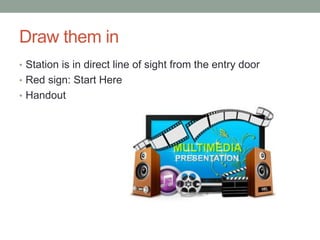
Draw them in
• Station is in direct line of sight from the entry door
• Red sign: Start Here
• Handout
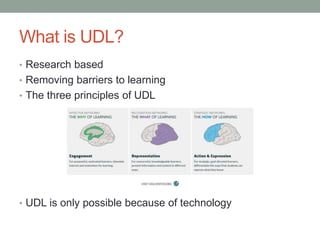
What is UDL?
• Research based
• Removing barriers to learning
• The three principles of UDL
• UDL is only possible because of technology
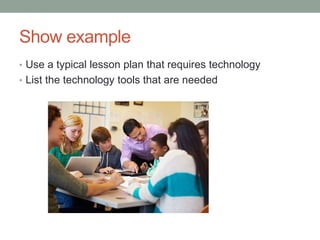
Show example
• Use a typical lesson plan that requires technology
• List the technology tools that are needed
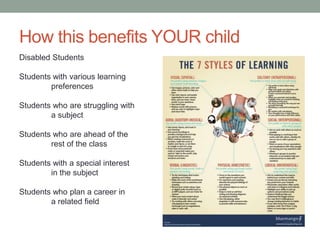
How this benefits YOUR child
Disabled Students
Students with various learning
preferences
Students who are struggling with
a subject
Students who are ahead of the
rest of the class
Students with a special interest
in the subject
Students who plan a career in
a related field
STATION TWO
Technology in actual use right here
Mission and goals
• Successful lifelong learners
• Student-Centered
• Future Focused
• More students graduating
• All students are able to go to college
• No student left out
Classes to offer
• Social studies videos
• Text to speech software for those who don’t write well
• Intercultural classes
• Input from authors in literature and writing classes
• American history with the National Archives
• Chemistry with virtual labs
• More math and science, including advanced, with online
classes
• Journalism with University of Missouri, Columbia
• Tech school equipment
• Classes from experts and professional organizations
STATION THREE
Why technology is important
Intercultural class example
• Global awareness (21st century themes)
• Work creatively with others (Learning and innovation
skills)
• Analyze and evaluate major alternative points of view
(Learning and innovation skills)
• Interact effectively with others (Life and career skills)
• Use technology as a tool to communicate effectively
(Information, media, and technology skills)
• Connecting with learners from other backgrounds and
cultures (ISTE 2c)
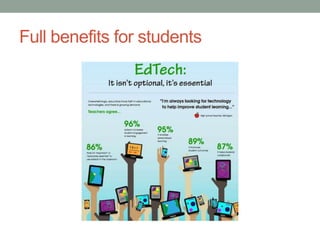
Full benefits for students
Station three features
• Interactive lesson for parents
• Computers for research
• Examine a laptop
• Examine a video camera
• Examine a piece of technology from the Tech school.
• Helper available
References
CAST. (2014). Universal design for learning guidelines. Retrieved October 5, 2016 from
http://www.udlcenter.org/aboutudl/udlguidelines_theorypractice
Edyburn, D. L. (2013). Inclusive technologies: Tools for helping diverse learners achieve
academic success. San Diego, CA: Bridgepoint Education.
International Brotherhood of Electrical Workers. (2015). IBEW education department
course list. Retrieved October 30. 2016 from http://www.ibew.org/Portals/31/
documents/education/Education%20Brochure.pdf?ver=2016-03-01-111903-470
International Society for Technology in Education. (2016). ISTE standards for students.
Retrieved October 30, 2016 from http://www.iste.org/
Lebanon R-3 School District. (2015). Comprehensive School Improvement Plan.
Retrieved October 30, 2016 from https://drive.google.com/file/d/
0B67B147n8yXbZnNJQWU1LW81YVk/view
Missouri Department of Elementary and Secondary Education. (2015). Top 10 by 20:
The plan. Retrieved October 30, 2016 from https://dese.mo.gov/sites/default/files/
Top10by20Plan.pdf
Partnership for 21st Century Learning. (2015). P21 framework definitions. Retrieved
October 30. 2016 from http://www.p21.org/storage/documents/docs/P21_Framework_
Definitions_New_Logo_2015.pdf
Puckett, K. S. (2013). Differentiating instruction: A practical guide. San Diego,
CA: Bridgepoint Education.
Shockley-Zalabak, P. S. (2009). Fundamentals of organizational communication:
Knowledge, sensitivity, skills, values (7th ed.). New York: Pearson.
Teaching Excellence in Adult Literacy. (2010). TEAL center fact sheet no. 2: Universal
design for learning. Retrieved October 29, 2016 from https://lincs.ed.gov/sites/
default/files/2_TEAL_UDL.pdf

Open house presentations

  • 1.
    OPEN HOUSE PRESENTATIONS Yvonne RocheEDU 620 Educator in local school district Adriane Wheat October 31, 2016
  • 2.
  • 3.
    Draw them in •Station is in direct line of sight from the entry door • Red sign: Start Here • Handout
  • 4.
    What is UDL? •Research based • Removing barriers to learning • The three principles of UDL • UDL is only possible because of technology
  • 5.
    Show example • Usea typical lesson plan that requires technology • List the technology tools that are needed
  • 6.
    How this benefitsYOUR child Disabled Students Students with various learning preferences Students who are struggling with a subject Students who are ahead of the rest of the class Students with a special interest in the subject Students who plan a career in a related field
  • 7.
    STATION TWO Technology inactual use right here
  • 8.
    Mission and goals •Successful lifelong learners • Student-Centered • Future Focused • More students graduating • All students are able to go to college • No student left out
  • 9.
    Classes to offer •Social studies videos • Text to speech software for those who don’t write well • Intercultural classes • Input from authors in literature and writing classes • American history with the National Archives • Chemistry with virtual labs • More math and science, including advanced, with online classes • Journalism with University of Missouri, Columbia • Tech school equipment • Classes from experts and professional organizations
  • 10.
  • 11.
    Intercultural class example •Global awareness (21st century themes) • Work creatively with others (Learning and innovation skills) • Analyze and evaluate major alternative points of view (Learning and innovation skills) • Interact effectively with others (Life and career skills) • Use technology as a tool to communicate effectively (Information, media, and technology skills) • Connecting with learners from other backgrounds and cultures (ISTE 2c)
  • 12.
  • 13.
    Station three features •Interactive lesson for parents • Computers for research • Examine a laptop • Examine a video camera • Examine a piece of technology from the Tech school. • Helper available
  • 14.
    References CAST. (2014). Universaldesign for learning guidelines. Retrieved October 5, 2016 from http://www.udlcenter.org/aboutudl/udlguidelines_theorypractice Edyburn, D. L. (2013). Inclusive technologies: Tools for helping diverse learners achieve academic success. San Diego, CA: Bridgepoint Education. International Brotherhood of Electrical Workers. (2015). IBEW education department course list. Retrieved October 30. 2016 from http://www.ibew.org/Portals/31/ documents/education/Education%20Brochure.pdf?ver=2016-03-01-111903-470
  • 15.
    International Society forTechnology in Education. (2016). ISTE standards for students. Retrieved October 30, 2016 from http://www.iste.org/ Lebanon R-3 School District. (2015). Comprehensive School Improvement Plan. Retrieved October 30, 2016 from https://drive.google.com/file/d/ 0B67B147n8yXbZnNJQWU1LW81YVk/view Missouri Department of Elementary and Secondary Education. (2015). Top 10 by 20: The plan. Retrieved October 30, 2016 from https://dese.mo.gov/sites/default/files/ Top10by20Plan.pdf
  • 16.
    Partnership for 21stCentury Learning. (2015). P21 framework definitions. Retrieved October 30. 2016 from http://www.p21.org/storage/documents/docs/P21_Framework_ Definitions_New_Logo_2015.pdf Puckett, K. S. (2013). Differentiating instruction: A practical guide. San Diego, CA: Bridgepoint Education. Shockley-Zalabak, P. S. (2009). Fundamentals of organizational communication: Knowledge, sensitivity, skills, values (7th ed.). New York: Pearson.
  • 17.
    Teaching Excellence inAdult Literacy. (2010). TEAL center fact sheet no. 2: Universal design for learning. Retrieved October 29, 2016 from https://lincs.ed.gov/sites/ default/files/2_TEAL_UDL.pdf