Object-Oriented Software Engineering
Chapter 3:
Basing Software Development on
Reusable Technology
Chap. 3: Basing Development on Reusable
Technology
2
Building on the Experience of Others
•Software engineers should avoid re-developing software
already developed
•Types of reuse:
– Reuse of expertise
Experience, Article and blog of expert software engineer
– Reuse of standard designs and algorithms
There are thousands of algorithms, designs and
documentation
– Reuse of libraries of classes or procedures
Libraries and commands represent implemented
algorithms, data structures and other facilities
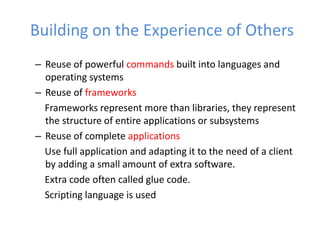
– Reuse of powerful commands built into languages and
operating systems
– Reuse of frameworks
Frameworks represent more than libraries, they represent
the structure of entire applications or subsystems
– Reuse of complete applications
Use full application and adapting it to the need of a client
by adding a small amount of extra software.
Extra code often called glue code.
Scripting language is used
Building on the Experience of Others
Chap. 3: Basing Development on Reusable
Technology
4
Frameworks: Reusable Subsystems
•A framework is reusable subsystem that implements a
generic solution to a generalized problem.
– It provides common facilities applicable to different
application programs.
•Principle: Applications that do different, but related, things
tend to have similar designs
Chap. 3: Basing Development on Reusable
Technology
5
Frameworks to promote reuse
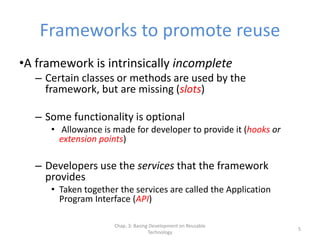
•A framework is intrinsically incomplete
– Certain classes or methods are used by the
framework, but are missing (slots)
– Some functionality is optional
• Allowance is made for developer to provide it (hooks or
extension points)
– Developers use the services that the framework
provides
• Taken together the services are called the Application
Program Interface (API)
Chap. 3: Basing Development on Reusable
Technology
6
Object-oriented frameworks
•In the object oriented paradigm, a framework is
composed of a library of classes.
– The API is defined by the set of all public methods of these
classes.
– Some of the classes will normally be abstract and there are
often many Interfaces
•Example:
– A framework for payroll management
Payment, tax, deduction
– A framework for frequent buyer clubs
frequent flier or frequent buyer for a supershop
– A framework for university registration
– A framework for e-commerce web sites
Chap. 3: Basing Development on Reusable
Technology
7
Frameworks and product lines
– A product line (or product family) is a set of
products built on a common base of
technology.
• The various products in the product line have
different features to satisfy different markets
• The software common to all products is included in
a framework
• Each product is produced by filling the available
hooks and slots
– E.g. software products offering ‘demo’, ‘lite’ or ‘pro’
versions
Chap. 3: Basing Development on Reusable
Technology
8
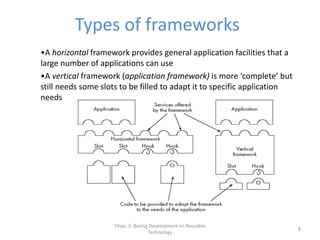
Types of frameworks
•A horizontal framework provides general application facilities that a
large number of applications can use
•A vertical framework (application framework) is more ‘complete’ but
still needs some slots to be filled to adapt it to specific application
needs
Types of frameworks
Hybrid framework
Composed of vertical and horizontal framework
e-commerce framework consists of horizontal and vertical e.g.
secure payment framework
A Java interface can be considered an extreme example of
horizontal framework
There is no implementation.
All slots are empty and to be filled
Chap. 3: Basing Development on Reusable
Technology
10
The Client-Server Architecture
•A distributed system is a system in which:
– computations are performed by separate programs
– … normally running on separate pieces of hardware
– … that co-operate to perform the task of the system.
•Server:
– A program that provides a service for other programs
that connect to it using a communication channel
•Client
– A program that accesses a server (or several servers)
to obtain services
– A server may be accessed by many clients
simultaneously
Chap. 3: Basing Development on Reusable
Technology
11
Example of client-server systems
– The World Wide Web
– Email
– Network File System
– Transaction Processing System
– Remote Display System
– Communication System
– Database System
Chap. 3: Basing Development on Reusable
Technology
12
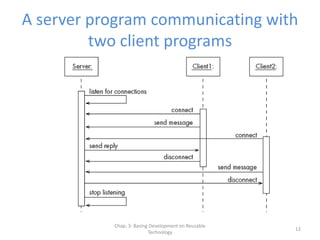
A server program communicating with
two client programs
Chap. 3: Basing Development on Reusable
Technology
13
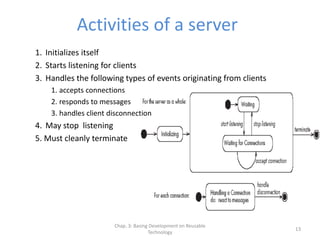
Activities of a server
1. Initializes itself
2. Starts listening for clients
3. Handles the following types of events originating from clients
1. accepts connections
2. responds to messages
3. handles client disconnection
4. May stop listening
5. Must cleanly terminate
Chap. 3: Basing Development on Reusable
Technology
14
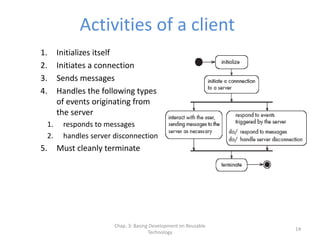
Activities of a client
1. Initializes itself
2. Initiates a connection
3. Sends messages
4. Handles the following types
of events originating from
the server
1. responds to messages
2. handles server disconnection
5. Must cleanly terminate
Chap. 3: Basing Development on Reusable
Technology
15
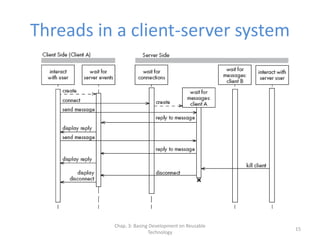
Threads in a client-server system
Chap. 3: Basing Development on Reusable
Technology
16
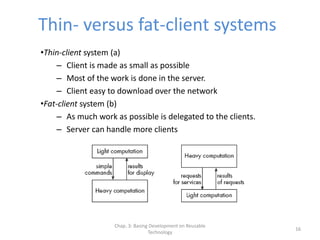
Thin- versus fat-client systems
•Thin-client system (a)
– Client is made as small as possible
– Most of the work is done in the server.
– Client easy to download over the network
•Fat-client system (b)
– As much work as possible is delegated to the clients.
– Server can handle more clients
Chap. 3: Basing Development on Reusable
Technology
17
Communications protocols
– The messages the client sends to the server form a
language.
• The server has to be programmed to understand that
language.
– The messages the server sends to the client also form
a language.
• The client has to be programmed to understand that
language.
– When a client and server are communicating, they are
in effect having a conversation using these two
languages
– The two languages and the rules of the conversation,
taken together, are called the protocol
Chap. 3: Basing Development on Reusable
Technology
18
Tasks to perform to develop
client-server applications
1. Design the primary work to be performed by
both client and server
2. Design how the work will be distributed
3. Design the details of the set of messages that
will be sent
4. Design the mechanism for
1. Initializing
2. Handling connections
3. Sending and receiving messages
4. Terminating
Chap. 3: Basing Development on Reusable
Technology
19
Advantages of client-server systems
– The work can be distributed among different
machines
– The clients can access the server’s functionality from a
distance
– The client and server can be designed separately
– They can both be simpler
– There is a choice about where to keep data:
• All the data can be kept centrally at the server
• Data can be distributed among many different clients or
servers
– The server can be accessed simultaneously by many
clients
Chap. 3: Basing Development on Reusable
Technology
20
Technology Needed to Build Client-
Server Systems
•Internet Protocol (IP)
– Route messages from one computer to another
– Long messages are normally split up into small pieces
•Transmission Control Protocol (TCP)
– Handles connections between two computers
– Computers can then exchange many IP messages over a connection
– Assures that the messages have been satisfactorily received
•A host has an IP address and a host name
– Several servers can run on the same host.
– Each server is identified by a port number (0 to 65535).
– To initiate communication with a server, a client must know both the
host name and the port number
Chap. 3: Basing Development on Reusable
Technology
21
Establishing a connection in Java
•The java.net package
– Permits the creation of a TCP/IP connection between
two applications
•Before a connection can be established, the server
must start listening to one of the ports:
ServerSocket serverSocket = new ServerSocket(port);
Socket clientSocket = serverSocket.accept();
•For a client to connect to a server:
Socket clientSocket= new Socket(host, port);
Chap. 3: Basing Development on Reusable
Technology
22
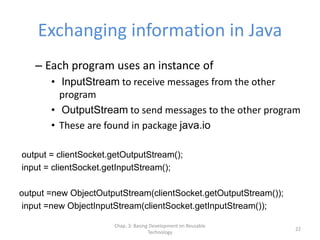
Exchanging information in Java
– Each program uses an instance of
• InputStream to receive messages from the other
program
• OutputStream to send messages to the other program
• These are found in package java.io
output = clientSocket.getOutputStream();
input = clientSocket.getInputStream();
output =new ObjectOutputStream(clientSocket.getOutputStream());
input =new ObjectInputStream(clientSocket.getInputStream());
Chap. 3: Basing Development on Reusable
Technology
23
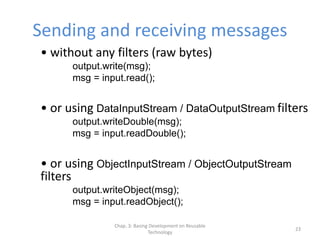
Sending and receiving messages
• without any filters (raw bytes)
output.write(msg);
msg = input.read();
• or using DataInputStream / DataOutputStream filters
output.writeDouble(msg);
msg = input.readDouble();
• or using ObjectInputStream / ObjectOutputStream
filters
output.writeObject(msg);
msg = input.readObject();
Chap. 3: Basing Development on Reusable
Technology
24
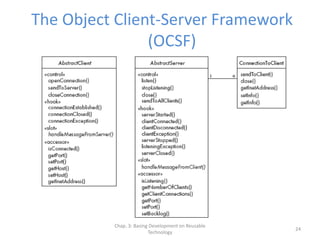
The Object Client-Server Framework
(OCSF)
Chap. 3: Basing Development on Reusable
Technology
25
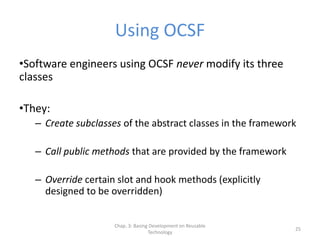
Using OCSF
•Software engineers using OCSF never modify its three
classes
•They:
– Create subclasses of the abstract classes in the framework
– Call public methods that are provided by the framework
– Override certain slot and hook methods (explicitly
designed to be overridden)
Chap. 3: Basing Development on Reusable
Technology
26
The Client Side
•Consists of a single class: AbstractClient
– Must be subclassed
• Any subclass must provide an implementation for
handleMessageFromServer
– Takes appropriate action when a message is received from a
server
– Implements the Runnable interface
• Has a run method which
– Contains a loop that executes for the lifetime of the thread
Chap. 3: Basing Development on Reusable
Technology
27
The public interface of AbstractClient
•Controlling methods:
– openConnection -- connects to a server if it can
– closeConnection -- stops communication
– sendToServer -- sends a message to server
•Accessing methods:
– isConnected -- to inquire whether client is connected to a server
– getHost -- which host the client is connected to
– setHost -- change the host of a disconnected client
– getPort -- which port the client is connected to
– setPort -- change the port of a disconnected client
– getInetAddress – provides detailed information about the client
Chap. 3: Basing Development on Reusable
Technology
28
The callback methods of
AbstractClient
•Methods that may be overridden:
– connectionEstablished
– connectionClosed
•Method that must be implemented:
– handleMessageFromServer
Chap. 3: Basing Development on Reusable
Technology
29
Using AbstractClient
– Create a subclass of AbstractClient
– Implement handleMessageFromServer slot
method
– Write code that:
• Creates an instance of the new subclass
• Calls openConnection
• Sends messages to the server using the sendToServer
service method
– Implement the connectionClosed callback
– Implement the connectionException callback
Chap. 3: Basing Development on Reusable
Technology
30
Internals of AbstractClient
•Instance variables:
– A Socket which keeps all the information about the
connection to the server
– Two streams, an ObjectOutputStream and an
ObjectInputStream
– A Thread that runs using AbstractClient’s run
method
– Two variables storing the host and port of the
server
Chap. 3: Basing Development on Reusable
Technology
31
The Server Side
•Two classes:
– One for the thread which listens for new
connections (AbstractServer)
– One for the threads that handle the connections to
clients (ConnectionToClient)
Chap. 3: Basing Development on Reusable
Technology
32
The public interface of AbstractServer
•Controlling methods:
– Listen -- listen on the port
– stopListening-- no new clients will be accepted
– close -- disconnects all client
– sendToAllClients -- send message to all clients
•Accessing methods:
– isListening -- determines if server is listening
– getClientConnections -- returns an array of instances of ConnectionToClient
– getPort -- what port the server is listening on
– setPort -- set a port to listen
– setBacklog -- set the size of the client queue length
Chap. 3: Basing Development on Reusable
Technology
33
The callback methods of
AbstractServer
•Methods that may be overridden:
– serverStarted – called when starts accepting connections
– clientConnected – when new client connects
– clientDisconnected – disconnect a client using close Method
of ConnectionToClient
– clientException – client disconnects itself or network failure
– serverStopped – whenever server stops accepting connections
– listeningException -- whenever server stops accepting
connections due to some failure
– serverClosed – when server closes down
•Method that must be implemented:
– handleMessageFromClient
Chap. 3: Basing Development on Reusable
Technology
34
The public interface of
ConnectionToClient
•Controlling methods:
– sendToClient – communicate with client
– close – causes the client to be disconnected
•Accessing methods:
– getInetAddress – internet address of the client
connection
– setInfo – arbitrary information to be saved
– getInfo – retreival of information
Chap. 3: Basing Development on Reusable
Technology
35
Using AbstractServer and
ConnectionToClient
– Create a subclass of AbstractServer
– Implement the slot method
handleMessageFromClient
– Write code that:
• Creates an instance of the subclass of AbstractServer
• Calls the listen method
• Sends messages to clients, using:
– the getClientConnections and sendToClient service methods
– or sendToAllClients
– Implement one or more of the other callback
methods
Chap. 3: Basing Development on Reusable
Technology
36
Internals of AbstractServer and
ConnectionToClient
– The setInfo and getInfo methods make use of a Java
class called HashMap
– Many methods in the server side are synchronized
– The collection of instances of ConnectionToClient is
stored using a special JAVA class called ThreadGroup
– The server must pause from listening every 500ms to
see if the stopListening method has been called
• if not, then it resumes listening immediately
Chap. 3: Basing Development on Reusable
Technology
37
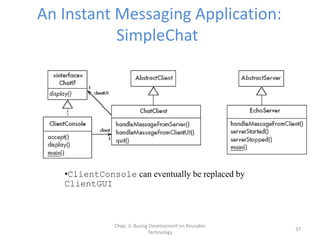
An Instant Messaging Application:
SimpleChat
•ClientConsole can eventually be replaced by
ClientGUI
Chap. 3: Basing Development on Reusable
Technology
38
The server
• EchoServer is a subclass of AbstractServer
– The main method creates a new instance and starts it
• It listens for clients and handles connections until the server is
stopped
– The three callback methods just print out a message to
the user
• handleMessageFromClient, serverStarted and
serverStopped
– The slot method handleMessageFromClient calls
sendToAllClients
• This echoes any messages
Chap. 3: Basing Development on Reusable
Technology
39
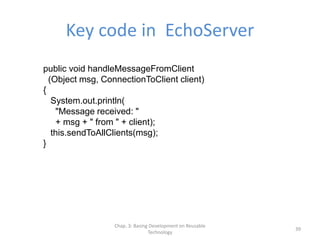
Key code in EchoServer
public void handleMessageFromClient
(Object msg, ConnectionToClient client)
{
System.out.println(
"Message received: "
+ msg + " from " + client);
this.sendToAllClients(msg);
}
Chap. 3: Basing Development on Reusable
Technology
40
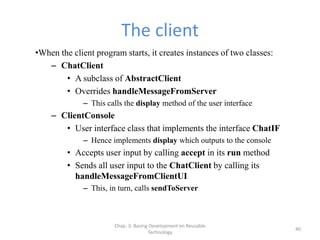
The client
•When the client program starts, it creates instances of two classes:
– ChatClient
• A subclass of AbstractClient
• Overrides handleMessageFromServer
– This calls the display method of the user interface
– ClientConsole
• User interface class that implements the interface ChatIF
– Hence implements display which outputs to the console
• Accepts user input by calling accept in its run method
• Sends all user input to the ChatClient by calling its
handleMessageFromClientUI
– This, in turn, calls sendToServer
Chap. 3: Basing Development on Reusable
Technology
41
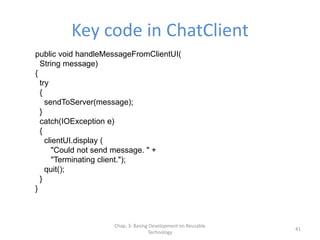
Key code in ChatClient
public void handleMessageFromClientUI(
String message)
{
try
{
sendToServer(message);
}
catch(IOException e)
{
clientUI.display (
"Could not send message. " +
"Terminating client.");
quit();
}
}
Chap. 3: Basing Development on Reusable
Technology
42
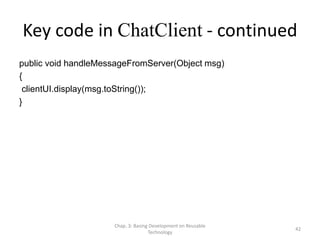
Key code in ChatClient - continued
public void handleMessageFromServer(Object msg)
{
clientUI.display(msg.toString());
}
Chap. 3: Basing Development on Reusable
Technology
43
Risks when reusing technology
– Poor quality reusable components
• Ensure that the developers of the reusable technology:
– follow good software engineering practices
– are willing to provide active support
– Compatibility not maintained
• Avoid obscure features
• Only re-use technology that others are also re-using
Chap. 3: Basing Development on Reusable
Technology
44
Risks when developing reusable
technology
– Investment uncertainty
• Plan the development of the reusable technology, just
as if it was a product for a client
– The ‘not invented here syndrome’
• Build confidence in the reusable technology by:
– Guaranteeing support
– Ensuring it is of high quality
– Responding to the needs of its users
Chap. 3: Basing Development on Reusable
Technology
45
Risk when developing reusable
technology – continued
– Competition
• The reusable technology must be as useful and as high
quality as possible
– Divergence (tendency of various groups to change
technology in different ways)
• Design it to be general enough, test it and review it in
advance
Chap. 3: Basing Development on Reusable
Technology
46
Risks when adopting a client-server
approach
– Security
• Security is a big problem with no perfect solutions:
consider the use of encryption, firewalls, ...
– Need for adaptive maintenance
• Ensure that all software is forward and backward
compatible with other versions of clients and servers

OOP - Basing Software Development on Reusable

  • 1.
    Object-Oriented Software Engineering Chapter3: Basing Software Development on Reusable Technology
  • 2.
    Chap. 3: BasingDevelopment on Reusable Technology 2 Building on the Experience of Others •Software engineers should avoid re-developing software already developed •Types of reuse: – Reuse of expertise Experience, Article and blog of expert software engineer – Reuse of standard designs and algorithms There are thousands of algorithms, designs and documentation – Reuse of libraries of classes or procedures Libraries and commands represent implemented algorithms, data structures and other facilities
  • 3.
    – Reuse ofpowerful commands built into languages and operating systems – Reuse of frameworks Frameworks represent more than libraries, they represent the structure of entire applications or subsystems – Reuse of complete applications Use full application and adapting it to the need of a client by adding a small amount of extra software. Extra code often called glue code. Scripting language is used Building on the Experience of Others
  • 4.
    Chap. 3: BasingDevelopment on Reusable Technology 4 Frameworks: Reusable Subsystems •A framework is reusable subsystem that implements a generic solution to a generalized problem. – It provides common facilities applicable to different application programs. •Principle: Applications that do different, but related, things tend to have similar designs
  • 5.
    Chap. 3: BasingDevelopment on Reusable Technology 5 Frameworks to promote reuse •A framework is intrinsically incomplete – Certain classes or methods are used by the framework, but are missing (slots) – Some functionality is optional • Allowance is made for developer to provide it (hooks or extension points) – Developers use the services that the framework provides • Taken together the services are called the Application Program Interface (API)
  • 6.
    Chap. 3: BasingDevelopment on Reusable Technology 6 Object-oriented frameworks •In the object oriented paradigm, a framework is composed of a library of classes. – The API is defined by the set of all public methods of these classes. – Some of the classes will normally be abstract and there are often many Interfaces •Example: – A framework for payroll management Payment, tax, deduction – A framework for frequent buyer clubs frequent flier or frequent buyer for a supershop – A framework for university registration – A framework for e-commerce web sites
  • 7.
    Chap. 3: BasingDevelopment on Reusable Technology 7 Frameworks and product lines – A product line (or product family) is a set of products built on a common base of technology. • The various products in the product line have different features to satisfy different markets • The software common to all products is included in a framework • Each product is produced by filling the available hooks and slots – E.g. software products offering ‘demo’, ‘lite’ or ‘pro’ versions
  • 8.
    Chap. 3: BasingDevelopment on Reusable Technology 8 Types of frameworks •A horizontal framework provides general application facilities that a large number of applications can use •A vertical framework (application framework) is more ‘complete’ but still needs some slots to be filled to adapt it to specific application needs
  • 9.
    Types of frameworks Hybridframework Composed of vertical and horizontal framework e-commerce framework consists of horizontal and vertical e.g. secure payment framework A Java interface can be considered an extreme example of horizontal framework There is no implementation. All slots are empty and to be filled
  • 10.
    Chap. 3: BasingDevelopment on Reusable Technology 10 The Client-Server Architecture •A distributed system is a system in which: – computations are performed by separate programs – … normally running on separate pieces of hardware – … that co-operate to perform the task of the system. •Server: – A program that provides a service for other programs that connect to it using a communication channel •Client – A program that accesses a server (or several servers) to obtain services – A server may be accessed by many clients simultaneously
  • 11.
    Chap. 3: BasingDevelopment on Reusable Technology 11 Example of client-server systems – The World Wide Web – Email – Network File System – Transaction Processing System – Remote Display System – Communication System – Database System
  • 12.
    Chap. 3: BasingDevelopment on Reusable Technology 12 A server program communicating with two client programs
  • 13.
    Chap. 3: BasingDevelopment on Reusable Technology 13 Activities of a server 1. Initializes itself 2. Starts listening for clients 3. Handles the following types of events originating from clients 1. accepts connections 2. responds to messages 3. handles client disconnection 4. May stop listening 5. Must cleanly terminate
  • 14.
    Chap. 3: BasingDevelopment on Reusable Technology 14 Activities of a client 1. Initializes itself 2. Initiates a connection 3. Sends messages 4. Handles the following types of events originating from the server 1. responds to messages 2. handles server disconnection 5. Must cleanly terminate
  • 15.
    Chap. 3: BasingDevelopment on Reusable Technology 15 Threads in a client-server system
  • 16.
    Chap. 3: BasingDevelopment on Reusable Technology 16 Thin- versus fat-client systems •Thin-client system (a) – Client is made as small as possible – Most of the work is done in the server. – Client easy to download over the network •Fat-client system (b) – As much work as possible is delegated to the clients. – Server can handle more clients
  • 17.
    Chap. 3: BasingDevelopment on Reusable Technology 17 Communications protocols – The messages the client sends to the server form a language. • The server has to be programmed to understand that language. – The messages the server sends to the client also form a language. • The client has to be programmed to understand that language. – When a client and server are communicating, they are in effect having a conversation using these two languages – The two languages and the rules of the conversation, taken together, are called the protocol
  • 18.
    Chap. 3: BasingDevelopment on Reusable Technology 18 Tasks to perform to develop client-server applications 1. Design the primary work to be performed by both client and server 2. Design how the work will be distributed 3. Design the details of the set of messages that will be sent 4. Design the mechanism for 1. Initializing 2. Handling connections 3. Sending and receiving messages 4. Terminating
  • 19.
    Chap. 3: BasingDevelopment on Reusable Technology 19 Advantages of client-server systems – The work can be distributed among different machines – The clients can access the server’s functionality from a distance – The client and server can be designed separately – They can both be simpler – There is a choice about where to keep data: • All the data can be kept centrally at the server • Data can be distributed among many different clients or servers – The server can be accessed simultaneously by many clients
  • 20.
    Chap. 3: BasingDevelopment on Reusable Technology 20 Technology Needed to Build Client- Server Systems •Internet Protocol (IP) – Route messages from one computer to another – Long messages are normally split up into small pieces •Transmission Control Protocol (TCP) – Handles connections between two computers – Computers can then exchange many IP messages over a connection – Assures that the messages have been satisfactorily received •A host has an IP address and a host name – Several servers can run on the same host. – Each server is identified by a port number (0 to 65535). – To initiate communication with a server, a client must know both the host name and the port number
  • 21.
    Chap. 3: BasingDevelopment on Reusable Technology 21 Establishing a connection in Java •The java.net package – Permits the creation of a TCP/IP connection between two applications •Before a connection can be established, the server must start listening to one of the ports: ServerSocket serverSocket = new ServerSocket(port); Socket clientSocket = serverSocket.accept(); •For a client to connect to a server: Socket clientSocket= new Socket(host, port);
  • 22.
    Chap. 3: BasingDevelopment on Reusable Technology 22 Exchanging information in Java – Each program uses an instance of • InputStream to receive messages from the other program • OutputStream to send messages to the other program • These are found in package java.io output = clientSocket.getOutputStream(); input = clientSocket.getInputStream(); output =new ObjectOutputStream(clientSocket.getOutputStream()); input =new ObjectInputStream(clientSocket.getInputStream());
  • 23.
    Chap. 3: BasingDevelopment on Reusable Technology 23 Sending and receiving messages • without any filters (raw bytes) output.write(msg); msg = input.read(); • or using DataInputStream / DataOutputStream filters output.writeDouble(msg); msg = input.readDouble(); • or using ObjectInputStream / ObjectOutputStream filters output.writeObject(msg); msg = input.readObject();
  • 24.
    Chap. 3: BasingDevelopment on Reusable Technology 24 The Object Client-Server Framework (OCSF)
  • 25.
    Chap. 3: BasingDevelopment on Reusable Technology 25 Using OCSF •Software engineers using OCSF never modify its three classes •They: – Create subclasses of the abstract classes in the framework – Call public methods that are provided by the framework – Override certain slot and hook methods (explicitly designed to be overridden)
  • 26.
    Chap. 3: BasingDevelopment on Reusable Technology 26 The Client Side •Consists of a single class: AbstractClient – Must be subclassed • Any subclass must provide an implementation for handleMessageFromServer – Takes appropriate action when a message is received from a server – Implements the Runnable interface • Has a run method which – Contains a loop that executes for the lifetime of the thread
  • 27.
    Chap. 3: BasingDevelopment on Reusable Technology 27 The public interface of AbstractClient •Controlling methods: – openConnection -- connects to a server if it can – closeConnection -- stops communication – sendToServer -- sends a message to server •Accessing methods: – isConnected -- to inquire whether client is connected to a server – getHost -- which host the client is connected to – setHost -- change the host of a disconnected client – getPort -- which port the client is connected to – setPort -- change the port of a disconnected client – getInetAddress – provides detailed information about the client
  • 28.
    Chap. 3: BasingDevelopment on Reusable Technology 28 The callback methods of AbstractClient •Methods that may be overridden: – connectionEstablished – connectionClosed •Method that must be implemented: – handleMessageFromServer
  • 29.
    Chap. 3: BasingDevelopment on Reusable Technology 29 Using AbstractClient – Create a subclass of AbstractClient – Implement handleMessageFromServer slot method – Write code that: • Creates an instance of the new subclass • Calls openConnection • Sends messages to the server using the sendToServer service method – Implement the connectionClosed callback – Implement the connectionException callback
  • 30.
    Chap. 3: BasingDevelopment on Reusable Technology 30 Internals of AbstractClient •Instance variables: – A Socket which keeps all the information about the connection to the server – Two streams, an ObjectOutputStream and an ObjectInputStream – A Thread that runs using AbstractClient’s run method – Two variables storing the host and port of the server
  • 31.
    Chap. 3: BasingDevelopment on Reusable Technology 31 The Server Side •Two classes: – One for the thread which listens for new connections (AbstractServer) – One for the threads that handle the connections to clients (ConnectionToClient)
  • 32.
    Chap. 3: BasingDevelopment on Reusable Technology 32 The public interface of AbstractServer •Controlling methods: – Listen -- listen on the port – stopListening-- no new clients will be accepted – close -- disconnects all client – sendToAllClients -- send message to all clients •Accessing methods: – isListening -- determines if server is listening – getClientConnections -- returns an array of instances of ConnectionToClient – getPort -- what port the server is listening on – setPort -- set a port to listen – setBacklog -- set the size of the client queue length
  • 33.
    Chap. 3: BasingDevelopment on Reusable Technology 33 The callback methods of AbstractServer •Methods that may be overridden: – serverStarted – called when starts accepting connections – clientConnected – when new client connects – clientDisconnected – disconnect a client using close Method of ConnectionToClient – clientException – client disconnects itself or network failure – serverStopped – whenever server stops accepting connections – listeningException -- whenever server stops accepting connections due to some failure – serverClosed – when server closes down •Method that must be implemented: – handleMessageFromClient
  • 34.
    Chap. 3: BasingDevelopment on Reusable Technology 34 The public interface of ConnectionToClient •Controlling methods: – sendToClient – communicate with client – close – causes the client to be disconnected •Accessing methods: – getInetAddress – internet address of the client connection – setInfo – arbitrary information to be saved – getInfo – retreival of information
  • 35.
    Chap. 3: BasingDevelopment on Reusable Technology 35 Using AbstractServer and ConnectionToClient – Create a subclass of AbstractServer – Implement the slot method handleMessageFromClient – Write code that: • Creates an instance of the subclass of AbstractServer • Calls the listen method • Sends messages to clients, using: – the getClientConnections and sendToClient service methods – or sendToAllClients – Implement one or more of the other callback methods
  • 36.
    Chap. 3: BasingDevelopment on Reusable Technology 36 Internals of AbstractServer and ConnectionToClient – The setInfo and getInfo methods make use of a Java class called HashMap – Many methods in the server side are synchronized – The collection of instances of ConnectionToClient is stored using a special JAVA class called ThreadGroup – The server must pause from listening every 500ms to see if the stopListening method has been called • if not, then it resumes listening immediately
  • 37.
    Chap. 3: BasingDevelopment on Reusable Technology 37 An Instant Messaging Application: SimpleChat •ClientConsole can eventually be replaced by ClientGUI
  • 38.
    Chap. 3: BasingDevelopment on Reusable Technology 38 The server • EchoServer is a subclass of AbstractServer – The main method creates a new instance and starts it • It listens for clients and handles connections until the server is stopped – The three callback methods just print out a message to the user • handleMessageFromClient, serverStarted and serverStopped – The slot method handleMessageFromClient calls sendToAllClients • This echoes any messages
  • 39.
    Chap. 3: BasingDevelopment on Reusable Technology 39 Key code in EchoServer public void handleMessageFromClient (Object msg, ConnectionToClient client) { System.out.println( "Message received: " + msg + " from " + client); this.sendToAllClients(msg); }
  • 40.
    Chap. 3: BasingDevelopment on Reusable Technology 40 The client •When the client program starts, it creates instances of two classes: – ChatClient • A subclass of AbstractClient • Overrides handleMessageFromServer – This calls the display method of the user interface – ClientConsole • User interface class that implements the interface ChatIF – Hence implements display which outputs to the console • Accepts user input by calling accept in its run method • Sends all user input to the ChatClient by calling its handleMessageFromClientUI – This, in turn, calls sendToServer
  • 41.
    Chap. 3: BasingDevelopment on Reusable Technology 41 Key code in ChatClient public void handleMessageFromClientUI( String message) { try { sendToServer(message); } catch(IOException e) { clientUI.display ( "Could not send message. " + "Terminating client."); quit(); } }
  • 42.
    Chap. 3: BasingDevelopment on Reusable Technology 42 Key code in ChatClient - continued public void handleMessageFromServer(Object msg) { clientUI.display(msg.toString()); }
  • 43.
    Chap. 3: BasingDevelopment on Reusable Technology 43 Risks when reusing technology – Poor quality reusable components • Ensure that the developers of the reusable technology: – follow good software engineering practices – are willing to provide active support – Compatibility not maintained • Avoid obscure features • Only re-use technology that others are also re-using
  • 44.
    Chap. 3: BasingDevelopment on Reusable Technology 44 Risks when developing reusable technology – Investment uncertainty • Plan the development of the reusable technology, just as if it was a product for a client – The ‘not invented here syndrome’ • Build confidence in the reusable technology by: – Guaranteeing support – Ensuring it is of high quality – Responding to the needs of its users
  • 45.
    Chap. 3: BasingDevelopment on Reusable Technology 45 Risk when developing reusable technology – continued – Competition • The reusable technology must be as useful and as high quality as possible – Divergence (tendency of various groups to change technology in different ways) • Design it to be general enough, test it and review it in advance
  • 46.
    Chap. 3: BasingDevelopment on Reusable Technology 46 Risks when adopting a client-server approach – Security • Security is a big problem with no perfect solutions: consider the use of encryption, firewalls, ... – Need for adaptive maintenance • Ensure that all software is forward and backward compatible with other versions of clients and servers