ICT
Ane Abalabide and Olaia Zinkunegi
Hello everybody!
This is our presentation about what we have
done in the first evaluation. We have done a
slidecast to make it more funny, and for you
to see how much we have worked.
Enter our blogs to see this fantastic work.
Enjoy it! :)
OUR WORK
· Create the blog, and change the appearance.
· 1st post: an article about tuenti's and facebook's
advantages and disadvantages.
· 2nd post: an article choosing one of given topics.
· Learning more about the curiosities of the blog.
· How to make link lists.
· 3rd post: creating six stories in groups.
· Story competition.
· Our school's timetable.
· Google docs spreadsheets and nobel prize winners.
· Slidecasts.
CREATING A BLOG
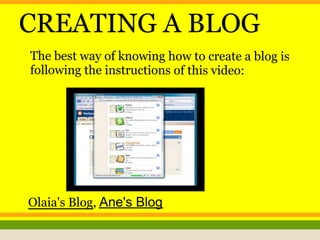
The best way of knowing how to create a blog is
following the instructions of this video:
Olaia's Blog, Ane's Blog
1st POST
Our first post, was to
write an article about
tuenti and facebook;
mentioning advantages,
disadvantages, advice...
Olaia's BlogAne's Blog
2nd POST
To make the second article, we had to choose
one of these topics: Teenagers vs adults, Nature
(environment, ecology...), Europe, music,
cultural differences and economic crisis in the
world; and with choosing one, we had to write
an article about it, explaining and giving
information. The ones that we chose were
Teenagers vs adults and cultural differences.
See it if you want!
Olaia's BlogAne's Blog
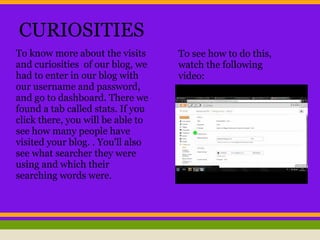
CURIOSITIES
To know more about the visits
and curiosities of our blog, we
had to enter in our blog with
our username and password,
and go to dashboard. There we
found a tab called stats. If you
click there, you will be able to
see how many people have
visited your blog. . You'll also
see what searcher they were
using and which their
searching words were.
To see how to do this,
watch the following
video:
MAKING A LINK LIST
To make a link list, you must follow these steps:
● 1Go to dashboard.
● 2Click on LAYOUT.
● 3You will find a schematic structure of your blog's main page. Decide
where you will include this list and choose ADD A GADGET.
● 4You will now see a long list of gadgets you can include in your blog.
Choose LINK LIST by Blogger.
● 5Put a title for this new section of your blog: useful links, interesting links,
etc...
● 6Write the name of the page: LASKENGLISH, and the URL address: www.
laskenglish.blogspot.com.
● 7Then SAVE the information.
3rd POST
We wrote stories altogether, but at the same time
individually. We started one story, and we specified the
genre of the story (romantic, drama, horror, science fiction,
detective, thriller...). We gave a title to our document. When
our paragraph was written, the next person in our group
continued with the story. At the end we had 25 different
collaborative stories and each person published his or her
story in their blogs.
Olaia's BlogAne's Blog
STORY COMPETITION
We had to read other students' stories and
vote for our favourite one. The winners were
Lore Lakunza, Irati Salaberria, Sara Birawi
and Ibon Iparragirre.
Olaia's BlogAne's Blog
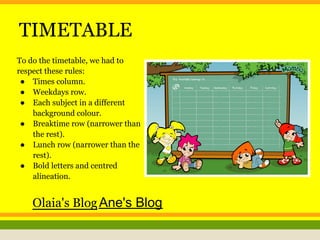
TIMETABLE
To do the timetable, we had to
respect these rules:
● Times column.
● Weekdays row.
● Each subject in a different
background colour.
● Breaktime row (narrower than
the rest).
● Lunch row (narrower than the
rest).
● Bold letters and centred
alineation.
Olaia's BlogAne's Blog
NOBEL PRIZE WINNERS
To do this, we worked in google Docs;
everybody in the same document taking
information from the page: The Nobel Prize
Internet Archive. All of us took one year and we
wrote about the person that had impressed us.
Olaia's BlogAne's Blog
SLIDECAST
To create the Slidecast, we are following the
instructions of the one that our teacher did.
http://laskoicts.blogspot.com.
es/2012/12/summary-slidecast.html

Olaia ane

  • 1.
    ICT Ane Abalabide andOlaia Zinkunegi
  • 2.
    Hello everybody! This isour presentation about what we have done in the first evaluation. We have done a slidecast to make it more funny, and for you to see how much we have worked. Enter our blogs to see this fantastic work. Enjoy it! :)
  • 4.
    OUR WORK · Createthe blog, and change the appearance. · 1st post: an article about tuenti's and facebook's advantages and disadvantages. · 2nd post: an article choosing one of given topics. · Learning more about the curiosities of the blog. · How to make link lists. · 3rd post: creating six stories in groups. · Story competition. · Our school's timetable. · Google docs spreadsheets and nobel prize winners. · Slidecasts.
  • 6.
    CREATING A BLOG Thebest way of knowing how to create a blog is following the instructions of this video: Olaia's Blog, Ane's Blog
  • 7.
    1st POST Our firstpost, was to write an article about tuenti and facebook; mentioning advantages, disadvantages, advice... Olaia's BlogAne's Blog
  • 8.
    2nd POST To makethe second article, we had to choose one of these topics: Teenagers vs adults, Nature (environment, ecology...), Europe, music, cultural differences and economic crisis in the world; and with choosing one, we had to write an article about it, explaining and giving information. The ones that we chose were Teenagers vs adults and cultural differences. See it if you want! Olaia's BlogAne's Blog
  • 9.
    CURIOSITIES To know moreabout the visits and curiosities of our blog, we had to enter in our blog with our username and password, and go to dashboard. There we found a tab called stats. If you click there, you will be able to see how many people have visited your blog. . You'll also see what searcher they were using and which their searching words were. To see how to do this, watch the following video:
  • 10.
    MAKING A LINKLIST To make a link list, you must follow these steps: ● 1Go to dashboard. ● 2Click on LAYOUT. ● 3You will find a schematic structure of your blog's main page. Decide where you will include this list and choose ADD A GADGET. ● 4You will now see a long list of gadgets you can include in your blog. Choose LINK LIST by Blogger. ● 5Put a title for this new section of your blog: useful links, interesting links, etc... ● 6Write the name of the page: LASKENGLISH, and the URL address: www. laskenglish.blogspot.com. ● 7Then SAVE the information.
  • 11.
    3rd POST We wrotestories altogether, but at the same time individually. We started one story, and we specified the genre of the story (romantic, drama, horror, science fiction, detective, thriller...). We gave a title to our document. When our paragraph was written, the next person in our group continued with the story. At the end we had 25 different collaborative stories and each person published his or her story in their blogs. Olaia's BlogAne's Blog
  • 12.
    STORY COMPETITION We hadto read other students' stories and vote for our favourite one. The winners were Lore Lakunza, Irati Salaberria, Sara Birawi and Ibon Iparragirre. Olaia's BlogAne's Blog
  • 13.
    TIMETABLE To do thetimetable, we had to respect these rules: ● Times column. ● Weekdays row. ● Each subject in a different background colour. ● Breaktime row (narrower than the rest). ● Lunch row (narrower than the rest). ● Bold letters and centred alineation. Olaia's BlogAne's Blog
  • 14.
    NOBEL PRIZE WINNERS Todo this, we worked in google Docs; everybody in the same document taking information from the page: The Nobel Prize Internet Archive. All of us took one year and we wrote about the person that had impressed us. Olaia's BlogAne's Blog
  • 15.
    SLIDECAST To create theSlidecast, we are following the instructions of the one that our teacher did. http://laskoicts.blogspot.com. es/2012/12/summary-slidecast.html