Please find a computer and log on while you’re waiting…


Mrs. Christman, Media Specialist – aka LIBRARIAN



Mrs. Brown, Assistant



Mrs. Carson, Secretary



Mrs. Fitzgerald, AV Assistant
Before school at
7:00 am
 After school until
3:30 pm
 During school hours
with a pass from your
teacher/study hall.



Report to study hall and get a group pass from your
teacher. You must come as a group! OR



Get a reference pass or regular pass from your
teacher



Come directly to the library – you can visit the
potty/locker after you get here.



Bring your pass to the circulation desk and sign in by
scanning your student ID.


Once you arrive from study hall, you STAY the
entire period and leave when the bell rings.



If you are coming from a class and only need to
stay briefly, we will sign your pass and send you
back to class.



Sign out to use the restroom or to go to your
locker. You MUST get a pass to leave.








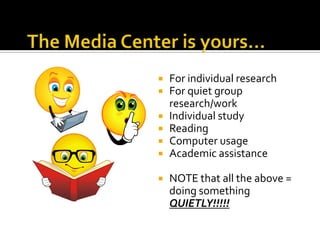
For individual research
For quiet group
research/work
Individual study
Reading
Computer usage
Academic assistance
NOTE that all the above =
doing something
QUIETLY!!!!!





Socializing
Goofing around
Playing games
Chatting with friends

This is an area for
QUIET work.

Repeat offenders may
lose library privileges!


All book bags are to be stored IN A CUBBY
prior to walking through the gate.
 PLEASE - Do NOT place them on the floor or

benches!


No food or drink permitted ANYWHERE in
the library!


Use only the main doors to
enter or exit the media
center.



Other doors are for
emergencies only.



When coming to the
writing lab with a class,
you must use the hallway
entrance by the gym
unless directed otherwise.
• The computers are to be used for academic

purposes.
No games
Use headphones for listening to sound
Print sparingly please!
• If you come from study hall – use the computers
on the left as you enter first!
• You must log on to retrieve a print job
All books in the Fiction, Biographies and Story
Collection are checked out for four (4) weeks.
 Books from the nonfiction collection are
checked out for two (2) weeks and can be
renewed.
 Fines are $.10 per school day per item and will
continue to accrue until the book is returned.
 All lost items must be replaced or the cost of
the item paid.

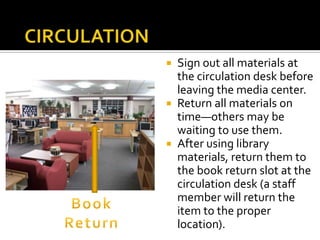
Sign out all materials at
the circulation desk before
leaving the media center.
 Return all materials on
time—others may be
waiting to use them.
 After using library
materials, return them to
the book return slot at the
circulation desk (a staff
member will return the
item to the proper
location).







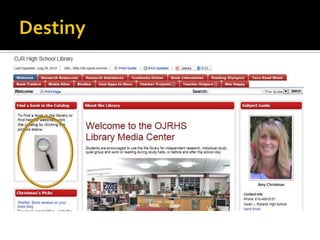
Destiny is our online library catalog.
You can search your school’s library or the
entire district.
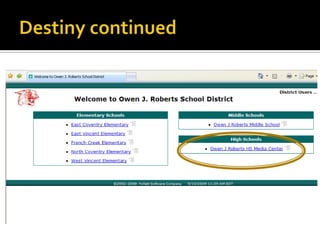
Go to the Library Media Center link from the
High School Homepage and look for the
magnifying glass.
Please save this link in your favorites for
future use


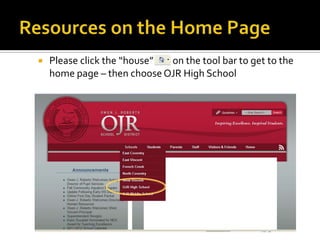
Please click the “house”
on the tool bar to get to the
home page – then choose OJR High School



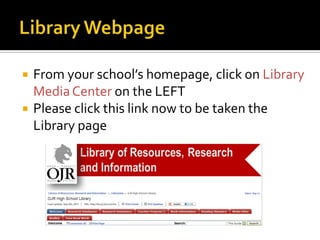
From your school’s homepage, click on Library
Media Center on the LEFT
Please click this link now to be taken the
Library page
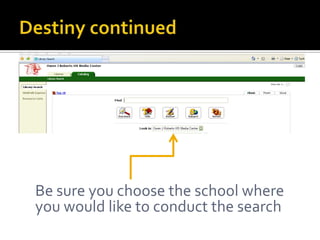
Be sure you choose the school where
you would like to conduct the search


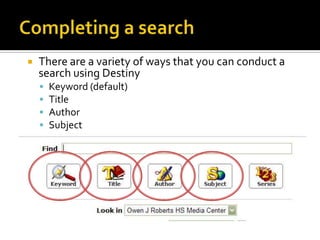
There are a variety of ways that you can conduct a
search using Destiny





Keyword (default)
Title
Author
Subject


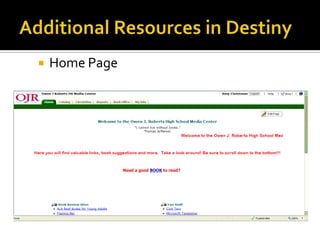
Home Page


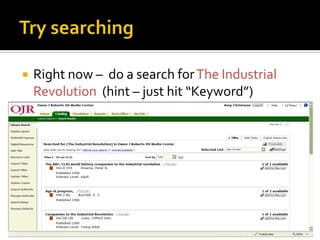
Right now – do a search for The Industrial
Revolution (hint – just hit “Keyword”)


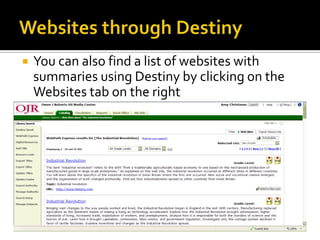
You can also find a list of websites with
summaries using Destiny by clicking on the
Websites tab on the right




While still in the Library Page, click on the
Databases Tab.
Here is where we will begin when we do
research.
Our main databases are:
 GALE
 MARSHALL CAVENDISH and
 POWER LIBRARY
We hope to see you
here often!

OJRHS Media Center overview

  • 1.
    Please find acomputer and log on while you’re waiting…
  • 2.
     Mrs. Christman, MediaSpecialist – aka LIBRARIAN  Mrs. Brown, Assistant  Mrs. Carson, Secretary  Mrs. Fitzgerald, AV Assistant
  • 3.
    Before school at 7:00am  After school until 3:30 pm  During school hours with a pass from your teacher/study hall. 
  • 4.
     Report to studyhall and get a group pass from your teacher. You must come as a group! OR  Get a reference pass or regular pass from your teacher  Come directly to the library – you can visit the potty/locker after you get here.  Bring your pass to the circulation desk and sign in by scanning your student ID.
  • 5.
     Once you arrivefrom study hall, you STAY the entire period and leave when the bell rings.  If you are coming from a class and only need to stay briefly, we will sign your pass and send you back to class.  Sign out to use the restroom or to go to your locker. You MUST get a pass to leave.
  • 6.
           For individual research Forquiet group research/work Individual study Reading Computer usage Academic assistance NOTE that all the above = doing something QUIETLY!!!!!
  • 7.
        Socializing Goofing around Playing games Chattingwith friends This is an area for QUIET work. Repeat offenders may lose library privileges!
  • 8.
     All book bagsare to be stored IN A CUBBY prior to walking through the gate.  PLEASE - Do NOT place them on the floor or benches!  No food or drink permitted ANYWHERE in the library!
  • 9.
     Use only themain doors to enter or exit the media center.  Other doors are for emergencies only.  When coming to the writing lab with a class, you must use the hallway entrance by the gym unless directed otherwise.
  • 10.
    • The computersare to be used for academic purposes. No games Use headphones for listening to sound Print sparingly please! • If you come from study hall – use the computers on the left as you enter first! • You must log on to retrieve a print job
  • 11.
    All books inthe Fiction, Biographies and Story Collection are checked out for four (4) weeks.  Books from the nonfiction collection are checked out for two (2) weeks and can be renewed.  Fines are $.10 per school day per item and will continue to accrue until the book is returned.  All lost items must be replaced or the cost of the item paid. 
  • 12.
    Sign out allmaterials at the circulation desk before leaving the media center.  Return all materials on time—others may be waiting to use them.  After using library materials, return them to the book return slot at the circulation desk (a staff member will return the item to the proper location). 
  • 13.
        Destiny is ouronline library catalog. You can search your school’s library or the entire district. Go to the Library Media Center link from the High School Homepage and look for the magnifying glass. Please save this link in your favorites for future use
  • 14.
     Please click the“house” on the tool bar to get to the home page – then choose OJR High School
  • 15.
      From your school’shomepage, click on Library Media Center on the LEFT Please click this link now to be taken the Library page
  • 18.
    Be sure youchoose the school where you would like to conduct the search
  • 19.
     There are avariety of ways that you can conduct a search using Destiny     Keyword (default) Title Author Subject
  • 20.
  • 21.
     Right now –do a search for The Industrial Revolution (hint – just hit “Keyword”)
  • 22.
     You can alsofind a list of websites with summaries using Destiny by clicking on the Websites tab on the right
  • 23.
       While still inthe Library Page, click on the Databases Tab. Here is where we will begin when we do research. Our main databases are:  GALE  MARSHALL CAVENDISH and  POWER LIBRARY
  • 24.
    We hope tosee you here often!