Welcome to the GHS
     Library
     Orientation 2012
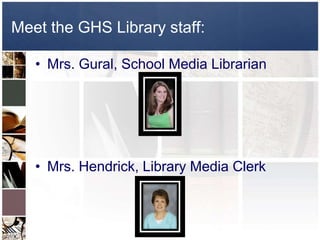
Meet the GHS Library staff:

   • Mrs. Gural, School Media Librarian


   • Mrs. Hendrick, Library Media Clerk
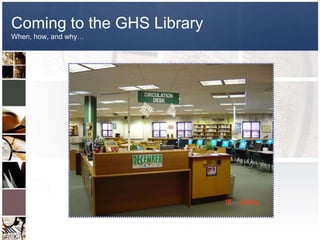
Coming to the GHS Library
When, how, and why…
When can you come to the Library?


    Monday –
     Wednesday
      7:00 am – 3:00 pm


    Thursday – Friday
      7:00 am – 2:35 pm
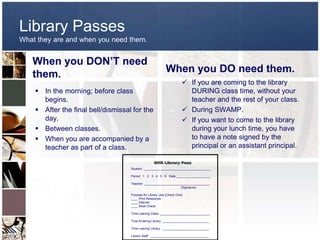
Library Passes
What they are and when you need them.


   When you DON’T need
                                                           When you DO need them.
   them.
                                                                       If you are coming to the library
     In the morning; before class                                      DURING class time, without your
      begins.                                                           teacher and the rest of your class.
     After the final bell/dismissal for the                           During SWAMP.
      day.                                                             If you want to come to the library
     Between classes.                                                  during your lunch time, you have
     When you are accompanied by a                                     to have a note signed by the
      teacher as part of a class.                                       principal or an assistant principal.


                                    Student: _______________________________________

                                    Period: 1 2 3 4 5 6 Date ____________________

                                    Teacher: ______________________________________
                                                                  (Signature)

                                    Purpose for Library Use (Check One)
                                    ____ Print Resources
                                    ____ Internet
                                    ____ Book Check

                                    Time Leaving Class: _____________________________

                                    Time Entering Library: ___________________________

                                    Time Leaving Library: ___________________________

                                    Library Staff: __________________________________
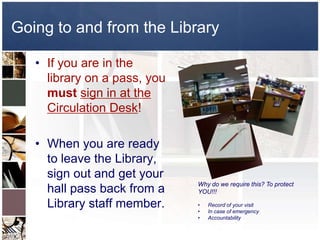
Going to and from the Library

   • If you are in the
     library on a pass, you
     must sign in at the
     Circulation Desk!

   • When you are ready
     to leave the Library,
     sign out and get your
                              Why do we require this? To protect
     hall pass back from a    YOU!!!

     Library staff member.    •
                              •
                                  Record of your visit
                                  In case of emergency
                              •   Accountability
Why come to the Library?


   •   Study or do homework
   •   Check out a book or magazine
   •   Research information for an assignment
   •   Use a computer for a class project
   •   Retrieve equipment or resources for a teacher
   •   Get assistance from the librarian
   •   Club meeting
What’s in the Library?


   • Fiction, Nonfiction, and audiobooks (2 week
     check-out with renewal available)
   • Magazines & Newspapers (Overnight check-out
     available)
   • Reference & Career Materials (Overnight
     check-out available)
   • VHS/DVD, Teacher Resources, & Equipment
     (available for student use in the library)
   • Computers
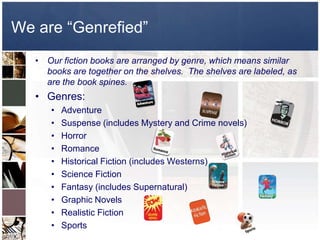
We are “Genrefied”
   • Our fiction books are arranged by genre, which means similar
     books are together on the shelves. The shelves are labeled, as
     are the book spines.
   • Genres:
      •   Adventure
      •   Suspense (includes Mystery and Crime novels)
      •   Horror
      •   Romance
      •   Historical Fiction (includes Westerns)
      •   Science Fiction
      •   Fantasy (includes Supernatural)
      •   Graphic Novels
      •   Realistic Fiction
      •   Sports
How to check-out library materials

• Locate what materials you desire:
   – Using the OPAC
   – Browsing
   – Asking for Assistance
• Go to Circulation Desk:
   – Give your name to check out
• Return materials when due in the book drop
• Overdue notices will be given out monthly to homeroom
  teachers

          Fines (.05 per day up to $1.00 max per item)
Computer Resources


• OPAC (Online Public Access Catalog)
• Microsoft Office products
• Internet (with AUP & educational uses only)
• KYVL (Kentucky Virtual Library)
• Country Reports
• Adobe Photoshop CS, Inspiration, Movie
  Maker, etc.
• Warren County Public Library
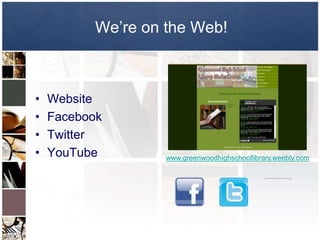
We’re on the Web!


•   Website
•   Facebook
•   Twitter
•   YouTube         www.greenwoodhighschoollibrary.weebly.com
Some comments about printing…

  • Select the item that you
    want to print.
  • PLEASE Do Not Print
    Whole Websites.
  • Go to “File”
  • Select “Print”
  • Select either the T654 or
    W820 printer.                   If you notice that the
                                    printer is out of paper
  • Print only ONE time. If         or there is a paper
    your document does not          jam, please notify a
                                    library staff member.
    print, notify a library staff
    member.
Using Computers @ GHS

The AUP [Acceptable Use Policy]
“As a student or as an employee, you are expected to
use computers and Internet resources in an ethical and
responsible manner; therefore, all students and
employees are required to sign an acceptable use policy.
Your signature represents that you understand and agree
to follow the acceptable use policy.”
AUP
• Students have access to the network
  through individual accounts.

• Students use these accounts only for class
  requirements or requests by sponsoring
  teachers.

• Students may access the Internet only
  under direct supervision.

• Students may not use e-mail on the network
  unless requested by a sponsoring teacher.
  This includes chat rooms, instant
  messaging, message boards, etc.
AUP


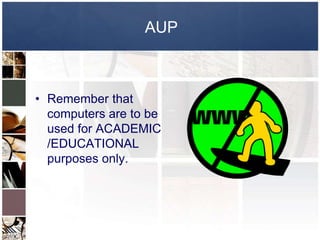
• Remember that
  computers are to be
  used for ACADEMIC
  /EDUCATIONAL
  purposes only.
AUP


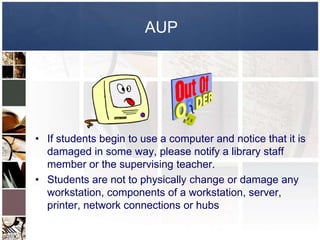
• If students begin to use a computer and notice that it is
  damaged in some way, please notify a library staff
  member or the supervising teacher.
• Students are not to physically change or damage any
  workstation, components of a workstation, server,
  printer, network connections or hubs
What can I not do on the computers?
  •   Students may not use or download multi-user games or
      any other non-instructional game via the WCPSNet.
      (Games are only allowed if they are part of instructional
      software.)

  •   Students must have permission to work from workstation
      hard drives. Students are not to work at a DOS prompt
      unless supervision is present.

  •   Students are not to install programs onto a hard drive or
      server without permission from a supervisor. This
      includes downloading programs, music, and video from
      the Internet.

  •   Students are not permitted to conduct any illegal activities
      via the network.

  •   Students are not permitted to get from or put onto the
      network any copyrighted material (including software), or
      threatening or obscene material.
Inappropriate Use Includes:
   • Accessing sites with inappropriate text, pictures, games,
     blogs, chat rooms, Myspace or Facebook [etc.]

   • Using email [unless authorized by a teacher or administrator]

   • Downloading executable files, graphics, games, audio/video
     files without instructor permission.

   • These types of files use up the bandwidth and could contain
     viruses or spyware.

   • Misuse of Internet will result in consequences outlined on
     page 21 of GHS Handbook.
What can I do on the computers?
   •   Look for a book on OPAC.

   •   Type a Word Document, save it and print it.

   •   Create a PowerPoint, Prezi, or Animoto presentation.

   •   Do Research on the Internet.

   •   Use online databases for research such as the KYVL, Country Reports,
       Career Cruising [ILP], etc.

   •   Photoshop

   •   Check grades on Infinite Campus

   •   Microtype

   •   Etc.
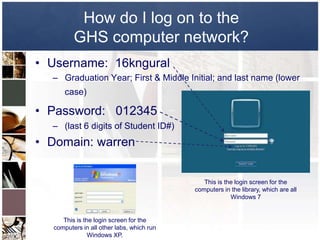
How do I log on to the
         GHS computer network?
• Username: 16kngural
  – Graduation Year; First & Middle Initial; and last name (lower
      case)

• Password: 012345
  – (last 6 digits of Student ID#)
• Domain: warren


                                              This is the login screen for the
                                           computers in the library, which are all
                                                        Windows 7


     This is the login screen for the
  computers in all other labs, which run
               Windows XP.
Why keep User ID & Password a secret?

   • Your electronic work is your personal
     property.

   • You have a responsibility to protect it.

   • Using someone else’s User ID is the
     same as being caught with someone
     else’s billfold.
Your files
• Electronic files are considered personal property. The deletion or
  vandalism of these files will be treated as if they were physical
  property.

• Students may not offer Internet access to any individual via their
  WCPS/GHS account.

• Students may not use or alter any one else’s account.

• Students may not give their password to anyone.

• You should lock your workstation if you leave the workspace by
  pressing Control + Alt + Delete.
Your files

• While your files are personal
  property, because it is located on
  school equipment, it is not private
  property.

• A school administrator or
  computer systems administrator
  has the authority to take full
  ownership of any electronic media
  that resides on any equipment
  owned by the school.
IMPORTANT!!!!

• Students should know that a
  proxy server records every
  transaction that takes place
  via the network. This
  includes a record of every
  account that logs on, a
  record of each machine that
  logs on, as well as the
  Internet site that was
  accessed.
Consequences for Violations of the AUP
  •   Removal of the privilege of using the school technology for a specified
      period of time.

  •   Responsibility for the financial burden of repairing any damage to
      hardware or software.

  •   ALC

  •   ASP

  •   Suspension

  •   Expulsion

      ***You will not receive any warnings when you have violated the
      policy because your signature on the AUP signifies that you have
      read and understand the policy.***
Consequences

• Computers are to be used for research and completing
  authorized assignments as directed by a staff member.
  If a student accesses a site that is not lewd, but is not
  part of an authorized assignment, the student shall
  receive:

   – 1st offense – Cafeteria Detention for five (5) days
   – 2nd offense – ALC Two (2) days
   – 3rd offense – administrative discretion

   For accessing lewd websites -- as determined by an
                     administrator.
Library Orientation 2012

Library Orientation 2012

  • 1.
    Welcome to theGHS Library Orientation 2012
  • 2.
    Meet the GHSLibrary staff: • Mrs. Gural, School Media Librarian • Mrs. Hendrick, Library Media Clerk
  • 3.
    Coming to theGHS Library When, how, and why…
  • 4.
    When can youcome to the Library?  Monday – Wednesday  7:00 am – 3:00 pm  Thursday – Friday  7:00 am – 2:35 pm
  • 5.
    Library Passes What theyare and when you need them. When you DON’T need When you DO need them. them.  If you are coming to the library  In the morning; before class DURING class time, without your begins. teacher and the rest of your class.  After the final bell/dismissal for the  During SWAMP. day.  If you want to come to the library  Between classes. during your lunch time, you have  When you are accompanied by a to have a note signed by the teacher as part of a class. principal or an assistant principal. Student: _______________________________________ Period: 1 2 3 4 5 6 Date ____________________ Teacher: ______________________________________ (Signature) Purpose for Library Use (Check One) ____ Print Resources ____ Internet ____ Book Check Time Leaving Class: _____________________________ Time Entering Library: ___________________________ Time Leaving Library: ___________________________ Library Staff: __________________________________
  • 6.
    Going to andfrom the Library • If you are in the library on a pass, you must sign in at the Circulation Desk! • When you are ready to leave the Library, sign out and get your Why do we require this? To protect hall pass back from a YOU!!! Library staff member. • • Record of your visit In case of emergency • Accountability
  • 7.
    Why come tothe Library? • Study or do homework • Check out a book or magazine • Research information for an assignment • Use a computer for a class project • Retrieve equipment or resources for a teacher • Get assistance from the librarian • Club meeting
  • 8.
    What’s in theLibrary? • Fiction, Nonfiction, and audiobooks (2 week check-out with renewal available) • Magazines & Newspapers (Overnight check-out available) • Reference & Career Materials (Overnight check-out available) • VHS/DVD, Teacher Resources, & Equipment (available for student use in the library) • Computers
  • 9.
    We are “Genrefied” • Our fiction books are arranged by genre, which means similar books are together on the shelves. The shelves are labeled, as are the book spines. • Genres: • Adventure • Suspense (includes Mystery and Crime novels) • Horror • Romance • Historical Fiction (includes Westerns) • Science Fiction • Fantasy (includes Supernatural) • Graphic Novels • Realistic Fiction • Sports
  • 10.
    How to check-outlibrary materials • Locate what materials you desire: – Using the OPAC – Browsing – Asking for Assistance • Go to Circulation Desk: – Give your name to check out • Return materials when due in the book drop • Overdue notices will be given out monthly to homeroom teachers Fines (.05 per day up to $1.00 max per item)
  • 11.
    Computer Resources • OPAC(Online Public Access Catalog) • Microsoft Office products • Internet (with AUP & educational uses only) • KYVL (Kentucky Virtual Library) • Country Reports • Adobe Photoshop CS, Inspiration, Movie Maker, etc. • Warren County Public Library
  • 12.
    We’re on theWeb! • Website • Facebook • Twitter • YouTube www.greenwoodhighschoollibrary.weebly.com
  • 13.
    Some comments aboutprinting… • Select the item that you want to print. • PLEASE Do Not Print Whole Websites. • Go to “File” • Select “Print” • Select either the T654 or W820 printer. If you notice that the printer is out of paper • Print only ONE time. If or there is a paper your document does not jam, please notify a library staff member. print, notify a library staff member.
  • 14.
    Using Computers @GHS The AUP [Acceptable Use Policy] “As a student or as an employee, you are expected to use computers and Internet resources in an ethical and responsible manner; therefore, all students and employees are required to sign an acceptable use policy. Your signature represents that you understand and agree to follow the acceptable use policy.”
  • 15.
    AUP • Students haveaccess to the network through individual accounts. • Students use these accounts only for class requirements or requests by sponsoring teachers. • Students may access the Internet only under direct supervision. • Students may not use e-mail on the network unless requested by a sponsoring teacher. This includes chat rooms, instant messaging, message boards, etc.
  • 16.
    AUP • Remember that computers are to be used for ACADEMIC /EDUCATIONAL purposes only.
  • 17.
    AUP • If studentsbegin to use a computer and notice that it is damaged in some way, please notify a library staff member or the supervising teacher. • Students are not to physically change or damage any workstation, components of a workstation, server, printer, network connections or hubs
  • 18.
    What can Inot do on the computers? • Students may not use or download multi-user games or any other non-instructional game via the WCPSNet. (Games are only allowed if they are part of instructional software.) • Students must have permission to work from workstation hard drives. Students are not to work at a DOS prompt unless supervision is present. • Students are not to install programs onto a hard drive or server without permission from a supervisor. This includes downloading programs, music, and video from the Internet. • Students are not permitted to conduct any illegal activities via the network. • Students are not permitted to get from or put onto the network any copyrighted material (including software), or threatening or obscene material.
  • 19.
    Inappropriate Use Includes: • Accessing sites with inappropriate text, pictures, games, blogs, chat rooms, Myspace or Facebook [etc.] • Using email [unless authorized by a teacher or administrator] • Downloading executable files, graphics, games, audio/video files without instructor permission. • These types of files use up the bandwidth and could contain viruses or spyware. • Misuse of Internet will result in consequences outlined on page 21 of GHS Handbook.
  • 20.
    What can Ido on the computers? • Look for a book on OPAC. • Type a Word Document, save it and print it. • Create a PowerPoint, Prezi, or Animoto presentation. • Do Research on the Internet. • Use online databases for research such as the KYVL, Country Reports, Career Cruising [ILP], etc. • Photoshop • Check grades on Infinite Campus • Microtype • Etc.
  • 21.
    How do Ilog on to the GHS computer network? • Username: 16kngural – Graduation Year; First & Middle Initial; and last name (lower case) • Password: 012345 – (last 6 digits of Student ID#) • Domain: warren This is the login screen for the computers in the library, which are all Windows 7 This is the login screen for the computers in all other labs, which run Windows XP.
  • 22.
    Why keep UserID & Password a secret? • Your electronic work is your personal property. • You have a responsibility to protect it. • Using someone else’s User ID is the same as being caught with someone else’s billfold.
  • 23.
    Your files • Electronicfiles are considered personal property. The deletion or vandalism of these files will be treated as if they were physical property. • Students may not offer Internet access to any individual via their WCPS/GHS account. • Students may not use or alter any one else’s account. • Students may not give their password to anyone. • You should lock your workstation if you leave the workspace by pressing Control + Alt + Delete.
  • 24.
    Your files • Whileyour files are personal property, because it is located on school equipment, it is not private property. • A school administrator or computer systems administrator has the authority to take full ownership of any electronic media that resides on any equipment owned by the school.
  • 25.
    IMPORTANT!!!! • Students shouldknow that a proxy server records every transaction that takes place via the network. This includes a record of every account that logs on, a record of each machine that logs on, as well as the Internet site that was accessed.
  • 26.
    Consequences for Violationsof the AUP • Removal of the privilege of using the school technology for a specified period of time. • Responsibility for the financial burden of repairing any damage to hardware or software. • ALC • ASP • Suspension • Expulsion ***You will not receive any warnings when you have violated the policy because your signature on the AUP signifies that you have read and understand the policy.***
  • 27.
    Consequences • Computers areto be used for research and completing authorized assignments as directed by a staff member. If a student accesses a site that is not lewd, but is not part of an authorized assignment, the student shall receive: – 1st offense – Cafeteria Detention for five (5) days – 2nd offense – ALC Two (2) days – 3rd offense – administrative discretion For accessing lewd websites -- as determined by an administrator.