© Middlesex University
Literature searching for
research projects
http:// unihub.mdx.ac.uk / study / library
NSPC March 2016
© Middlesex University
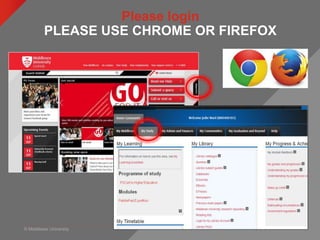
Please login
PLEASE USE CHROME OR FIREFOX
© Middlesex University
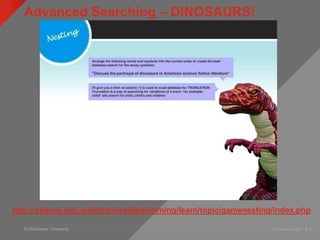
Advanced Searching – DINOSAURS!
Presentation title | 3
http://sydney.edu.au/library/skills/elearning/learn/topic/gamenesting/index.php
© Middlesex University
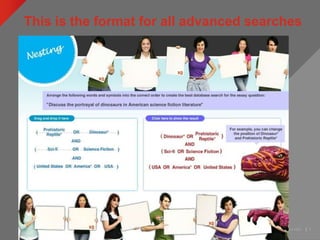
This is the format for all advanced searches
Presentation title | 4
© Middlesex University
Task: Thinking about keywords
http://www.flickr.com/photos/rossjamesparker/89414788/
• Work in groups of at least 3
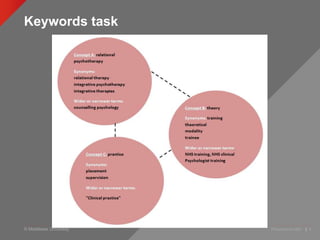
• Use the worksheet to look at:
—Synonyms
—Combining terms
—Search symbols and operators ( * “ ” AND OR
NOT)
• Ask me if you need help!
© Middlesex University
Keywords task
Presentation title | 6
© Middlesex University
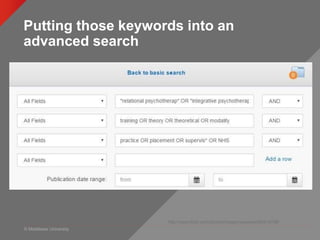
Putting those keywords into an
advanced search
http://www.flickr.com/photos/rossjamesparker/89414788/
© Middlesex University
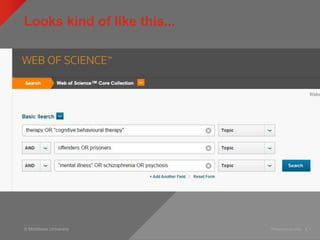
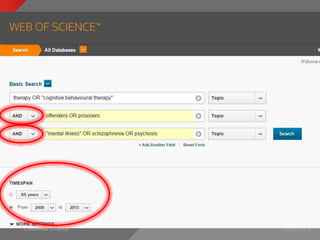
Looks kind of like this...
Presentation title | 8
© Middlesex University
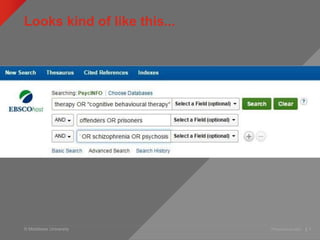
Looks kind of like this...
Presentation title | 9
© Middlesex University
Databases for research articles
myUniHub > My Study > My Library > Databases
Search for database by
letter, then name
© Middlesex University Psych PG | 11
Web of Science
© Middlesex University
Web of Science
MyUniHub > MyStudy > MyLibrary > Databases > W > Web of Science
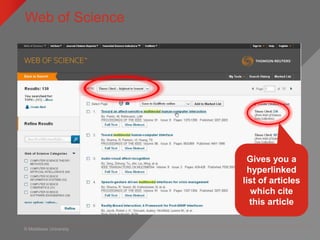
Gives you a
hyperlinked
list of articles
which cite
this article
© Middlesex University
Citation searching
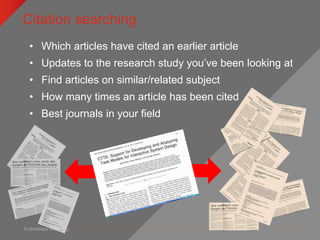
• Which articles have cited an earlier article
• Updates to the research study you’ve been looking at
• Find articles on similar/related subject
• How many times an article has been cited
• Best journals in your field
© Middlesex University Presentation title | 14
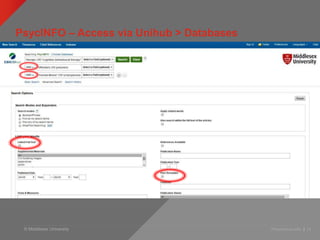
PsycINFO – Access via Unihub > Databases
© Middlesex University Presentation title | 15
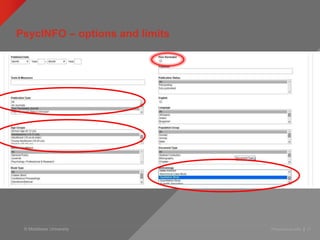
PsycINFO – options and limits
© Middlesex University Presentation title | 16
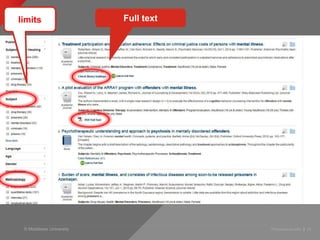
limits Full text
© Middlesex University
What if you don’t get any results?!
Presentation title | 17
• Don’t panic!
• Nature of new and individual
research topics
• The answer is lots of little
searches…..
© Middlesex University
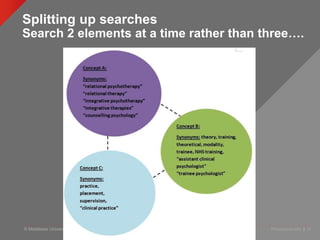
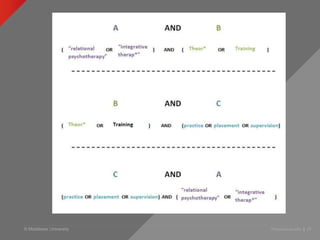
Splitting up searches
Search 2 elements at a time rather than three….
Presentation title | 18
© Middlesex University Presentation title | 19
© Middlesex University
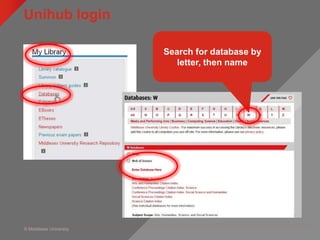
Unihub login
myUniHub > My Study > My Library > Databases
Search for database by
letter, then name
© Middlesex University
Cite them right
Presentation title | 21
examples
Gives you a formatted
example to type over
© Middlesex University
Managing your references
• 2 choices of referencing software at MDX
• New Refworks - simple to use, limited functionality, fine for
essays
• Legacy Refworks – slightly more complex to use but more
functional
• Both will allow you to import citations from databases and
both will format your reference list for you.
• Go to Psychology Library Subject Guide and find the section
on referencing
libguides.mdx.ac.uk/psy/referencing
© Middlesex University
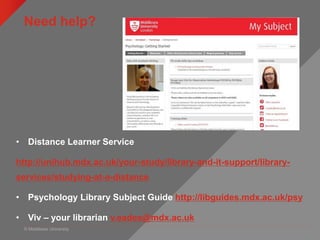
Need help?
• Distance Learner Service
http://unihub.mdx.ac.uk/your-study/library-and-it-support/library-
services/studying-at-a-distance
• Psychology Library Subject Guide http://libguides.mdx.ac.uk/psy
• Viv – your librarian v.eades@mdx.ac.uk

NSPC March 2016 Literature Searching

  • 1.
    © Middlesex University Literaturesearching for research projects http:// unihub.mdx.ac.uk / study / library NSPC March 2016
  • 2.
    © Middlesex University Pleaselogin PLEASE USE CHROME OR FIREFOX
  • 3.
    © Middlesex University AdvancedSearching – DINOSAURS! Presentation title | 3 http://sydney.edu.au/library/skills/elearning/learn/topic/gamenesting/index.php
  • 4.
    © Middlesex University Thisis the format for all advanced searches Presentation title | 4
  • 5.
    © Middlesex University Task:Thinking about keywords http://www.flickr.com/photos/rossjamesparker/89414788/ • Work in groups of at least 3 • Use the worksheet to look at: —Synonyms —Combining terms —Search symbols and operators ( * “ ” AND OR NOT) • Ask me if you need help!
  • 6.
    © Middlesex University Keywordstask Presentation title | 6
  • 7.
    © Middlesex University Puttingthose keywords into an advanced search http://www.flickr.com/photos/rossjamesparker/89414788/
  • 8.
    © Middlesex University Lookskind of like this... Presentation title | 8
  • 9.
    © Middlesex University Lookskind of like this... Presentation title | 9
  • 10.
    © Middlesex University Databasesfor research articles myUniHub > My Study > My Library > Databases Search for database by letter, then name
  • 11.
    © Middlesex UniversityPsych PG | 11 Web of Science
  • 12.
    © Middlesex University Webof Science MyUniHub > MyStudy > MyLibrary > Databases > W > Web of Science Gives you a hyperlinked list of articles which cite this article
  • 13.
    © Middlesex University Citationsearching • Which articles have cited an earlier article • Updates to the research study you’ve been looking at • Find articles on similar/related subject • How many times an article has been cited • Best journals in your field
  • 14.
    © Middlesex UniversityPresentation title | 14 PsycINFO – Access via Unihub > Databases
  • 15.
    © Middlesex UniversityPresentation title | 15 PsycINFO – options and limits
  • 16.
    © Middlesex UniversityPresentation title | 16 limits Full text
  • 17.
    © Middlesex University Whatif you don’t get any results?! Presentation title | 17 • Don’t panic! • Nature of new and individual research topics • The answer is lots of little searches…..
  • 18.
    © Middlesex University Splittingup searches Search 2 elements at a time rather than three…. Presentation title | 18
  • 19.
    © Middlesex UniversityPresentation title | 19
  • 20.
    © Middlesex University Unihublogin myUniHub > My Study > My Library > Databases Search for database by letter, then name
  • 21.
    © Middlesex University Citethem right Presentation title | 21 examples Gives you a formatted example to type over
  • 22.
    © Middlesex University Managingyour references • 2 choices of referencing software at MDX • New Refworks - simple to use, limited functionality, fine for essays • Legacy Refworks – slightly more complex to use but more functional • Both will allow you to import citations from databases and both will format your reference list for you. • Go to Psychology Library Subject Guide and find the section on referencing libguides.mdx.ac.uk/psy/referencing
  • 23.
    © Middlesex University Needhelp? • Distance Learner Service http://unihub.mdx.ac.uk/your-study/library-and-it-support/library- services/studying-at-a-distance • Psychology Library Subject Guide http://libguides.mdx.ac.uk/psy • Viv – your librarian v.eades@mdx.ac.uk

Editor's Notes

  • #2  Welcome and intros.
  • #4 http://sydney.edu.au/library/skills/elearning/learn/topic/gamenesting/index.php Slight deviation from Psychology to look at how literature searching works.
  • #6 Preparation – chicken analogy. If type ‘fruit’ into database will get millions of hits, how can you break it down ie. search for something more specific to get more manageable results Can you be more specific ie. Type of fruit: apples, oranges, bananas etc Location: Stall, market, outdoor market, fruit market, Britain Detail: boxes, signs, astroturf, prices, colour of fruit, lights, pound £ signs, special offer etc People in background: old, young, male, female > stall holder, customers, browsers etc Think of related subjects eg. retail, commercial, financial, point-of-sale Shopping, shops, fish/meat/clothes market, shopping centres, high street Town, city, centre, British town Nutrition: vits and mins Also: Orange or Blackberry: fruit NOT telephone Apple: fruit NOT computer Thinking beyond the obvious, looking for the detail that might make a difference.
  • #8 Preparation – chicken analogy. If type ‘fruit’ into database will get millions of hits, how can you break it down ie. search for something more specific to get more manageable results Can you be more specific ie. Type of fruit: apples, oranges, bananas etc Location: Stall, market, outdoor market, fruit market, Britain Detail: boxes, signs, astroturf, prices, colour of fruit, lights, pound £ signs, special offer etc People in background: old, young, male, female > stall holder, customers, browsers etc Think of related subjects eg. retail, commercial, financial, point-of-sale Shopping, shops, fish/meat/clothes market, shopping centres, high street Town, city, centre, British town Nutrition: vits and mins Also: Orange or Blackberry: fruit NOT telephone Apple: fruit NOT computer Thinking beyond the obvious, looking for the detail that might make a difference.
  • #11 Students can also search individual databases. Select ‘Computing science’ for a list of subject specific resources.
  • #14  Which articles have cited an earlier article ie. Way of looking forward in the literature-if have found excellent article, can use a citation index to see which articles have subsequently cited it Find articles on similar/related subjects: Citation implies subject relationship, so can find papers on a similar topic without using any keywords or subject terms Find out how many times a paper has been cited ie. gauge the usefulness/quality. esteem of a paper Determine which are the best journals in your field: citation data used to rank journals within particular subject areas…..useful way of seeing how journals perform in relation to others in the same subject area
  • #20 Remembering where and’s and Or’s go…..
  • #21 Students can also search individual databases. Select ‘Computing science’ for a list of subject specific resources.
  • #24 Mention that they can make appointments through LibGuide (next month!)