© Middlesex University
Library basics
http:// unihub.mdx.ac.uk / study / library
NSPC September 2015
© Middlesex University
Before we start….
• Log in to the PC
Username = AB1234
Password = M00XXXXX plus first three letters of birth
month, lower case (e.g. jan, feb, mar, etc)
• Log in to MyUniHub
 Go to My Study tab
 Always do this for FREE access
Presentation title | 2
© Middlesex University
In this workshop we will look at...
• Why keywords matter
• Summon
• Other useful basics
• More detailed training later:
 Psychinfo
 PEPweb
 Web of Science
 RefWorks
© Middlesex University
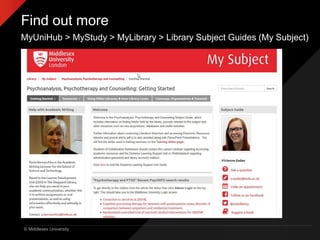
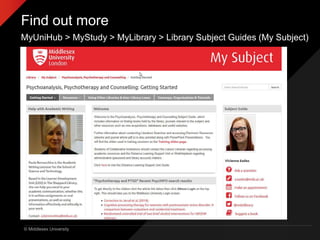
Find out more
MyUniHub > MyStudy > MyLibrary > Library Subject Guides (My Subject)
© Middlesex University
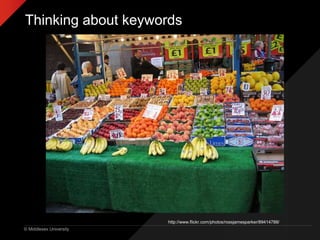
Thinking about keywords
http://www.flickr.com/photos/rossjamesparker/89414788/
© Middlesex University
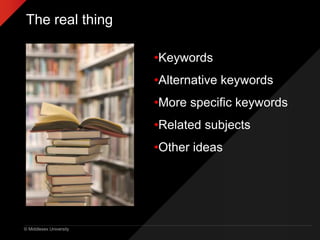
The real thing
•Keywords
•Alternative keywords
•More specific keywords
•Related subjects
•Other ideas
© Middlesex University
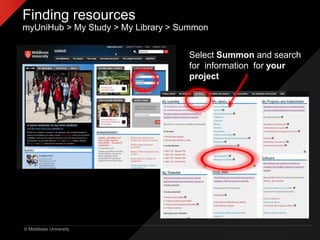
Finding resources
myUniHub > My Study > My Library > Summon
Select Summon and search
for information for your
project
© Middlesex University
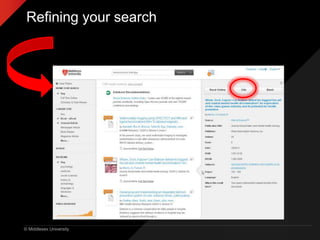
Refining your search
© Middlesex University
Summon provides:
• Access to quality information
• Information not available elsewhere
• Up-to-date
• Focussed/specific
• Full-text access
• Access on/off campus
• Personalize
• Citation info
© Middlesex University
Find out more
MyUniHub > MyStudy > MyLibrary > Library Subject Guides (My Subject)
© Middlesex University
It’s not in the Library!
• Inter Library Loans http://libguides.mdx.ac.uk/interlibraryloan
© Middlesex University
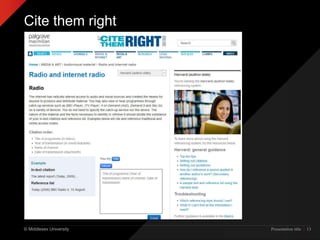
Cite them right
Presentation title | 13
© Middlesex University
Keeping in touch
• Library Facebook Middlesex University Library
• Library Twitter http://twitter.com/MDXLibrary
• Ask a Librarian
• Middlesex Uni app
© Middlesex University
Need further help?
Viv Eades
v.eades@mdx.ac.uk

NSPC Introduction to Library Resources

Editor's Notes

  • #2  Welcome and intros.
  • #5 How to find information for your projects How to develop an effective search strategy when you need to find information for an essay or project The range of resources available and how to use them to find good quality and relevant information Evaluating information for quality and relevance Managing references Research from Uni of Huddersfield shows that correlation between library usage and good grades.
  • #6 More information about the range of resources available on the Library Subject Guide plus useful online guides eg. how to find information for your project.
  • #7 Group discussion: What can you see in the picture…fruit If type ‘fruit’ into database will get millions of hits, how can you break it down ie. search for something more specific to get more manageable results Can you be more specific ie. Type of fruit: apples, oranges, bananas etc Location: Stall, market, outdoor market, fruit market, Britain Detail: boxes, signs, astroturf, prices, colour of fruit, lights, pound £ signs, special offer etc People in background: old, young, male, female > stall holder, customers, browsers etc Think of related subjects eg. retail, commercial, financial, point-of-sale Shopping, shops, fish/meat/clothes market, shopping centres, high street Town, city, centre, British town Nutrition: vits and mins Also: Orange or Blackberry: fruit NOT telephone Apple: fruit NOT computer Thinking beyond the obvious, looking for the detail that might make a difference.
  • #8 Hand out worksheet. 5 mins. Feedback.
  • #9 Need to carry out a literature search: Finding the information available on a subject Finding information to inform, underpin and shape your research Finding what has already been written on a subject Analyzing, evaluating and making judgements about the info found Identifying the main trends Finding appropriate information: the information needs to be suitable for your need ie. right level, current if important, sufficient breadth or detail etc
  • #10 Show the students how to refine their search using: FT Content type Subject terms Publication date Language etc Have another go.
  • #11 CS £1397 IEEE Xplore £61,000 Summon £16k Access to quality academic information eg. Peer reviewed journal articles, conference proceedings , research etc Information not available elsewhere Up-to-date Focussed/specific....not designed to sell you things, search results not sponsored Full-text access Access on/off campus Personalize eg. In MyEBSCO, once signerd up you can: Save preferences Organise research within folders Share folders Save search history Create email alerts/Rss feeds for searches and subjects Can provide citation and journal impact info > more info on next slide
  • #12 More information about the range of resources available on the Library Subject Guide plus useful online guides eg. how to find information for your project.
  • #13 Inter Library Loan service: request copies of books and journals not held by MDX. £3 charge. Register as DL first. More info on our website. SCONUL Access http://www.access.sconul.ac.uk/ The SCONUL Access Scheme provides reciprocal access and borrowing rights for staff and students to approximately 170 member institutions in the UK. Apply online. Other libraries (specialist, catalogues etc): British Library http://www.bl.uk/ COPAC http://copac.ac.uk/ COPAC is a union catalogue that gives access to the merged online catalogues of members of the Consortium of University Research Libraries (CURL). Twenty  major university libraries currently contribute to COPAC. Search25 http://www.search25.ac.uk/: helps you discover library resources across London and the South East. You can also see where the libraries are and find out how to visit them. SUNCAT http://www.suncat.ac.uk/ SUNCAT, a union catalogue of serials (periodicals) for the UK, is a tool for locating serials held in UK libraries.