MBA 643
Dr Danielle Morin
Fall 2022
CHAPTER 3
DATA VISUALIZATION
Introduction
Data visualization involves:
◦ Creating a summary table for the data
◦ Generating charts to help interpret, analyze, and learn from
the data
Uses of data visualization:
◦ Helpful for identifying data errors
◦ Reduces the size of your data set by highlighting important
relationships and trends in the data
2
Overview of Data
Visualization
EFFECTIVE DESIGN TECHNIQUES
3
Overview of Data Visualization
Data-ink ratio: Measures the proportion of “data-ink” to the total amount of
ink used in a table or chart
◦ Edward R. Tufte first described the data-ink ratio
◦ Helpful for creating effective tables and charts for data visualization
◦ Data-ink: Ink used in a table or chart that is necessary to convey the
meaning of the data to the audience
◦ Non-data-ink: Ink used in a table or chart that serves no useful purpose in
conveying the data to the audience
4
https://www.youtube.com/watch?v=JIMUzJzqaA8
Example
Low Data-Ink Ratio Table / Low Data-Ink Ratio Chart
5
Scarf Sales by Day
Day Sales Days Sales
1 150 11 170
2 170 12 160
3 140 13 290
4 150 14 200
5 180 15 210
6 180 16 110
7 210 17 90
8 230 18 140
9 140 19 150
10 200 20 230
0
50
100
150
200
250
300
350
0 5 10 15 20 25
Scarf Sales per day
Sales
What is not necessary?
Example
Increasing Data-Ink Ratio in Table and Chart
6
Scarf Sales by Day
Day Sales Days Sales
1 150 11 170
2 170 12 160
3 140 13 290
4 150 14 200
5 180 15 210
6 180 16 110
7 210 17 90
8 230 18 140
9 140 19 150
10 200 20 230
HOW?
Remove
gridlines
Add labels to axis
Remove
unnecessary lines
and labels
Tables
TABLE DESIGN PRINCIPLES
CROSSTABULATION
PIVOT TABLES IN EXCEL
RECOMMENDED PIVOT TABLE IN EXCEL
Tables
Tables should be used when:
1. The reader needs to refer to specific numerical values
2. The reader needs to make precise comparisons between different values and
not just relative comparisons
3. The values being displayed have different units or very different magnitudes
8
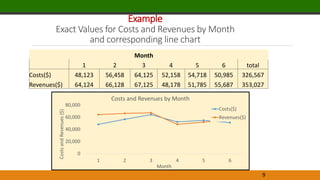
Example
Exact Values for Costs and Revenues by Month
and corresponding line chart
9
Month
1 2 3 4 5 6 total
Costs($) 48,123 56,458 64,125 52,158 54,718 50,985 326,567
Revenues($) 64,124 66,128 67,125 48,178 51,785 55,687 353,027
0
20,000
40,000
60,000
80,000
1 2 3 4 5 6
Costs
and
Revenues
($)
Month
Costs and Revenues by Month
Costs($)
Revenues($)
Example
Exact Values for Costs and Revenues by Month
and corresponding line chart
10
0
10,000
20,000
30,000
40,000
50,000
60,000
70,000
80,000
1 2 3 4 5 6
Costs
and
Revenues
($)
Month
Costs and Revenues by Month
Costs($)
Revenues($)
Example
Exact Values for Costs and Revenues by Month
and corresponding line chart
11
1 2 3 4 5 6
Costs($) 48,123 56,458 64,125 52,158 54,718 50,985
Revenues($) 64,124 66,128 67,125 48,178 51,785 55,687
0
10,000
20,000
30,000
40,000
50,000
60,000
70,000
80,000
Costs
and
Revenues
($)
Month
Costs and Revenues by Month
Costs($)
Revenues($)
Tables Principles
◦ Data-Ink Ratio
◦ Avoid using vertical lines in a table unless they are
necessary for clarity
◦ Horizontal lines are generally necessary only for
separating column titles from data values or when
indicating that a calculation has taken place
12
Comparing Different Table Designs
13
Which one is better?
Example
Table of Revenues by Location for 12 Months of Data
14
Example
Table of Revenues by Location for 12 Months of Data
15
1. Column of numbers should be right
aligned
2. Always use the same number of
decimals
3. Use decimals only when necessary
4. Large numbers should be adjusted
with units of $1000
5. Left align text values in columns
If we are interested in showing differences of Revenues between locations, the
rows instead of the columns should have different shades of colours.
Tables
Crosstabulation: A useful type of table for describing data of
two variables
PivotTable: A crosstabulation in Microsoft Excel
16
Example
How to analysis this data set?
Quality Rating and Meal Price for 300 Los Angeles Restaurants
17
Count of Restaurant Column Labels
Row Labels 10
1
1 12 13 14 15 16 17 18 19 20 21 22 23 24 25 26 27 28 29 30 31 32 33 34 35 36 37 38 40 41 42 43 44 45 46 47 48Grand Total
Excellent 1 1 2 1 1 2 1 1 1 3 2 4 3 5 3 2 3 4 2 2 4 4 2 1 2 2 3 2 2 66
Good 64 3 3 2 4 4 5 5 6 10 1 3 5 1 3 4 5 5 3 1 1 84
Very Good 14 3 5 6 1 5 3 3 3 9 9 4 6 5 9 4 8 10 7 5 6 6 5 5 2 4 6 1 2 1 1 1 150
Grand Total 78 6 9 8 5 9 9 8 9 21 11 8 13 7 13 9 16 17 3 11 8 11 10 7 8 6 7 8 5 4 4 1 3 3 3 2 3 300
First step: Pivot Table:
Rows = Quality Rating
Columns = Meal Price
Values = Count of Restaurants
Count of Restaurant Column Labels
Row Labels 10-19 20-29 30-39 40-49 Grand Total
Excellent 2 14 28 22 66
Good 42 40 2 84
Very Good 34 64 46 6 150
Grand Total 78 118 76 28 300
Right click on a cell that contains a meal price column label / select
Group / Starting at : 10, Ending at 49, By 10
Right click on
Excellent/ Move /
Move “Excellent” to
End
Count of Restaurant Meal Price
Quality Rating 10-19 20-29 30-39 40-49 Grand Total
Good 42 40 2 84
Very Good 34 64 46 6 150
Excellent 2 14 28 22 66
Grand Total 78 118 76 28 300
Count of
Restaurant Meal Price
Quality Rating 10-19 20-29 30-39 40-49
Grand
Total
Good 14.00% 13.33% 0.67% 0.00% 28.00%
Very Good 11.33% 21.33% 15.33% 2.00% 50.00%
Excellent 0.67% 4.67% 9.33% 7.33% 22.00%
Grand Total 26.00% 39.33% 25.33% 9.33% 100.00%
Select Field Settings
/ Show values as
/ % of Grand Total
Percent Frequency
Distribution
Interpretation
What is the most popular combination of quality Rating and Meal Price?
How many restaurants have excellent rating and a meal price in the $10–19 range?
What is the percentage of restaurants with excellent quality rating?
20
Count of Restaurant Meal Price
Quality Rating 10-19 20-29 30-39 40-49 Grand Total
Good 42 40 2 84
Very Good 34 64 46 6 150
Excellent 2 14 28 22 66
Grand Total 78 118 76 28 300
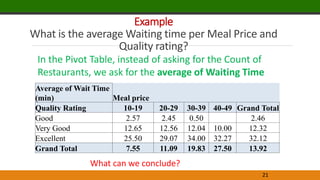
Example
What is the average Waiting time per Meal Price and
Quality rating?
21
In the Pivot Table, instead of asking for the Count of
Restaurants, we ask for the average of Waiting Time
What can we conclude?
Average of Wait Time
(min) Meal price
Quality Rating 10-19 20-29 30-39 40-49 Grand Total
Good 2.57 2.45 0.50 2.46
Very Good 12.65 12.56 12.04 10.00 12.32
Excellent 25.50 29.07 34.00 32.27 32.12
Grand Total 7.55 11.09 19.83 27.50 13.92
Charts
SCATTER CHARTS
RECOMMENDED CHARTS IN EXCEL
LINE CHARTS
BAR CHARTS AND COLUMN CHARTS
BUBBLE CHARTS
HEAT MAPS
PIVOTCHARTS IN EXCEL
Charts
Charts (or graphs): Visual methods of displaying data
Scatter chart: Graphical presentation of the relationship between two
quantitative variables
Trendline: A line that provides an approximation of the relationship between
the variables
Line chart: A line connects the points in the chart
◦ Useful for time series data collected over a period of time (minutes,
hours, days, years, etc.)
23
Example
Number of Commercials and Sales of Electronics
24
Week
No. of
Commercials Sales Volume
1 2 50
2 5 57
3 1 41
4 3 54
5 4 54
6 1 38
7 5 63
8 3 48
9 4 59
10 2 46
What is the independent variable?
What is the dependent variable?
The manager wants to know
whether a linear relationship
exists between Number of
commercials and Sales on the
following week.
Example
Number of Commercials and Sales of Electronics
25
Week
No. of
Commercials
X
Sales Volume
($100)
Y
1 2 50
2 5 57
3 1 41
4 3 54
5 4 54
6 1 38
7 5 63
8 3 48
9 4 59
10 2 46
Example
Number of Commercials and Sales of Electronics
26
0
10
20
30
40
50
60
70
0 1 2 3 4 5 6
Sales
Volume
($100)
Number of Commercials
Sales Volume by No. of Commercials
0
10
20
30
40
50
60
70
0 1 2 3 4 5 6
Sales
Volume
($100)
Number of Commercials
Sales Volume by No. of Commercials
Insert Scatter(X,Y)
Add a Trend line that provides an approximation of
the relationship between the variables
Y =4.95X + 36.15
𝑅2
= 0.8658
𝑹 = 𝑹𝟐 = 𝟎. 𝟖𝟔𝟓𝟖 = 𝟎. 𝟗𝟑𝟎𝟓
Example
Number of Commercials and Sales of Electronics
27
0
10
20
30
40
50
60
70
0 1 2 3 4 5 6
Sales
Volume
($100)
Number of Commercials
Sales Volume by No. of Commercials
Interpret
Calculate the correlation between Sales
and No. of Commercials?
R = 0.93
Example
Monthly Sales Data of
Air Compressors at
Kirkland Industries
28
Month Sales ($100s)
Jan 135
Feb 145
Mar 175
Apr 180
May 160
Jun 135
Jul 210
Aug 175
Sep 160
Oct 120
Nov 115
Dec 120
What can we say about
the monthly sales?
Scatter Chart and Line Chart for Monthly Sales Data
29
0
50
100
150
200
250
Sales
($100)
Months
Line Chart for Monthly Sales ($100s)
0
50
100
150
200
250
0 5 10 15
Sales
($100)
Months
Scatter Chart for Monthly Sales
($100s)
30
Sales ($100s)
Month North South
Jan 95 40
Feb 100 45
Mar 120 55
Apr 115 65
May 100 60
Jun 85 50
Jul 135 75
Aug 110 65
Sep 100 60
Oct 50 70
Nov 40 75
Dec 40 80
Example
Regional Monthly
Sales Data of
Air Compressors
What can we say about
the regional monthly
sales?
Line Chart of Regional Sales Data
31
0
50
100
150
Jan Feb Mar Apr May Jun Jul Aug Sep Oct Nov Dec
Sales
(100$)
Months
Line Chart of Regional Data Sales
North
South
Sparkline
◦ Minimalist type of line chart that can be placed directly
into a cell in Excel
◦ Contain no axes; they display only the line for the data
◦ Take up very little space and they can be effectively
used to provide information on overall trends for time
series data
32
Sparklines for the Regional Sales Data
33
EXAMPLE
Charts
Bar Charts: Use horizontal bars to display the
magnitude of the quantitative variable
Column Charts: Use vertical bars to display the
magnitude of the quantitative variable
Bar and column charts are very helpful in making
comparisons between categorical variables
35
Example
Manager
Accounts
Managed
Davis 24
Edwards 11
Francois 28
Gentry 37
Jones 15
Lopez 29
Smith 21
Williams 6
24
11
28
37
15
29
21
6
0
10
20
30
40
Accounts
managed
Managers
Bar Chart of Accounts Managed
24
11
28
37
15
29
21
6
0 10 20 30 40
Davis
Edwards
Francois
Gentry
Jones
Lopez
Smith
Williams
Accounts managed
Managers
Bar Chart of Accounts Managed
Example
Manager
Accounts
Managed
Davis 24
Edwards 11
Francois 28
Gentry 37
Jones 15
Lopez 29
Smith 21
Williams 6
Manager
Accounts
Managed
Gentry 37
Lopez 29
Francois 28
Davis 24
Smith 21
Jones 15
Edwards 11
Williams 6
6
11
15
21
24
28
29
37
0 5 10 15 20 25 30 35 40
Williams
Edwards
Jones
Smith
Davis
Francois
Lopez
Gentry
Accounts managed
Managers
Bar Chart of Accounts Managed
Charts
Pie charts: Common form of chart used to compare categorical
data
Bubble chart:
◦ Graphical means of visualizing three variables in a two-
dimensional graph
◦ Sometimes a preferred alternative to a 3-D graph
Heat map: A two-dimensional graphical representation of data that
uses different shades of color to indicate magnitude
40
Example
Pie Chart of Accounts Managed
41
37
29
28
24
21
15
11 6
Accounts Managed
Gentry
Lopez
Francois
Davis
Smith
Jones
Edwards
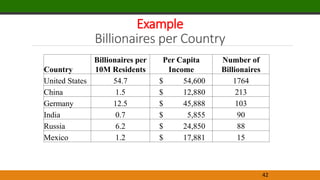
Example
Billionaires per Country
42
Country
Billionaires per
10M Residents
Per Capita
Income
Number of
Billionaires
United States 54.7 $ 54,600 1764
China 1.5 $ 12,880 213
Germany 12.5 $ 45,888 103
India 0.7 $ 5,855 90
Russia 6.2 $ 24,850 88
Mexico 1.2 $ 17,881 15
Example
Billionaires per Country
43
Country
Billionaires per
10M Residents
Per Capita
Income
Number of
Billionaires
United States 54.7 $ 54,600 1764
China 1.5 $ 12,880 213
Germany 12.5 $ 45,888 103
India 0.7 $ 5,855 90
Russia 6.2 $ 24,850 88
Mexico 1.2 $ 17,881 15
X Y Bubble size
Bubble label
Example
Billionaires per Country
44
Country
Billionaires per 10M
Residents Per Capita Income
Number of
Billionaires
United States 54.7 $ 54,600 1764
China 1.5 $ 12,880 213
Germany 12.5 $ 45,888 103
India 0.7 $ 5,855 90
Russia 6.2 $ 24,850 88
Mexico 1.2 $ 17,881 15
[CELLRANGE]
[CELLRANGE]
[CELLRANGE]
[CELLRANGE]
[CELLRANGE]
[CELLRANGE]
$(10,000)
$-
$10,000
$20,000
$30,000
$40,000
$50,000
$60,000
$70,000
-10 0 10 20 30 40 50 60 70
Per
Capita
Income
Billionaires per 10 million residents
Billionaires per Country
The size of each bubble is
proportionate to the number of
billionaires in that country
Example
Heat Map
45
A Heat map is a two dimensional graphical representation of data that uses
different shapes of color to indicate magnitude.
Example
Heat Map and Sparklines for Same-Store Sales Data
46
Same-store Sales
is a measure
used often in the
retail industry to
measure trends
in sales
JAN FEB MAR APR MAY JUN JUL AUG SEP OCT NOV DEC
St. Louis -2% -1% -1% 0% 2% 4% 3% 5% 6% 7% 8% 8%
Phoenix 5% 4% 4% 2% 2% -2% -5% -8% -6% -5% -7% -8%
Albany -5% -6% -4% -5% -2% -5% -5% -3% -1% -2% -1% -2%
Austin 16% 15% 15% 16% 18% 17% 14% 15% 16% 19% 18% 16%
Cincinnati -9% -6% -7% -3% 3% 6% 8% 11% 10% 11% 13% 11%
San Francisco 2% 4% 5% 8% 4% 2% 4% 3% 1% -1% 1% 2%
Seattle 7% 7% 8% 7% 5% 4% 2% 0% -2% -4% -6% -5%
Chicago 5% 3% 2% 6% 8% 7% 8% 5% 8% 10% 9% 8%
Atlanta 12% 14% 13% 17% 12% 11% 8% 7% 7% 8% 5% 3%
Miami 2% 3% 0% 1% -1% -4% -6% -8% -11% -13% -11% -10%
Minneapolis -6% -6% -8% -5% -6% -5% -5% -7% -5% -2% -1% -2%
Denver 5% 4% 1% 1% 2% 3% 1% -1% 0% 1% 2% 3%
Salt Lake City 7% 7% 7% 13% 12% 8% 5% 9% 10% 9% 7% 6%
Raleigh 4% 2% 0% 5% 4% 3% 5% 5% 9% 11% 8% 6%
Boston -5% -5% -3% 4% -5% -4% -3% -1% 1% 2% 3% 5%
Pittsburgh -6% -6% -4% -5% -3% -3% -1% -2% -2% -1% -2% -1%
Example
Heat Map and Sparklines for Same-Store Sales Data
48
JAN FEB MAR APR MAY JUN JUL AUG SEP OCT NOV DEC
St. Louis -2% -1% -1% 0% 2% 4% 3% 5% 6% 7% 8% 8%
Phoenix 5% 4% 4% 2% 2% -2% -5% -8% -6% -5% -7% -8%
Albany -5% -6% -4% -5% -2% -5% -5% -3% -1% -2% -1% -2%
Austin 16% 15% 15% 16% 18% 17% 14% 15% 16% 19% 18% 16%
Cincinnati -9% -6% -7% -3% 3% 6% 8% 11% 10% 11% 13% 11%
San Francisco 2% 4% 5% 8% 4% 2% 4% 3% 1% -1% 1% 2%
Seattle 7% 7% 8% 7% 5% 4% 2% 0% -2% -4% -6% -5%
Chicago 5% 3% 2% 6% 8% 7% 8% 5% 8% 10% 9% 8%
Atlanta 12% 14% 13% 17% 12% 11% 8% 7% 7% 8% 5% 3%
Miami 2% 3% 0% 1% -1% -4% -6% -8% -11% -13% -11% -10%
Minneapolis -6% -6% -8% -5% -6% -5% -5% -7% -5% -2% -1% -2%
Denver 5% 4% 1% 1% 2% 3% 1% -1% 0% 1% 2% 3%
Salt Lake City 7% 7% 7% 13% 12% 8% 5% 9% 10% 9% 7% 6%
Raleigh 4% 2% 0% 5% 4% 3% 5% 5% 9% 11% 8% 6%
Boston -5% -5% -3% 4% -5% -4% -3% -1% 1% 2% 3% 5%
Pittsburgh -6% -6% -4% -5% -3% -3% -1% -2% -2% -1% -2% -1%
Additional Charts
◦ Stacked column chart: Allows the reader to compare the
relative values of quantitative variables for the same category
in a bar chart
◦ Clustered column (or bar) chart: An alternative chart to
stacked column chart for comparing quantitative variables
◦ Scatter chart matrix: Useful chart for displaying multiple
variables
49
NOTE Stacked column and bar charts should be used only when comparing a few quantitative variables and
when there are large differences in the relative values of the quantitative variables within the category.
Example
Stacked-Column Chart for Regional Sales Data
51
0
50
100
150
200
250
Jan Feb Mar Apr May Jun Jul Aug Sep Oct Nov Dec
Sales
($100)
Months
Stacked Column Chart for Regional Sales
South
North
Although Stacked-
Column Chart allow
the reader to
compare the relative
values of
quantitative
variables for the
same category in a
bar chart, however
they suffer from the
same difficulty
perceiving small
differences in areas.
Example
Clustered-Column Chart for Regional Sales Data
52
The Clustered-
Column Chart is
superior to the
Stacked-Column
Chart for comparing
a small number
quantitative
variables.
0
20
40
60
80
100
120
140
160
Jan Feb Mar Apr May Jun Jul Aug Sep Oct Nov Dec
Sales
($100)
Months
Clurtered Column Chart for Regional Sales
North
South
Compare
Stacked-, Clustered-, and Multiple-Column Charts for the Regional Sales
53
When comparing many
quantitative variables,
using multiple charts
can often be superior
even if each chart must
be made smaller.
Stacked-column and
stacked-bar charts should
be used only when
comparing a few
quantitative variables
and when there are large
differences in the relative
values of the quantitative
variables within the
category.
Example
Data for New York City
55 Subboroughs on
54
Area
Median
Monthy Rent
($)
Percentage
College
Graduates (%)
Poverty
Rate
(%)
Travel
Time
(min)
Astoria 1106 36.8 15.9 35.4
Bay Ridge 1082 34.3 15.6 41.9
Bayside/Little Neck 1243 41.3 7.6 40.6
Bedford Stuyvesant 822 21.0 34.2 40.5
Bensonhurst 876 17.7 14.4 44.0
Borough Park 980 26.0 27.6 35.3
Brooklyn Heights/Fort Greene 1086 55.3 17.4 34.5
Brownsville/Ocean Hill 714 11.6 36.0 40.3
Bushwick 945 13.3 33.5 35.5
Central Harlem 665 30.6 27.1 25.0
Chelsea/Clinton/Midtown 1624 66.1 12.7 43.7
Coney Island 786 27.2 20.0 46.3
East Flatbush 940 18.4 11.7 33.2
East Harlem 677 23.7 30.0 44.2
East New York/Starrett City 890 13.7 29.2 43.9
Elmhurst/Corona 1121 21.8 22.3 41.1
Flatbush 931 28.3 25.1 43.9
Flatlands/Canarsie 1052 26.6 9.3 42.0
Flushing/Whitestone 1170 32.5 11.4 23.4
Greenwich Village/Financial
District 1965 78.3 7.9 44.0
Highbridge/South Concourse 781 11.2 31.4 44.6
Hillcrest/Fresh Meadows 1138 39.6 12.9 41.6
Jackson Heights 1114 19.8 16.0 47.3
Jamaica 980 19.8 12.7 42.8
Kingsbridge Heights/Moshulu 860 16.0 35.0 31.6
Lower East Side/Chinatown 821 34.2 25.9 39.0
Middle Village/Ridgewood 1078 20.1 12.1 39.7
… … …. … …
• Median Monthly Rent($)
• Percentage College Graduates (%)
• Poverty Rate (%)
• Travel Time (min)
A scatter-chart
matrix allows the
reader to easily see
the relationships
among multiple
variables.
Each scatter chart in
the matrix is
created in the same
manner as for
creating a single
scatter chart.
Each column and
each row in the
scatter-chart matrix
corresponds to one
categorical variable
Scatter-Chart
Matrix
cannot be
done in Excel.
The Excel
add-in
Frontline
Solver is
required
Data Mining-
Explore-
Chart Wizart –
ScatterPlot Matrix
% graduate Poverty Rate
PivotCharts in Excel
PivotChart are used to summarize and analyze data with both a
crosstabulation and charting, Excel pairs PivotCharts with
PivotTables
56
Example
PivotTable and PivotChart for the Restaurant Data
57
Restaurant Quality Rating
Meal Price
($)
Wait Time
(min)
1 Good 18 5
2 Very Good 22 6
3 Good 28 1
4 Excellent 38 74
5 Very Good 33 6
6 Good 28 5
7 Very Good 19 11
… …
A sample of 300 restaurants
was collected and the following
variables were studied:
Quality Rating
Meal Price ($)
Wait Time (min)
Example
PivotTable and PivotChart for the Restaurant Data
58
Average of Wait Time
(min)
Column
Labels
Row Labels 10-19
20-
29
30-
39
40-
49
Grand
Total
Good 2.6 2.5 0.5 2.5
Very Good 12.6 12.6 12.0 10.0 12.3
Excellent 25.5 29.1 34.0 32.3 32.1
Grand Total 7.6 11.1 19.8 27.5 13.9
Advanced Data
Visualization
ADVANCED CHARTS
GEOGRAPHIC INFORMATION SYSTEMS CHARTS
Advanced Data Visualization
Parallel-coordinates plot: Chart for examining data with more than
two variables
◦ Includes a different vertical axis for each variable
◦ Each observation is represented by drawing a line on the parallel
coordinates plot connecting each vertical axis
◦ The height of the line on each vertical axis represents the value
taken by that observation for the variable corresponding to the
vertical axis
Treemap: Useful for visualizing hierarchical data along multiple
dimensions
61
Example
Plot for Baseball Data
62
Position HR SB AVG
1B 39 4 0.248
1B 38 1 0.299
1B 37 9 0.299
1B 33 1 0.253
1B 31 2 0.301
1B 31 1 0.3
1B 31 2 0.303
1B 29 8 0.309
1B 28 2 0.225
1B 27 1 0.338
2B 32 30 0.255
2B 21 26 0.307
2B 2 22 0.303
2B 0 21 0.255
2B 8 21 0.246
2B 7 19 0.246
2B 21 17 0.236
2B 21 16 0.222
2B 2 15 0.26
2B 7 14 0.248
Data on 20 Baseball players where
10 play first base (1B) (in Blue) and
10 play second base (2B). (in red)
HR : Number of Home Runs
SB: Number of Stolen Bases
AVG: Batting Average
Example
Plot for Baseball Data
63
Data mining –
Explore –
Chart Wizart –
Parallel Coordinates –
Select HR, SB and AVG -
Colors
Blue : First Base
Red : Second Base
Advanced Data Visualization
◦ Geographic Information Systems (GIS): A system that merges
maps and statistics to present data collected over different
geographies
◦ Helps in interpreting data and observing patterns
64
Example
GIS Chart for Cincinnati Zoo Member Data
65
Data Dashboards
PRINCIPLES OF EFFECTIVE DATA DASHBOARDS
APPLICATION OF DATA DASHBOARDS
Data Dashboards
Data dashboard: Data visualization tool that illustrates multiple metrics and automatically
updates these metrics as new data become available
Key performance indicators (KPIs) in dashboards:
◦ Automobile dashboard: Current speed, Fuel level, and oil pressure
◦ Business dashboard: Financial position, inventory on hand,
customer service metrics
67
Data Dashboards
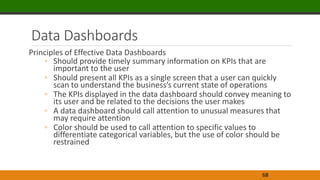
Principles of Effective Data Dashboards
◦ Should provide timely summary information on KPIs that are
important to the user
◦ Should present all KPIs as a single screen that a user can quickly
scan to understand the business’s current state of operations
◦ The KPIs displayed in the data dashboard should convey meaning to
its user and be related to the decisions the user makes
◦ A data dashboard should call attention to unusual measures that
may require attention
◦ Color should be used to call attention to specific values to
differentiate categorical variables, but the use of color should be
restrained
68
Example
Data Dashboard for the Grogan Oil Information Technology Call Center
69

Notes Chapter 3.pptx

  • 1.
    MBA 643 Dr DanielleMorin Fall 2022 CHAPTER 3 DATA VISUALIZATION
  • 2.
    Introduction Data visualization involves: ◦Creating a summary table for the data ◦ Generating charts to help interpret, analyze, and learn from the data Uses of data visualization: ◦ Helpful for identifying data errors ◦ Reduces the size of your data set by highlighting important relationships and trends in the data 2
  • 3.
  • 4.
    Overview of DataVisualization Data-ink ratio: Measures the proportion of “data-ink” to the total amount of ink used in a table or chart ◦ Edward R. Tufte first described the data-ink ratio ◦ Helpful for creating effective tables and charts for data visualization ◦ Data-ink: Ink used in a table or chart that is necessary to convey the meaning of the data to the audience ◦ Non-data-ink: Ink used in a table or chart that serves no useful purpose in conveying the data to the audience 4 https://www.youtube.com/watch?v=JIMUzJzqaA8
  • 5.
    Example Low Data-Ink RatioTable / Low Data-Ink Ratio Chart 5 Scarf Sales by Day Day Sales Days Sales 1 150 11 170 2 170 12 160 3 140 13 290 4 150 14 200 5 180 15 210 6 180 16 110 7 210 17 90 8 230 18 140 9 140 19 150 10 200 20 230 0 50 100 150 200 250 300 350 0 5 10 15 20 25 Scarf Sales per day Sales What is not necessary?
  • 6.
    Example Increasing Data-Ink Ratioin Table and Chart 6 Scarf Sales by Day Day Sales Days Sales 1 150 11 170 2 170 12 160 3 140 13 290 4 150 14 200 5 180 15 210 6 180 16 110 7 210 17 90 8 230 18 140 9 140 19 150 10 200 20 230 HOW? Remove gridlines Add labels to axis Remove unnecessary lines and labels
  • 7.
    Tables TABLE DESIGN PRINCIPLES CROSSTABULATION PIVOTTABLES IN EXCEL RECOMMENDED PIVOT TABLE IN EXCEL
  • 8.
    Tables Tables should beused when: 1. The reader needs to refer to specific numerical values 2. The reader needs to make precise comparisons between different values and not just relative comparisons 3. The values being displayed have different units or very different magnitudes 8
  • 9.
    Example Exact Values forCosts and Revenues by Month and corresponding line chart 9 Month 1 2 3 4 5 6 total Costs($) 48,123 56,458 64,125 52,158 54,718 50,985 326,567 Revenues($) 64,124 66,128 67,125 48,178 51,785 55,687 353,027 0 20,000 40,000 60,000 80,000 1 2 3 4 5 6 Costs and Revenues ($) Month Costs and Revenues by Month Costs($) Revenues($)
  • 10.
    Example Exact Values forCosts and Revenues by Month and corresponding line chart 10 0 10,000 20,000 30,000 40,000 50,000 60,000 70,000 80,000 1 2 3 4 5 6 Costs and Revenues ($) Month Costs and Revenues by Month Costs($) Revenues($)
  • 11.
    Example Exact Values forCosts and Revenues by Month and corresponding line chart 11 1 2 3 4 5 6 Costs($) 48,123 56,458 64,125 52,158 54,718 50,985 Revenues($) 64,124 66,128 67,125 48,178 51,785 55,687 0 10,000 20,000 30,000 40,000 50,000 60,000 70,000 80,000 Costs and Revenues ($) Month Costs and Revenues by Month Costs($) Revenues($)
  • 12.
    Tables Principles ◦ Data-InkRatio ◦ Avoid using vertical lines in a table unless they are necessary for clarity ◦ Horizontal lines are generally necessary only for separating column titles from data values or when indicating that a calculation has taken place 12
  • 13.
    Comparing Different TableDesigns 13 Which one is better?
  • 14.
    Example Table of Revenuesby Location for 12 Months of Data 14
  • 15.
    Example Table of Revenuesby Location for 12 Months of Data 15 1. Column of numbers should be right aligned 2. Always use the same number of decimals 3. Use decimals only when necessary 4. Large numbers should be adjusted with units of $1000 5. Left align text values in columns If we are interested in showing differences of Revenues between locations, the rows instead of the columns should have different shades of colours.
  • 16.
    Tables Crosstabulation: A usefultype of table for describing data of two variables PivotTable: A crosstabulation in Microsoft Excel 16
  • 17.
    Example How to analysisthis data set? Quality Rating and Meal Price for 300 Los Angeles Restaurants 17
  • 18.
    Count of RestaurantColumn Labels Row Labels 10 1 1 12 13 14 15 16 17 18 19 20 21 22 23 24 25 26 27 28 29 30 31 32 33 34 35 36 37 38 40 41 42 43 44 45 46 47 48Grand Total Excellent 1 1 2 1 1 2 1 1 1 3 2 4 3 5 3 2 3 4 2 2 4 4 2 1 2 2 3 2 2 66 Good 64 3 3 2 4 4 5 5 6 10 1 3 5 1 3 4 5 5 3 1 1 84 Very Good 14 3 5 6 1 5 3 3 3 9 9 4 6 5 9 4 8 10 7 5 6 6 5 5 2 4 6 1 2 1 1 1 150 Grand Total 78 6 9 8 5 9 9 8 9 21 11 8 13 7 13 9 16 17 3 11 8 11 10 7 8 6 7 8 5 4 4 1 3 3 3 2 3 300 First step: Pivot Table: Rows = Quality Rating Columns = Meal Price Values = Count of Restaurants Count of Restaurant Column Labels Row Labels 10-19 20-29 30-39 40-49 Grand Total Excellent 2 14 28 22 66 Good 42 40 2 84 Very Good 34 64 46 6 150 Grand Total 78 118 76 28 300 Right click on a cell that contains a meal price column label / select Group / Starting at : 10, Ending at 49, By 10
  • 19.
    Right click on Excellent/Move / Move “Excellent” to End Count of Restaurant Meal Price Quality Rating 10-19 20-29 30-39 40-49 Grand Total Good 42 40 2 84 Very Good 34 64 46 6 150 Excellent 2 14 28 22 66 Grand Total 78 118 76 28 300 Count of Restaurant Meal Price Quality Rating 10-19 20-29 30-39 40-49 Grand Total Good 14.00% 13.33% 0.67% 0.00% 28.00% Very Good 11.33% 21.33% 15.33% 2.00% 50.00% Excellent 0.67% 4.67% 9.33% 7.33% 22.00% Grand Total 26.00% 39.33% 25.33% 9.33% 100.00% Select Field Settings / Show values as / % of Grand Total Percent Frequency Distribution
  • 20.
    Interpretation What is themost popular combination of quality Rating and Meal Price? How many restaurants have excellent rating and a meal price in the $10–19 range? What is the percentage of restaurants with excellent quality rating? 20 Count of Restaurant Meal Price Quality Rating 10-19 20-29 30-39 40-49 Grand Total Good 42 40 2 84 Very Good 34 64 46 6 150 Excellent 2 14 28 22 66 Grand Total 78 118 76 28 300
  • 21.
    Example What is theaverage Waiting time per Meal Price and Quality rating? 21 In the Pivot Table, instead of asking for the Count of Restaurants, we ask for the average of Waiting Time What can we conclude? Average of Wait Time (min) Meal price Quality Rating 10-19 20-29 30-39 40-49 Grand Total Good 2.57 2.45 0.50 2.46 Very Good 12.65 12.56 12.04 10.00 12.32 Excellent 25.50 29.07 34.00 32.27 32.12 Grand Total 7.55 11.09 19.83 27.50 13.92
  • 22.
    Charts SCATTER CHARTS RECOMMENDED CHARTSIN EXCEL LINE CHARTS BAR CHARTS AND COLUMN CHARTS BUBBLE CHARTS HEAT MAPS PIVOTCHARTS IN EXCEL
  • 23.
    Charts Charts (or graphs):Visual methods of displaying data Scatter chart: Graphical presentation of the relationship between two quantitative variables Trendline: A line that provides an approximation of the relationship between the variables Line chart: A line connects the points in the chart ◦ Useful for time series data collected over a period of time (minutes, hours, days, years, etc.) 23
  • 24.
    Example Number of Commercialsand Sales of Electronics 24 Week No. of Commercials Sales Volume 1 2 50 2 5 57 3 1 41 4 3 54 5 4 54 6 1 38 7 5 63 8 3 48 9 4 59 10 2 46 What is the independent variable? What is the dependent variable? The manager wants to know whether a linear relationship exists between Number of commercials and Sales on the following week.
  • 25.
    Example Number of Commercialsand Sales of Electronics 25 Week No. of Commercials X Sales Volume ($100) Y 1 2 50 2 5 57 3 1 41 4 3 54 5 4 54 6 1 38 7 5 63 8 3 48 9 4 59 10 2 46
  • 26.
    Example Number of Commercialsand Sales of Electronics 26 0 10 20 30 40 50 60 70 0 1 2 3 4 5 6 Sales Volume ($100) Number of Commercials Sales Volume by No. of Commercials 0 10 20 30 40 50 60 70 0 1 2 3 4 5 6 Sales Volume ($100) Number of Commercials Sales Volume by No. of Commercials Insert Scatter(X,Y) Add a Trend line that provides an approximation of the relationship between the variables Y =4.95X + 36.15 𝑅2 = 0.8658 𝑹 = 𝑹𝟐 = 𝟎. 𝟖𝟔𝟓𝟖 = 𝟎. 𝟗𝟑𝟎𝟓
  • 27.
    Example Number of Commercialsand Sales of Electronics 27 0 10 20 30 40 50 60 70 0 1 2 3 4 5 6 Sales Volume ($100) Number of Commercials Sales Volume by No. of Commercials Interpret Calculate the correlation between Sales and No. of Commercials? R = 0.93
  • 28.
    Example Monthly Sales Dataof Air Compressors at Kirkland Industries 28 Month Sales ($100s) Jan 135 Feb 145 Mar 175 Apr 180 May 160 Jun 135 Jul 210 Aug 175 Sep 160 Oct 120 Nov 115 Dec 120 What can we say about the monthly sales?
  • 29.
    Scatter Chart andLine Chart for Monthly Sales Data 29 0 50 100 150 200 250 Sales ($100) Months Line Chart for Monthly Sales ($100s) 0 50 100 150 200 250 0 5 10 15 Sales ($100) Months Scatter Chart for Monthly Sales ($100s)
  • 30.
    30 Sales ($100s) Month NorthSouth Jan 95 40 Feb 100 45 Mar 120 55 Apr 115 65 May 100 60 Jun 85 50 Jul 135 75 Aug 110 65 Sep 100 60 Oct 50 70 Nov 40 75 Dec 40 80 Example Regional Monthly Sales Data of Air Compressors What can we say about the regional monthly sales?
  • 31.
    Line Chart ofRegional Sales Data 31 0 50 100 150 Jan Feb Mar Apr May Jun Jul Aug Sep Oct Nov Dec Sales (100$) Months Line Chart of Regional Data Sales North South
  • 32.
    Sparkline ◦ Minimalist typeof line chart that can be placed directly into a cell in Excel ◦ Contain no axes; they display only the line for the data ◦ Take up very little space and they can be effectively used to provide information on overall trends for time series data 32
  • 33.
    Sparklines for theRegional Sales Data 33
  • 34.
  • 35.
    Charts Bar Charts: Usehorizontal bars to display the magnitude of the quantitative variable Column Charts: Use vertical bars to display the magnitude of the quantitative variable Bar and column charts are very helpful in making comparisons between categorical variables 35
  • 36.
    Example Manager Accounts Managed Davis 24 Edwards 11 Francois28 Gentry 37 Jones 15 Lopez 29 Smith 21 Williams 6
  • 37.
    24 11 28 37 15 29 21 6 0 10 20 30 40 Accounts managed Managers Bar Chart ofAccounts Managed 24 11 28 37 15 29 21 6 0 10 20 30 40 Davis Edwards Francois Gentry Jones Lopez Smith Williams Accounts managed Managers Bar Chart of Accounts Managed
  • 38.
    Example Manager Accounts Managed Davis 24 Edwards 11 Francois28 Gentry 37 Jones 15 Lopez 29 Smith 21 Williams 6 Manager Accounts Managed Gentry 37 Lopez 29 Francois 28 Davis 24 Smith 21 Jones 15 Edwards 11 Williams 6
  • 39.
    6 11 15 21 24 28 29 37 0 5 1015 20 25 30 35 40 Williams Edwards Jones Smith Davis Francois Lopez Gentry Accounts managed Managers Bar Chart of Accounts Managed
  • 40.
    Charts Pie charts: Commonform of chart used to compare categorical data Bubble chart: ◦ Graphical means of visualizing three variables in a two- dimensional graph ◦ Sometimes a preferred alternative to a 3-D graph Heat map: A two-dimensional graphical representation of data that uses different shades of color to indicate magnitude 40
  • 41.
    Example Pie Chart ofAccounts Managed 41 37 29 28 24 21 15 11 6 Accounts Managed Gentry Lopez Francois Davis Smith Jones Edwards
  • 42.
    Example Billionaires per Country 42 Country Billionairesper 10M Residents Per Capita Income Number of Billionaires United States 54.7 $ 54,600 1764 China 1.5 $ 12,880 213 Germany 12.5 $ 45,888 103 India 0.7 $ 5,855 90 Russia 6.2 $ 24,850 88 Mexico 1.2 $ 17,881 15
  • 43.
    Example Billionaires per Country 43 Country Billionairesper 10M Residents Per Capita Income Number of Billionaires United States 54.7 $ 54,600 1764 China 1.5 $ 12,880 213 Germany 12.5 $ 45,888 103 India 0.7 $ 5,855 90 Russia 6.2 $ 24,850 88 Mexico 1.2 $ 17,881 15 X Y Bubble size Bubble label
  • 44.
    Example Billionaires per Country 44 Country Billionairesper 10M Residents Per Capita Income Number of Billionaires United States 54.7 $ 54,600 1764 China 1.5 $ 12,880 213 Germany 12.5 $ 45,888 103 India 0.7 $ 5,855 90 Russia 6.2 $ 24,850 88 Mexico 1.2 $ 17,881 15 [CELLRANGE] [CELLRANGE] [CELLRANGE] [CELLRANGE] [CELLRANGE] [CELLRANGE] $(10,000) $- $10,000 $20,000 $30,000 $40,000 $50,000 $60,000 $70,000 -10 0 10 20 30 40 50 60 70 Per Capita Income Billionaires per 10 million residents Billionaires per Country The size of each bubble is proportionate to the number of billionaires in that country
  • 45.
    Example Heat Map 45 A Heatmap is a two dimensional graphical representation of data that uses different shapes of color to indicate magnitude.
  • 46.
    Example Heat Map andSparklines for Same-Store Sales Data 46 Same-store Sales is a measure used often in the retail industry to measure trends in sales JAN FEB MAR APR MAY JUN JUL AUG SEP OCT NOV DEC St. Louis -2% -1% -1% 0% 2% 4% 3% 5% 6% 7% 8% 8% Phoenix 5% 4% 4% 2% 2% -2% -5% -8% -6% -5% -7% -8% Albany -5% -6% -4% -5% -2% -5% -5% -3% -1% -2% -1% -2% Austin 16% 15% 15% 16% 18% 17% 14% 15% 16% 19% 18% 16% Cincinnati -9% -6% -7% -3% 3% 6% 8% 11% 10% 11% 13% 11% San Francisco 2% 4% 5% 8% 4% 2% 4% 3% 1% -1% 1% 2% Seattle 7% 7% 8% 7% 5% 4% 2% 0% -2% -4% -6% -5% Chicago 5% 3% 2% 6% 8% 7% 8% 5% 8% 10% 9% 8% Atlanta 12% 14% 13% 17% 12% 11% 8% 7% 7% 8% 5% 3% Miami 2% 3% 0% 1% -1% -4% -6% -8% -11% -13% -11% -10% Minneapolis -6% -6% -8% -5% -6% -5% -5% -7% -5% -2% -1% -2% Denver 5% 4% 1% 1% 2% 3% 1% -1% 0% 1% 2% 3% Salt Lake City 7% 7% 7% 13% 12% 8% 5% 9% 10% 9% 7% 6% Raleigh 4% 2% 0% 5% 4% 3% 5% 5% 9% 11% 8% 6% Boston -5% -5% -3% 4% -5% -4% -3% -1% 1% 2% 3% 5% Pittsburgh -6% -6% -4% -5% -3% -3% -1% -2% -2% -1% -2% -1%
  • 47.
    Example Heat Map andSparklines for Same-Store Sales Data 48 JAN FEB MAR APR MAY JUN JUL AUG SEP OCT NOV DEC St. Louis -2% -1% -1% 0% 2% 4% 3% 5% 6% 7% 8% 8% Phoenix 5% 4% 4% 2% 2% -2% -5% -8% -6% -5% -7% -8% Albany -5% -6% -4% -5% -2% -5% -5% -3% -1% -2% -1% -2% Austin 16% 15% 15% 16% 18% 17% 14% 15% 16% 19% 18% 16% Cincinnati -9% -6% -7% -3% 3% 6% 8% 11% 10% 11% 13% 11% San Francisco 2% 4% 5% 8% 4% 2% 4% 3% 1% -1% 1% 2% Seattle 7% 7% 8% 7% 5% 4% 2% 0% -2% -4% -6% -5% Chicago 5% 3% 2% 6% 8% 7% 8% 5% 8% 10% 9% 8% Atlanta 12% 14% 13% 17% 12% 11% 8% 7% 7% 8% 5% 3% Miami 2% 3% 0% 1% -1% -4% -6% -8% -11% -13% -11% -10% Minneapolis -6% -6% -8% -5% -6% -5% -5% -7% -5% -2% -1% -2% Denver 5% 4% 1% 1% 2% 3% 1% -1% 0% 1% 2% 3% Salt Lake City 7% 7% 7% 13% 12% 8% 5% 9% 10% 9% 7% 6% Raleigh 4% 2% 0% 5% 4% 3% 5% 5% 9% 11% 8% 6% Boston -5% -5% -3% 4% -5% -4% -3% -1% 1% 2% 3% 5% Pittsburgh -6% -6% -4% -5% -3% -3% -1% -2% -2% -1% -2% -1%
  • 48.
    Additional Charts ◦ Stackedcolumn chart: Allows the reader to compare the relative values of quantitative variables for the same category in a bar chart ◦ Clustered column (or bar) chart: An alternative chart to stacked column chart for comparing quantitative variables ◦ Scatter chart matrix: Useful chart for displaying multiple variables 49 NOTE Stacked column and bar charts should be used only when comparing a few quantitative variables and when there are large differences in the relative values of the quantitative variables within the category.
  • 49.
    Example Stacked-Column Chart forRegional Sales Data 51 0 50 100 150 200 250 Jan Feb Mar Apr May Jun Jul Aug Sep Oct Nov Dec Sales ($100) Months Stacked Column Chart for Regional Sales South North Although Stacked- Column Chart allow the reader to compare the relative values of quantitative variables for the same category in a bar chart, however they suffer from the same difficulty perceiving small differences in areas.
  • 50.
    Example Clustered-Column Chart forRegional Sales Data 52 The Clustered- Column Chart is superior to the Stacked-Column Chart for comparing a small number quantitative variables. 0 20 40 60 80 100 120 140 160 Jan Feb Mar Apr May Jun Jul Aug Sep Oct Nov Dec Sales ($100) Months Clurtered Column Chart for Regional Sales North South
  • 51.
    Compare Stacked-, Clustered-, andMultiple-Column Charts for the Regional Sales 53 When comparing many quantitative variables, using multiple charts can often be superior even if each chart must be made smaller. Stacked-column and stacked-bar charts should be used only when comparing a few quantitative variables and when there are large differences in the relative values of the quantitative variables within the category.
  • 52.
    Example Data for NewYork City 55 Subboroughs on 54 Area Median Monthy Rent ($) Percentage College Graduates (%) Poverty Rate (%) Travel Time (min) Astoria 1106 36.8 15.9 35.4 Bay Ridge 1082 34.3 15.6 41.9 Bayside/Little Neck 1243 41.3 7.6 40.6 Bedford Stuyvesant 822 21.0 34.2 40.5 Bensonhurst 876 17.7 14.4 44.0 Borough Park 980 26.0 27.6 35.3 Brooklyn Heights/Fort Greene 1086 55.3 17.4 34.5 Brownsville/Ocean Hill 714 11.6 36.0 40.3 Bushwick 945 13.3 33.5 35.5 Central Harlem 665 30.6 27.1 25.0 Chelsea/Clinton/Midtown 1624 66.1 12.7 43.7 Coney Island 786 27.2 20.0 46.3 East Flatbush 940 18.4 11.7 33.2 East Harlem 677 23.7 30.0 44.2 East New York/Starrett City 890 13.7 29.2 43.9 Elmhurst/Corona 1121 21.8 22.3 41.1 Flatbush 931 28.3 25.1 43.9 Flatlands/Canarsie 1052 26.6 9.3 42.0 Flushing/Whitestone 1170 32.5 11.4 23.4 Greenwich Village/Financial District 1965 78.3 7.9 44.0 Highbridge/South Concourse 781 11.2 31.4 44.6 Hillcrest/Fresh Meadows 1138 39.6 12.9 41.6 Jackson Heights 1114 19.8 16.0 47.3 Jamaica 980 19.8 12.7 42.8 Kingsbridge Heights/Moshulu 860 16.0 35.0 31.6 Lower East Side/Chinatown 821 34.2 25.9 39.0 Middle Village/Ridgewood 1078 20.1 12.1 39.7 … … …. … … • Median Monthly Rent($) • Percentage College Graduates (%) • Poverty Rate (%) • Travel Time (min)
  • 53.
    A scatter-chart matrix allowsthe reader to easily see the relationships among multiple variables. Each scatter chart in the matrix is created in the same manner as for creating a single scatter chart. Each column and each row in the scatter-chart matrix corresponds to one categorical variable Scatter-Chart Matrix cannot be done in Excel. The Excel add-in Frontline Solver is required Data Mining- Explore- Chart Wizart – ScatterPlot Matrix % graduate Poverty Rate
  • 54.
    PivotCharts in Excel PivotChartare used to summarize and analyze data with both a crosstabulation and charting, Excel pairs PivotCharts with PivotTables 56
  • 55.
    Example PivotTable and PivotChartfor the Restaurant Data 57 Restaurant Quality Rating Meal Price ($) Wait Time (min) 1 Good 18 5 2 Very Good 22 6 3 Good 28 1 4 Excellent 38 74 5 Very Good 33 6 6 Good 28 5 7 Very Good 19 11 … … A sample of 300 restaurants was collected and the following variables were studied: Quality Rating Meal Price ($) Wait Time (min)
  • 56.
    Example PivotTable and PivotChartfor the Restaurant Data 58 Average of Wait Time (min) Column Labels Row Labels 10-19 20- 29 30- 39 40- 49 Grand Total Good 2.6 2.5 0.5 2.5 Very Good 12.6 12.6 12.0 10.0 12.3 Excellent 25.5 29.1 34.0 32.3 32.1 Grand Total 7.6 11.1 19.8 27.5 13.9
  • 57.
  • 58.
    Advanced Data Visualization Parallel-coordinatesplot: Chart for examining data with more than two variables ◦ Includes a different vertical axis for each variable ◦ Each observation is represented by drawing a line on the parallel coordinates plot connecting each vertical axis ◦ The height of the line on each vertical axis represents the value taken by that observation for the variable corresponding to the vertical axis Treemap: Useful for visualizing hierarchical data along multiple dimensions 61
  • 59.
    Example Plot for BaseballData 62 Position HR SB AVG 1B 39 4 0.248 1B 38 1 0.299 1B 37 9 0.299 1B 33 1 0.253 1B 31 2 0.301 1B 31 1 0.3 1B 31 2 0.303 1B 29 8 0.309 1B 28 2 0.225 1B 27 1 0.338 2B 32 30 0.255 2B 21 26 0.307 2B 2 22 0.303 2B 0 21 0.255 2B 8 21 0.246 2B 7 19 0.246 2B 21 17 0.236 2B 21 16 0.222 2B 2 15 0.26 2B 7 14 0.248 Data on 20 Baseball players where 10 play first base (1B) (in Blue) and 10 play second base (2B). (in red) HR : Number of Home Runs SB: Number of Stolen Bases AVG: Batting Average
  • 60.
    Example Plot for BaseballData 63 Data mining – Explore – Chart Wizart – Parallel Coordinates – Select HR, SB and AVG - Colors Blue : First Base Red : Second Base
  • 61.
    Advanced Data Visualization ◦Geographic Information Systems (GIS): A system that merges maps and statistics to present data collected over different geographies ◦ Helps in interpreting data and observing patterns 64
  • 62.
    Example GIS Chart forCincinnati Zoo Member Data 65
  • 63.
    Data Dashboards PRINCIPLES OFEFFECTIVE DATA DASHBOARDS APPLICATION OF DATA DASHBOARDS
  • 64.
    Data Dashboards Data dashboard:Data visualization tool that illustrates multiple metrics and automatically updates these metrics as new data become available Key performance indicators (KPIs) in dashboards: ◦ Automobile dashboard: Current speed, Fuel level, and oil pressure ◦ Business dashboard: Financial position, inventory on hand, customer service metrics 67
  • 65.
    Data Dashboards Principles ofEffective Data Dashboards ◦ Should provide timely summary information on KPIs that are important to the user ◦ Should present all KPIs as a single screen that a user can quickly scan to understand the business’s current state of operations ◦ The KPIs displayed in the data dashboard should convey meaning to its user and be related to the decisions the user makes ◦ A data dashboard should call attention to unusual measures that may require attention ◦ Color should be used to call attention to specific values to differentiate categorical variables, but the use of color should be restrained 68
  • 66.
    Example Data Dashboard forthe Grogan Oil Information Technology Call Center 69