
Introduction
Learning how to use node.js
Welcome
● Name.
● A brief description of yourself and your
experience.
● What do you know about node.js?
● What do you expect of this course?
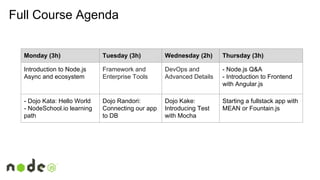
Monday (3h) Tuesday (3h) Wednesday (2h) Thursday (3h)
Introduction to Node.js
Async and ecosystem
Framework and
Enterprise Tools
DevOps and
Advanced Details
- Node.js Q&A
- Introduction to Frontend
with Angular.js
- Dojo Kata: Hello World
- NodeSchool.io learning
path
Dojo Randori:
Connecting our app
to DB
Dojo Kake:
Introducing Test
with Mocha
Starting a fullstack app with
MEAN or Fountain.js
Full Course Agenda
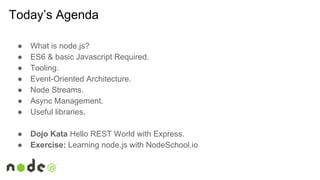
Today’s Agenda
● What is node.js?
● ES6 & basic Javascript Required.
● Tooling.
● Event-Oriented Architecture.
● Node Streams.
● Async Management.
● Useful libraries.
● Dojo Kata Hello REST World with Express.
● Exercise: Learning node.js with NodeSchool.io
WHAT is it…
A runtime environment designed to use JavaScript in order to develop
high-performance and low latency applications.
& =
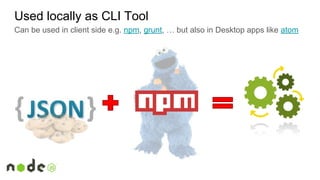
Used locally as CLI Tool
Can be used in client side e.g. npm, grunt, … but also in Desktop apps like atom
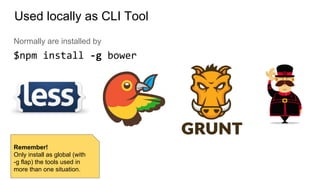
Normally are installed by
$npm install -g bower
Used locally as CLI Tool
Remember!
Only install as global (with
-g flap) the tools used in
more than one situation.
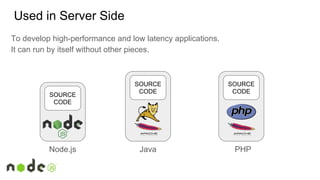
Used in Server Side
JavaNode.js PHP
SOURCE
CODE
SOURCE
CODE
SOURCE
CODE
To develop high-performance and low latency applications.
It can run by itself without other pieces.
<?php
$books = array(
"Myst: The Book of Atrus",
"Myst: The Book of Ti'ana",
"Myst: The Book of D'ni");
serveBooks($books);
function serveBooks($books) {
echo $html = join($books, ',');
$books = array(); // Intentionally deleted
}
?>
One thread running
let books = [ 'The Fellowship of the Ring',
'The Two Towers',
'The return of the King' ];
function serveBooks() {
let reply = books.join(',');
books = []; // Intentionally deleted
return reply;
}
What happens if we press F5
several times?
ES6 & JS Required
It’s highly recommendable to know or study the new Javascript Standard known
as ES6 or ECMAScript 2015.
● Let / Const.
● Classes.
● Arrow Functions.
● Typed Arrays.
● Native Promises.
● ....
See references for more
info about “How to learn
Javascript”.
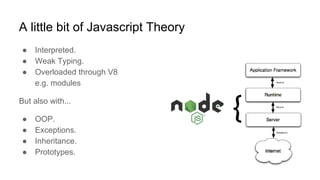
A little bit of Javascript Theory
● Interpreted.
● Weak Typing.
● Overloaded through V8
e.g. modules
But also with...
● OOP.
● Exceptions.
● Inheritance.
● Prototypes.
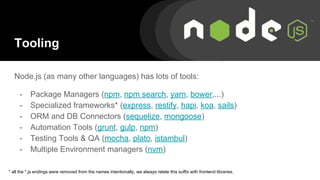
Tooling
Node.js (as many other languages) has lots of tools:
- Package Managers (npm, npm search, yarn, bower,...)
- Specialized frameworks* (express, restify, hapi, koa, sails)
- ORM and DB Connectors (sequelize, mongoose)
- Automation Tools (grunt, gulp, npm)
- Testing Tools & QA (mocha, plato, istambul)
- Multiple Environment managers (nvm)
* all the *.js endings were removed from the names intentionally, we always relate this suffix with frontend libraries.
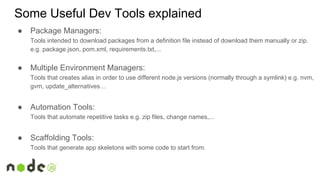
● Package Managers:
Tools intended to download packages from a definition file instead of download them manually or zip.
e.g. package.json, pom.xml, requirements.txt,...
● Multiple Environment Managers:
Tools that creates alias in order to use different node.js versions (normally through a symlink) e.g. nvm,
gvm, update_alternatives…
● Automation Tools:
Tools that automate repetitive tasks e.g. zip files, change names,...
● Scaffolding Tools:
Tools that generate app skeletons with some code to start from.
Some Useful Dev Tools explained
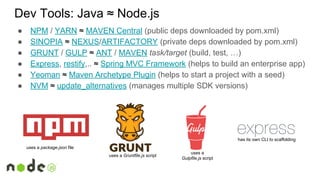
Dev Tools: Java ≈ Node.js
● NPM / YARN ≈ MAVEN Central (public deps downloaded by pom.xml)
● SINOPIA ≈ NEXUS/ARTIFACTORY (private deps downloaded by pom.xml)
● GRUNT / GULP ≈ ANT / MAVEN task/target (build, test, …)
● Express, restify,.. ≈ Spring MVC Framework (helps to build an enterprise app)
● Yeoman ≈ Maven Archetype Plugin (helps to start a project with a seed)
● NVM ≈ update_alternatives (manages multiple SDK versions)
uses a package.json file
uses a Gruntfile.js script
uses a
Gulpfile.js script
has its own CLI to scaffolding
Node Streams
All data in node.js can be treated as a Stream. A stream is a data flow received by
chunks. e.g. A file opened, data, buffers,...
● It’s an useful way to manage large volumes of data!
Example: https://github.com/wilk/node-certification/blob/master/src/03-Node_Concepts/stream.js
Event Oriented
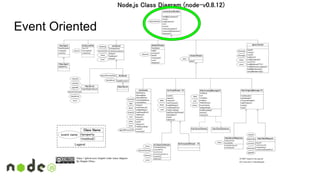
In node.js lots of its classes inherit from EventEmitter so…
● Attach or detach listeners.
● Extend with our own classes to benefit from this behaviour.
● Communicate different parts of the code with an event.
Example: https://github.com/wilk/node-certification/blob/master/src/03-Node_Concepts/events.js
Event Oriented
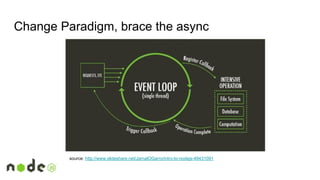
Change Paradigm, brace the async
source: http://www.slideshare.net/JamalOGarro/intro-to-nodejs-49431091
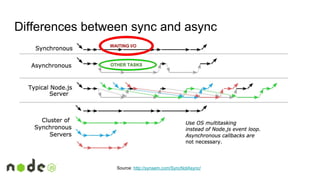
Differences between sync and async
Source: http://synsem.com/SyncNotAsync/
WAITING I/O
OTHER TASKS
Async Management
There are 4 “main ways” to deal with it:
1. Callback & CPS style with fail first.
2. Promises.
3. Flow Control Libraries.
4. Avoid it (when possible) :).
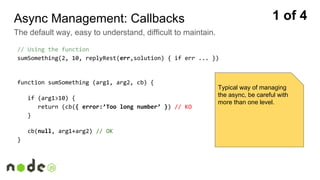
Async Management: Callbacks
The default way, easy to understand, difficult to maintain.
// Using the function
sumSomething(2, 10, replyRest(err,solution) { if err ... })
function sumSomething (arg1, arg2, cb) {
if (arg1>10) {
return (cb({ error:’Too long number’ }) // KO
}
cb(null, arg1+arg2) // OK
}
1 of 4
Typical way of managing
the async, be careful with
more than one level.
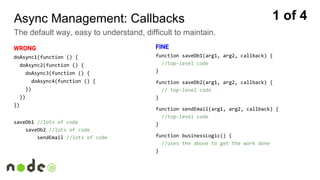
Async Management: Callbacks
The default way, easy to understand, difficult to maintain.
WRONG
doAsync1(function () {
doAsync2(function () {
doAsync3(function () {
doAsync4(function () {
})
})
})
saveDb1 //lots of code
saveDb2 //lots of code
sendEmail //lots of code
FINE
function saveDb1(arg1, arg2, callback) {
//top-level code
}
function saveDb2(arg1, arg2, callback) {
// top-level code
}
function sendEmail(arg1, arg2, callback) {
//top-level code
}
function businessLogic() {
//uses the above to get the work done
}
1 of 4
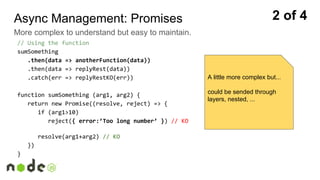
// Using the function
sumSomething
.then(data => anotherFunction(data))
.then(data => replyRest(data))
.catch(err => replyRestKO(err))
function sumSomething (arg1, arg2) {
return new Promise((resolve, reject) => {
if (arg1>10)
reject({ error:’Too long number’ }) // KO
resolve(arg1+arg2) // KO
})
}
Async Management: Promises
More complex to understand but easy to maintain.
2 of 4
A little more complex but...
could be sended through
layers, nested, ...
Async Management: Flow Control Libraries
Easy to understand, easy to apply, difficult to escape from them.
const async = require(‘async’)
async.parallel([
function(callback) {
setTimeout(function() { callback(null, 'one'); }, 200);
},
function(callback) {
setTimeout(function() { callback(null, 'two'); }, 100);
}
],
// optional callback, when all finish
function(err, results) {
// results = ['one','two']
});
First param:
array of functions
Second param:
another cb function
3 of 4
Be careful because they’re
sticky and you’ll always need
it!
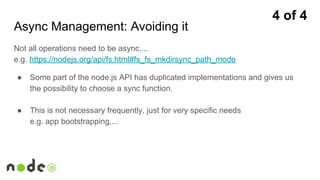
Async Management: Avoiding it
Not all operations need to be async,...
e.g. https://nodejs.org/api/fs.html#fs_fs_mkdirsync_path_mode
● Some part of the node.js API has duplicated implementations and gives us
the possibility to choose a sync function.
● This is not necessary frequently, just for very specific needs
e.g. app bootstrapping,...
4 of 4
Useful Libraries
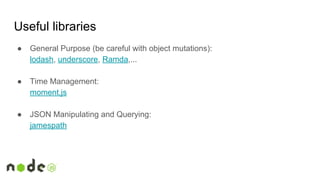
Useful libraries
● General Purpose (be careful with object mutations):
lodash, underscore, Ramda,...
● Time Management:
moment.js
● JSON Manipulating and Querying:
jamespath
Useful libraries
● Immutability:
RxJS
● Memory Queues/Buses:
postal.js
● REST, AJAX, Xhr request,...
superagent, request,...
Exercises
Dojo Kata:
Hello World with node.js
Dojo Kata
Hello REST World with Express
1. Starting project with $npm init (private:true -> it prevents the accidental
publication of our code).
2. Creating actions to start.
3. Install deps.
4. Adding .gitignore / .svnignore.
5. Coding!
exercise: https://github.com/Pelirrojo/nodejs-npm-express-basic-with-grunt
Dojo Randori
Learning node.js with NodeSchool.io
1. Create a folder for the full lab.
2. $npm install -g learnyounode.
3. make a sub folder for each exercise.
4. run $learnyounode.
5. Choose an exercise from menu and solve it.
6. goTo 4 step :).
References
● Node.js Official API
nodejs.org/api
● A free series of eBooks
github.com/getify/You-Dont-Know-JS
● A series of exercises intended to prepare the node.js certification
https://github.com/wilk/node-certification/tree/master/src
● EchoJS: News about JS
echojs.com
● HotJS: another JS interesting blog
hotjs.com
Remember to spend some
time improving your
JavaScript skills. This will
be useful for node.js and
fronted Development!
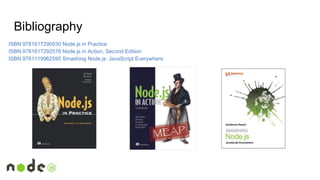
Bibliography
ISBN 9781617290930 Node.js in Practice
ISBN 9781617292576 Node.js in Action, Second Edition
ISBN 9781119962595 Smashing Node.js: JavaScript Everywhere
Any question?
Manuel E. de Paz Carmona
manuel.depaz.geek@mail.com
Disclaimer
All product names, logos, and brands are property of their respective owners. All company, product and service names
used in this slide deck are for identification purposes only. Use of these names, logos, and brands does not imply
endorsement.
This slide deck is licensed by

Node.js Course 1 of 2 - Introduction and first steps

  • 1.
  • 2.
    Welcome ● Name. ● Abrief description of yourself and your experience. ● What do you know about node.js? ● What do you expect of this course?
  • 3.
    Monday (3h) Tuesday(3h) Wednesday (2h) Thursday (3h) Introduction to Node.js Async and ecosystem Framework and Enterprise Tools DevOps and Advanced Details - Node.js Q&A - Introduction to Frontend with Angular.js - Dojo Kata: Hello World - NodeSchool.io learning path Dojo Randori: Connecting our app to DB Dojo Kake: Introducing Test with Mocha Starting a fullstack app with MEAN or Fountain.js Full Course Agenda
  • 4.
    Today’s Agenda ● Whatis node.js? ● ES6 & basic Javascript Required. ● Tooling. ● Event-Oriented Architecture. ● Node Streams. ● Async Management. ● Useful libraries. ● Dojo Kata Hello REST World with Express. ● Exercise: Learning node.js with NodeSchool.io
  • 5.
    WHAT is it… Aruntime environment designed to use JavaScript in order to develop high-performance and low latency applications. & =
  • 6.
    Used locally asCLI Tool Can be used in client side e.g. npm, grunt, … but also in Desktop apps like atom
  • 7.
    Normally are installedby $npm install -g bower Used locally as CLI Tool Remember! Only install as global (with -g flap) the tools used in more than one situation.
  • 8.
    Used in ServerSide JavaNode.js PHP SOURCE CODE SOURCE CODE SOURCE CODE To develop high-performance and low latency applications. It can run by itself without other pieces.
  • 9.
    <?php $books = array( "Myst:The Book of Atrus", "Myst: The Book of Ti'ana", "Myst: The Book of D'ni"); serveBooks($books); function serveBooks($books) { echo $html = join($books, ','); $books = array(); // Intentionally deleted } ?> One thread running let books = [ 'The Fellowship of the Ring', 'The Two Towers', 'The return of the King' ]; function serveBooks() { let reply = books.join(','); books = []; // Intentionally deleted return reply; } What happens if we press F5 several times?
  • 10.
    ES6 & JSRequired It’s highly recommendable to know or study the new Javascript Standard known as ES6 or ECMAScript 2015. ● Let / Const. ● Classes. ● Arrow Functions. ● Typed Arrays. ● Native Promises. ● .... See references for more info about “How to learn Javascript”.
  • 11.
    A little bitof Javascript Theory ● Interpreted. ● Weak Typing. ● Overloaded through V8 e.g. modules But also with... ● OOP. ● Exceptions. ● Inheritance. ● Prototypes.
  • 12.
    Tooling Node.js (as manyother languages) has lots of tools: - Package Managers (npm, npm search, yarn, bower,...) - Specialized frameworks* (express, restify, hapi, koa, sails) - ORM and DB Connectors (sequelize, mongoose) - Automation Tools (grunt, gulp, npm) - Testing Tools & QA (mocha, plato, istambul) - Multiple Environment managers (nvm) * all the *.js endings were removed from the names intentionally, we always relate this suffix with frontend libraries.
  • 13.
    ● Package Managers: Toolsintended to download packages from a definition file instead of download them manually or zip. e.g. package.json, pom.xml, requirements.txt,... ● Multiple Environment Managers: Tools that creates alias in order to use different node.js versions (normally through a symlink) e.g. nvm, gvm, update_alternatives… ● Automation Tools: Tools that automate repetitive tasks e.g. zip files, change names,... ● Scaffolding Tools: Tools that generate app skeletons with some code to start from. Some Useful Dev Tools explained
  • 14.
    Dev Tools: Java≈ Node.js ● NPM / YARN ≈ MAVEN Central (public deps downloaded by pom.xml) ● SINOPIA ≈ NEXUS/ARTIFACTORY (private deps downloaded by pom.xml) ● GRUNT / GULP ≈ ANT / MAVEN task/target (build, test, …) ● Express, restify,.. ≈ Spring MVC Framework (helps to build an enterprise app) ● Yeoman ≈ Maven Archetype Plugin (helps to start a project with a seed) ● NVM ≈ update_alternatives (manages multiple SDK versions) uses a package.json file uses a Gruntfile.js script uses a Gulpfile.js script has its own CLI to scaffolding
  • 15.
    Node Streams All datain node.js can be treated as a Stream. A stream is a data flow received by chunks. e.g. A file opened, data, buffers,... ● It’s an useful way to manage large volumes of data! Example: https://github.com/wilk/node-certification/blob/master/src/03-Node_Concepts/stream.js
  • 16.
    Event Oriented In node.jslots of its classes inherit from EventEmitter so… ● Attach or detach listeners. ● Extend with our own classes to benefit from this behaviour. ● Communicate different parts of the code with an event. Example: https://github.com/wilk/node-certification/blob/master/src/03-Node_Concepts/events.js
  • 17.
  • 18.
    Change Paradigm, bracethe async source: http://www.slideshare.net/JamalOGarro/intro-to-nodejs-49431091
  • 19.
    Differences between syncand async Source: http://synsem.com/SyncNotAsync/ WAITING I/O OTHER TASKS
  • 20.
    Async Management There are4 “main ways” to deal with it: 1. Callback & CPS style with fail first. 2. Promises. 3. Flow Control Libraries. 4. Avoid it (when possible) :).
  • 21.
    Async Management: Callbacks Thedefault way, easy to understand, difficult to maintain. // Using the function sumSomething(2, 10, replyRest(err,solution) { if err ... }) function sumSomething (arg1, arg2, cb) { if (arg1>10) { return (cb({ error:’Too long number’ }) // KO } cb(null, arg1+arg2) // OK } 1 of 4 Typical way of managing the async, be careful with more than one level.
  • 22.
    Async Management: Callbacks Thedefault way, easy to understand, difficult to maintain. WRONG doAsync1(function () { doAsync2(function () { doAsync3(function () { doAsync4(function () { }) }) }) saveDb1 //lots of code saveDb2 //lots of code sendEmail //lots of code FINE function saveDb1(arg1, arg2, callback) { //top-level code } function saveDb2(arg1, arg2, callback) { // top-level code } function sendEmail(arg1, arg2, callback) { //top-level code } function businessLogic() { //uses the above to get the work done } 1 of 4
  • 23.
    // Using thefunction sumSomething .then(data => anotherFunction(data)) .then(data => replyRest(data)) .catch(err => replyRestKO(err)) function sumSomething (arg1, arg2) { return new Promise((resolve, reject) => { if (arg1>10) reject({ error:’Too long number’ }) // KO resolve(arg1+arg2) // KO }) } Async Management: Promises More complex to understand but easy to maintain. 2 of 4 A little more complex but... could be sended through layers, nested, ...
  • 24.
    Async Management: FlowControl Libraries Easy to understand, easy to apply, difficult to escape from them. const async = require(‘async’) async.parallel([ function(callback) { setTimeout(function() { callback(null, 'one'); }, 200); }, function(callback) { setTimeout(function() { callback(null, 'two'); }, 100); } ], // optional callback, when all finish function(err, results) { // results = ['one','two'] }); First param: array of functions Second param: another cb function 3 of 4 Be careful because they’re sticky and you’ll always need it!
  • 25.
    Async Management: Avoidingit Not all operations need to be async,... e.g. https://nodejs.org/api/fs.html#fs_fs_mkdirsync_path_mode ● Some part of the node.js API has duplicated implementations and gives us the possibility to choose a sync function. ● This is not necessary frequently, just for very specific needs e.g. app bootstrapping,... 4 of 4
  • 26.
  • 27.
    Useful libraries ● GeneralPurpose (be careful with object mutations): lodash, underscore, Ramda,... ● Time Management: moment.js ● JSON Manipulating and Querying: jamespath
  • 28.
    Useful libraries ● Immutability: RxJS ●Memory Queues/Buses: postal.js ● REST, AJAX, Xhr request,... superagent, request,...
  • 29.
  • 30.
    Dojo Kata Hello RESTWorld with Express 1. Starting project with $npm init (private:true -> it prevents the accidental publication of our code). 2. Creating actions to start. 3. Install deps. 4. Adding .gitignore / .svnignore. 5. Coding! exercise: https://github.com/Pelirrojo/nodejs-npm-express-basic-with-grunt
  • 31.
    Dojo Randori Learning node.jswith NodeSchool.io 1. Create a folder for the full lab. 2. $npm install -g learnyounode. 3. make a sub folder for each exercise. 4. run $learnyounode. 5. Choose an exercise from menu and solve it. 6. goTo 4 step :).
  • 32.
    References ● Node.js OfficialAPI nodejs.org/api ● A free series of eBooks github.com/getify/You-Dont-Know-JS ● A series of exercises intended to prepare the node.js certification https://github.com/wilk/node-certification/tree/master/src ● EchoJS: News about JS echojs.com ● HotJS: another JS interesting blog hotjs.com Remember to spend some time improving your JavaScript skills. This will be useful for node.js and fronted Development!
  • 33.
    Bibliography ISBN 9781617290930 Node.jsin Practice ISBN 9781617292576 Node.js in Action, Second Edition ISBN 9781119962595 Smashing Node.js: JavaScript Everywhere
  • 34.
    Any question? Manuel E.de Paz Carmona manuel.depaz.geek@mail.com
  • 35.
    Disclaimer All product names,logos, and brands are property of their respective owners. All company, product and service names used in this slide deck are for identification purposes only. Use of these names, logos, and brands does not imply endorsement. This slide deck is licensed by