Node js
with npm,
installing express js
@RohanChandane

Last updated on 13th Oct 2013
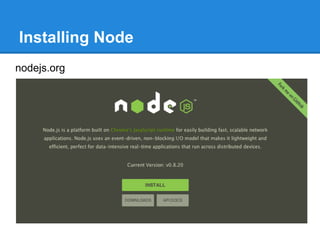
Installing Node
nodejs.org
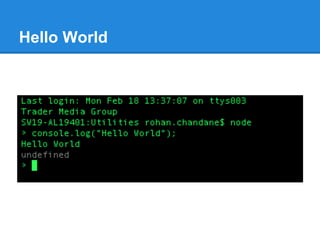
Hello World
...

On windows machine,
- Setting up environment variable is built in inside nodejs
directory
- after installation, type nodevars to install environment variable.
nodevars.bat is a batch file responsible for setting it up
What is Node / Node js?
- Node is Command line tool
- Download it and install
- It runs javascript code by typing ‘node your-script-file.js’

- Hosted on V8 Javascript engine
- uses V8 as standalone engine to execute javascript.

- Server-side javascript
- Node provides JavaScript API to access network & file system.
- These JavaScript files runs on the server rather than on the client side
- We can also write a server, which can be a replacement for something like
the Apache web server
...
- Uses event-driven I/O (non-blocking I/O)
- is just a term that describes the normal asynchronous callback
mechanisms.
- In node.js you supply callback functions for all sorts of things, and your
function is called when the relevant event occurs.
- So that means, it works parallelly on different I/O operations.
- eg. Code for reading from a file & reading values from a database can be
executed one after another (since node js is single threaded), and it will wait for
data to receive from file & database.
Once it receives data, it will call callback function related to function call.

- One language
- to write server side and client side code
- No need to learn server side language like Java & PHP
Why Node
1. Efficiency
- Response time
= server-side script execution time + time taken for I/O operation

- Node reduces the response time to the duration it takes to execute
the slowest I/O query
- Its mainly because ‘Single threaded - Event loop’
- Also called Event driven computing Architecture

- There is a need for high performance web servers
...
2. JavaScript
- JavaScript is universal language for web
developers
- Its single threaded
- Its dynamic

3. Speed
- Up till now, JavaScript was related to
browser
- We used it for DOM manipulation
- and our favourite browser to execute
javascript, is Chrome
...
- Chrome uses V8 engine
underneath to execute js
- V8 is the fastest javascript
execution engine
- V8 was designed to run in
Chrome’s multi-process model

V8 engine

- V8 is intended to be used both in a browser
and as a standalone high-performance engine
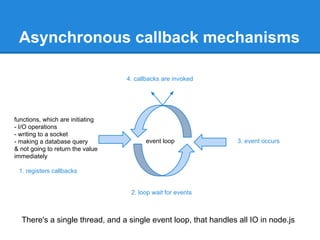
Asynchronous callback mechanisms
4. callbacks are invoked

functions, which are initiating
- I/O operations
- writing to a socket
- making a database query
& not going to return the value
immediately

event loop

3. event occurs

1. registers callbacks

2. loop wait for events

There's a single thread, and a single event loop, that handles all IO in node.js
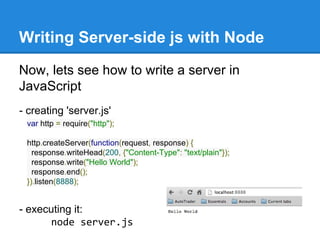
Writing Server-side js with Node
Now, lets see how to write a server in
JavaScript
- creating 'server.js'
var http = require("http");
http.createServer(function(request, response) {
response.writeHead(200, {"Content-Type": "text/plain"});
response.write("Hello World");
response.end();
}).listen(8888);

- executing it:
node server.js
Passing function as parameter
lets say
function execute(someFunction, value) {
someFunction(value);
}
execute(function(word){ console.log(word) }, "Hello");

can also be written
function say(word) {
console.log(word);
}
function execute(someFunction, value) {
someFunction(value);
}
execute(say, "Hello");
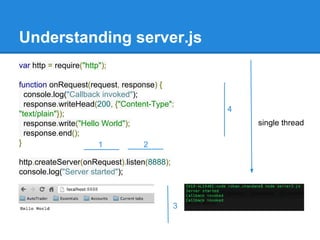
Understanding server.js
var http = require("http");
function onRequest(request, response) {
console.log("Callback invoked");
response.writeHead(200, {"Content-Type":
"text/plain"});
response.write("Hello World");
response.end();
}
1
2
http.createServer(onRequest).listen(8888);
console.log("Server started");

3

4
single thread
...
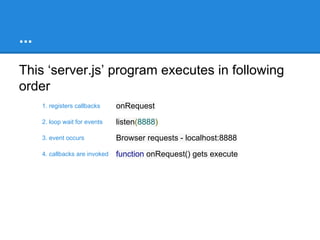
This ‘server.js’ program executes in following
order
1. registers callbacks

onRequest

2. loop wait for events

listen(8888)

3. event occurs

Browser requests - localhost:8888

4. callbacks are invoked

function onRequest() gets execute
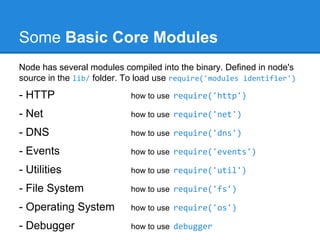
Some Basic Core Modules
Node has several modules compiled into the binary. Defined in node's
source in the lib/ folder. To load use require('modules identifier')

- HTTP

how to use require('http')

- Net

how to use require('net')

- DNS

how to use require('dns')

- Events

how to use require('events')

- Utilities

how to use require('util')

- File System

how to use require('fs')

- Operating System

how to use require('os')

- Debugger

how to use debugger
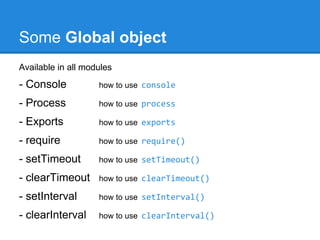
Some Global object
Available in all modules

- Console

how to use console

- Process

how to use process

- Exports

how to use exports

- require

how to use require()

- setTimeout

how to use setTimeout()

- clearTimeout

how to use clearTimeout()

- setInterval

how to use setInterval()

- clearInterval

how to use clearInterval()
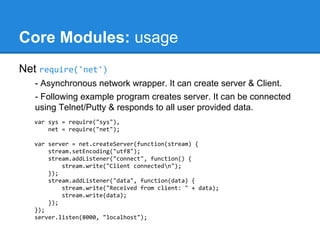
Core Modules: usage
Net require('net')
- Asynchronous network wrapper. It can create server & Client.
- Following example program creates server. It can be connected
using Telnet/Putty & responds to all user provided data.
var sys = require("sys"),
net = require("net");
var server = net.createServer(function(stream) {
stream.setEncoding("utf8");
stream.addListener("connect", function() {
stream.write("Client connectedn");
});
stream.addListener("data", function(data) {
stream.write("Received from client: " + data);
stream.write(data);
});
});
server.listen(8000, "localhost");
Node Package Manager
NPM: npmjs.org
Node Package Manager (NPM)
- Node modules largely written in JavaScript which runs on the server
(executed by the V8 engine) rather than on the client side.
- These modules are registered in npm registry at registry.npmjs.org
- To use these modules while developing application, npm helps in
- installing Node js packages / Modules / Programs
- & linking their dependencies

- npm is a command line utility program
- npm is bundled and installed automatically with Node version 0.6.3 and
above
- On windows, after setting up environment variables npm command can
be executed from any desired location to install node packages
NPM Commands
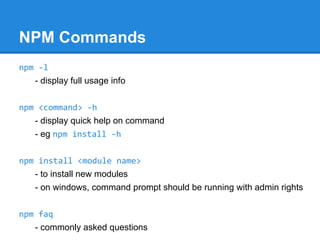
npm -l
- display full usage info
npm <command> -h
- display quick help on command
- eg npm install -h
npm faq
- commonly asked questions
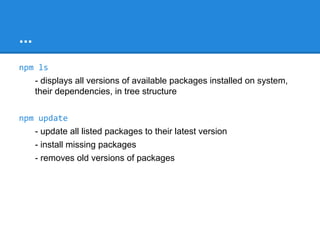
npm ls
- displays all versions of available packages installed on system, their
dependencies, in tree structure
…
npm install <module name>
- to install new modules
- on windows, command prompt should be running with admin rights
npm install <module name> -g
- to install new modules globally
- on windows at location C:Users<user>AppDataRoamingnpm
...
npm update
- update all listed packages to their latest version (in given folder)
- install missing packages
- removes old versions of packages
npm update -g
- update all listed global packages
npm update <pkg>
- update specific package
express js
Installing node module: express js
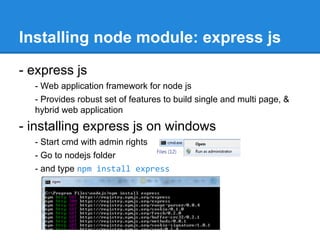
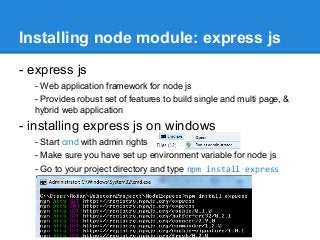
- express js
- Web application framework for node js
- Provides robust set of features to build single and multi page, &
hybrid web application

- installing express js on windows
- Start cmd with admin rights
- Make sure you have set up environment variable for node js
- Go to your project directory and type npm install express
...
- installing express as global package
- Previously we installed express for particular folder
- But usually we install it globally
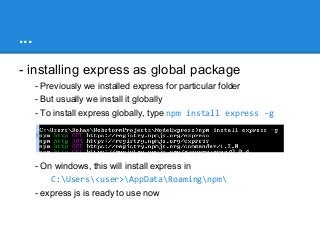
- To install express globally, type npm install express -g

- On windows, this will install express in
C:Users<user>AppDataRoamingnpm
- express js is ready to use now
...
- Create a express project
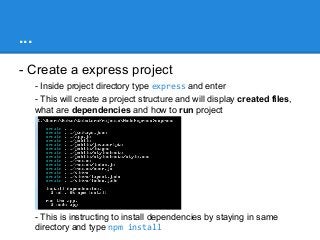
- Inside project directory type express and enter
- This will create a project structure and will display created files,
what are dependencies and how to run project

- This is instructing to install dependencies by staying in same
directory and type npm install
...
- Run express server
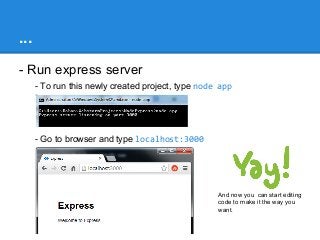
- To run this newly created project, type node app

- Go to browser and type localhost:3000

And now you can start editing
code to make it the way you
want.
...
- While setting up project
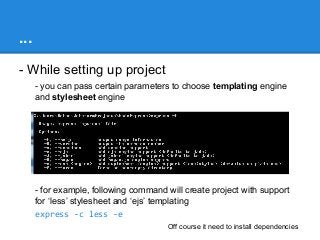
- you can pass certain parameters to choose templating engine
and stylesheet engine

- for example, following command will create project with support
for ‘less’ stylesheet and ‘ejs’ templating
express -c less -e
Off course it need to install dependencies
References
http://en.wikipedia.org/wiki/V8_(JavaScript_engine)
http://stackoverflow.com/questions/6632606/where-does-node-js-fit-within-theweb-development-context
http://debuggable.com/posts/understanding-node-js:4bd98440-45e4-4a9a-8ef70f7ecbdd56cb
http://www.nodebeginner.org/
http://howtonode.org/
https://npmjs.org/
http://nodejs.org/
Book:
Node: Up & Running - Tom Hughes-Croucher & Mike Wilson (O’reilly)

Node js

  • 1.
    Node js with npm, installingexpress js @RohanChandane Last updated on 13th Oct 2013
  • 2.
  • 3.
  • 4.
    ... On windows machine, -Setting up environment variable is built in inside nodejs directory - after installation, type nodevars to install environment variable. nodevars.bat is a batch file responsible for setting it up
  • 5.
    What is Node/ Node js? - Node is Command line tool - Download it and install - It runs javascript code by typing ‘node your-script-file.js’ - Hosted on V8 Javascript engine - uses V8 as standalone engine to execute javascript. - Server-side javascript - Node provides JavaScript API to access network & file system. - These JavaScript files runs on the server rather than on the client side - We can also write a server, which can be a replacement for something like the Apache web server
  • 6.
    ... - Uses event-drivenI/O (non-blocking I/O) - is just a term that describes the normal asynchronous callback mechanisms. - In node.js you supply callback functions for all sorts of things, and your function is called when the relevant event occurs. - So that means, it works parallelly on different I/O operations. - eg. Code for reading from a file & reading values from a database can be executed one after another (since node js is single threaded), and it will wait for data to receive from file & database. Once it receives data, it will call callback function related to function call. - One language - to write server side and client side code - No need to learn server side language like Java & PHP
  • 7.
    Why Node 1. Efficiency -Response time = server-side script execution time + time taken for I/O operation - Node reduces the response time to the duration it takes to execute the slowest I/O query - Its mainly because ‘Single threaded - Event loop’ - Also called Event driven computing Architecture - There is a need for high performance web servers
  • 8.
    ... 2. JavaScript - JavaScriptis universal language for web developers - Its single threaded - Its dynamic 3. Speed - Up till now, JavaScript was related to browser - We used it for DOM manipulation - and our favourite browser to execute javascript, is Chrome
  • 9.
    ... - Chrome usesV8 engine underneath to execute js - V8 is the fastest javascript execution engine - V8 was designed to run in Chrome’s multi-process model V8 engine - V8 is intended to be used both in a browser and as a standalone high-performance engine
  • 10.
    Asynchronous callback mechanisms 4.callbacks are invoked functions, which are initiating - I/O operations - writing to a socket - making a database query & not going to return the value immediately event loop 3. event occurs 1. registers callbacks 2. loop wait for events There's a single thread, and a single event loop, that handles all IO in node.js
  • 11.
    Writing Server-side jswith Node Now, lets see how to write a server in JavaScript - creating 'server.js' var http = require("http"); http.createServer(function(request, response) { response.writeHead(200, {"Content-Type": "text/plain"}); response.write("Hello World"); response.end(); }).listen(8888); - executing it: node server.js
  • 12.
    Passing function asparameter lets say function execute(someFunction, value) { someFunction(value); } execute(function(word){ console.log(word) }, "Hello"); can also be written function say(word) { console.log(word); } function execute(someFunction, value) { someFunction(value); } execute(say, "Hello");
  • 13.
    Understanding server.js var http= require("http"); function onRequest(request, response) { console.log("Callback invoked"); response.writeHead(200, {"Content-Type": "text/plain"}); response.write("Hello World"); response.end(); } 1 2 http.createServer(onRequest).listen(8888); console.log("Server started"); 3 4 single thread
  • 14.
    ... This ‘server.js’ programexecutes in following order 1. registers callbacks onRequest 2. loop wait for events listen(8888) 3. event occurs Browser requests - localhost:8888 4. callbacks are invoked function onRequest() gets execute
  • 15.
    Some Basic CoreModules Node has several modules compiled into the binary. Defined in node's source in the lib/ folder. To load use require('modules identifier') - HTTP how to use require('http') - Net how to use require('net') - DNS how to use require('dns') - Events how to use require('events') - Utilities how to use require('util') - File System how to use require('fs') - Operating System how to use require('os') - Debugger how to use debugger
  • 16.
    Some Global object Availablein all modules - Console how to use console - Process how to use process - Exports how to use exports - require how to use require() - setTimeout how to use setTimeout() - clearTimeout how to use clearTimeout() - setInterval how to use setInterval() - clearInterval how to use clearInterval()
  • 17.
    Core Modules: usage Netrequire('net') - Asynchronous network wrapper. It can create server & Client. - Following example program creates server. It can be connected using Telnet/Putty & responds to all user provided data. var sys = require("sys"), net = require("net"); var server = net.createServer(function(stream) { stream.setEncoding("utf8"); stream.addListener("connect", function() { stream.write("Client connectedn"); }); stream.addListener("data", function(data) { stream.write("Received from client: " + data); stream.write(data); }); }); server.listen(8000, "localhost");
  • 18.
  • 19.
    NPM: npmjs.org Node PackageManager (NPM) - Node modules largely written in JavaScript which runs on the server (executed by the V8 engine) rather than on the client side. - These modules are registered in npm registry at registry.npmjs.org - To use these modules while developing application, npm helps in - installing Node js packages / Modules / Programs - & linking their dependencies - npm is a command line utility program - npm is bundled and installed automatically with Node version 0.6.3 and above - On windows, after setting up environment variables npm command can be executed from any desired location to install node packages
  • 20.
    NPM Commands npm -l -display full usage info npm <command> -h - display quick help on command - eg npm install -h npm faq - commonly asked questions npm ls - displays all versions of available packages installed on system, their dependencies, in tree structure
  • 21.
    … npm install <modulename> - to install new modules - on windows, command prompt should be running with admin rights npm install <module name> -g - to install new modules globally - on windows at location C:Users<user>AppDataRoamingnpm
  • 22.
    ... npm update - updateall listed packages to their latest version (in given folder) - install missing packages - removes old versions of packages npm update -g - update all listed global packages npm update <pkg> - update specific package
  • 23.
  • 24.
    Installing node module:express js - express js - Web application framework for node js - Provides robust set of features to build single and multi page, & hybrid web application - installing express js on windows - Start cmd with admin rights - Make sure you have set up environment variable for node js - Go to your project directory and type npm install express
  • 25.
    ... - installing expressas global package - Previously we installed express for particular folder - But usually we install it globally - To install express globally, type npm install express -g - On windows, this will install express in C:Users<user>AppDataRoamingnpm - express js is ready to use now
  • 26.
    ... - Create aexpress project - Inside project directory type express and enter - This will create a project structure and will display created files, what are dependencies and how to run project - This is instructing to install dependencies by staying in same directory and type npm install
  • 27.
    ... - Run expressserver - To run this newly created project, type node app - Go to browser and type localhost:3000 And now you can start editing code to make it the way you want.
  • 28.
    ... - While settingup project - you can pass certain parameters to choose templating engine and stylesheet engine - for example, following command will create project with support for ‘less’ stylesheet and ‘ejs’ templating express -c less -e Off course it need to install dependencies
  • 29.