NodeJS
- Dilkash Shaikh Mahajan
Anjuman College of Engineering and Technology, Nagpur.
+91 9325696751
Contents
 Introduction
 Advantages
 Applications
 Why We Are Used NodeJS(Pictorial)
 Difference Between PHP and NodeJS
 Modules
 Path
 OS
 File System
By Dilkash Shaikh Mahajan
Introduction
 Node.js is a runtime environment that includes everything that is needed to execute a
program that is written in JavaScript.
 Node.js runs the V8 JavaScript engine, the core of Google Chrome, outside of the
browser. This allows Node.js to be very performant.
 A Node.js app is run in a single process, without creating a new thread for every
request.
 Node.js provides a set of asynchronous I/O primitives in its standard library that
prevent JavaScript code from blocking and generally, libraries in Node.js are written
using non-blocking paradigms, making blocking behavior the exception rather than
the norm.
By Dilkash Shaikh Mahajan
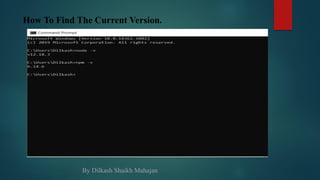
How To Find The Current Version.
By Dilkash Shaikh Mahajan
Advantages
 Easy to Learn.
 Fast Backend Solution.
 Scalability.
 Community.
 High Performance.
 Caching.
By Dilkash Shaikh Mahajan
Applications
 Real-time Web Applications
 Streaming Applications
 Messaging Apps
 Chat Programs
 Social Media Apps
 Virtual Emulators
 Multiplayer Games
 Collaboration Tools
 API
By Dilkash Shaikh Mahajan
Why We Are Used NodeJS(Pictorial)
By Dilkash Shaikh Mahajan
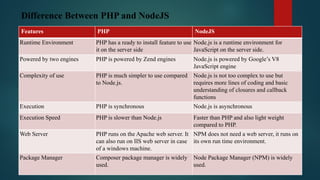
Difference Between PHP and NodeJS
Features PHP NodeJS
Runtime Environment PHP has a ready to install feature to use
it on the server side
Node.js is a runtime environment for
JavaScript on the server side.
Powered by two engines PHP is powered by Zend engines Node.js is powered by Google’s V8
JavaScript engine
Complexity of use PHP is much simpler to use compared
to Node.js.
Node.js is not too complex to use but
requires more lines of coding and basic
understanding of closures and callback
functions
Execution PHP is synchronous Node.js is asynchronous
Execution Speed PHP is slower than Node.js Faster than PHP and also light weight
compared to PHP.
Web Server PHP runs on the Apache web server. It
can also run on IIS web server in case
of a windows machine.
NPM does not need a web server, it runs on
its own run time environment.
Package Manager Composer package manager is widely
used.
Node Package Manager (NPM) is widely
used.
 PATH Modules
The Path Module Provides Utilities For Working With File And Directory Paths. It can be accessed using:
const path = require('path');
 path.basename(path):-
The path.basename() method returns the last portion of a path, similar to the Unix basename command.
 path.dirname(path):-
The path.dirname() method returns the directory name of a path, similar to the Unix dirname command.
 path.extname(path):-
The path.extname() method returns the extension of the path, from the last occurrence of the .
 path.isabsolute(path):-
The path.isAbsolute() method determines if path is an absolute path. If the given path is a zero-length
string, false will be returned.
 path.parse(path):-
The path.parse() method returns an object whose properties represent significant elements of the path.
By Dilkash Shaikh Mahajan
 OS Modules
The OS Module Provides Operating System-related Utility Methods And Properties. It Can Be Accessed Using:
const os = require(‘os’);
 os.arch():-
Returns the operating system CPU architecture for which the Node.js binary was compiled.
 os.homedir():-
Returns the string path of the current user's home directory.
 os.hostname():-
Returns the host name of the operating system as a string.
 os.version():-
Returns a string identifying the kernel version.
 os.platform():-
Returns a string identifying the operating system platform. The value is set at compile time.
By Dilkash Shaikh Mahajan
 fs.appendFile(path, data[options], callback)
Asynchronously append data to a file, creating the file if it does not yet exist.
 fs.mkdir(path[options], callback)
Asynchronously creates a directory.
 fs.readFile(path[options], encoding, callback)
Returns the host name of the operating system as a string.
 fs.rename(oldPath, newPath, callback)
Asynchronously rename file at oldPath to the pathname provided as newPath. In the case
that newPath already exists, it will be overwritten.
 fs.writeFile(file, data[, options], callback)
When file is a filename, asynchronously writes data to the file, replacing the file if it already
exists. data can be a string or a buffer.
 FILE SYSTEM Modules
The fs module enables interacting with the file system in a way modeled on standard POSIX functions. We are see
asynchronous way.
const fs = require(‘fs’);
By Dilkash Shaikh Mahajan
Thank You.
By Dilkash Shaikh Mahajan

Node JS | Dilkash Shaikh Mahajan

  • 1.
    NodeJS - Dilkash ShaikhMahajan Anjuman College of Engineering and Technology, Nagpur. +91 9325696751
  • 2.
    Contents  Introduction  Advantages Applications  Why We Are Used NodeJS(Pictorial)  Difference Between PHP and NodeJS  Modules  Path  OS  File System By Dilkash Shaikh Mahajan
  • 3.
    Introduction  Node.js isa runtime environment that includes everything that is needed to execute a program that is written in JavaScript.  Node.js runs the V8 JavaScript engine, the core of Google Chrome, outside of the browser. This allows Node.js to be very performant.  A Node.js app is run in a single process, without creating a new thread for every request.  Node.js provides a set of asynchronous I/O primitives in its standard library that prevent JavaScript code from blocking and generally, libraries in Node.js are written using non-blocking paradigms, making blocking behavior the exception rather than the norm. By Dilkash Shaikh Mahajan
  • 4.
    How To FindThe Current Version. By Dilkash Shaikh Mahajan
  • 5.
    Advantages  Easy toLearn.  Fast Backend Solution.  Scalability.  Community.  High Performance.  Caching. By Dilkash Shaikh Mahajan
  • 6.
    Applications  Real-time WebApplications  Streaming Applications  Messaging Apps  Chat Programs  Social Media Apps  Virtual Emulators  Multiplayer Games  Collaboration Tools  API By Dilkash Shaikh Mahajan
  • 7.
    Why We AreUsed NodeJS(Pictorial) By Dilkash Shaikh Mahajan
  • 8.
    Difference Between PHPand NodeJS Features PHP NodeJS Runtime Environment PHP has a ready to install feature to use it on the server side Node.js is a runtime environment for JavaScript on the server side. Powered by two engines PHP is powered by Zend engines Node.js is powered by Google’s V8 JavaScript engine Complexity of use PHP is much simpler to use compared to Node.js. Node.js is not too complex to use but requires more lines of coding and basic understanding of closures and callback functions Execution PHP is synchronous Node.js is asynchronous Execution Speed PHP is slower than Node.js Faster than PHP and also light weight compared to PHP. Web Server PHP runs on the Apache web server. It can also run on IIS web server in case of a windows machine. NPM does not need a web server, it runs on its own run time environment. Package Manager Composer package manager is widely used. Node Package Manager (NPM) is widely used.
  • 9.
     PATH Modules ThePath Module Provides Utilities For Working With File And Directory Paths. It can be accessed using: const path = require('path');  path.basename(path):- The path.basename() method returns the last portion of a path, similar to the Unix basename command.  path.dirname(path):- The path.dirname() method returns the directory name of a path, similar to the Unix dirname command.  path.extname(path):- The path.extname() method returns the extension of the path, from the last occurrence of the .  path.isabsolute(path):- The path.isAbsolute() method determines if path is an absolute path. If the given path is a zero-length string, false will be returned.  path.parse(path):- The path.parse() method returns an object whose properties represent significant elements of the path. By Dilkash Shaikh Mahajan
  • 10.
     OS Modules TheOS Module Provides Operating System-related Utility Methods And Properties. It Can Be Accessed Using: const os = require(‘os’);  os.arch():- Returns the operating system CPU architecture for which the Node.js binary was compiled.  os.homedir():- Returns the string path of the current user's home directory.  os.hostname():- Returns the host name of the operating system as a string.  os.version():- Returns a string identifying the kernel version.  os.platform():- Returns a string identifying the operating system platform. The value is set at compile time. By Dilkash Shaikh Mahajan
  • 11.
     fs.appendFile(path, data[options],callback) Asynchronously append data to a file, creating the file if it does not yet exist.  fs.mkdir(path[options], callback) Asynchronously creates a directory.  fs.readFile(path[options], encoding, callback) Returns the host name of the operating system as a string.  fs.rename(oldPath, newPath, callback) Asynchronously rename file at oldPath to the pathname provided as newPath. In the case that newPath already exists, it will be overwritten.  fs.writeFile(file, data[, options], callback) When file is a filename, asynchronously writes data to the file, replacing the file if it already exists. data can be a string or a buffer.  FILE SYSTEM Modules The fs module enables interacting with the file system in a way modeled on standard POSIX functions. We are see asynchronous way. const fs = require(‘fs’); By Dilkash Shaikh Mahajan
  • 12.
    Thank You. By DilkashShaikh Mahajan