Running Netflix OSS on Docker
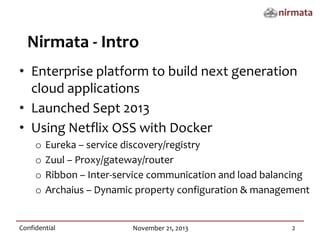
Nirmata - Intro
• Enterprise platform to build next generation
cloud applications
• Launched Sept 2013
• Using Netflix OSS with Docker
o
o
o
o

Eureka – service discovery/registry
Zuul – Proxy/gateway/router
Ribbon – Inter-service communication and load balancing
Archaius – Dynamic property configuration & management

Confidential

November 21, 2013

2
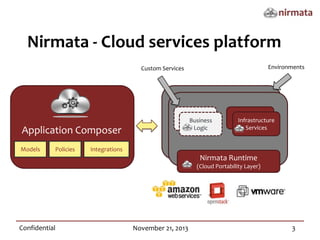
Nirmata - Cloud services platform
Environments

Custom Services

Application Composer
Models

Policies

User’s
Business
Services
Logic

Services
Infrastructure
Services

Integrations

Nirmata Runtime
(Cloud Portability Layer)

Confidential

November 21, 2013

3
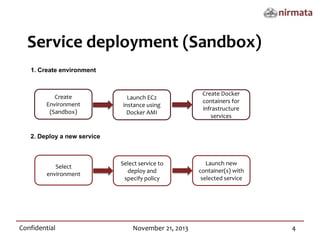
Service deployment (Sandbox)
1. Create environment

Create
Environment
(Sandbox)

Launch EC2
instance using
Docker AMI

Create Docker
containers for
infrastructure
services

Select service to
deploy and
specify policy

Launch new
container(s) with
selected service

2. Deploy a new service

Select
environment

Confidential

November 21, 2013

4
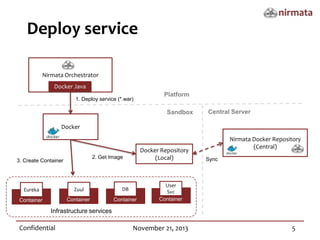
Deploy service
Nirmata Orchestrator
Docker Java
1. Deploy service (*.war)

Platform
Sandbox

Central Server

Docker

Docker Repository
(Local)

2. Get Image

3. Create Container

Eureka

Zuul

DB

Container

Container

Container

Nirmata Docker Repository
(Central)
Sync

User
Svc
Container

Infrastructure services

Confidential

November 21, 2013

5
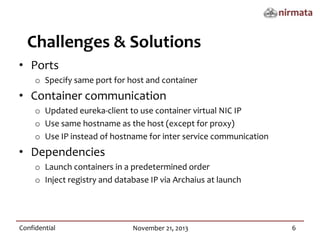
Challenges & Solutions
• Ports
o Specify same port for host and container

• Container communication
o Updated eureka-client to use container virtual NIC IP
o Use same hostname as the host (except for proxy)
o Use IP instead of hostname for inter service communication

• Dependencies
o Launch containers in a predetermined order
o Inject registry and database IP via Archaius at launch

Confidential

November 21, 2013

6
Demo

Confidential

November 21, 2013

7
Thank you.
redefining software
http://nirmata.com

@NirmataCloud

Running Netflix OSS on Docker with Nirmata

  • 1.
  • 2.
    Nirmata - Intro •Enterprise platform to build next generation cloud applications • Launched Sept 2013 • Using Netflix OSS with Docker o o o o Eureka – service discovery/registry Zuul – Proxy/gateway/router Ribbon – Inter-service communication and load balancing Archaius – Dynamic property configuration & management Confidential November 21, 2013 2
  • 3.
    Nirmata - Cloudservices platform Environments Custom Services Application Composer Models Policies User’s Business Services Logic Services Infrastructure Services Integrations Nirmata Runtime (Cloud Portability Layer) Confidential November 21, 2013 3
  • 4.
    Service deployment (Sandbox) 1.Create environment Create Environment (Sandbox) Launch EC2 instance using Docker AMI Create Docker containers for infrastructure services Select service to deploy and specify policy Launch new container(s) with selected service 2. Deploy a new service Select environment Confidential November 21, 2013 4
  • 5.
    Deploy service Nirmata Orchestrator DockerJava 1. Deploy service (*.war) Platform Sandbox Central Server Docker Docker Repository (Local) 2. Get Image 3. Create Container Eureka Zuul DB Container Container Container Nirmata Docker Repository (Central) Sync User Svc Container Infrastructure services Confidential November 21, 2013 5
  • 6.
    Challenges & Solutions •Ports o Specify same port for host and container • Container communication o Updated eureka-client to use container virtual NIC IP o Use same hostname as the host (except for proxy) o Use IP instead of hostname for inter service communication • Dependencies o Launch containers in a predetermined order o Inject registry and database IP via Archaius at launch Confidential November 21, 2013 6
  • 7.
  • 8.