Nicelabel Integration
with
eSeal
for
Nicelabel Designer
• NiceLabel is a leading global developer of label design software and label
management systems.
• This help companies of all sizes improve the quality, speed and efficiency of
their labeling, while reducing cost.
• NiceLabel Design and Print software helps you quickly design labels and
create an efficient printing process.
• Quickly produce professional labels without making investments in training
and coding.
Nicelabel .NET API
• Nicelabel .NET API is .NET Framework based library that enables software
developers to seamlessly print Nicelabel label templates and interact with
Nicelabel management module.
• NiceLabel .NET API is built on Microsoft .NET Framework and is the
preferred choice for developers of .NET applications.
• It enables users to quickly add full-featured professional label printing
capability to their own applications.
• NiceLabel Print Engine is a rendering engine that is packaged as part of
the NiceLabel .NET API.
Earlier Integration with eSeal
Printer Client
Printer
Configurations
Replaces
template with
dynamic values
DB
Label
Master
Template Text
Dynamic
attributes from
eSeal
USB
Printer Name,
Template file
Network
Printer Name,
Template File,
Printer Port
Template Files(.PRN)
Label files(.prn)
Created by client • Label files(.prn) fields will be integrated with eSeal
attributes for dynamic values.
• These files will need to be stored in DB.
• If any change required in Labels design, that also need
to be changed in DB also.
• .Prn file is Printer Specific
Nicelabel Integration
Dynamic
attributes
from eSeal
Nicelabel SDK
SDK.NET.Interface.dll
File Name
Ex: Primarylabel.lbl
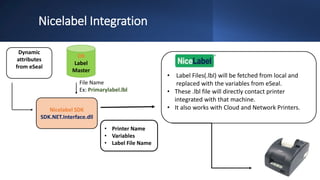
• Label Files(.lbl) will be fetched from local and
replaced with the variables from eSeal.
• These .lbl file will directly contact printer
integrated with that machine.
• It also works with Cloud and Network Printers.
• Printer Name
• Variables
• Label File Name
DB
Label
Master
Template File(.LBL)
Client creates the .lbl files
with
eSeal Integrated Variables
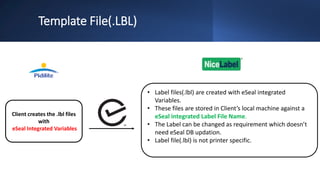
• Label files(.lbl) are created with eSeal integrated
Variables.
• These files are stored in Client’s local machine against a
eSeal integrated Label File Name.
• The Label can be changed as requirement which doesn’t
need eSeal DB updation.
• Label file(.lbl) is not printer specific.
eSeal
Integrated
Variables
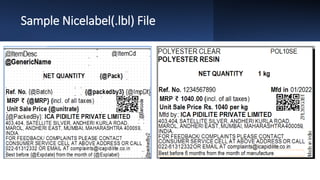
Sample Nicelabel(.lbl) File
Thank You

Nicelabel Integration.pptx

  • 1.
  • 2.
    Nicelabel Designer • NiceLabelis a leading global developer of label design software and label management systems. • This help companies of all sizes improve the quality, speed and efficiency of their labeling, while reducing cost. • NiceLabel Design and Print software helps you quickly design labels and create an efficient printing process. • Quickly produce professional labels without making investments in training and coding.
  • 3.
    Nicelabel .NET API •Nicelabel .NET API is .NET Framework based library that enables software developers to seamlessly print Nicelabel label templates and interact with Nicelabel management module. • NiceLabel .NET API is built on Microsoft .NET Framework and is the preferred choice for developers of .NET applications. • It enables users to quickly add full-featured professional label printing capability to their own applications. • NiceLabel Print Engine is a rendering engine that is packaged as part of the NiceLabel .NET API.
  • 4.
    Earlier Integration witheSeal Printer Client Printer Configurations Replaces template with dynamic values DB Label Master Template Text Dynamic attributes from eSeal USB Printer Name, Template file Network Printer Name, Template File, Printer Port
  • 5.
    Template Files(.PRN) Label files(.prn) Createdby client • Label files(.prn) fields will be integrated with eSeal attributes for dynamic values. • These files will need to be stored in DB. • If any change required in Labels design, that also need to be changed in DB also. • .Prn file is Printer Specific
  • 6.
    Nicelabel Integration Dynamic attributes from eSeal NicelabelSDK SDK.NET.Interface.dll File Name Ex: Primarylabel.lbl • Label Files(.lbl) will be fetched from local and replaced with the variables from eSeal. • These .lbl file will directly contact printer integrated with that machine. • It also works with Cloud and Network Printers. • Printer Name • Variables • Label File Name DB Label Master
  • 7.
    Template File(.LBL) Client createsthe .lbl files with eSeal Integrated Variables • Label files(.lbl) are created with eSeal integrated Variables. • These files are stored in Client’s local machine against a eSeal integrated Label File Name. • The Label can be changed as requirement which doesn’t need eSeal DB updation. • Label file(.lbl) is not printer specific.
  • 8.
  • 9.
  • 10.