FULLTEXT SEARCH
FTS QUERY
• WORD SEARCH
• SELECT ... WHERE MATCH(columns) AGAINST(‘word‘);
• SELECT ... WHERE MATCH(columns) AGAINST(‘word‘ IN BOOLEAN MODE);
• SELECT ... WHERE MATCH(columns) AGAINST(‘word‘ IN NATURAL LANGUAGE MODE);
• PHRASE SEARCH
• SELECT ... WHERE MATCH(columns) AGAINST(‘word1 word2‘);
• SELECT ... WHERE MATCH(columns) AGAINST(‘word1 word2‘ IN BOOLEAN MODE);
• SELECT ... WHERE MATCH(columns) AGAINST(‘word1 word2‘ IN NAUTRAL LANGUAGE MODE);
• Relevance Scoring
• Float value
• 0 - No relevance
• 1 - Perfect match (?)
• SELECT MATCH(columns) AGAINST(‘word‘) as score;
FTS MODE
• BOOLEAN MODE
• Support Boolean operator
• NATURAL LANGUAGE MODE
• Not support boolean operator
• Sort by relevance ranking (default)
• QUERY EXPANSION
• Blind Query Expansion for MySQL
• First result
• FTS query with user keywords
• Second result
• Find common words from `First result`
• FTS query with common words
• Return First + Second results
FTS OPERATOR
• Wild card search (BOOLEAN & NATURAL MODE)
• MATCH() AGAINST(‘kakao*‘ IN BOOLEAN MODE)
• Boolean operator (BOOLEAN MODE)
• MATCH() AGAINST(‘kakao talk‘ IN BOOLEAN MODE)
• MATCH() AGAINST(‘+kakao +talk‘ IN BOOLEAN MODE)
• MATCH() AGAINST(‘+kakao -talk‘ IN BOOLEAN MODE)
• MATCH() AGAINST(‘+kakao ~talk‘ IN BOOLEAN MODE)
• MATCH() AGAINST('"kakao talk"' IN BOOLEAN MODE)
• MATCH() AGAINST('"kakao talk" @8' IN BOOLEAN MODE)
• Proximity search
• See the manual for more operator
FTS RANKING
• TF-IDF Weighting algorithm
• Term Frequency - Inverse Document Frequency
• ${TF} = Frequency of Term
• ${IDF} = log10( ${total_records} / ${matching_records} )
• ${rank} = ${TF} * ${IDF} * ${IDF}
mysql> SELECT id, title, body,
MATCH (title,body) AGAINST ('database' IN BOOLEAN MODE) AS score
FROM articles ORDER BY score DESC;
+----+------------------------------+-------------------------------------+---------------------+
| id | title | body | score |
+----+------------------------------+-------------------------------------+---------------------+
| 6 | Database, Database, Database | database database database | 1.0886961221694946 |
| 3 | Optimizing Your Database | In this database tutorial ... | 0.3628987073883154 |
| 1 | MySQL Tutorial | This database tutorial ... | 0.1814493536991577 |
| 2 | How To Use MySQL | After you went through a ... | 0 |
| 4 | MySQL vs. YourSQL | When comparing databases ... | 0 |
| 5 | MySQL Security | When configured properly, MySQL ... | 0 |
| 7 | 1001 MySQL Tricks | 1. Never run mysqld as root. 2. ... | 0 |
| 8 | MySQL Full-Text Indexes | MySQL fulltext indexes use a .. | 0 |
+----+------------------------------+-------------------------------------+---------------------+
8 rows in set (0.00 sec)
TF = 6
IDF = log10(8/3)
1.088696164686938 =
6 * log10(8/3) * log10(8/3)
FTS PARSER
• DELIMITER
• default Parser
• NGRAM
• NGRAM Parser
• STEMMING
• MECAB Parser
FTS PARSER
• DELIMITER
• MySQL only use space-character(‘ ‘) as delimiter(tokenizing)
• innodb_ft_min_token_size <= length(token) <= innodb_ft_max_token_size
• Filter out if token matched with stopword 100%
• No stemming (even English)
• 1-pass full-text search
• Tokenizing example
“This is the mysql book”
This is the mysql book
user input text
tokenized word (token)
filter out stopword (indexing target)
FTS PARSER
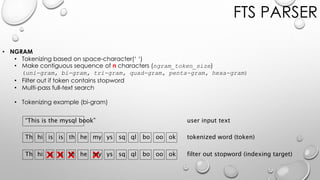
• NGRAM
• Tokenizing based on space-character(‘ ‘)
• Make contiguous sequence of n characters (ngram_token_size)
(uni-gram, bi-gram, tri-gram, quad-gram, penta-gram, hexa-gram)
• Filter out if token contains stopword
• Multi-pass full-text search
• Tokenizing example (bi-gram)
“This is the mysql book”
Th
user input text
tokenized word (token)
filter out stopword (indexing target)
hi is is th he my ys sq ql bo oo ok
Th hi is is th he my ys sq ql bo oo ok
FTS PARSER
• STEMMING
• MySQL support MECAB library
• Developed for japaneses phrase analysis
• Can be used for Korean also (same pattern of postpositional word(조사 助詞))
• You need to prepare really a lot(*1000) of things to use MECAB
• Need to be a language expert (First)
• Need a dictionary (Noun, Verb, ...)
• Need phrase pattern (Machine learning for various pharse pattern)
• Need to tuning for performance
• Tokenizing example
이것은 MySQL 책입니다
이것
user input text
tokenized word (token)
filter out useless word (indexing target)
은 MySQL 책 입니다
이것 은 MySQL 책 입니다
FTS INDEX
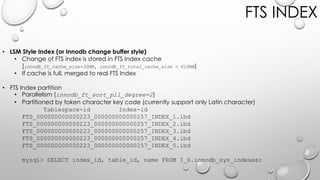
• LSM Style Index (or Innodb change buffer style)
• Change of FTS index is stored in FTS Index cache
(innodb_ft_cache_size=32MB, innodb_ft_total_cache_size = 610MB)
• If cache is full, merged to real FTS Index
• FTS Index partition
• Parallelism (innodb_ft_sort_pll_degree=2)
• Partitioned by token character key code (currently support only Latin character)
Tablespace-id Index-id
FTS_000000000000223_000000000000257_INDEX_1.ibd
FTS_000000000000223_000000000000257_INDEX_2.ibd
FTS_000000000000223_000000000000257_INDEX_3.ibd
FTS_000000000000223_000000000000257_INDEX_4.ibd
FTS_000000000000223_000000000000257_INDEX_5.ibd
mysql> SELECT index_id, table_id, name FROM I_S.innodb_sys_indexes;
FTS INDEX
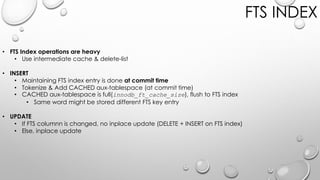
• FTS Index operations are heavy
• Use intermediate cache & delete-list
• INSERT
• Maintaining FTS index entry is done at commit time
• Tokenize & Add CACHED aux-tablespace (at commit time)
• CACHED aux-tablespace is full(innodb_ft_cache_size), flush to FTS index
• Same word might be stored different FTS key entry
• UPDATE
• If FTS columnn is changed, no inplace update (DELETE + INSERT on FTS index)
• Else, inplace update
FTS INDEX
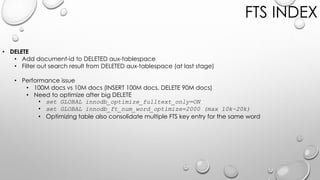
• DELETE
• Add document-id to DELETED aux-tablespace
• Filter out search result from DELETED aux-tablespace (at last stage)
• Performance issue
• 100M docs vs 10M docs (INSERT 100M docs, DELETE 90M docs)
• Need to optimize after big DELETE
• set GLOBAL innodb_optimize_fulltext_only=ON
• set GLOBAL innodb_ft_num_word_optimize=2000 (max 10k~20k)
• Optimizing table also consolidate multiple FTS key entry for the same word
Token iList
MySQL
Fulltext
FTS INDEX
• INVERTED INDEX
• Index entry = [token - iList] pair
• iList = [document-id, position] list
• iList has position
• Support proximity search
• Index size vs Common(Frequent) token
• Index size vs FTS Index cache
doc-id(1), pos(3) doc-id(4), pos(1) doc-id(7), pos(12)
doc-id(1), pos(8) doc-id(6), pos(21) doc-id(9), pos(3) doc-id(13), pos(9)
FTS STOPWORD
• STOPWORD ?
• Filter out word list from FTS Index
• Overhead to check stopword (rb-tree search)
• Current implementation is useless for Korean (c.f. MECAB)
• DELIMITER Parser : postpositional word(조사 助詞)
• NGRAM Parser : filter out containing stopword
• Control using stopword
• innodb_ft_enable_stopword='db/table'
• innodb_ft_server_stopword_table='db/table'
• innodb_ft_user_stopword_table=OFF (Recommend for curr-version)
• Stopword table is registered table’s meta information
• Once custom stopword table is used, do not remove it
FTS STOPWORD
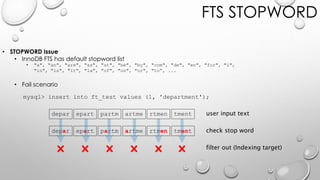
• STOPWORD Issue
• InnoDB FTS has default stopword list
• "a", "an", "are", "as", "at", "be", "by", "com", "de", "en", "for", "i",
"in", "is", "it", "la", "of", "on", "or", "to“, ...
• Fail scenario
mysql> insert into ft_test values (1, 'department');
depar epart partm artme rtmen tment
user input text
check stop word
filter out (Indexing target)
FTS DOCUMENT ID
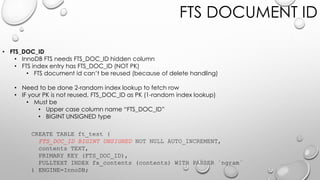
• FTS_DOC_ID
• InnoDB FTS needs FTS_DOC_ID hidden column
• FTS index entry has FTS_DOC_ID (NOT PK)
• FTS document id can’t be reused (because of delete handling)
• Need to be done 2-random index lookup to fetch row
• IF your PK is not reused, FTS_DOC_ID as PK (1-random index lookup)
• Must be
• Upper case column name “FTS_DOC_ID”
• BIGINT UNSIGNED type
CREATE TABLE ft_test (
FTS_DOC_ID BIGINT UNSIGNED NOT NULL AUTO_INCREMENT,
contents TEXT,
PRIMARY KEY (FTS_DOC_ID),
FULLTEXT INDEX fx_contents (contents) WITH PARSER `ngram`
) ENGINE=InnoDB;
NGRAM TOKEN_SIZE
• token_size of NGRAM Parser
• Choose carefully, ngram_token_size determine
• FTS index size
• FTS query performance
• FTS query can find documents
• ngram_token_size ↑↑
• Index size ↑ (varying text characteristics)
• Token uniqueness ↑ Query performance ↑
• Searchabliity ↓ (len<ngram_token_size word is not indexed)
• ngram_token_size ↓↓
• Index size ↓ (varying text characteristics)
• Token uniqueness ↓ Query performance ↓
• Searchabliity ↑
FT index size of 500M Tab
NGRAM PERFORMANCE
• FTS Query performance is depend on result-count
• Query matching several documents is faster (Generally)
• Query matching huge documents is slower (No way to avoid this)
• Real test result
• Do it yourself (with your own service data)
NGRAM PERFORMANCE
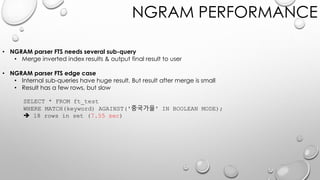
• NGRAM parser FTS needs several sub-query
• Merge inverted index results & output final result to user
• NGRAM parser FTS edge case
• Internal sub-queries have huge result, But result after merge is small
• Result has a few rows, but slow
SELECT * FROM ft_test
WHERE MATCH(keyword) AGAINST('중국가을' IN BOOLEAN MODE);
 18 rows in set (7.55 sec)
NGRAM PERFORMANCE
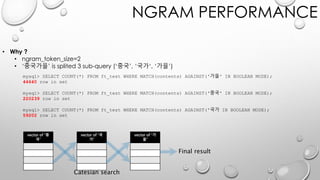
• Why ?
• ngram_token_size=2
• ‘중국가을’ is splited 3 sub-query (‘중국’, ‘국가‘, ‘가을’)
mysql> SELECT COUNT(*) FROM ft_test WHERE MATCH(contents) AGAINST('가을' IN BOOLEAN MODE);
44640 row in set
mysql> SELECT COUNT(*) FROM ft_test WHERE MATCH(contents) AGAINST('중국' IN BOOLEAN MODE);
220239 row in set
mysql> SELECT COUNT(*) FROM ft_test WHERE MATCH(contents) AGAINST('국가 IN BOOLEAN MODE);
59202 row in set
vector of ‘중
국’
vector of ‘국
가’
vector of ‘가
을’
Catesian search
Final result
NGRAM PERFORMANCE
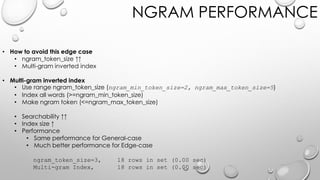
• How to avoid this edge case
• ngram_token_size ↑↑
• Multi-gram inverted index
• Use range ngram_token_size (ngram_min_token_size=2, ngram_max_token_size=5)
• Index all words (>=ngram_min_token_size)
• Make ngram token (<=ngram_max_token_size)
• Searchability ↑↑
• Index size ↑
• Performance
• Same performance for General-case
• Much better performance for Edge-case
ngram_token_size=3, 18 rows in set (0.00 sec)
Multi-gram Index, 18 rows in set (0.00 sec)
MULTI-GRAM PARSER
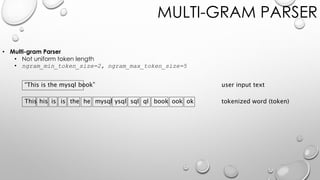
• Multi-gram Parser
• Not uniform token length
• ngram_min_token_size=2, ngram_max_token_size=5
“This is the mysql book”
This
user input text
tokenized word (token)his is is the he mysql ysql sql ql book ook ok
MULTI-GRAM PARSER
• Multi-gram Parser
• Index size (n-Gram vs Multi-Gram)
DELIMITER VS NGRAM PARSER
• DELIMITER vs n-GRAM
• How many tokens (tokens = Indexing overhead)
• Delimiter ==> tokens 105
• 2-gram ==> tokens 325
• Really need n-Gram parser ?
• SELECT * FROM ft_tab WHERE match(contents) against(‘wear*’ IN BOOLEAN MODE);
-> Found
• SELECT * FROM ft_tab WHERE match(contents) against(‘level*’ IN BOOLEAN MODE);
-> Not Found
27. Over-provisioning은 Wear-leveling과 성능 향상에 많은 도움이 된다.
SSD 드라이브는 최대 물리 용량보다 더 작은 용량으로 파티션을 생성함으로써 Over-provisioning 공간을 할당할 수 있다. 남은 공간은 사용자나 호스트에게는
보이지 않지만 SSD 컨트롤러는 여전히 남은 물리 공간을 활용할 수 있다. Over-provisioning 공간은 NAND 플래시 셀의 제한된 수명을 극복하기 위한 Wear-
leveling이 좀 더 원활하게 처리될 수 있도록 도와준다. 데이터 쓰기가 아주 빈번한 경우에는 성능 향상을 위해서 전체 용량의 25% 정도의 공간을 Over-
provisioning 공간을 할당하는 것이 좋으며, 그렇게 쓰기 부하가 심하지 않은 경우에는 10%~15% 정도의 공간을 Over-provisioning 공간으로 할당해주는 것이
좋다. Over-provisioning 공간은 NAND 플래시 블록의 버퍼처럼 작동하기도 하는데, 이는 일시적으로 평상시보다 높은 쓰기 부하가 발생하더라도 Garbage-
collection이 충분한 “free” 상태 페이지를 만들어 낼수 있도록 완충 역할을 해준다.
BUGS & CAUTIONS
• Assertion fail during fulltext search query with LIMIT clause
(https://bugs.mysql.com/bug.php?id=85835)
MySQL server is crashed because of assertion fail during ngram fulltext search query with LIMIT clause.
Assertion failure happen on this code
(https://github.com/mysql/mysql-server/blob/mysql-5.7.17/storage/innobase/fts/fts0que.cc#L3559).
l don't think THIS code block is a good place to LIMIT rows of query result.
This code is not working correctly (LIMITing result rows of fulltext search query).
(https://github.com/mysql/mysql-server/blob/mysql-5.7.17/storage/innobase/fts/fts0que.cc#L3311~L3314)
And this code might cause this assertion fail if they cut off result in the middle of fetching.
BUGS & CAUTIONS
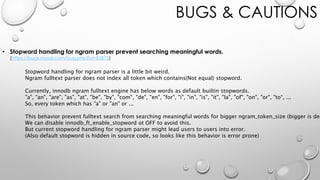
• Stopword handling for ngram parser prevent searching meaningful words.
(https://bugs.mysql.com/bug.php?id=85875)
Stopword handling for ngram parser is a little bit weird.
Ngram fulltext parser does not index all token which contains(Not equal) stopword.
Currently, innodb ngram fulltext engine has below words as default builtin stopwords.
"a", "an", "are", "as", "at", "be", "by", "com", "de", "en", "for", "i", "in", "is", "it", "la", "of", "on", "or", "to“, ...
So, every token which has "a" or "an" or ...
This behavior prevent fulltext search from searching meaningful words for bigger ngram_token_size (bigger is dep
We can disable innodb_ft_enable_stopword ot OFF to avoid this.
But current stopword handling for ngram parser might lead users to users into error.
(Also default stopword is hidden in source code, so looks like this behavior is error prone)
BUGS & CAUTIONS
• Fulltext search can not find word which contains "," or ".”
(https://bugs.mysql.com/bug.php?id=85876)
Fulltext search can not find word which contains "," or "." in boolean mode BUT natural language mode.
Looks like "." and "," are not a special operator character in boolean mode according to the manual
(https://dev.mysql.com/doc/refman/5.7/en/fulltext-boolean.html).
And also ngram parser add words which contains "," and "." to fulltext index.
What is different between natural language and boolean mode ?
And one more thing is that I don't think indexing "," and "." (and including all punctuation marks) are useful.
On current implementation, fts index have these punctuation marks but can't search.
I think this implementation makes fts index bigger but not useful.
BUGS & CAUTIONS
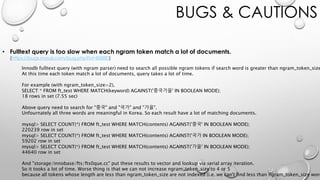
• Fulltext query is too slow when each ngram token match a lot of documents.
(https://bugs.mysql.com/bug.php?id=85880)
Innodb fulltext query (with ngram parser) need to search all possible ngram tokens if search word is greater than ngram_token_size
At this time each token match a lot of documents, query takes a lot of time.
For example (with ngram_token_size=2),
SELECT * FROM ft_test WHERE MATCH(keyword) AGAINST('중국가을' IN BOOLEAN MODE);
18 rows in set (7.55 sec)
Above query need to search for "중국" and "국가" and "가을".
Unfournately all three words are meaningful in Korea. So each result have a lot of matching documents.
mysql> SELECT COUNT(*) FROM ft_test WHERE MATCH(contents) AGAINST('중국' IN BOOLEAN MODE);
220239 row in set
mysql> SELECT COUNT(*) FROM ft_test WHERE MATCH(contents) AGAINST('국가 IN BOOLEAN MODE);
59202 row in set
mysql> SELECT COUNT(*) FROM ft_test WHERE MATCH(contents) AGAINST('가을' IN BOOLEAN MODE);
44640 row in set
And "storage/innobase/fts/fts0que.cc" put these results to vector and lookup via serial array iteration.
So it tooks a lot of time. Worse thing is that we can not increase ngram_token_size to 4 or 5
because all tokens whose length are less than ngram_token_size are not indexed (i.e. we can't find less than ngram_token_size word
BUGS & CAUTIONS
• FTS index are processed at trx commit time
• You can’t see not committed data before commit for INSERT
• You can’t see not committed data before commit for DELETE
• INSERT
mysql> begin;
mysql> insert into ft_test3 values (1, 'matt');
mysql> select * from ft_test3 where match(contents) against('matt' in boolean mode);
Empty set (0.00 sec)
mysql> commit;
mysql> select * from ft_test3 where match(contents) against('matt' in boolean mode);
+----+----------+
| id | contents |
+----+----------+
| 1 | matt |
+----+----------+
BUGS & CAUTIONS
• DELETE
mysql> begin;
mysql> delete from ft_test3 where id=1;
mysql> select * from ft_test3 where match(contents) against('matt' in boolean mode);
Empty set (0.00 sec)  Why not found ?
mysql> commit;
mysql> select * from ft_test3 where match(contents) against('matt' in boolean mode);
Empty set (0.00 sec)
BUGS & CAUTIONS
• UPDATE
mysql> insert into ft_test3 values (1, 'matt');
mysql> begin;
mysql> update ft_test3 set contents='lara' where id=1;
mysql> select * from ft_test3 where match(contents) against('matt' in boolean mode);
Empty set (0.00 sec)
mysql> select * from ft_test3 where match(contents) against('lara' in boolean mode);
Empty set (0.00 sec)
mysql> commit;
mysql> select * from ft_test3 where match(contents) against('matt' in boolean mode);
Empty set (0.00 sec)
mysql> select * from ft_test3 where match(contents) against('lara' in boolean mode);
+----+----------+
| id | contents |
+----+----------+
| 1 | lara |
+----+----------+

nGram full text search (by 이성욱)

  • 1.
  • 2.
    FTS QUERY • WORDSEARCH • SELECT ... WHERE MATCH(columns) AGAINST(‘word‘); • SELECT ... WHERE MATCH(columns) AGAINST(‘word‘ IN BOOLEAN MODE); • SELECT ... WHERE MATCH(columns) AGAINST(‘word‘ IN NATURAL LANGUAGE MODE); • PHRASE SEARCH • SELECT ... WHERE MATCH(columns) AGAINST(‘word1 word2‘); • SELECT ... WHERE MATCH(columns) AGAINST(‘word1 word2‘ IN BOOLEAN MODE); • SELECT ... WHERE MATCH(columns) AGAINST(‘word1 word2‘ IN NAUTRAL LANGUAGE MODE); • Relevance Scoring • Float value • 0 - No relevance • 1 - Perfect match (?) • SELECT MATCH(columns) AGAINST(‘word‘) as score;
  • 3.
    FTS MODE • BOOLEANMODE • Support Boolean operator • NATURAL LANGUAGE MODE • Not support boolean operator • Sort by relevance ranking (default) • QUERY EXPANSION • Blind Query Expansion for MySQL • First result • FTS query with user keywords • Second result • Find common words from `First result` • FTS query with common words • Return First + Second results
  • 4.
    FTS OPERATOR • Wildcard search (BOOLEAN & NATURAL MODE) • MATCH() AGAINST(‘kakao*‘ IN BOOLEAN MODE) • Boolean operator (BOOLEAN MODE) • MATCH() AGAINST(‘kakao talk‘ IN BOOLEAN MODE) • MATCH() AGAINST(‘+kakao +talk‘ IN BOOLEAN MODE) • MATCH() AGAINST(‘+kakao -talk‘ IN BOOLEAN MODE) • MATCH() AGAINST(‘+kakao ~talk‘ IN BOOLEAN MODE) • MATCH() AGAINST('"kakao talk"' IN BOOLEAN MODE) • MATCH() AGAINST('"kakao talk" @8' IN BOOLEAN MODE) • Proximity search • See the manual for more operator
  • 5.
    FTS RANKING • TF-IDFWeighting algorithm • Term Frequency - Inverse Document Frequency • ${TF} = Frequency of Term • ${IDF} = log10( ${total_records} / ${matching_records} ) • ${rank} = ${TF} * ${IDF} * ${IDF} mysql> SELECT id, title, body, MATCH (title,body) AGAINST ('database' IN BOOLEAN MODE) AS score FROM articles ORDER BY score DESC; +----+------------------------------+-------------------------------------+---------------------+ | id | title | body | score | +----+------------------------------+-------------------------------------+---------------------+ | 6 | Database, Database, Database | database database database | 1.0886961221694946 | | 3 | Optimizing Your Database | In this database tutorial ... | 0.3628987073883154 | | 1 | MySQL Tutorial | This database tutorial ... | 0.1814493536991577 | | 2 | How To Use MySQL | After you went through a ... | 0 | | 4 | MySQL vs. YourSQL | When comparing databases ... | 0 | | 5 | MySQL Security | When configured properly, MySQL ... | 0 | | 7 | 1001 MySQL Tricks | 1. Never run mysqld as root. 2. ... | 0 | | 8 | MySQL Full-Text Indexes | MySQL fulltext indexes use a .. | 0 | +----+------------------------------+-------------------------------------+---------------------+ 8 rows in set (0.00 sec) TF = 6 IDF = log10(8/3) 1.088696164686938 = 6 * log10(8/3) * log10(8/3)
  • 6.
    FTS PARSER • DELIMITER •default Parser • NGRAM • NGRAM Parser • STEMMING • MECAB Parser
  • 7.
    FTS PARSER • DELIMITER •MySQL only use space-character(‘ ‘) as delimiter(tokenizing) • innodb_ft_min_token_size <= length(token) <= innodb_ft_max_token_size • Filter out if token matched with stopword 100% • No stemming (even English) • 1-pass full-text search • Tokenizing example “This is the mysql book” This is the mysql book This is the mysql book user input text tokenized word (token) filter out stopword (indexing target)
  • 8.
    FTS PARSER • NGRAM •Tokenizing based on space-character(‘ ‘) • Make contiguous sequence of n characters (ngram_token_size) (uni-gram, bi-gram, tri-gram, quad-gram, penta-gram, hexa-gram) • Filter out if token contains stopword • Multi-pass full-text search • Tokenizing example (bi-gram) “This is the mysql book” Th user input text tokenized word (token) filter out stopword (indexing target) hi is is th he my ys sq ql bo oo ok Th hi is is th he my ys sq ql bo oo ok
  • 9.
    FTS PARSER • STEMMING •MySQL support MECAB library • Developed for japaneses phrase analysis • Can be used for Korean also (same pattern of postpositional word(조사 助詞)) • You need to prepare really a lot(*1000) of things to use MECAB • Need to be a language expert (First) • Need a dictionary (Noun, Verb, ...) • Need phrase pattern (Machine learning for various pharse pattern) • Need to tuning for performance • Tokenizing example 이것은 MySQL 책입니다 이것 user input text tokenized word (token) filter out useless word (indexing target) 은 MySQL 책 입니다 이것 은 MySQL 책 입니다
  • 10.
    FTS INDEX • LSMStyle Index (or Innodb change buffer style) • Change of FTS index is stored in FTS Index cache (innodb_ft_cache_size=32MB, innodb_ft_total_cache_size = 610MB) • If cache is full, merged to real FTS Index • FTS Index partition • Parallelism (innodb_ft_sort_pll_degree=2) • Partitioned by token character key code (currently support only Latin character) Tablespace-id Index-id FTS_000000000000223_000000000000257_INDEX_1.ibd FTS_000000000000223_000000000000257_INDEX_2.ibd FTS_000000000000223_000000000000257_INDEX_3.ibd FTS_000000000000223_000000000000257_INDEX_4.ibd FTS_000000000000223_000000000000257_INDEX_5.ibd mysql> SELECT index_id, table_id, name FROM I_S.innodb_sys_indexes;
  • 11.
    FTS INDEX • FTSIndex operations are heavy • Use intermediate cache & delete-list • INSERT • Maintaining FTS index entry is done at commit time • Tokenize & Add CACHED aux-tablespace (at commit time) • CACHED aux-tablespace is full(innodb_ft_cache_size), flush to FTS index • Same word might be stored different FTS key entry • UPDATE • If FTS columnn is changed, no inplace update (DELETE + INSERT on FTS index) • Else, inplace update
  • 12.
    FTS INDEX • DELETE •Add document-id to DELETED aux-tablespace • Filter out search result from DELETED aux-tablespace (at last stage) • Performance issue • 100M docs vs 10M docs (INSERT 100M docs, DELETE 90M docs) • Need to optimize after big DELETE • set GLOBAL innodb_optimize_fulltext_only=ON • set GLOBAL innodb_ft_num_word_optimize=2000 (max 10k~20k) • Optimizing table also consolidate multiple FTS key entry for the same word
  • 13.
    Token iList MySQL Fulltext FTS INDEX •INVERTED INDEX • Index entry = [token - iList] pair • iList = [document-id, position] list • iList has position • Support proximity search • Index size vs Common(Frequent) token • Index size vs FTS Index cache doc-id(1), pos(3) doc-id(4), pos(1) doc-id(7), pos(12) doc-id(1), pos(8) doc-id(6), pos(21) doc-id(9), pos(3) doc-id(13), pos(9)
  • 14.
    FTS STOPWORD • STOPWORD? • Filter out word list from FTS Index • Overhead to check stopword (rb-tree search) • Current implementation is useless for Korean (c.f. MECAB) • DELIMITER Parser : postpositional word(조사 助詞) • NGRAM Parser : filter out containing stopword • Control using stopword • innodb_ft_enable_stopword='db/table' • innodb_ft_server_stopword_table='db/table' • innodb_ft_user_stopword_table=OFF (Recommend for curr-version) • Stopword table is registered table’s meta information • Once custom stopword table is used, do not remove it
  • 15.
    FTS STOPWORD • STOPWORDIssue • InnoDB FTS has default stopword list • "a", "an", "are", "as", "at", "be", "by", "com", "de", "en", "for", "i", "in", "is", "it", "la", "of", "on", "or", "to“, ... • Fail scenario mysql> insert into ft_test values (1, 'department'); depar epart partm artme rtmen tment depar epart partm artme rtmen tment user input text check stop word filter out (Indexing target)
  • 16.
    FTS DOCUMENT ID •FTS_DOC_ID • InnoDB FTS needs FTS_DOC_ID hidden column • FTS index entry has FTS_DOC_ID (NOT PK) • FTS document id can’t be reused (because of delete handling) • Need to be done 2-random index lookup to fetch row • IF your PK is not reused, FTS_DOC_ID as PK (1-random index lookup) • Must be • Upper case column name “FTS_DOC_ID” • BIGINT UNSIGNED type CREATE TABLE ft_test ( FTS_DOC_ID BIGINT UNSIGNED NOT NULL AUTO_INCREMENT, contents TEXT, PRIMARY KEY (FTS_DOC_ID), FULLTEXT INDEX fx_contents (contents) WITH PARSER `ngram` ) ENGINE=InnoDB;
  • 17.
    NGRAM TOKEN_SIZE • token_sizeof NGRAM Parser • Choose carefully, ngram_token_size determine • FTS index size • FTS query performance • FTS query can find documents • ngram_token_size ↑↑ • Index size ↑ (varying text characteristics) • Token uniqueness ↑ Query performance ↑ • Searchabliity ↓ (len<ngram_token_size word is not indexed) • ngram_token_size ↓↓ • Index size ↓ (varying text characteristics) • Token uniqueness ↓ Query performance ↓ • Searchabliity ↑ FT index size of 500M Tab
  • 18.
    NGRAM PERFORMANCE • FTSQuery performance is depend on result-count • Query matching several documents is faster (Generally) • Query matching huge documents is slower (No way to avoid this) • Real test result • Do it yourself (with your own service data)
  • 19.
    NGRAM PERFORMANCE • NGRAMparser FTS needs several sub-query • Merge inverted index results & output final result to user • NGRAM parser FTS edge case • Internal sub-queries have huge result, But result after merge is small • Result has a few rows, but slow SELECT * FROM ft_test WHERE MATCH(keyword) AGAINST('중국가을' IN BOOLEAN MODE);  18 rows in set (7.55 sec)
  • 20.
    NGRAM PERFORMANCE • Why? • ngram_token_size=2 • ‘중국가을’ is splited 3 sub-query (‘중국’, ‘국가‘, ‘가을’) mysql> SELECT COUNT(*) FROM ft_test WHERE MATCH(contents) AGAINST('가을' IN BOOLEAN MODE); 44640 row in set mysql> SELECT COUNT(*) FROM ft_test WHERE MATCH(contents) AGAINST('중국' IN BOOLEAN MODE); 220239 row in set mysql> SELECT COUNT(*) FROM ft_test WHERE MATCH(contents) AGAINST('국가 IN BOOLEAN MODE); 59202 row in set vector of ‘중 국’ vector of ‘국 가’ vector of ‘가 을’ Catesian search Final result
  • 21.
    NGRAM PERFORMANCE • Howto avoid this edge case • ngram_token_size ↑↑ • Multi-gram inverted index • Multi-gram inverted index • Use range ngram_token_size (ngram_min_token_size=2, ngram_max_token_size=5) • Index all words (>=ngram_min_token_size) • Make ngram token (<=ngram_max_token_size) • Searchability ↑↑ • Index size ↑ • Performance • Same performance for General-case • Much better performance for Edge-case ngram_token_size=3, 18 rows in set (0.00 sec) Multi-gram Index, 18 rows in set (0.00 sec)
  • 22.
    MULTI-GRAM PARSER • Multi-gramParser • Not uniform token length • ngram_min_token_size=2, ngram_max_token_size=5 “This is the mysql book” This user input text tokenized word (token)his is is the he mysql ysql sql ql book ook ok
  • 23.
    MULTI-GRAM PARSER • Multi-gramParser • Index size (n-Gram vs Multi-Gram)
  • 24.
    DELIMITER VS NGRAMPARSER • DELIMITER vs n-GRAM • How many tokens (tokens = Indexing overhead) • Delimiter ==> tokens 105 • 2-gram ==> tokens 325 • Really need n-Gram parser ? • SELECT * FROM ft_tab WHERE match(contents) against(‘wear*’ IN BOOLEAN MODE); -> Found • SELECT * FROM ft_tab WHERE match(contents) against(‘level*’ IN BOOLEAN MODE); -> Not Found 27. Over-provisioning은 Wear-leveling과 성능 향상에 많은 도움이 된다. SSD 드라이브는 최대 물리 용량보다 더 작은 용량으로 파티션을 생성함으로써 Over-provisioning 공간을 할당할 수 있다. 남은 공간은 사용자나 호스트에게는 보이지 않지만 SSD 컨트롤러는 여전히 남은 물리 공간을 활용할 수 있다. Over-provisioning 공간은 NAND 플래시 셀의 제한된 수명을 극복하기 위한 Wear- leveling이 좀 더 원활하게 처리될 수 있도록 도와준다. 데이터 쓰기가 아주 빈번한 경우에는 성능 향상을 위해서 전체 용량의 25% 정도의 공간을 Over- provisioning 공간을 할당하는 것이 좋으며, 그렇게 쓰기 부하가 심하지 않은 경우에는 10%~15% 정도의 공간을 Over-provisioning 공간으로 할당해주는 것이 좋다. Over-provisioning 공간은 NAND 플래시 블록의 버퍼처럼 작동하기도 하는데, 이는 일시적으로 평상시보다 높은 쓰기 부하가 발생하더라도 Garbage- collection이 충분한 “free” 상태 페이지를 만들어 낼수 있도록 완충 역할을 해준다.
  • 25.
    BUGS & CAUTIONS •Assertion fail during fulltext search query with LIMIT clause (https://bugs.mysql.com/bug.php?id=85835) MySQL server is crashed because of assertion fail during ngram fulltext search query with LIMIT clause. Assertion failure happen on this code (https://github.com/mysql/mysql-server/blob/mysql-5.7.17/storage/innobase/fts/fts0que.cc#L3559). l don't think THIS code block is a good place to LIMIT rows of query result. This code is not working correctly (LIMITing result rows of fulltext search query). (https://github.com/mysql/mysql-server/blob/mysql-5.7.17/storage/innobase/fts/fts0que.cc#L3311~L3314) And this code might cause this assertion fail if they cut off result in the middle of fetching.
  • 26.
    BUGS & CAUTIONS •Stopword handling for ngram parser prevent searching meaningful words. (https://bugs.mysql.com/bug.php?id=85875) Stopword handling for ngram parser is a little bit weird. Ngram fulltext parser does not index all token which contains(Not equal) stopword. Currently, innodb ngram fulltext engine has below words as default builtin stopwords. "a", "an", "are", "as", "at", "be", "by", "com", "de", "en", "for", "i", "in", "is", "it", "la", "of", "on", "or", "to“, ... So, every token which has "a" or "an" or ... This behavior prevent fulltext search from searching meaningful words for bigger ngram_token_size (bigger is dep We can disable innodb_ft_enable_stopword ot OFF to avoid this. But current stopword handling for ngram parser might lead users to users into error. (Also default stopword is hidden in source code, so looks like this behavior is error prone)
  • 27.
    BUGS & CAUTIONS •Fulltext search can not find word which contains "," or ".” (https://bugs.mysql.com/bug.php?id=85876) Fulltext search can not find word which contains "," or "." in boolean mode BUT natural language mode. Looks like "." and "," are not a special operator character in boolean mode according to the manual (https://dev.mysql.com/doc/refman/5.7/en/fulltext-boolean.html). And also ngram parser add words which contains "," and "." to fulltext index. What is different between natural language and boolean mode ? And one more thing is that I don't think indexing "," and "." (and including all punctuation marks) are useful. On current implementation, fts index have these punctuation marks but can't search. I think this implementation makes fts index bigger but not useful.
  • 28.
    BUGS & CAUTIONS •Fulltext query is too slow when each ngram token match a lot of documents. (https://bugs.mysql.com/bug.php?id=85880) Innodb fulltext query (with ngram parser) need to search all possible ngram tokens if search word is greater than ngram_token_size At this time each token match a lot of documents, query takes a lot of time. For example (with ngram_token_size=2), SELECT * FROM ft_test WHERE MATCH(keyword) AGAINST('중국가을' IN BOOLEAN MODE); 18 rows in set (7.55 sec) Above query need to search for "중국" and "국가" and "가을". Unfournately all three words are meaningful in Korea. So each result have a lot of matching documents. mysql> SELECT COUNT(*) FROM ft_test WHERE MATCH(contents) AGAINST('중국' IN BOOLEAN MODE); 220239 row in set mysql> SELECT COUNT(*) FROM ft_test WHERE MATCH(contents) AGAINST('국가 IN BOOLEAN MODE); 59202 row in set mysql> SELECT COUNT(*) FROM ft_test WHERE MATCH(contents) AGAINST('가을' IN BOOLEAN MODE); 44640 row in set And "storage/innobase/fts/fts0que.cc" put these results to vector and lookup via serial array iteration. So it tooks a lot of time. Worse thing is that we can not increase ngram_token_size to 4 or 5 because all tokens whose length are less than ngram_token_size are not indexed (i.e. we can't find less than ngram_token_size word
  • 29.
    BUGS & CAUTIONS •FTS index are processed at trx commit time • You can’t see not committed data before commit for INSERT • You can’t see not committed data before commit for DELETE • INSERT mysql> begin; mysql> insert into ft_test3 values (1, 'matt'); mysql> select * from ft_test3 where match(contents) against('matt' in boolean mode); Empty set (0.00 sec) mysql> commit; mysql> select * from ft_test3 where match(contents) against('matt' in boolean mode); +----+----------+ | id | contents | +----+----------+ | 1 | matt | +----+----------+
  • 30.
    BUGS & CAUTIONS •DELETE mysql> begin; mysql> delete from ft_test3 where id=1; mysql> select * from ft_test3 where match(contents) against('matt' in boolean mode); Empty set (0.00 sec)  Why not found ? mysql> commit; mysql> select * from ft_test3 where match(contents) against('matt' in boolean mode); Empty set (0.00 sec)
  • 31.
    BUGS & CAUTIONS •UPDATE mysql> insert into ft_test3 values (1, 'matt'); mysql> begin; mysql> update ft_test3 set contents='lara' where id=1; mysql> select * from ft_test3 where match(contents) against('matt' in boolean mode); Empty set (0.00 sec) mysql> select * from ft_test3 where match(contents) against('lara' in boolean mode); Empty set (0.00 sec) mysql> commit; mysql> select * from ft_test3 where match(contents) against('matt' in boolean mode); Empty set (0.00 sec) mysql> select * from ft_test3 where match(contents) against('lara' in boolean mode); +----+----------+ | id | contents | +----+----------+ | 1 | lara | +----+----------+