Chicago, October 19 - 22,
2010
Next Generation Spring MVC
with Spring Roo
Stefan Schmidt & Keith Donald
Agenda
•  Mastering Spring MVC with Spring Roo
•  Keeping up with project domain changes
•  View scaffolding & customization
•  How social is your application?
•  Does your application speak Spanish?
•  How secure is your application?
•  Going with the flow
Mastering Spring MVC
with Spring ROO
Master Spring MVC with Spring Roo
•  Best-practice Spring MVC out of the box
–  REST support
–  Round tripping of View artifacts
–  Strong Templating support
–  Theming support
–  Pagination support
–  i18n & i11n built-in
–  Form validation based on JSR 303
–  Tested on popular Web browsers & Web containers
REST Support - Form Handling
Resource GET PUT POST DELETE
Collection URI such as
http://tld.com/pizzashop/
toppings
List members of
the collection
(pagination
possible)
Not used. Create
new
resource
Not used.
Member URI such as
http://tld.com/pizzashop/
toppings/5
Retrieve addressed
resource
Update the
addressed
resource
Not used. Delete the
addressed
resource
Member URI such as
http://tld.com/pizzashop/
toppings?form
Creates a initialized
but empty form for
the resource
(create use-case)
Not used. Not used. Not used.
Member URI such as
http://tld.com/pizzashop/
toppings/5?form
Creates an
initialized form pre-
populated with data
of resource (update
use-case)
Not used. Not used. Not used.
REST Support - Customizable JSON Binding
•  Roo offers two methods for integrating JSON binding:
–  Option 1: Spring MVC detects Jackson
•  @RequestBody & @ResponseBody
•  ContentNegotiatingViewResolver
–  Option 2: Built-in JSON handling managed in domain layer
•  Customizable FlexJson integration
Spring Roo MVC Scaffolding Options
•  Generation of Web artifacts
–  controller scaffold
•  generate a controller for a given entity
–  controller all
•  generate controllers for all entities without an existing
controller
–  controller class
•  generate a simple Spring @MVC controller with a post and a
get method
DEMO
View scaffolding
Keeping up with project
domain changes
Keeping up with project domain changes
Past: Roo 1.0.x all-or-nothing approach
–  either manage view templates manually after initial scaffold,
–  or abstain from customization of JSP view artifacts
Future: Roo 1.1.x intelligent round-tripping
–  introduction of customizable tag library
–  reduction of JSP code by ~90%
–  JSPs are now user editable
JSP View Round-Tripping
•  Customizable Tag libraries
–  every tag has three common attributes
•  ‘id’ is used by Roo to identify tags via Xpath (required)
•  ‘z’ is used to store a hash code which determines who ‘owns’
the tag (required)
•  ‘render’ can be used to omit form rendering of the tag
JSP View Round Tripping Cont.
Example jspx file:
<form:update	
  id="fu_com_foo_Person"	
  modelAttribute="person"	
  path="/people"	


  z="3lX+WZW4CQVBb7OlvB0AvdgbGRQ=">	


  <field:datetime	
  dateTimePattern="${person_birthday_date_format}"	
  field="birthDay"	


  id="c_com_foo_Person_birthDay"	
  z="dXnEoWaz4rI4CKD9mlz+clbSUP4="/>	


  <field:select	
  field="car"	
  id="c_com_foo_Person_car"	
  itemValue="id"	
  items="${cars}"	


  path="/cars"	
  z="z2LA3LvNKRO9OISmZurGjEczHkc="/>	


  <field:select	
  field="cars"	
  id="c_com_foo_Person_cars"	
  itemValue="id"	
  items="${cars}"	


  multiple="true"	
  path="/cars"	
  z="c0rdAISxzHsNvJPFfAmEEGz2LU4="/>	
  
</form:update>	
  
Hash Key Calculation
Things included in hash code
calulation
Things not included in hash key
calculation
Element name (name only, not
namespace)
Name space of element names
Attribute names present in element White spaces used in the element
Attribute values present in the element Potential child elements
The ‘z’ attribute and its value
Any attribute (and value) whose name
starts with '_'
The order of the attributes does not
contribute to the value of a hash key
DEMO
View round-tripping
View Scaffolding &
Customization
View Scaffolding & Customization
•  Roo MVC views offer numerous customization points:
–  Spring Theming support via CSS (and graphics)
–  Global template structural adjustments via Tiles
–  Page structure changes in JSP pages
–  Portable templates through JSP tag library
– 
Roo Default Tag Library
•  Spring JavaScript
•  Dojo Toolkit
•  Easy XML-based tags (no .java required)
•  Tags for
–  form handling
–  field rendering
–  util (pagination, page decoration, language selection, …)
DEMO
View customization
How social is your application?
Embedding Social Features
Roo offers two shell commands to install features:
•  Option 1
–  web mvc embed generic --url http://www.youtube.com/watch?v=Gb1Z0lfl52I
–  automatic detection of social feature based on domain name
–  easiest way to get a feature embedded
•  Option 2
–  web mvc embed map --provider GOOGLE_MAPS --location "Sydney,
Australia”
–  web mvc embed finances --stockSymbol VMW
–  specification of type of social feature
–  better supported through tab completion
DEMO
Embedding Social Features
Does your app speak
Spanish?
i18n & l11n Support
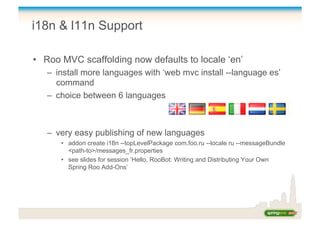
•  Roo MVC scaffolding now defaults to locale ‘en’
–  install more languages with ‘web mvc install --language es’
command
–  choice between 6 languages
–  very easy publishing of new languages
•  addon create i18n --topLevelPackage com.foo.ru --locale ru --messageBundle
<path-to>/messages_fr.properties
•  see slides for session ‘Hello, RooBot: Writing and Distributing Your Own
Spring Roo Add-Ons’
i18n & l11n Support
•  Roo MVC scaffolding uses two artifacts for managing
localization (l11n) & internationalization (i18n)
–  application.properties
•  application / domain specific messages
•  managed by Roo round tripping
–  messages_XX.properties
•  non- application / domain specific messages
•  never touched by Roo after initial install
How secure is your
application?
Integrating Spring Security
•  One simple command
–  security setup
–  URL-based security with applicationContext-security.xml
<http	
  auto-­‐config="true"	
  use-­‐expressions="true">	


  <form-­‐login	
  login-­‐processing-­‐url="/resources/j_spring_security_check"	
  login-­‐	


  page="/login"	
  authentication-­‐failure-­‐url="/login?login_error=t"/>	


  <logout	
  logout-­‐url="/resources/j_spring_security_logout"/>	


  <intercept-­‐url	
  pattern="/choices/**"	
  access="hasRole('ROLE_ADMIN')”/>	


  <intercept-­‐url	
  pattern="/resources/**"	
  access="permitAll"	
  />	


  <intercept-­‐url	
  pattern="/**"	
  access="permitAll"	
  />	
  
</http>	
  
Going with the Flow
Spring Web Flow
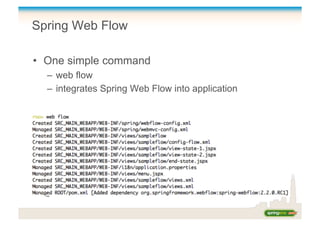
•  One simple command
–  web flow
–  integrates Spring Web Flow into application
DEMO
Securing Your Application
Spring Web Flow
Selenium Tests
Resources & Links
•  Home → http://www.springsource.org/roo
–  Contains links to all other resources
•  Forum → http://forum.springsource.org
–  Roo team actively monitor forum and answer queries
•  Issues → http://jira.springframework.org/browse/ROO
•  Twitter → @SpringRoo
–  Follow for updates, or include in tweets so we see them
•  Contact details
–  Keith Donald @kdonald, kdonald@vmware.com
–  Stefan Schmidt @schmidtstefan, schmidts@vmware.com
Q&A

Next Generation Spring MVC with Spring Roo

  • 1.
    Chicago, October 19- 22, 2010 Next Generation Spring MVC with Spring Roo Stefan Schmidt & Keith Donald
  • 2.
    Agenda •  Mastering SpringMVC with Spring Roo •  Keeping up with project domain changes •  View scaffolding & customization •  How social is your application? •  Does your application speak Spanish? •  How secure is your application? •  Going with the flow
  • 3.
  • 4.
    Master Spring MVCwith Spring Roo •  Best-practice Spring MVC out of the box –  REST support –  Round tripping of View artifacts –  Strong Templating support –  Theming support –  Pagination support –  i18n & i11n built-in –  Form validation based on JSR 303 –  Tested on popular Web browsers & Web containers
  • 5.
    REST Support -Form Handling Resource GET PUT POST DELETE Collection URI such as http://tld.com/pizzashop/ toppings List members of the collection (pagination possible) Not used. Create new resource Not used. Member URI such as http://tld.com/pizzashop/ toppings/5 Retrieve addressed resource Update the addressed resource Not used. Delete the addressed resource Member URI such as http://tld.com/pizzashop/ toppings?form Creates a initialized but empty form for the resource (create use-case) Not used. Not used. Not used. Member URI such as http://tld.com/pizzashop/ toppings/5?form Creates an initialized form pre- populated with data of resource (update use-case) Not used. Not used. Not used.
  • 6.
    REST Support -Customizable JSON Binding •  Roo offers two methods for integrating JSON binding: –  Option 1: Spring MVC detects Jackson •  @RequestBody & @ResponseBody •  ContentNegotiatingViewResolver –  Option 2: Built-in JSON handling managed in domain layer •  Customizable FlexJson integration
  • 7.
    Spring Roo MVCScaffolding Options •  Generation of Web artifacts –  controller scaffold •  generate a controller for a given entity –  controller all •  generate controllers for all entities without an existing controller –  controller class •  generate a simple Spring @MVC controller with a post and a get method
  • 8.
  • 9.
    Keeping up withproject domain changes
  • 10.
    Keeping up withproject domain changes Past: Roo 1.0.x all-or-nothing approach –  either manage view templates manually after initial scaffold, –  or abstain from customization of JSP view artifacts Future: Roo 1.1.x intelligent round-tripping –  introduction of customizable tag library –  reduction of JSP code by ~90% –  JSPs are now user editable
  • 11.
    JSP View Round-Tripping • Customizable Tag libraries –  every tag has three common attributes •  ‘id’ is used by Roo to identify tags via Xpath (required) •  ‘z’ is used to store a hash code which determines who ‘owns’ the tag (required) •  ‘render’ can be used to omit form rendering of the tag
  • 12.
    JSP View RoundTripping Cont. Example jspx file: <form:update  id="fu_com_foo_Person"  modelAttribute="person"  path="/people"                                  z="3lX+WZW4CQVBb7OlvB0AvdgbGRQ=">      <field:datetime  dateTimePattern="${person_birthday_date_format}"  field="birthDay"                                            id="c_com_foo_Person_birthDay"  z="dXnEoWaz4rI4CKD9mlz+clbSUP4="/>      <field:select  field="car"  id="c_com_foo_Person_car"  itemValue="id"  items="${cars}"                                            path="/cars"  z="z2LA3LvNKRO9OISmZurGjEczHkc="/>      <field:select  field="cars"  id="c_com_foo_Person_cars"  itemValue="id"  items="${cars}"                                            multiple="true"  path="/cars"  z="c0rdAISxzHsNvJPFfAmEEGz2LU4="/>   </form:update>  
  • 13.
    Hash Key Calculation Thingsincluded in hash code calulation Things not included in hash key calculation Element name (name only, not namespace) Name space of element names Attribute names present in element White spaces used in the element Attribute values present in the element Potential child elements The ‘z’ attribute and its value Any attribute (and value) whose name starts with '_' The order of the attributes does not contribute to the value of a hash key
  • 14.
  • 15.
  • 16.
    View Scaffolding &Customization •  Roo MVC views offer numerous customization points: –  Spring Theming support via CSS (and graphics) –  Global template structural adjustments via Tiles –  Page structure changes in JSP pages –  Portable templates through JSP tag library – 
  • 17.
    Roo Default TagLibrary •  Spring JavaScript •  Dojo Toolkit •  Easy XML-based tags (no .java required) •  Tags for –  form handling –  field rendering –  util (pagination, page decoration, language selection, …)
  • 18.
  • 19.
    How social isyour application?
  • 20.
  • 21.
    Embedding Social Features Roooffers two shell commands to install features: •  Option 1 –  web mvc embed generic --url http://www.youtube.com/watch?v=Gb1Z0lfl52I –  automatic detection of social feature based on domain name –  easiest way to get a feature embedded •  Option 2 –  web mvc embed map --provider GOOGLE_MAPS --location "Sydney, Australia” –  web mvc embed finances --stockSymbol VMW –  specification of type of social feature –  better supported through tab completion
  • 22.
  • 23.
    Does your appspeak Spanish?
  • 24.
    i18n & l11nSupport •  Roo MVC scaffolding now defaults to locale ‘en’ –  install more languages with ‘web mvc install --language es’ command –  choice between 6 languages –  very easy publishing of new languages •  addon create i18n --topLevelPackage com.foo.ru --locale ru --messageBundle <path-to>/messages_fr.properties •  see slides for session ‘Hello, RooBot: Writing and Distributing Your Own Spring Roo Add-Ons’
  • 25.
    i18n & l11nSupport •  Roo MVC scaffolding uses two artifacts for managing localization (l11n) & internationalization (i18n) –  application.properties •  application / domain specific messages •  managed by Roo round tripping –  messages_XX.properties •  non- application / domain specific messages •  never touched by Roo after initial install
  • 26.
    How secure isyour application?
  • 27.
    Integrating Spring Security • One simple command –  security setup –  URL-based security with applicationContext-security.xml <http  auto-­‐config="true"  use-­‐expressions="true">      <form-­‐login  login-­‐processing-­‐url="/resources/j_spring_security_check"  login-­‐                                    page="/login"  authentication-­‐failure-­‐url="/login?login_error=t"/>      <logout  logout-­‐url="/resources/j_spring_security_logout"/>      <intercept-­‐url  pattern="/choices/**"  access="hasRole('ROLE_ADMIN')”/>        <intercept-­‐url  pattern="/resources/**"  access="permitAll"  />      <intercept-­‐url  pattern="/**"  access="permitAll"  />   </http>  
  • 28.
  • 29.
    Spring Web Flow • One simple command –  web flow –  integrates Spring Web Flow into application
  • 30.
  • 31.
    Resources & Links • Home → http://www.springsource.org/roo –  Contains links to all other resources •  Forum → http://forum.springsource.org –  Roo team actively monitor forum and answer queries •  Issues → http://jira.springframework.org/browse/ROO •  Twitter → @SpringRoo –  Follow for updates, or include in tweets so we see them •  Contact details –  Keith Donald @kdonald, kdonald@vmware.com –  Stefan Schmidt @schmidtstefan, schmidts@vmware.com
  • 32.