Network Planning Worksheets
for Videoconferencing


Getting Started with Video Conferencing

Many organizations today are considering the purchase of a video conferencing solution. These solutions give you the
benefits of face-to-face meetings without leaving the office. As a result, not only can you reduce travel, facilities and
recruitment costs, you can also enhance team collaboration and your ability to manage geographically dispersed
teams.

Implementing a visual communications network requires that you take steps to ensure that the systems and
applications you select meet end user usability requirements and that your organization is prepared from a
management and IT perspective. IT considerations include installing endpoints, bridges, management software as
well as NAT Firewall Traversal and Recording/Streaming solutions. Not only will you need to determine which of these
components, and how many of them, you will require, you must also ensure that your network has sufficient
bandwidth to meet their demands.

This guide is designed to help you plan what you need to get started adding video conferencing to your network.


                                                          1
Why Add Video Conferencing to your Network?
If your organization is considering purchasing a video conferencing system this year, you’re not alone. According to
Wainhouse Research in its 2009 annual survey of video conferencing users, purchases of room and executive video
conferencing systems have sustained a unit growth rate of more than 20 percent 1 between 2006 and 2009. Video
conferencing technology allows staff at your organization to maintain the benefits of meeting face-to-face without
leaving the office. Whether you’re a large global organization and wish to facilitate communication among colleagues,
partners or job seekers or have customers scattered across the nation or globe, video conferencing allows all
participants to hear and see each other and the content they want to share, regardless of their location. The recession
has clearly spurred interest due to video conferencing technology’s ability to cut travel, facility and recruitment costs,
but these solutions also have the added benefit of improving management and collaboration of dispersed workgroups.

Reduce Travel Expenses
Avoiding travel costs is the number one reason that companies adopt video conferencing. While travel will never be
eliminated completely, video conferencing can dramatically reduce the number of necessary business trips. As a
result, organizations can reduce a wide range of travel-related costs including those for air, train, and ground
transportation as well as for lodging, meals and entertainment. Video conferencing also eliminates many hours of
downtime and days away from the office, improving productivity.

Lower Facility Costs
Interest in telecommuting has grown considerably as workers seek greater home-work balance. Such arrangements
give employees more options about where they want to work and reduce facilities costs. Yet, telecommuters can also
present management challenges, since managers and employees are no longer in regular physical contact. By
allowing management and remote workers to see and hear each other, organizations can better support remote
workers.

Trim Recruitment Expenses
If your company recruits by video conference rather than flying recruiters or candidates around the country, you can
interview more people from more locations in less time with less costs and disruption to executive schedules, thereby
allowing you to make better and faster hiring decisions.

Improve Team Collaboration
Decisions today require insight and approval from many different sources. Video conferencing tools allow dispersed
teams to collaborate more easily, solving problems and speeding coordination. This allows organizations to come to a
consensus much faster in order to deliver new products and services more quickly. Video conferencing meetings also
tend to be shorter than in-person meetings, leading to less wasted time.

Enhance Management of Dispersed Teams
Large organizations have subject matter experts and qualified resources around the globe. Video conferencing allows
firms to more easily deploy and manage those globally dispersed resources by allowing impromptu, face-to-face
meetings between managers, subordinates and remote peers.


1 ―The Compelling Case for Video Telephony in Unified Communications: Why Integrating Video with Telephony Call Control Makes Sense‖ by
Brent Kelly & Andrew Davis, Wainhouse Research, March 2009.

                               ©2009 Polycom, Inc. All rights reserved. Polycom and the Polycom logo design are registered trademarks of Polycom, Inc.
                               All other trademarks are the property of their respective owners. Information is subject to change without notice.


                                                                                2
Executive Support
Before embarking on a video conferencing implementation, it is critical to have executive buy in and support.
Implementing real changes in your organization starts with executive commitment. The executive team should deliver
the message that visual communication can increase productivity, enhance collaboration, and reduce business travel,
saving valuable dollars that can be spent elsewhere or given back to investors.

End User Requirements
Additionally, your video conferencing solution will only be successful to the extent that it meets the needs of end
users. These requirements include:
        Ease of use. End users should not need to know IP addresses, E.164 numbers or ISDN numbers. To find a
        room or person to call, users should simply be able to access an enhanced search directory connected to the
        corporate LDAP directory, making it as easy to find the intended party for video as it is for email or IM.
        A variety of conferencing options. The video conferencing solution should offer options that accommodate
        the needs of different types of users within your organization. For example, your organization can incorporate
        immersive telepresence for executives, desktop video conferencing for people in small/remote offices, as well
        as traditional room-based video solutions.
        Presence capabilities. Presence capabilities allow end users to determine whether a conference room or a
        contact’s personal video system is available to receive a video call or if it is busy, offline, or in ―do not disturb‖
        mode. Presence dramatically adds to the usability of a real-time video conference.
        Video on Demand. Scheduled video conferencing was once the norm, but more and more organizations are
        moving to an ad-hoc or video on demand policy, using scheduling only for critical ―white glove‖ conferencing.
        Video on demand makes it easier to leverage human resources, training and corporate communications
        across the organization. It allows employees to access important video communications when it is most
        convenient for them. Reporting embedded in the management solution enables the organization to easily
        track and record who has accessed each video.

IT Prerequisites
From an IT perspective, your organization will need to be prepared to supplement your network with equipment and
bandwidth as well as management tools. In particular, you may need to:
        Increase and manage bandwidth to ensure quality of experience for every video call.
        Manage quality of service on the network.
        Determine if MPLS is needed on your network (separates applications, like video, across your network to
        make those applications run more smoothly.)
        Coordinate all elements of the video conferencing network, including video endpoints, conference bridges,
        and NAT/Firewall traversal to safely conference with users outside of the organization.
        Provision, deploy and manage all of these video conferencing elements. The management tools you select
        must embrace standards and allow for integration with your existing communication infrastructure.
        Enforce security using standards-based encryption of audio, video and data streams that traverse firewalls.
        Ensure scalability as usage is likely to grow as employees become familiar with the system.
        Make video on demand and/or streaming accessible for all employees.


                            ©2009 Polycom, Inc. All rights reserved. Polycom and the Polycom logo design are registered trademarks of Polycom, Inc.
                            All other trademarks are the property of their respective owners. Information is subject to change without notice.


                                                                             3
Network Planning Worksheets

You will need to add equipment, software and bandwidth to your network to implement your video conferencing
solution. Video conferencing components can include:
         Endpoint devices for rooms or individuals
         Bridges for multi party video calls
         Solutions for network management, gatekeeping and scheduling
         NAT firewall traversal devices for calling people outside your network
         Recording and streaming solutions

The following sections describe the functions that each of these video conferencing network components perform and
Polycom solutions in each area. We also provide worksheets to help you plan your requirements for your network in
each of these areas from a generic perspective. For specific information about your network, we recommend that you
speak with a systems engineer from a vendor.

Endpoint Devices
Videoconferencing endpoints are standards-based terminals that provide real-time two-way communications.
The most popular standard used for video conference today is H.323, which enables video conferencing over IP
networks, including the Internet. However, H.320, which uses ISDN lines for video calling, continues to be a very
popular standard in some countries. H.324 is a video standard that was used with video phones in the recent past;
however, recent multi-purpose business media phones are based on SIP so the H.324 standard has all but vanished
from corporate video communications. Since most new video network deployments employ H.323 endpoints and
network equipment, this white paper will focus on H.323 solutions. However, many solutions offer the ability to dial
over both ISDN and/or H.323 networks.

To identify the User or H.323 endpoint to conference with, videoconferencing systems use a Dial Plan to allocate a
unique number to an H.323 endpoint. This number is referred to as the H.323, E.164 or User Number. This H.323
User Number is registered with a Gatekeeper, which in turn translates the User Number into an IP address. An
example is the phone extension in your office. Internal users dial a four or five digit number while external callers dial
a seven or ten digit number.

Polycom endpoint solutions include the Polycom HDX series and the Polycom QDX series. Additionally the Polycom
CMA solution, which will be discussed later in this whitepaper, includes a free desktop video conferencing application,
the Polycom CMA Desktop.

    Polycom HDX Series—The Polycom HDX Series provides robust room and personal telepresence solutions for
    integrators, boardrooms, meeting rooms and conference rooms, as well as individuals and teams. These
    solutions furnish high resolution or High Definition communication for every user. The series offers HD video up to
    1080p pixel resolution and HD voice with stereo audio. Colleagues and partners can include rich content during a
    conference call. Lost Packet Recovery (LPR) technology ensures an optimal experience even when calling over
    the Internet or congested networks. User interfaces are intuitive and include Presence.

    Polycom QDX Series—The Polycom QDX series provides affordable high resolution video starting as low as 256
    Kbps and is optimized for networks that require video calls to be placed at lower bandwidths. It provides easy-to-
    use content sharing and is easy to deploy, use and maintain without the need for IT support.

    CMA Desktop—The CMA Desktop is part of a powerful, management, scheduling and gatekeeping application,
    the Polycom Converged Management Application™ (CMA). CMA allows you to centrally deploy, manage, and
    provision visual communication tools across your organization—from large conference rooms to individual
    desktops. Polycom CMA Desktop comes free with the Polycom CMA and is a fully standards-based video
    conferencing application that can be easily and quickly installed on thousands of PC’s across the video network.
    The Polycom CMA Desktop speeds deployment and makes it easy to locate contacts and resources through

                           ©2009 Polycom, Inc. All rights reserved. Polycom and the Polycom logo design are registered trademarks of Polycom, Inc.
                           All other trademarks are the property of their respective owners. Information is subject to change without notice.


                                                                            4
integration with existing corporate directory services. Integrated Presence-awareness and status icons enable
    users to instantly verify contact and resource availability. An intuitive click-to-dial IM-style interface allows easy
    and high quality point-to-point and multipoint video interactions among users. A point-and-click interface makes it
    easy for end users to share content with other users and, as a standards-based application, it can join any
    multipoint video call or communicate with any other H.323 endpoint on the network.


Endpoint Planning Worksheet
Because different organizations are structured differently, they have different endpoint requirements. You may wish to
assign endpoints to different physical locations, buildings and conference rooms. Alternatively, if different departments
within your organization have different bandwidth requirements, you may wish to assign endpoints by department.
However your organization wishes to structure your video conferencing network, the following worksheet will help you
determine the number of endpoints and the bandwidth your organization will require:

    1. To determine number of group video conferencing systems or telepresence rooms for your organization:

         Number of departments or sites
         Amount of bandwidth between site
         Number of buildings at each site
         Number of conference rooms per building
         Number of conference rooms per building to be outfitted with video
         Note: you could also determine the number of video systems needed by
         using a 1:20 ratio of video systems per employee
         Multiply number of sites x number of video systems per building

    2. Now consider the number of individuals who will require desktop conferencing systems. Each of the following
       types of workers will require one endpoint:

         Number of teleworkers/endpoints
         Number of traveling employees/endpoints

    3. Total number of endpoints:
         Immersive Telepresence systems
         Group video conferencing systems
         Desktop video conferencing

    4. Now you will determine your bandwidth requirements for your endpoints:
         HDX systems require an average of 384Kbps - 1Mbps per endpoint for standard conferences; 2Mbpsper
         endpoint for locations that do significant rich media sharing
         QDX systems require roughly .384kbps – 512Kbps per endpoint
         Immersive telepresence rooms require up to 6 MB per endpoint

        Multiply your total number of endpoints by the bandwidth requirements for each endpoint.
        Immersive Telepresence
        Group video conferencing systems
        Desktop video conferencing systems


                           ©2009 Polycom, Inc. All rights reserved. Polycom and the Polycom logo design are registered trademarks of Polycom, Inc.
                           All other trademarks are the property of their respective owners. Information is subject to change without notice.


                                                                            5
Total bandwidth required for your endpoints
        If calls will all be made internally, take the total bandwidth number above and
        divide by two – this is the final number for your bandwidth needs.
        (The reason for this is that when endpoint call each other, they are not each
        taking up the bandwidth – i.e. if two people call each other at 384kbps, the
        total bandwidth for the call is 384Kbps.)

If there will be a mixture of internal and external calls, you will need to determine the % of external calls and adjust
bandwidth requirements accordingly.

For bandwidth considerations, you all need to determine how many concurrent calls will be happening between sites
and make sure you have enough bandwidth dedicated to video to meet that demand. If there are other mission
critical applications, such as VOIP, SAP, email, etc. using this same bandwidth this must also be considered and for
optimal quality of experience networks such as these should have MPLS and QoS implemented.

You can estimate that on the low end, 5% of video systems will be in use at any given time and on the high end 20%
of video systems will be in use at any given time.

Bridging for Multi-party Conferences
Bridging is necessary when three or more people wish to see and hear each other as part of a video conference.
The most common way to conduct a multipoint video meeting is for each participating video system (meeting room,
desktop, etc.) to connect to a single bridging device, called a multipoint conferencing unit or MCU. Video bridges are
available either embedded within the video endpoint itself or as a stand-alone hardware device. While MCUs
embedded within video endpoints can provide a cost effective way to host high-quality multipoint meetings, they
support a limited number of participants and provide a limited feature set. Many of Polycom’s endpoints include
embedded MCU functionality. However, when deploying ten or more endpoints a centrally located bridging solution is
highly recommended.

Polycom offers these bridging solutions:

    Polycom RMX 2000 & RMX 4000 —The Polycom RMX 2000 and RMX 4000 are real-time media conference
    bridges that provide multi-party video conferencing anytime, on-demand. They allow cell phone callers and PSTN
    (regular voice) callers to join a conference over audio, while other callers also use the video. They also perform
    transcoding (supporting fully unified communications for IP—H.323/SIP, PSTN and ISDN) so everyone can call in
    at their own data rate and speed, using their own equipment and the bridge allows them all to communicate
    without having to know any call-in requirements in advance. The RMX 2000 can grow from 20-160 video
    resources on a single bridge; the RMX 4000 can grow from 40-320 video resources on a single bridge. Multiple
    bridges can easily be managed on a single network. If three or more bridges are required for your video
    conferencing network, it is highly recommended that you investigate the Polycom DMA 7000 – an application that
    unites the RMX platforms under a single point of call control.

    Polycom RMX 1000—This conference platform delivers high performance H.323 video and audio conferencing to
    small-to-medium sized organizations and branch sites within the enterprise. Supporting up to twenty video and
    audio endpoints concurrently, the Polycom RMX 1000 is ideal for either small to medium sized deployments of IP
    video conferencing systems or as edge servers, working in conjunction with an RMX 2000 located at the NOC.


                           ©2009 Polycom, Inc. All rights reserved. Polycom and the Polycom logo design are registered trademarks of Polycom, Inc.
                           All other trademarks are the property of their respective owners. Information is subject to change without notice.


                                                                            6
Bridge Planning Worksheet
The following worksheet will help you plan the number of bridges you will require and the amount of bandwidth
necessary for each one.

    1. How many bridges do you need?
       You will want at least one bridge resource (or port) for every five endpoints, assuming no more than 20
       percent of your end users are on the bridge at any one time. If every endpoint will need to be included in your
       bridge calls (e.g. a company wide meeting) you will need a bridge resource per endpoint.

         Number of endpoints (taken from previous worksheet):
         Number of bridging resources (assuming a 1:5 ratio of bridges to
         endpoints):

    2. How much bandwidth do you need?
       The bandwidth required at the bridge equals the aggregate bandwidth of all the endpoints served by the
       bridge at any given time. In other words, if a particular bridge serves five endpoints, you will need 5 x the
       bandwidth required by each endpoint at the bridge location. For example, if five endpoints called into the
       bridge at 1Mbps each, the total amount of bandwidth needed at the bridge location is 5Mbps.

        Remember that different types of calls require different amounts of bandwidth:

         Voice caller –                                                                                                        64Kbps
         CIF caller (non-HD endpoints) –                                                                                       128Kbps
         4CIF caller, or SD caller (ex: QDX 6000) –                                                                            256Kbps
         HD caller at 720p, 30fps –                                                                                            1Mbps
         HD caller at 720p, 60fps –                                                                                            2Mbps
         HD caller at 1080p, 30fps –                                                                                           4Mbps


         Average bandwidth required for each bridge resource (look at the average
         bandwidth specified for video callers) :
         Total bandwidth required for bridging (multiply the average bandwidth times
         the number of bridging resources needed):

        Note: this bandwidth must be available at the location of the bridge.


                           ©2009 Polycom, Inc. All rights reserved. Polycom and the Polycom logo design are registered trademarks of Polycom, Inc.
                           All other trademarks are the property of their respective owners. Information is subject to change without notice.


                                                                            7
Management, Gatekeeping and Scheduling

As you set up your video conferencing network, you will need capabilities to enable IT administrators to manage the
network. These solutions may include gatekeeping, management and scheduling services.

Gatekeeping services. Gatekeepers are part of H.323 networking and are the brains of an H.323 network, delivering
a wide range of IP services and applications. Gatekeepers provide call control and routing services to H.323
endpoints and bridges. Gatekeepers allow administrators to provision the capabilities for different users; for example,
allowing executives to have access to any kind of conference while giving other employees access to desktop
conferences. In particular, gatekeepers allow network administrators to:

       Configure, monitor and manage the activities of registered endpoints (e.g. H.323 terminals, gateways or MCUs)
       Set policies
       Control resources, such as bandwidth usage within their H.323 zone
       Provide address translation between an endpoint’s H.323 address and its various aliases. An alias allows you
       to use a name, such as ―Bill Smith‖ to designate an endpoint rather than an abstract IP address.

Although the H.323 specification describes the gatekeeper as an optional component of a fully functional H.323
system, gatekeepers are essential for all but the smallest video conferencing networks.

Management services. Management services allow administrators to remotely monitor, troubleshoot or upgrade
endpoints. This greatly simplifies an IT administrator’s job when there are multiple sites, departments or locations that
have video conferencing systems. Additionally these management services will allow administrators to support
remote or traveling users.

Scheduling. Many organizations mandate that video conferencing only be used in a scheduled environment. This
approach is used mainly when limited video conferencing rooms and resources are available and demand is high,
meaning that people going into the room on an ad-hoc basis would be disruptive to other employees.

Scheduling plug- ins can be installed so that users can perform scheduling using Microsoft Outlook, Lotus Notes or an
independent web scheduler.

Polycom solutions provide gatekeeping, management and scheduling services in a single solution.

    Polycom Converged Management Application 5000/4000—Providing gatekeeping, management and
    scheduling capabilities, the Polycom CMA 5000/4000 allows administrators to centrally manage and deploy visual
    communication across the entire organization from large conference rooms to individual desktops. It accelerates
    and streamlines deployment, management and provisioning of visual communication tools. By integrating with
    existing corporate directory services, the Polycom CMA speeds deployment and enables seamless
    contact/resource locating. Integrated Presence-awareness and status icons enable users to instantly verify
    contact and resource availability. The CMA 4000 serves and supports video conference networks with up to 400
    devices. The CMA 5000 can grow to 5,000 devices. As mentioned earlier, the Polycom CMA includes the
    Polycom CMA Desktop application that can be easily distributed to thousands of desktop PCs for H.323
    standards-based desktop video conferencing.


                           ©2009 Polycom, Inc. All rights reserved. Polycom and the Polycom logo design are registered trademarks of Polycom, Inc.
                           All other trademarks are the property of their respective owners. Information is subject to change without notice.


                                                                            8
Management Software Worksheet
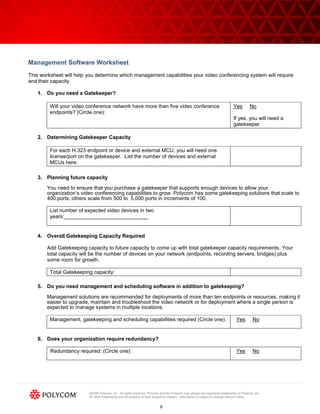
This worksheet will help you determine which management capabilities your video conferencing system will require
and their capacity.

   1. Do you need a Gatekeeper?

         Will your video conference network have more than five video conference                                             Yes        No
         endpoints? (Circle one):
                                                                                                                             If yes, you will need a
                                                                                                                             gatekeeper.

   2. Determining Gatekeeper Capacity

         For each H.323 endpoint or device and external MCU, you will need one
         license/port on the gatekeeper. List the number of devices and external
         MCUs here:

   3. Planning future capacity
       You need to ensure that you purchase a gatekeeper that supports enough devices to allow your
       organization’s video conferencing capabilities to grow. Polycom has some gatekeeping solutions that scale to
       400 ports, others scale from 500 to 5,000 ports in increments of 100.

         List number of expected video devices in two
         years:_____________________________


   4. Overall Gatekeeping Capacity Required

       Add Gatekeeping capacity to future capacity to come up with total gatekeeper capacity requirements. Your
       total capacity will be the number of devices on your network (endpoints, recording servers, bridges) plus
       some room for growth.

         Total Gatekeeping capacity:

   5. Do you need management and scheduling software in addition to gatekeeping?

       Management solutions are recommended for deployments of more than ten endpoints or resources, making it
       easier to upgrade, maintain and troubleshoot the video network or for deployment where a single person is
       expected to manage systems in multiple locations.

         Management, gatekeeping and scheduling capabilities required (Circle one):                                            Yes        No


   6. Does your organization require redundancy?

         Redundancy required: (Circle one):                                                                                    Yes        No


                         ©2009 Polycom, Inc. All rights reserved. Polycom and the Polycom logo design are registered trademarks of Polycom, Inc.
                         All other trademarks are the property of their respective owners. Information is subject to change without notice.


                                                                          9
NAT Firewall Traversal
NAT firewall traversal products make calling off the Intranet to other users such as vendors, partners, colleagues, or
specialists (over the Internet) seamless for the end user yet secure for the organization. NAT and Firewall Traversal
devices allow organizations use to video-enable their users, regardless of location.

Traditional IP communication for voice and data has largely been secured through specially-built firewalls, but with
video, firewalls often block required ports and often mistranslate IP addresses passed through in H.323 call signaling.
The result of these failures is dialing and ringing but no negotiation, or one-way audio and video with little or no
connection.

NAT translation helps to modify IP addresses used in the transfer of packets from one network to another and is
helpful for protecting devices from external exposure. NAT’s can also free up or allow IP addresses to be re-used on a
different network without causing conflicts.

Polycom’s NAT Firewall Traversal solution is:

    Video Border Proxy (VBP)—VBP allows all members of an organization to video conference with anyone
    outside of the network while protecting critical IP communication components. Complying with the ITU-T H.460
    standard, VBP routes video and voice traffic via the shortest path and supports 1Mbps up to 85 Mbps of traffic in
    any combination of voice, video or data—depending on product model. It protects H.323 gatekeepers and
    multipoint conference units from network-based attacks and eliminates security risks by providing a stateful
    packet inspection firewall in combination with an application layer gateway.

    The Polycom VBP (ST models) combined with the Polycom CMA also provide a way for CMA Desktop users to
    make and receive calls when not connected to the corporate network and when VPN access is not available.

NAT Firewall Traversal Worksheet
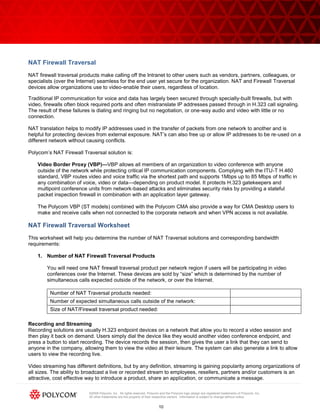
This worksheet will help you determine the number of NAT Traversal solutions and corresponding bandwidth
requirements:

    1. Number of NAT Firewall Traversal Products

        You will need one NAT firewall traversal product per network region if users will be participating in video
        conferences over the Internet. These devices are sold by ―size‖ which is determined by the number of
        simultaneous calls expected outside of the network, or over the Internet.

         Number of NAT Traversal products needed:
         Number of expected simultaneous calls outside of the network:
         Size of NAT/Firewall traversal product needed:

Recording and Streaming
Recording solutions are usually H.323 endpoint devices on a network that allow you to record a video session and
then play it back on demand. Users simply dial the device like they would another video conference endpoint, and
press a button to start recording. The device records the session, then gives the user a link that they can send to
anyone in the company, allowing them to view the video at their leisure. The system can also generate a link to allow
users to view the recording live.

Video streaming has different definitions, but by any definition, streaming is gaining popularity among organizations of
all sizes. The ability to broadcast a live or recorded stream to employees, resellers, partners and/or customers is an
attractive, cost effective way to introduce a product, share an application, or communicate a message.

                          ©2009 Polycom, Inc. All rights reserved. Polycom and the Polycom logo design are registered trademarks of Polycom, Inc.
                          All other trademarks are the property of their respective owners. Information is subject to change without notice.


                                                                          10
A streaming solution can be deployed using multicast or unicast protocols. Multicast is more bandwidth efficient, but
the network must be ―multicast-ready,‖ which means upgrading routers, switches and other network gear.
Unicast is more bandwidth intensive, but does not require upgrades to other network equipment and, therefore, can
be used over the Internet as well as inside of an organization.

The Polycom recording and streaming solution is as follows:

    The Polycom RSS 4000 is Polycom’s recording, streaming and archiving server. The RSS 4000 makes it easy
    and cost effective to record video conferences, seamlessly synchronize them with associated presentations and
    offer on-demand playback using H.323 and H.239 standards. This is the only video conferencing recording and
    playback solution capable of High Definition recording and playback to provide the highest quality detail and
    precision. Fifteen recordings can be created and up to 200 people can simultaneously watch a recorded video.

    Polycom VMC 1000—The Polycom VMC 1000 works in tandem with the RSS 4000 recording and streaming
    server, uploading and publishing video content and accompanying data such as presentations. The VMC 1000
    reduces communication barriers by streaming telepresence and video conferences, live broadcasts, training
    sessions and more to thousands of employees, customers and partners in either unicast or multicast modes.
    Highly scalable and cost effective, the VMC 1000 provides an ideal platform for both Video on Demand (VOD)
    and real-time streaming across the enterprise with unprecedented degrees of simplicity and ease of use. You can
    also import into the VMC 1000 video from other sources such as encoders, standards-based video conferencing
    endpoints, and employee-generated content for centralized management, tracking, and streaming of all enterprise
    video assets.


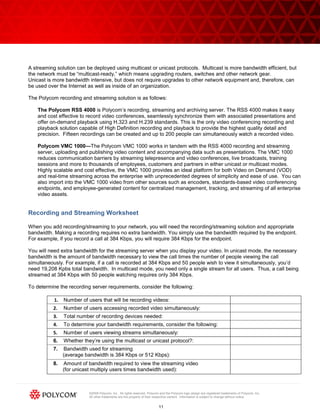
Recording and Streaming Worksheet

When you add recording/streaming to your network, you will need the recording/streaming solution and appropriate
bandwidth. Making a recording requires no extra bandwidth. You simply use the bandwidth required by the endpoint.
For example, if you record a call at 384 Kbps, you will require 384 Kbps for the endpoint.

You will need extra bandwidth for the streaming server when you display your video. In unicast mode, the necessary
bandwidth is the amount of bandwidth necessary to view the call times the number of people viewing the call
simultaneously. For example, if a call is recorded at 384 Kbps and 50 people wish to view it simultaneously, you’d
need 19,208 Kpbs total bandwidth. In multicast mode, you need only a single stream for all users. Thus, a call being
streamed at 384 Kbps with 50 people watching requires only 384 Kbps.

To determine the recording server requirements, consider the following:

           1.   Number of users that will be recording videos:
          2.    Number of users accessing recorded video simultaneously:
          3.    Total number of recording devices needed:
          4.    To determine your bandwidth requirements, consider the following:
          5.    Number of users viewing streams simultaneously:
          6.    Whether they’re using the multicast or unicast protocol?:
          7.    Bandwidth used for streaming
                (average bandwidth is 384 Kbps or 512 Kbps):
          8.    Amount of bandwidth required to view the streaming video
                (for unicast multiply users times bandwidth used):


                           ©2009 Polycom, Inc. All rights reserved. Polycom and the Polycom logo design are registered trademarks of Polycom, Inc.
                           All other trademarks are the property of their respective owners. Information is subject to change without notice.


                                                                           11
Putting it All Together

From the results of the previous sections, you can create a list of the equipment and bandwidth you will require to
implement your video conferencing network.

           1. Total number of endpoints:
           2. Total bandwidth required for your endpoints:
           3. Total number bridging resources:
           4. Total bandwidth for bridging:
           5. Gatekeeper required:                                                                                             (Circle One)          Yes   No
           6. Overall gatekeeping capacity:
           7. Management and scheduling required:                                                                              (Circle One)          Yes   No
           8. Redundant management devices:                                                                                    (Circle One)          Yes   No
           9. Number of NAT Traversal products:
           10. Total number of recording devices needed:
           11. Total bandwidth required for recording devices
           12. Total bandwidth required to view streaming video:

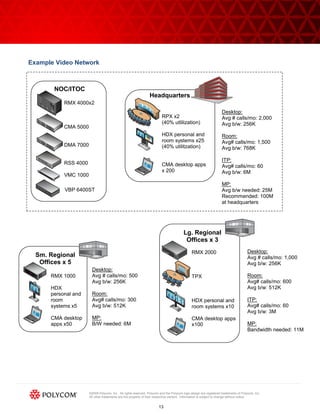
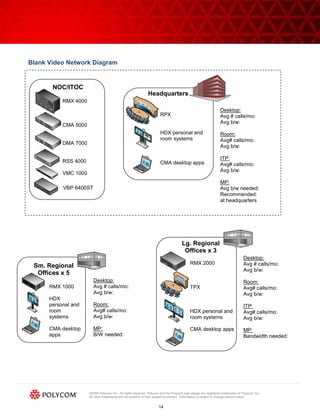
The network diagram shown here illustrates a video conferencing network that incorporates each of the devices
described in this paper: endpoints, bridges, NAT/Firewall Traversal and recording and streaming devices and how
much bandwidth is required. You can include your totals in the blank spaces provided in the diagram. We have
included one completed diagram as an example.

Performance
Finally, one of the most important keys to a successful video conferencing network is ensuring quality of experience
for each participant. This table shows good target values for an enterprise network supporting voide or video
conferencing. Meeting these goals will ensure quality voice and video conferencing transport.

                                        Parameter                          Value
                                        Packet Loss                        < 0.1%
                                        Packet Latency                     <= 100 ms
                                        Packet Jitter                      < 40 ms

Learn More!

The benefits of video conferencing include reductions in costs for travel, facilities and recruitment as well as improved
team collaboration and management. This whitepaper was designed to help you get started planning a video
conferencing solution that will enable you to achieve these benefits.

To learn more about the quantitative benefits you can achieve by installing a video conferencing solution,
you can plug the information you’ve gathered using these worksheets into our ROI calculator tool. Click here
ROI Calculator to access the Polycom videoconferencing ROI calculator tool. You can learn more about our
products by going to our video conferencing education center. Click here Education Center to access the
video conferencing education center.


                           ©2009 Polycom, Inc. All rights reserved. Polycom and the Polycom logo design are registered trademarks of Polycom, Inc.
                           All other trademarks are the property of their respective owners. Information is subject to change without notice.


                                                                           12
Example Video Network


       NOC/ITOC
                                                                Headquarters
           RMX 4000x2
                                                                                                                  Desktop:
                                                                        RPX x2                                    Avg # calls/mo: 2,000
                                                                        (40% utlilization)                        Avg b/w: 256K
           CMA 5000
                                                                        HDX personal and                          Room:
                                                                        room systems x25                          Avg# calls/mo: 1,500
           DMA 7000                                                     (40% utilitzation)                        Avg b/w: 768K

                                                                                                                  ITP:
           RSS 4000                                                     CMA desktop apps                          Avg# calls/mo: 60
                                                                        x 200                                     Avg b/w: 6M
           VMC 1000
                                                                                                                  MP:
           VBP 6400ST                                                                                             Avg b/w needed: 25M
                                                                                                                  Recommended: 100M
                                                                                                                  at headquarters


                                                                                       Lg. Regional
                                                                                        Offices x 3
                                                                                             RMX 2000                               Desktop:
  Sm. Regional                                                                                                                      Avg # calls/mo: 1,000
   Offices x 5                                                                                                                      Avg b/w: 256K
                       Desktop:
      RMX 1000         Avg # calls/mo: 500                                                   TPX                                    Room:
                       Avg b/w: 256K                                                                                                Avg# calls/mo: 600
      HDX                                                                                                                           Avg b/w: 512K
      personal and     Room:
      room             Avg# calls/mo: 300                                                    HDX personal and                       ITP:
      systems x5       Avg b/w: 512K                                                         room systems x10                       Avg# calls/mo: 60
                                                                                                                                    Avg b/w: 3M
      CMA desktop      MP:                                                                   CMA desktop apps
      apps x50         B/W needed: 6M                                                        x100                                   MP:
                                                                                                                                    Bandwidth needed: 11M


                      ©2009 Polycom, Inc. All rights reserved. Polycom and the Polycom logo design are registered trademarks of Polycom, Inc.
                      All other trademarks are the property of their respective owners. Information is subject to change without notice.


                                                                      13
Blank Video Network Diagram


       NOC/ITOC
                                                              Headquarters
           RMX 4000
                                                                                                                 Desktop:
                                                                       RPX                                       Avg # calls/mo:
                                                                                                                 Avg b/w:
           CMA 5000
                                                                       HDX personal and                          Room:
                                                                       room systems                              Avg# calls/mo:
           DMA 7000
                                                                                                                 Avg b/w:

                                                                                                                 ITP:
           RSS 4000                                                    CMA desktop apps                          Avg# calls/mo:
                                                                                                                 Avg b/w:
           VMC 1000
                                                                                                                 MP:
           VBP 6400ST                                                                                            Avg b/w needed:
                                                                                                                 Recommended:
                                                                                                                 at headquarters


                                                                                      Lg. Regional
                                                                                       Offices x 3
                                                                                                                                 Desktop:
                                                                                            RMX 2000                             Avg # calls/mo:
 Sm. Regional
                                                                                                                                 Avg b/w:
  Offices x 5
                        Desktop:                                                                                                 Room:
      RMX 1000          Avg # calls/mo:                                                     TPX                                  Avg# calls/mo:
                        Avg b/w:                                                                                                 Avg b/w:
      HDX
      personal and      Room:                                                                                                    ITP:
      room              Avg# calls/mo:                                                      HDX personal and                     Avg# calls/mo:
      systems           Avg b/w:                                                            room systems                         Avg b/w:

      CMA desktop       MP:                                                                 CMA desktop apps                     MP:
      apps              B/W needed:                                                                                              Bandwidth needed:


                      ©2009 Polycom, Inc. All rights reserved. Polycom and the Polycom logo design are registered trademarks of Polycom, Inc.
                      All other trademarks are the property of their respective owners. Information is subject to change without notice.


                                                                      14

Network Planning Worksheets for Video Conferencing

  • 1.
    Network Planning Worksheets forVideoconferencing Getting Started with Video Conferencing Many organizations today are considering the purchase of a video conferencing solution. These solutions give you the benefits of face-to-face meetings without leaving the office. As a result, not only can you reduce travel, facilities and recruitment costs, you can also enhance team collaboration and your ability to manage geographically dispersed teams. Implementing a visual communications network requires that you take steps to ensure that the systems and applications you select meet end user usability requirements and that your organization is prepared from a management and IT perspective. IT considerations include installing endpoints, bridges, management software as well as NAT Firewall Traversal and Recording/Streaming solutions. Not only will you need to determine which of these components, and how many of them, you will require, you must also ensure that your network has sufficient bandwidth to meet their demands. This guide is designed to help you plan what you need to get started adding video conferencing to your network. 1
  • 2.
    Why Add VideoConferencing to your Network? If your organization is considering purchasing a video conferencing system this year, you’re not alone. According to Wainhouse Research in its 2009 annual survey of video conferencing users, purchases of room and executive video conferencing systems have sustained a unit growth rate of more than 20 percent 1 between 2006 and 2009. Video conferencing technology allows staff at your organization to maintain the benefits of meeting face-to-face without leaving the office. Whether you’re a large global organization and wish to facilitate communication among colleagues, partners or job seekers or have customers scattered across the nation or globe, video conferencing allows all participants to hear and see each other and the content they want to share, regardless of their location. The recession has clearly spurred interest due to video conferencing technology’s ability to cut travel, facility and recruitment costs, but these solutions also have the added benefit of improving management and collaboration of dispersed workgroups. Reduce Travel Expenses Avoiding travel costs is the number one reason that companies adopt video conferencing. While travel will never be eliminated completely, video conferencing can dramatically reduce the number of necessary business trips. As a result, organizations can reduce a wide range of travel-related costs including those for air, train, and ground transportation as well as for lodging, meals and entertainment. Video conferencing also eliminates many hours of downtime and days away from the office, improving productivity. Lower Facility Costs Interest in telecommuting has grown considerably as workers seek greater home-work balance. Such arrangements give employees more options about where they want to work and reduce facilities costs. Yet, telecommuters can also present management challenges, since managers and employees are no longer in regular physical contact. By allowing management and remote workers to see and hear each other, organizations can better support remote workers. Trim Recruitment Expenses If your company recruits by video conference rather than flying recruiters or candidates around the country, you can interview more people from more locations in less time with less costs and disruption to executive schedules, thereby allowing you to make better and faster hiring decisions. Improve Team Collaboration Decisions today require insight and approval from many different sources. Video conferencing tools allow dispersed teams to collaborate more easily, solving problems and speeding coordination. This allows organizations to come to a consensus much faster in order to deliver new products and services more quickly. Video conferencing meetings also tend to be shorter than in-person meetings, leading to less wasted time. Enhance Management of Dispersed Teams Large organizations have subject matter experts and qualified resources around the globe. Video conferencing allows firms to more easily deploy and manage those globally dispersed resources by allowing impromptu, face-to-face meetings between managers, subordinates and remote peers. 1 ―The Compelling Case for Video Telephony in Unified Communications: Why Integrating Video with Telephony Call Control Makes Sense‖ by Brent Kelly & Andrew Davis, Wainhouse Research, March 2009. ©2009 Polycom, Inc. All rights reserved. Polycom and the Polycom logo design are registered trademarks of Polycom, Inc. All other trademarks are the property of their respective owners. Information is subject to change without notice. 2
  • 3.
    Executive Support Before embarkingon a video conferencing implementation, it is critical to have executive buy in and support. Implementing real changes in your organization starts with executive commitment. The executive team should deliver the message that visual communication can increase productivity, enhance collaboration, and reduce business travel, saving valuable dollars that can be spent elsewhere or given back to investors. End User Requirements Additionally, your video conferencing solution will only be successful to the extent that it meets the needs of end users. These requirements include: Ease of use. End users should not need to know IP addresses, E.164 numbers or ISDN numbers. To find a room or person to call, users should simply be able to access an enhanced search directory connected to the corporate LDAP directory, making it as easy to find the intended party for video as it is for email or IM. A variety of conferencing options. The video conferencing solution should offer options that accommodate the needs of different types of users within your organization. For example, your organization can incorporate immersive telepresence for executives, desktop video conferencing for people in small/remote offices, as well as traditional room-based video solutions. Presence capabilities. Presence capabilities allow end users to determine whether a conference room or a contact’s personal video system is available to receive a video call or if it is busy, offline, or in ―do not disturb‖ mode. Presence dramatically adds to the usability of a real-time video conference. Video on Demand. Scheduled video conferencing was once the norm, but more and more organizations are moving to an ad-hoc or video on demand policy, using scheduling only for critical ―white glove‖ conferencing. Video on demand makes it easier to leverage human resources, training and corporate communications across the organization. It allows employees to access important video communications when it is most convenient for them. Reporting embedded in the management solution enables the organization to easily track and record who has accessed each video. IT Prerequisites From an IT perspective, your organization will need to be prepared to supplement your network with equipment and bandwidth as well as management tools. In particular, you may need to: Increase and manage bandwidth to ensure quality of experience for every video call. Manage quality of service on the network. Determine if MPLS is needed on your network (separates applications, like video, across your network to make those applications run more smoothly.) Coordinate all elements of the video conferencing network, including video endpoints, conference bridges, and NAT/Firewall traversal to safely conference with users outside of the organization. Provision, deploy and manage all of these video conferencing elements. The management tools you select must embrace standards and allow for integration with your existing communication infrastructure. Enforce security using standards-based encryption of audio, video and data streams that traverse firewalls. Ensure scalability as usage is likely to grow as employees become familiar with the system. Make video on demand and/or streaming accessible for all employees. ©2009 Polycom, Inc. All rights reserved. Polycom and the Polycom logo design are registered trademarks of Polycom, Inc. All other trademarks are the property of their respective owners. Information is subject to change without notice. 3
  • 4.
    Network Planning Worksheets Youwill need to add equipment, software and bandwidth to your network to implement your video conferencing solution. Video conferencing components can include: Endpoint devices for rooms or individuals Bridges for multi party video calls Solutions for network management, gatekeeping and scheduling NAT firewall traversal devices for calling people outside your network Recording and streaming solutions The following sections describe the functions that each of these video conferencing network components perform and Polycom solutions in each area. We also provide worksheets to help you plan your requirements for your network in each of these areas from a generic perspective. For specific information about your network, we recommend that you speak with a systems engineer from a vendor. Endpoint Devices Videoconferencing endpoints are standards-based terminals that provide real-time two-way communications. The most popular standard used for video conference today is H.323, which enables video conferencing over IP networks, including the Internet. However, H.320, which uses ISDN lines for video calling, continues to be a very popular standard in some countries. H.324 is a video standard that was used with video phones in the recent past; however, recent multi-purpose business media phones are based on SIP so the H.324 standard has all but vanished from corporate video communications. Since most new video network deployments employ H.323 endpoints and network equipment, this white paper will focus on H.323 solutions. However, many solutions offer the ability to dial over both ISDN and/or H.323 networks. To identify the User or H.323 endpoint to conference with, videoconferencing systems use a Dial Plan to allocate a unique number to an H.323 endpoint. This number is referred to as the H.323, E.164 or User Number. This H.323 User Number is registered with a Gatekeeper, which in turn translates the User Number into an IP address. An example is the phone extension in your office. Internal users dial a four or five digit number while external callers dial a seven or ten digit number. Polycom endpoint solutions include the Polycom HDX series and the Polycom QDX series. Additionally the Polycom CMA solution, which will be discussed later in this whitepaper, includes a free desktop video conferencing application, the Polycom CMA Desktop. Polycom HDX Series—The Polycom HDX Series provides robust room and personal telepresence solutions for integrators, boardrooms, meeting rooms and conference rooms, as well as individuals and teams. These solutions furnish high resolution or High Definition communication for every user. The series offers HD video up to 1080p pixel resolution and HD voice with stereo audio. Colleagues and partners can include rich content during a conference call. Lost Packet Recovery (LPR) technology ensures an optimal experience even when calling over the Internet or congested networks. User interfaces are intuitive and include Presence. Polycom QDX Series—The Polycom QDX series provides affordable high resolution video starting as low as 256 Kbps and is optimized for networks that require video calls to be placed at lower bandwidths. It provides easy-to- use content sharing and is easy to deploy, use and maintain without the need for IT support. CMA Desktop—The CMA Desktop is part of a powerful, management, scheduling and gatekeeping application, the Polycom Converged Management Application™ (CMA). CMA allows you to centrally deploy, manage, and provision visual communication tools across your organization—from large conference rooms to individual desktops. Polycom CMA Desktop comes free with the Polycom CMA and is a fully standards-based video conferencing application that can be easily and quickly installed on thousands of PC’s across the video network. The Polycom CMA Desktop speeds deployment and makes it easy to locate contacts and resources through ©2009 Polycom, Inc. All rights reserved. Polycom and the Polycom logo design are registered trademarks of Polycom, Inc. All other trademarks are the property of their respective owners. Information is subject to change without notice. 4
  • 5.
    integration with existingcorporate directory services. Integrated Presence-awareness and status icons enable users to instantly verify contact and resource availability. An intuitive click-to-dial IM-style interface allows easy and high quality point-to-point and multipoint video interactions among users. A point-and-click interface makes it easy for end users to share content with other users and, as a standards-based application, it can join any multipoint video call or communicate with any other H.323 endpoint on the network. Endpoint Planning Worksheet Because different organizations are structured differently, they have different endpoint requirements. You may wish to assign endpoints to different physical locations, buildings and conference rooms. Alternatively, if different departments within your organization have different bandwidth requirements, you may wish to assign endpoints by department. However your organization wishes to structure your video conferencing network, the following worksheet will help you determine the number of endpoints and the bandwidth your organization will require: 1. To determine number of group video conferencing systems or telepresence rooms for your organization: Number of departments or sites Amount of bandwidth between site Number of buildings at each site Number of conference rooms per building Number of conference rooms per building to be outfitted with video Note: you could also determine the number of video systems needed by using a 1:20 ratio of video systems per employee Multiply number of sites x number of video systems per building 2. Now consider the number of individuals who will require desktop conferencing systems. Each of the following types of workers will require one endpoint: Number of teleworkers/endpoints Number of traveling employees/endpoints 3. Total number of endpoints: Immersive Telepresence systems Group video conferencing systems Desktop video conferencing 4. Now you will determine your bandwidth requirements for your endpoints: HDX systems require an average of 384Kbps - 1Mbps per endpoint for standard conferences; 2Mbpsper endpoint for locations that do significant rich media sharing QDX systems require roughly .384kbps – 512Kbps per endpoint Immersive telepresence rooms require up to 6 MB per endpoint Multiply your total number of endpoints by the bandwidth requirements for each endpoint. Immersive Telepresence Group video conferencing systems Desktop video conferencing systems ©2009 Polycom, Inc. All rights reserved. Polycom and the Polycom logo design are registered trademarks of Polycom, Inc. All other trademarks are the property of their respective owners. Information is subject to change without notice. 5
  • 6.
    Total bandwidth requiredfor your endpoints If calls will all be made internally, take the total bandwidth number above and divide by two – this is the final number for your bandwidth needs. (The reason for this is that when endpoint call each other, they are not each taking up the bandwidth – i.e. if two people call each other at 384kbps, the total bandwidth for the call is 384Kbps.) If there will be a mixture of internal and external calls, you will need to determine the % of external calls and adjust bandwidth requirements accordingly. For bandwidth considerations, you all need to determine how many concurrent calls will be happening between sites and make sure you have enough bandwidth dedicated to video to meet that demand. If there are other mission critical applications, such as VOIP, SAP, email, etc. using this same bandwidth this must also be considered and for optimal quality of experience networks such as these should have MPLS and QoS implemented. You can estimate that on the low end, 5% of video systems will be in use at any given time and on the high end 20% of video systems will be in use at any given time. Bridging for Multi-party Conferences Bridging is necessary when three or more people wish to see and hear each other as part of a video conference. The most common way to conduct a multipoint video meeting is for each participating video system (meeting room, desktop, etc.) to connect to a single bridging device, called a multipoint conferencing unit or MCU. Video bridges are available either embedded within the video endpoint itself or as a stand-alone hardware device. While MCUs embedded within video endpoints can provide a cost effective way to host high-quality multipoint meetings, they support a limited number of participants and provide a limited feature set. Many of Polycom’s endpoints include embedded MCU functionality. However, when deploying ten or more endpoints a centrally located bridging solution is highly recommended. Polycom offers these bridging solutions: Polycom RMX 2000 & RMX 4000 —The Polycom RMX 2000 and RMX 4000 are real-time media conference bridges that provide multi-party video conferencing anytime, on-demand. They allow cell phone callers and PSTN (regular voice) callers to join a conference over audio, while other callers also use the video. They also perform transcoding (supporting fully unified communications for IP—H.323/SIP, PSTN and ISDN) so everyone can call in at their own data rate and speed, using their own equipment and the bridge allows them all to communicate without having to know any call-in requirements in advance. The RMX 2000 can grow from 20-160 video resources on a single bridge; the RMX 4000 can grow from 40-320 video resources on a single bridge. Multiple bridges can easily be managed on a single network. If three or more bridges are required for your video conferencing network, it is highly recommended that you investigate the Polycom DMA 7000 – an application that unites the RMX platforms under a single point of call control. Polycom RMX 1000—This conference platform delivers high performance H.323 video and audio conferencing to small-to-medium sized organizations and branch sites within the enterprise. Supporting up to twenty video and audio endpoints concurrently, the Polycom RMX 1000 is ideal for either small to medium sized deployments of IP video conferencing systems or as edge servers, working in conjunction with an RMX 2000 located at the NOC. ©2009 Polycom, Inc. All rights reserved. Polycom and the Polycom logo design are registered trademarks of Polycom, Inc. All other trademarks are the property of their respective owners. Information is subject to change without notice. 6
  • 7.
    Bridge Planning Worksheet Thefollowing worksheet will help you plan the number of bridges you will require and the amount of bandwidth necessary for each one. 1. How many bridges do you need? You will want at least one bridge resource (or port) for every five endpoints, assuming no more than 20 percent of your end users are on the bridge at any one time. If every endpoint will need to be included in your bridge calls (e.g. a company wide meeting) you will need a bridge resource per endpoint. Number of endpoints (taken from previous worksheet): Number of bridging resources (assuming a 1:5 ratio of bridges to endpoints): 2. How much bandwidth do you need? The bandwidth required at the bridge equals the aggregate bandwidth of all the endpoints served by the bridge at any given time. In other words, if a particular bridge serves five endpoints, you will need 5 x the bandwidth required by each endpoint at the bridge location. For example, if five endpoints called into the bridge at 1Mbps each, the total amount of bandwidth needed at the bridge location is 5Mbps. Remember that different types of calls require different amounts of bandwidth: Voice caller – 64Kbps CIF caller (non-HD endpoints) – 128Kbps 4CIF caller, or SD caller (ex: QDX 6000) – 256Kbps HD caller at 720p, 30fps – 1Mbps HD caller at 720p, 60fps – 2Mbps HD caller at 1080p, 30fps – 4Mbps Average bandwidth required for each bridge resource (look at the average bandwidth specified for video callers) : Total bandwidth required for bridging (multiply the average bandwidth times the number of bridging resources needed): Note: this bandwidth must be available at the location of the bridge. ©2009 Polycom, Inc. All rights reserved. Polycom and the Polycom logo design are registered trademarks of Polycom, Inc. All other trademarks are the property of their respective owners. Information is subject to change without notice. 7
  • 8.
    Management, Gatekeeping andScheduling As you set up your video conferencing network, you will need capabilities to enable IT administrators to manage the network. These solutions may include gatekeeping, management and scheduling services. Gatekeeping services. Gatekeepers are part of H.323 networking and are the brains of an H.323 network, delivering a wide range of IP services and applications. Gatekeepers provide call control and routing services to H.323 endpoints and bridges. Gatekeepers allow administrators to provision the capabilities for different users; for example, allowing executives to have access to any kind of conference while giving other employees access to desktop conferences. In particular, gatekeepers allow network administrators to: Configure, monitor and manage the activities of registered endpoints (e.g. H.323 terminals, gateways or MCUs) Set policies Control resources, such as bandwidth usage within their H.323 zone Provide address translation between an endpoint’s H.323 address and its various aliases. An alias allows you to use a name, such as ―Bill Smith‖ to designate an endpoint rather than an abstract IP address. Although the H.323 specification describes the gatekeeper as an optional component of a fully functional H.323 system, gatekeepers are essential for all but the smallest video conferencing networks. Management services. Management services allow administrators to remotely monitor, troubleshoot or upgrade endpoints. This greatly simplifies an IT administrator’s job when there are multiple sites, departments or locations that have video conferencing systems. Additionally these management services will allow administrators to support remote or traveling users. Scheduling. Many organizations mandate that video conferencing only be used in a scheduled environment. This approach is used mainly when limited video conferencing rooms and resources are available and demand is high, meaning that people going into the room on an ad-hoc basis would be disruptive to other employees. Scheduling plug- ins can be installed so that users can perform scheduling using Microsoft Outlook, Lotus Notes or an independent web scheduler. Polycom solutions provide gatekeeping, management and scheduling services in a single solution. Polycom Converged Management Application 5000/4000—Providing gatekeeping, management and scheduling capabilities, the Polycom CMA 5000/4000 allows administrators to centrally manage and deploy visual communication across the entire organization from large conference rooms to individual desktops. It accelerates and streamlines deployment, management and provisioning of visual communication tools. By integrating with existing corporate directory services, the Polycom CMA speeds deployment and enables seamless contact/resource locating. Integrated Presence-awareness and status icons enable users to instantly verify contact and resource availability. The CMA 4000 serves and supports video conference networks with up to 400 devices. The CMA 5000 can grow to 5,000 devices. As mentioned earlier, the Polycom CMA includes the Polycom CMA Desktop application that can be easily distributed to thousands of desktop PCs for H.323 standards-based desktop video conferencing. ©2009 Polycom, Inc. All rights reserved. Polycom and the Polycom logo design are registered trademarks of Polycom, Inc. All other trademarks are the property of their respective owners. Information is subject to change without notice. 8
  • 9.
    Management Software Worksheet Thisworksheet will help you determine which management capabilities your video conferencing system will require and their capacity. 1. Do you need a Gatekeeper? Will your video conference network have more than five video conference Yes No endpoints? (Circle one): If yes, you will need a gatekeeper. 2. Determining Gatekeeper Capacity For each H.323 endpoint or device and external MCU, you will need one license/port on the gatekeeper. List the number of devices and external MCUs here: 3. Planning future capacity You need to ensure that you purchase a gatekeeper that supports enough devices to allow your organization’s video conferencing capabilities to grow. Polycom has some gatekeeping solutions that scale to 400 ports, others scale from 500 to 5,000 ports in increments of 100. List number of expected video devices in two years:_____________________________ 4. Overall Gatekeeping Capacity Required Add Gatekeeping capacity to future capacity to come up with total gatekeeper capacity requirements. Your total capacity will be the number of devices on your network (endpoints, recording servers, bridges) plus some room for growth. Total Gatekeeping capacity: 5. Do you need management and scheduling software in addition to gatekeeping? Management solutions are recommended for deployments of more than ten endpoints or resources, making it easier to upgrade, maintain and troubleshoot the video network or for deployment where a single person is expected to manage systems in multiple locations. Management, gatekeeping and scheduling capabilities required (Circle one): Yes No 6. Does your organization require redundancy? Redundancy required: (Circle one): Yes No ©2009 Polycom, Inc. All rights reserved. Polycom and the Polycom logo design are registered trademarks of Polycom, Inc. All other trademarks are the property of their respective owners. Information is subject to change without notice. 9
  • 10.
    NAT Firewall Traversal NATfirewall traversal products make calling off the Intranet to other users such as vendors, partners, colleagues, or specialists (over the Internet) seamless for the end user yet secure for the organization. NAT and Firewall Traversal devices allow organizations use to video-enable their users, regardless of location. Traditional IP communication for voice and data has largely been secured through specially-built firewalls, but with video, firewalls often block required ports and often mistranslate IP addresses passed through in H.323 call signaling. The result of these failures is dialing and ringing but no negotiation, or one-way audio and video with little or no connection. NAT translation helps to modify IP addresses used in the transfer of packets from one network to another and is helpful for protecting devices from external exposure. NAT’s can also free up or allow IP addresses to be re-used on a different network without causing conflicts. Polycom’s NAT Firewall Traversal solution is: Video Border Proxy (VBP)—VBP allows all members of an organization to video conference with anyone outside of the network while protecting critical IP communication components. Complying with the ITU-T H.460 standard, VBP routes video and voice traffic via the shortest path and supports 1Mbps up to 85 Mbps of traffic in any combination of voice, video or data—depending on product model. It protects H.323 gatekeepers and multipoint conference units from network-based attacks and eliminates security risks by providing a stateful packet inspection firewall in combination with an application layer gateway. The Polycom VBP (ST models) combined with the Polycom CMA also provide a way for CMA Desktop users to make and receive calls when not connected to the corporate network and when VPN access is not available. NAT Firewall Traversal Worksheet This worksheet will help you determine the number of NAT Traversal solutions and corresponding bandwidth requirements: 1. Number of NAT Firewall Traversal Products You will need one NAT firewall traversal product per network region if users will be participating in video conferences over the Internet. These devices are sold by ―size‖ which is determined by the number of simultaneous calls expected outside of the network, or over the Internet. Number of NAT Traversal products needed: Number of expected simultaneous calls outside of the network: Size of NAT/Firewall traversal product needed: Recording and Streaming Recording solutions are usually H.323 endpoint devices on a network that allow you to record a video session and then play it back on demand. Users simply dial the device like they would another video conference endpoint, and press a button to start recording. The device records the session, then gives the user a link that they can send to anyone in the company, allowing them to view the video at their leisure. The system can also generate a link to allow users to view the recording live. Video streaming has different definitions, but by any definition, streaming is gaining popularity among organizations of all sizes. The ability to broadcast a live or recorded stream to employees, resellers, partners and/or customers is an attractive, cost effective way to introduce a product, share an application, or communicate a message. ©2009 Polycom, Inc. All rights reserved. Polycom and the Polycom logo design are registered trademarks of Polycom, Inc. All other trademarks are the property of their respective owners. Information is subject to change without notice. 10
  • 11.
    A streaming solutioncan be deployed using multicast or unicast protocols. Multicast is more bandwidth efficient, but the network must be ―multicast-ready,‖ which means upgrading routers, switches and other network gear. Unicast is more bandwidth intensive, but does not require upgrades to other network equipment and, therefore, can be used over the Internet as well as inside of an organization. The Polycom recording and streaming solution is as follows: The Polycom RSS 4000 is Polycom’s recording, streaming and archiving server. The RSS 4000 makes it easy and cost effective to record video conferences, seamlessly synchronize them with associated presentations and offer on-demand playback using H.323 and H.239 standards. This is the only video conferencing recording and playback solution capable of High Definition recording and playback to provide the highest quality detail and precision. Fifteen recordings can be created and up to 200 people can simultaneously watch a recorded video. Polycom VMC 1000—The Polycom VMC 1000 works in tandem with the RSS 4000 recording and streaming server, uploading and publishing video content and accompanying data such as presentations. The VMC 1000 reduces communication barriers by streaming telepresence and video conferences, live broadcasts, training sessions and more to thousands of employees, customers and partners in either unicast or multicast modes. Highly scalable and cost effective, the VMC 1000 provides an ideal platform for both Video on Demand (VOD) and real-time streaming across the enterprise with unprecedented degrees of simplicity and ease of use. You can also import into the VMC 1000 video from other sources such as encoders, standards-based video conferencing endpoints, and employee-generated content for centralized management, tracking, and streaming of all enterprise video assets. Recording and Streaming Worksheet When you add recording/streaming to your network, you will need the recording/streaming solution and appropriate bandwidth. Making a recording requires no extra bandwidth. You simply use the bandwidth required by the endpoint. For example, if you record a call at 384 Kbps, you will require 384 Kbps for the endpoint. You will need extra bandwidth for the streaming server when you display your video. In unicast mode, the necessary bandwidth is the amount of bandwidth necessary to view the call times the number of people viewing the call simultaneously. For example, if a call is recorded at 384 Kbps and 50 people wish to view it simultaneously, you’d need 19,208 Kpbs total bandwidth. In multicast mode, you need only a single stream for all users. Thus, a call being streamed at 384 Kbps with 50 people watching requires only 384 Kbps. To determine the recording server requirements, consider the following: 1. Number of users that will be recording videos: 2. Number of users accessing recorded video simultaneously: 3. Total number of recording devices needed: 4. To determine your bandwidth requirements, consider the following: 5. Number of users viewing streams simultaneously: 6. Whether they’re using the multicast or unicast protocol?: 7. Bandwidth used for streaming (average bandwidth is 384 Kbps or 512 Kbps): 8. Amount of bandwidth required to view the streaming video (for unicast multiply users times bandwidth used): ©2009 Polycom, Inc. All rights reserved. Polycom and the Polycom logo design are registered trademarks of Polycom, Inc. All other trademarks are the property of their respective owners. Information is subject to change without notice. 11
  • 12.
    Putting it AllTogether From the results of the previous sections, you can create a list of the equipment and bandwidth you will require to implement your video conferencing network. 1. Total number of endpoints: 2. Total bandwidth required for your endpoints: 3. Total number bridging resources: 4. Total bandwidth for bridging: 5. Gatekeeper required: (Circle One) Yes No 6. Overall gatekeeping capacity: 7. Management and scheduling required: (Circle One) Yes No 8. Redundant management devices: (Circle One) Yes No 9. Number of NAT Traversal products: 10. Total number of recording devices needed: 11. Total bandwidth required for recording devices 12. Total bandwidth required to view streaming video: The network diagram shown here illustrates a video conferencing network that incorporates each of the devices described in this paper: endpoints, bridges, NAT/Firewall Traversal and recording and streaming devices and how much bandwidth is required. You can include your totals in the blank spaces provided in the diagram. We have included one completed diagram as an example. Performance Finally, one of the most important keys to a successful video conferencing network is ensuring quality of experience for each participant. This table shows good target values for an enterprise network supporting voide or video conferencing. Meeting these goals will ensure quality voice and video conferencing transport. Parameter Value Packet Loss < 0.1% Packet Latency <= 100 ms Packet Jitter < 40 ms Learn More! The benefits of video conferencing include reductions in costs for travel, facilities and recruitment as well as improved team collaboration and management. This whitepaper was designed to help you get started planning a video conferencing solution that will enable you to achieve these benefits. To learn more about the quantitative benefits you can achieve by installing a video conferencing solution, you can plug the information you’ve gathered using these worksheets into our ROI calculator tool. Click here ROI Calculator to access the Polycom videoconferencing ROI calculator tool. You can learn more about our products by going to our video conferencing education center. Click here Education Center to access the video conferencing education center. ©2009 Polycom, Inc. All rights reserved. Polycom and the Polycom logo design are registered trademarks of Polycom, Inc. All other trademarks are the property of their respective owners. Information is subject to change without notice. 12
  • 13.
    Example Video Network NOC/ITOC Headquarters RMX 4000x2 Desktop: RPX x2 Avg # calls/mo: 2,000 (40% utlilization) Avg b/w: 256K CMA 5000 HDX personal and Room: room systems x25 Avg# calls/mo: 1,500 DMA 7000 (40% utilitzation) Avg b/w: 768K ITP: RSS 4000 CMA desktop apps Avg# calls/mo: 60 x 200 Avg b/w: 6M VMC 1000 MP: VBP 6400ST Avg b/w needed: 25M Recommended: 100M at headquarters Lg. Regional Offices x 3 RMX 2000 Desktop: Sm. Regional Avg # calls/mo: 1,000 Offices x 5 Avg b/w: 256K Desktop: RMX 1000 Avg # calls/mo: 500 TPX Room: Avg b/w: 256K Avg# calls/mo: 600 HDX Avg b/w: 512K personal and Room: room Avg# calls/mo: 300 HDX personal and ITP: systems x5 Avg b/w: 512K room systems x10 Avg# calls/mo: 60 Avg b/w: 3M CMA desktop MP: CMA desktop apps apps x50 B/W needed: 6M x100 MP: Bandwidth needed: 11M ©2009 Polycom, Inc. All rights reserved. Polycom and the Polycom logo design are registered trademarks of Polycom, Inc. All other trademarks are the property of their respective owners. Information is subject to change without notice. 13
  • 14.
    Blank Video NetworkDiagram NOC/ITOC Headquarters RMX 4000 Desktop: RPX Avg # calls/mo: Avg b/w: CMA 5000 HDX personal and Room: room systems Avg# calls/mo: DMA 7000 Avg b/w: ITP: RSS 4000 CMA desktop apps Avg# calls/mo: Avg b/w: VMC 1000 MP: VBP 6400ST Avg b/w needed: Recommended: at headquarters Lg. Regional Offices x 3 Desktop: RMX 2000 Avg # calls/mo: Sm. Regional Avg b/w: Offices x 5 Desktop: Room: RMX 1000 Avg # calls/mo: TPX Avg# calls/mo: Avg b/w: Avg b/w: HDX personal and Room: ITP: room Avg# calls/mo: HDX personal and Avg# calls/mo: systems Avg b/w: room systems Avg b/w: CMA desktop MP: CMA desktop apps MP: apps B/W needed: Bandwidth needed: ©2009 Polycom, Inc. All rights reserved. Polycom and the Polycom logo design are registered trademarks of Polycom, Inc. All other trademarks are the property of their respective owners. Information is subject to change without notice. 14