MISSION
CHRIST is a nurturing ground for an individual’s
holistic development to make effective contribution to
the society in a dynamic environment
VISION
Excellence and Service
CORE VALUES
Faith in God | Moral Uprightness
Love of Fellow Beings
Social Responsibility | Pursuit of Excellence
4. Network Attached Storage
Dr Mithun B N
Asst. Prof. Dept. of CSE, SoET
Excellence and Service
CHRIST
Deemed to be University
Network Attached Storage
● Network-attached storage (NAS) is an IP-based file-sharing device
attached to a local area network.
● NAS provides the advantages of server consolidation by
eliminating the need for multiple file servers.
● It provides storage consolidation through file-level data access
and sharing. NAS is a preferred storage solution that enables
clients to share files quickly and directly with minimum storage
management overhead.
● NAS also helps to eliminate bottlenecks that users face when
accessing files from a general-purpose server.
● NAS uses network and file-sharing protocols to perform filing and
storage functions.
● These protocols include TCP/IP for data transfer and CIFS and NFS
for remote file service.
Excellence and Service
CHRIST
Deemed to be University
Network Attached Storage
● A NAS device is a dedicated, high-performance, high-speed,
single-purpose file serving and storage system.
● NAS serves a mix of clients and servers over an IP network. Most
NAS devices support multiple interfaces and networks.
● A NAS device uses its own operating system and integrated
hardware, software components to meet specific file service
needs. Its operating system is optimized for file I/O and,
therefore, performs file I/O better than a general purpose server.
Excellence and Service
CHRIST
Deemed to be University
General purpose servers v/s NAS devices
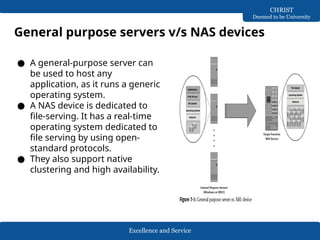
● A general-purpose server can
be used to host any
application, as it runs a generic
operating system.
● A NAS device is dedicated to
file-serving. It has a real-time
operating system dedicated to
file serving by using open-
standard protocols.
● They also support native
clustering and high availability.
Excellence and Service
CHRIST
Deemed to be University
Benefits of NAS
● Supports comprehensive access to information.
● Improved efficiency
● Improved flexibility
● Centralized storage
● Simplified management
● Scalability
● High availability
● Security
Excellence and Service
CHRIST
Deemed to be University
NAS file I/O
● NAS uses file-level access for all of its I/O operations. File I/O is a
high-level request that specifies the file to be accessed, but does
not specify its logical block address.
● For example, a file I/O request from a client may specify reading
256 bytes from byte number 1152 onward in a specific file. Unlike
block I/O, there is no disk volume or disk sector information in a
file I/O request.
● The NAS operating system keeps track of the location of files on
the disk volume and converts client file I/O into block-level I/O to
retrieve data.
● The NAS operating system issues a block I/O request to fulfill the
file read and write requests that it receives. The retrieved data is
again converted to file level I/O for applications and clients.
Excellence and Service
CHRIST
Deemed to be University
File System and Remote File Sharing
● A file system is a structured way of storing and
organizing data files. Many file systems maintain a file
access table to simplify the process of finding and
accessing files.
Accessing a file system
A file system must be mounted before it can be used. In
most cases, the operating system mounts a local file
system during the boot process.
The mount process creates a link between the file system
and the operating system.
When mounting a file system, the operating system
organizes files and directories in a tree-like structure and
grants the user the privilege of accessing this structure.
Excellence and Service
CHRIST
Deemed to be University
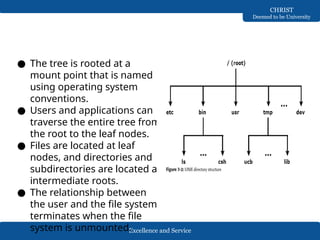
● The tree is rooted at a
mount point that is named
using operating system
conventions.
● Users and applications can
traverse the entire tree from
the root to the leaf nodes.
● Files are located at leaf
nodes, and directories and
subdirectories are located at
intermediate roots.
● The relationship between
the user and the file system
terminates when the file
system is unmounted.
Excellence and Service
CHRIST
Deemed to be University
File sharing
● File sharing refers to storing and accessing data files over a
network.
● Owner – one who creates file, determines the types of
access to be given to the file.
● File operations are – read, write, execute, append, delete
and list.
● FTP is a client/server protocol that enables data transfer
over a network.
● FTP over secure shell (SSH) adds security to the original FTP
specification.
● Client/server model – the clients mount remote file systems
that are available on dedicated file servers.
● NFS and CIFS enable the owner of a file to set the required
type of access, such as read only or read-write for a
particular user or group.
Excellence and Service
CHRIST
Deemed to be University
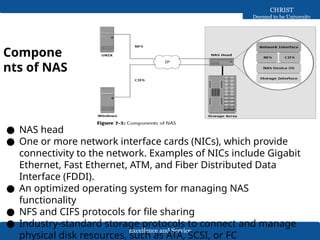
Compone
nts of NAS
● NAS head
● One or more network interface cards (NICs), which provide
connectivity to the network. Examples of NICs include Gigabit
Ethernet, Fast Ethernet, ATM, and Fiber Distributed Data
Interface (FDDI).
● An optimized operating system for managing NAS
functionality
● NFS and CIFS protocols for file sharing
● Industry-standard storage protocols to connect and manage
physical disk resources, such as ATA, SCSI, or FC
Excellence and Service
CHRIST
Deemed to be University
NAS Implementations
● Two types of NAS implementation:
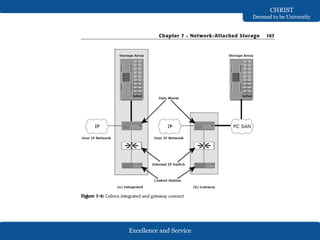
● The integrated NAS device has all of its components and
storage system in a single enclosure. In gateway
implementation, NAS head shares its storage with SAN
environment.
Excellence and Service
CHRIST
Deemed to be University
Integrated NAS
● An integrated NAS device has all the components of NAS,
such as the NAS head and storage, in a single enclosure, or
frame.
● This makes the integrated NAS a self-contained
environment. The NAS head connects to the IP network to
provide connectivity to the clients and service the file I/O
requests.
● The storage consists of a number of disks that can range
from low-cost ATA to high throughput FC disk drives.
● Management software manages the NAS head and storage
configurations.
● A low-end appliance-type NAS solution is suitable for
applications that a small department may use, where the
primary need is consolidation of storage, rather than high
performance or advanced features such as disaster recovery
and business continuity.
● In a high-end NAS solution, external and dedicated storage
Excellence and Service
CHRIST
Deemed to be University
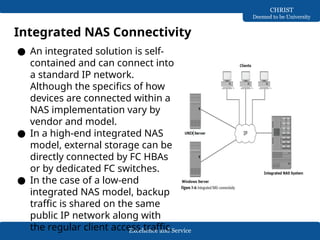
Integrated NAS Connectivity
● An integrated solution is self-
contained and can connect into
a standard IP network.
Although the specifics of how
devices are connected within a
NAS implementation vary by
vendor and model.
● In a high-end integrated NAS
model, external storage can be
directly connected by FC HBAs
or by dedicated FC switches.
● In the case of a low-end
integrated NAS model, backup
traffic is shared on the same
public IP network along with
the regular client access traffic.
Excellence and Service
CHRIST
Deemed to be University
Gateway NAS
● A gateway NAS device consists of an independent NAS head
and one or more storage arrays. The NAS head performs the
same functions that it does in the integrated solution; while
the storage is shared with other applications that require
block-level I/O.
● Management functions in this type of solution are more
complex than those in an integrated environment because
there are separate administrative tasks for the NAS head and
the storage.
● The gateway NAS is the most scalable because NAS heads
and storage arrays can be independently scaled up when
required.
● Adding processing capacity to the NAS gateway is an example
of scaling.
● When the storage limit is reached, it can scale up, adding
capacity on the SAN independently of the NAS head.
Excellence and Service
CHRIST
Deemed to be University
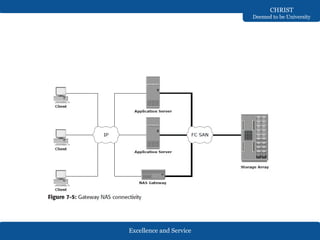
Gateway NAS connectivity
● In a gateway solution, front-end connectivity is similar to that in
an integrated solution.
● An integrated environment has a fixed number of NAS heads,
making it relatively easy to determine IP networking
requirements.
● In contrast, networking requirements in a gateway environment
are complex to determine due to scalability options.
● Adding more NAS heads may require additional networking
connectivity and bandwidth.
● Communication between the NAS gateway and the storage
system in a gateway solution is achieved through a traditional FC
SAN.
● To deploy a stable NAS solution, factors such as multiple paths
for data, redundant fabrics, and load distribution must be
considered.
● Analyze the SAN to determine whether the workload is primarily
read or write, or random or sequential.
Excellence and Service
CHRIST
Deemed to be University
Excellence and Service
CHRIST
Deemed to be University
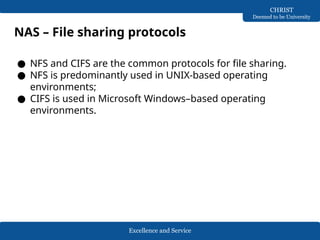
NAS – File sharing protocols
● NFS and CIFS are the common protocols for file sharing.
● NFS is predominantly used in UNIX-based operating
environments;
● CIFS is used in Microsoft Windows–based operating
environments.
Excellence and Service
CHRIST
Deemed to be University
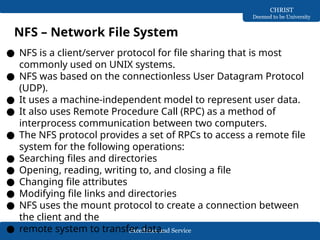
NFS – Network File System
● NFS is a client/server protocol for file sharing that is most
commonly used on UNIX systems.
● NFS was based on the connectionless User Datagram Protocol
(UDP).
● It uses a machine-independent model to represent user data.
● It also uses Remote Procedure Call (RPC) as a method of
interprocess communication between two computers.
● The NFS protocol provides a set of RPCs to access a remote file
system for the following operations:
● Searching files and directories
● Opening, reading, writing to, and closing a file
● Changing file attributes
● Modifying file links and directories
● NFS uses the mount protocol to create a connection between
the client and the
● remote system to transfer data.
Excellence and Service
CHRIST
Deemed to be University
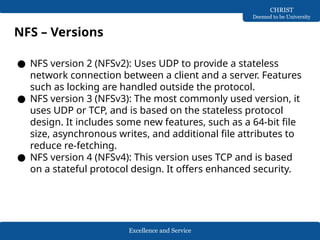
NFS – Versions
● NFS version 2 (NFSv2): Uses UDP to provide a stateless
network connection between a client and a server. Features
such as locking are handled outside the protocol.
● NFS version 3 (NFSv3): The most commonly used version, it
uses UDP or TCP, and is based on the stateless protocol
design. It includes some new features, such as a 64-bit file
size, asynchronous writes, and additional file attributes to
reduce re-fetching.
● NFS version 4 (NFSv4): This version uses TCP and is based
on a stateful protocol design. It offers enhanced security.
Excellence and Service
CHRIST
Deemed to be University
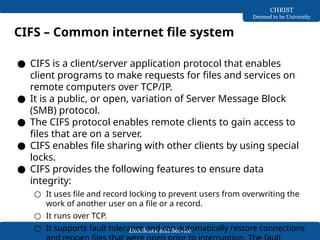
CIFS – Common internet file system
● CIFS is a client/server application protocol that enables
client programs to make requests for files and services on
remote computers over TCP/IP.
● It is a public, or open, variation of Server Message Block
(SMB) protocol.
● The CIFS protocol enables remote clients to gain access to
files that are on a server.
● CIFS enables file sharing with other clients by using special
locks.
● CIFS provides the following features to ensure data
integrity:
○ It uses file and record locking to prevent users from overwriting the
work of another user on a file or a record.
○ It runs over TCP.
○ It supports fault tolerance and can automatically restore connections
Excellence and Service
CHRIST
Deemed to be University
● CIFS is a stateful protocol because the CIFS server maintains
connection information regarding every connected client.
● In the event of a network failure or CIFS server failure, the
client receives a disconnection notification.
● User disruption is minimized if the application has the
embedded intelligence to restore the connection.
● However, if the embedded intelligence is missing, the user
has to take steps to reestablish the CIFS connection.
Excellence and Service
CHRIST
Deemed to be University
NAS I/O operations
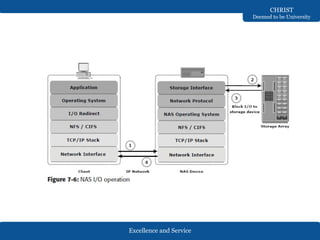
● The NFS and CIFS protocols handle file I/O requests to a
remote file system, which is managed by the NAS device.
● The process of NAS I/O is as follows:
○ The requestor packages an I/O request into TCP/IP and forwards it
through the network stack. The NAS device receives this request
from the network.
○ The NAS device converts the I/O request into an appropriate physical
storage request, which is a block-level I/O, and then performs the
operation against the physical storage pool.
○ When the data is returned from the physical storage pool, the NAS
device processes and repackages the data into an appropriate file
protocol response.
○ The NAS device packages this response into TCP/IP again and
forwards it to the client through the network.
Excellence and Service
CHRIST
Deemed to be University
Excellence and Service
CHRIST
Deemed to be University
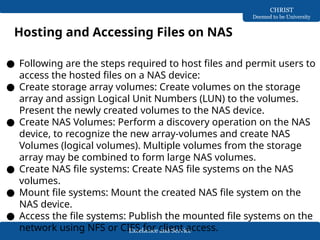
Hosting and Accessing Files on NAS
● Following are the steps required to host files and permit users to
access the hosted files on a NAS device:
● Create storage array volumes: Create volumes on the storage
array and assign Logical Unit Numbers (LUN) to the volumes.
Present the newly created volumes to the NAS device.
● Create NAS Volumes: Perform a discovery operation on the NAS
device, to recognize the new array-volumes and create NAS
Volumes (logical volumes). Multiple volumes from the storage
array may be combined to form large NAS volumes.
● Create NAS file systems: Create NAS file systems on the NAS
volumes.
● Mount file systems: Mount the created NAS file system on the
NAS device.
● Access the file systems: Publish the mounted file systems on the
network using NFS or CIFS for client access.
Excellence and Service
CHRIST
Deemed to be University
Factors affecting NAS performance and
availability
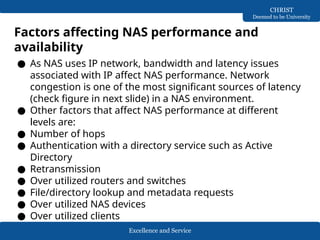
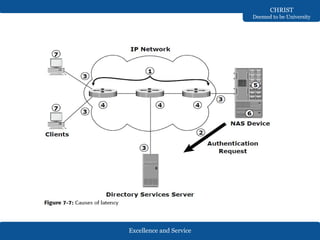
● As NAS uses IP network, bandwidth and latency issues
associated with IP affect NAS performance. Network
congestion is one of the most significant sources of latency
(check figure in next slide) in a NAS environment.
● Other factors that affect NAS performance at different
levels are:
● Number of hops
● Authentication with a directory service such as Active
Directory
● Retransmission
● Over utilized routers and switches
● File/directory lookup and metadata requests
● Over utilized NAS devices
● Over utilized clients
Excellence and Service
CHRIST
Deemed to be University
Excellence and Service
CHRIST
Deemed to be University
● Configuring VLANs and setting proper Maximum Transmission
Unit (MTU) and TCP window size can improve NAS performance.
● Link aggregation and redundant network configurations ensure
high availability.
● A virtual LAN (VLAN) is a switched network that is logically
segmented by functions, project teams, or applications,
regardless of the user’s physical location.
● A VLAN is similar to a physical LAN except that the VLAN enables
the grouping of end stations even if they are not physically
located on the same network segment. VLAN is a layer 2 (data
link layer) construct.
● A network switch can be divided among multiple VLANs,
enabling better utilization of port density and reducing the
overall cost of deploying a network infrastructure.
● A VLAN can control the overall broadcast traffic. The broadcast
traffic on one VLAN is not transmitted outside that VLAN, which
substantially reduces broadcast overhead, makes bandwidth
available for applications, and reduces the network’s
Excellence and Service
CHRIST
Deemed to be University
● The MTU setting determines the size of the largest packet that
can be transmitted without data fragmentation.
● Path maximum transmission unit discovery is the process of
discovering the maximum size of a packet that can be sent
across a network without fragmentation.
● The default MTU settings are specific for each protocol and
depend on the type of NIC installed.
● The default MTU setting for an Ethernet interface card is 1,500
bytes. A feature called jumbo frames is used to send, receive, or
transport Ethernet frames with an MTU of more than 1,500
bytes.
● The most common deployments of jumbo frames have an MTU
of 9,000 bytes. Servers send and receive larger frames more
efficiently than smaller ones in heavy network traffic conditions.
● Larger packets also reduce the amount of raw network
bandwidth being consumed for the same amount of payload.
Larger frames also help smooth the sudden I/O bursts.
Excellence and Service
CHRIST
Deemed to be University
● The TCP window size is the maximum amount of data that
can be on the network at any time for a connection.
● For example, if a pair of hosts is talking over a TCP
connection that has a TCP window size of 64 KB, the sender
can send only 64 KB of data and must then wait for an
acknowledgment from the receiver.
● If the receiver acknowledges that all the data has been
received, then the sender is free to send another 64 KB of
data.
● If the sender receives an acknowledgment from the receiver
that only the first 32 KB of data has been received, which
can happen only if another 32 KB of data is in transit or was
lost, the sender can only send another 32 KB of data
because the transmission cannot have more than 64 KB of
unacknowledged data outstanding.
Excellence and Service
CHRIST
Deemed to be University
● In theory, the TCP window size should be set to the product
of the available bandwidth of the network and the round-
trip time of data sent over the network.
● For example, if a network has a bandwidth of 100 Mbps and
the round-trip time is 5 milliseconds, the TCP window
should be as follows:
● 100 Mb/s × .005 seconds = 524,288 bits
● 524,288 bits / 8 bits/byte = 65,536 bytes
● The size of TCP window field that controls the flow of data is
between 2 bytes and 65,535 bytes.
Excellence and Service
CHRIST
Deemed to be University
● Link aggregation is the process of combining two or more
network interfaces into a logical network interface, enabling
higher throughput, load sharing or load balancing,
transparent path failover, and scalability.
● Link aggregation in a NAS device combines channels to
achieve redundancy of network connectivity.
● Due to link aggregation, multiple active Ethernet
connections to the same switch appear as one link.
● If a connection or a port in the aggregation is lost, then all
the network traffic on that link is redistributed across the
remaining active connections.
● The primary purpose of the aggregation is high availability.
Excellence and Service
CHRIST
Deemed to be University
Concepts in Practice: EMC Celerra
● EMC offers NAS solutions with the Celerra family of
products. Celerra is available in either a gateway or an
integrated configuration.
● EMC Celerra provides a dedicated, high-performance, high-
speed communication infrastructure for file level I/Os.
● It uses a significantly streamlined or tuned operating
system.
● It supports Network Data Management Protocol (NDMP) for
backup, CIFS, NFS, FTP, and iSCSI. Celerra supports Fast
Ethernet Channel by using PAgP or IEEE 802.3ad LACP to
combine two or more data channels into one data channel
for high availability.
Excellence and Service
CHRIST
Deemed to be University
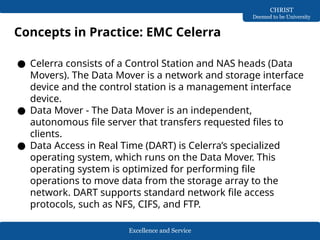
● Celerra consists of a Control Station and NAS heads (Data
Movers). The Data Mover is a network and storage interface
device and the control station is a management interface
device.
● Data Mover - The Data Mover is an independent,
autonomous file server that transfers requested files to
clients.
● Data Access in Real Time (DART) is Celerra’s specialized
operating system, which runs on the Data Mover. This
operating system is optimized for performing file
operations to move data from the storage array to the
network. DART supports standard network file access
protocols, such as NFS, CIFS, and FTP.
Concepts in Practice: EMC Celerra
Excellence and Service
CHRIST
Deemed to be University
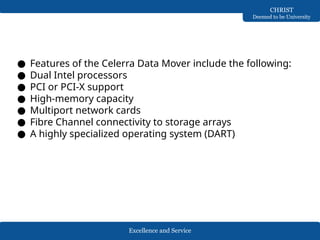
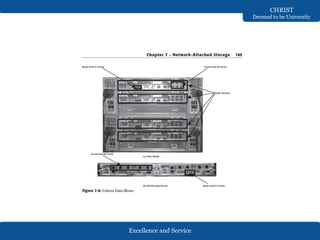
● Features of the Celerra Data Mover include the following:
● Dual Intel processors
● PCI or PCI-X support
● High-memory capacity
● Multiport network cards
● Fibre Channel connectivity to storage arrays
● A highly specialized operating system (DART)
Excellence and Service
CHRIST
Deemed to be University
Excellence and Service
CHRIST
Deemed to be University
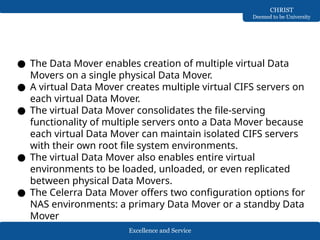
● The Data Mover enables creation of multiple virtual Data
Movers on a single physical Data Mover.
● A virtual Data Mover creates multiple virtual CIFS servers on
each virtual Data Mover.
● The virtual Data Mover consolidates the file-serving
functionality of multiple servers onto a Data Mover because
each virtual Data Mover can maintain isolated CIFS servers
with their own root file system environments.
● The virtual Data Mover also enables entire virtual
environments to be loaded, unloaded, or even replicated
between physical Data Movers.
● The Celerra Data Mover offers two configuration options for
NAS environments: a primary Data Mover or a standby Data
Mover
Excellence and Service
CHRIST
Deemed to be University
● Control Station
● The control station provides dedicated processing capabilities to
control, manage, and configure a NAS solution.
● The control station hosts the Linux operating system that is used
to install, manage, and configure Data Movers and monitor the
environmental conditions and performance of all components.
● The control station also provides high-availability features such
as fault monitoring, fault recovery, fault reporting, call home,
and remote diagnostics. Administrative functions are also
accessible through the local console, SSH, or a Web browser.
● Storage Connectivity
● Celerra data movers connect to storage in two ways: integrated
and gateway.
● In the integrated configuration, dedicated storage is assigned to
Celerra. In this configuration, the control station is connected to
the Data Movers via a private, internal IP network. Each Data
Mover is directly connected to the storage array through dual
Fibre Channel connections.
● The Data Movers provide an interface for the control station
Excellence and Service
CHRIST
Deemed to be University
Excellence and Service
CHRIST
Deemed to be University
Celerra Product Family
● NS Series: Integrated
● NS20: The NS20 comes in either an NS20 or an NS20FC
configuration, and can have one or two X-Blade (Data
Movers), and a single control station.
● NS40: This has a single or dual X-Blade configuration. This
series provides high performance and capacity.
● NS Series: Gateway
● NS40G: This is an entry-level gateway, which delivers high
performance, provides high availability, and requires simple
management.
● NSX: The NSX system is the most highly redundant model in
the Celerra family of products. It supports 4–8 X-Blades that
come in an X-Blade Enclosure, and provides redundant
management switches in each enclosure and dual control
stations.
Excellence and Service
CHRIST
Deemed to be University
Celerra Management Software
● EMC Celerra can be managed through either a command-
line interface or the Celerra Manager GUI.
● CLI Management: This can be accessed from the control
station through the SSH (secure shell) interface tool, or
PUTTY. CLI can be used for scripting common repetitive
tasks that may run on a predetermined schedule to ease
administrative burdens. It has approximately 80 UNIX-like
commands.
● GUI Management—Celerra Manager: GUI management
through the Celerra Manager has the following two options
—Celerra Manager Basic Edition, or Celerra Manager
Advanced Edition, which is licensed separately and provides
advanced features
MISSION
CHRIST is a nurturing ground for an individual’s
holistic development to make effective contribution to
the society in a dynamic environment
VISION
Excellence and Service
CORE VALUES
Faith in God | Moral Uprightness
Love of Fellow Beings
Social Responsibility | Pursuit of Excellence
4. Network Attached Storage
Backup and Recovery
Dr Mithun B N
Asst. Prof. Dept. of CSE, SoET
Excellence and Service
CHRIST
Deemed to be University
Backup
● A backup is a copy of production data, created and retained
for the sole purpose of recovering deleted or corrupted
data.
● With growing business and regulatory demands for data
storage, retention, and availability, organizations are faced
with the task of backing up an ever-increasing amount of
data.
● Organizations must ensure that the right data is in the right
place at the right time.
● Evaluating backup technologies, recovery, and retention
requirements for data and applications is an essential step
to ensure successful implementation of the backup and
recovery solution.

Network Attached Storage - Information Storage and Management

  • 1.
    MISSION CHRIST is anurturing ground for an individual’s holistic development to make effective contribution to the society in a dynamic environment VISION Excellence and Service CORE VALUES Faith in God | Moral Uprightness Love of Fellow Beings Social Responsibility | Pursuit of Excellence 4. Network Attached Storage Dr Mithun B N Asst. Prof. Dept. of CSE, SoET
  • 2.
    Excellence and Service CHRIST Deemedto be University Network Attached Storage ● Network-attached storage (NAS) is an IP-based file-sharing device attached to a local area network. ● NAS provides the advantages of server consolidation by eliminating the need for multiple file servers. ● It provides storage consolidation through file-level data access and sharing. NAS is a preferred storage solution that enables clients to share files quickly and directly with minimum storage management overhead. ● NAS also helps to eliminate bottlenecks that users face when accessing files from a general-purpose server. ● NAS uses network and file-sharing protocols to perform filing and storage functions. ● These protocols include TCP/IP for data transfer and CIFS and NFS for remote file service.
  • 3.
    Excellence and Service CHRIST Deemedto be University Network Attached Storage ● A NAS device is a dedicated, high-performance, high-speed, single-purpose file serving and storage system. ● NAS serves a mix of clients and servers over an IP network. Most NAS devices support multiple interfaces and networks. ● A NAS device uses its own operating system and integrated hardware, software components to meet specific file service needs. Its operating system is optimized for file I/O and, therefore, performs file I/O better than a general purpose server.
  • 4.
    Excellence and Service CHRIST Deemedto be University General purpose servers v/s NAS devices ● A general-purpose server can be used to host any application, as it runs a generic operating system. ● A NAS device is dedicated to file-serving. It has a real-time operating system dedicated to file serving by using open- standard protocols. ● They also support native clustering and high availability.
  • 5.
    Excellence and Service CHRIST Deemedto be University Benefits of NAS ● Supports comprehensive access to information. ● Improved efficiency ● Improved flexibility ● Centralized storage ● Simplified management ● Scalability ● High availability ● Security
  • 6.
    Excellence and Service CHRIST Deemedto be University NAS file I/O ● NAS uses file-level access for all of its I/O operations. File I/O is a high-level request that specifies the file to be accessed, but does not specify its logical block address. ● For example, a file I/O request from a client may specify reading 256 bytes from byte number 1152 onward in a specific file. Unlike block I/O, there is no disk volume or disk sector information in a file I/O request. ● The NAS operating system keeps track of the location of files on the disk volume and converts client file I/O into block-level I/O to retrieve data. ● The NAS operating system issues a block I/O request to fulfill the file read and write requests that it receives. The retrieved data is again converted to file level I/O for applications and clients.
  • 7.
    Excellence and Service CHRIST Deemedto be University File System and Remote File Sharing ● A file system is a structured way of storing and organizing data files. Many file systems maintain a file access table to simplify the process of finding and accessing files. Accessing a file system A file system must be mounted before it can be used. In most cases, the operating system mounts a local file system during the boot process. The mount process creates a link between the file system and the operating system. When mounting a file system, the operating system organizes files and directories in a tree-like structure and grants the user the privilege of accessing this structure.
  • 8.
    Excellence and Service CHRIST Deemedto be University ● The tree is rooted at a mount point that is named using operating system conventions. ● Users and applications can traverse the entire tree from the root to the leaf nodes. ● Files are located at leaf nodes, and directories and subdirectories are located at intermediate roots. ● The relationship between the user and the file system terminates when the file system is unmounted.
  • 9.
    Excellence and Service CHRIST Deemedto be University File sharing ● File sharing refers to storing and accessing data files over a network. ● Owner – one who creates file, determines the types of access to be given to the file. ● File operations are – read, write, execute, append, delete and list. ● FTP is a client/server protocol that enables data transfer over a network. ● FTP over secure shell (SSH) adds security to the original FTP specification. ● Client/server model – the clients mount remote file systems that are available on dedicated file servers. ● NFS and CIFS enable the owner of a file to set the required type of access, such as read only or read-write for a particular user or group.
  • 10.
    Excellence and Service CHRIST Deemedto be University Compone nts of NAS ● NAS head ● One or more network interface cards (NICs), which provide connectivity to the network. Examples of NICs include Gigabit Ethernet, Fast Ethernet, ATM, and Fiber Distributed Data Interface (FDDI). ● An optimized operating system for managing NAS functionality ● NFS and CIFS protocols for file sharing ● Industry-standard storage protocols to connect and manage physical disk resources, such as ATA, SCSI, or FC
  • 11.
    Excellence and Service CHRIST Deemedto be University NAS Implementations ● Two types of NAS implementation: ● The integrated NAS device has all of its components and storage system in a single enclosure. In gateway implementation, NAS head shares its storage with SAN environment.
  • 12.
    Excellence and Service CHRIST Deemedto be University Integrated NAS ● An integrated NAS device has all the components of NAS, such as the NAS head and storage, in a single enclosure, or frame. ● This makes the integrated NAS a self-contained environment. The NAS head connects to the IP network to provide connectivity to the clients and service the file I/O requests. ● The storage consists of a number of disks that can range from low-cost ATA to high throughput FC disk drives. ● Management software manages the NAS head and storage configurations. ● A low-end appliance-type NAS solution is suitable for applications that a small department may use, where the primary need is consolidation of storage, rather than high performance or advanced features such as disaster recovery and business continuity. ● In a high-end NAS solution, external and dedicated storage
  • 13.
    Excellence and Service CHRIST Deemedto be University Integrated NAS Connectivity ● An integrated solution is self- contained and can connect into a standard IP network. Although the specifics of how devices are connected within a NAS implementation vary by vendor and model. ● In a high-end integrated NAS model, external storage can be directly connected by FC HBAs or by dedicated FC switches. ● In the case of a low-end integrated NAS model, backup traffic is shared on the same public IP network along with the regular client access traffic.
  • 14.
    Excellence and Service CHRIST Deemedto be University Gateway NAS ● A gateway NAS device consists of an independent NAS head and one or more storage arrays. The NAS head performs the same functions that it does in the integrated solution; while the storage is shared with other applications that require block-level I/O. ● Management functions in this type of solution are more complex than those in an integrated environment because there are separate administrative tasks for the NAS head and the storage. ● The gateway NAS is the most scalable because NAS heads and storage arrays can be independently scaled up when required. ● Adding processing capacity to the NAS gateway is an example of scaling. ● When the storage limit is reached, it can scale up, adding capacity on the SAN independently of the NAS head.
  • 15.
    Excellence and Service CHRIST Deemedto be University Gateway NAS connectivity ● In a gateway solution, front-end connectivity is similar to that in an integrated solution. ● An integrated environment has a fixed number of NAS heads, making it relatively easy to determine IP networking requirements. ● In contrast, networking requirements in a gateway environment are complex to determine due to scalability options. ● Adding more NAS heads may require additional networking connectivity and bandwidth. ● Communication between the NAS gateway and the storage system in a gateway solution is achieved through a traditional FC SAN. ● To deploy a stable NAS solution, factors such as multiple paths for data, redundant fabrics, and load distribution must be considered. ● Analyze the SAN to determine whether the workload is primarily read or write, or random or sequential.
  • 16.
  • 17.
    Excellence and Service CHRIST Deemedto be University NAS – File sharing protocols ● NFS and CIFS are the common protocols for file sharing. ● NFS is predominantly used in UNIX-based operating environments; ● CIFS is used in Microsoft Windows–based operating environments.
  • 18.
    Excellence and Service CHRIST Deemedto be University NFS – Network File System ● NFS is a client/server protocol for file sharing that is most commonly used on UNIX systems. ● NFS was based on the connectionless User Datagram Protocol (UDP). ● It uses a machine-independent model to represent user data. ● It also uses Remote Procedure Call (RPC) as a method of interprocess communication between two computers. ● The NFS protocol provides a set of RPCs to access a remote file system for the following operations: ● Searching files and directories ● Opening, reading, writing to, and closing a file ● Changing file attributes ● Modifying file links and directories ● NFS uses the mount protocol to create a connection between the client and the ● remote system to transfer data.
  • 19.
    Excellence and Service CHRIST Deemedto be University NFS – Versions ● NFS version 2 (NFSv2): Uses UDP to provide a stateless network connection between a client and a server. Features such as locking are handled outside the protocol. ● NFS version 3 (NFSv3): The most commonly used version, it uses UDP or TCP, and is based on the stateless protocol design. It includes some new features, such as a 64-bit file size, asynchronous writes, and additional file attributes to reduce re-fetching. ● NFS version 4 (NFSv4): This version uses TCP and is based on a stateful protocol design. It offers enhanced security.
  • 20.
    Excellence and Service CHRIST Deemedto be University CIFS – Common internet file system ● CIFS is a client/server application protocol that enables client programs to make requests for files and services on remote computers over TCP/IP. ● It is a public, or open, variation of Server Message Block (SMB) protocol. ● The CIFS protocol enables remote clients to gain access to files that are on a server. ● CIFS enables file sharing with other clients by using special locks. ● CIFS provides the following features to ensure data integrity: ○ It uses file and record locking to prevent users from overwriting the work of another user on a file or a record. ○ It runs over TCP. ○ It supports fault tolerance and can automatically restore connections
  • 21.
    Excellence and Service CHRIST Deemedto be University ● CIFS is a stateful protocol because the CIFS server maintains connection information regarding every connected client. ● In the event of a network failure or CIFS server failure, the client receives a disconnection notification. ● User disruption is minimized if the application has the embedded intelligence to restore the connection. ● However, if the embedded intelligence is missing, the user has to take steps to reestablish the CIFS connection.
  • 22.
    Excellence and Service CHRIST Deemedto be University NAS I/O operations ● The NFS and CIFS protocols handle file I/O requests to a remote file system, which is managed by the NAS device. ● The process of NAS I/O is as follows: ○ The requestor packages an I/O request into TCP/IP and forwards it through the network stack. The NAS device receives this request from the network. ○ The NAS device converts the I/O request into an appropriate physical storage request, which is a block-level I/O, and then performs the operation against the physical storage pool. ○ When the data is returned from the physical storage pool, the NAS device processes and repackages the data into an appropriate file protocol response. ○ The NAS device packages this response into TCP/IP again and forwards it to the client through the network.
  • 23.
  • 24.
    Excellence and Service CHRIST Deemedto be University Hosting and Accessing Files on NAS ● Following are the steps required to host files and permit users to access the hosted files on a NAS device: ● Create storage array volumes: Create volumes on the storage array and assign Logical Unit Numbers (LUN) to the volumes. Present the newly created volumes to the NAS device. ● Create NAS Volumes: Perform a discovery operation on the NAS device, to recognize the new array-volumes and create NAS Volumes (logical volumes). Multiple volumes from the storage array may be combined to form large NAS volumes. ● Create NAS file systems: Create NAS file systems on the NAS volumes. ● Mount file systems: Mount the created NAS file system on the NAS device. ● Access the file systems: Publish the mounted file systems on the network using NFS or CIFS for client access.
  • 25.
    Excellence and Service CHRIST Deemedto be University Factors affecting NAS performance and availability ● As NAS uses IP network, bandwidth and latency issues associated with IP affect NAS performance. Network congestion is one of the most significant sources of latency (check figure in next slide) in a NAS environment. ● Other factors that affect NAS performance at different levels are: ● Number of hops ● Authentication with a directory service such as Active Directory ● Retransmission ● Over utilized routers and switches ● File/directory lookup and metadata requests ● Over utilized NAS devices ● Over utilized clients
  • 26.
  • 27.
    Excellence and Service CHRIST Deemedto be University ● Configuring VLANs and setting proper Maximum Transmission Unit (MTU) and TCP window size can improve NAS performance. ● Link aggregation and redundant network configurations ensure high availability. ● A virtual LAN (VLAN) is a switched network that is logically segmented by functions, project teams, or applications, regardless of the user’s physical location. ● A VLAN is similar to a physical LAN except that the VLAN enables the grouping of end stations even if they are not physically located on the same network segment. VLAN is a layer 2 (data link layer) construct. ● A network switch can be divided among multiple VLANs, enabling better utilization of port density and reducing the overall cost of deploying a network infrastructure. ● A VLAN can control the overall broadcast traffic. The broadcast traffic on one VLAN is not transmitted outside that VLAN, which substantially reduces broadcast overhead, makes bandwidth available for applications, and reduces the network’s
  • 28.
    Excellence and Service CHRIST Deemedto be University ● The MTU setting determines the size of the largest packet that can be transmitted without data fragmentation. ● Path maximum transmission unit discovery is the process of discovering the maximum size of a packet that can be sent across a network without fragmentation. ● The default MTU settings are specific for each protocol and depend on the type of NIC installed. ● The default MTU setting for an Ethernet interface card is 1,500 bytes. A feature called jumbo frames is used to send, receive, or transport Ethernet frames with an MTU of more than 1,500 bytes. ● The most common deployments of jumbo frames have an MTU of 9,000 bytes. Servers send and receive larger frames more efficiently than smaller ones in heavy network traffic conditions. ● Larger packets also reduce the amount of raw network bandwidth being consumed for the same amount of payload. Larger frames also help smooth the sudden I/O bursts.
  • 29.
    Excellence and Service CHRIST Deemedto be University ● The TCP window size is the maximum amount of data that can be on the network at any time for a connection. ● For example, if a pair of hosts is talking over a TCP connection that has a TCP window size of 64 KB, the sender can send only 64 KB of data and must then wait for an acknowledgment from the receiver. ● If the receiver acknowledges that all the data has been received, then the sender is free to send another 64 KB of data. ● If the sender receives an acknowledgment from the receiver that only the first 32 KB of data has been received, which can happen only if another 32 KB of data is in transit or was lost, the sender can only send another 32 KB of data because the transmission cannot have more than 64 KB of unacknowledged data outstanding.
  • 30.
    Excellence and Service CHRIST Deemedto be University ● In theory, the TCP window size should be set to the product of the available bandwidth of the network and the round- trip time of data sent over the network. ● For example, if a network has a bandwidth of 100 Mbps and the round-trip time is 5 milliseconds, the TCP window should be as follows: ● 100 Mb/s × .005 seconds = 524,288 bits ● 524,288 bits / 8 bits/byte = 65,536 bytes ● The size of TCP window field that controls the flow of data is between 2 bytes and 65,535 bytes.
  • 31.
    Excellence and Service CHRIST Deemedto be University ● Link aggregation is the process of combining two or more network interfaces into a logical network interface, enabling higher throughput, load sharing or load balancing, transparent path failover, and scalability. ● Link aggregation in a NAS device combines channels to achieve redundancy of network connectivity. ● Due to link aggregation, multiple active Ethernet connections to the same switch appear as one link. ● If a connection or a port in the aggregation is lost, then all the network traffic on that link is redistributed across the remaining active connections. ● The primary purpose of the aggregation is high availability.
  • 32.
    Excellence and Service CHRIST Deemedto be University Concepts in Practice: EMC Celerra ● EMC offers NAS solutions with the Celerra family of products. Celerra is available in either a gateway or an integrated configuration. ● EMC Celerra provides a dedicated, high-performance, high- speed communication infrastructure for file level I/Os. ● It uses a significantly streamlined or tuned operating system. ● It supports Network Data Management Protocol (NDMP) for backup, CIFS, NFS, FTP, and iSCSI. Celerra supports Fast Ethernet Channel by using PAgP or IEEE 802.3ad LACP to combine two or more data channels into one data channel for high availability.
  • 33.
    Excellence and Service CHRIST Deemedto be University ● Celerra consists of a Control Station and NAS heads (Data Movers). The Data Mover is a network and storage interface device and the control station is a management interface device. ● Data Mover - The Data Mover is an independent, autonomous file server that transfers requested files to clients. ● Data Access in Real Time (DART) is Celerra’s specialized operating system, which runs on the Data Mover. This operating system is optimized for performing file operations to move data from the storage array to the network. DART supports standard network file access protocols, such as NFS, CIFS, and FTP. Concepts in Practice: EMC Celerra
  • 34.
    Excellence and Service CHRIST Deemedto be University ● Features of the Celerra Data Mover include the following: ● Dual Intel processors ● PCI or PCI-X support ● High-memory capacity ● Multiport network cards ● Fibre Channel connectivity to storage arrays ● A highly specialized operating system (DART)
  • 35.
  • 36.
    Excellence and Service CHRIST Deemedto be University ● The Data Mover enables creation of multiple virtual Data Movers on a single physical Data Mover. ● A virtual Data Mover creates multiple virtual CIFS servers on each virtual Data Mover. ● The virtual Data Mover consolidates the file-serving functionality of multiple servers onto a Data Mover because each virtual Data Mover can maintain isolated CIFS servers with their own root file system environments. ● The virtual Data Mover also enables entire virtual environments to be loaded, unloaded, or even replicated between physical Data Movers. ● The Celerra Data Mover offers two configuration options for NAS environments: a primary Data Mover or a standby Data Mover
  • 37.
    Excellence and Service CHRIST Deemedto be University ● Control Station ● The control station provides dedicated processing capabilities to control, manage, and configure a NAS solution. ● The control station hosts the Linux operating system that is used to install, manage, and configure Data Movers and monitor the environmental conditions and performance of all components. ● The control station also provides high-availability features such as fault monitoring, fault recovery, fault reporting, call home, and remote diagnostics. Administrative functions are also accessible through the local console, SSH, or a Web browser. ● Storage Connectivity ● Celerra data movers connect to storage in two ways: integrated and gateway. ● In the integrated configuration, dedicated storage is assigned to Celerra. In this configuration, the control station is connected to the Data Movers via a private, internal IP network. Each Data Mover is directly connected to the storage array through dual Fibre Channel connections. ● The Data Movers provide an interface for the control station
  • 38.
  • 39.
    Excellence and Service CHRIST Deemedto be University Celerra Product Family ● NS Series: Integrated ● NS20: The NS20 comes in either an NS20 or an NS20FC configuration, and can have one or two X-Blade (Data Movers), and a single control station. ● NS40: This has a single or dual X-Blade configuration. This series provides high performance and capacity. ● NS Series: Gateway ● NS40G: This is an entry-level gateway, which delivers high performance, provides high availability, and requires simple management. ● NSX: The NSX system is the most highly redundant model in the Celerra family of products. It supports 4–8 X-Blades that come in an X-Blade Enclosure, and provides redundant management switches in each enclosure and dual control stations.
  • 40.
    Excellence and Service CHRIST Deemedto be University Celerra Management Software ● EMC Celerra can be managed through either a command- line interface or the Celerra Manager GUI. ● CLI Management: This can be accessed from the control station through the SSH (secure shell) interface tool, or PUTTY. CLI can be used for scripting common repetitive tasks that may run on a predetermined schedule to ease administrative burdens. It has approximately 80 UNIX-like commands. ● GUI Management—Celerra Manager: GUI management through the Celerra Manager has the following two options —Celerra Manager Basic Edition, or Celerra Manager Advanced Edition, which is licensed separately and provides advanced features
  • 41.
    MISSION CHRIST is anurturing ground for an individual’s holistic development to make effective contribution to the society in a dynamic environment VISION Excellence and Service CORE VALUES Faith in God | Moral Uprightness Love of Fellow Beings Social Responsibility | Pursuit of Excellence 4. Network Attached Storage Backup and Recovery Dr Mithun B N Asst. Prof. Dept. of CSE, SoET
  • 42.
    Excellence and Service CHRIST Deemedto be University Backup ● A backup is a copy of production data, created and retained for the sole purpose of recovering deleted or corrupted data. ● With growing business and regulatory demands for data storage, retention, and availability, organizations are faced with the task of backing up an ever-increasing amount of data. ● Organizations must ensure that the right data is in the right place at the right time. ● Evaluating backup technologies, recovery, and retention requirements for data and applications is an essential step to ensure successful implementation of the backup and recovery solution.