Presented by
Harishma Shaik(1992567)
Zulqua Naaz(2091491)
 Overview
 History of NetBeans
 Requirements
 Installation
 How NetBeans works?
 Working with Jframes in NetBeans
 Advantages/Disadvantages
 Queries?
 NetBeans is an open-source platform, Java-based integrated
development environment (IDE) that allows developers to create
mobile, desktop, and web applications.
 This IDE supports integrated for developing with multiple languages
including Java, CSS, PHP, HTML, and C++….
 NetBeans can run in cross-platform architecture, which means that
this IDE can impeccably run on Windows, OS X, Linux, and other
UNIX based Operating systems.
 NetBeans is the official IDE for Java 8 with powerful code
analyzers, converters, and editors.
 In addition, the solution has a worldwide community of active users
and developers.
 NetBeans was introduced in 1996.
 NetBeans basically stands for Network JavaBeans.
 Group of people who started a college project.
Initially in C++, later on they switch to Java 1.0.2.
 It is a final year student project.
 It was named as “Xelfi” (meaning Delphi for UNIX).
 Started selling it on the internet for approximately $20
USD and got successful.
Windows Requirements:
 Microsoft Windows 7 Professional/Windows 8/Windows 8.1:
 Processor: Intel Core i5 or equivalent.
 Memory: 2 GB (32-bit), 4 GB (64-bit).
 Ubuntu 15.04:
 Processor: Intel Core i5 or equivalent. Memory: 2 GB (32-bit), 4 GB (64-bit)
 OS X 10.10 Intel: Processor: Dual-Core Intel. Memory: 4 GB
MAC Requirements:
 Processor: Dual-Core Intel.
 Memory: 2 GB.
 Disk space: 650 MB of free disk space.
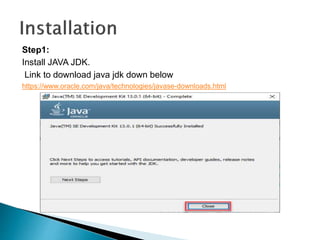
Step1:
Install JAVA JDK.
Link to download java jdk down below
https://www.oracle.com/java/technologies/javase-downloads.html
Step2:
Install Netbeans IDE.
You can install netbeans from link below
https://netbeans.apache.org/download/index.html
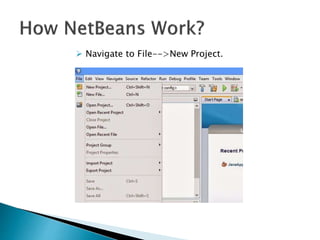
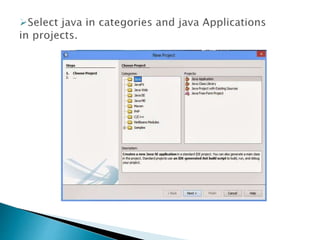
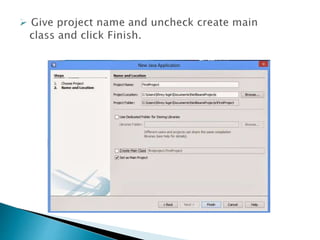
 Navigate to File-->New Project.
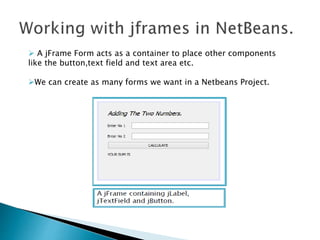
 A jFrame Form acts as a container to place other components
like the button,text field and text area etc.
We can create as many forms we want in a Netbeans Project.
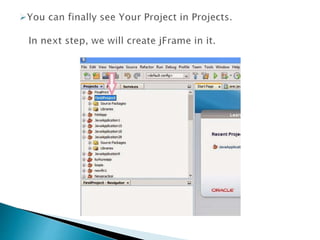
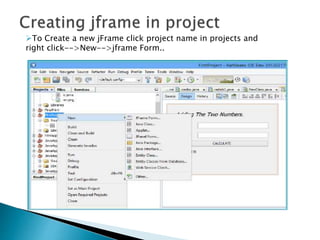
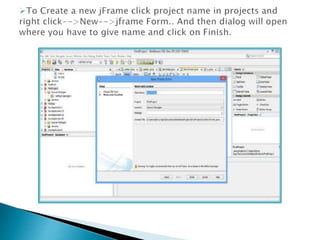
To Create a new jFrame click project name in projects and
right click-->New-->jframe Form..
 Simple to download and install the NetBeans IDE
and you are good to go.
 Free and Open Source.
 Connected Developer.
 Powerful GUI Builder.
 Support for Java Standards and Platforms.
 Profiling and Debugging Tools.
 Dynamic Language Support.
 Extensible Platform.
 NetBeans IDE is a little bit slow to load.
 Takes up more memory than lighter IDEs.
 Advanced tools and features require some training.
Netbeans
Netbeans

Netbeans

  • 1.
  • 2.
     Overview  Historyof NetBeans  Requirements  Installation  How NetBeans works?  Working with Jframes in NetBeans  Advantages/Disadvantages  Queries?
  • 3.
     NetBeans isan open-source platform, Java-based integrated development environment (IDE) that allows developers to create mobile, desktop, and web applications.  This IDE supports integrated for developing with multiple languages including Java, CSS, PHP, HTML, and C++….  NetBeans can run in cross-platform architecture, which means that this IDE can impeccably run on Windows, OS X, Linux, and other UNIX based Operating systems.  NetBeans is the official IDE for Java 8 with powerful code analyzers, converters, and editors.  In addition, the solution has a worldwide community of active users and developers.
  • 4.
     NetBeans wasintroduced in 1996.  NetBeans basically stands for Network JavaBeans.  Group of people who started a college project. Initially in C++, later on they switch to Java 1.0.2.  It is a final year student project.  It was named as “Xelfi” (meaning Delphi for UNIX).  Started selling it on the internet for approximately $20 USD and got successful.
  • 6.
    Windows Requirements:  MicrosoftWindows 7 Professional/Windows 8/Windows 8.1:  Processor: Intel Core i5 or equivalent.  Memory: 2 GB (32-bit), 4 GB (64-bit).  Ubuntu 15.04:  Processor: Intel Core i5 or equivalent. Memory: 2 GB (32-bit), 4 GB (64-bit)  OS X 10.10 Intel: Processor: Dual-Core Intel. Memory: 4 GB MAC Requirements:  Processor: Dual-Core Intel.  Memory: 2 GB.  Disk space: 650 MB of free disk space.
  • 7.
    Step1: Install JAVA JDK. Linkto download java jdk down below https://www.oracle.com/java/technologies/javase-downloads.html
  • 8.
    Step2: Install Netbeans IDE. Youcan install netbeans from link below https://netbeans.apache.org/download/index.html
  • 9.
     Navigate toFile-->New Project.
  • 14.
     A jFrameForm acts as a container to place other components like the button,text field and text area etc. We can create as many forms we want in a Netbeans Project.
  • 15.
    To Create anew jFrame click project name in projects and right click-->New-->jframe Form..
  • 23.
     Simple todownload and install the NetBeans IDE and you are good to go.  Free and Open Source.  Connected Developer.  Powerful GUI Builder.  Support for Java Standards and Platforms.  Profiling and Debugging Tools.  Dynamic Language Support.  Extensible Platform.
  • 24.
     NetBeans IDEis a little bit slow to load.  Takes up more memory than lighter IDEs.  Advanced tools and features require some training.