Copyright © 2021 Systems Engineering Consultants Co.,LTD. All rights reserved.
NEDO特別講座
画像処理・AI技術活用コース 前編
加藤 隆典
Copyright © 2021 Systems Engineering Consultants Co.,LTD. All rights reserved.
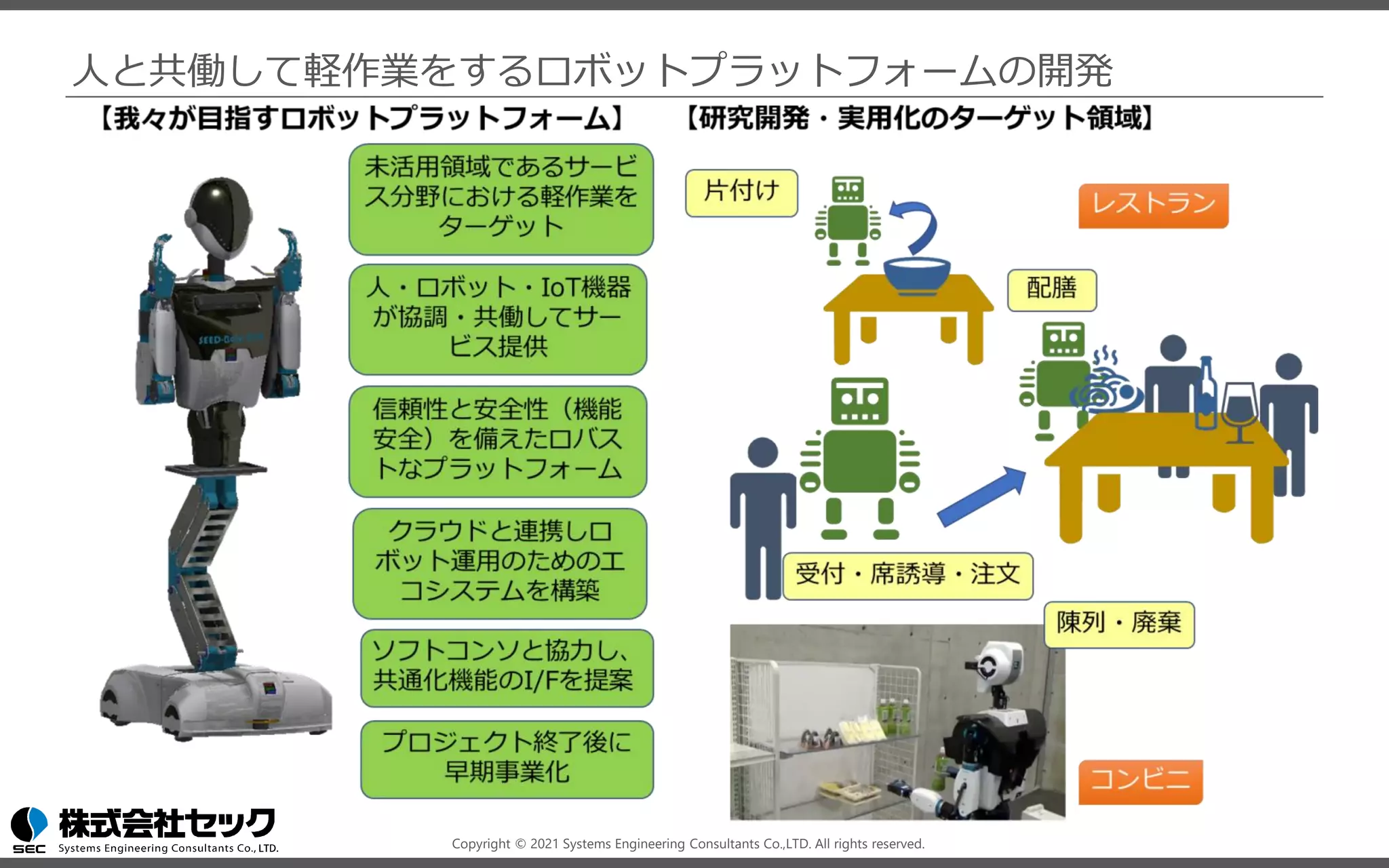
人と共働して軽作業をするロボットプラットフォームの開発
Copyright © 2021 Systems Engineering Consultants Co.,LTD. All rights reserved.
講座内容
前半
◼ ロボットシステムでのAI活用事例
◼ AIを活用したロボットシステムのチュートリアル
後半
◼ チュートリアルのおさらい
◼ AIを活用したロボットシステムの設計のポイント
◼ AIを活用したロボットシステムの運用のポイント
3
Copyright © 2021 Systems Engineering Consultants Co.,LTD. All rights reserved.
ロボットシステムでのAI活用事例
◼ ロボットに適用されるAI・画像処理技術
◼ ロボットアーム制御
◼ 自動運転(Autoware)
4
Copyright © 2021 Systems Engineering Consultants Co.,LTD. All rights reserved.
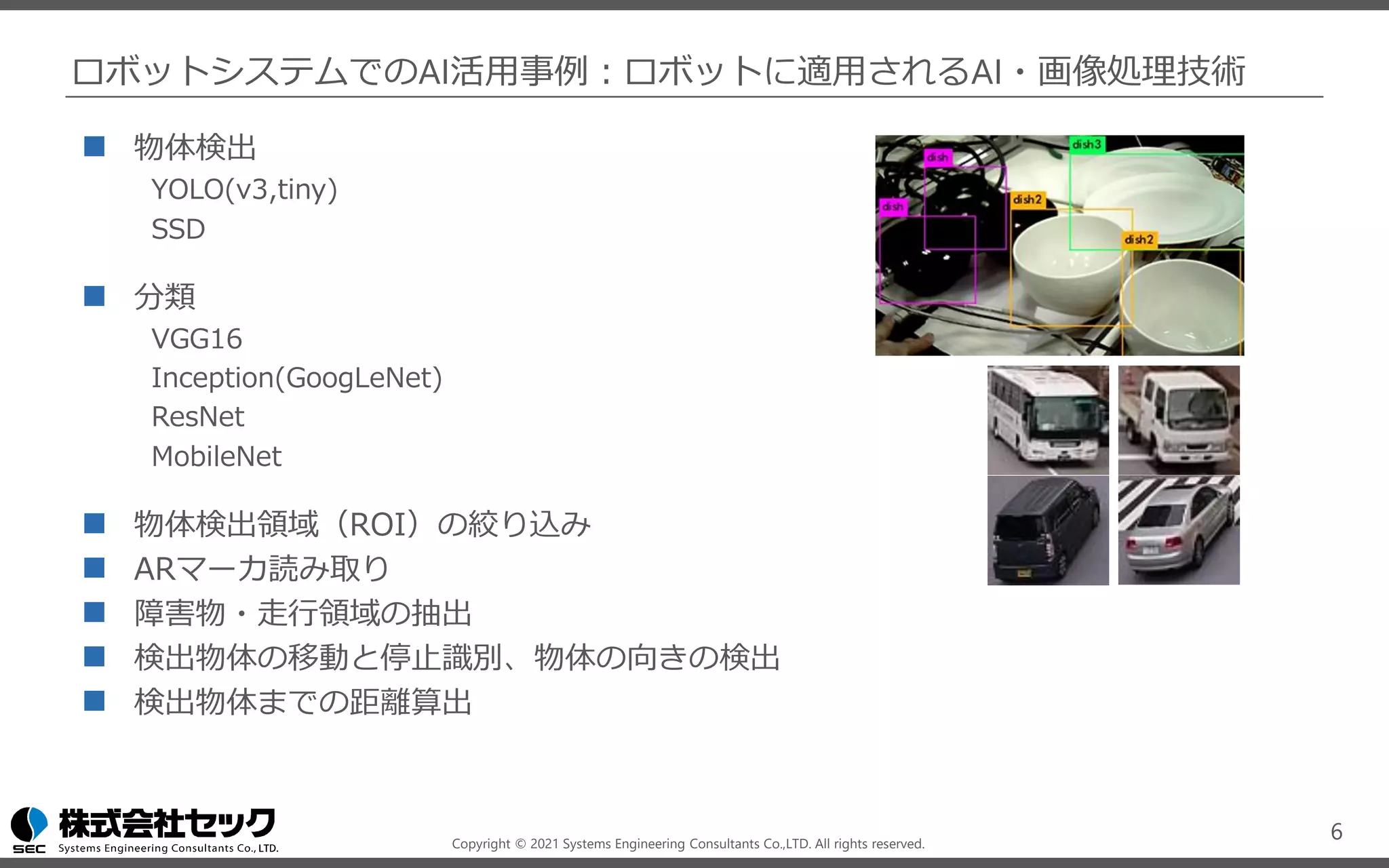
ロボットシステムでのAI活用事例:ロボットに適用されるAI・画像処理技術
ディープラーニング技術や各種画像処理を活用して特定の物体・領域を抽出し、
ロボットや機器の高度な制御が可能となります。
5
Rtrilo
https://www.sec.co.jp/ja/rd/rtrilo.html
走行可能/走行禁止エリアの抽出
ピンポイントでの物体検出
把持対象の特定
物体の動き(移動方向)検出
Copyright © 2021 Systems Engineering Consultants Co.,LTD. All rights reserved.
ロボットシステムでのAI活用事例:ロボットに適用されるAI・画像処理技術
◼ 物体検出
YOLO(v3,tiny)
SSD
◼ 分類
VGG16
Inception(GoogLeNet)
ResNet
MobileNet
◼ 物体検出領域(ROI)の絞り込み
◼ ARマーカ読み取り
◼ 障害物・走行領域の抽出
◼ 検出物体の移動と停止識別、物体の向きの検出
◼ 検出物体までの距離算出
6
Copyright © 2021 Systems Engineering Consultants Co.,LTD. All rights reserved.
ロボットシステムでのAI活用事例:ロボットアーム制御
強化学習
ロボットアームが試行錯誤を繰り返し、
その経験からロボットの制御を学習す
る
7
Deep Learning for Robots: Learning from Large-Scale Interaction
http://googleresearch.blogspot.jp/2016/03/deep-learning-for-robots-learning-from.html
出典:https://sites.google.com/site/brainrobotdata/home
Copyright © 2021 Systems Engineering Consultants Co.,LTD. All rights reserved.
ロボットシステムでのAI活用事例:ロボットアーム制御
模倣学習
人の動作を模倣してロボットアームの
制御方法を学習する
8
「NEDO次世代人工知能・ロボット中核技術開発」
早稲田大学 尾形研究室のタオルの折り畳みロボット
https://www.youtube.com/watch?v=beZUyZMyHeo
出典:https://www.youtube.com/watch?v=YH1TrL1q6Po
Copyright © 2021 Systems Engineering Consultants Co.,LTD. All rights reserved.
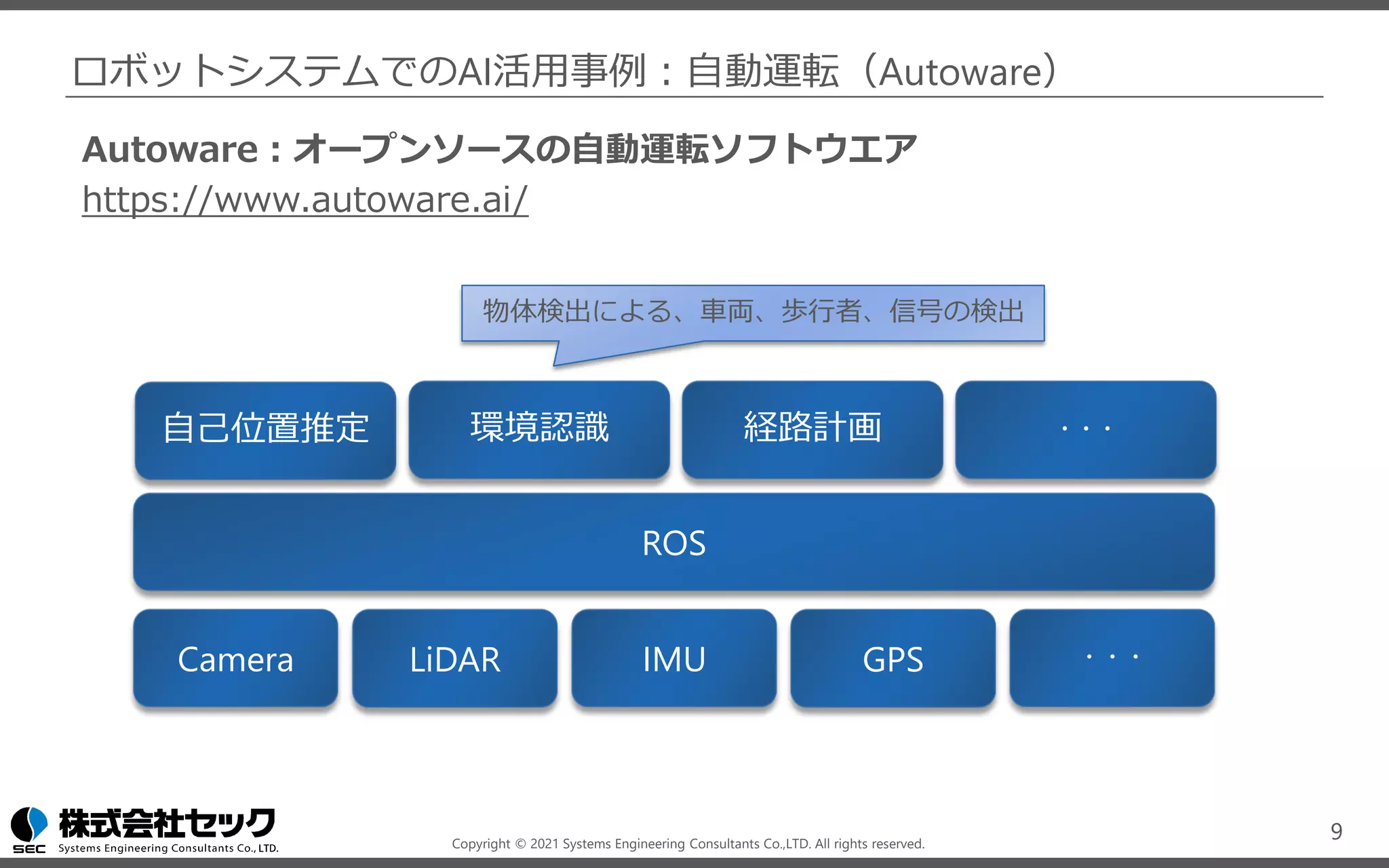
Autoware:オープンソースの自動運転ソフトウエア
https://www.autoware.ai/
ロボットシステムでのAI活用事例:自動運転(Autoware)
9
ROS
自己位置推定 環境認識 経路計画 ・・・
Camera LiDAR IMU GPS ・・・
物体検出による、車両、歩行者、信号の検出
Copyright © 2021 Systems Engineering Consultants Co.,LTD. All rights reserved.
AIを活用したロボットシステムの
チュートリアル
10
Copyright © 2021 Systems Engineering Consultants Co.,LTD. All rights reserved.
AIを活用したロボットシステムのチュートリアル
本講座のチュートリアルでは、ROSを利用して、物体検出を行うロボットシステムを構
築します。ロボットシステムの構築の流れとともに、ロボットシステムにAIを組み込む
うえでのポイントを、チュートリアルを通して解説します。
11
Webカメラの映像を取り込み物体検出の結果を動画として表示する
物体検出ノードは複数のアルゴリズムを実装し切り替え可能とする
カメラ
ノード
結果描画
ノード
物体検出
ノード
(YOLO)
Webカメラ
Copyright © 2021 Systems Engineering Consultants Co.,LTD. All rights reserved.
AIを活用したロボットシステムのチュートリアル
本講座のチュートリアルでは、ROSを利用して、物体検出を行うロボットシステムを構
築します。ロボットシステムの構築の流れとともに、ロボットシステムにAIを組み込む
うえでのポイントを、チュートリアルを通して解説します。
12
カメラ
ノード
結果描画
ノード
物体検出
ノード
(SSD)
Webカメラ
Webカメラの映像を取り込み物体検出の結果を動画として表示する
物体検出ノードは複数のアルゴリズムを実装し切り替え可能とする
Copyright © 2021 Systems Engineering Consultants Co.,LTD. All rights reserved.
AIを活用したロボットシステムのチュートリアル
本講座のチュートリアルでは、ROSを利用して、物体検出を行うロボットシステムを構
築します。ロボットシステムの構築の流れとともに、ロボットシステムにAIを組み込む
うえでのポイントを、チュートリアルを通して解説します。
13
カメラ
ノード
結果描画
ノード
物体検出
ノード
(YOLO)
Webカメラ
物体追跡
ノード
Webカメラの映像を取り込み物体検出の結果を動画として表示する
物体検出ノードは複数のアルゴリズムを実装し切り替え可能とする
Copyright © 2021 Systems Engineering Consultants Co.,LTD. All rights reserved.
AIを活用したロボットシステムのチュートリアル
チュートリアル全体の流れ
14
物体検出システムを作成する
物体検出モデルをSSDに入れ替える
物体追跡機能を追加する
Copyright © 2021 Systems Engineering Consultants Co.,LTD. All rights reserved.
AIを活用したロボットシステムのチュートリアル
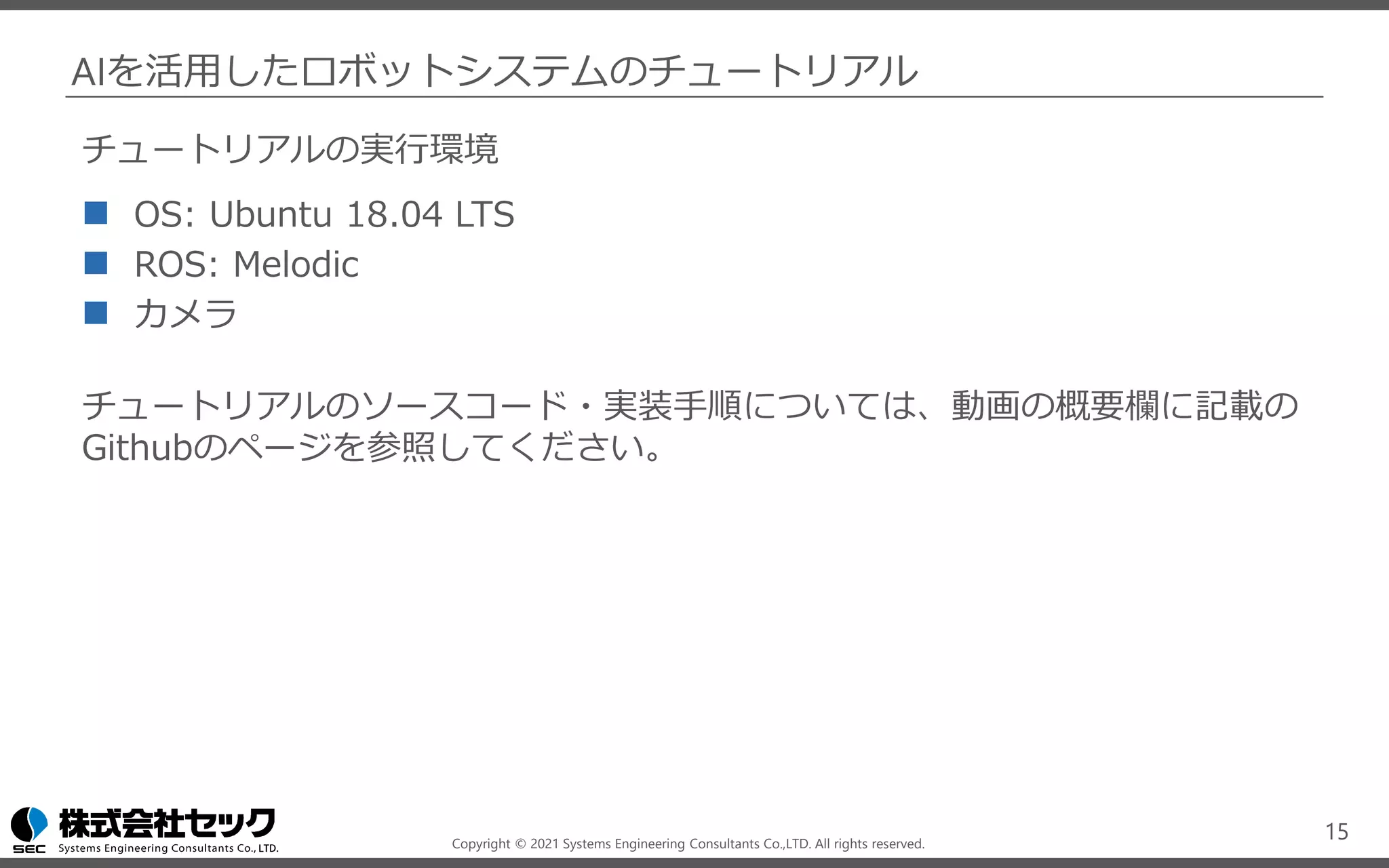
チュートリアルの実行環境
◼ OS: Ubuntu 18.04 LTS
◼ ROS: Melodic
◼ カメラ
チュートリアルのソースコード・実装手順については、動画の概要欄に記載の
Githubのページを参照してください。
15
Copyright © 2021 Systems Engineering Consultants Co.,LTD. All rights reserved.
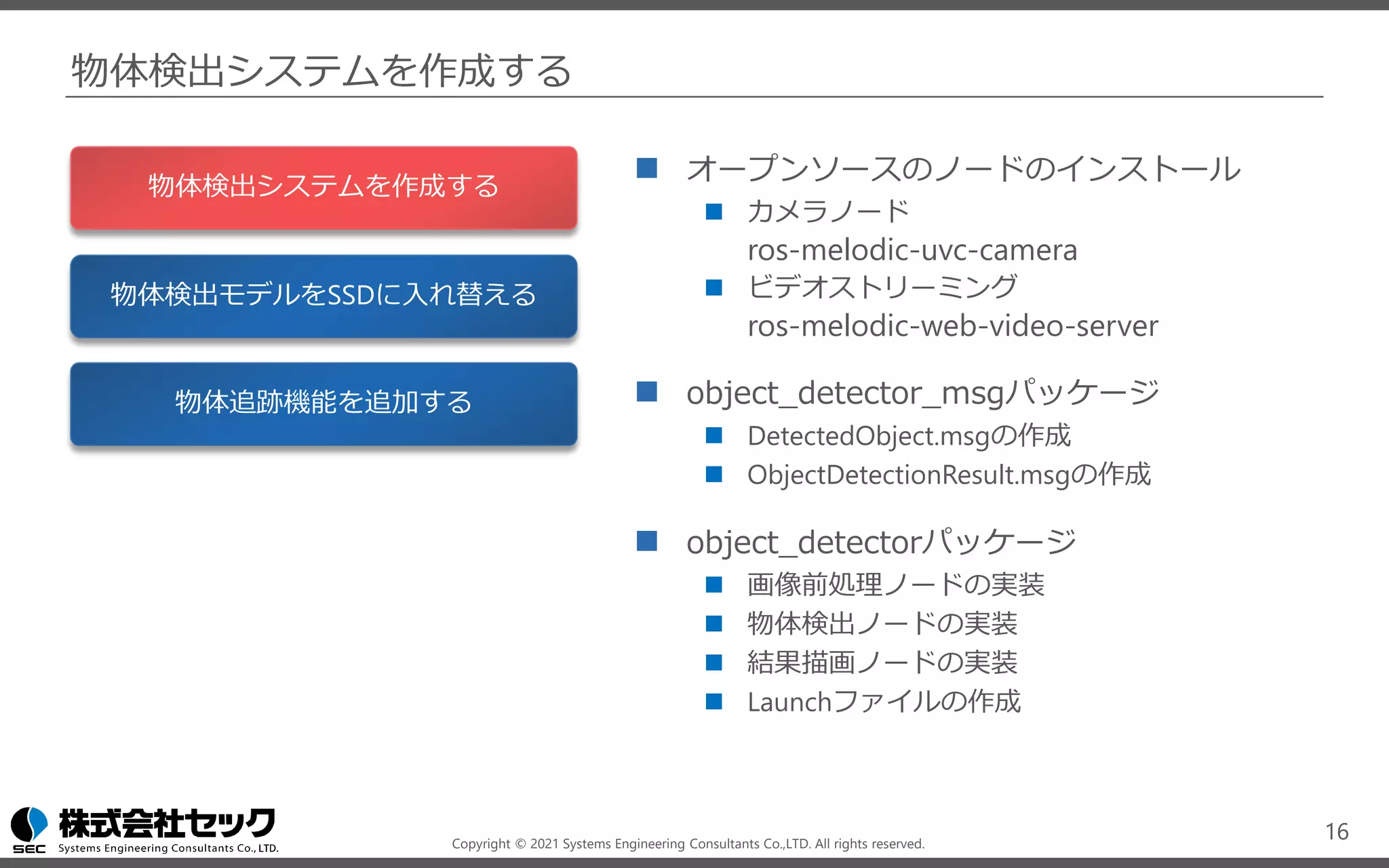
物体検出システムを作成する
◼ オープンソースのノードのインストール
◼ カメラノード
ros-melodic-uvc-camera
◼ ビデオストリーミング
ros-melodic-web-video-server
◼ object_detector_msgパッケージ
◼ DetectedObject.msgの作成
◼ ObjectDetectionResult.msgの作成
◼ object_detectorパッケージ
◼ 画像前処理ノードの実装
◼ 物体検出ノードの実装
◼ 結果描画ノードの実装
◼ Launchファイルの作成
16
物体検出システムを作成する
物体検出モデルをSSDに入れ替える
物体追跡機能を追加する
Copyright © 2021 Systems Engineering Consultants Co.,LTD. All rights reserved.
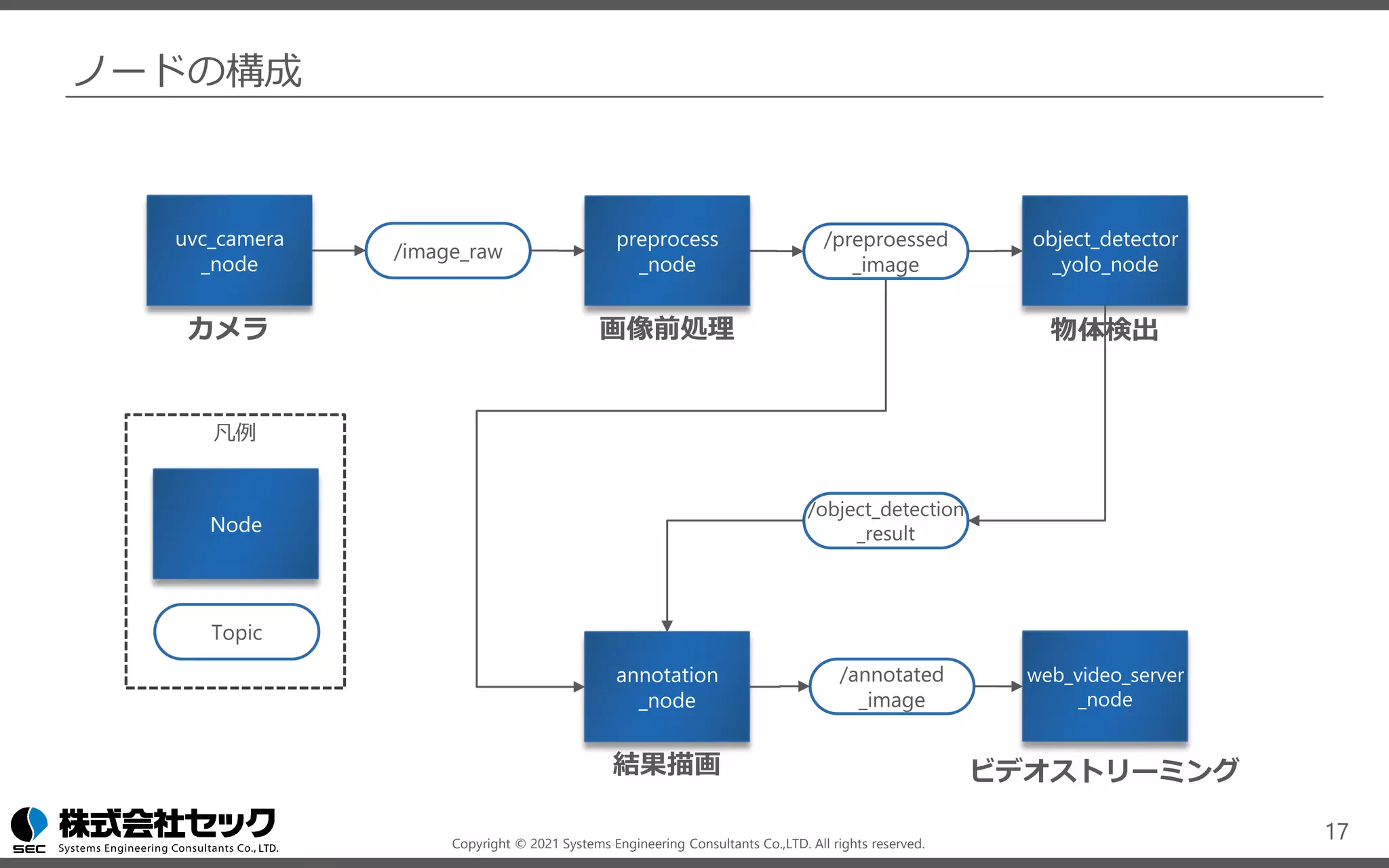
ノードの構成
17
uvc_camera
_node
object_detector
_yolo_node
preprocess
_node
web_video_server
_node
annotation
_node
/image_raw
/object_detection
_result
/preproessed
_image
/annotated
_image
Node
Topic
凡例
カメラ 画像前処理 物体検出
結果描画 ビデオストリーミング
Copyright © 2021 Systems Engineering Consultants Co.,LTD. All rights reserved.
カメラノード
uvc_camera_node
uvc_camera ( http://wiki.ros.org/uvc_camera )
カメラデバイスから画像を取得するノードには、オープンソースの実装を利用する。
/image_raw
senser_msg/Image ( https://docs.ros.org/en/melodic/api/sensor_msgs/html/msg/Image.html )
ROS標準のImageメッセージが送信される。
18
uvc_camera
_node
/image_raw
カメラデバイスやカメラノードの実装によって、サポートする画像のフォーマットが異なる場合があります。
物体検出などのAIモデルは画像をRGBで扱うことが多いため、後のpreprocess_nodeで画像フォーマットを
RGBに変換します。
sudo apt install ros-melodic-uvc-camera
Copyright © 2021 Systems Engineering Consultants Co.,LTD. All rights reserved.
画像前処理ノード
preprocess_node
src/object_detector/script/preprocess.py
カメラデバイスから取得した画像を、物体検出モデルで利用できるよう変換する。今回の例では
画像のフォーマットをRGBに変換する。必要であれば以下の処理も含める。
◼ リサイズ / クロップ / コントラスト調整
/preprocessed_image
senser_msg/Image ( https://docs.ros.org/en/melodic/api/sensor_msgs/html/msg/Image.html )
ROS標準のImageメッセージが送信される。
19
preprocess
_node
/image_raw
/preproessed
_image
Copyright © 2021 Systems Engineering Consultants Co.,LTD. All rights reserved.
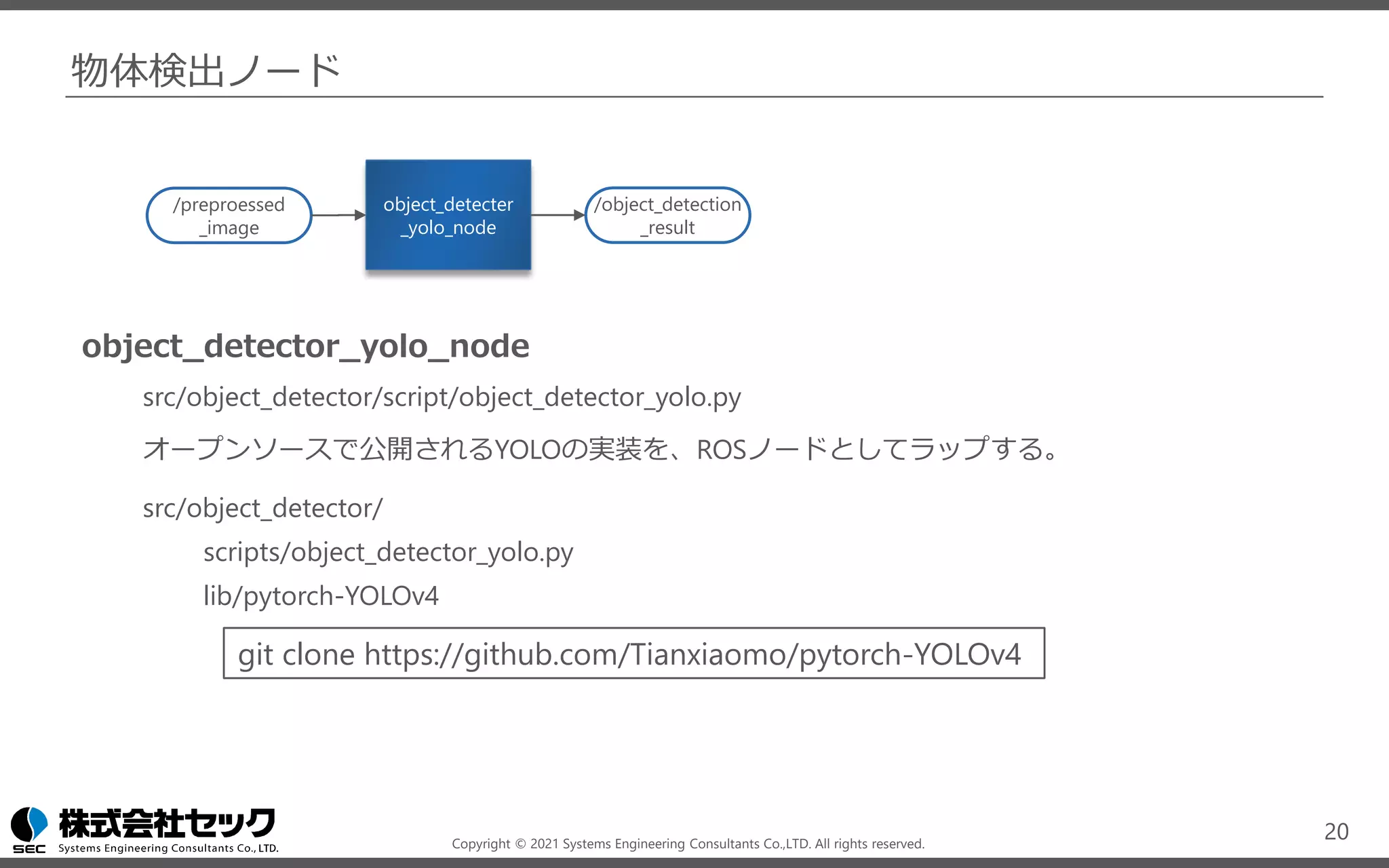
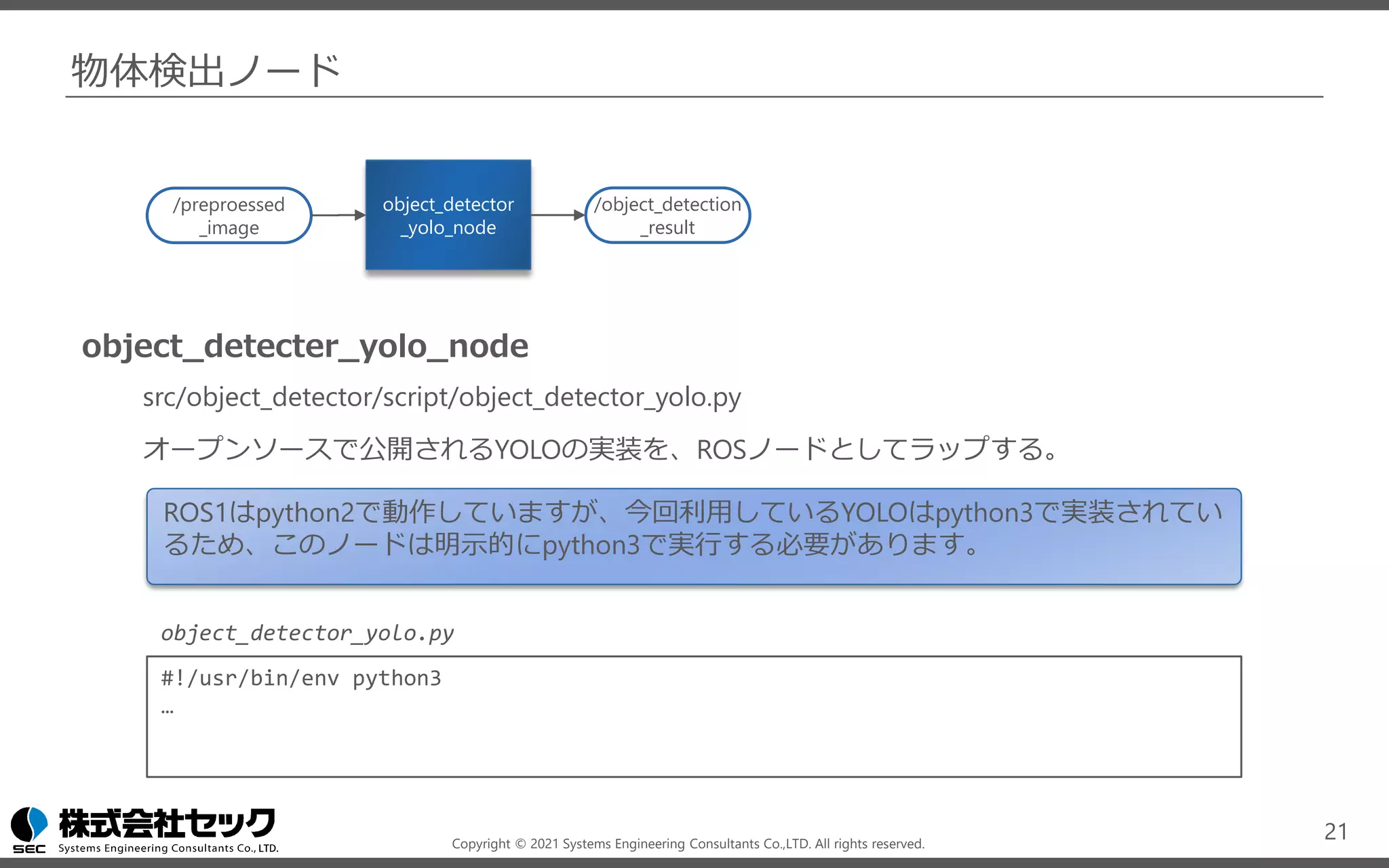
物体検出ノード
object_detector_yolo_node
src/object_detector/script/object_detector_yolo.py
オープンソースで公開されるYOLOの実装を、ROSノードとしてラップする。
src/object_detector/
scripts/object_detector_yolo.py
lib/pytorch-YOLOv4
20
object_detecter
_yolo_node
/object_detection
_result
/preproessed
_image
git clone https://github.com/Tianxiaomo/pytorch-YOLOv4
Copyright © 2021 Systems Engineering Consultants Co.,LTD. All rights reserved.
物体検出ノード
object_detecter_yolo_node
src/object_detector/script/object_detector_yolo.py
オープンソースで公開されるYOLOの実装を、ROSノードとしてラップする。
21
object_detector
_yolo_node
/object_detection
_result
/preproessed
_image
ROS1はpython2で動作していますが、今回利用しているYOLOはpython3で実装されてい
るため、このノードは明示的にpython3で実行する必要があります。
#!/usr/bin/env python3
…
object_detector_yolo.py
Copyright © 2021 Systems Engineering Consultants Co.,LTD. All rights reserved.
物体検出ノード
/object_detecter_result
src/object_detector_msg/msg/ObjectDetectionResult.msg
src/object_detector_msg/msg/DetectedObject.msg
物体検出を結果を、独自のメッセージとして
定義する。
22
object_detector
_yolo_node
/object_detection
_result
/preproessed
_image
DetectedObject
xmin float64
xmax float64
ymin float64
ymax float64
confidence float64
class_id int64
name string
ObjectDetectionResult
detected_objects DetectedObject[]
物体の検出位置
検出の信頼度
物体の分類ID
物体の名前
Copyright © 2021 Systems Engineering Consultants Co.,LTD. All rights reserved.
結果描画ノード
annotation_node
src/object_detector/script/annotation.py
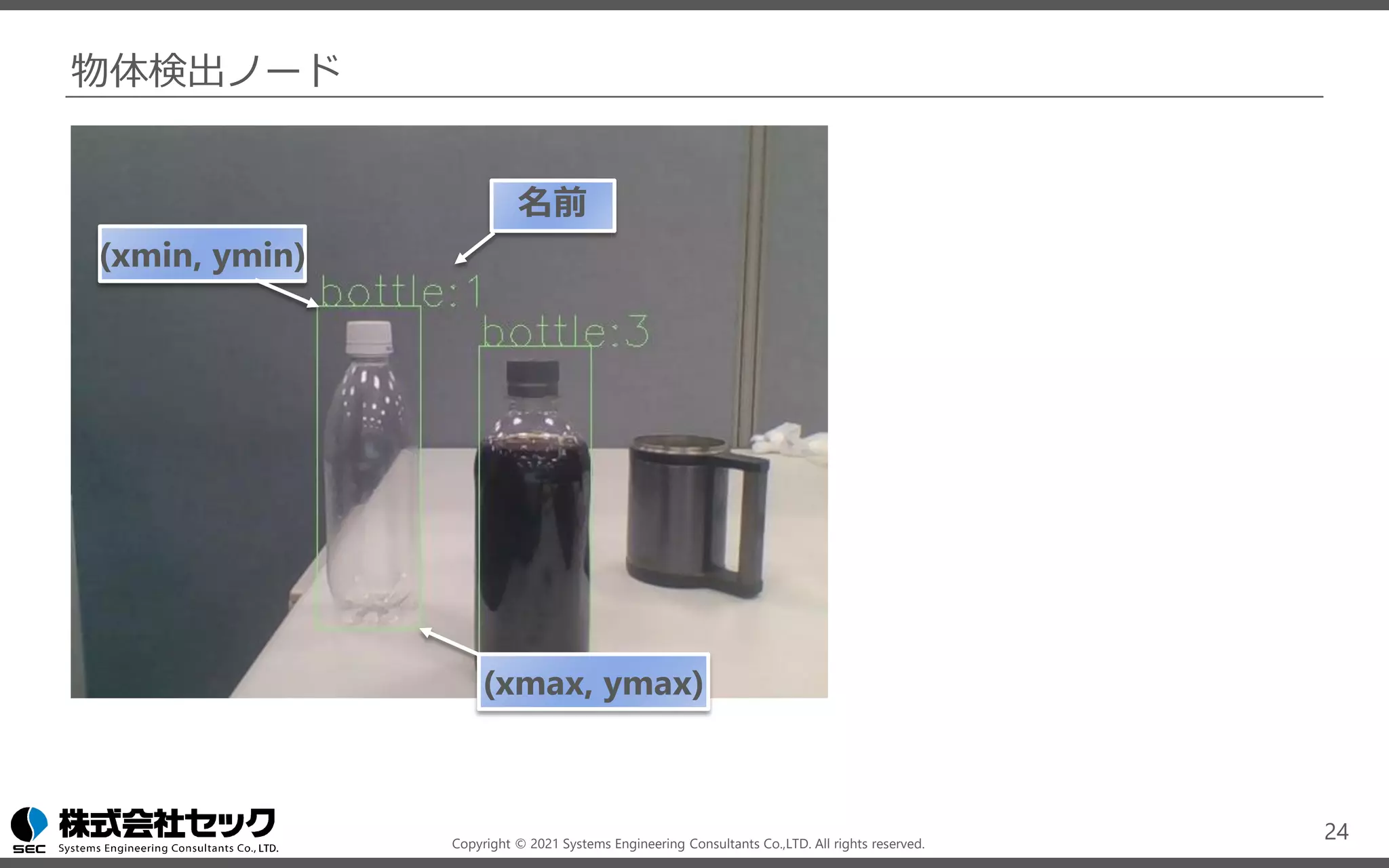
チュートリアルでは、opencvにより右上の画像のような結果を描画する。
/annotated_image
senser_msg/Image ( https://docs.ros.org/en/melodic/api/sensor_msgs/html/msg/Image.html )
RGBフォーマットの画像。
23
annotation
_node
/object_detection
_result
/preproessed
_image
/annotated
_image
Copyright © 2021 Systems Engineering Consultants Co.,LTD. All rights reserved.
物体検出ノード
24
(xmin, ymin)
(xmax, ymax)
名前
Copyright © 2021 Systems Engineering Consultants Co.,LTD. All rights reserved.
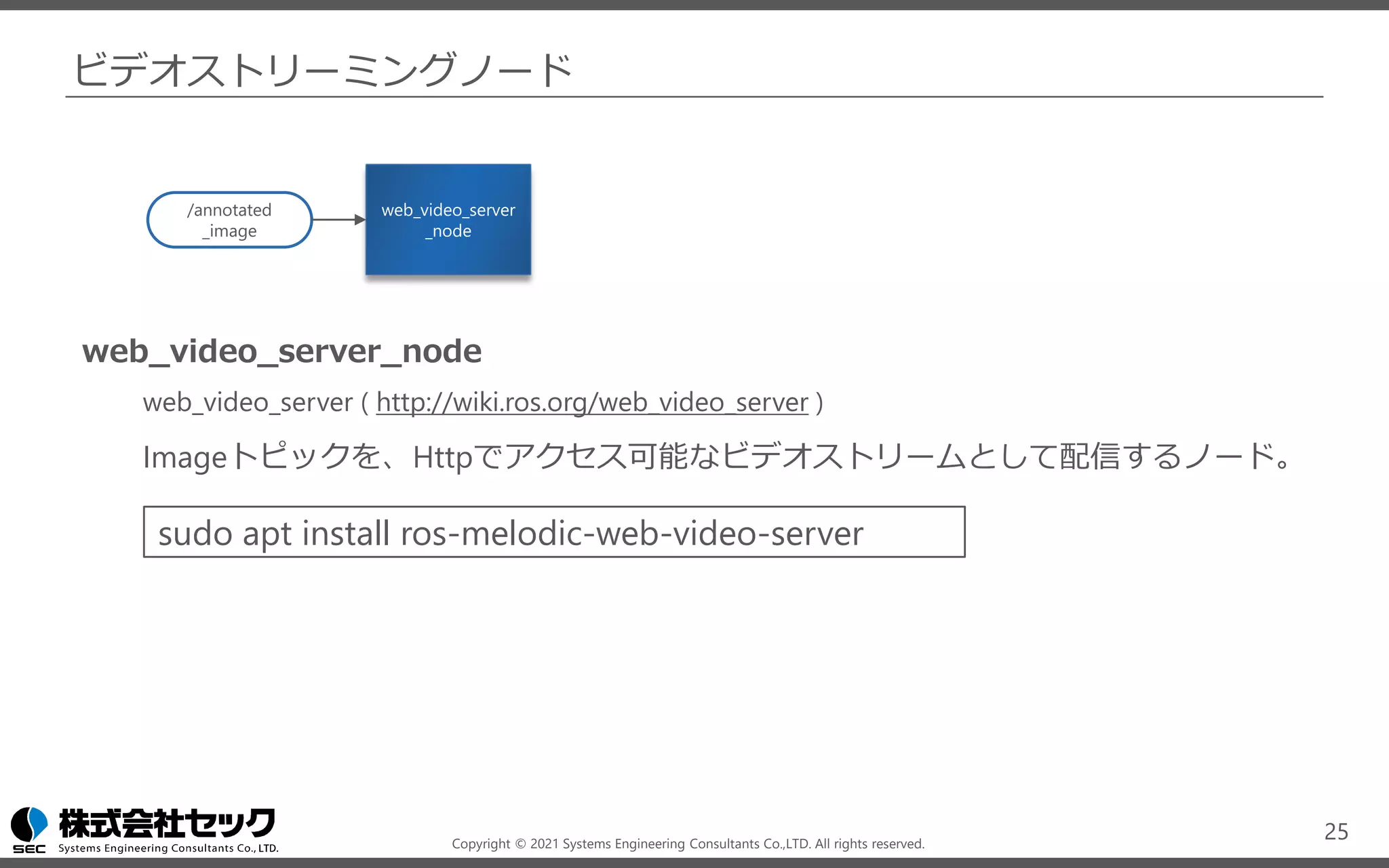
ビデオストリーミングノード
web_video_server_node
web_video_server ( http://wiki.ros.org/web_video_server )
Imageトピックを、Httpでアクセス可能なビデオストリームとして配信するノード。
25
web_video_server
_node
/annotated
_image
sudo apt install ros-melodic-web-video-server
Copyright © 2021 Systems Engineering Consultants Co.,LTD. All rights reserved.
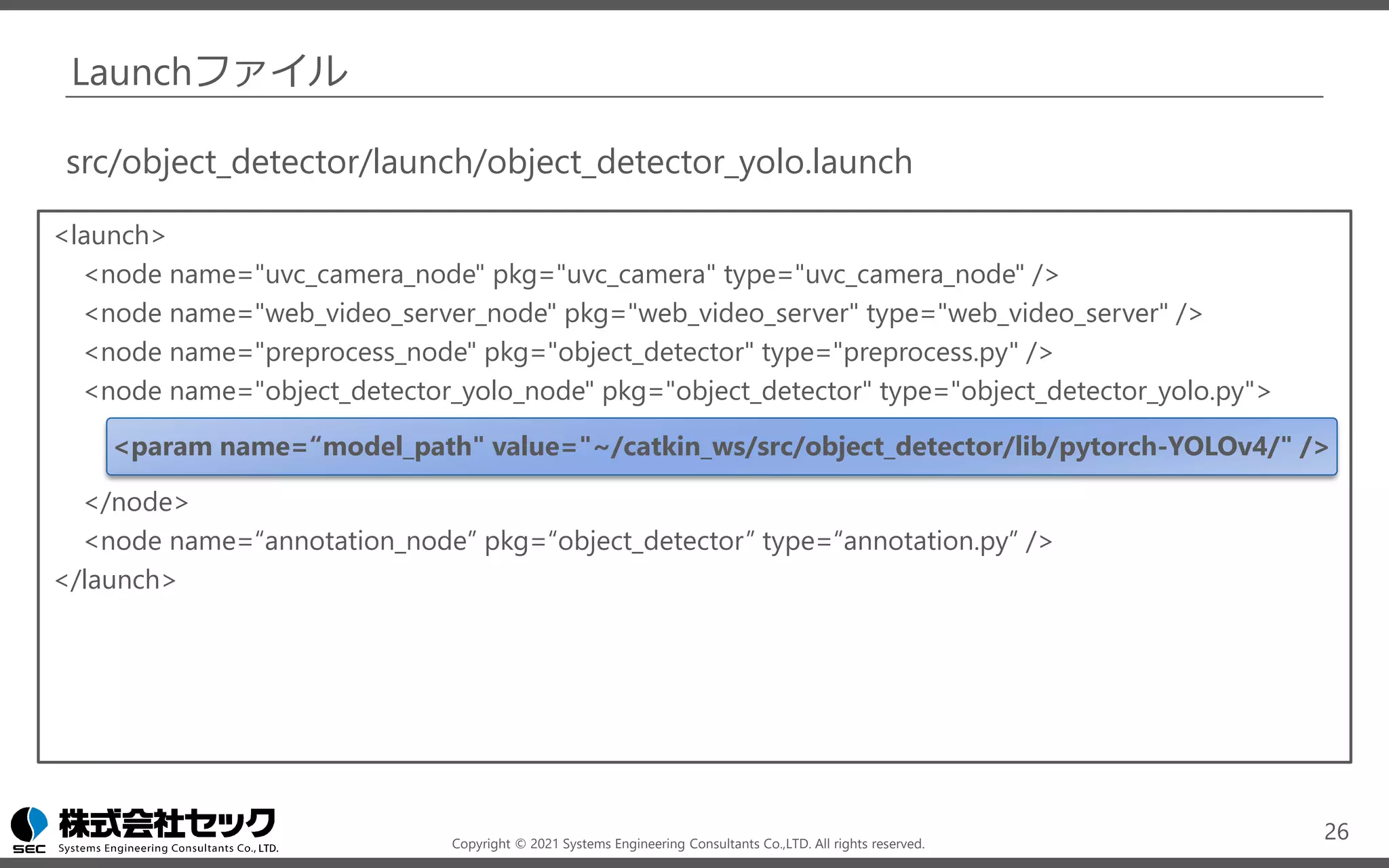
Launchファイル
<launch>
<node name="uvc_camera_node" pkg="uvc_camera" type="uvc_camera_node" />
<node name="web_video_server_node" pkg="web_video_server" type="web_video_server" />
<node name="preprocess_node" pkg="object_detector" type="preprocess.py" />
<node name="object_detector_yolo_node" pkg="object_detector" type="object_detector_yolo.py">
<param name=“model_path" value="~/catkin_ws/src/object_detector/lib/pytorch-YOLOv4/" />
</node>
<node name=“annotation_node” pkg=“object_detector” type=“annotation.py” />
</launch>
26
src/object_detector/launch/object_detector_yolo.launch
Copyright © 2021 Systems Engineering Consultants Co.,LTD. All rights reserved.
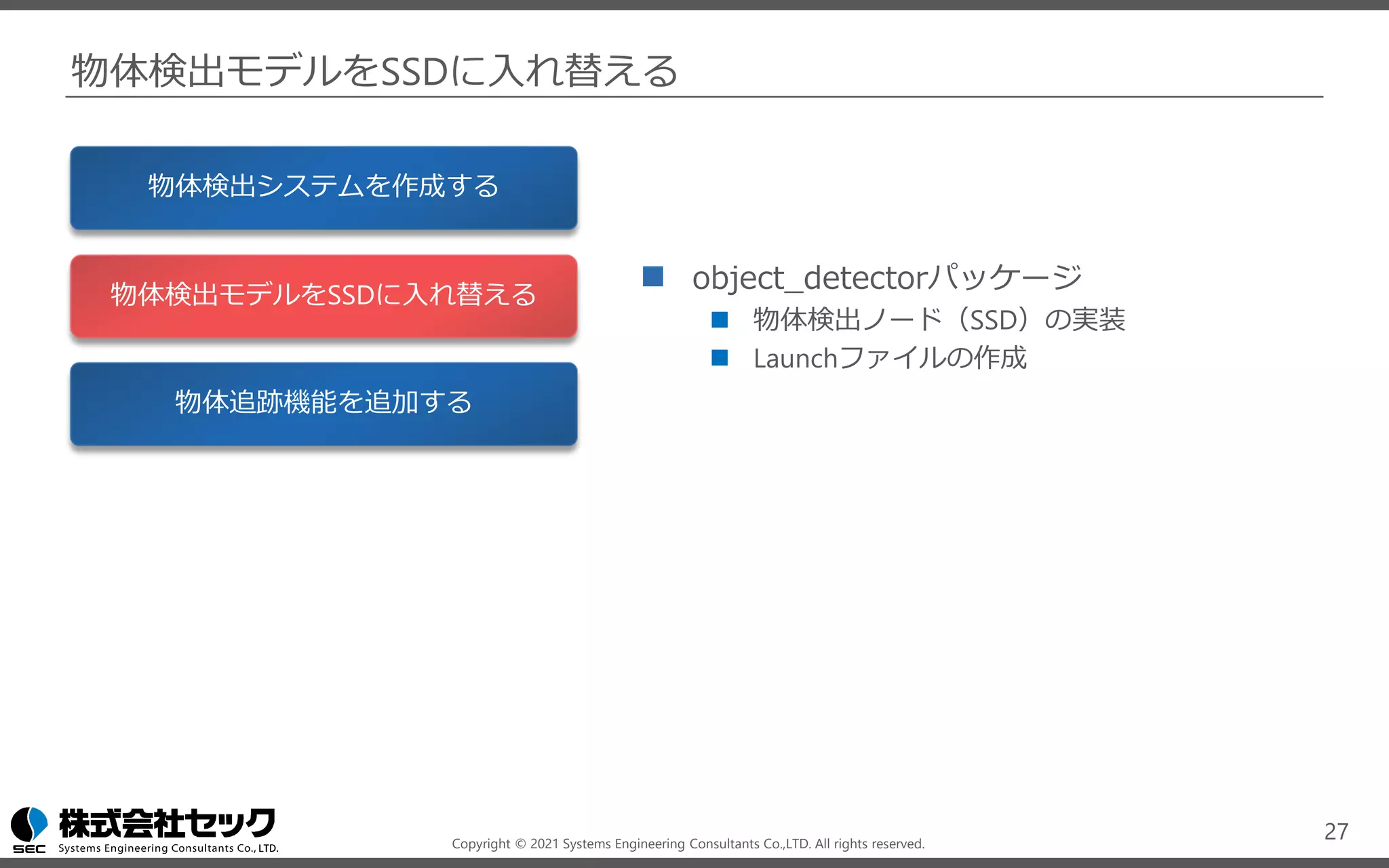
物体検出モデルをSSDに入れ替える
◼ object_detectorパッケージ
◼ 物体検出ノード(SSD)の実装
◼ Launchファイルの作成
27
物体検出システムを作成する
物体検出モデルをSSDに入れ替える
物体追跡機能を追加する
Copyright © 2021 Systems Engineering Consultants Co.,LTD. All rights reserved.
ノードの構成
28
uvc_camera
_node
object_detection
_yolo_node
preprocess
_node
web_video_server
_node
annotation
_node
/image_raw
/object_detection
_result
/preproessed
_image
/annotated
_image
カメラ 画像前処理 物体検出
結果描画 ビデオストリーミング
object_detector
_ssd_node
Copyright © 2021 Systems Engineering Consultants Co.,LTD. All rights reserved.
物体検出ノード
object_detector_ssd_node
src/object_detector/script/object_detector_ssd.py
オープンソースで公開されるSSDの実装を、ROSノードとしてラップする。
src/object_detector/
scripts/object_detector_ssd.py
lib/SSD
29
object_detector
_ssd_node
/object_detection
_result
/preproessed
_image
git clone https://github.com/lufficc/SSD
Copyright © 2021 Systems Engineering Consultants Co.,LTD. All rights reserved.
物体検出ノード
object_detector_ssd_node
src/object_detector/script/object_detector_ssd.py
入力・出力のトピックが共通であるため、launchファイルの変更のみで物体検出ノードを
入れ替えることができる。
30
object_detector
_ssd_node
/object_detection
_result
/preproessed
_image
AIを活用したシステムの開発では、精度やパフォーマンス調整のため複数のモデルを
試すことが多いため、モデル部分を入れ替えやすく設計することが、重要なポイントです。
Copyright © 2021 Systems Engineering Consultants Co.,LTD. All rights reserved.
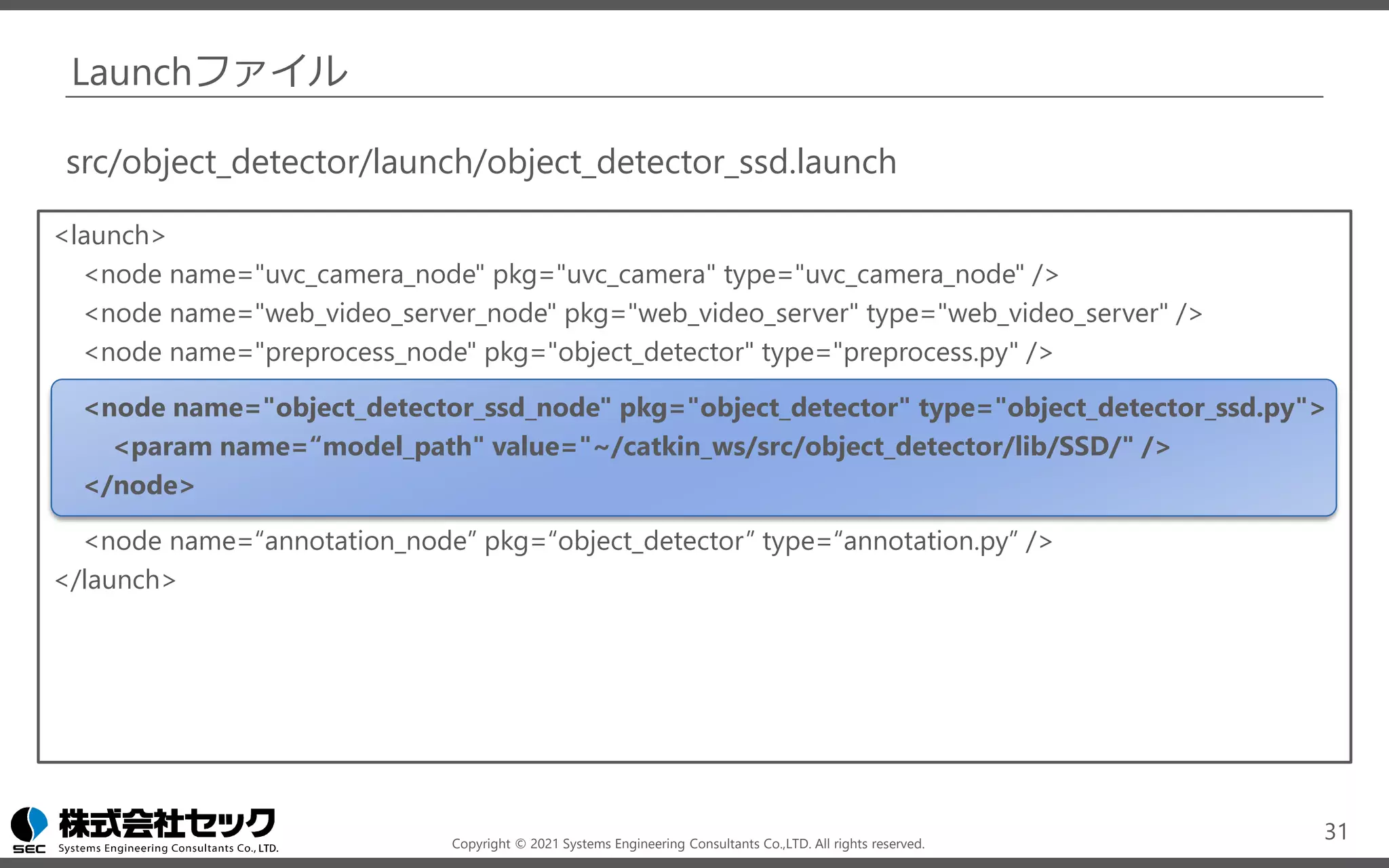
Launchファイル
<launch>
<node name="uvc_camera_node" pkg="uvc_camera" type="uvc_camera_node" />
<node name="web_video_server_node" pkg="web_video_server" type="web_video_server" />
<node name="preprocess_node" pkg="object_detector" type="preprocess.py" />
<node name="object_detector_ssd_node" pkg="object_detector" type="object_detector_ssd.py">
<param name=“model_path" value="~/catkin_ws/src/object_detector/lib/SSD/" />
</node>
<node name=“annotation_node” pkg=“object_detector” type=“annotation.py” />
</launch>
31
src/object_detector/launch/object_detector_ssd.launch
Copyright © 2021 Systems Engineering Consultants Co.,LTD. All rights reserved.
物体追跡機能を追加する
◼ object_detectorパッケージ
◼ 物体追跡ノードの実装
◼ Launchファイルの作成
32
物体検出システムを作成する
物体検出モデルをSSDに入れ替える
物体追跡機能を追加する
Copyright © 2021 Systems Engineering Consultants Co.,LTD. All rights reserved.
ノードの構成
33
uvc_camera
_node
object_detector
_yolo_node
preprocess
_node
web_video_server
_node
annotation
_node
/image_raw
/object_detection
_result
/preproessed
_image
/annotated
_image
カメラ 画像前処理 物体検出
結果描画 ビデオストリーミング
/object_detection
_result
object_tracking
_node
/object_tracking
_result
物体追跡
Copyright © 2021 Systems Engineering Consultants Co.,LTD. All rights reserved.
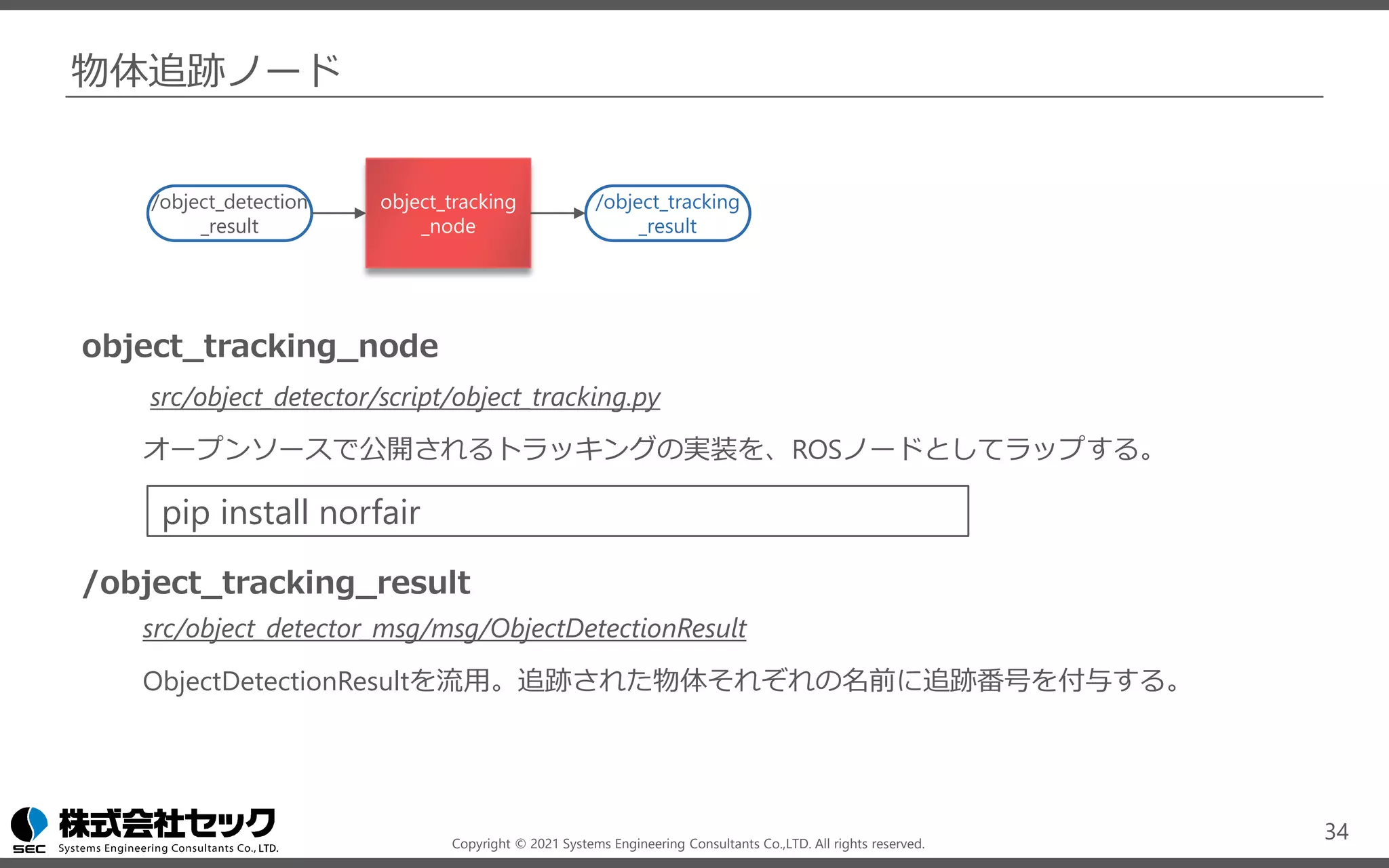
物体追跡ノード
34
/object_detection
_result
object_tracking
_node
/object_tracking
_result
object_tracking_node
src/object_detector/script/object_tracking.py
オープンソースで公開されるトラッキングの実装を、ROSノードとしてラップする。
/object_tracking_result
src/object_detector_msg/msg/ObjectDetectionResult
ObjectDetectionResultを流用。追跡された物体それぞれの名前に追跡番号を付与する。
pip install norfair
Copyright © 2021 Systems Engineering Consultants Co.,LTD. All rights reserved.
Launchファイル
<launch>
<node name="uvc_camera_node" pkg="uvc_camera" type="uvc_camera_node" />
<node name="web_video_server_node" pkg="web_video_server" type="web_video_server" />
<node name="preprocess_node" pkg="object_detector" type="preprocess.py" />
<node name="object_detector_yolo_node" pkg="object_detector" type="object_detector_yolo.py">
<param name=“model_path" value="~/catkin_ws/src/object_detector/lib/pytorch-YOLOv4/" />
</node>
<node name="object_tracking_node" pkg="object_detector" type="object_tracking.py" />
<node name="annotation_node" pkg="object_detector" type="annotation.py">
<remap from="object_detection_result" to="object_tracking_result" />
</node>
</launch>
35
src/object_detector/launch/object_tracking.launch
Copyright © 2021 Systems Engineering Consultants Co.,LTD. All rights reserved.
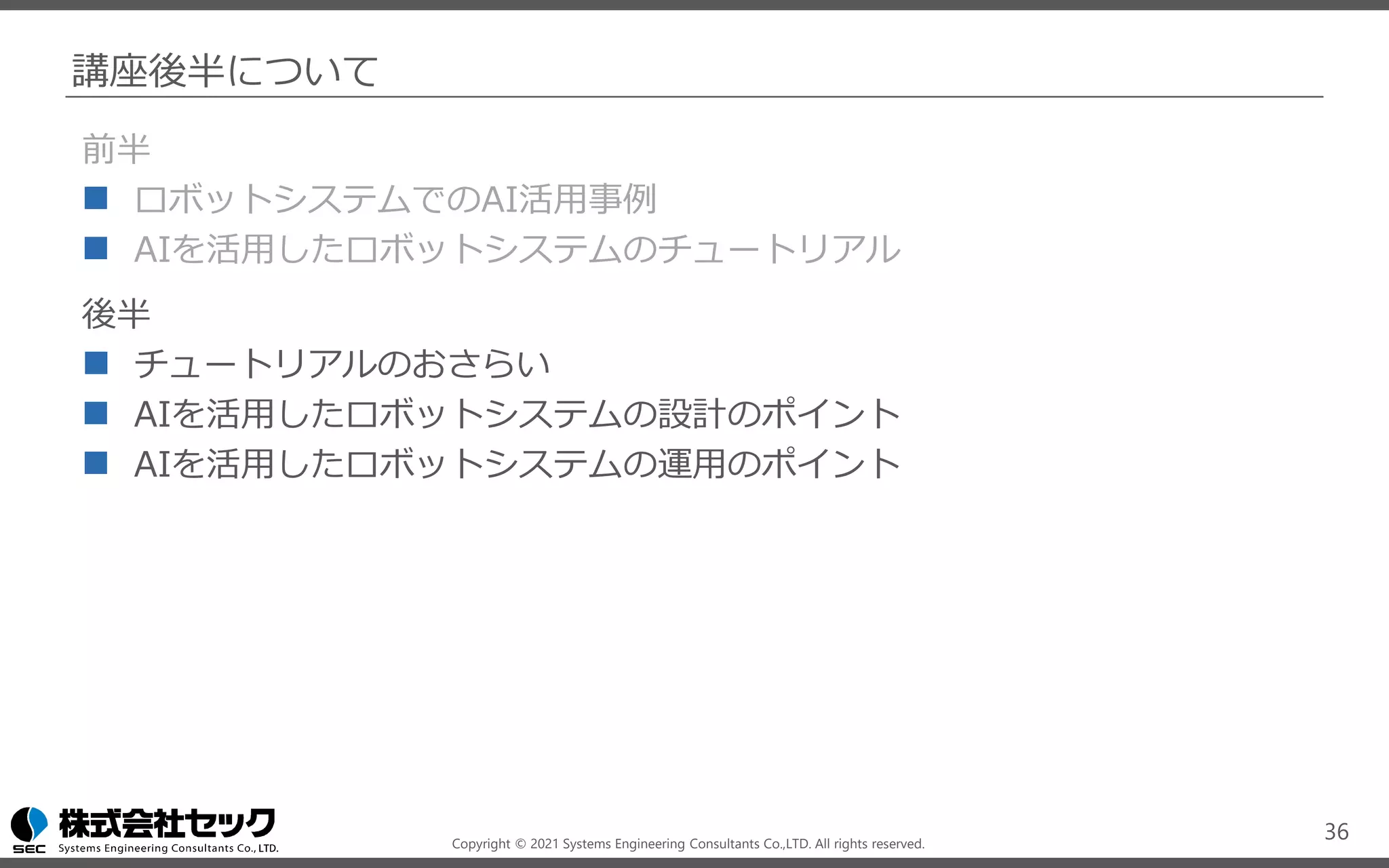
講座後半について
前半
◼ ロボットシステムでのAI活用事例
◼ AIを活用したロボットシステムのチュートリアル
後半
◼ チュートリアルのおさらい
◼ AIを活用したロボットシステムの設計のポイント
◼ AIを活用したロボットシステムの運用のポイント
36
Copyright © 2021 Systems Engineering Consultants Co.,LTD. All rights reserved.
37

NEDO特別講座_画像処理・AI技術活用コース_前編

  • 1.
    Copyright © 2021Systems Engineering Consultants Co.,LTD. All rights reserved. NEDO特別講座 画像処理・AI技術活用コース 前編 加藤 隆典
  • 2.
    Copyright © 2021Systems Engineering Consultants Co.,LTD. All rights reserved. 人と共働して軽作業をするロボットプラットフォームの開発
  • 3.
    Copyright © 2021Systems Engineering Consultants Co.,LTD. All rights reserved. 講座内容 前半 ◼ ロボットシステムでのAI活用事例 ◼ AIを活用したロボットシステムのチュートリアル 後半 ◼ チュートリアルのおさらい ◼ AIを活用したロボットシステムの設計のポイント ◼ AIを活用したロボットシステムの運用のポイント 3
  • 4.
    Copyright © 2021Systems Engineering Consultants Co.,LTD. All rights reserved. ロボットシステムでのAI活用事例 ◼ ロボットに適用されるAI・画像処理技術 ◼ ロボットアーム制御 ◼ 自動運転(Autoware) 4
  • 5.
    Copyright © 2021Systems Engineering Consultants Co.,LTD. All rights reserved. ロボットシステムでのAI活用事例:ロボットに適用されるAI・画像処理技術 ディープラーニング技術や各種画像処理を活用して特定の物体・領域を抽出し、 ロボットや機器の高度な制御が可能となります。 5 Rtrilo https://www.sec.co.jp/ja/rd/rtrilo.html 走行可能/走行禁止エリアの抽出 ピンポイントでの物体検出 把持対象の特定 物体の動き(移動方向)検出
  • 6.
    Copyright © 2021Systems Engineering Consultants Co.,LTD. All rights reserved. ロボットシステムでのAI活用事例:ロボットに適用されるAI・画像処理技術 ◼ 物体検出 YOLO(v3,tiny) SSD ◼ 分類 VGG16 Inception(GoogLeNet) ResNet MobileNet ◼ 物体検出領域(ROI)の絞り込み ◼ ARマーカ読み取り ◼ 障害物・走行領域の抽出 ◼ 検出物体の移動と停止識別、物体の向きの検出 ◼ 検出物体までの距離算出 6
  • 7.
    Copyright © 2021Systems Engineering Consultants Co.,LTD. All rights reserved. ロボットシステムでのAI活用事例:ロボットアーム制御 強化学習 ロボットアームが試行錯誤を繰り返し、 その経験からロボットの制御を学習す る 7 Deep Learning for Robots: Learning from Large-Scale Interaction http://googleresearch.blogspot.jp/2016/03/deep-learning-for-robots-learning-from.html 出典:https://sites.google.com/site/brainrobotdata/home
  • 8.
    Copyright © 2021Systems Engineering Consultants Co.,LTD. All rights reserved. ロボットシステムでのAI活用事例:ロボットアーム制御 模倣学習 人の動作を模倣してロボットアームの 制御方法を学習する 8 「NEDO次世代人工知能・ロボット中核技術開発」 早稲田大学 尾形研究室のタオルの折り畳みロボット https://www.youtube.com/watch?v=beZUyZMyHeo 出典:https://www.youtube.com/watch?v=YH1TrL1q6Po
  • 9.
    Copyright © 2021Systems Engineering Consultants Co.,LTD. All rights reserved. Autoware:オープンソースの自動運転ソフトウエア https://www.autoware.ai/ ロボットシステムでのAI活用事例:自動運転(Autoware) 9 ROS 自己位置推定 環境認識 経路計画 ・・・ Camera LiDAR IMU GPS ・・・ 物体検出による、車両、歩行者、信号の検出
  • 10.
    Copyright © 2021Systems Engineering Consultants Co.,LTD. All rights reserved. AIを活用したロボットシステムの チュートリアル 10
  • 11.
    Copyright © 2021Systems Engineering Consultants Co.,LTD. All rights reserved. AIを活用したロボットシステムのチュートリアル 本講座のチュートリアルでは、ROSを利用して、物体検出を行うロボットシステムを構 築します。ロボットシステムの構築の流れとともに、ロボットシステムにAIを組み込む うえでのポイントを、チュートリアルを通して解説します。 11 Webカメラの映像を取り込み物体検出の結果を動画として表示する 物体検出ノードは複数のアルゴリズムを実装し切り替え可能とする カメラ ノード 結果描画 ノード 物体検出 ノード (YOLO) Webカメラ
  • 12.
    Copyright © 2021Systems Engineering Consultants Co.,LTD. All rights reserved. AIを活用したロボットシステムのチュートリアル 本講座のチュートリアルでは、ROSを利用して、物体検出を行うロボットシステムを構 築します。ロボットシステムの構築の流れとともに、ロボットシステムにAIを組み込む うえでのポイントを、チュートリアルを通して解説します。 12 カメラ ノード 結果描画 ノード 物体検出 ノード (SSD) Webカメラ Webカメラの映像を取り込み物体検出の結果を動画として表示する 物体検出ノードは複数のアルゴリズムを実装し切り替え可能とする
  • 13.
    Copyright © 2021Systems Engineering Consultants Co.,LTD. All rights reserved. AIを活用したロボットシステムのチュートリアル 本講座のチュートリアルでは、ROSを利用して、物体検出を行うロボットシステムを構 築します。ロボットシステムの構築の流れとともに、ロボットシステムにAIを組み込む うえでのポイントを、チュートリアルを通して解説します。 13 カメラ ノード 結果描画 ノード 物体検出 ノード (YOLO) Webカメラ 物体追跡 ノード Webカメラの映像を取り込み物体検出の結果を動画として表示する 物体検出ノードは複数のアルゴリズムを実装し切り替え可能とする
  • 14.
    Copyright © 2021Systems Engineering Consultants Co.,LTD. All rights reserved. AIを活用したロボットシステムのチュートリアル チュートリアル全体の流れ 14 物体検出システムを作成する 物体検出モデルをSSDに入れ替える 物体追跡機能を追加する
  • 15.
    Copyright © 2021Systems Engineering Consultants Co.,LTD. All rights reserved. AIを活用したロボットシステムのチュートリアル チュートリアルの実行環境 ◼ OS: Ubuntu 18.04 LTS ◼ ROS: Melodic ◼ カメラ チュートリアルのソースコード・実装手順については、動画の概要欄に記載の Githubのページを参照してください。 15
  • 16.
    Copyright © 2021Systems Engineering Consultants Co.,LTD. All rights reserved. 物体検出システムを作成する ◼ オープンソースのノードのインストール ◼ カメラノード ros-melodic-uvc-camera ◼ ビデオストリーミング ros-melodic-web-video-server ◼ object_detector_msgパッケージ ◼ DetectedObject.msgの作成 ◼ ObjectDetectionResult.msgの作成 ◼ object_detectorパッケージ ◼ 画像前処理ノードの実装 ◼ 物体検出ノードの実装 ◼ 結果描画ノードの実装 ◼ Launchファイルの作成 16 物体検出システムを作成する 物体検出モデルをSSDに入れ替える 物体追跡機能を追加する
  • 17.
    Copyright © 2021Systems Engineering Consultants Co.,LTD. All rights reserved. ノードの構成 17 uvc_camera _node object_detector _yolo_node preprocess _node web_video_server _node annotation _node /image_raw /object_detection _result /preproessed _image /annotated _image Node Topic 凡例 カメラ 画像前処理 物体検出 結果描画 ビデオストリーミング
  • 18.
    Copyright © 2021Systems Engineering Consultants Co.,LTD. All rights reserved. カメラノード uvc_camera_node uvc_camera ( http://wiki.ros.org/uvc_camera ) カメラデバイスから画像を取得するノードには、オープンソースの実装を利用する。 /image_raw senser_msg/Image ( https://docs.ros.org/en/melodic/api/sensor_msgs/html/msg/Image.html ) ROS標準のImageメッセージが送信される。 18 uvc_camera _node /image_raw カメラデバイスやカメラノードの実装によって、サポートする画像のフォーマットが異なる場合があります。 物体検出などのAIモデルは画像をRGBで扱うことが多いため、後のpreprocess_nodeで画像フォーマットを RGBに変換します。 sudo apt install ros-melodic-uvc-camera
  • 19.
    Copyright © 2021Systems Engineering Consultants Co.,LTD. All rights reserved. 画像前処理ノード preprocess_node src/object_detector/script/preprocess.py カメラデバイスから取得した画像を、物体検出モデルで利用できるよう変換する。今回の例では 画像のフォーマットをRGBに変換する。必要であれば以下の処理も含める。 ◼ リサイズ / クロップ / コントラスト調整 /preprocessed_image senser_msg/Image ( https://docs.ros.org/en/melodic/api/sensor_msgs/html/msg/Image.html ) ROS標準のImageメッセージが送信される。 19 preprocess _node /image_raw /preproessed _image
  • 20.
    Copyright © 2021Systems Engineering Consultants Co.,LTD. All rights reserved. 物体検出ノード object_detector_yolo_node src/object_detector/script/object_detector_yolo.py オープンソースで公開されるYOLOの実装を、ROSノードとしてラップする。 src/object_detector/ scripts/object_detector_yolo.py lib/pytorch-YOLOv4 20 object_detecter _yolo_node /object_detection _result /preproessed _image git clone https://github.com/Tianxiaomo/pytorch-YOLOv4
  • 21.
    Copyright © 2021Systems Engineering Consultants Co.,LTD. All rights reserved. 物体検出ノード object_detecter_yolo_node src/object_detector/script/object_detector_yolo.py オープンソースで公開されるYOLOの実装を、ROSノードとしてラップする。 21 object_detector _yolo_node /object_detection _result /preproessed _image ROS1はpython2で動作していますが、今回利用しているYOLOはpython3で実装されてい るため、このノードは明示的にpython3で実行する必要があります。 #!/usr/bin/env python3 … object_detector_yolo.py
  • 22.
    Copyright © 2021Systems Engineering Consultants Co.,LTD. All rights reserved. 物体検出ノード /object_detecter_result src/object_detector_msg/msg/ObjectDetectionResult.msg src/object_detector_msg/msg/DetectedObject.msg 物体検出を結果を、独自のメッセージとして 定義する。 22 object_detector _yolo_node /object_detection _result /preproessed _image DetectedObject xmin float64 xmax float64 ymin float64 ymax float64 confidence float64 class_id int64 name string ObjectDetectionResult detected_objects DetectedObject[] 物体の検出位置 検出の信頼度 物体の分類ID 物体の名前
  • 23.
    Copyright © 2021Systems Engineering Consultants Co.,LTD. All rights reserved. 結果描画ノード annotation_node src/object_detector/script/annotation.py チュートリアルでは、opencvにより右上の画像のような結果を描画する。 /annotated_image senser_msg/Image ( https://docs.ros.org/en/melodic/api/sensor_msgs/html/msg/Image.html ) RGBフォーマットの画像。 23 annotation _node /object_detection _result /preproessed _image /annotated _image
  • 24.
    Copyright © 2021Systems Engineering Consultants Co.,LTD. All rights reserved. 物体検出ノード 24 (xmin, ymin) (xmax, ymax) 名前
  • 25.
    Copyright © 2021Systems Engineering Consultants Co.,LTD. All rights reserved. ビデオストリーミングノード web_video_server_node web_video_server ( http://wiki.ros.org/web_video_server ) Imageトピックを、Httpでアクセス可能なビデオストリームとして配信するノード。 25 web_video_server _node /annotated _image sudo apt install ros-melodic-web-video-server
  • 26.
    Copyright © 2021Systems Engineering Consultants Co.,LTD. All rights reserved. Launchファイル <launch> <node name="uvc_camera_node" pkg="uvc_camera" type="uvc_camera_node" /> <node name="web_video_server_node" pkg="web_video_server" type="web_video_server" /> <node name="preprocess_node" pkg="object_detector" type="preprocess.py" /> <node name="object_detector_yolo_node" pkg="object_detector" type="object_detector_yolo.py"> <param name=“model_path" value="~/catkin_ws/src/object_detector/lib/pytorch-YOLOv4/" /> </node> <node name=“annotation_node” pkg=“object_detector” type=“annotation.py” /> </launch> 26 src/object_detector/launch/object_detector_yolo.launch
  • 27.
    Copyright © 2021Systems Engineering Consultants Co.,LTD. All rights reserved. 物体検出モデルをSSDに入れ替える ◼ object_detectorパッケージ ◼ 物体検出ノード(SSD)の実装 ◼ Launchファイルの作成 27 物体検出システムを作成する 物体検出モデルをSSDに入れ替える 物体追跡機能を追加する
  • 28.
    Copyright © 2021Systems Engineering Consultants Co.,LTD. All rights reserved. ノードの構成 28 uvc_camera _node object_detection _yolo_node preprocess _node web_video_server _node annotation _node /image_raw /object_detection _result /preproessed _image /annotated _image カメラ 画像前処理 物体検出 結果描画 ビデオストリーミング object_detector _ssd_node
  • 29.
    Copyright © 2021Systems Engineering Consultants Co.,LTD. All rights reserved. 物体検出ノード object_detector_ssd_node src/object_detector/script/object_detector_ssd.py オープンソースで公開されるSSDの実装を、ROSノードとしてラップする。 src/object_detector/ scripts/object_detector_ssd.py lib/SSD 29 object_detector _ssd_node /object_detection _result /preproessed _image git clone https://github.com/lufficc/SSD
  • 30.
    Copyright © 2021Systems Engineering Consultants Co.,LTD. All rights reserved. 物体検出ノード object_detector_ssd_node src/object_detector/script/object_detector_ssd.py 入力・出力のトピックが共通であるため、launchファイルの変更のみで物体検出ノードを 入れ替えることができる。 30 object_detector _ssd_node /object_detection _result /preproessed _image AIを活用したシステムの開発では、精度やパフォーマンス調整のため複数のモデルを 試すことが多いため、モデル部分を入れ替えやすく設計することが、重要なポイントです。
  • 31.
    Copyright © 2021Systems Engineering Consultants Co.,LTD. All rights reserved. Launchファイル <launch> <node name="uvc_camera_node" pkg="uvc_camera" type="uvc_camera_node" /> <node name="web_video_server_node" pkg="web_video_server" type="web_video_server" /> <node name="preprocess_node" pkg="object_detector" type="preprocess.py" /> <node name="object_detector_ssd_node" pkg="object_detector" type="object_detector_ssd.py"> <param name=“model_path" value="~/catkin_ws/src/object_detector/lib/SSD/" /> </node> <node name=“annotation_node” pkg=“object_detector” type=“annotation.py” /> </launch> 31 src/object_detector/launch/object_detector_ssd.launch
  • 32.
    Copyright © 2021Systems Engineering Consultants Co.,LTD. All rights reserved. 物体追跡機能を追加する ◼ object_detectorパッケージ ◼ 物体追跡ノードの実装 ◼ Launchファイルの作成 32 物体検出システムを作成する 物体検出モデルをSSDに入れ替える 物体追跡機能を追加する
  • 33.
    Copyright © 2021Systems Engineering Consultants Co.,LTD. All rights reserved. ノードの構成 33 uvc_camera _node object_detector _yolo_node preprocess _node web_video_server _node annotation _node /image_raw /object_detection _result /preproessed _image /annotated _image カメラ 画像前処理 物体検出 結果描画 ビデオストリーミング /object_detection _result object_tracking _node /object_tracking _result 物体追跡
  • 34.
    Copyright © 2021Systems Engineering Consultants Co.,LTD. All rights reserved. 物体追跡ノード 34 /object_detection _result object_tracking _node /object_tracking _result object_tracking_node src/object_detector/script/object_tracking.py オープンソースで公開されるトラッキングの実装を、ROSノードとしてラップする。 /object_tracking_result src/object_detector_msg/msg/ObjectDetectionResult ObjectDetectionResultを流用。追跡された物体それぞれの名前に追跡番号を付与する。 pip install norfair
  • 35.
    Copyright © 2021Systems Engineering Consultants Co.,LTD. All rights reserved. Launchファイル <launch> <node name="uvc_camera_node" pkg="uvc_camera" type="uvc_camera_node" /> <node name="web_video_server_node" pkg="web_video_server" type="web_video_server" /> <node name="preprocess_node" pkg="object_detector" type="preprocess.py" /> <node name="object_detector_yolo_node" pkg="object_detector" type="object_detector_yolo.py"> <param name=“model_path" value="~/catkin_ws/src/object_detector/lib/pytorch-YOLOv4/" /> </node> <node name="object_tracking_node" pkg="object_detector" type="object_tracking.py" /> <node name="annotation_node" pkg="object_detector" type="annotation.py"> <remap from="object_detection_result" to="object_tracking_result" /> </node> </launch> 35 src/object_detector/launch/object_tracking.launch
  • 36.
    Copyright © 2021Systems Engineering Consultants Co.,LTD. All rights reserved. 講座後半について 前半 ◼ ロボットシステムでのAI活用事例 ◼ AIを活用したロボットシステムのチュートリアル 後半 ◼ チュートリアルのおさらい ◼ AIを活用したロボットシステムの設計のポイント ◼ AIを活用したロボットシステムの運用のポイント 36
  • 37.
    Copyright © 2021Systems Engineering Consultants Co.,LTD. All rights reserved. 37