MYOB Hosting
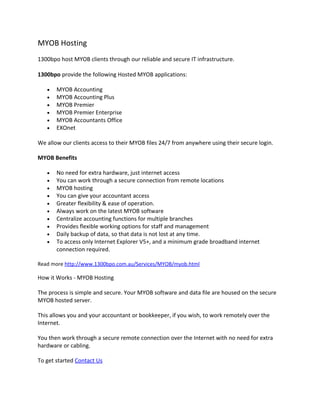
1300bpo host MYOB clients through our reliable and secure IT infrastructure.

1300bpo provide the following Hosted MYOB applications:

   •   MYOB Accounting
   •   MYOB Accounting Plus
   •   MYOB Premier
   •   MYOB Premier Enterprise
   •   MYOB Accountants Office
   •   EXOnet

We allow our clients access to their MYOB files 24/7 from anywhere using their secure login.

MYOB Benefits

   •   No need for extra hardware, just internet access
   •   You can work through a secure connection from remote locations
   •   MYOB hosting
   •   You can give your accountant access
   •   Greater flexibility & ease of operation.
   •   Always work on the latest MYOB software
   •   Centralize accounting functions for multiple branches
   •   Provides flexible working options for staff and management
   •   Daily backup of data, so that data is not lost at any time.
   •   To access only Internet Explorer V5+, and a minimum grade broadband internet
       connection required.

Read more http://www.1300bpo.com.au/Services/MYOB/myob.html

How it Works - MYOB Hosting

The process is simple and secure. Your MYOB software and data file are housed on the secure
MYOB hosted server.

This allows you and your accountant or bookkeeper, if you wish, to work remotely over the
Internet.

You then work through a secure remote connection over the Internet with no need for extra
hardware or cabling.

To get started Contact Us
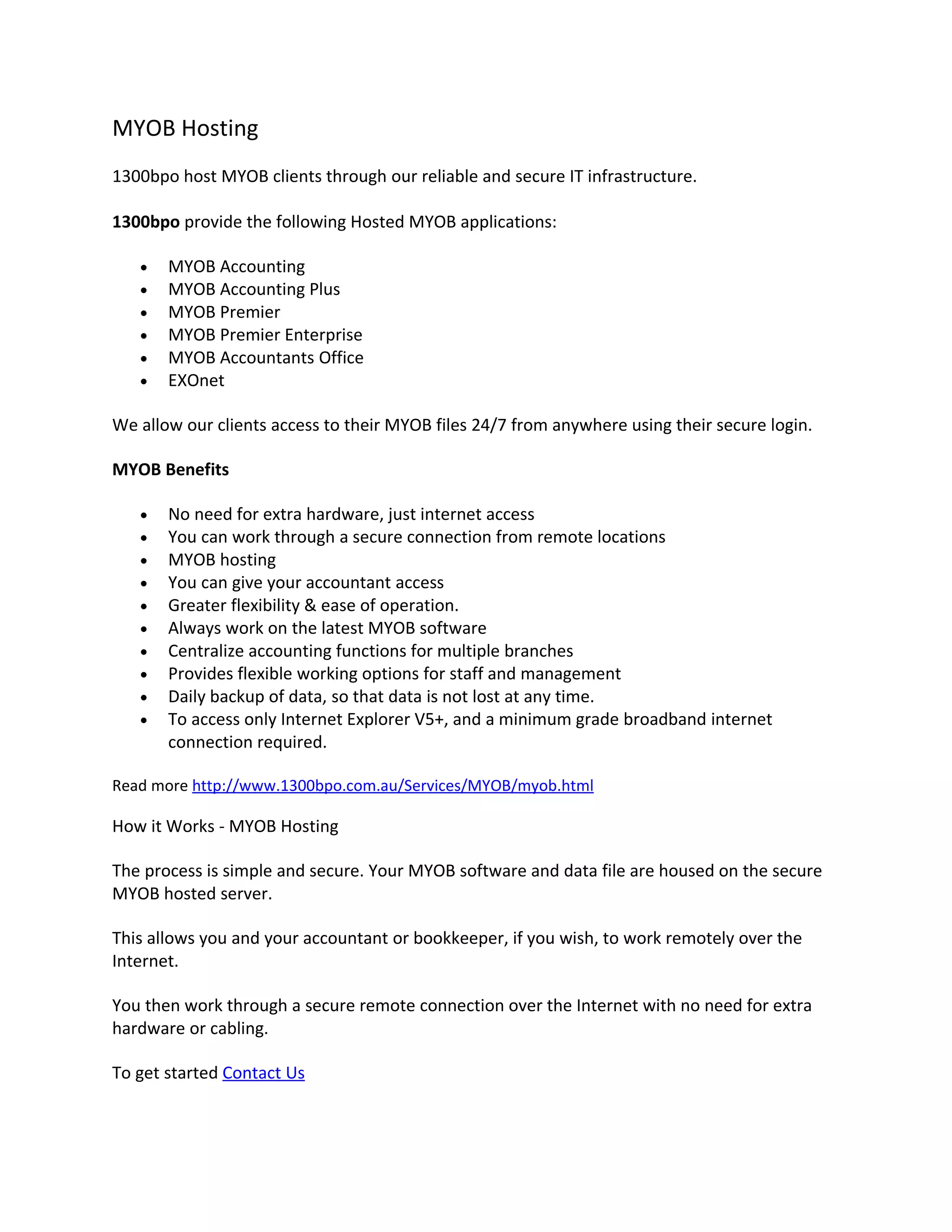
Transferring to MYOB Hosting
Accessing your MYOB Hosting
MYOB hosting instruction

MYOB Live Demo
MYOB login

Read more http://www.1300bpo.com.au/Services/MYOB/how_myob_works.html

Frequently Asked Questions - MYOB Hosting

Who can use this service?

You will need to confirm with 1300bpo which MYOB software can be hosted, but they include:

   •   MYOB Accounting v15+;
   •   MYOB Accounting Plus v15+
   •   MYOB Premier v9+
   •   MYOB Premier Enterprise v3+
   •   Accountants Office v10+

I’m using MYOB Accounting Plus, can more than one staff member access it at the
same time?

No. You will just need to upgrade to MYOB Premier to allow this.

Can my accountant or bookkeeper access my data if they need to?

Yes, if you give them permission. If you want them to be able to access it simultaneously with
you, you will need MYOB Premier.

Do I need an additional License?

Yes, but a single MYOB Remote Hosting License is only $29 per year
One License per MYOB product serial number.

Do I need backups?

Daily backups are completed of the server, including all client data for internal recovery
purposes only.

Specific backups of your individual business data can be provided as per the schedule requested
by you - daily, weekly or monthly.
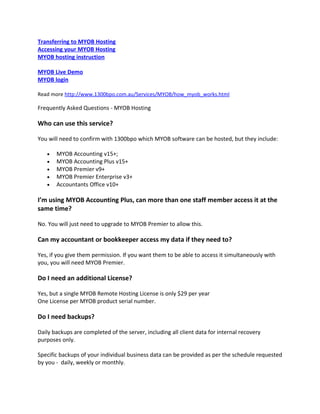
We recommend that you also create backups as prompted when closing MYOB, and save these
backups at end of week/month/year as a secondary measure.

How many users can access concurrently?

You can have as many users as you wish, with the proper MYOB license. You can also setup
users without a licence, where the user only requires access to your centralised information
store.

How secure will my information be?

The data hosting is secured by smart card access, and multiple firewalls with high level data
encryption.

All Terminal Servers run Windows 2003 Server, with its enhanced performance and security.

Your data is also protected by the inherent MYOB security features, such as password
protection.

What down time can I expect?

0.05% maximum unscheduled downtime benchmark is adhered to. All scheduled maintenance
occurs with adequate notice.

What support hours do you offer?

By Phone: Monday to Friday 8.30am - 8.30pm EST
By email: All requests for support can be made 24 hours a day, 7 days a week.

What hardware, software, connection and firewall do I need?

A broadband Internet connection is recommended and a computer running either Windows
(2000 or higher) or Mac OS (X or higher).

Computers running Mac OS or Windows XP or higher can use any existing printer you might
have.

What initial setup is required?

None. If you are an existing MYOB user, you will need to transfer your MYOB data file to the
hosted server. If you are a new MYOB user, you can create a new data file in MYOB once your
profile is complete and access commenced.

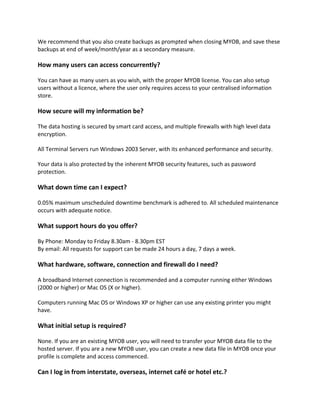
Can I log in from interstate, overseas, internet café or hotel etc.?
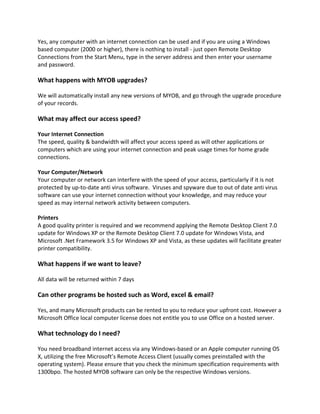
Yes, any computer with an internet connection can be used and if you are using a Windows
based computer (2000 or higher), there is nothing to install - just open Remote Desktop
Connections from the Start Menu, type in the server address and then enter your username
and password.

What happens with MYOB upgrades?

We will automatically install any new versions of MYOB, and go through the upgrade procedure
of your records.

What may affect our access speed?

Your Internet Connection
The speed, quality & bandwidth will affect your access speed as will other applications or
computers which are using your internet connection and peak usage times for home grade
connections.

Your Computer/Network
Your computer or network can interfere with the speed of your access, particularly if it is not
protected by up-to-date anti virus software. Viruses and spyware due to out of date anti virus
software can use your internet connection without your knowledge, and may reduce your
speed as may internal network activity between computers.

Printers
A good quality printer is required and we recommend applying the Remote Desktop Client 7.0
update for Windows XP or the Remote Desktop Client 7.0 update for Windows Vista, and
Microsoft .Net Framework 3.5 for Windows XP and Vista, as these updates will facilitate greater
printer compatibility.

What happens if we want to leave?

All data will be returned within 7 days

Can other programs be hosted such as Word, excel & email?

Yes, and many Microsoft products can be rented to you to reduce your upfront cost. However a
Microsoft Office local computer license does not entitle you to use Office on a hosted server.

What technology do I need?

You need broadband internet access via any Windows-based or an Apple computer running OS
X, utilizing the free Microsoft’s Remote Access Client (usually comes preinstalled with the
operating system). Please ensure that you check the minimum specification requirements with
1300bpo. The hosted MYOB software can only be the respective Windows versions.
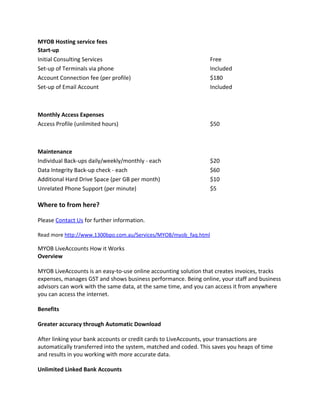
MYOB Hosting service fees
Start-up
Initial Consulting Services                                       Free
Set-up of Terminals via phone                                     Included
Account Connection fee (per profile)                              $180
Set-up of Email Account                                           Included


Monthly Access Expenses
Access Profile (unlimited hours)                                  $50


Maintenance
Individual Back-ups daily/weekly/monthly - each                   $20
Data Integrity Back-up check - each                               $60
Additional Hard Drive Space (per GB per month)                    $10
Unrelated Phone Support (per minute)                              $5

Where to from here?

Please Contact Us for further information.

Read more http://www.1300bpo.com.au/Services/MYOB/myob_faq.html

MYOB LiveAccounts How it Works
Overview

MYOB LiveAccounts is an easy-to-use online accounting solution that creates invoices, tracks
expenses, manages GST and shows business performance. Being online, your staff and business
advisors can work with the same data, at the same time, and you can access it from anywhere
you can access the internet.

Benefits

Greater accuracy through Automatic Download

After linking your bank accounts or credit cards to LiveAccounts, your transactions are
automatically transferred into the system, matched and coded. This saves you heaps of time
and results in you working with more accurate data.

Unlimited Linked Bank Accounts
Save time by linking as many business bank accounts and credit cards as you need

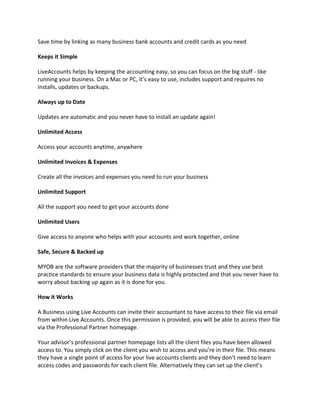
Keeps it Simple

LiveAccounts helps by keeping the accounting easy, so you can focus on the big stuff - like
running your business. On a Mac or PC, it’s easy to use, includes support and requires no
installs, updates or backups.

Always up to Date

Updates are automatic and you never have to install an update again!

Unlimited Access

Access your accounts anytime, anywhere

Unlimited Invoices & Expenses

Create all the invoices and expenses you need to run your business

Unlimited Support

All the support you need to get your accounts done

Unlimited Users

Give access to anyone who helps with your accounts and work together, online

Safe, Secure & Backed up

MYOB are the software providers that the majority of businesses trust and they use best
practice standards to ensure your business data is highly protected and that you never have to
worry about backing up again as it is done for you.

How it Works

A Business using Live Accounts can invite their accountant to have access to their file via email
from within Live Accounts. Once this permission is provided, you will be able to access their file
via the Professional Partner homepage.

Your advisor’s professional partner homepage lists all the client files you have been allowed
access to. You simply click on the client you wish to access and you’re in their file. This means
they have a single point of access for your live accounts clients and they don’t need to learn
access codes and passwords for each client file. Alternatively they can set up the client’s
Liveaccounts file and then give you Ownership rights to it and hence be connected from the day
one.

FAQ's

What does it cost to use the Professional Partner Home Page
It’s free for accountants, advisors and bookkeepers.

Who is MYOB LiveAccounts for?
It’s an easy to use solution for creating invoices, tracking expenses, and managing GST online.
The system is really simple & is not cluttered with unnecessary functionality.

It is a fantastic solution for sole traders, start-ups, and smaller businesses that are still using
manual methods to do their accounts. It is aimed at clients who do not want to invest in MYOB
Business software but still want to track their company financials. It is also aimed at clients who
are terrible at tracking business financials, the system then allows the accountant to access
their data without having to depend on the client relaying accurate data in a timely fashion.

Is it based on turnover?
No, it is not based on turnover

What are the criteria we can use?
Businesses just starting out or have only been in business for a short time < 3 years.
Business owners who are comfortable working online e.g., use internet banking
Business owners with little accounting knowledge so want something easy to use and
understand
Business owners that don’t want to worry about software installations, updates and backups.

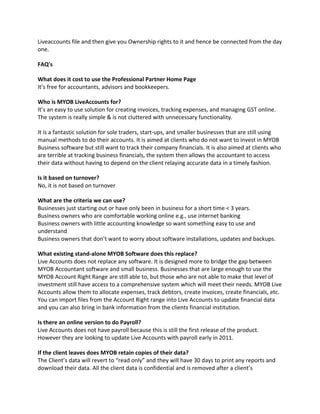
What existing stand-alone MYOB Software does this replace?
Live Accounts does not replace any software. It is designed more to bridge the gap between
MYOB Accountant software and small business. Businesses that are large enough to use the
MYOB Account Right Range are still able to, but those who are not able to make that level of
investment still have access to a comprehensive system which will meet their needs. MYOB Live
Accounts allow them to allocate expenses, track debtors, create invoices, create financials, etc.
You can import files from the Account Right range into Live Accounts to update financial data
and you can also bring in bank information from the clients financial institution.

Is there an online version to do Payroll?
Live Accounts does not have payroll because this is still the first release of the product.
However they are looking to update Live Accounts with payroll early in 2011.

If the client leaves does MYOB retain copies of their data?
The Client’s data will revert to “read only” and they will have 30 days to print any reports and
download their data. All the client data is confidential and is removed after a client’s
cancellation. However if that client decides to resubscribe to Live Accounts they will need to
start their account from scratch as if they were using the product again for the first time

How do you ensure the privacy of the Clients Data?
Client data can only be accessed by the account holder who has the login and password
information. The accountant (advisor) can only access the clients information if they set up and
link the account for the client in the first instance, or are invited by the client to link accounts.
The security of the client’s information is in accordance with military data security and
encryption standards. In other words, it is very safe and private.

What does it Cost?
Live Accounts costs nothing for the advisor and only costs $25 including GST per month for each
client. The pricing of the product is unlimited users per company file. Will the price include the
Business Transaction costs?

The price does include the delivery of transactions from the client’s bank accounts or credit
cards however there is a “fair-use” clause in the terms and conditions around this. The fair
usage will be set at around 100 transactions per month.

What are the Computer Hardware Specifications?
A Computer with Internet Connection is needed to use this product. Below are the supporting
Browser

   •   PC Users : Internet Explorer (V7 and Above)
   •   Mac Users : Firefox (v3 and above)

Read more http://www.1300bpo.com.au/Services/MYOB/myob_liveaccounts.html

MYOB Hosting

  • 1.
    MYOB Hosting 1300bpo hostMYOB clients through our reliable and secure IT infrastructure. 1300bpo provide the following Hosted MYOB applications: • MYOB Accounting • MYOB Accounting Plus • MYOB Premier • MYOB Premier Enterprise • MYOB Accountants Office • EXOnet We allow our clients access to their MYOB files 24/7 from anywhere using their secure login. MYOB Benefits • No need for extra hardware, just internet access • You can work through a secure connection from remote locations • MYOB hosting • You can give your accountant access • Greater flexibility & ease of operation. • Always work on the latest MYOB software • Centralize accounting functions for multiple branches • Provides flexible working options for staff and management • Daily backup of data, so that data is not lost at any time. • To access only Internet Explorer V5+, and a minimum grade broadband internet connection required. Read more http://www.1300bpo.com.au/Services/MYOB/myob.html How it Works - MYOB Hosting The process is simple and secure. Your MYOB software and data file are housed on the secure MYOB hosted server. This allows you and your accountant or bookkeeper, if you wish, to work remotely over the Internet. You then work through a secure remote connection over the Internet with no need for extra hardware or cabling. To get started Contact Us
  • 2.
    Transferring to MYOBHosting Accessing your MYOB Hosting MYOB hosting instruction MYOB Live Demo MYOB login Read more http://www.1300bpo.com.au/Services/MYOB/how_myob_works.html Frequently Asked Questions - MYOB Hosting Who can use this service? You will need to confirm with 1300bpo which MYOB software can be hosted, but they include: • MYOB Accounting v15+; • MYOB Accounting Plus v15+ • MYOB Premier v9+ • MYOB Premier Enterprise v3+ • Accountants Office v10+ I’m using MYOB Accounting Plus, can more than one staff member access it at the same time? No. You will just need to upgrade to MYOB Premier to allow this. Can my accountant or bookkeeper access my data if they need to? Yes, if you give them permission. If you want them to be able to access it simultaneously with you, you will need MYOB Premier. Do I need an additional License? Yes, but a single MYOB Remote Hosting License is only $29 per year One License per MYOB product serial number. Do I need backups? Daily backups are completed of the server, including all client data for internal recovery purposes only. Specific backups of your individual business data can be provided as per the schedule requested by you - daily, weekly or monthly.
  • 3.
    We recommend thatyou also create backups as prompted when closing MYOB, and save these backups at end of week/month/year as a secondary measure. How many users can access concurrently? You can have as many users as you wish, with the proper MYOB license. You can also setup users without a licence, where the user only requires access to your centralised information store. How secure will my information be? The data hosting is secured by smart card access, and multiple firewalls with high level data encryption. All Terminal Servers run Windows 2003 Server, with its enhanced performance and security. Your data is also protected by the inherent MYOB security features, such as password protection. What down time can I expect? 0.05% maximum unscheduled downtime benchmark is adhered to. All scheduled maintenance occurs with adequate notice. What support hours do you offer? By Phone: Monday to Friday 8.30am - 8.30pm EST By email: All requests for support can be made 24 hours a day, 7 days a week. What hardware, software, connection and firewall do I need? A broadband Internet connection is recommended and a computer running either Windows (2000 or higher) or Mac OS (X or higher). Computers running Mac OS or Windows XP or higher can use any existing printer you might have. What initial setup is required? None. If you are an existing MYOB user, you will need to transfer your MYOB data file to the hosted server. If you are a new MYOB user, you can create a new data file in MYOB once your profile is complete and access commenced. Can I log in from interstate, overseas, internet café or hotel etc.?
  • 4.
    Yes, any computerwith an internet connection can be used and if you are using a Windows based computer (2000 or higher), there is nothing to install - just open Remote Desktop Connections from the Start Menu, type in the server address and then enter your username and password. What happens with MYOB upgrades? We will automatically install any new versions of MYOB, and go through the upgrade procedure of your records. What may affect our access speed? Your Internet Connection The speed, quality & bandwidth will affect your access speed as will other applications or computers which are using your internet connection and peak usage times for home grade connections. Your Computer/Network Your computer or network can interfere with the speed of your access, particularly if it is not protected by up-to-date anti virus software. Viruses and spyware due to out of date anti virus software can use your internet connection without your knowledge, and may reduce your speed as may internal network activity between computers. Printers A good quality printer is required and we recommend applying the Remote Desktop Client 7.0 update for Windows XP or the Remote Desktop Client 7.0 update for Windows Vista, and Microsoft .Net Framework 3.5 for Windows XP and Vista, as these updates will facilitate greater printer compatibility. What happens if we want to leave? All data will be returned within 7 days Can other programs be hosted such as Word, excel & email? Yes, and many Microsoft products can be rented to you to reduce your upfront cost. However a Microsoft Office local computer license does not entitle you to use Office on a hosted server. What technology do I need? You need broadband internet access via any Windows-based or an Apple computer running OS X, utilizing the free Microsoft’s Remote Access Client (usually comes preinstalled with the operating system). Please ensure that you check the minimum specification requirements with 1300bpo. The hosted MYOB software can only be the respective Windows versions.
  • 5.
    MYOB Hosting servicefees Start-up Initial Consulting Services Free Set-up of Terminals via phone Included Account Connection fee (per profile) $180 Set-up of Email Account Included Monthly Access Expenses Access Profile (unlimited hours) $50 Maintenance Individual Back-ups daily/weekly/monthly - each $20 Data Integrity Back-up check - each $60 Additional Hard Drive Space (per GB per month) $10 Unrelated Phone Support (per minute) $5 Where to from here? Please Contact Us for further information. Read more http://www.1300bpo.com.au/Services/MYOB/myob_faq.html MYOB LiveAccounts How it Works Overview MYOB LiveAccounts is an easy-to-use online accounting solution that creates invoices, tracks expenses, manages GST and shows business performance. Being online, your staff and business advisors can work with the same data, at the same time, and you can access it from anywhere you can access the internet. Benefits Greater accuracy through Automatic Download After linking your bank accounts or credit cards to LiveAccounts, your transactions are automatically transferred into the system, matched and coded. This saves you heaps of time and results in you working with more accurate data. Unlimited Linked Bank Accounts
  • 6.
    Save time bylinking as many business bank accounts and credit cards as you need Keeps it Simple LiveAccounts helps by keeping the accounting easy, so you can focus on the big stuff - like running your business. On a Mac or PC, it’s easy to use, includes support and requires no installs, updates or backups. Always up to Date Updates are automatic and you never have to install an update again! Unlimited Access Access your accounts anytime, anywhere Unlimited Invoices & Expenses Create all the invoices and expenses you need to run your business Unlimited Support All the support you need to get your accounts done Unlimited Users Give access to anyone who helps with your accounts and work together, online Safe, Secure & Backed up MYOB are the software providers that the majority of businesses trust and they use best practice standards to ensure your business data is highly protected and that you never have to worry about backing up again as it is done for you. How it Works A Business using Live Accounts can invite their accountant to have access to their file via email from within Live Accounts. Once this permission is provided, you will be able to access their file via the Professional Partner homepage. Your advisor’s professional partner homepage lists all the client files you have been allowed access to. You simply click on the client you wish to access and you’re in their file. This means they have a single point of access for your live accounts clients and they don’t need to learn access codes and passwords for each client file. Alternatively they can set up the client’s
  • 7.
    Liveaccounts file andthen give you Ownership rights to it and hence be connected from the day one. FAQ's What does it cost to use the Professional Partner Home Page It’s free for accountants, advisors and bookkeepers. Who is MYOB LiveAccounts for? It’s an easy to use solution for creating invoices, tracking expenses, and managing GST online. The system is really simple & is not cluttered with unnecessary functionality. It is a fantastic solution for sole traders, start-ups, and smaller businesses that are still using manual methods to do their accounts. It is aimed at clients who do not want to invest in MYOB Business software but still want to track their company financials. It is also aimed at clients who are terrible at tracking business financials, the system then allows the accountant to access their data without having to depend on the client relaying accurate data in a timely fashion. Is it based on turnover? No, it is not based on turnover What are the criteria we can use? Businesses just starting out or have only been in business for a short time < 3 years. Business owners who are comfortable working online e.g., use internet banking Business owners with little accounting knowledge so want something easy to use and understand Business owners that don’t want to worry about software installations, updates and backups. What existing stand-alone MYOB Software does this replace? Live Accounts does not replace any software. It is designed more to bridge the gap between MYOB Accountant software and small business. Businesses that are large enough to use the MYOB Account Right Range are still able to, but those who are not able to make that level of investment still have access to a comprehensive system which will meet their needs. MYOB Live Accounts allow them to allocate expenses, track debtors, create invoices, create financials, etc. You can import files from the Account Right range into Live Accounts to update financial data and you can also bring in bank information from the clients financial institution. Is there an online version to do Payroll? Live Accounts does not have payroll because this is still the first release of the product. However they are looking to update Live Accounts with payroll early in 2011. If the client leaves does MYOB retain copies of their data? The Client’s data will revert to “read only” and they will have 30 days to print any reports and download their data. All the client data is confidential and is removed after a client’s
  • 8.
    cancellation. However ifthat client decides to resubscribe to Live Accounts they will need to start their account from scratch as if they were using the product again for the first time How do you ensure the privacy of the Clients Data? Client data can only be accessed by the account holder who has the login and password information. The accountant (advisor) can only access the clients information if they set up and link the account for the client in the first instance, or are invited by the client to link accounts. The security of the client’s information is in accordance with military data security and encryption standards. In other words, it is very safe and private. What does it Cost? Live Accounts costs nothing for the advisor and only costs $25 including GST per month for each client. The pricing of the product is unlimited users per company file. Will the price include the Business Transaction costs? The price does include the delivery of transactions from the client’s bank accounts or credit cards however there is a “fair-use” clause in the terms and conditions around this. The fair usage will be set at around 100 transactions per month. What are the Computer Hardware Specifications? A Computer with Internet Connection is needed to use this product. Below are the supporting Browser • PC Users : Internet Explorer (V7 and Above) • Mac Users : Firefox (v3 and above) Read more http://www.1300bpo.com.au/Services/MYOB/myob_liveaccounts.html