Minding Your Own
Business
www.myobaccounting.com.my | Deltatech Computer Systems & Solutions | support@myobaccounting.com.my
Exploring MYOB
Opening the sample
data file
Exploring MYOB | Opening the sample data file
www.myobaccounting.com.my | Deltatech Computer Systems & Solutions | support@myobaccounting.com.my
When you install MYOB, there is a sample data file
that comes with it.
Using the sample file is a quick way to familiarize
yourself with the features in MYOB.
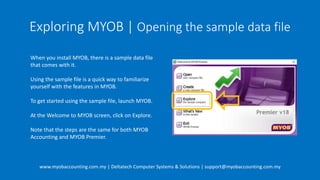
To get started using the sample file, launch MYOB.
At the Welcome to MYOB screen, click on Explore.
Note that the steps are the same for both MYOB
Accounting and MYOB Premier.
Exploring MYOB | Opening the sample data file
www.myobaccounting.com.my | Deltatech Computer Systems & Solutions | support@myobaccounting.com.my
In the sign on screen use the following credentials:
User ID: Administrator
Password: [Leave blank]
Then click the OK button
Leave blank
Exploring MYOB | Opening the sample data file
www.myobaccounting.com.my | Deltatech Computer Systems & Solutions | support@myobaccounting.com.my
The MYOB Premier sign on screen looks different,
but essentially, you can sign on using the same
credentials:
User ID: Administrator
Password: [Leave blank]
For trying out Premier, you can leave the File Access
and Protocol settings at whichever option is initially
selected.
Then click the OK button
Leave blank
Exploring MYOB | Opening the sample data file
www.myobaccounting.com.my | Deltatech Computer Systems & Solutions | support@myobaccounting.com.my
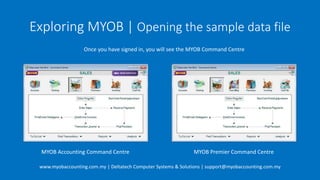
Once you have signed in, you will see the MYOB Command Centre
MYOB Accounting Command Centre MYOB Premier Command Centre
Exploring MYOB | Opening the sample data file
www.myobaccounting.com.my | Deltatech Computer Systems & Solutions | support@myobaccounting.com.my
That’s it!
You have opened the sample data file and signed in.
Exploring MYOB | Opening the sample data file
www.myobaccounting.com.my | Deltatech Computer Systems & Solutions | support@myobaccounting.com.my
Need help?
At Deltatech, we provide free demo and consultation sessions for those who
would like to explore MYOB as an option for their accounting needs.
A demo and consultation session is a quick way to get to know MYOB features
and how it fits in with your business needs.
With over 19 years of MYOB experience, we can get you up to speed in a shorter
time period.
Request a free session now by going to www.myobaccounting.com.my/contactus.aspx
Exploring MYOB | Opening the sample data file
www.myobaccounting.com.my | Deltatech Computer Systems & Solutions | support@myobaccounting.com.my
Thank you for watching.
For additional videos and tutorials on MYOB please visit
www.myob-support.com
This has been part of a video tutorial series by
Deltatech Computer Systems & Solutions
Empowering SMEs since 1999!

Exploring myob

  • 1.
    Minding Your Own Business www.myobaccounting.com.my| Deltatech Computer Systems & Solutions | support@myobaccounting.com.my Exploring MYOB Opening the sample data file
  • 2.
    Exploring MYOB |Opening the sample data file www.myobaccounting.com.my | Deltatech Computer Systems & Solutions | support@myobaccounting.com.my When you install MYOB, there is a sample data file that comes with it. Using the sample file is a quick way to familiarize yourself with the features in MYOB. To get started using the sample file, launch MYOB. At the Welcome to MYOB screen, click on Explore. Note that the steps are the same for both MYOB Accounting and MYOB Premier.
  • 3.
    Exploring MYOB |Opening the sample data file www.myobaccounting.com.my | Deltatech Computer Systems & Solutions | support@myobaccounting.com.my In the sign on screen use the following credentials: User ID: Administrator Password: [Leave blank] Then click the OK button Leave blank
  • 4.
    Exploring MYOB |Opening the sample data file www.myobaccounting.com.my | Deltatech Computer Systems & Solutions | support@myobaccounting.com.my The MYOB Premier sign on screen looks different, but essentially, you can sign on using the same credentials: User ID: Administrator Password: [Leave blank] For trying out Premier, you can leave the File Access and Protocol settings at whichever option is initially selected. Then click the OK button Leave blank
  • 5.
    Exploring MYOB |Opening the sample data file www.myobaccounting.com.my | Deltatech Computer Systems & Solutions | support@myobaccounting.com.my Once you have signed in, you will see the MYOB Command Centre MYOB Accounting Command Centre MYOB Premier Command Centre
  • 6.
    Exploring MYOB |Opening the sample data file www.myobaccounting.com.my | Deltatech Computer Systems & Solutions | support@myobaccounting.com.my That’s it! You have opened the sample data file and signed in.
  • 7.
    Exploring MYOB |Opening the sample data file www.myobaccounting.com.my | Deltatech Computer Systems & Solutions | support@myobaccounting.com.my Need help? At Deltatech, we provide free demo and consultation sessions for those who would like to explore MYOB as an option for their accounting needs. A demo and consultation session is a quick way to get to know MYOB features and how it fits in with your business needs. With over 19 years of MYOB experience, we can get you up to speed in a shorter time period. Request a free session now by going to www.myobaccounting.com.my/contactus.aspx
  • 8.
    Exploring MYOB |Opening the sample data file www.myobaccounting.com.my | Deltatech Computer Systems & Solutions | support@myobaccounting.com.my Thank you for watching. For additional videos and tutorials on MYOB please visit www.myob-support.com This has been part of a video tutorial series by Deltatech Computer Systems & Solutions Empowering SMEs since 1999!