[08/31/2019]: [MuleSoft And Artificial Intelligence]
[Pune Meetup]
All contents © MuleSoft Inc.
Agenda
2
• Introductions
• What is Artificial Intelligence
• Intelligent Application with Mulesoft and AI
• [MuleSoft and AI Application]
• What’s next
• Networking time
All contents © MuleSoft Inc.
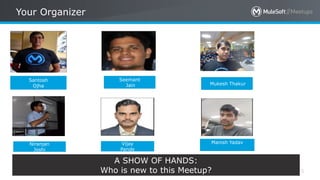
Your Organizer
3
Niranjan
Joshi
Santosh
Ojha
Seemant
Jain
Vijay
Pande
Mukesh Thakur
A SHOW OF HANDS:
Who is new to this Meetup?
Manish Yadav
All contents © MuleSoft Inc.
INTRODUCTION TO AI
All contents © MuleSoft Inc.
Lets First Understand How We Think (Human
Intelligence)
5
• What is Intelligence ?
• How you play chess?
• How you play cards?
• How you drive a car?
• How you recognize voices of your relatives and
friends?
All contents © MuleSoft Inc.
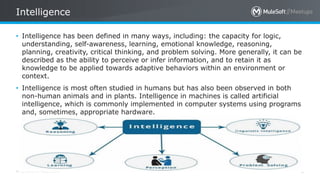
Intelligence
6
• Intelligence has been defined in many ways, including: the capacity for logic,
understanding, self-awareness, learning, emotional knowledge, reasoning,
planning, creativity, critical thinking, and problem solving. More generally, it can be
described as the ability to perceive or infer information, and to retain it as
knowledge to be applied towards adaptive behaviors within an environment or
context.
• Intelligence is most often studied in humans but has also been observed in both
non-human animals and in plants. Intelligence in machines is called artificial
intelligence, which is commonly implemented in computer systems using programs
and, sometimes, appropriate hardware.
All contents © MuleSoft Inc.
7
What is Artificial Intelligence?
“The art of creating machines that perform functions that
require intelligence when performed by people.” (Kurzweil)
“The study of how to make computers do things at which, at
the moment, people are better.” (Rich and Knight)
All contents © MuleSoft Inc.
8
Humans perceive by patterns whereas the machines perceive by set of
rules and data.
Humans store and recall information by patterns, machines do it by
searching algorithms. For example, the number 40404040 is easy to
remember, store, and recall as its pattern is simple.
Humans can figure out the complete object even if some part of it is
missing or distorted; whereas the machines cannot do it correctly.
Difference between Human and Machine
Intelligence
All contents © MuleSoft Inc. 9
All contents © MuleSoft Inc. 10
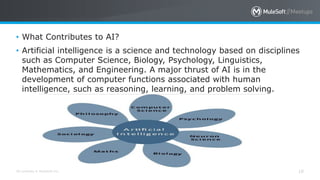
• What Contributes to AI?
• Artificial intelligence is a science and technology based on disciplines
such as Computer Science, Biology, Psychology, Linguistics,
Mathematics, and Engineering. A major thrust of AI is in the
development of computer functions associated with human
intelligence, such as reasoning, learning, and problem solving.
All contents © MuleSoft Inc. 11
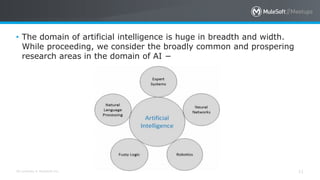
• The domain of artificial intelligence is huge in breadth and width.
While proceeding, we consider the broadly common and prospering
research areas in the domain of AI −
All contents © MuleSoft Inc.
Real Life Applications of Research Areas
12
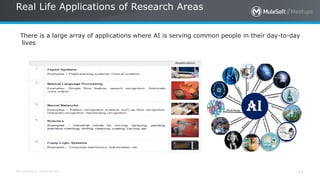
There is a large array of applications where AI is serving common people in their day-to-day
lives
All contents © MuleSoft Inc.
Task Classification of AI
13
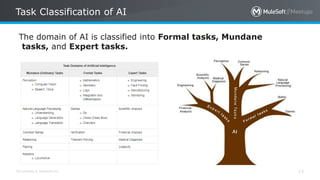
The domain of AI is classified into Formal tasks, Mundane
tasks, and Expert tasks.
All contents © MuleSoft Inc.
How AI works
14
• In our IoT and Mulesoft Meet up ,we discussed about sensors and
Actuators,So sensors take data from External enviroment and feed to
AI engine and Actuators performs the action after reacving signal
from AI engine
• Mechatronics- mechanics, electronics and computing which,
combined, make possible the generation of simpler, more
economical, reliable and versatile systems.
• Cybernetics- the study of communication and control, typically
involving regulatory feedback, in living organisms, in machines, and
in combinations of the two.
All contents © MuleSoft Inc.
Agents and Environment
15
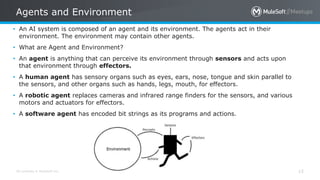
• An AI system is composed of an agent and its environment. The agents act in their
environment. The environment may contain other agents.
• What are Agent and Environment?
• An agent is anything that can perceive its environment through sensors and acts upon
that environment through effectors.
• A human agent has sensory organs such as eyes, ears, nose, tongue and skin parallel to
the sensors, and other organs such as hands, legs, mouth, for effectors.
• A robotic agent replaces cameras and infrared range finders for the sensors, and various
motors and actuators for effectors.
• A software agent has encoded bit strings as its programs and actions.
All contents © MuleSoft Inc.
Programming Algorithm, Fuzzy logic in AI
16
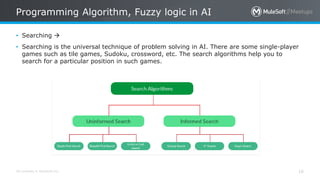
• Searching 
• Searching is the universal technique of problem solving in AI. There are some single-player
games such as tile games, Sudoku, crossword, etc. The search algorithms help you to
search for a particular position in such games.
All contents © MuleSoft Inc.
Example of search Algorithms
17
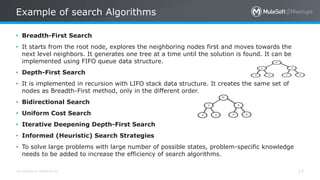
• Breadth-First Search
• It starts from the root node, explores the neighboring nodes first and moves towards the
next level neighbors. It generates one tree at a time until the solution is found. It can be
implemented using FIFO queue data structure.
• Depth-First Search
• It is implemented in recursion with LIFO stack data structure. It creates the same set of
nodes as Breadth-First method, only in the different order.
• Bidirectional Search
• Uniform Cost Search
• Iterative Deepening Depth-First Search
• Informed (Heuristic) Search Strategies
• To solve large problems with large number of possible states, problem-specific knowledge
needs to be added to increase the efficiency of search algorithms.
All contents © MuleSoft Inc.
Fuzzy Logic Systems
18
• Fuzzy Logic (FL) is a method of reasoning that resembles human reasoning. The approach of FL imitates
the way of decision making in humans that involves all intermediate possibilities between digital values
YES and NO.
• The conventional logic block that a computer can understand takes precise input and produces a definite
output as TRUE or FALSE, which is equivalent to human’s YES or NO.
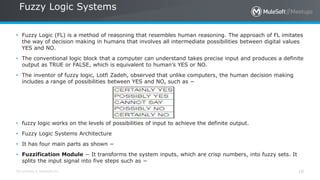
• The inventor of fuzzy logic, Lotfi Zadeh, observed that unlike computers, the human decision making
includes a range of possibilities between YES and NO, such as −
• fuzzy logic works on the levels of possibilities of input to achieve the definite output.
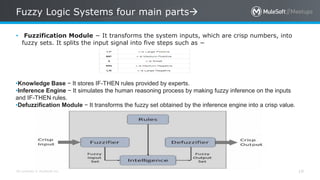
• Fuzzy Logic Systems Architecture
• It has four main parts as shown −
• Fuzzification Module − It transforms the system inputs, which are crisp numbers, into fuzzy sets. It
splits the input signal into five steps such as −
All contents © MuleSoft Inc.
Fuzzy Logic Systems four main parts
19
• Fuzzification Module − It transforms the system inputs, which are crisp numbers, into
fuzzy sets. It splits the input signal into five steps such as −
•Knowledge Base − It stores IF-THEN rules provided by experts.
•Inference Engine − It simulates the human reasoning process by making fuzzy inference on the inputs
and IF-THEN rules.
•Defuzzification Module − It transforms the fuzzy set obtained by the inference engine into a crisp value.
All contents © MuleSoft Inc.
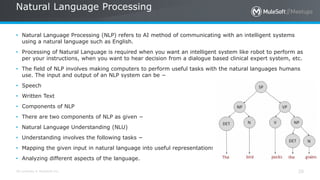
Natural Language Processing
20
• Natural Language Processing (NLP) refers to AI method of communicating with an intelligent systems
using a natural language such as English.
• Processing of Natural Language is required when you want an intelligent system like robot to perform as
per your instructions, when you want to hear decision from a dialogue based clinical expert system, etc.
• The field of NLP involves making computers to perform useful tasks with the natural languages humans
use. The input and output of an NLP system can be −
• Speech
• Written Text
• Components of NLP
• There are two components of NLP as given −
• Natural Language Understanding (NLU)
• Understanding involves the following tasks −
• Mapping the given input in natural language into useful representations.
• Analyzing different aspects of the language.
All contents © MuleSoft Inc.
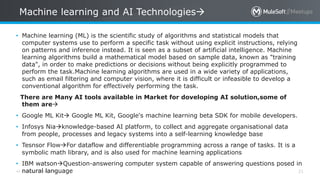
Machine learning and AI Technologies
21
• Machine learning (ML) is the scientific study of algorithms and statistical models that
computer systems use to perform a specific task without using explicit instructions, relying
on patterns and inference instead. It is seen as a subset of artificial intelligence. Machine
learning algorithms build a mathematical model based on sample data, known as "training
data", in order to make predictions or decisions without being explicitly programmed to
perform the task.Machine learning algorithms are used in a wide variety of applications,
such as email filtering and computer vision, where it is difficult or infeasible to develop a
conventional algorithm for effectively performing the task.
There are Many AI tools available in Market for doveloping AI solution,some of
them are
• Google ML Kit Google ML Kit, Google's machine learning beta SDK for mobile developers.
• Infosys Niaknowledge-based AI platform, to collect and aggregate organisational data
from people, processes and legacy systems into a self-learning knowledge base
• Tesnsor FlowFor dataflow and differentiable programming across a range of tasks. It is a
symbolic math library, and is also used for machine learning applications
• IBM watsonQuestion-answering computer system capable of answering questions posed in
natural language
All contents © MuleSoft Inc.
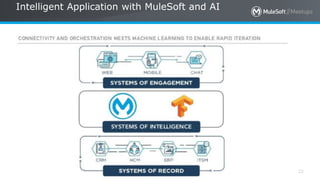
Intelligent Application with MuleSoft and AI
22
All contents © MuleSoft Inc.
Importance of MuleSoft(connected application
network) in AI
23
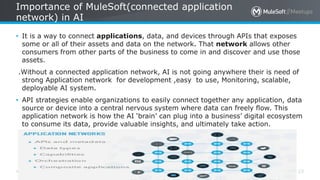
• It is a way to connect applications, data, and devices through APIs that exposes
some or all of their assets and data on the network. That network allows other
consumers from other parts of the business to come in and discover and use those
assets.
.Without a connected application network, AI is not going anywhere their is need of
strong Application network for development ,easy to use, Monitoring, scalable,
deployable AI system.
• API strategies enable organizations to easily connect together any application, data
source or device into a central nervous system where data can freely flow. This
application network is how the AI ‘brain’ can plug into a business’ digital ecosystem
to consume its data, provide valuable insights, and ultimately take action.
All contents © MuleSoft Inc. 24
All contents © MuleSoft Inc.
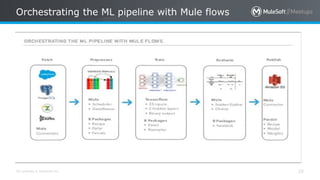
Orchestrating the ML pipeline with Mule flows
25
All contents © MuleSoft Inc. 26
All contents © MuleSoft Inc. 27
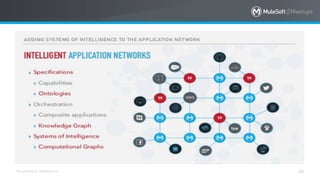
• Now we have Intelligent mule
All contents © MuleSoft Inc.
Sample Project ->MuleSoft and AI
28
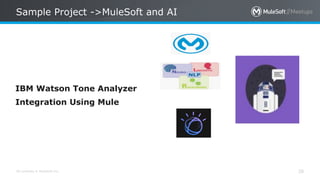
IBM Watson Tone Analyzer
Integration Using Mule
All contents © MuleSoft Inc.
Let's begin with what we need before we start:
29
• In this competitive world, it is very important to understand the linguistic tone of a
customer so that we can decide whether we need to respond to the customer
immediately.
• These days, customer satisfaction is more important to a sales manager or
representative. A sales manager or representative may want to understand the
linguistic tone from his customer's sent mail. For example, when a customer sends
a mail to a sales manager or representative, the sales manager or representative
may want to understand the tone of the mail so that the sales manager or
representative can decide on further actions. This powerful feature can be achieved
by leveraging IBM Watson Tone Analyzer service.
All contents © MuleSoft Inc. 30
• Here we want to show how a Salesforce user (sales manager or representative) can
understand the tone of his customer's sent mail by integrating Salesforce and IBM
Watson Tone Analyzer service using Mule Soft ESB.
• We have written a Mule flow that makes the integration of Salesforce and IBM
Watson Tone Analyzerservice very easy.
• Prerequisites
• However, below are the prerequisites to test the flow shown below:
• An account at IBM Blumix.
• A deployed Tone Analyzer service to IBM Blumix.
• An account at Salesforce.
• A custom contact field CutomerTone__c on Salesforce. See here to create a custom
field on any
• Salesforce object.
All contents © MuleSoft Inc.
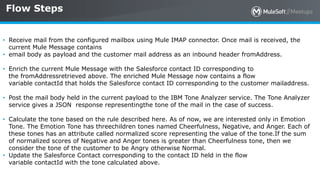
Flow Steps
31
• Receive mail from the configured mailbox using Mule IMAP connector. Once mail is received, the
current Mule Message contains
• email body as payload and the customer mail address as an inbound header fromAddress.
• Enrich the current Mule Message with the Salesforce contact ID corresponding to
the fromAddressretrieved above. The enriched Mule Message now contains a flow
variable contactId that holds the Salesforce contact ID corresponding to the customer mailaddress.
• Post the mail body held in the current payload to the IBM Tone Analyzer service. The Tone Analyzer
service gives a JSON response representingthe tone of the mail in the case of success.
• Calculate the tone based on the rule described here. As of now, we are interested only in Emotion
Tone. The Emotion Tone has threechildren tones named Cheerfulness, Negative, and Anger. Each of
these tones has an attribute called normalized score representing the value of the tone.If the sum
of normalized scores of Negative and Anger tones is greater than Cheerfulness tone, then we
consider the tone of the customer to be Angry otherwise Normal.
• Update the Salesforce Contact corresponding to the contact ID held in the flow
variable contactId with the tone calculated above.
All contents © MuleSoft Inc.
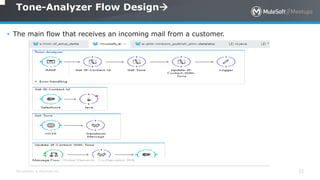
Tone-Analyzer Flow Design
32
• The main flow that receives an incoming mail from a customer.
All contents © MuleSoft Inc.
Get-Sf-Contact-Id Flow
33
• Sub-flow retrieves the Salesforce contact ID corresponding to the customer mail
address.
• This sub-flow finally returns a contact ID corresponding to the customer mail
address.
• In the tone analyzer flow, we use an enricher to enrich the message with the
contact ID
• retrieved from Salesforce and this contact id is stored in a flow variable
#[flowVars.contactId]
All contents © MuleSoft Inc.
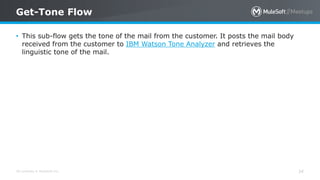
Get-Tone Flow
34
• This sub-flow gets the tone of the mail from the customer. It posts the mail body
received from the customer to IBM Watson Tone Analyzer and retrieves the
linguistic tone of the mail.
All contents © MuleSoft Inc.
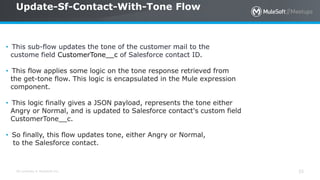
Update-Sf-Contact-With-Tone Flow
35
• This sub-flow updates the tone of the customer mail to the
custome field CustomerTone__c of Salesforce contact ID.
• This flow applies some logic on the tone response retrieved from
the get-tone flow. This logic is encapsulated in the Mule expression
component.
• This logic finally gives a JSON payload, represents the tone either
Angry or Normal, and is updated to Salesforce contact's custom field
CustomerTone__c.
• So finally, this flow updates tone, either Angry or Normal,
to the Salesforce contact.
All contents © MuleSoft Inc.
What’s next
36
• Share:
– Tweet your pictures with the hashtag #MuleMeetup
– Invite your network to join: <https://meetups.mulesoft.com/pune/>
• Feedback:
– Contact your organizer <Santosh Ojha> to suggest topics
– Contact MuleSoft at meetup@mulesoft.com for ways to improve the program
• Our next meetup:
– Date: <___>
– Location: <___>
– Topic: <___>
Networking time
Introduce yourself to your neighbors!
See you next time
Please send topic suggestions to the organizer
All contents © MuleSoft Inc.
39
Thank you !
Mule Meetup Pune - August 2019

Mule Meetup Pune - August 2019

  • 1.
    [08/31/2019]: [MuleSoft AndArtificial Intelligence] [Pune Meetup]
  • 2.
    All contents ©MuleSoft Inc. Agenda 2 • Introductions • What is Artificial Intelligence • Intelligent Application with Mulesoft and AI • [MuleSoft and AI Application] • What’s next • Networking time
  • 3.
    All contents ©MuleSoft Inc. Your Organizer 3 Niranjan Joshi Santosh Ojha Seemant Jain Vijay Pande Mukesh Thakur A SHOW OF HANDS: Who is new to this Meetup? Manish Yadav
  • 4.
    All contents ©MuleSoft Inc. INTRODUCTION TO AI
  • 5.
    All contents ©MuleSoft Inc. Lets First Understand How We Think (Human Intelligence) 5 • What is Intelligence ? • How you play chess? • How you play cards? • How you drive a car? • How you recognize voices of your relatives and friends?
  • 6.
    All contents ©MuleSoft Inc. Intelligence 6 • Intelligence has been defined in many ways, including: the capacity for logic, understanding, self-awareness, learning, emotional knowledge, reasoning, planning, creativity, critical thinking, and problem solving. More generally, it can be described as the ability to perceive or infer information, and to retain it as knowledge to be applied towards adaptive behaviors within an environment or context. • Intelligence is most often studied in humans but has also been observed in both non-human animals and in plants. Intelligence in machines is called artificial intelligence, which is commonly implemented in computer systems using programs and, sometimes, appropriate hardware.
  • 7.
    All contents ©MuleSoft Inc. 7 What is Artificial Intelligence? “The art of creating machines that perform functions that require intelligence when performed by people.” (Kurzweil) “The study of how to make computers do things at which, at the moment, people are better.” (Rich and Knight)
  • 8.
    All contents ©MuleSoft Inc. 8 Humans perceive by patterns whereas the machines perceive by set of rules and data. Humans store and recall information by patterns, machines do it by searching algorithms. For example, the number 40404040 is easy to remember, store, and recall as its pattern is simple. Humans can figure out the complete object even if some part of it is missing or distorted; whereas the machines cannot do it correctly. Difference between Human and Machine Intelligence
  • 9.
    All contents ©MuleSoft Inc. 9
  • 10.
    All contents ©MuleSoft Inc. 10 • What Contributes to AI? • Artificial intelligence is a science and technology based on disciplines such as Computer Science, Biology, Psychology, Linguistics, Mathematics, and Engineering. A major thrust of AI is in the development of computer functions associated with human intelligence, such as reasoning, learning, and problem solving.
  • 11.
    All contents ©MuleSoft Inc. 11 • The domain of artificial intelligence is huge in breadth and width. While proceeding, we consider the broadly common and prospering research areas in the domain of AI −
  • 12.
    All contents ©MuleSoft Inc. Real Life Applications of Research Areas 12 There is a large array of applications where AI is serving common people in their day-to-day lives
  • 13.
    All contents ©MuleSoft Inc. Task Classification of AI 13 The domain of AI is classified into Formal tasks, Mundane tasks, and Expert tasks.
  • 14.
    All contents ©MuleSoft Inc. How AI works 14 • In our IoT and Mulesoft Meet up ,we discussed about sensors and Actuators,So sensors take data from External enviroment and feed to AI engine and Actuators performs the action after reacving signal from AI engine • Mechatronics- mechanics, electronics and computing which, combined, make possible the generation of simpler, more economical, reliable and versatile systems. • Cybernetics- the study of communication and control, typically involving regulatory feedback, in living organisms, in machines, and in combinations of the two.
  • 15.
    All contents ©MuleSoft Inc. Agents and Environment 15 • An AI system is composed of an agent and its environment. The agents act in their environment. The environment may contain other agents. • What are Agent and Environment? • An agent is anything that can perceive its environment through sensors and acts upon that environment through effectors. • A human agent has sensory organs such as eyes, ears, nose, tongue and skin parallel to the sensors, and other organs such as hands, legs, mouth, for effectors. • A robotic agent replaces cameras and infrared range finders for the sensors, and various motors and actuators for effectors. • A software agent has encoded bit strings as its programs and actions.
  • 16.
    All contents ©MuleSoft Inc. Programming Algorithm, Fuzzy logic in AI 16 • Searching  • Searching is the universal technique of problem solving in AI. There are some single-player games such as tile games, Sudoku, crossword, etc. The search algorithms help you to search for a particular position in such games.
  • 17.
    All contents ©MuleSoft Inc. Example of search Algorithms 17 • Breadth-First Search • It starts from the root node, explores the neighboring nodes first and moves towards the next level neighbors. It generates one tree at a time until the solution is found. It can be implemented using FIFO queue data structure. • Depth-First Search • It is implemented in recursion with LIFO stack data structure. It creates the same set of nodes as Breadth-First method, only in the different order. • Bidirectional Search • Uniform Cost Search • Iterative Deepening Depth-First Search • Informed (Heuristic) Search Strategies • To solve large problems with large number of possible states, problem-specific knowledge needs to be added to increase the efficiency of search algorithms.
  • 18.
    All contents ©MuleSoft Inc. Fuzzy Logic Systems 18 • Fuzzy Logic (FL) is a method of reasoning that resembles human reasoning. The approach of FL imitates the way of decision making in humans that involves all intermediate possibilities between digital values YES and NO. • The conventional logic block that a computer can understand takes precise input and produces a definite output as TRUE or FALSE, which is equivalent to human’s YES or NO. • The inventor of fuzzy logic, Lotfi Zadeh, observed that unlike computers, the human decision making includes a range of possibilities between YES and NO, such as − • fuzzy logic works on the levels of possibilities of input to achieve the definite output. • Fuzzy Logic Systems Architecture • It has four main parts as shown − • Fuzzification Module − It transforms the system inputs, which are crisp numbers, into fuzzy sets. It splits the input signal into five steps such as −
  • 19.
    All contents ©MuleSoft Inc. Fuzzy Logic Systems four main parts 19 • Fuzzification Module − It transforms the system inputs, which are crisp numbers, into fuzzy sets. It splits the input signal into five steps such as − •Knowledge Base − It stores IF-THEN rules provided by experts. •Inference Engine − It simulates the human reasoning process by making fuzzy inference on the inputs and IF-THEN rules. •Defuzzification Module − It transforms the fuzzy set obtained by the inference engine into a crisp value.
  • 20.
    All contents ©MuleSoft Inc. Natural Language Processing 20 • Natural Language Processing (NLP) refers to AI method of communicating with an intelligent systems using a natural language such as English. • Processing of Natural Language is required when you want an intelligent system like robot to perform as per your instructions, when you want to hear decision from a dialogue based clinical expert system, etc. • The field of NLP involves making computers to perform useful tasks with the natural languages humans use. The input and output of an NLP system can be − • Speech • Written Text • Components of NLP • There are two components of NLP as given − • Natural Language Understanding (NLU) • Understanding involves the following tasks − • Mapping the given input in natural language into useful representations. • Analyzing different aspects of the language.
  • 21.
    All contents ©MuleSoft Inc. Machine learning and AI Technologies 21 • Machine learning (ML) is the scientific study of algorithms and statistical models that computer systems use to perform a specific task without using explicit instructions, relying on patterns and inference instead. It is seen as a subset of artificial intelligence. Machine learning algorithms build a mathematical model based on sample data, known as "training data", in order to make predictions or decisions without being explicitly programmed to perform the task.Machine learning algorithms are used in a wide variety of applications, such as email filtering and computer vision, where it is difficult or infeasible to develop a conventional algorithm for effectively performing the task. There are Many AI tools available in Market for doveloping AI solution,some of them are • Google ML Kit Google ML Kit, Google's machine learning beta SDK for mobile developers. • Infosys Niaknowledge-based AI platform, to collect and aggregate organisational data from people, processes and legacy systems into a self-learning knowledge base • Tesnsor FlowFor dataflow and differentiable programming across a range of tasks. It is a symbolic math library, and is also used for machine learning applications • IBM watsonQuestion-answering computer system capable of answering questions posed in natural language
  • 22.
    All contents ©MuleSoft Inc. Intelligent Application with MuleSoft and AI 22
  • 23.
    All contents ©MuleSoft Inc. Importance of MuleSoft(connected application network) in AI 23 • It is a way to connect applications, data, and devices through APIs that exposes some or all of their assets and data on the network. That network allows other consumers from other parts of the business to come in and discover and use those assets. .Without a connected application network, AI is not going anywhere their is need of strong Application network for development ,easy to use, Monitoring, scalable, deployable AI system. • API strategies enable organizations to easily connect together any application, data source or device into a central nervous system where data can freely flow. This application network is how the AI ‘brain’ can plug into a business’ digital ecosystem to consume its data, provide valuable insights, and ultimately take action.
  • 24.
    All contents ©MuleSoft Inc. 24
  • 25.
    All contents ©MuleSoft Inc. Orchestrating the ML pipeline with Mule flows 25
  • 26.
    All contents ©MuleSoft Inc. 26
  • 27.
    All contents ©MuleSoft Inc. 27 • Now we have Intelligent mule
  • 28.
    All contents ©MuleSoft Inc. Sample Project ->MuleSoft and AI 28 IBM Watson Tone Analyzer Integration Using Mule
  • 29.
    All contents ©MuleSoft Inc. Let's begin with what we need before we start: 29 • In this competitive world, it is very important to understand the linguistic tone of a customer so that we can decide whether we need to respond to the customer immediately. • These days, customer satisfaction is more important to a sales manager or representative. A sales manager or representative may want to understand the linguistic tone from his customer's sent mail. For example, when a customer sends a mail to a sales manager or representative, the sales manager or representative may want to understand the tone of the mail so that the sales manager or representative can decide on further actions. This powerful feature can be achieved by leveraging IBM Watson Tone Analyzer service.
  • 30.
    All contents ©MuleSoft Inc. 30 • Here we want to show how a Salesforce user (sales manager or representative) can understand the tone of his customer's sent mail by integrating Salesforce and IBM Watson Tone Analyzer service using Mule Soft ESB. • We have written a Mule flow that makes the integration of Salesforce and IBM Watson Tone Analyzerservice very easy. • Prerequisites • However, below are the prerequisites to test the flow shown below: • An account at IBM Blumix. • A deployed Tone Analyzer service to IBM Blumix. • An account at Salesforce. • A custom contact field CutomerTone__c on Salesforce. See here to create a custom field on any • Salesforce object.
  • 31.
    All contents ©MuleSoft Inc. Flow Steps 31 • Receive mail from the configured mailbox using Mule IMAP connector. Once mail is received, the current Mule Message contains • email body as payload and the customer mail address as an inbound header fromAddress. • Enrich the current Mule Message with the Salesforce contact ID corresponding to the fromAddressretrieved above. The enriched Mule Message now contains a flow variable contactId that holds the Salesforce contact ID corresponding to the customer mailaddress. • Post the mail body held in the current payload to the IBM Tone Analyzer service. The Tone Analyzer service gives a JSON response representingthe tone of the mail in the case of success. • Calculate the tone based on the rule described here. As of now, we are interested only in Emotion Tone. The Emotion Tone has threechildren tones named Cheerfulness, Negative, and Anger. Each of these tones has an attribute called normalized score representing the value of the tone.If the sum of normalized scores of Negative and Anger tones is greater than Cheerfulness tone, then we consider the tone of the customer to be Angry otherwise Normal. • Update the Salesforce Contact corresponding to the contact ID held in the flow variable contactId with the tone calculated above.
  • 32.
    All contents ©MuleSoft Inc. Tone-Analyzer Flow Design 32 • The main flow that receives an incoming mail from a customer.
  • 33.
    All contents ©MuleSoft Inc. Get-Sf-Contact-Id Flow 33 • Sub-flow retrieves the Salesforce contact ID corresponding to the customer mail address. • This sub-flow finally returns a contact ID corresponding to the customer mail address. • In the tone analyzer flow, we use an enricher to enrich the message with the contact ID • retrieved from Salesforce and this contact id is stored in a flow variable #[flowVars.contactId]
  • 34.
    All contents ©MuleSoft Inc. Get-Tone Flow 34 • This sub-flow gets the tone of the mail from the customer. It posts the mail body received from the customer to IBM Watson Tone Analyzer and retrieves the linguistic tone of the mail.
  • 35.
    All contents ©MuleSoft Inc. Update-Sf-Contact-With-Tone Flow 35 • This sub-flow updates the tone of the customer mail to the custome field CustomerTone__c of Salesforce contact ID. • This flow applies some logic on the tone response retrieved from the get-tone flow. This logic is encapsulated in the Mule expression component. • This logic finally gives a JSON payload, represents the tone either Angry or Normal, and is updated to Salesforce contact's custom field CustomerTone__c. • So finally, this flow updates tone, either Angry or Normal, to the Salesforce contact.
  • 36.
    All contents ©MuleSoft Inc. What’s next 36 • Share: – Tweet your pictures with the hashtag #MuleMeetup – Invite your network to join: <https://meetups.mulesoft.com/pune/> • Feedback: – Contact your organizer <Santosh Ojha> to suggest topics – Contact MuleSoft at meetup@mulesoft.com for ways to improve the program • Our next meetup: – Date: <___> – Location: <___> – Topic: <___>
  • 37.
  • 38.
    See you nexttime Please send topic suggestions to the organizer
  • 39.
    All contents ©MuleSoft Inc. 39 Thank you !