1
Test Design
Agenda:
2
Importance of Test Design:
• Foundation to design and develop test script.
• Greater confidence in Quality.
• Completeness of test.
• Estimation of Test Effort.
Test Design
3
Test Design Essentials:
 Test Design covers Test Scenarios & Test Cases.
 Test Scenarios & Test Cases covers all features.
 There is a balance between normal, abnormal, boundary and
environmental test cases.
 There is a balance between black box and white box testing.
 There is a balance between functional tests and non- functional tests.
 Finally, documenting test cases.
Test Design
4
Design-Activities:
• Setup test environment.
• Design Test Cases: Requirements-based and Code-based Test Cases.
• Analyze if automation of any test cases is needed.
Test Design
5
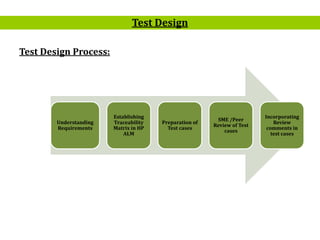
Test Design Process:
Test Design
Understanding
Requirements
Establishing
Traceability
Matrix in HP
ALM
Preparation of
Test cases
SME /Peer
Review of Test
cases
Incorporating
Review
comments in
test cases
6
Test Design Process:
• The tester will understand each requirement and prepare corresponding
test case to ensure all requirements are covered.
• Each Test case will be mapped to Use cases to Requirements as part of
Traceability matrix.
• Each of the Test cases will undergo review by the BUSINESS ANALYST
and the review defects are captured and shared to the Test team.
• The testers will rework on the review defects and finally obtain approval
and sign-off.
Test Design
7
Test Design Process:
• During the preparation phase, tester will use the prototype, use case and
functional specification to write step by step test cases.
• During the preparation phase, tester will use the various Black Box Test
Design Techniques –ECP, BVA, Decision Table, State Transition, Use Case
to write step by step test cases.
• Testers will maintain a clarification Tracker sheet and same will be
shared periodically with the Requirements team and accordingly the test
case will be updated. The clarifications may sometimes lead to Change
Requests or not in scope or detailing implicit requirements.
Test Design
8
Test Design Process:
• Sign-off for the test cases would be communicates through mail by
Business Analyst’s.
• Any subsequent changes to the test case if any will be directly updated in
HP ALM.
Note:
• In this phase test engineers will plan what to test and how to test i.e.
testers will prepare various input documents such as test scenarios, test
cases and test data etc…(test specifications)required for testing.
Test Design
9
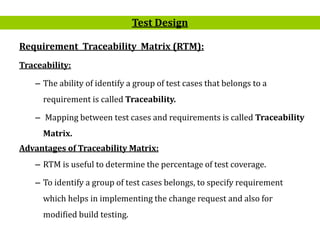
Requirement Traceability Matrix (RTM):
Traceability:
– The ability of identify a group of test cases that belongs to a
requirement is called Traceability.
– Mapping between test cases and requirements is called Traceability
Matrix.
Advantages of Traceability Matrix:
– RTM is useful to determine the percentage of test coverage.
– To identify a group of test cases belongs, to specify requirement
which helps in implementing the change request and also for
modified build testing.
Test Design
10
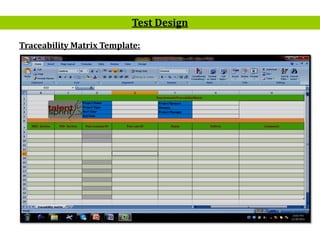
Traceability Matrix Template:
Test Design
11
Test Scenario:
– An item or a functionality to be tested is called test scenario.
– In other words what to test.
Test Design
12
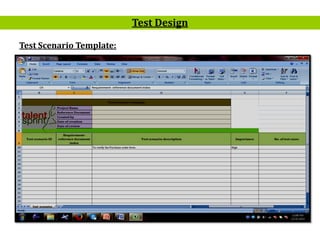
Test Scenario Template:
Test Design
13
Assignments:
Create Test Scenarios for Following Tasks:
• Online Bus-Ticket Booking
• Search Book in Library
• Search Train on Platform
• Gmail- Login
• Purchase Product in Flip Kart
• Lift
• Mobile Product
• Windows Calculator
Test Design
14
Test Case:
– A test case is a set of pre-conditions; steps to be followed input data
and expected results to validate functionality in the system. In other
words what to test and how to test is called test case.
Test Cases and Test Data:
– Test data are inputs that have been devised to test the system.
– Test Cases are inputs and outputs specification plus a statement of
the function under test.
– Test data can be generated
• From live systems
• It can be simulated
Test Design
15
What Is A Good Test Case:
– Accurate - tests what it’s designed to test.
– Economical - no unnecessary steps.
– Repeatable, reusable - keeps on going.
– Traceable - to a requirement.
– Appropriate - for test environment, testers.
– Self standing - independent of the writer.
– Self cleaning - picks up after itself.
Test Design
16
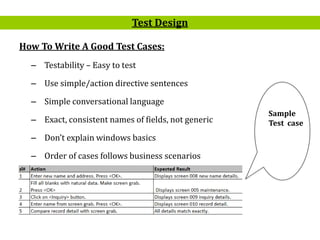
How To Write A Good Test Cases:
– Testability – Easy to test
– Use simple/action directive sentences
– Simple conversational language
– Exact, consistent names of fields, not generic
– Don’t explain windows basics
– Order of cases follows business scenarios
Test Design
Sample
Test case
17
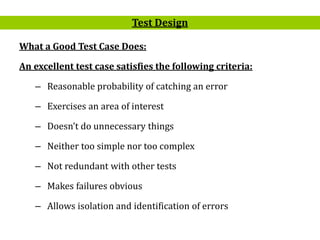
What a Good Test Case Does:
An excellent test case satisfies the following criteria:
– Reasonable probability of catching an error
– Exercises an area of interest
– Doesn’t do unnecessary things
– Neither too simple nor too complex
– Not redundant with other tests
– Makes failures obvious
– Allows isolation and identification of errors
Test Design
18
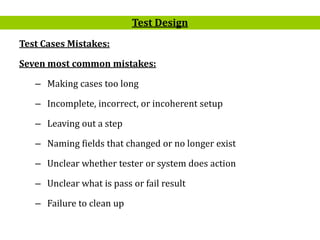
Test Cases Mistakes:
Seven most common mistakes:
– Making cases too long
– Incomplete, incorrect, or incoherent setup
– Leaving out a step
– Naming fields that changed or no longer exist
– Unclear whether tester or system does action
– Unclear what is pass or fail result
– Failure to clean up
Test Design
19
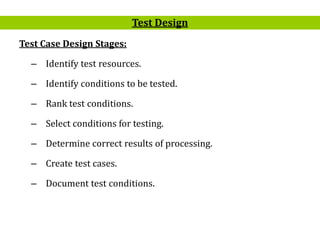
Test Case Design Stages:
– Identify test resources.
– Identify conditions to be tested.
– Rank test conditions.
– Select conditions for testing.
– Determine correct results of processing.
– Create test cases.
– Document test conditions.
Test Design
20
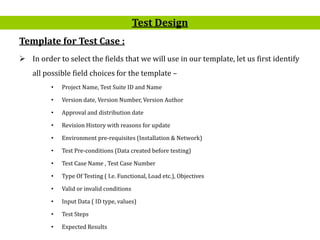
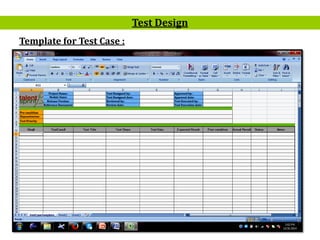
Template for Test Case :
 In order to select the fields that we will use in our template, let us first identify
all possible field choices for the template –
• Project Name, Test Suite ID and Name
• Version date, Version Number, Version Author
• Approval and distribution date
• Revision History with reasons for update
• Environment pre-requisites (Installation & Network)
• Test Pre-conditions (Data created before testing)
• Test Case Name , Test Case Number
• Type Of Testing ( I.e. Functional, Load etc.), Objectives
• Valid or invalid conditions
• Input Data ( ID type, values)
• Test Steps
• Expected Results
Test Design
21
Template for Test Case :
Test Design
22
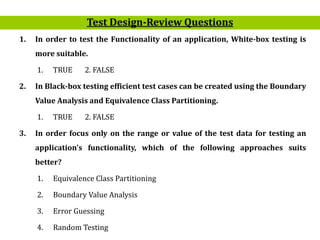
1. In order to test the Functionality of an application, White-box testing is
more suitable.
1. TRUE 2. FALSE
2. In Black-box testing efficient test cases can be created using the Boundary
Value Analysis and Equivalence Class Partitioning.
1. TRUE 2. FALSE
3. In order focus only on the range or value of the test data for testing an
application’s functionality, which of the following approaches suits
better?
1. Equivalence Class Partitioning
2. Boundary Value Analysis
3. Error Guessing
4. Random Testing
Test Design-Review Questions
23
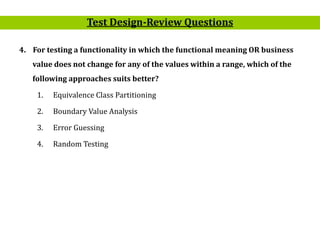
4. For testing a functionality in which the functional meaning OR business
value does not change for any of the values within a range, which of the
following approaches suits better?
1. Equivalence Class Partitioning
2. Boundary Value Analysis
3. Error Guessing
4. Random Testing
Test Design-Review Questions
24
Question and Answer

Mt s11 test_design

  • 1.
  • 2.
    2 Importance of TestDesign: • Foundation to design and develop test script. • Greater confidence in Quality. • Completeness of test. • Estimation of Test Effort. Test Design
  • 3.
    3 Test Design Essentials: Test Design covers Test Scenarios & Test Cases.  Test Scenarios & Test Cases covers all features.  There is a balance between normal, abnormal, boundary and environmental test cases.  There is a balance between black box and white box testing.  There is a balance between functional tests and non- functional tests.  Finally, documenting test cases. Test Design
  • 4.
    4 Design-Activities: • Setup testenvironment. • Design Test Cases: Requirements-based and Code-based Test Cases. • Analyze if automation of any test cases is needed. Test Design
  • 5.
    5 Test Design Process: TestDesign Understanding Requirements Establishing Traceability Matrix in HP ALM Preparation of Test cases SME /Peer Review of Test cases Incorporating Review comments in test cases
  • 6.
    6 Test Design Process: •The tester will understand each requirement and prepare corresponding test case to ensure all requirements are covered. • Each Test case will be mapped to Use cases to Requirements as part of Traceability matrix. • Each of the Test cases will undergo review by the BUSINESS ANALYST and the review defects are captured and shared to the Test team. • The testers will rework on the review defects and finally obtain approval and sign-off. Test Design
  • 7.
    7 Test Design Process: •During the preparation phase, tester will use the prototype, use case and functional specification to write step by step test cases. • During the preparation phase, tester will use the various Black Box Test Design Techniques –ECP, BVA, Decision Table, State Transition, Use Case to write step by step test cases. • Testers will maintain a clarification Tracker sheet and same will be shared periodically with the Requirements team and accordingly the test case will be updated. The clarifications may sometimes lead to Change Requests or not in scope or detailing implicit requirements. Test Design
  • 8.
    8 Test Design Process: •Sign-off for the test cases would be communicates through mail by Business Analyst’s. • Any subsequent changes to the test case if any will be directly updated in HP ALM. Note: • In this phase test engineers will plan what to test and how to test i.e. testers will prepare various input documents such as test scenarios, test cases and test data etc…(test specifications)required for testing. Test Design
  • 9.
    9 Requirement Traceability Matrix(RTM): Traceability: – The ability of identify a group of test cases that belongs to a requirement is called Traceability. – Mapping between test cases and requirements is called Traceability Matrix. Advantages of Traceability Matrix: – RTM is useful to determine the percentage of test coverage. – To identify a group of test cases belongs, to specify requirement which helps in implementing the change request and also for modified build testing. Test Design
  • 10.
  • 11.
    11 Test Scenario: – Anitem or a functionality to be tested is called test scenario. – In other words what to test. Test Design
  • 12.
  • 13.
    13 Assignments: Create Test Scenariosfor Following Tasks: • Online Bus-Ticket Booking • Search Book in Library • Search Train on Platform • Gmail- Login • Purchase Product in Flip Kart • Lift • Mobile Product • Windows Calculator Test Design
  • 14.
    14 Test Case: – Atest case is a set of pre-conditions; steps to be followed input data and expected results to validate functionality in the system. In other words what to test and how to test is called test case. Test Cases and Test Data: – Test data are inputs that have been devised to test the system. – Test Cases are inputs and outputs specification plus a statement of the function under test. – Test data can be generated • From live systems • It can be simulated Test Design
  • 15.
    15 What Is AGood Test Case: – Accurate - tests what it’s designed to test. – Economical - no unnecessary steps. – Repeatable, reusable - keeps on going. – Traceable - to a requirement. – Appropriate - for test environment, testers. – Self standing - independent of the writer. – Self cleaning - picks up after itself. Test Design
  • 16.
    16 How To WriteA Good Test Cases: – Testability – Easy to test – Use simple/action directive sentences – Simple conversational language – Exact, consistent names of fields, not generic – Don’t explain windows basics – Order of cases follows business scenarios Test Design Sample Test case
  • 17.
    17 What a GoodTest Case Does: An excellent test case satisfies the following criteria: – Reasonable probability of catching an error – Exercises an area of interest – Doesn’t do unnecessary things – Neither too simple nor too complex – Not redundant with other tests – Makes failures obvious – Allows isolation and identification of errors Test Design
  • 18.
    18 Test Cases Mistakes: Sevenmost common mistakes: – Making cases too long – Incomplete, incorrect, or incoherent setup – Leaving out a step – Naming fields that changed or no longer exist – Unclear whether tester or system does action – Unclear what is pass or fail result – Failure to clean up Test Design
  • 19.
    19 Test Case DesignStages: – Identify test resources. – Identify conditions to be tested. – Rank test conditions. – Select conditions for testing. – Determine correct results of processing. – Create test cases. – Document test conditions. Test Design
  • 20.
    20 Template for TestCase :  In order to select the fields that we will use in our template, let us first identify all possible field choices for the template – • Project Name, Test Suite ID and Name • Version date, Version Number, Version Author • Approval and distribution date • Revision History with reasons for update • Environment pre-requisites (Installation & Network) • Test Pre-conditions (Data created before testing) • Test Case Name , Test Case Number • Type Of Testing ( I.e. Functional, Load etc.), Objectives • Valid or invalid conditions • Input Data ( ID type, values) • Test Steps • Expected Results Test Design
  • 21.
    21 Template for TestCase : Test Design
  • 22.
    22 1. In orderto test the Functionality of an application, White-box testing is more suitable. 1. TRUE 2. FALSE 2. In Black-box testing efficient test cases can be created using the Boundary Value Analysis and Equivalence Class Partitioning. 1. TRUE 2. FALSE 3. In order focus only on the range or value of the test data for testing an application’s functionality, which of the following approaches suits better? 1. Equivalence Class Partitioning 2. Boundary Value Analysis 3. Error Guessing 4. Random Testing Test Design-Review Questions
  • 23.
    23 4. For testinga functionality in which the functional meaning OR business value does not change for any of the values within a range, which of the following approaches suits better? 1. Equivalence Class Partitioning 2. Boundary Value Analysis 3. Error Guessing 4. Random Testing Test Design-Review Questions
  • 24.