Extreme Power Release


MSI INTEL X79
 PLATFORMS
  Overclocking Guide
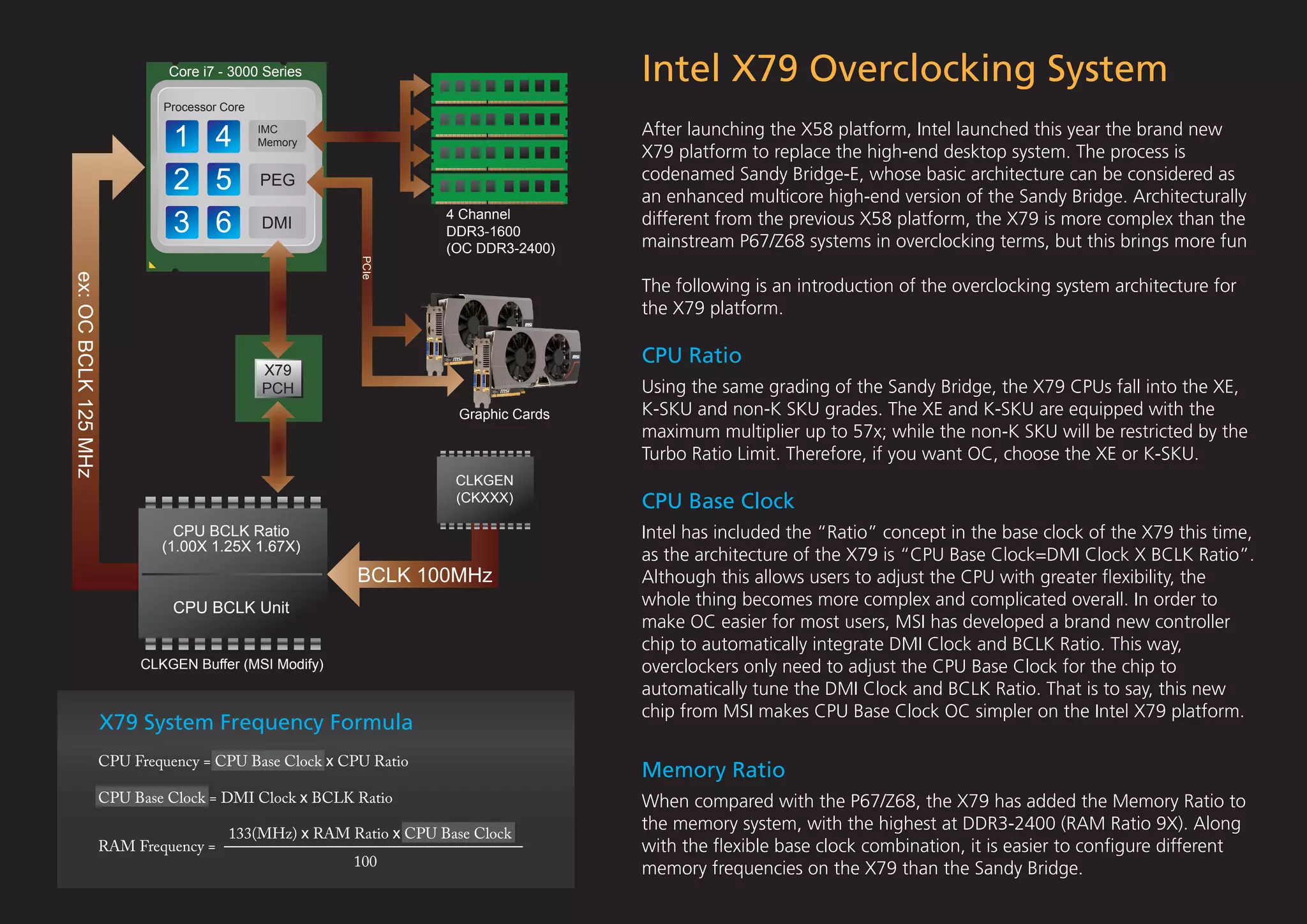
Core i7 - 3000 Series                                   Intel X79 Overclocking System
                            Processor Core


                             1 4             IMC
                                             Memory
                                                                                     After launching the X58 platform, Intel launched this year the brand new
                                                                                     X79 platform to replace the high-end desktop system. The process is
                             2 5             PEG                                     codenamed Sandy Bridge-E, whose basic architecture can be considered as
                                                                                     an enhanced multicore high-end version of the Sandy Bridge. Architecturally
                             3 6             DMI
                                                                   4 Channel
                                                                   DDR3-1600
                                                                                     different from the previous X58 platform, the X79 is more complex than the
                                                                                     mainstream P67/Z68 systems in overclocking terms, but this brings more fun
                                                                   (OC DDR3-2400)


                                                        PCIe
ex: OC BCLK 125 MHz


                                                                                     The following is an introduction of the overclocking system architecture for
                                                                                     the X79 platform.

                                                                                     CPU Ratio
                                             X79
                                             PCH                                     Using the same grading of the Sandy Bridge, the X79 CPUs fall into the XE,
                                                                     Graphic Cards   K-SKU and non-K SKU grades. The XE and K-SKU are equipped with the
                                                                                     maximum multiplier up to 57x; while the non-K SKU will be restricted by the
                                                                                     Turbo Ratio Limit. Therefore, if you want OC, choose the XE or K-SKU.
                                                                    CLKGEN
                                                                    (CKXXX)          CPU Base Clock
                              CPU BCLK Ratio                                         Intel has included the “Ratio” concept in the base clock of the X79 this time,
                            (1.00X 1.25X 1.67X)
                                                                                     as the architecture of the X79 is “CPU Base Clock=DMI Clock X BCLK Ratio”.
                                                       BCLK 100MHz                   Although this allows users to adjust the CPU with greater flexibility, the
                             CPU BCLK Unit                                           whole thing becomes more complex and complicated overall. In order to
                                                                                     make OC easier for most users, MSI has developed a brand new controller
                                                                                     chip to automatically integrate DMI Clock and BCLK Ratio. This way,
                         CLKGEN Buffer (MSI Modify)                                  overclockers only need to adjust the CPU Base Clock for the chip to
                                                                                     automatically tune the DMI Clock and BCLK Ratio. That is to say, this new
                                                                                     chip from MSI makes CPU Base Clock OC simpler on the Intel X79 platform.
                      X79 System Frequency Formula
                  CPU Frequency = CPU Base Clock x CPU Ratio
                                                                                     Memory Ratio
                  CPU Base Clock = DMI Clock x BCLK Ratio                            When compared with the P67/Z68, the X79 has added the Memory Ratio to
                                       133(MHz) x RAM Ratio x CPU Base Clock
                                                                                     the memory system, with the highest at DDR3-2400 (RAM Ratio 9X). Along
                  RAM Frequency =                                                    with the flexible base clock combination, it is easier to configure different
                                                       100
                                                                                     memory frequencies on the X79 than the Sandy Bridge.
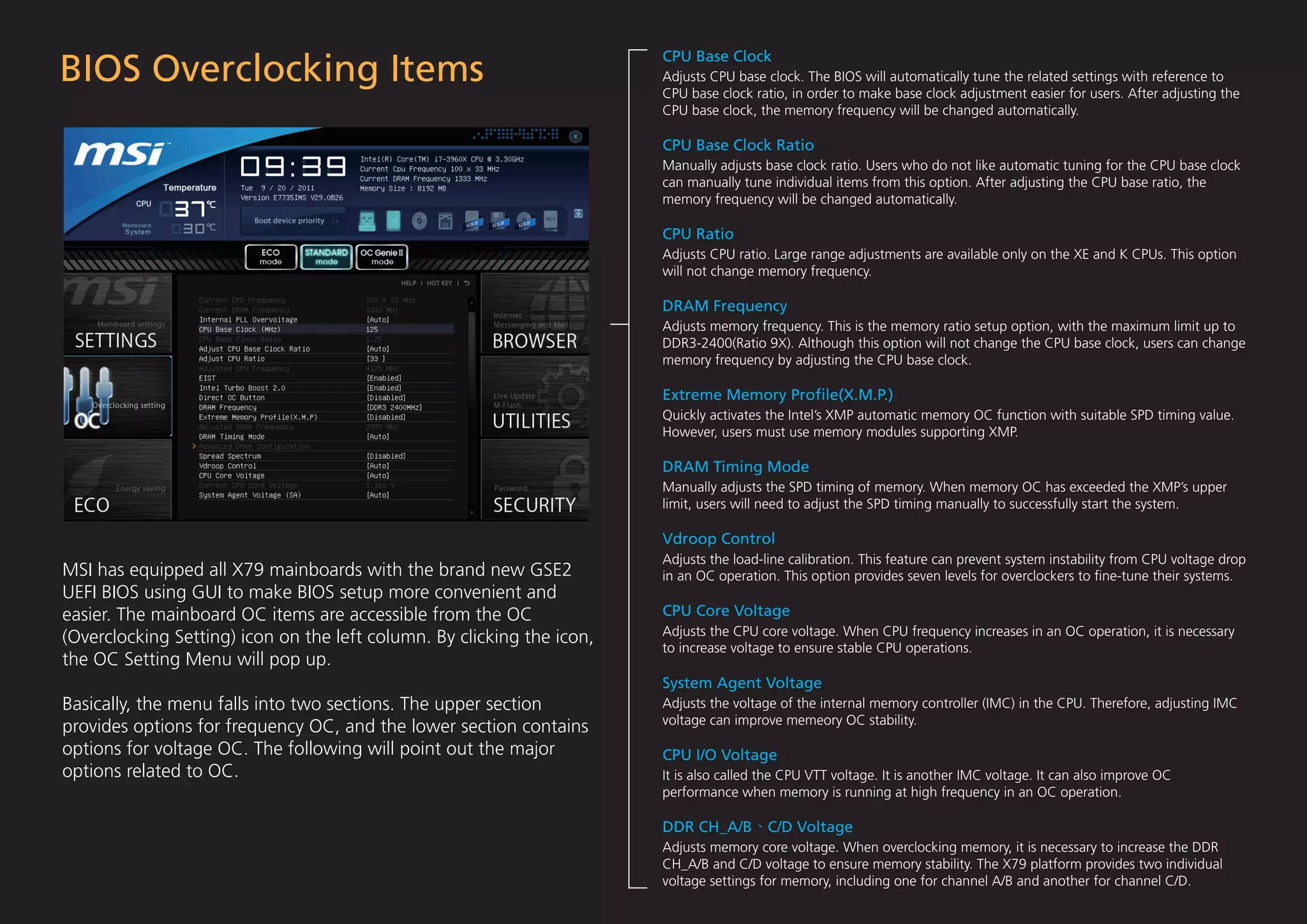
BIOS Overclocking Items
                                                                        CPU Base Clock
                                                                        Adjusts CPU base clock. The BIOS will automatically tune the related settings with reference to
                                                                        CPU base clock ratio, in order to make base clock adjustment easier for users. After adjusting the
                                                                        CPU base clock, the memory frequency will be changed automatically.

                                                                        CPU Base Clock Ratio
                                                                        Manually adjusts base clock ratio. Users who do not like automatic tuning for the CPU base clock
                                                                        can manually tune individual items from this option. After adjusting the CPU base ratio, the
                                                                        memory frequency will be changed automatically.

                                                                        CPU Ratio
                                                                        Adjusts CPU ratio. Large range adjustments are available only on the XE and K CPUs. This option
                                                                        will not change memory frequency.

                                                                        DRAM Frequency
                                                                        Adjusts memory frequency. This is the memory ratio setup option, with the maximum limit up to
                                                                        DDR3-2400(Ratio 9X). Although this option will not change the CPU base clock, users can change
                                                                        memory frequency by adjusting the CPU base clock.

                                                                        Extreme Memory Profile(X.M.P.)
                                                                        Quickly activates the Intel’s XMP automatic memory OC function with suitable SPD timing value.
                                                                        However, users must use memory modules supporting XMP.

                                                                        DRAM Timing Mode
                                                                        Manually adjusts the SPD timing of memory. When memory OC has exceeded the XMP’s upper
                                                                        limit, users will need to adjust the SPD timing manually to successfully start the system.

                                                                        Vdroop Control
                                                                        Adjusts the load-line calibration. This feature can prevent system instability from CPU voltage drop
MSI has equipped all X79 mainboards with the brand new GSE2             in an OC operation. This option provides seven levels for overclockers to fine-tune their systems.
UEFI BIOS using GUI to make BIOS setup more convenient and
easier. The mainboard OC items are accessible from the OC               CPU Core Voltage
                                                                        Adjusts the CPU core voltage. When CPU frequency increases in an OC operation, it is necessary
(Overclocking Setting) icon on the left column. By clicking the icon,
                                                                        to increase voltage to ensure stable CPU operations.
the OC Setting Menu will pop up.
                                                                        System Agent Voltage
Basically, the menu falls into two sections. The upper section          Adjusts the voltage of the internal memory controller (IMC) in the CPU. Therefore, adjusting IMC
                                                                        voltage can improve memeory OC stability.
provides options for frequency OC, and the lower section contains
options for voltage OC. The following will point out the major          CPU I/O Voltage
options related to OC.                                                  It is also called the CPU VTT voltage. It is another IMC voltage. It can also improve OC
                                                                        performance when memory is running at high frequency in an OC operation.

                                                                        DDR CH_A/B        C/D Voltage
                                                                        Adjusts memory core voltage. When overclocking memory, it is necessary to increase the DDR
                                                                        CH_A/B and C/D voltage to ensure memory stability. The X79 platform provides two individual
                                                                        voltage settings for memory, including one for channel A/B and another for channel C/D.
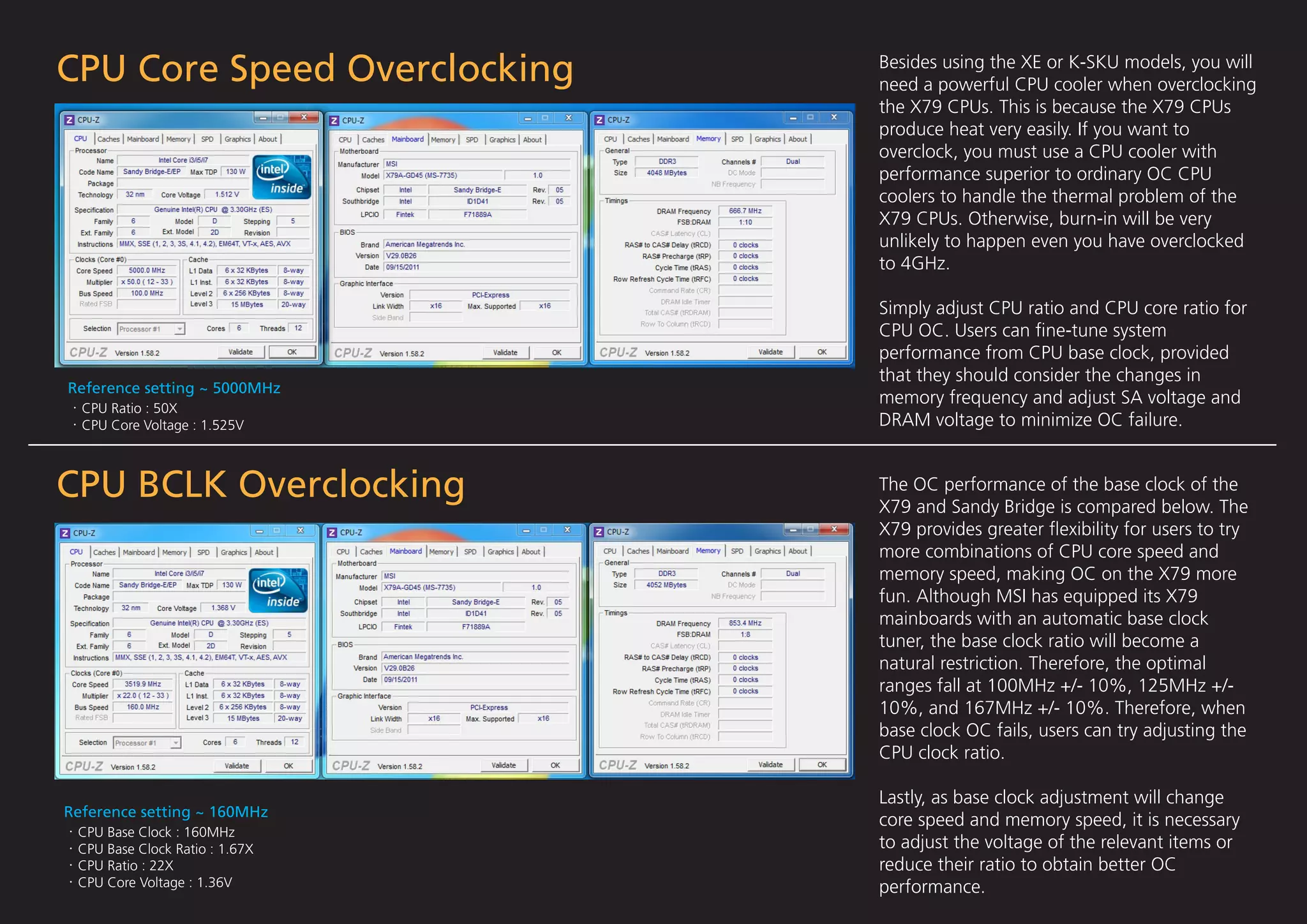
CPU Core Speed Overclocking     Besides using the XE or K-SKU models, you will
                                need a powerful CPU cooler when overclocking
                                the X79 CPUs. This is because the X79 CPUs
                                produce heat very easily. If you want to
                                overclock, you must use a CPU cooler with
                                performance superior to ordinary OC CPU
                                coolers to handle the thermal problem of the
                                X79 CPUs. Otherwise, burn-in will be very
                                unlikely to happen even you have overclocked
                                to 4GHz.

                                Simply adjust CPU ratio and CPU core ratio for
                                CPU OC. Users can fine-tune system
                                performance from CPU base clock, provided
                                that they should consider the changes in
Reference setting ~ 5000MHz
                                memory frequency and adjust SA voltage and
  CPU Ratio : 50X
  CPU Core Voltage : 1.525V     DRAM voltage to minimize OC failure.


CPU BCLK Overclocking           The OC performance of the base clock of the
                                X79 and Sandy Bridge is compared below. The
                                X79 provides greater flexibility for users to try
                                more combinations of CPU core speed and
                                memory speed, making OC on the X79 more
                                fun. Although MSI has equipped its X79
                                mainboards with an automatic base clock
                                tuner, the base clock ratio will become a
                                natural restriction. Therefore, the optimal
                                ranges fall at 100MHz +/- 10%, 125MHz +/-
                                10%, and 167MHz +/- 10%. Therefore, when
                                base clock OC fails, users can try adjusting the
                                CPU clock ratio.

                                Lastly, as base clock adjustment will change
Reference setting ~ 160MHz
                                core speed and memory speed, it is necessary
 CPU Base Clock : 160MHz
 CPU Base Clock Ratio : 1.67X   to adjust the voltage of the relevant items or
 CPU Ratio : 22X                reduce their ratio to obtain better OC
 CPU Core Voltage : 1.36V       performance.
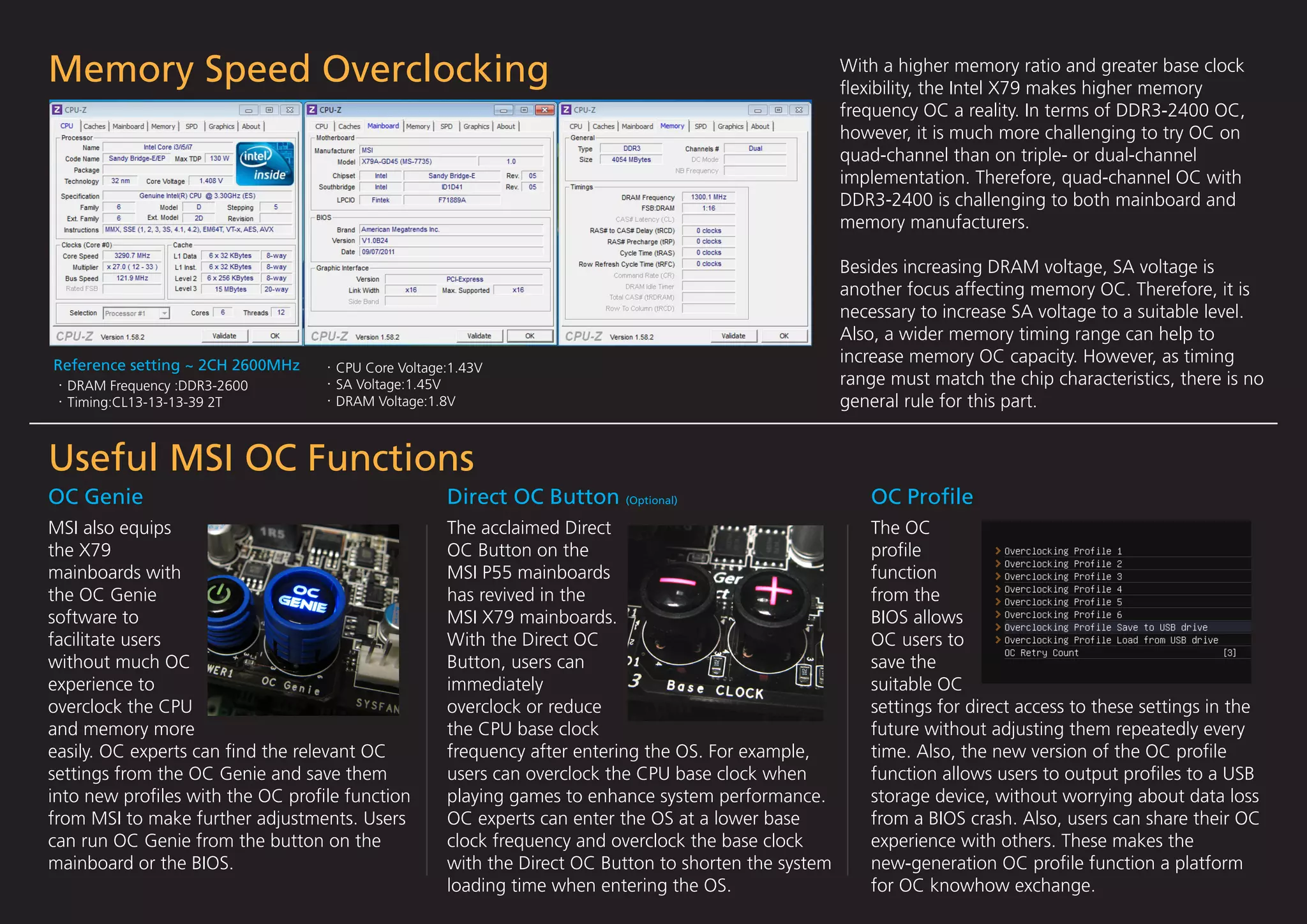
Memory Speed Overclocking                                                                           With a higher memory ratio and greater base clock
                                                                                                    flexibility, the Intel X79 makes higher memory
                                                                                                    frequency OC a reality. In terms of DDR3-2400 OC,
                                                                                                    however, it is much more challenging to try OC on
                                                                                                    quad-channel than on triple- or dual-channel
                                                                                                    implementation. Therefore, quad-channel OC with
                                                                                                    DDR3-2400 is challenging to both mainboard and
                                                                                                    memory manufacturers.

                                                                                                    Besides increasing DRAM voltage, SA voltage is
                                                                                                    another focus affecting memory OC. Therefore, it is
                                                                                                    necessary to increase SA voltage to a suitable level.
                                                                                                    Also, a wider memory timing range can help to
Reference setting ~ 2CH 2600MHz
                                                                                                    increase memory OC capacity. However, as timing
                                  CPU Core Voltage:1.43V
  DRAM Frequency :DDR3-2600       SA Voltage:1.45V                                                  range must match the chip characteristics, there is no
  Timing:CL13-13-13-39 2T         DRAM Voltage:1.8V                                                 general rule for this part.


Useful MSI OC Functions
OC Genie                                          Direct OC Button (Optional)                          OC Profile
MSI also equips                                   The acclaimed Direct                                 The OC
the X79                                           OC Button on the                                     profile
mainboards with                                   MSI P55 mainboards                                   function
the OC Genie                                      has revived in the                                   from the
software to                                       MSI X79 mainboards.                                  BIOS allows
facilitate users                                  With the Direct OC                                   OC users to
without much OC                                   Button, users can                                    save the
experience to                                     immediately                                          suitable OC
overclock the CPU                                 overclock or reduce                                  settings for direct access to these settings in the
and memory more                                   the CPU base clock                                   future without adjusting them repeatedly every
easily. OC experts can find the relevant OC        frequency after entering the OS. For example,        time. Also, the new version of the OC profile
settings from the OC Genie and save them          users can overclock the CPU base clock when          function allows users to output profiles to a USB
into new profiles with the OC profile function      playing games to enhance system performance.         storage device, without worrying about data loss
from MSI to make further adjustments. Users       OC experts can enter the OS at a lower base          from a BIOS crash. Also, users can share their OC
can run OC Genie from the button on the           clock frequency and overclock the base clock         experience with others. These makes the
mainboard or the BIOS.                            with the Direct OC Button to shorten the system      new-generation OC profile function a platform
                                                  loading time when entering the OS.                   for OC knowhow exchange.
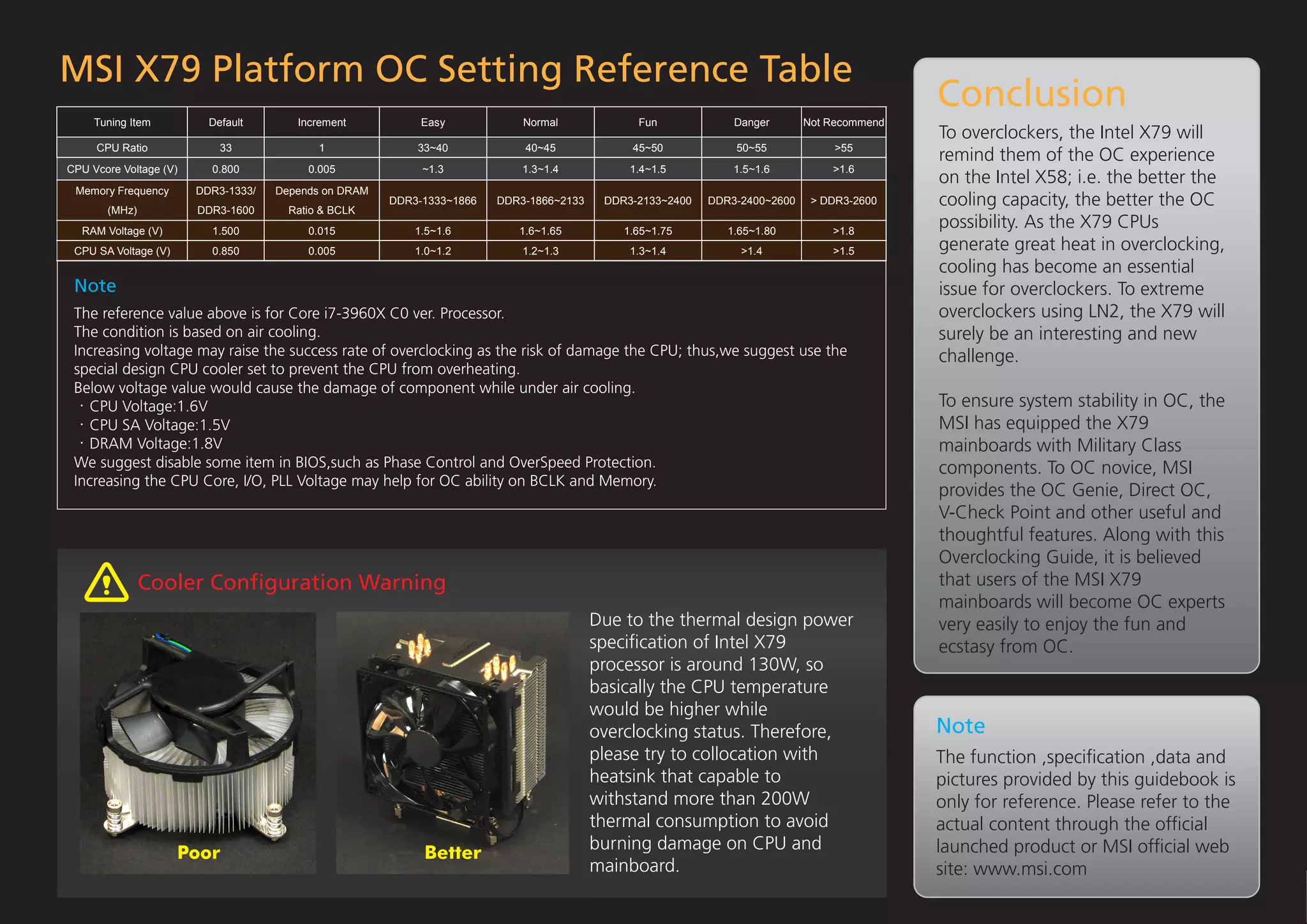
MSI X79 Platform OC Setting Reference Table
                                                                                                                                            Conclusion
     Tuning Item          Default       Increment           Easy            Normal             Fun             Danger       Not Recommend
                                                                                                                                            To overclockers, the Intel X79 will
     CPU Ratio              33              1              33~40            40~45             45~50            50~55             >55
                                                                                                                                            remind them of the OC experience
CPU Vcore Voltage (V)     0.800           0.005             ~1.3            1.3~1.4           1.4~1.5          1.5~1.6          >1.6
                                                                                                                                            on the Intel X58; i.e. the better the
 Memory Frequency       DDR3-1333/   Depends on DRAM
       (MHz)            DDR3-1600      Ratio & BCLK
                                                       DDR3-1333~1866   DDR3-1866~2133    DDR3-2133~2400   DDR3-2400~2600    > DDR3-2600    cooling capacity, the better the OC
  RAM Voltage (V)         1.500           0.015            1.5~1.6         1.6~1.65          1.65~1.75        1.65~1.80         >1.8
                                                                                                                                            possibility. As the X79 CPUs
 CPU SA Voltage (V)       0.850           0.005            1.0~1.2          1.2~1.3           1.3~1.4           >1.4            >1.5        generate great heat in overclocking,
                                                                                                                                            cooling has become an essential
 Note                                                                                                                                       issue for overclockers. To extreme
 The reference value above is for Core i7-3960X C0 ver. Processor.                                                                          overclockers using LN2, the X79 will
 The condition is based on air cooling.                                                                                                     surely be an interesting and new
 Increasing voltage may raise the success rate of overclocking as the risk of damage the CPU; thus,we suggest use the                       challenge.
 special design CPU cooler set to prevent the CPU from overheating.
 Below voltage value would cause the damage of component while under air cooling.
    CPU Voltage:1.6V                                                                                                                        To ensure system stability in OC, the
    CPU SA Voltage:1.5V                                                                                                                     MSI has equipped the X79
    DRAM Voltage:1.8V                                                                                                                       mainboards with Military Class
 We suggest disable some item in BIOS,such as Phase Control and OverSpeed Protection.                                                       components. To OC novice, MSI
 Increasing the CPU Core, I/O, PLL Voltage may help for OC ability on BCLK and Memory.
                                                                                                                                            provides the OC Genie, Direct OC,
                                                                                                                                            V-Check Point and other useful and
                                                                                                                                            thoughtful features. Along with this
                                                                                                                                            Overclocking Guide, it is believed
               Cooler Configuration Warning                                                                                                  that users of the MSI X79
                                                                                                                                            mainboards will become OC experts
                                                                                         Due to the thermal design power                    very easily to enjoy the fun and
                                                                                         specification of Intel X79                          ecstasy from OC.
                                                                                         processor is around 130W, so
                                                                                         basically the CPU temperature
                                                                                         would be higher while
                                                                                         overclocking status. Therefore,                    Note
                                                                                         please try to collocation with                     The function ,specification ,data and
                                                                                         heatsink that capable to                           pictures provided by this guidebook is
                                                                                         withstand more than 200W                           only for reference. Please refer to the
                                                                                         thermal consumption to avoid                       actual content through the official
                                                                                         burning damage on CPU and                          launched product or MSI official web
                      Poor                                  Better
                                                                                         mainboard.                                         site: www.msi.com

MSI X79 OC Guide

  • 1.
    Extreme Power Release MSIINTEL X79 PLATFORMS Overclocking Guide
  • 2.
    Core i7 -3000 Series Intel X79 Overclocking System Processor Core 1 4 IMC Memory After launching the X58 platform, Intel launched this year the brand new X79 platform to replace the high-end desktop system. The process is 2 5 PEG codenamed Sandy Bridge-E, whose basic architecture can be considered as an enhanced multicore high-end version of the Sandy Bridge. Architecturally 3 6 DMI 4 Channel DDR3-1600 different from the previous X58 platform, the X79 is more complex than the mainstream P67/Z68 systems in overclocking terms, but this brings more fun (OC DDR3-2400) PCIe ex: OC BCLK 125 MHz The following is an introduction of the overclocking system architecture for the X79 platform. CPU Ratio X79 PCH Using the same grading of the Sandy Bridge, the X79 CPUs fall into the XE, Graphic Cards K-SKU and non-K SKU grades. The XE and K-SKU are equipped with the maximum multiplier up to 57x; while the non-K SKU will be restricted by the Turbo Ratio Limit. Therefore, if you want OC, choose the XE or K-SKU. CLKGEN (CKXXX) CPU Base Clock CPU BCLK Ratio Intel has included the “Ratio” concept in the base clock of the X79 this time, (1.00X 1.25X 1.67X) as the architecture of the X79 is “CPU Base Clock=DMI Clock X BCLK Ratio”. BCLK 100MHz Although this allows users to adjust the CPU with greater flexibility, the CPU BCLK Unit whole thing becomes more complex and complicated overall. In order to make OC easier for most users, MSI has developed a brand new controller chip to automatically integrate DMI Clock and BCLK Ratio. This way, CLKGEN Buffer (MSI Modify) overclockers only need to adjust the CPU Base Clock for the chip to automatically tune the DMI Clock and BCLK Ratio. That is to say, this new chip from MSI makes CPU Base Clock OC simpler on the Intel X79 platform. X79 System Frequency Formula CPU Frequency = CPU Base Clock x CPU Ratio Memory Ratio CPU Base Clock = DMI Clock x BCLK Ratio When compared with the P67/Z68, the X79 has added the Memory Ratio to 133(MHz) x RAM Ratio x CPU Base Clock the memory system, with the highest at DDR3-2400 (RAM Ratio 9X). Along RAM Frequency = with the flexible base clock combination, it is easier to configure different 100 memory frequencies on the X79 than the Sandy Bridge.
  • 3.
    BIOS Overclocking Items CPU Base Clock Adjusts CPU base clock. The BIOS will automatically tune the related settings with reference to CPU base clock ratio, in order to make base clock adjustment easier for users. After adjusting the CPU base clock, the memory frequency will be changed automatically. CPU Base Clock Ratio Manually adjusts base clock ratio. Users who do not like automatic tuning for the CPU base clock can manually tune individual items from this option. After adjusting the CPU base ratio, the memory frequency will be changed automatically. CPU Ratio Adjusts CPU ratio. Large range adjustments are available only on the XE and K CPUs. This option will not change memory frequency. DRAM Frequency Adjusts memory frequency. This is the memory ratio setup option, with the maximum limit up to DDR3-2400(Ratio 9X). Although this option will not change the CPU base clock, users can change memory frequency by adjusting the CPU base clock. Extreme Memory Profile(X.M.P.) Quickly activates the Intel’s XMP automatic memory OC function with suitable SPD timing value. However, users must use memory modules supporting XMP. DRAM Timing Mode Manually adjusts the SPD timing of memory. When memory OC has exceeded the XMP’s upper limit, users will need to adjust the SPD timing manually to successfully start the system. Vdroop Control Adjusts the load-line calibration. This feature can prevent system instability from CPU voltage drop MSI has equipped all X79 mainboards with the brand new GSE2 in an OC operation. This option provides seven levels for overclockers to fine-tune their systems. UEFI BIOS using GUI to make BIOS setup more convenient and easier. The mainboard OC items are accessible from the OC CPU Core Voltage Adjusts the CPU core voltage. When CPU frequency increases in an OC operation, it is necessary (Overclocking Setting) icon on the left column. By clicking the icon, to increase voltage to ensure stable CPU operations. the OC Setting Menu will pop up. System Agent Voltage Basically, the menu falls into two sections. The upper section Adjusts the voltage of the internal memory controller (IMC) in the CPU. Therefore, adjusting IMC voltage can improve memeory OC stability. provides options for frequency OC, and the lower section contains options for voltage OC. The following will point out the major CPU I/O Voltage options related to OC. It is also called the CPU VTT voltage. It is another IMC voltage. It can also improve OC performance when memory is running at high frequency in an OC operation. DDR CH_A/B C/D Voltage Adjusts memory core voltage. When overclocking memory, it is necessary to increase the DDR CH_A/B and C/D voltage to ensure memory stability. The X79 platform provides two individual voltage settings for memory, including one for channel A/B and another for channel C/D.
  • 4.
    CPU Core SpeedOverclocking Besides using the XE or K-SKU models, you will need a powerful CPU cooler when overclocking the X79 CPUs. This is because the X79 CPUs produce heat very easily. If you want to overclock, you must use a CPU cooler with performance superior to ordinary OC CPU coolers to handle the thermal problem of the X79 CPUs. Otherwise, burn-in will be very unlikely to happen even you have overclocked to 4GHz. Simply adjust CPU ratio and CPU core ratio for CPU OC. Users can fine-tune system performance from CPU base clock, provided that they should consider the changes in Reference setting ~ 5000MHz memory frequency and adjust SA voltage and CPU Ratio : 50X CPU Core Voltage : 1.525V DRAM voltage to minimize OC failure. CPU BCLK Overclocking The OC performance of the base clock of the X79 and Sandy Bridge is compared below. The X79 provides greater flexibility for users to try more combinations of CPU core speed and memory speed, making OC on the X79 more fun. Although MSI has equipped its X79 mainboards with an automatic base clock tuner, the base clock ratio will become a natural restriction. Therefore, the optimal ranges fall at 100MHz +/- 10%, 125MHz +/- 10%, and 167MHz +/- 10%. Therefore, when base clock OC fails, users can try adjusting the CPU clock ratio. Lastly, as base clock adjustment will change Reference setting ~ 160MHz core speed and memory speed, it is necessary CPU Base Clock : 160MHz CPU Base Clock Ratio : 1.67X to adjust the voltage of the relevant items or CPU Ratio : 22X reduce their ratio to obtain better OC CPU Core Voltage : 1.36V performance.
  • 5.
    Memory Speed Overclocking With a higher memory ratio and greater base clock flexibility, the Intel X79 makes higher memory frequency OC a reality. In terms of DDR3-2400 OC, however, it is much more challenging to try OC on quad-channel than on triple- or dual-channel implementation. Therefore, quad-channel OC with DDR3-2400 is challenging to both mainboard and memory manufacturers. Besides increasing DRAM voltage, SA voltage is another focus affecting memory OC. Therefore, it is necessary to increase SA voltage to a suitable level. Also, a wider memory timing range can help to Reference setting ~ 2CH 2600MHz increase memory OC capacity. However, as timing CPU Core Voltage:1.43V DRAM Frequency :DDR3-2600 SA Voltage:1.45V range must match the chip characteristics, there is no Timing:CL13-13-13-39 2T DRAM Voltage:1.8V general rule for this part. Useful MSI OC Functions OC Genie Direct OC Button (Optional) OC Profile MSI also equips The acclaimed Direct The OC the X79 OC Button on the profile mainboards with MSI P55 mainboards function the OC Genie has revived in the from the software to MSI X79 mainboards. BIOS allows facilitate users With the Direct OC OC users to without much OC Button, users can save the experience to immediately suitable OC overclock the CPU overclock or reduce settings for direct access to these settings in the and memory more the CPU base clock future without adjusting them repeatedly every easily. OC experts can find the relevant OC frequency after entering the OS. For example, time. Also, the new version of the OC profile settings from the OC Genie and save them users can overclock the CPU base clock when function allows users to output profiles to a USB into new profiles with the OC profile function playing games to enhance system performance. storage device, without worrying about data loss from MSI to make further adjustments. Users OC experts can enter the OS at a lower base from a BIOS crash. Also, users can share their OC can run OC Genie from the button on the clock frequency and overclock the base clock experience with others. These makes the mainboard or the BIOS. with the Direct OC Button to shorten the system new-generation OC profile function a platform loading time when entering the OS. for OC knowhow exchange.
  • 6.
    MSI X79 PlatformOC Setting Reference Table Conclusion Tuning Item Default Increment Easy Normal Fun Danger Not Recommend To overclockers, the Intel X79 will CPU Ratio 33 1 33~40 40~45 45~50 50~55 >55 remind them of the OC experience CPU Vcore Voltage (V) 0.800 0.005 ~1.3 1.3~1.4 1.4~1.5 1.5~1.6 >1.6 on the Intel X58; i.e. the better the Memory Frequency DDR3-1333/ Depends on DRAM (MHz) DDR3-1600 Ratio & BCLK DDR3-1333~1866 DDR3-1866~2133 DDR3-2133~2400 DDR3-2400~2600 > DDR3-2600 cooling capacity, the better the OC RAM Voltage (V) 1.500 0.015 1.5~1.6 1.6~1.65 1.65~1.75 1.65~1.80 >1.8 possibility. As the X79 CPUs CPU SA Voltage (V) 0.850 0.005 1.0~1.2 1.2~1.3 1.3~1.4 >1.4 >1.5 generate great heat in overclocking, cooling has become an essential Note issue for overclockers. To extreme The reference value above is for Core i7-3960X C0 ver. Processor. overclockers using LN2, the X79 will The condition is based on air cooling. surely be an interesting and new Increasing voltage may raise the success rate of overclocking as the risk of damage the CPU; thus,we suggest use the challenge. special design CPU cooler set to prevent the CPU from overheating. Below voltage value would cause the damage of component while under air cooling. CPU Voltage:1.6V To ensure system stability in OC, the CPU SA Voltage:1.5V MSI has equipped the X79 DRAM Voltage:1.8V mainboards with Military Class We suggest disable some item in BIOS,such as Phase Control and OverSpeed Protection. components. To OC novice, MSI Increasing the CPU Core, I/O, PLL Voltage may help for OC ability on BCLK and Memory. provides the OC Genie, Direct OC, V-Check Point and other useful and thoughtful features. Along with this Overclocking Guide, it is believed Cooler Configuration Warning that users of the MSI X79 mainboards will become OC experts Due to the thermal design power very easily to enjoy the fun and specification of Intel X79 ecstasy from OC. processor is around 130W, so basically the CPU temperature would be higher while overclocking status. Therefore, Note please try to collocation with The function ,specification ,data and heatsink that capable to pictures provided by this guidebook is withstand more than 200W only for reference. Please refer to the thermal consumption to avoid actual content through the official burning damage on CPU and launched product or MSI official web Poor Better mainboard. site: www.msi.com