N ext generation
servers and
virtualization
Ben Timms, Solutions Architect
April 23, 2009


© 2009 Hewlett-Pa cka rd Development Compa ny, L      .P.
The informa tion conta ined herein is subject to cha nge without notice
G6: Better
performa nce from
next-genera tion
processors
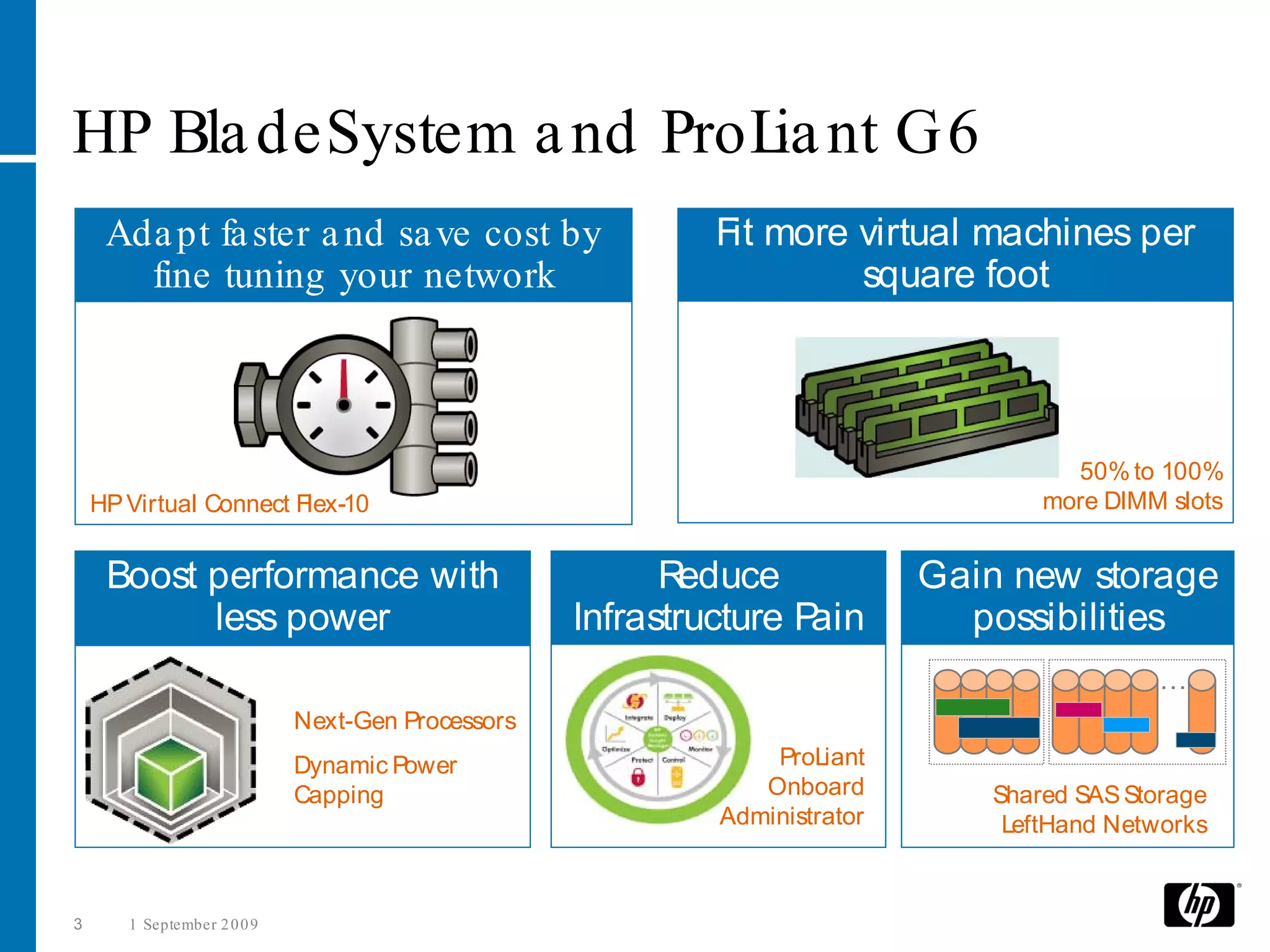
HP Bla deSystem a nd ProL nt G6
                         ia
     Ada pt fa ster a nd sa ve cost by                      Fit more virtual machines per
       fine tuning your network                                      square foot


                                                                                     50% to 100%
    HP Virtual Connect Flex-10                                                     more DIMM slots


     Boost performance with                              R educe            Gain new storage
           less power                              Infrastructure Pain        possibilities
                                                                                            …
                             Next-Gen Processors
                             Dynamic Power                      ProLiant
                             Capping                           Onboard         Shared SAS Storage
                                                            Administrator       LeftHand Networks


3      1 September 2 0 0 9
HP G6 Server

O verview
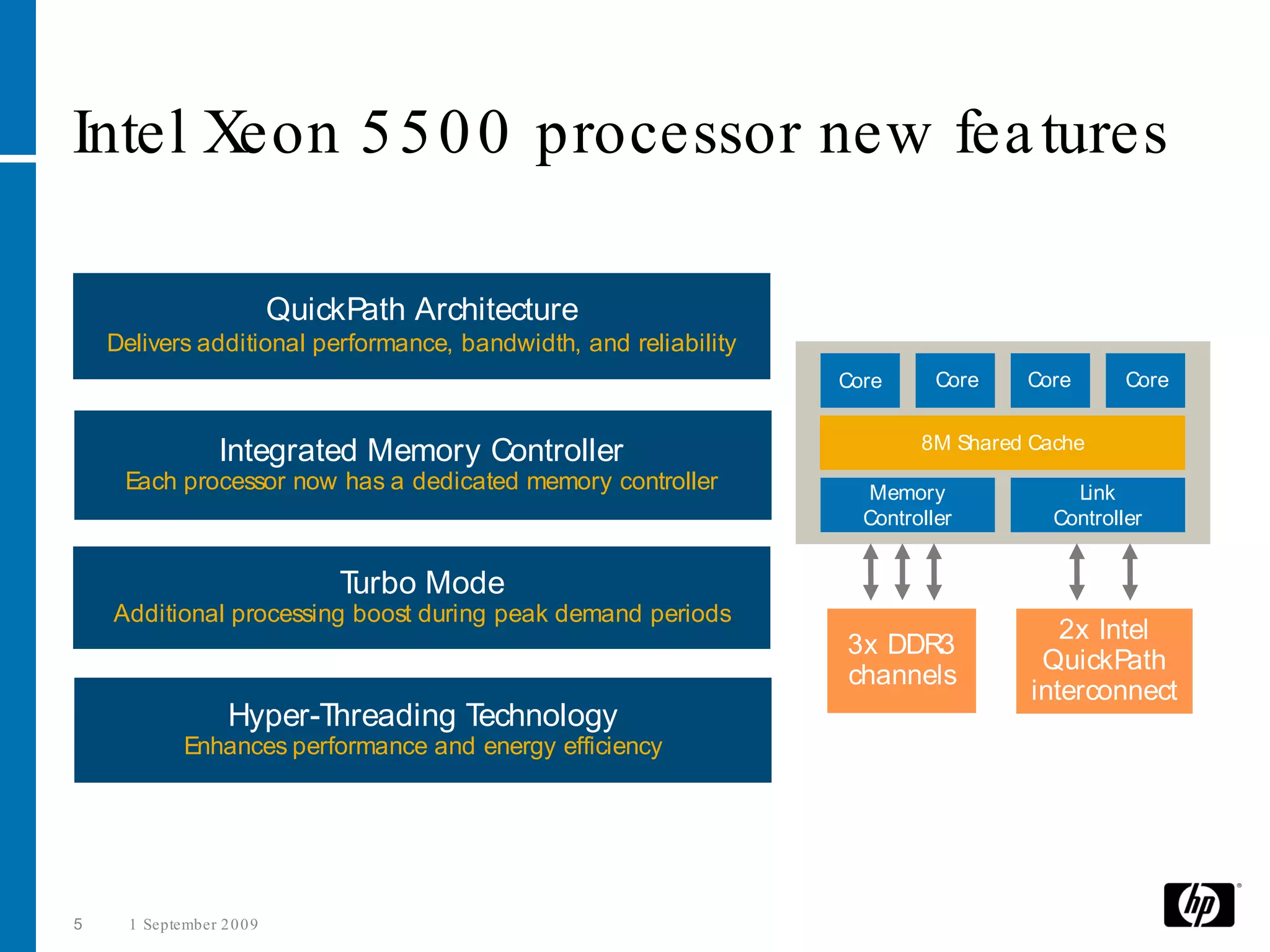
Intel Xeon 5 5 0 0 processor new fea tures

                            QuickPath Architecture
    Delivers additional performance, bandwidth, and reliability
                                                                  Core      Core   Core       Core

                                                                          8M Shared Cache
                   Integrated Memory Controller
     Each processor now has a dedicated memory controller            Memory             Link
                                                                    Controller        Controller


                                 Turbo Mode
    Additional processing boost during peak demand periods
                                                                                       2x Intel
                                                                  3x DDR3
                                                                                     QuickPath
                                                                  channels
                                                                                    interconnect
                    Hyper-Threading Technology
              Enhances performance and energy efficiency


5     1 September 2 0 0 9
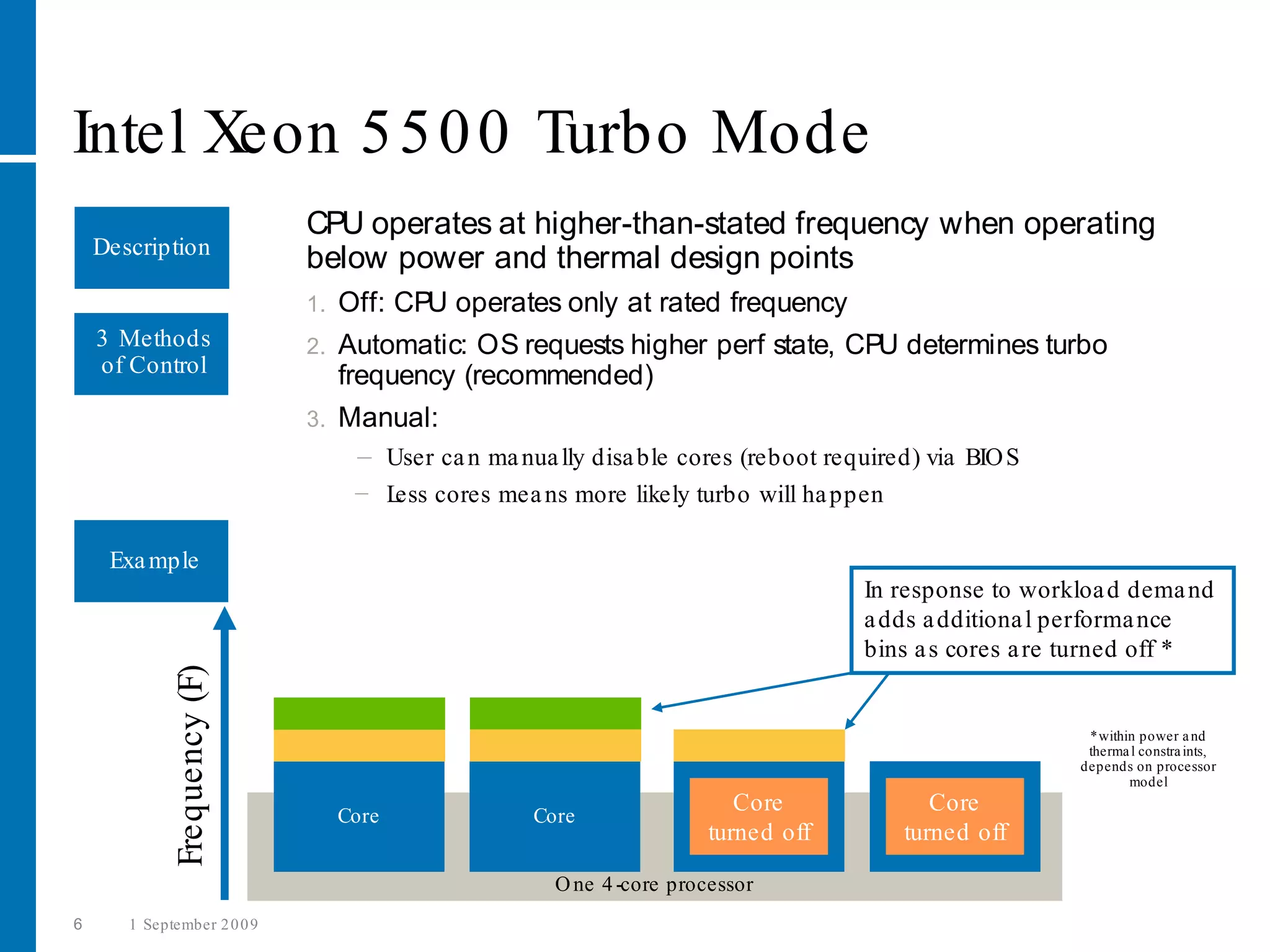
Intel Xeon 5 5 0 0 Turbo Mode
                              CPU operates at higher-than-stated frequency when operating
    Description
                              below power and thermal design points
                              1.   Off: CPU operates only at rated frequency
    3 Methods                 2.   Automatic: OS requests higher perf state, CPU determines turbo
    of Control                     frequency (recommended)
                              3.   Manual:
                                    − User ca n ma nua lly disa ble cores (reboot required) via BIO S
                                    − L cores mea ns more likely turbo will ha ppen
                                       ess

     Exa mple
                                                                                     In response to workloa d dema nd
                                                                                     a dds a dditiona l performa nce
                                                                                     bins a s cores a re turned off *
              Frequency (F)


                                                                                                         *within power a nd
                                                                                                         therma l constra ints,
                                                                                                        depends on processor
                                                                                                               model

                                   Core              Core
                                                                          Core
                                                                          Core
                                                                                            Core
                                                                                            Core
                                                                       turned off        turned off

                                                       O ne 4 -core processor
6      1 September 2 0 0 9
DDR 3:
Two memory
types to ma tch
your priorities
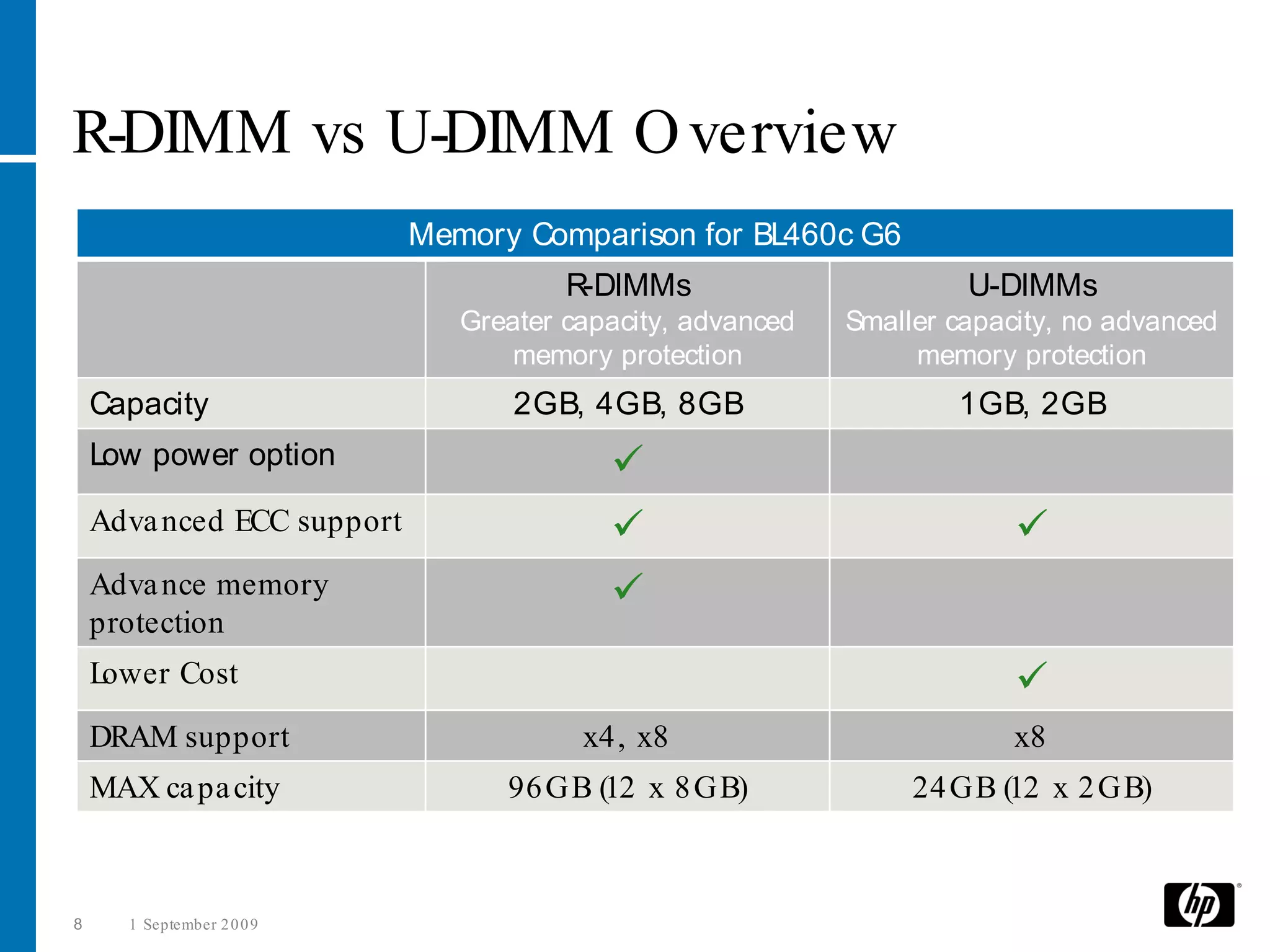
R-DIMM vs U-DIMM O verview
                            Memory Comparison for BL460c G6
                                       R-DIMMs                       U-DIMMs
                               Greater capacity, advanced   Smaller capacity, no advanced
                                  memory protection              memory protection
    Capacity                       2GB, 4GB, 8GB                    1GB, 2GB
    Low power option                      
    Adva nced ECC support                                               
    Adva nce memory                       
    protection
    Lower Cost                                                           
    DRAM support                        x4, x8                           x8
    MAX ca pa city                96 GB (12 x 8 GB)              24 GB (12 x 2 GB)


8     1 September 2 0 0 9
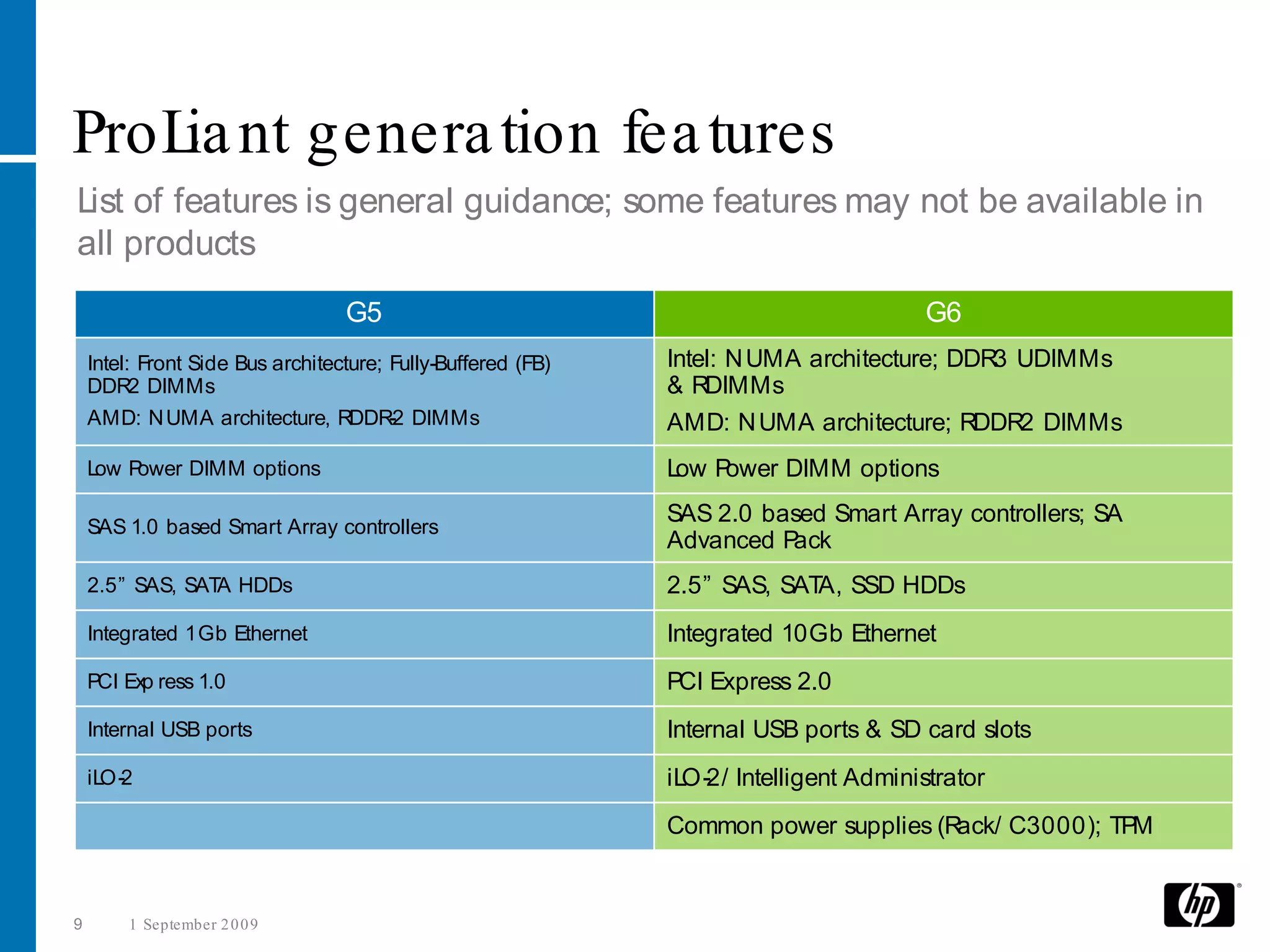
ProL nt genera tion fea tures
    ia
List of features is general guidance; some features may not be available in
all products
                                  G5                                                    G6
    Intel: Front Side Bus architecture; Fully-Buffered (FB)   Intel: N UMA architecture; DDR3 UDIMMs
    DDR2 DIMMs                                                & RDIMMs
    AMD: N UMA architecture, RDDR DIMMs -2                    AMD: N UMA architecture; RDDR2 DIMMs
    Low Power DIMM options                                    L P
                                                               ow ower DIMM options

    SAS 1.0 based Smart Array controllers
                                                              SAS 2.0 based Smart Array controllers; SA
                                                              Advanced Pack
    2.5” SAS, SAT HDDs
                 A                                            2.5” SAS, SAT SSD HDDs
                                                                           A,
    Integrated 1Gb Ethernet                                   Integrated 10Gb Ethernet
    PCI Exp ress 1.0                                          PCI Express 2.0
    Internal USB ports                                        Internal USB ports & SD card slots
    iLO-2                                                     iLO-2/ Intelligent Administrator
                                                              Common power supplies (Rack/ C3000); TPM


9       1 September 2 0 0 9
Save costs &
control networks
with 1 0 G iga bit
Ethernet & Flex-1 0
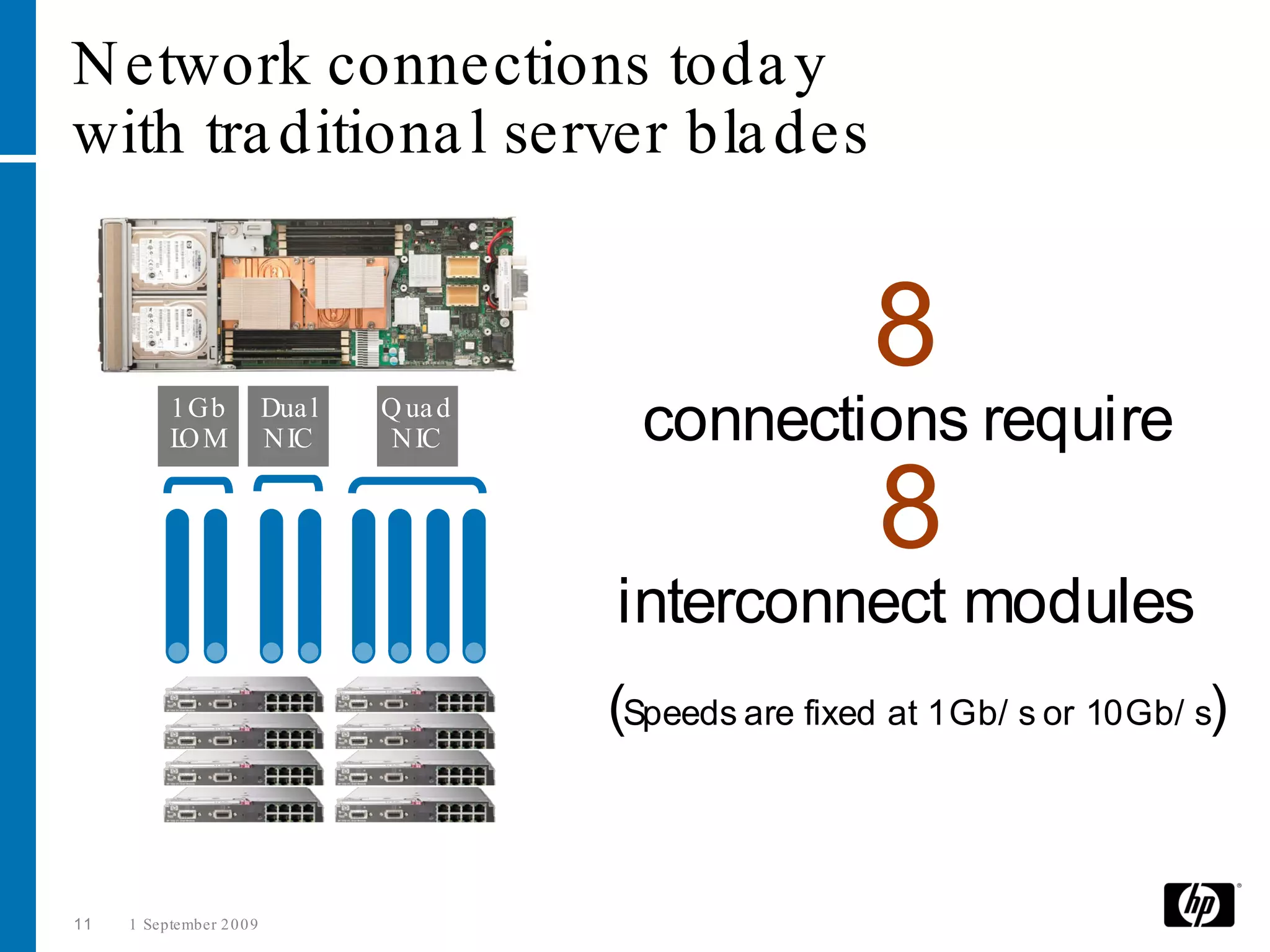
N etwork connections toda y
with tra ditiona l server bla des


                                                            8
           1 Gb
           L M
            O
                           Dua l
                           N IC
                                   Q ua d
                                    N IC      connections require
                                                             8
                                            interconnect modules
                                            (Speeds are fixed at 1Gb/ s or 10Gb/ s)


11   1 September 2 0 0 9
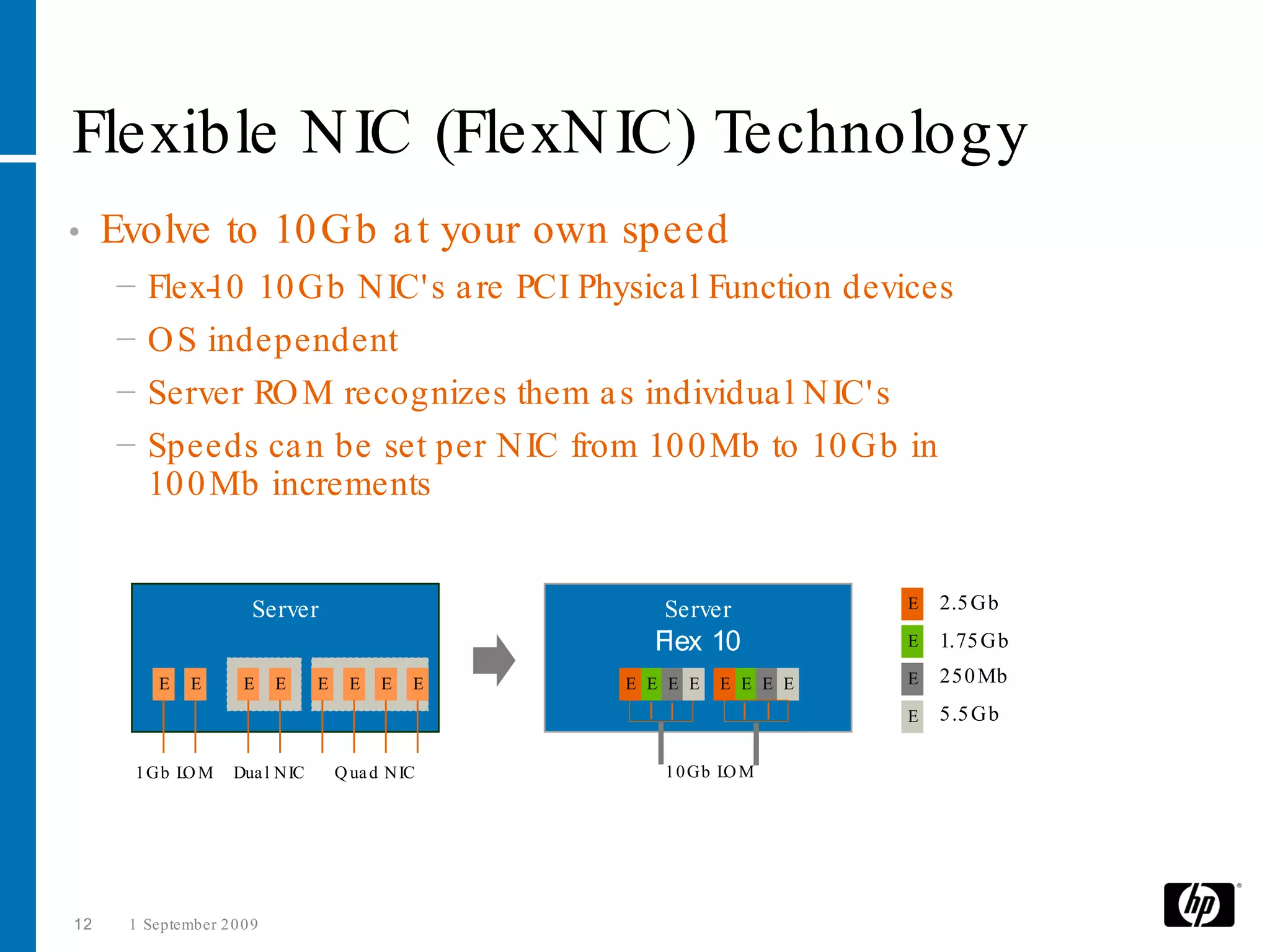
Flexible N IC (FlexN IC) Technology
•    Evolve to 10 Gb a t your own speed
     −   Flex- 0 10 Gb N IC' s a re PCI Physica l Function devices
              1
     −   O S independent
     −   Server RO M recognizes them a s individua l N IC' s
     −   Speeds ca n be set per N IC from 10 0 Mb to 10 Gb in
         10 0 Mb increments


                        Server                         Server           E   2.5 Gb
                                                      Flex 10           E   1.75 Gb
          E    E      E     E     E     E   E   E   E E E E   E E E E   E   250 Mb
                                                                        E   5.5 Gb

      1 Gb L M
            O        Dua l N IC       Q ua d N IC      1 0 Gb L M
                                                               O


12    1 September 2 0 0 9
W hy 1 0 Gb Ethernet
• The use of fa ster multi-core processors is
  increa sing ba ndwidth requirements per server
• Customers in a broa d ra nge of a dva nced
  computing environments a re working with ever
  more complex da ta sets requiring 10 Gb
  ba ndwidth
      − High performa nce computing (HPC)
      − Da ta ba se clusters, iSCSI, a nd
        stora ge ba ckups
      − Grid systems a nd virtua liza tion
      − Server, I/ O, & fa bric consolida tion
      − VoIP a nd VO D
•    As the delta between 1 Gb a nd 10 Gb na rrows,
     it becomes cost effective to utilize 10 GbE switch
     uplinks to reduce ca bling


13     1 September 2 0 0 9
Introducing Flex-1 0
For HP Virtual Connect


     Configure your server when you define your Virtual
                  Connect Server Profile!


           N umber of N ICs              …all with the
                                   performance of real
                      N etworks
                                    hardware network
                           Speed           interfaces!


14   1 September 2 0 0 9
Introducing Flex-1 0
For HP Virtual Connect


 HP Virtua l Connect Flex- 0 is the world’s first technology to
                           1
 fine -tune network ba ndwidth a t the server edge a nd to a da pt
 to virtua l server workloa d dema nds on-the -fly.

     Flex- 0 reduces infra structure costs by brea king the ba rriers of rigid
          1
 network connections, speeds, a nd N IC ports providing unpa ra lleled server
      sca le -out, virtua liza tion a nd network efficiency in the Da ta Center.


15   1 September 2 0 0 9
HP Virtua l Connect with Flex-1 0 technology is the
simplest, most powerful connection to your networks
•    Simplify networks
      − Reduce ca bles up to 94 % without a dding switches to ma na ge
•    Simplify server connections
      − Ma kes system a dministra tor self-sufficient a nd frees LAN a nd SAN a dmins
        from common server ta sks
•    Cha nge servers in minutes, not da ys
      − Add, move a nd repla ce servers on-the -fly without a ffecting your
        LAN a nd SAN
      − Tota l control to move workloa ds fa st without impa cting L s or SAN s or the
                                                                    AN
        people who ma na ge them.
                                                                                 Ne
•    T ilor network speeds ba sed on a pplica tion needs
      a                                                                          w!

      − Reduce ca bles a nd network components by using up to 4 physica l N IC' s per
        10 Gb server connection
      − Control a nd ma na ge your ba ndwidth by setting N IC speeds a t the
        server edge

16    1 September 2 0 0 9
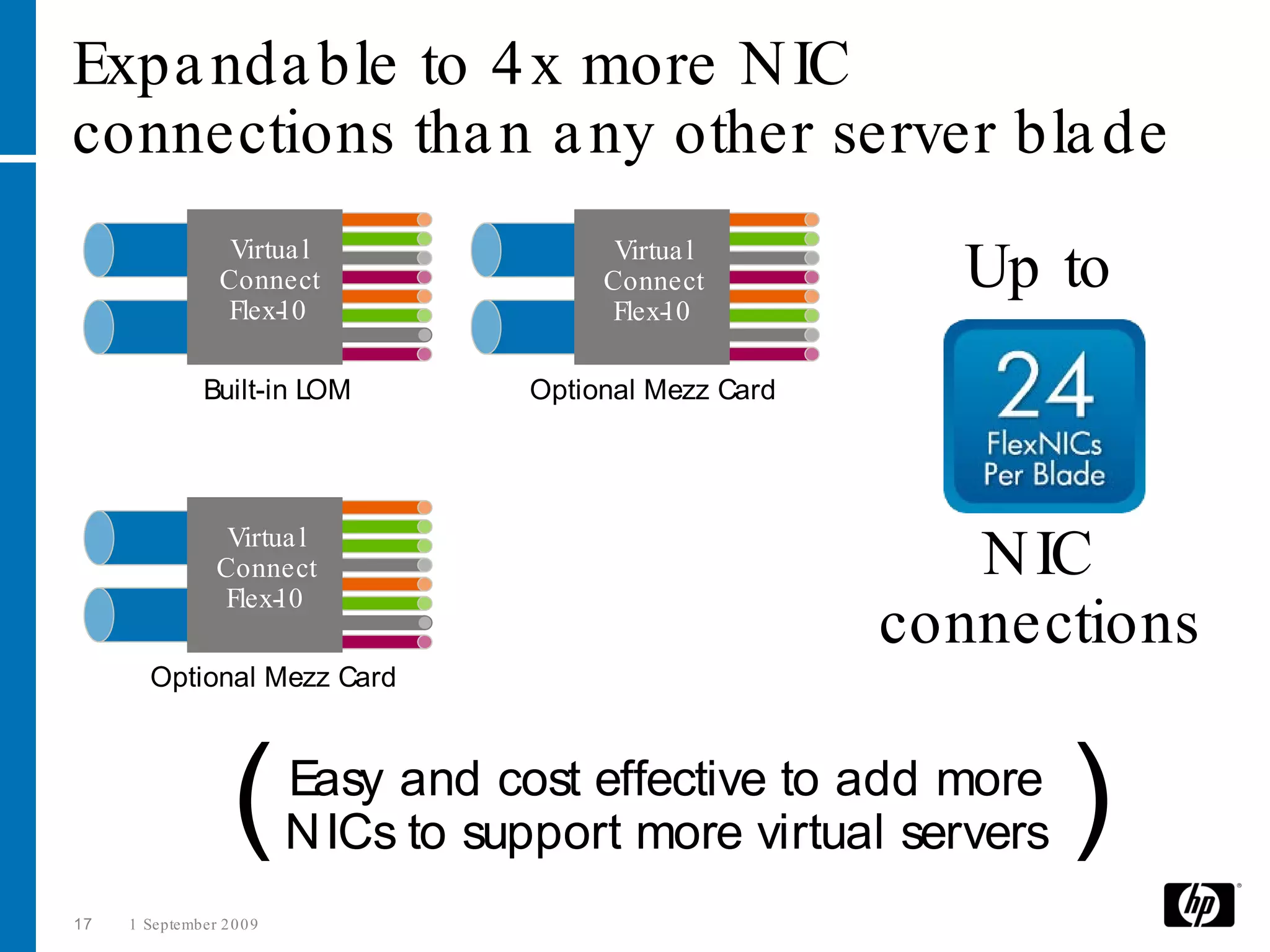
Expa nda ble to 4 x more N IC
connections tha n a ny other server bla de
                   Virtua l                 Virtua l
                  Connect                  Connect           Up to
                  Flex- 0
                       1                   Flex- 0
                                                1

               Built-in LOM           Optional Mezz Card


                  Virtua l
                 Connect                                      N IC
                 Flex- 0
                      1
                                                           connections
        Optional Mezz Card


                    (      Easy and cost effective to add more
                           N ICs to support more virtual servers   )
17   1 September 2 0 0 9
First ever to provide precise control over
ba ndwidth per N IC connection
                   Virtua l
                  Connect
                                  Fine -tune the speed of
                  Flex- 0
                       1
                                  ea ch network connection


                                In 10 0 Mb increments from
                                100Mb to 10Gb

                    (      So you can optimize and prioritize
                           performance for each VM channel      )
18   1 September 2 0 0 9
Reduce costs a nd a dd flexibility
•    Flex- 0 reduces infra structure costs up to 60 %
         1
•    Flex- 0 reduces power costs up to 56 %
         1
•    Flex- 0 is the most cost effective solution in the industry for
         1
     servers needing 4 or more N IC’s
•    Flex- 0 is cha nge -rea dy with a ll of the benefits of Virtua l
         1
     Connect plus N IC fine -tuning a t the server edge
•    Evolve your da ta center a t your own speed without
     a dditiona l infra structure costs – Flex- 0 is cha nge rea dy
                                              1
•    Ma ximize your VM environment with HP BL          495 c Bla des
     a nd Virtua l Connect Ethernet a nd Fibre Cha nnel modules


19    1 September 2 0 0 9
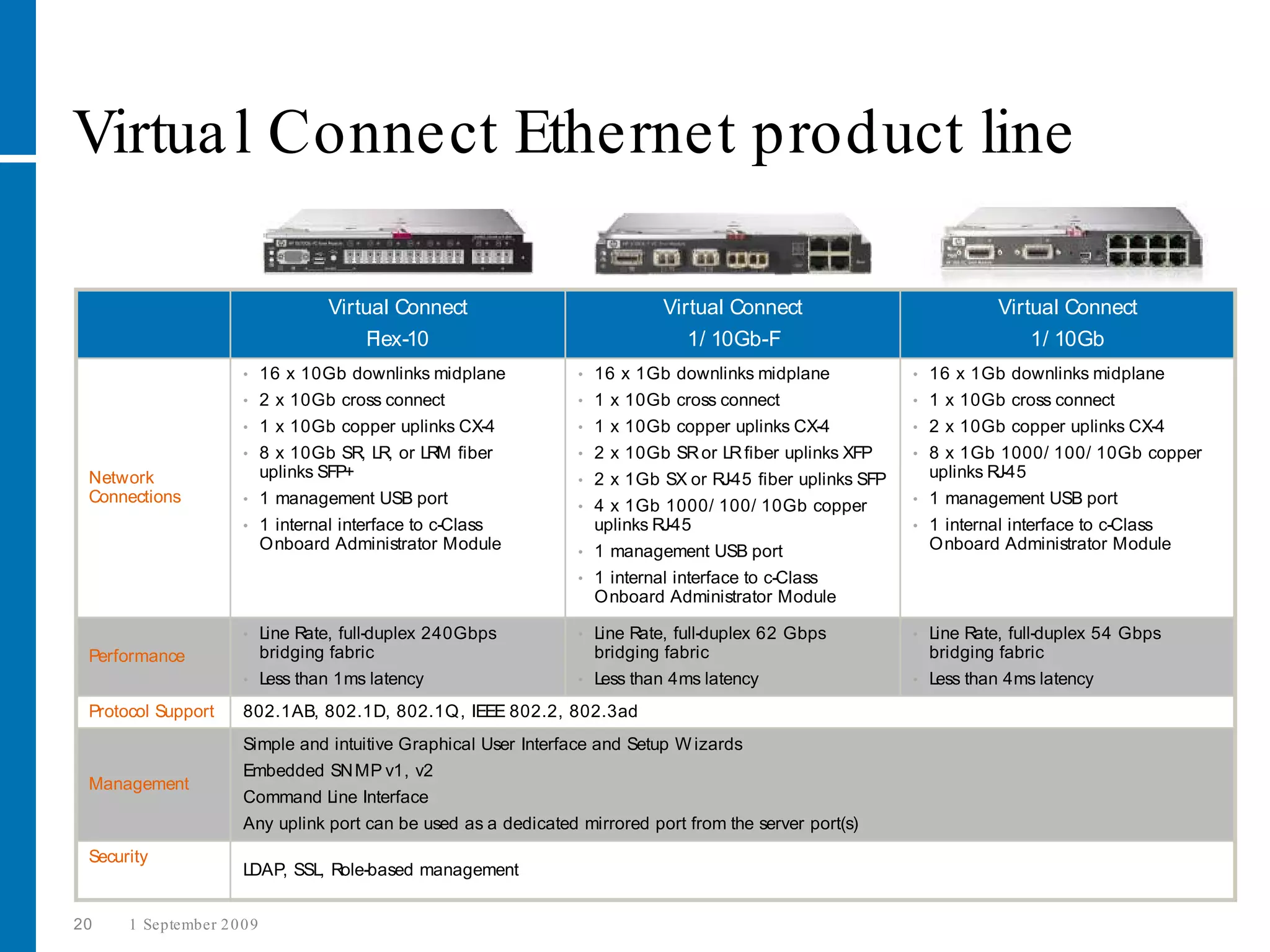
Virtua l Connect Ethernet product line

                                    Virtual Connect                          Virtual Connect                             Virtual Connect
                                        Flex-10                                 1/ 10Gb-F                                    1/ 10Gb
                      •     16 x 10Gb downlinks midplane         •   16 x 1Gb downlinks midplane             •   16 x 1Gb downlinks midplane
                      •     2 x 10Gb cross connect               •   1 x 10Gb cross connect                  •   1 x 10Gb cross connect
                      •     1 x 10Gb copper uplinks CX-4         •   1 x 10Gb copper uplinks CX-4            •   2 x 10Gb copper uplinks CX-4
                      •     8 x 10Gb SR, LR, or LRM fiber        •   2 x 10Gb SR or LR fiber uplinks XFP     •   8 x 1Gb 1000/ 100/ 10Gb copper
 Network                    uplinks SFP+                         •   2 x 1Gb SX or RJ-45 fiber uplinks SFP       uplinks RJ-45
 Connections          •     1 management USB port                                                            •   1 management USB port
                                                                 •   4 x 1Gb 1000/ 100/ 10Gb copper
                      •     1 internal interface to c-Class          uplinks RJ-45                           •   1 internal interface to c-Class
                            Onboard Administrator Module         •   1 management USB port                       Onboard Administrator Module
                                                                 •   1 internal interface to c-Class
                                                                     Onboard Administrator Module

                      •     Line Rate, full-duplex 240Gbps       •   Line Rate, full-duplex 62 Gbps          •   Line Rate, full-duplex 54 Gbps
 Performance                bridging fabric                          bridging fabric                             bridging fabric
                      •     Less than 1ms latency                •   Less than 4ms latency                   •   Less than 4ms latency
 Protocol Support     802.1AB, 802.1D, 802.1Q, IEEE 802.2, 802.3ad
                      Simple and intuitive Graphical User Interface and Setup W izards
                      Embedded SN MP v1, v2
 Management
                      Command Line Interface
                      Any uplink port can be used as a dedicated mirrored port from the server port(s)
 Security
                      LDAP, SSL, Role-based management


20    1 September 2 0 0 9
HP Bla deSystem enclosures
            Bla de System c30 0 0 Ra ck
                                          Bla deSystem c70 0 0
                a nd Tower Versions


21   1 September 2 0 0 9
HP logo blue on white


     Technology for better business outcomes
HP LeftHand
P4000 SAN
Solutions
Overview
Ben Timms
PSG Solutions Architect


© 2009 Hewlett-Packard Development Company, L.P.
The information contained herein is subject to change without notice.
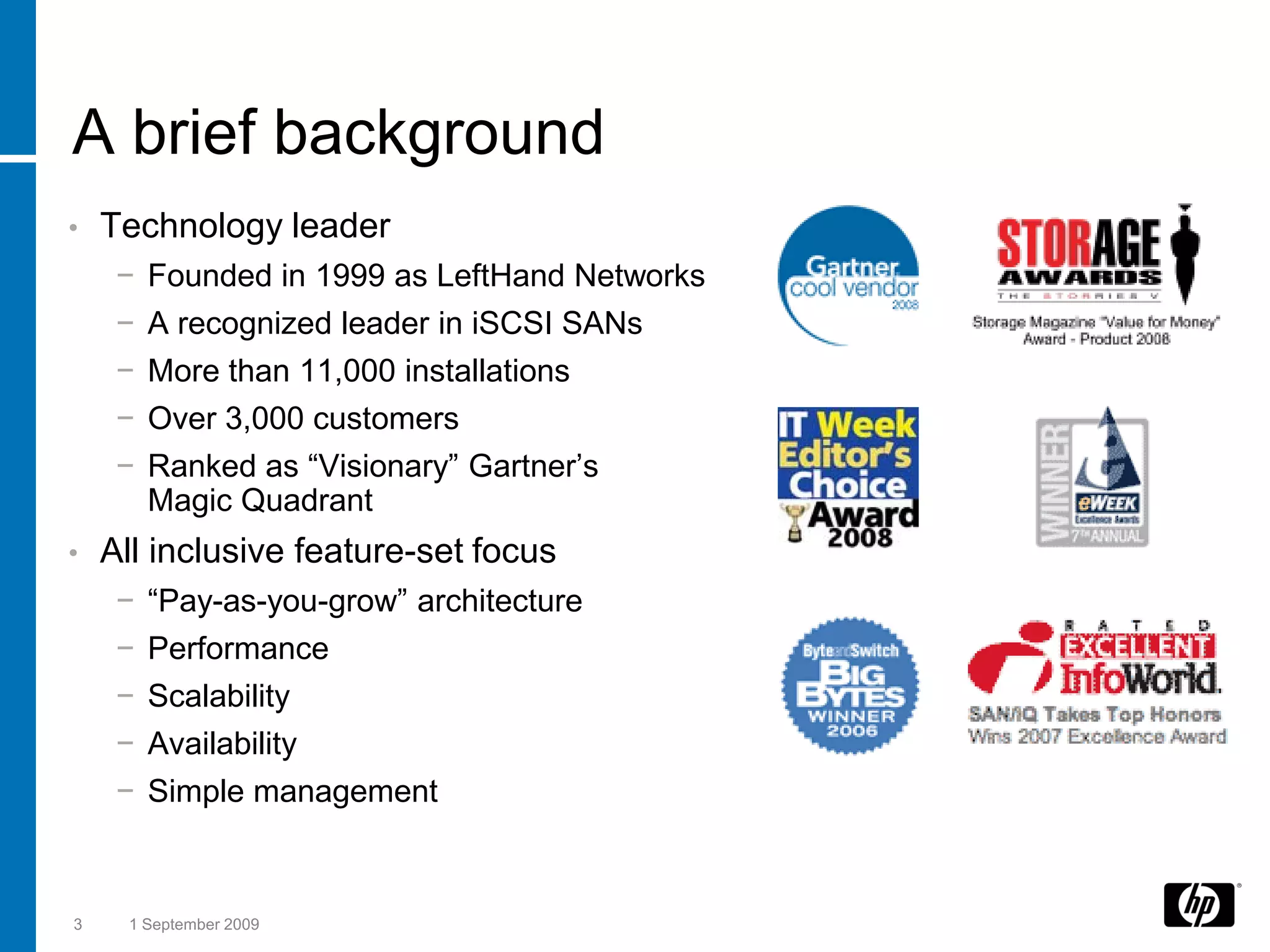
A brief background
•   Technology leader
     −   Founded in 1999 as LeftHand Networks
     −   A recognized leader in iSCSI SANs
     −   More than 11,000 installations
     −   Over 3,000 customers
     −   Ranked as “Visionary” Gartner’s
         Magic Quadrant
•   All inclusive feature-set focus
     −   “Pay-as-you-grow” architecture
     −   Performance
     −   Scalability
     −   Availability
     −   Simple management


3    1 September 2009
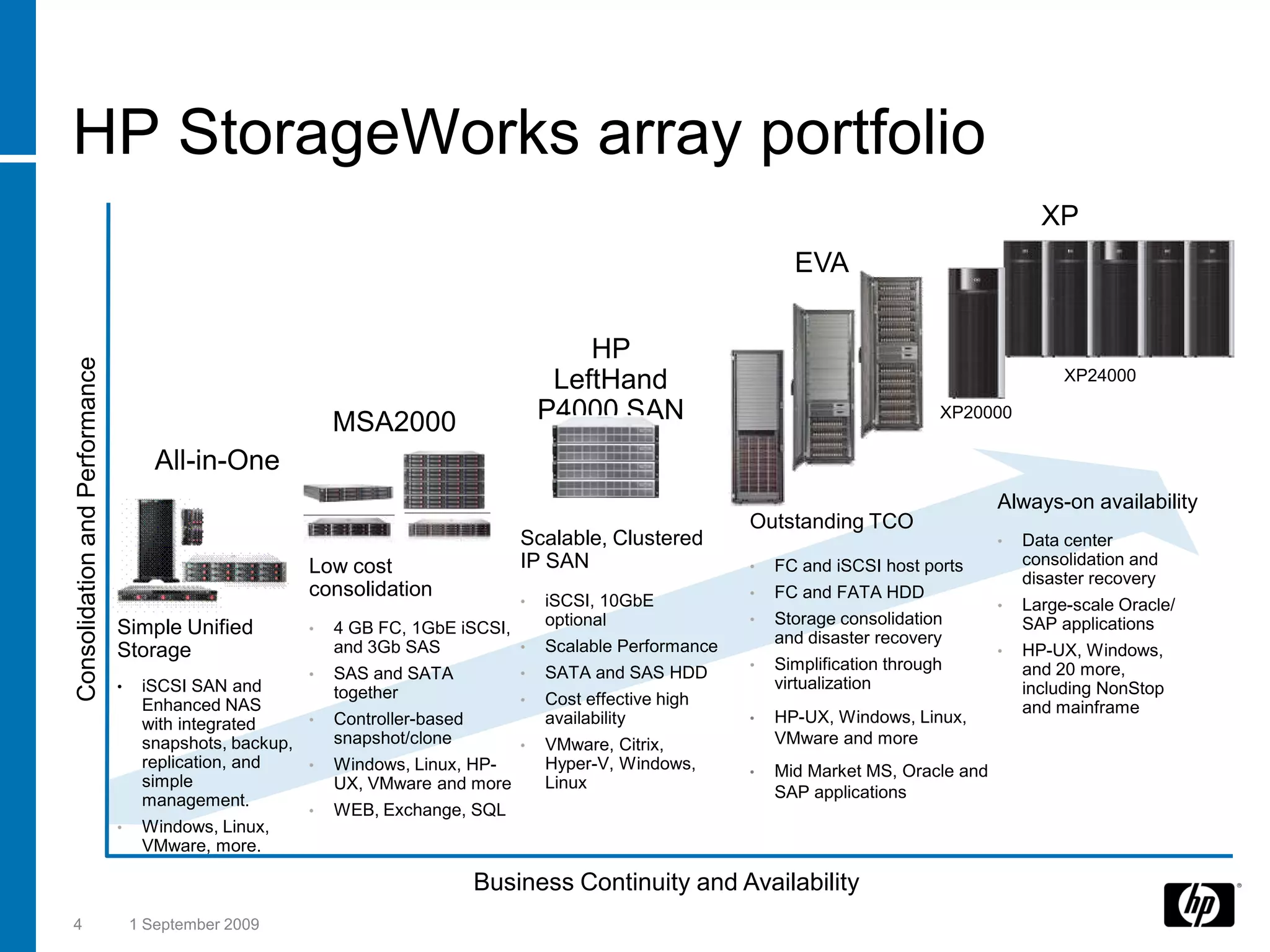
HP StorageWorks array portfolio
                                                                                                                                                    XP
                                                                                                                    EVA


                                                                                           HP
Consolidation and Performance


                                                                                        LeftHand                                                       XP24000

                                                            MSA2000                    P4000 SAN                                       XP20000

                                       All-in-One
                                                                                                                                              Always-on availability
                                                                                                              Outstanding TCO
                                                                                   Scalable, Clustered                                        •   Data center
                                                        Low cost                   IP SAN                     •   FC and iSCSI host ports         consolidation and
                                                                                                                                                  disaster recovery
                                                        consolidation                                         •   FC and FATA HDD
                                                                                   •   iSCSI, 10GbE                                           •   Large-scale Oracle/
                                                                                       optional               •   Storage consolidation           SAP applications
                                Simple Unified          •   4 GB FC, 1GbE iSCSI,
                                                                                                                  and disaster recovery
                                Storage                     and 3Gb SAS          •     Scalable Performance                                   •   HP-UX, Windows,
                                                                                       SATA and SAS HDD       •   Simplification through          and 20 more,
                                                        •   SAS and SATA           •
                                •    iSCSI SAN and                                                                virtualization                  including NonStop
                                                            together               •   Cost effective high
                                     Enhanced NAS                                                                                                 and mainframe
                                     with integrated    •   Controller-based           availability           •   HP-UX, Windows, Linux,
                                     snapshots, backup,     snapshot/clone         •   VMware, Citrix,            VMware and more
                                     replication, and   •   Windows, Linux, HP-        Hyper-V, Windows,      •   Mid Market MS, Oracle and
                                     simple                 UX, VMware and more        Linux
                                     management.                                                                  SAP applications
                                                        •   WEB, Exchange, SQL
                                •    Windows, Linux,
                                     VMware, more.

                                                                               Business Continuity and Availability
4                                   1 September 2009
HP LeftHand
P4000 SAN
Solutions
Features
and Benefits
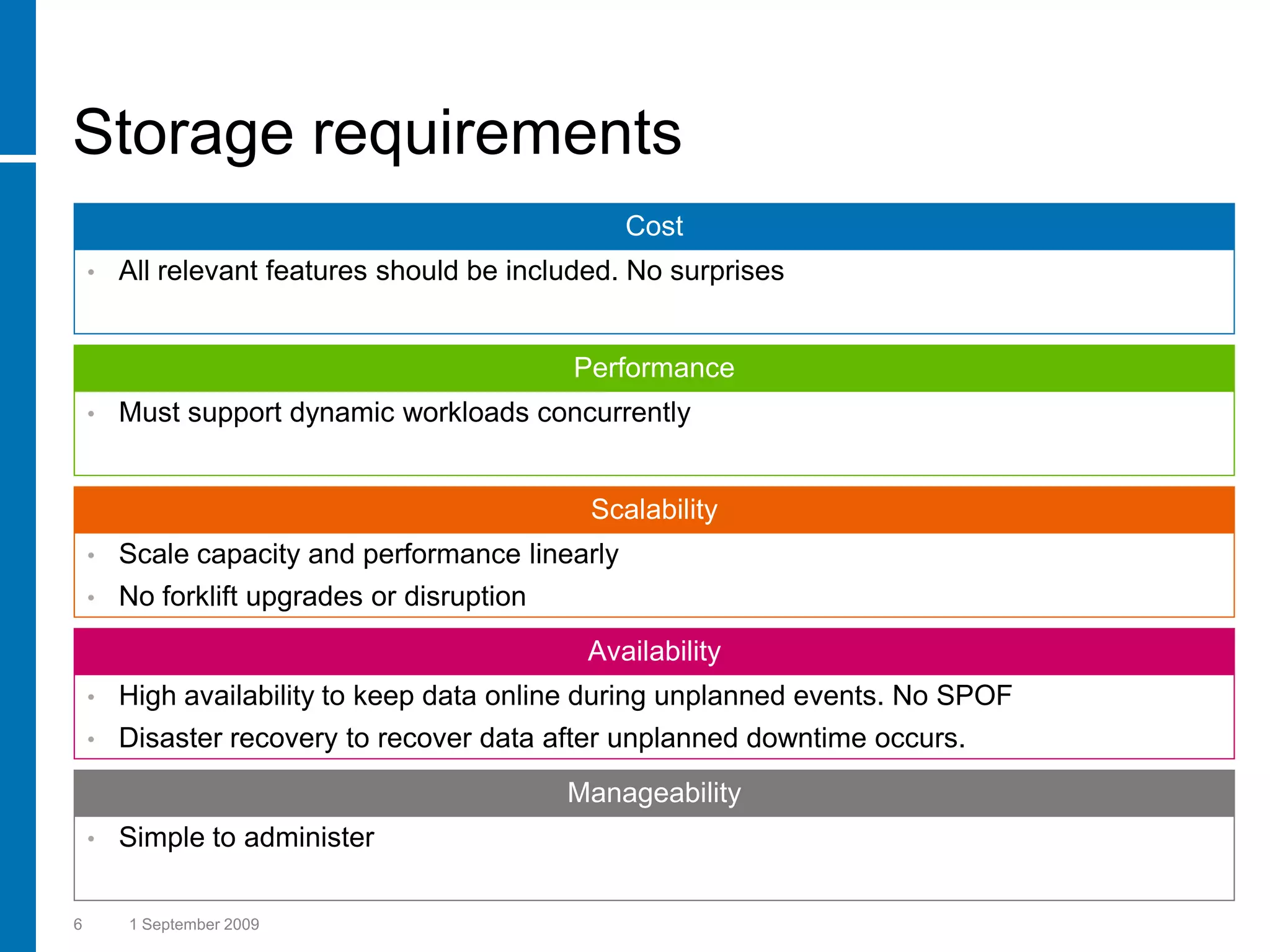
Storage requirements
                                                  Cost
    •   All relevant features should be included. No surprises


                                             Performance
    •   Must support dynamic workloads concurrently


                                              Scalability
    •   Scale capacity and performance linearly
    •   No forklift upgrades or disruption
                                              Availability
    •   High availability to keep data online during unplanned events. No SPOF
    •   Disaster recovery to recover data after unplanned downtime occurs.
                                             Manageability
    •   Simple to administer

6       1 September 2009
5 features with every HP LeftHand
P4000 SAN
      Storage
                         •   Scalable performance and capacity
     Clustering


    Network RAID         •   Beyond the box availability


       Thin
                         •   Reduce costs, increase capacity utilization
    Provisioning


     Snapshot            •   Data protection, tape storage reduction


    Remote Copy          •   Disaster recovery through integrated replication


7     1 September 2009
HP SAN/iQ® Storage Clustering
True clustering brings reliability, performance,
and ease of management
•   Storage clustering                                                  Storage Node
                                                                            SAS
     − Aggregates critical components                           CPU                          Disk
     − Data is load balanced                                    NICs
                                                                                             Cache
                                                                         Hardware RAID
     − Predictable scalability
                                                                        Redundant cooling
•   Grow on your terms                                                  Redundant power
     − Scale-out storage                                               HP SAN/iQ® Software
     − Non-disruptive
     − Throttle bandwidth
•   Storage tiering
                                                                            SATA
     − Enhanced for type of data
     − Online volume migration
•   Simple centralized management
     − One step server-volume mapping
     − Integrated performance management      Centralized
                                           Management Console
8     1 September 2009
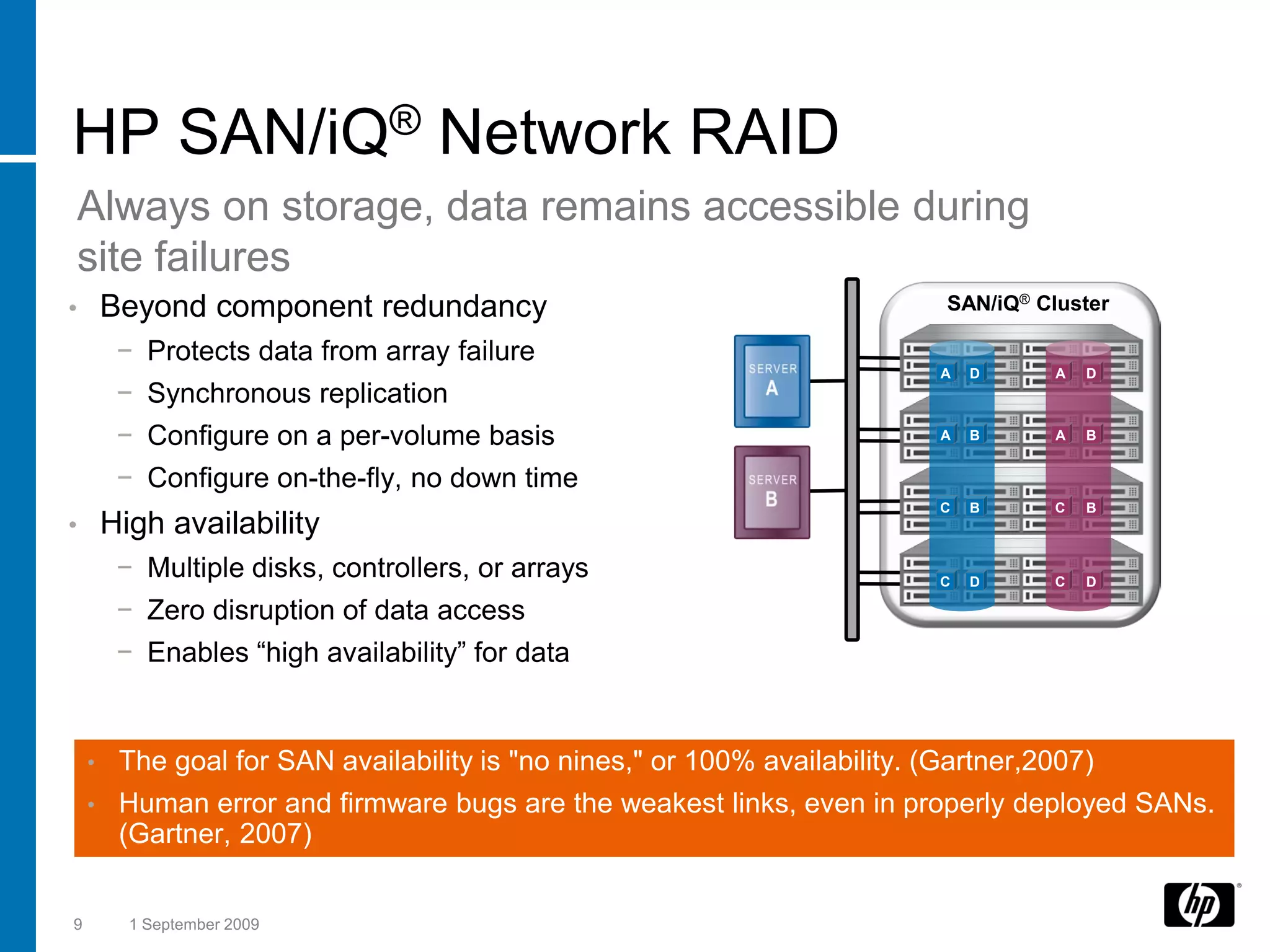
HP SAN/iQ® Network RAID
Always on storage, data remains accessible during
site failures
•       Beyond component redundancy                                          SAN/iQ® Cluster

         − Protects data from array failure
                                                                             A   D     A   D
         − Synchronous replication
         − Configure on a per-volume basis                                   A   B     A   B


         − Configure on-the-fly, no down time
                                                                             C   B    C    B
•       High availability
         − Multiple disks, controllers, or arrays                            C   D    C    D

         − Zero disruption of data access
         − Enables “high availability” for data


    •    The goal for SAN availability is "no nines," or 100% availability. (Gartner,2007)
    •    Human error and firmware bugs are the weakest links, even in properly deployed SANs.
         (Gartner, 2007)


9         1 September 2009
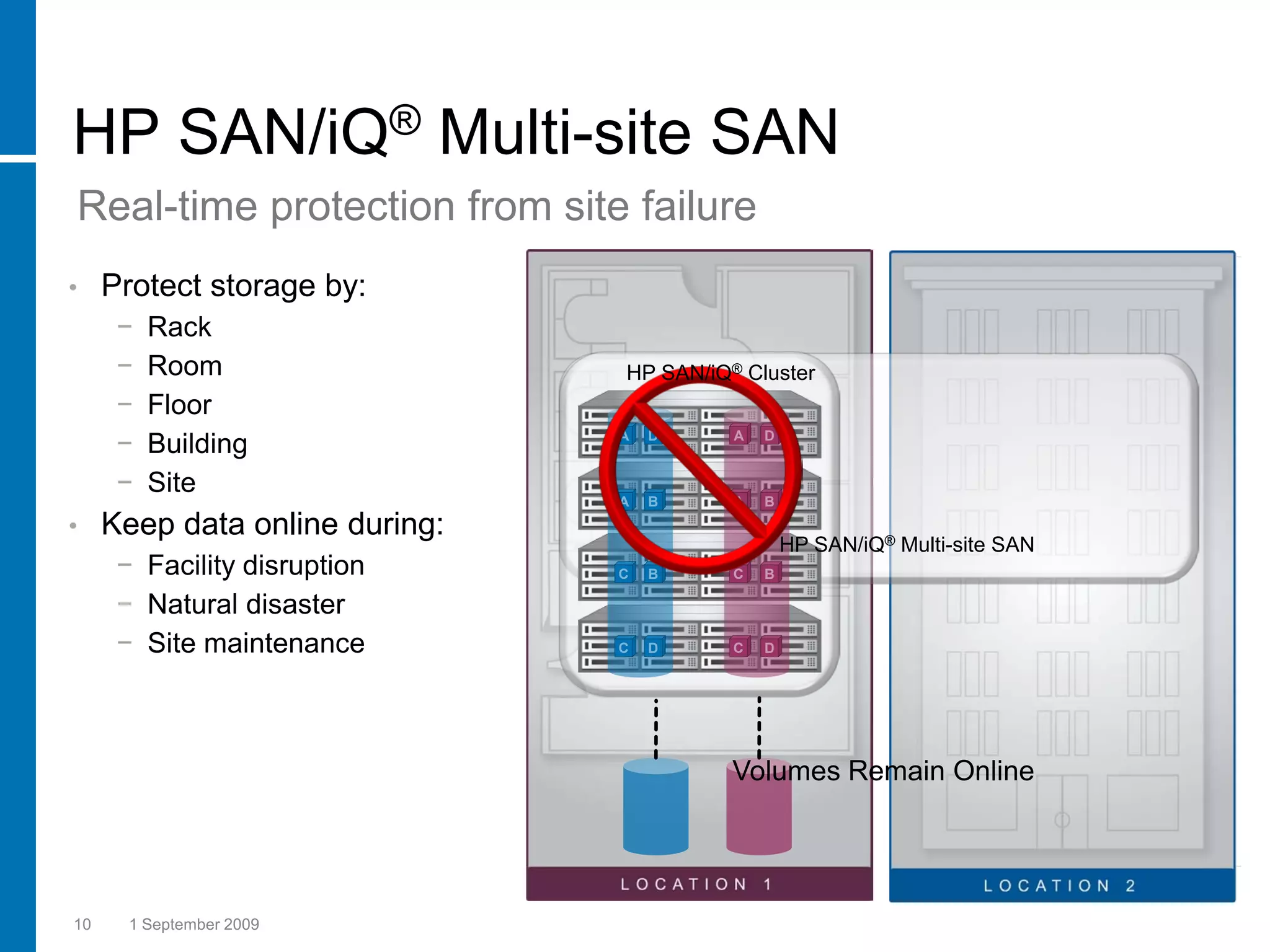
HP SAN/iQ® Multi-site SAN
Real-time protection from site failure
•    Protect storage by:
      −   Rack
      −   Room                  HP SAN/iQ® Cluster
      −   Floor
      −   Building              A   D     A   D


      −   Site
                                A   B     A   B
•    Keep data online during:
                                                  HP SAN/iQ® Multi-site SAN
      − Facility disruption     C   B     C   B

      − Natural disaster
      − Site maintenance        C   D     C   D


                                          Volumes Remain Online


10     1 September 2009
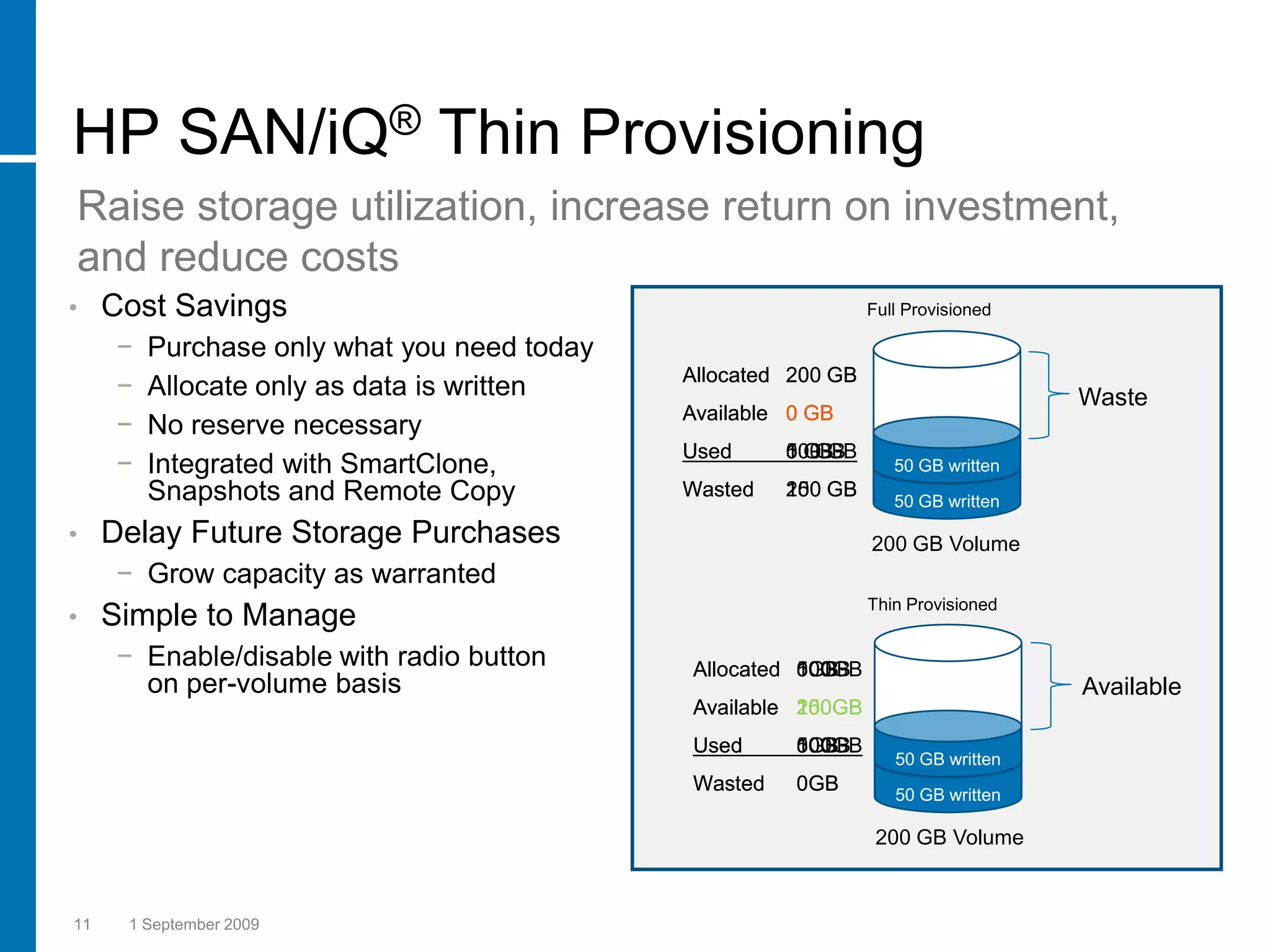
HP SAN/iQ® Thin Provisioning
Raise storage utilization, increase return on investment,
and reduce costs
•    Cost Savings                                                Full Provisioned

      −   Purchase only what you need today
      −   Allocate only as data is written    Allocated 200 GB
                                                                                    Waste
                                              Available 0 GB
      −   No reserve necessary
                                              Used     100 GB
                                                       0 GB
                                                       50 GB
      −   Integrated with SmartClone,                               50 GB written
          Snapshots and Remote Copy           Wasted   100
                                                       150
                                                       200 GB
                                                                    50 GB written

•    Delay Future Storage Purchases                              200 GB Volume
      − Grow capacity as warranted
                                                                 Thin Provisioned
•    Simple to Manage
      − Enable/disable with radio button      Allocated 0GB
                                                        100GB
                                                        50GB
        on per-volume basis                                                         Available
                                              Available 200GB
                                                        100GB
                                                        150GB
                                              Used      100GB
                                                        50GB
                                                        0GB
                                                                    50 GB written
                                              Wasted    0GB         50 GB written

                                                                  200 GB Volume


11    1 September 2009
HP SAN/iQ® SmartClone™ Technology
Cost efficient volume copies that allow for quick provisioning

•    Realize cost savings through               HP SAN/iQ® Cluster
     cloning
      − No duplicate data, only changes
        are stored
      − Ideal for storing system images
      − Instant provisioning of volume copies
        for test and development
      − Testing can be done with real data
      − No impact to production


                                                  SmartClone Volumes


12    1 September 2009
HP SAN/iQ® Snapshots
Point-in-time, space-efficient snapshots for backup
and recovery
•    Simplified Backup and Recovery       SAN/iQ Cluster
      − Point-in-time volume copies
      − Scheduled, ad hoc or scripted
•    Functional
      − Volume rollback                  1:00
      − Recover granular data
      − Backup integration
          • Microsoft VSS
          • VMware VCB
•    Space Efficient                      1:00
      − Thin provisioned always
                                          2:00
      − Delta changes only
      − No snap reservation               3:00


13    1 September 2009
HP SAN/iQ® Remote Copy
Time and space-efficient asynchronous replication
for disaster recovery
•    Asynchronous Replication                                                     Recovery
                                                                                   Server
      −   Per volume basis
      −   Scheduled or manual
      −   Thin provisioned                    SAN 1
      −   No reserve space required
                                                                         SAN 2
      −   Incremental failback


                                      (Primary)
                                        Vol_1
•    Simple to Manage


                                                                            (Remote
                                                                            (Primary
                                                                              Vol_1
                                                                             Vol_1
      − Bandwidth management


                                                                                )
                                                                                )
      − Failover/Failback Wizard

                                       1:00            Baseline Copy

                                       2:00
                                                      Incremental Copy

                                       3:00
                                                      Incremental Copy


14    1 September 2009
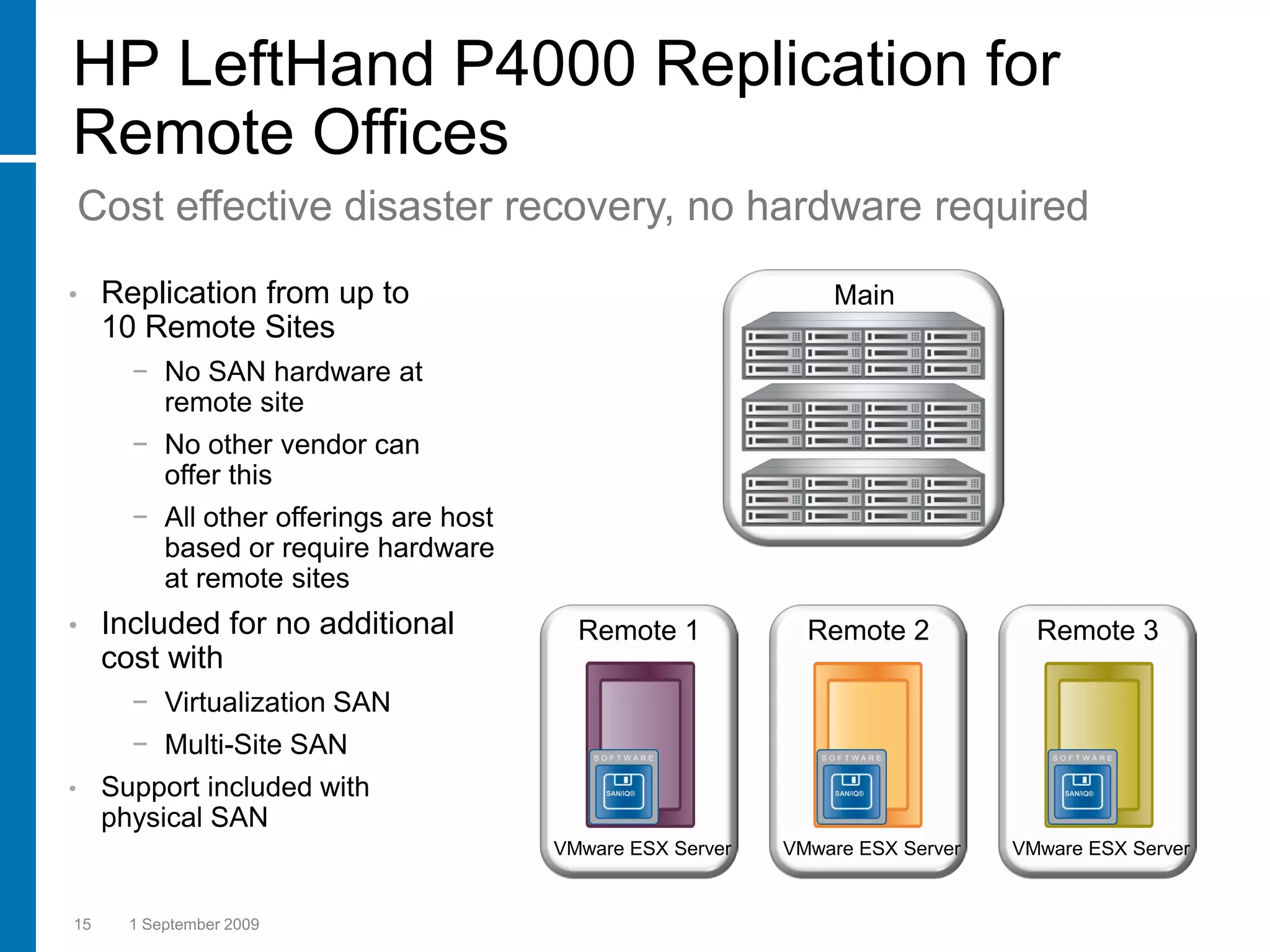
HP LeftHand P4000 Replication for
Remote Offices
    Cost effective disaster recovery, no hardware required
•    Replication from up to                                     Main
     10 Remote Sites
       − No SAN hardware at
         remote site
       − No other vendor can
         offer this
       − All other offerings are host
         based or require hardware
         at remote sites
•    Included for no additional           Remote 1            Remote 2            Remote 3
     cost with
       − Virtualization SAN
       − Multi-Site SAN
•    Support included with                   SAN/iQ®            SAN/iQ®              SAN/iQ®


     physical SAN
                                        VMware ESX Server   VMware ESX Server   VMware ESX Server


15     1 September 2009
HP LeftHand
P4000 SAN
Solution
Product Offering
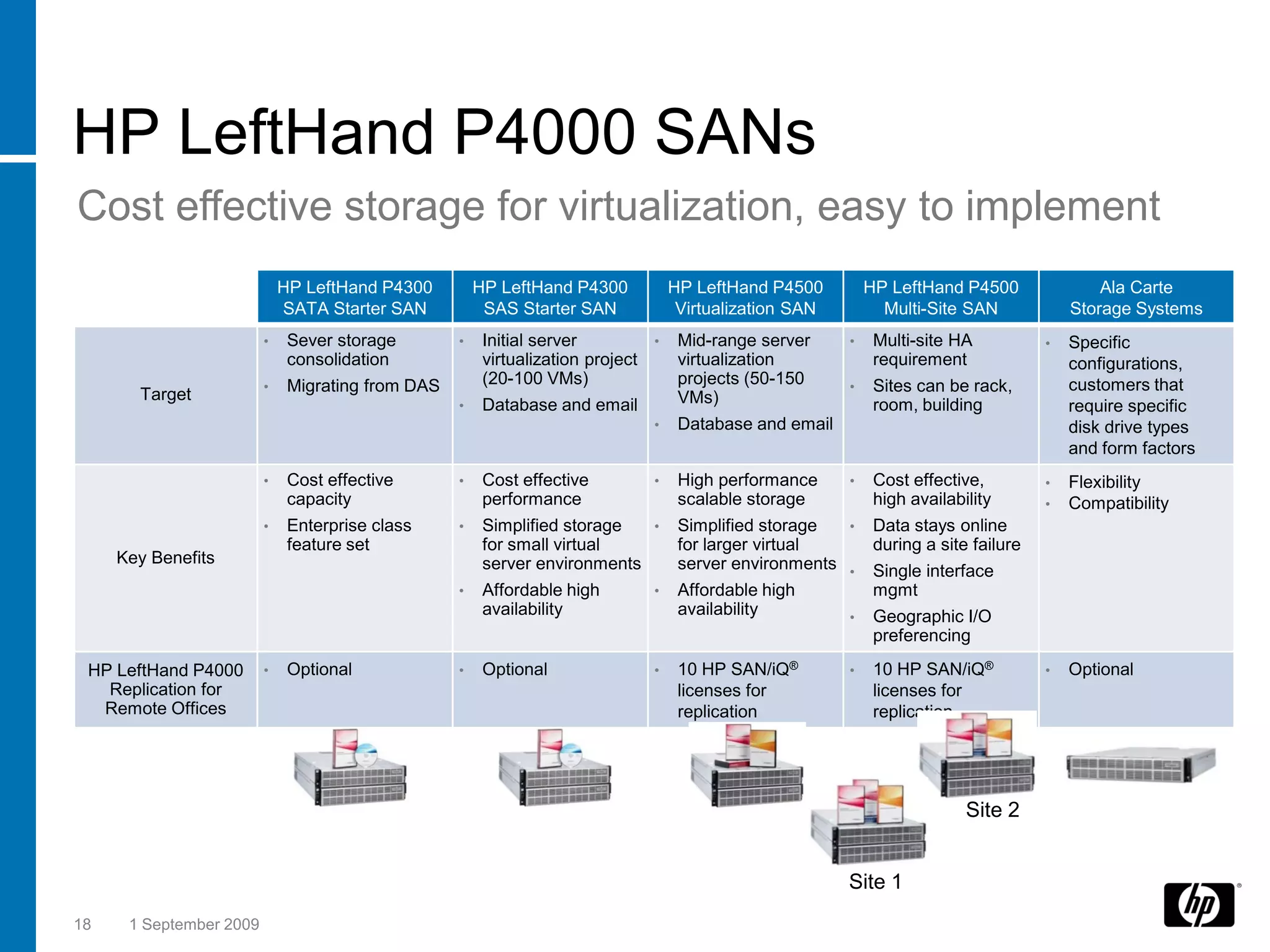
HP LeftHand P4000 SANs
Cost effective storage for virtualization, easy to implement
                            HP LeftHand P4300   HP LeftHand P4300   HP LeftHand P4500      HP LeftHand P4500           Ala Carte
                            SATA Starter SAN     SAS Starter SAN     Virtualization SAN      Multi-Site SAN        Storage Systems

        Disk Drives             16 - 320            16 - 320             24 - 480                  48 - 960             Varies

     Starting Capacity      12.0 TB 7.2K SATA    4.8 TB 15K SAS      10.8 TB 15K SAS        21.6 TB 15K SAS             Varies

     Dual Active/Active                                                                                                Requires
        Controllers                                                                                
                                                                                                                       2 Nodes
     Dual Active/Active
       Site Failover                                                                                  

       Every SAN/iQ®
      feature included                                                                                                 

 3 Yrs Basic Support                                                                                           1 yr Basic Support

 HP LeftHand P4000
   Replication for              Optional            Optional                                                         Optional
  Remote Offices


                                                                                                          Site 2


                                                                                          Site 1
17       1 September 2009
HP LeftHand P4000 SANs
Cost effective storage for virtualization, easy to implement
                             HP LeftHand P4300         HP LeftHand P4300           HP LeftHand P4500         HP LeftHand P4500                Ala Carte
                             SATA Starter SAN           SAS Starter SAN             Virtualization SAN         Multi-Site SAN             Storage Systems
                         •    Sever storage        •    Initial server         •    Mid-range server     •    Multi-site HA           •   Specific
                              consolidation             virtualization project      virtualization            requirement                 configurations,
                         •    Migrating from DAS        (20-100 VMs)                projects (50-150     •    Sites can be rack,          customers that
       Target                                                                       VMs)
                                                   •    Database and email                                    room, building              require specific
                                                                               •    Database and email                                    disk drive types
                                                                                                                                          and form factors
                         •    Cost effective       •    Cost effective         •    High performance     •    Cost effective,         •   Flexibility
                              capacity                  performance                 scalable storage          high availability       •   Compatibility
                         •    Enterprise class     •    Simplified storage  •       Simplified storage  •     Data stays online
                              feature set               for small virtual           for larger virtual        during a site failure
     Key Benefits                                       server environments         server environments •     Single interface
                                                   •    Affordable high        •    Affordable high           mgmt
                                                        availability                availability         •    Geographic I/O
                                                                                                              preferencing
 HP LeftHand P4000       •    Optional             •    Optional               •    10 HP SAN/iQ®        •    10 HP SAN/iQ®           •   Optional
   Replication for                                                                  licenses for              licenses for
  Remote Offices                                                                    replication               replication


                                                                                                                           Site 2


                                                                                                         Site 1
18    1 September 2009
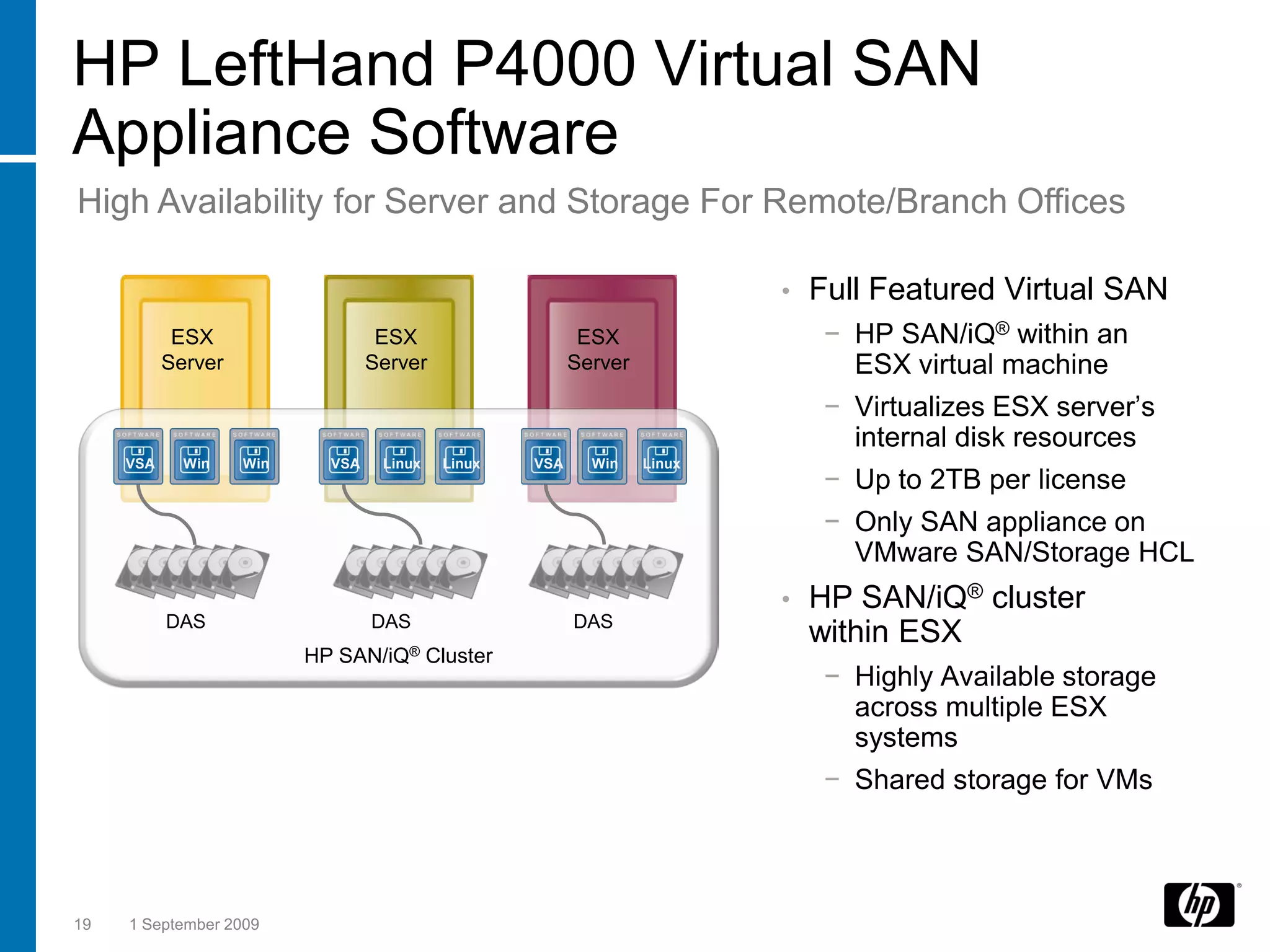
HP LeftHand P4000 Virtual SAN
Appliance Software
High Availability for Server and Storage For Remote/Branch Offices

                                                                          •   Full Featured Virtual SAN
            ESX                    ESX                    ESX                  − HP SAN/iQ® within an
           Server                 Server                 Server                  ESX virtual machine
                                                                               − Virtualizes ESX server’s
                                                                                 internal disk resources
     VSA     Win    Win     VSA    Linux   Linux   VSA     Win    Linux
                                                                               − Up to 2TB per license
                                                                               − Only SAN appliance on
                                                                                 VMware SAN/Storage HCL
                                                                          •   HP SAN/iQ® cluster
           DAS                    DAS                    DAS
                                                                              within ESX
                          HP SAN/iQ® Cluster
                                                                               − Highly Available storage
                                                                                 across multiple ESX
                                                                                 systems
                                                                               − Shared storage for VMs


19   1 September 2009
Technology for better business outcomes
HP Thin Client 2009
Product Portfolio


                                                                       Ben Timms
                                                                       HP Solutions Architect, PSG


© 2008 Hewlett-Packard Development Company, L.P.
The information contained herein is subject to change without notice
HP Thin Client 2009
A Thin Client
Primer


                                                                       Ben Timms
                                                                       HP Solutions Architect, PSG


© 2008 Hewlett-Packard Development Company, L.P.
The information contained herein is subject to change without notice
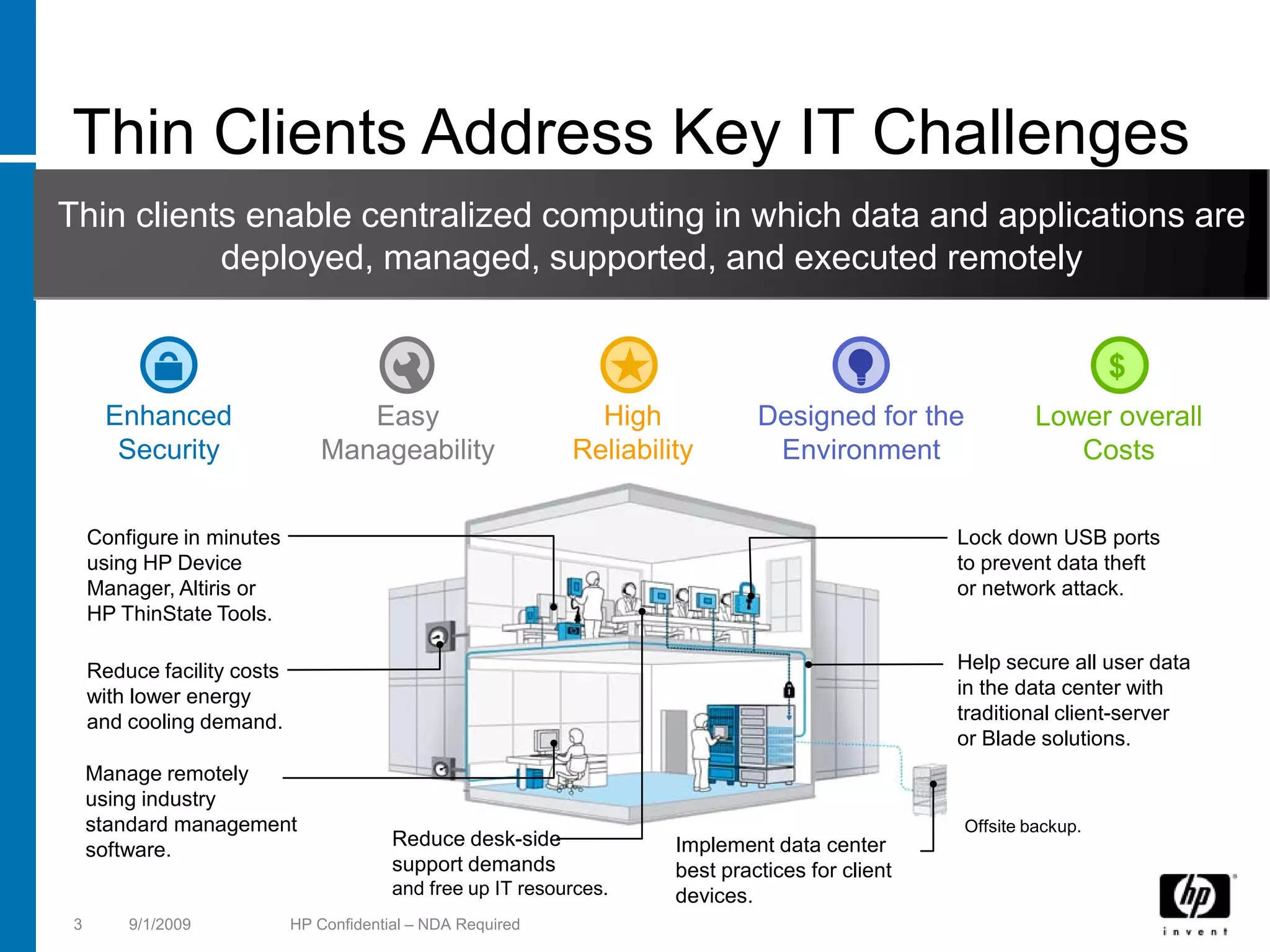
Thin Clients Address Key IT Challenges
Thin clients enable centralized computing in which data and applications are
           deployed, managed, supported, and executed remotely


                                                                                                                     $
      Enhanced                      Easy                        High            Designed for the            Lower overall
       Security                  Manageability                Reliability        Environment                   Costs


     Configure in minutes                                                                          Lock down USB ports
     using HP Device                                                                               to prevent data theft
     Manager, Altiris or                                                                           or network attack.
     HP ThinState Tools.

     Reduce facility costs                                                                         Help secure all user data
     with lower energy                                                                             in the data center with
     and cooling demand.                                                                           traditional client-server
                                                                                                   or Blade solutions.
     Manage remotely
     using industry
     standard management                                                                           Offsite backup.
                                          Reduce desk-side             Implement data center
     software.
                                          support demands              best practices for client
                                          and free up IT resources.    devices.
 3       9/1/2009            HP Confidential – NDA Required
How Thin Clients Work
Processing and storage of a PC is moved to a remote location
 for more security, higher reliability and easier manageability

    The application runs remotely on a
    server, virtual PC, or a blade PC.                        Apps Install
                                                              & Run on
    On server, virtual PC, or blade PC, the                   Server
    graphic is captured, compressed,
    encrypted and sent to the thin client.
                                                    Screen
    On thin client, the keyboard and mouse          Updates
    events are captured and transmitted to                         Keyboard &
    the server.                                                   Mouse events


    Brokers are used to allocate an
    available virtual PC or a blade PC to a         Applications
    thin client. Brokers are not needed in          Accessed
    server-based computing environment.             From Client


4     9/1/2009     HP Confidential – NDA Required
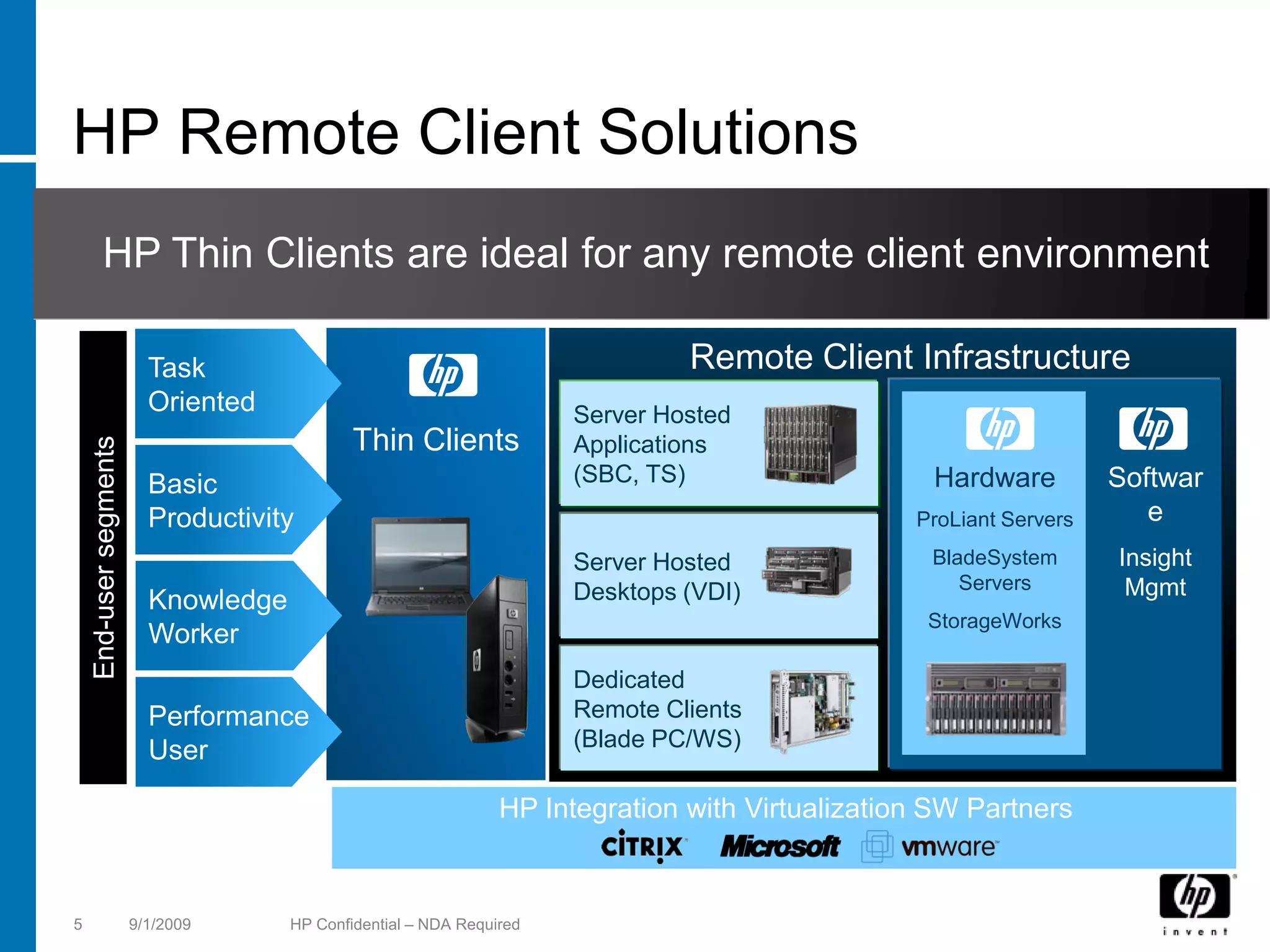
HP Remote Client Solutions
          HP Thin Clients are ideal for any remote client environment

                          Task                                                  Remote Client Infrastructure
                          Oriented                                     Server Hosted
                                              Thin Clients             Applications
    End-user segments


                          Basic                                        (SBC, TS)                   Hardware          Softwar
                          Productivity                                                            ProLiant Servers      e
                                                                       Server Hosted               BladeSystem       Insight
                                                                       Desktops (VDI)                 Servers         Mgmt
                          Knowledge
                                                                                                   StorageWorks
                          Worker
                                                                       Dedicated
                          Performance                                  Remote Clients
                          User                                         (Blade PC/WS)

                                                                 HP Integration with Virtualization SW Partners


5                       9/1/2009      HP Confidential – NDA Required
HP Thin Client Solution:                         SBC   HP VDI
                                                                HP Blade PC &
                                                                     CCI
                                                                                Mobile   HP Blade Wkst


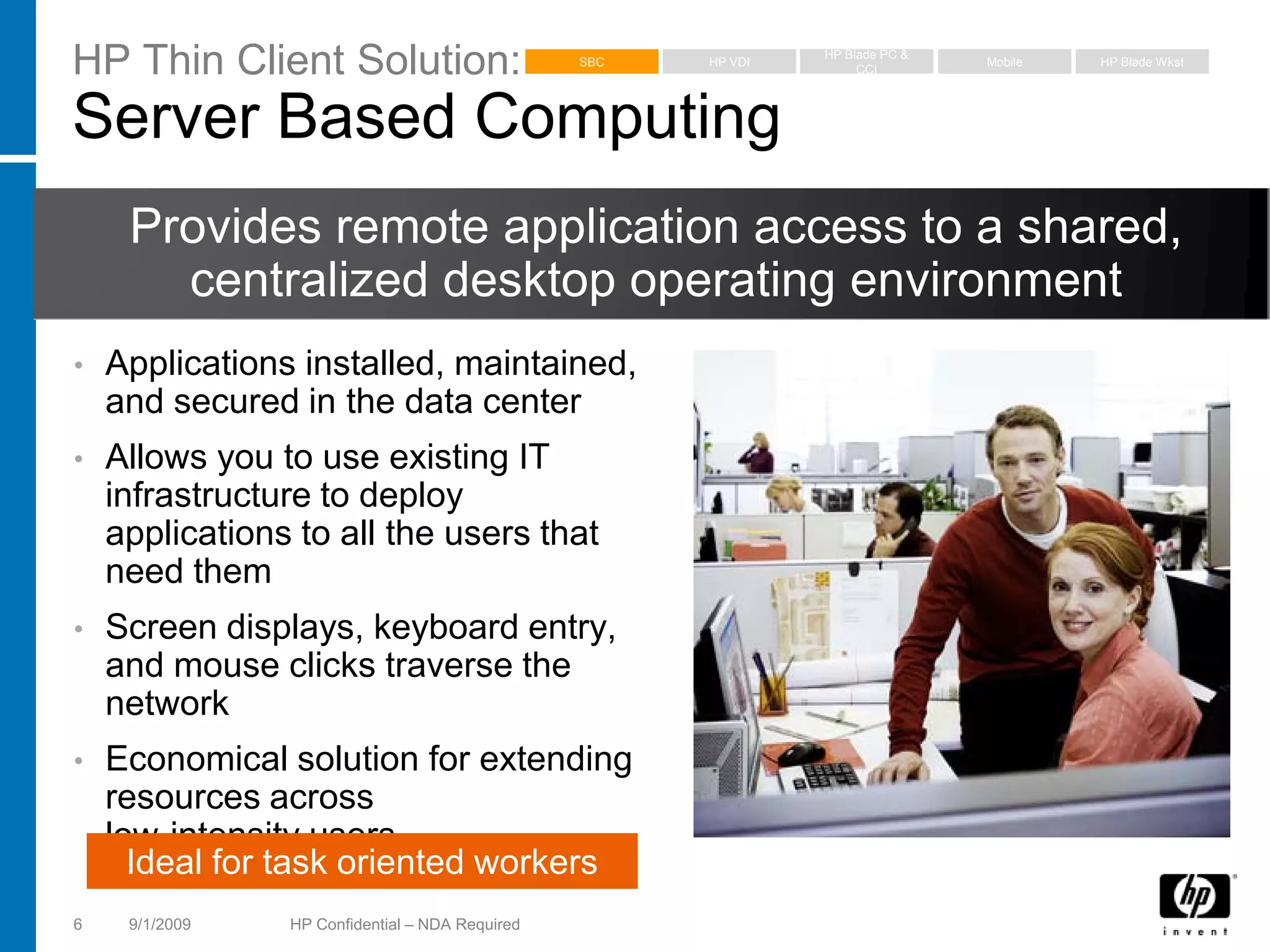
Server Based Computing
     Provides remote application access to a shared,
       centralized desktop operating environment
•   Applications installed, maintained,
    and secured in the data center
•   Allows you to use existing IT
    infrastructure to deploy
    applications to all the users that
    need them
•   Screen displays, keyboard entry,
    and mouse clicks traverse the
    network
•   Economical solution for extending
    resources across
    low-intensity users
      Ideal for task oriented workers
6    9/1/2009   HP Confidential – NDA Required
HP Thin Client Solution:                          SBC   HP VDI
                                                                 HP Blade PC &
                                                                      CCI
                                                                                 Mobile   HP Blade Wkst


HP Virtual Desktop Infrastructure (VDI)
    Provides fully functional and personalized desktops
               delivered across the network
•   Each virtual desktop is isolated
    and protected in the data
    center
•   Shares physical data center
    resources for optimal resource
    allocation through virtualization
•   Allows IT to maximize
    utilization, lower costs, and
    increase reliability
    Ideal for basic office productivity
    applications
7     9/1/2009   HP Confidential – NDA Required
HP Thin Client Solution:                         SBC   HP VDI
                                                                HP Blade PC &
                                                                     CCI
                                                                                Mobile   HP Blade Wkst


Mobile
     Users who value high need for security, mobility, and
    predominately work with process-oriented applications

•   Designed to be more
    secure than traditional
    notebook PCs
•   Choice of management
    tools to suit your specific
    requirements
•   Longer life cycle due to no
    moving parts

    Ideal high security for mobile
    end-users
8    9/1/2009   HP Confidential – NDA Required
HP Thin Client Solution:                          SBC   HP VDI
                                                                 HP Blade PC &
                                                                      CCI
                                                                                 Mobile   HP Blade Wkst


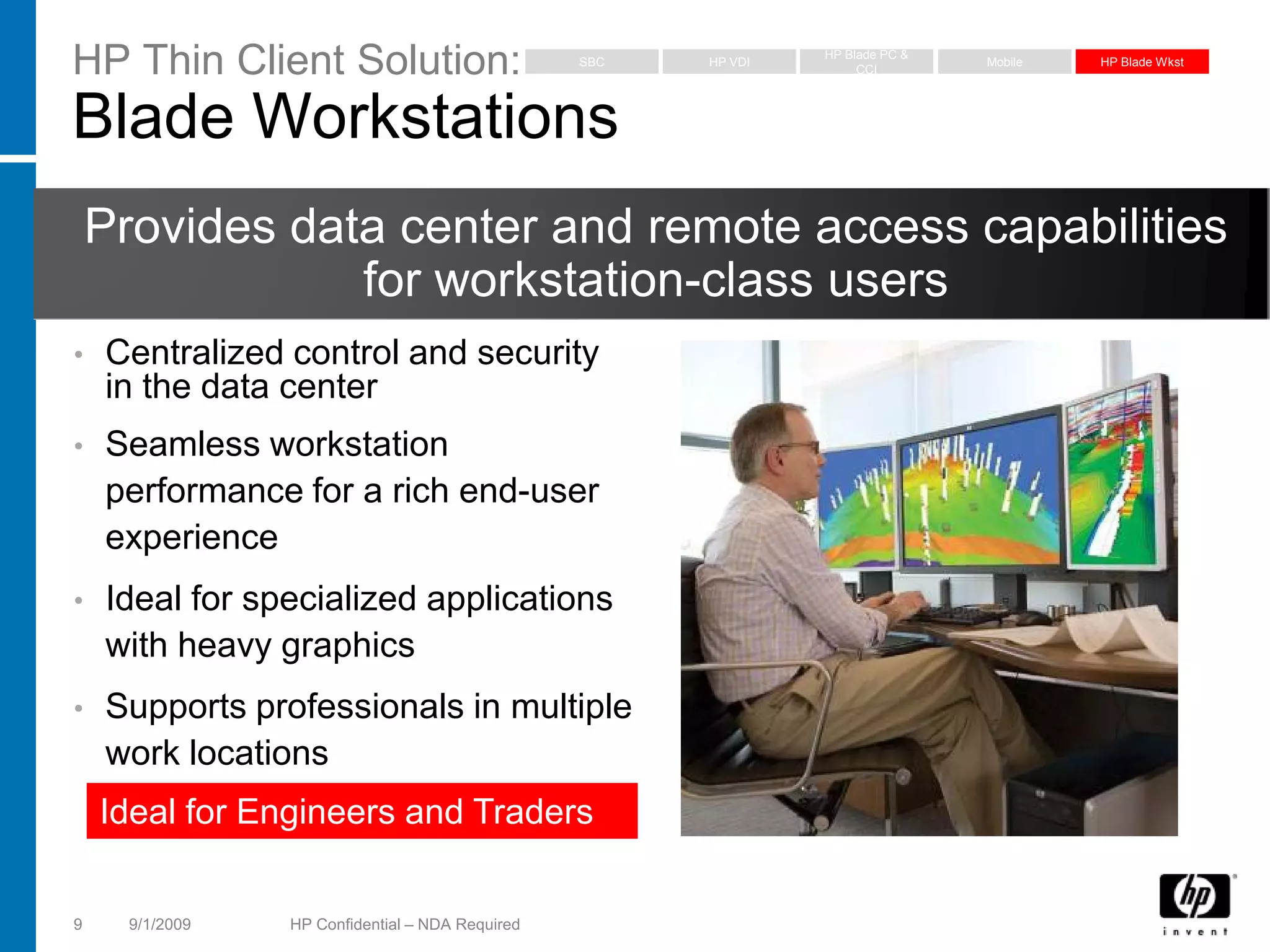
Blade Workstations
    Provides data center and remote access capabilities
                for workstation-class users
•   Centralized control and security
    in the data center
•   Seamless workstation
    performance for a rich end-user
    experience
•   Ideal for specialized applications
    with heavy graphics
•   Supports professionals in multiple
    work locations
    Ideal for Engineers and Traders


9     9/1/2009   HP Confidential – NDA Required
HP Manageability Products
Choose the management capabilities that are right for you


    •   HP ThinState
        Our simplest imaging solution
    •   HP Device Manager
        Our easy to use thin client management solution
    •   HP Client Automation
        Client management integrated with Business
        Service Automation
    •   Altiris DS
        Integrated thin client, PC and server management
    •   Microsoft SCCM
        Grow our support for Microsoft management
        solutions to benefit HP


Because easily managing clients are important for you, HP ThinState, HP Device Manager, HP Client
Automation Starter and Altiris Deployment Solution are included with the purchase of every HP thin client
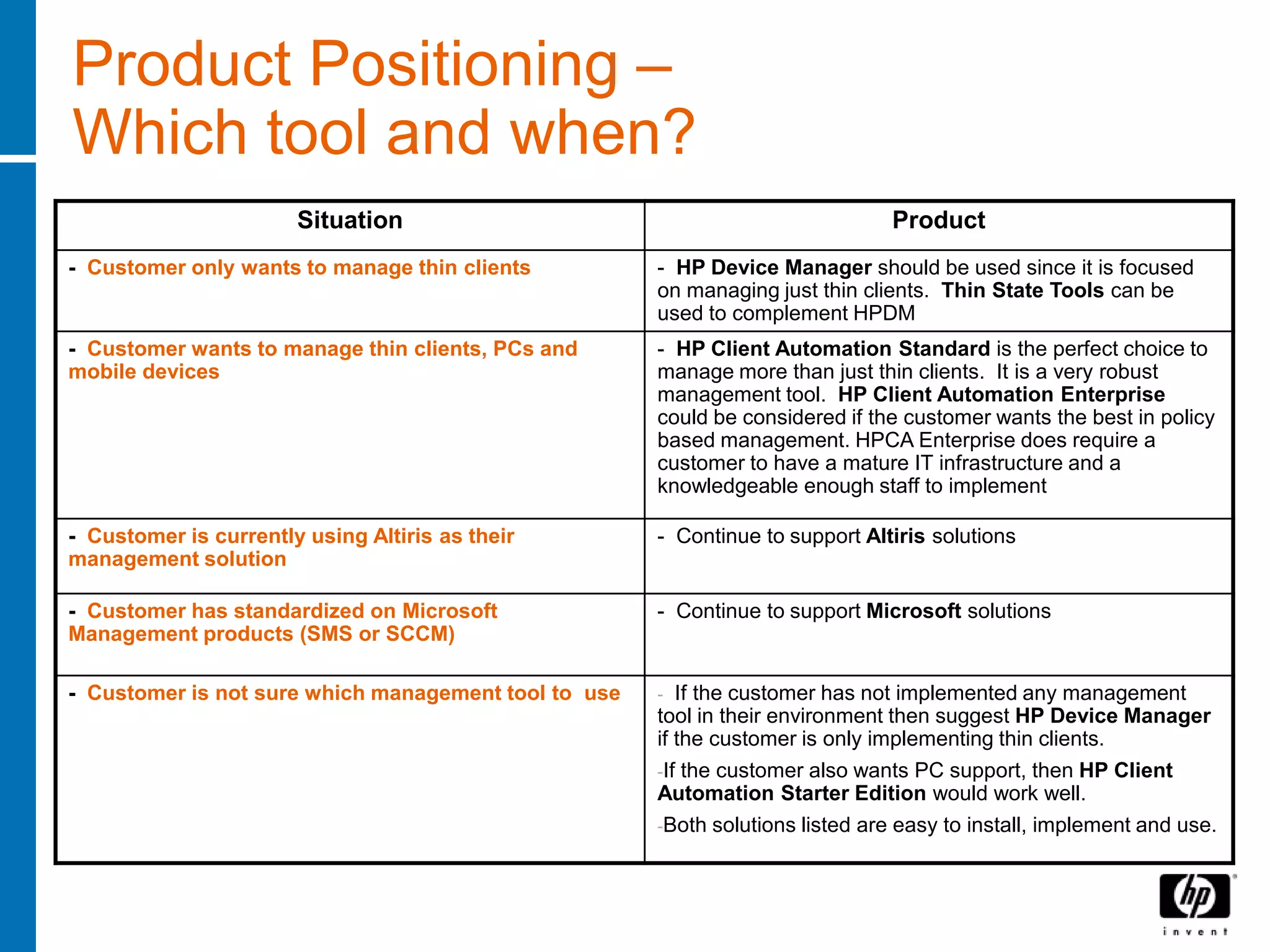
Product Positioning –
Which tool and when?
                       Situation                                                Product
- Customer only wants to manage thin clients          - HP Device Manager should be used since it is focused
                                                      on managing just thin clients. Thin State Tools can be
                                                      used to complement HPDM
- Customer wants to manage thin clients, PCs and      - HP Client Automation Standard is the perfect choice to
mobile devices                                        manage more than just thin clients. It is a very robust
                                                      management tool. HP Client Automation Enterprise
                                                      could be considered if the customer wants the best in policy
                                                      based management. HPCA Enterprise does require a
                                                      customer to have a mature IT infrastructure and a
                                                      knowledgeable enough staff to implement

- Customer is currently using Altiris as their        - Continue to support Altiris solutions
management solution

- Customer has standardized on Microsoft              - Continue to support Microsoft solutions
Management products (SMS or SCCM)

- Customer is not sure which management tool to use   -  If the customer has not implemented any management
                                                      tool in their environment then suggest HP Device Manager
                                                      if the customer is only implementing thin clients.
                                                      -If the customer also wants PC support, then HP Client
                                                      Automation Starter Edition would work well.
                                                      -Both solutions listed are easy to install, implement and use.
2009
Thin Client Portfolio


© 2008 Hewlett-Packard Development Company, L.P.
The information contained herein is subject to change without notice
2009 HP Thin Client Portfolio
                                  Essential               Mainstream                          Flexible                                       Specialty
                                 The Simplest         Enhanced Features                 Powerful, Flexible,             High performance                       Mobile
                                 Solution at our        for Mainstream                     Innovative!                    Superb Remote                    More secure,
                                  Best Price             Business Use                                                       Computing                   reliable, thin client
                                                                                                                               Experience
                                                                                                        HP t5630                                                      HP 6720t
                                                                                                        HP t5730                      HP gt7725                       HP 2533t
                                                                                                        HP t5735
                                                                                                                                    HP ThinPro GT                   Windows XPe
                                                                   HP t5540                          Windows XPe
                                                                   HP t5545
                                                                                                      Debian Linux
                                                                                                                        Features:                       Features:
                                                                  HP ThinPro
                                                                                                                        • Superior processing           • Highly configurable OS
                                        HP t5145                                       Features:
                                                               Windows CE 6.0                                             power                         • 15.4” diag. or
                                                                                       • Highly configurable OS             o 2.3 GHz cpu                 12.1” diag. WXGA
                                     HP ThinConnect
                                                                                       • PCI Expansion                      o Dual Channel
                                                         Features:                                                                                      • Support for local apps
                                                                                         (t573x models only)                  memory
                                                         • IE or Firefox                                                • Native Dual Head              • Write Filter & Firewall
                             Features:                                                 • Support for local apps                                         • PC Class IE browser
                                                           browser                     • Write Filter & Firewall
                                                                                                                          (2560x1600 per display)
                             •   Stateless mode          • Terminal                                                     • Quad head avail.              • Wired LAN
                                                                                         (XPe)
                             •   ICA                       Emulation                                                      (1920x1200 per display)       • Integrated Wireless
                                                                                       • PC Class IE or Firefox
                             •   RDP                     • Media Player or                                              • Multi-display rotation        • PC Card reader
                                                                                         browser
                             •   Support for                                                                            • Ideal for VDI & blade         • Optional Smart Card
Price and Performance


                                                           Flash Player                • Integrated Wireless
                                 leading VDI             • ICA                           (select t5730 models)            environments                    Reader (2533t only)
                                 brokers*                                              • Terminal Emulation             • Preinstalled Remote           • Terminal emulation
                                                         • RDP
                             • Essential                                               • Windows Media Player             Graphics Software             • Windows Media Player
                                                         • Support for
                                                                                         (XPe)                          • Preinstalled Session          • ICA & RDP
                               peripheral                  leading VDI
                                                                                       • ICA & RDP                        Allocation Manager            • Support for leading VDI
                               support                     brokers*                                                     • Terminal emulation              brokers*
                                                                                       • Support for leading VDI
                                                         • Wide peripheral               brokers*                       • ICA & RDP                     • Broad peripheral
                                                           support                     • Broad peripheral support       • Support for leading VDI         support
                                                                                                                          brokers*
                        Flexibility & Functionality
                        13         9/1/2009           HP Confidential – NDA Required                    * Broker availability may vary between models
Essential Thin Clients
The Simplest
Solution at our Best
Price

HP t5145


© 2008 Hewlett-Packard Development Company, L.P.
The information contained herein is subject to change without notice
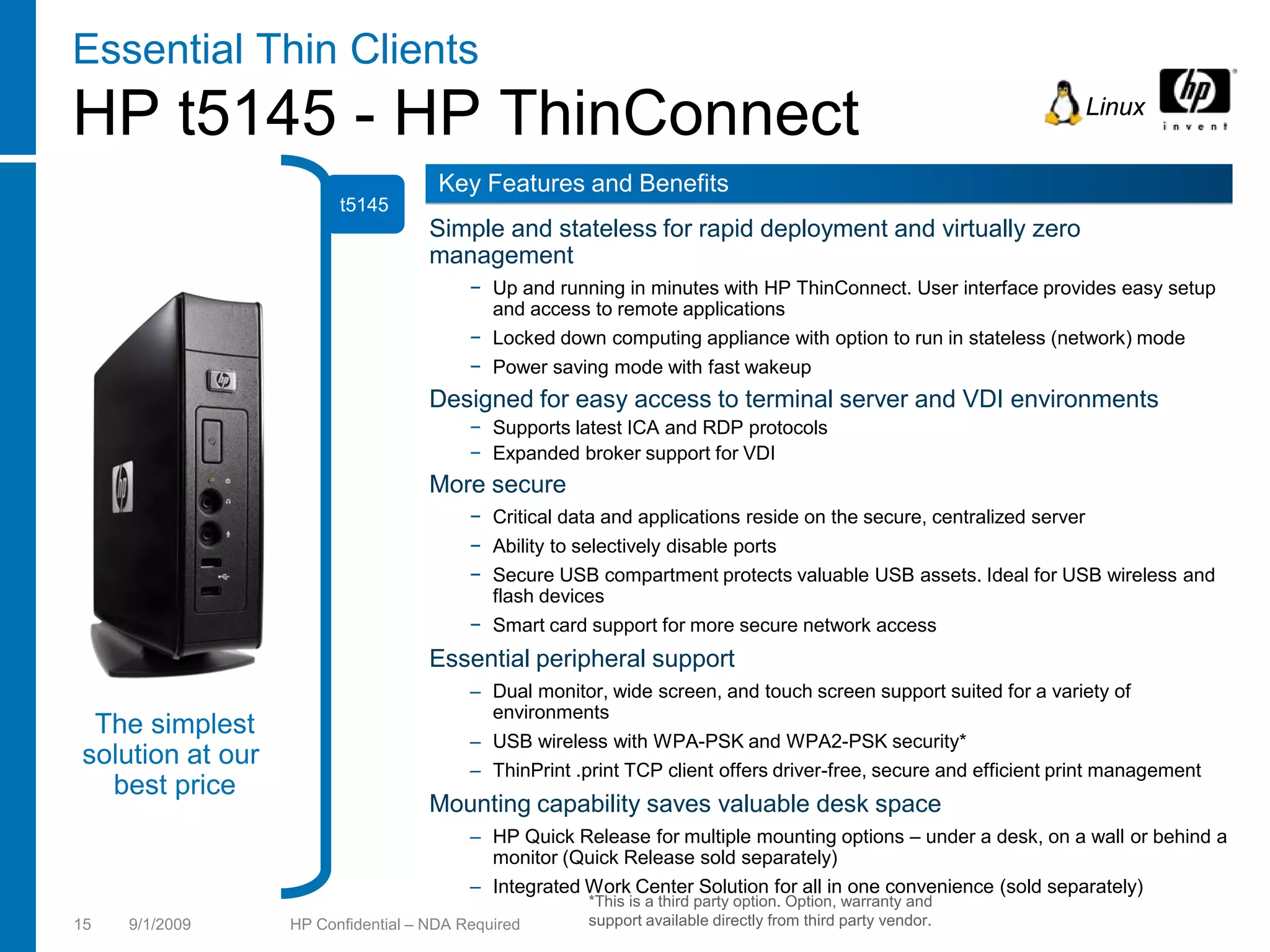
Essential Thin Clients
HP t5145 - HP ThinConnect                                                                                         Linux


                                     Key Features and Benefits
                        t5145
                                    Simple and stateless for rapid deployment and virtually zero
                                    management
                                         − Up and running in minutes with HP ThinConnect. User interface provides easy setup
                                           and access to remote applications
                                         − Locked down computing appliance with option to run in stateless (network) mode
                                         − Power saving mode with fast wakeup
                                    Designed for easy access to terminal server and VDI environments
                                         − Supports latest ICA and RDP protocols
                                         − Expanded broker support for VDI
                                    More secure
                                         − Critical data and applications reside on the secure, centralized server
                                         − Ability to selectively disable ports
                                         − Secure USB compartment protects valuable USB assets. Ideal for USB wireless and
                                           flash devices
                                         − Smart card support for more secure network access
                                    Essential peripheral support
                                         – Dual monitor, wide screen, and touch screen support suited for a variety of
                                           environments
 The simplest
                                         – USB wireless with WPA-PSK and WPA2-PSK security*
solution at our                          – ThinPrint .print TCP client offers driver-free, secure and efficient print management
  best price
                                    Mounting capability saves valuable desk space
                                         – HP Quick Release for multiple mounting options – under a desk, on a wall or behind a
                                           monitor (Quick Release sold separately)
                                         – Integrated Work Center Solution for all in one convenience (sold separately)
                                                       *This is a third party option. Option, warranty and
15   9/1/2009     HP Confidential – NDA Required       support available directly from third party vendor.
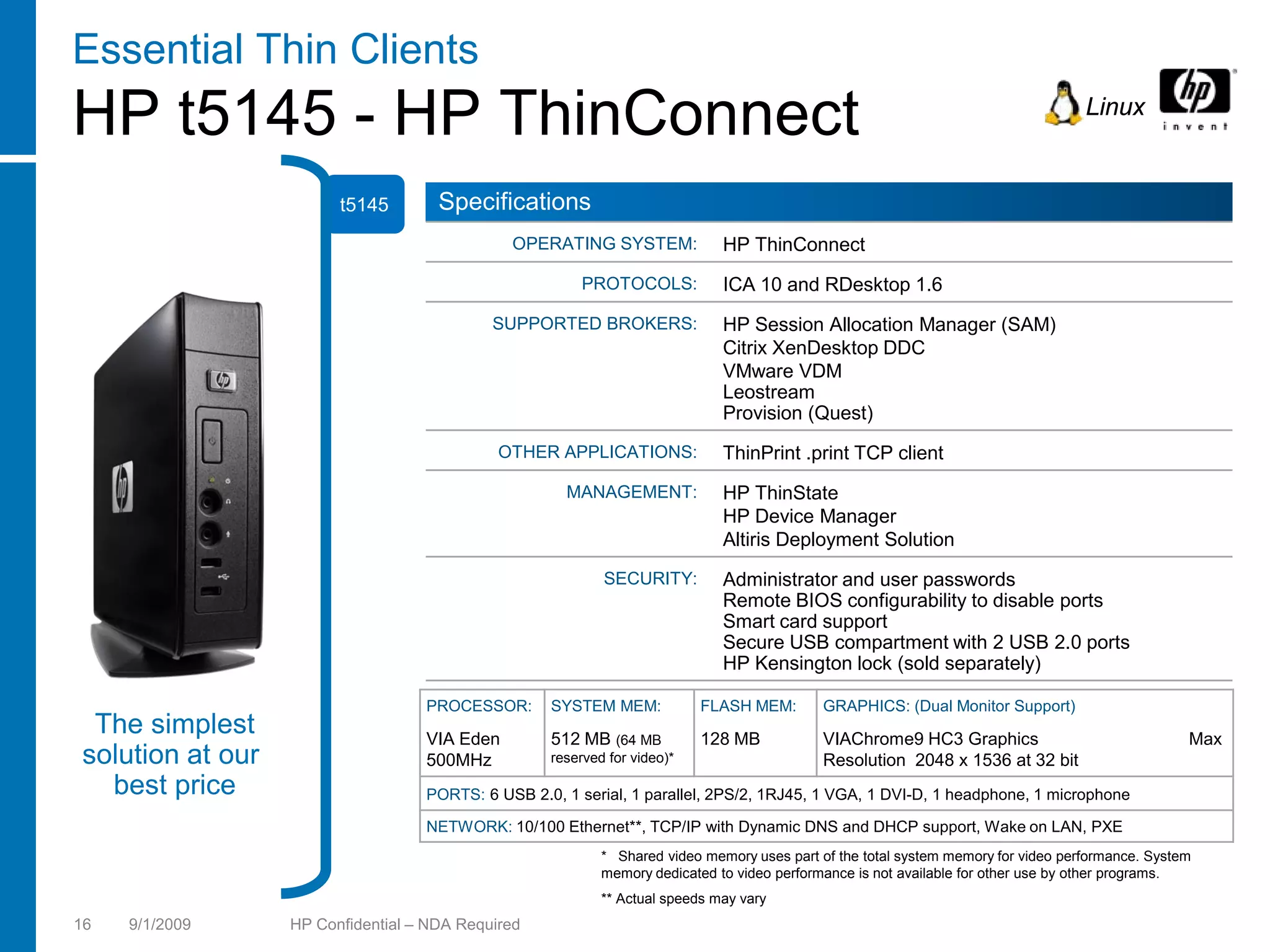
Essential Thin Clients
HP t5145 - HP ThinConnect                                                                                                          Linux


                        t5145        Specifications
                                              OPERATING SYSTEM:              HP ThinConnect
                                                        PROTOCOLS:           ICA 10 and RDesktop 1.6
                                            SUPPORTED BROKERS:               HP Session Allocation Manager (SAM)
                                                                             Citrix XenDesktop DDC
                                                                             VMware VDM
                                                                             Leostream
                                                                             Provision (Quest)
                                             OTHER APPLICATIONS:             ThinPrint .print TCP client
                                                     MANAGEMENT:             HP ThinState
                                                                             HP Device Manager
                                                                             Altiris Deployment Solution
                                                           SECURITY:         Administrator and user passwords
                                                                             Remote BIOS configurability to disable ports
                                                                             Smart card support
                                                                             Secure USB compartment with 2 USB 2.0 ports
                                                                             HP Kensington lock (sold separately)

                                   PROCESSOR:      SYSTEM MEM:            FLASH MEM:        GRAPHICS: (Dual Monitor Support)
 The simplest                      VIA Eden        512 MB (64 MB          128 MB            VIAChrome9 HC3 Graphics                               Max
solution at our                    500MHz          reserved for video)*                     Resolution 2048 x 1536 at 32 bit
  best price                       PORTS: 6 USB 2.0, 1 serial, 1 parallel, 2PS/2, 1RJ45, 1 VGA, 1 DVI-D, 1 headphone, 1 microphone

                                   NETWORK: 10/100 Ethernet**, TCP/IP with Dynamic DNS and DHCP support, Wake on LAN, PXE
                                                           * Shared video memory uses part of the total system memory for video performance. System
                                                           memory dedicated to video performance is not available for other use by other programs.
                                                           ** Actual speeds may vary
16   9/1/2009     HP Confidential – NDA Required
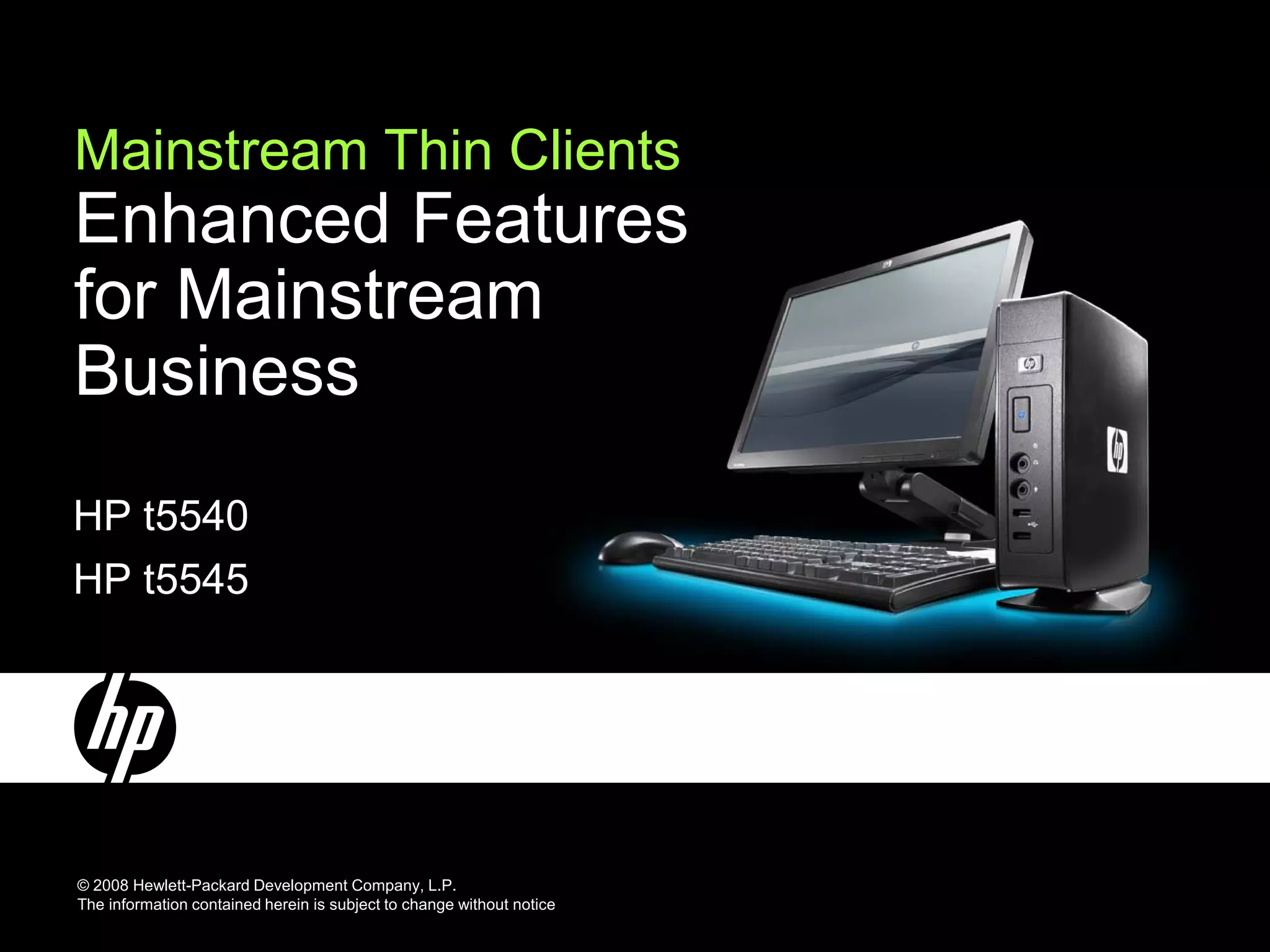
Mainstream Thin Clients
Enhanced Features
for Mainstream
Business
HP t5540
HP t5545


© 2008 Hewlett-Packard Development Company, L.P.
The information contained herein is subject to change without notice
Mainstream Thin Clients
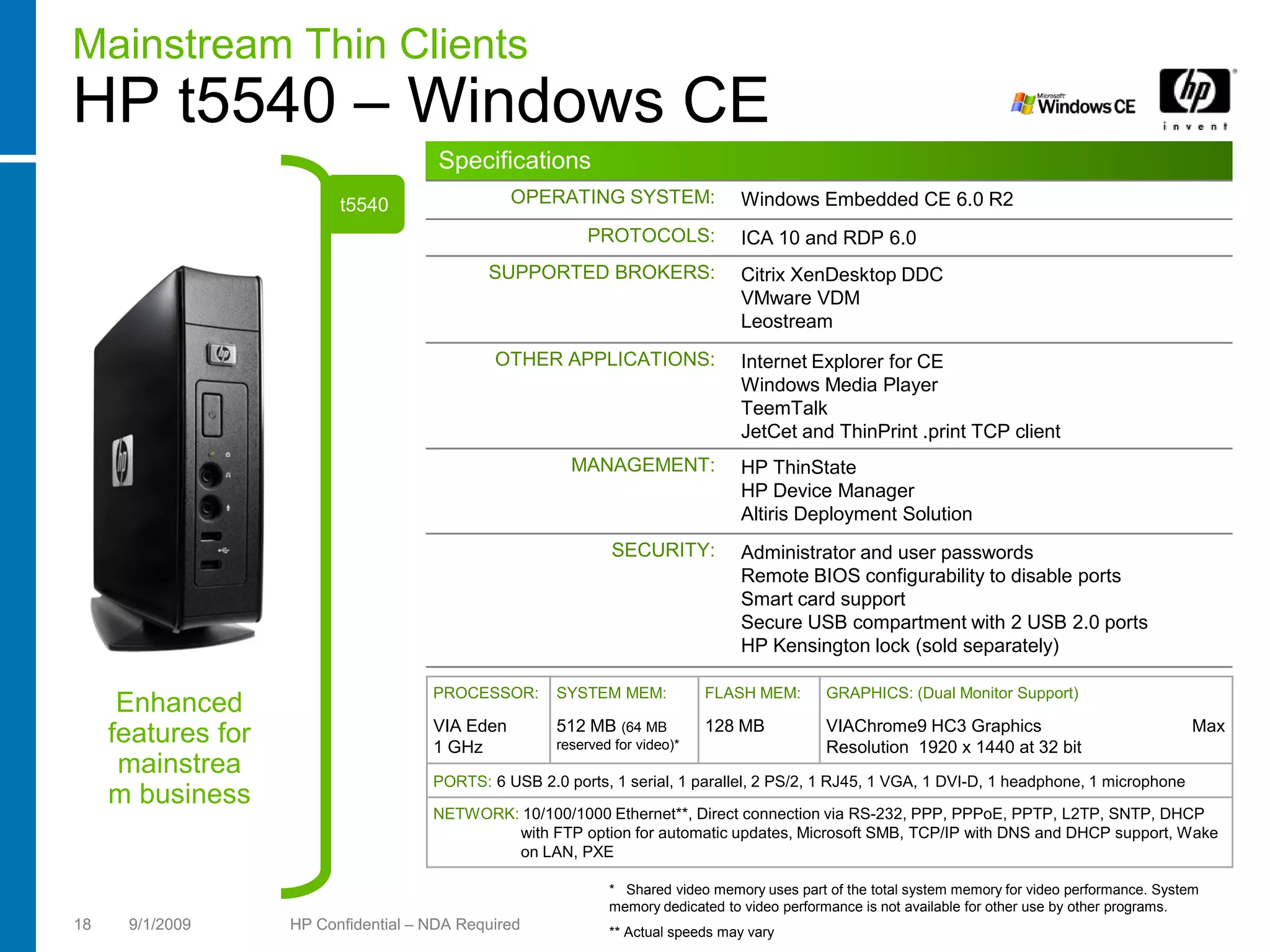
HP t5540 – Windows CE
                                       Specifications
                          t5540                  OPERATING SYSTEM:               Windows Embedded CE 6.0 R2
                                                           PROTOCOLS:            ICA 10 and RDP 6.0
                                             SUPPORTED BROKERS:                  Citrix XenDesktop DDC
                                                                                 VMware VDM
                                                                                 Leostream
                                              OTHER APPLICATIONS:                Internet Explorer for CE
                                                                                 Windows Media Player
                                                                                 TeemTalk
                                                                                 JetCet and ThinPrint .print TCP client
                                                        MANAGEMENT:              HP ThinState
                                                                                 HP Device Manager
                                                                                 Altiris Deployment Solution
                                                              SECURITY:          Administrator and user passwords
                                                                                 Remote BIOS configurability to disable ports
                                                                                 Smart card support
                                                                                 Secure USB compartment with 2 USB 2.0 ports
                                                                                 HP Kensington lock (sold separately)

                                      PROCESSOR:      SYSTEM MEM:            FLASH MEM:       GRAPHICS: (Dual Monitor Support)
      Enhanced
                                      VIA Eden        512 MB (64 MB          128 MB           VIAChrome9 HC3 Graphics                               Max
     features for                     1 GHz           reserved for video)*                    Resolution 1920 x 1440 at 32 bit
      mainstrea                       PORTS: 6 USB 2.0 ports, 1 serial, 1 parallel, 2 PS/2, 1 RJ45, 1 VGA, 1 DVI-D, 1 headphone, 1 microphone
     m business
                                      NETWORK: 10/100/1000 Ethernet**, Direct connection via RS-232, PPP, PPPoE, PPTP, L2TP, SNTP, DHCP
                                              with FTP option for automatic updates, Microsoft SMB, TCP/IP with DNS and DHCP support, Wake
                                              on LAN, PXE

                                                              * Shared video memory uses part of the total system memory for video performance. System
                                                              memory dedicated to video performance is not available for other use by other programs.
18    9/1/2009      HP Confidential – NDA Required            ** Actual speeds may vary
Mainstream Thin Clients
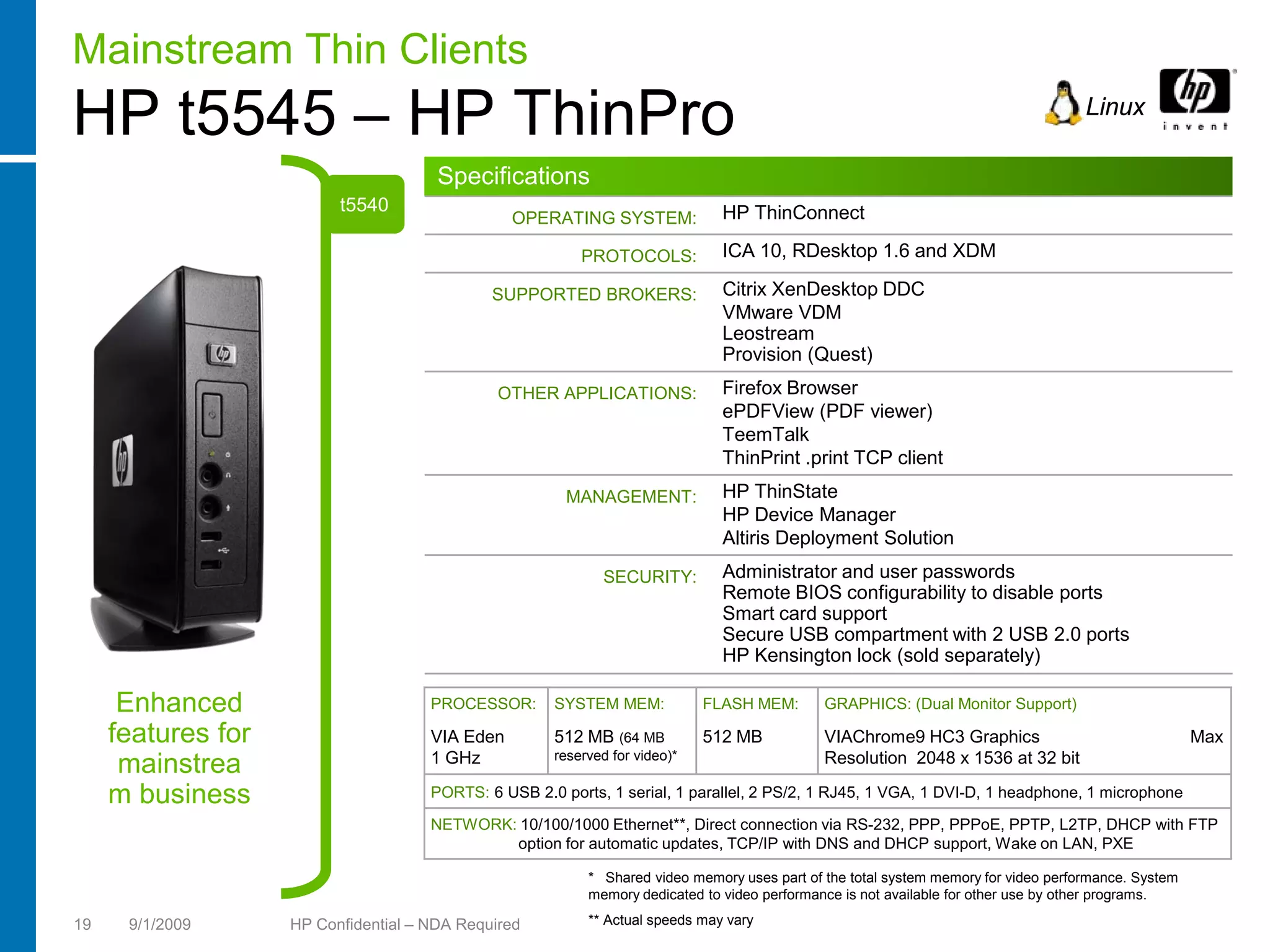
HP t5545 – HP ThinPro                                                                                                                Linux

                                       Specifications
                          t5540                                                HP ThinConnect
                                                 OPERATING SYSTEM:

                                                          PROTOCOLS:           ICA 10, RDesktop 1.6 and XDM

                                              SUPPORTED BROKERS:               Citrix XenDesktop DDC
                                                                               VMware VDM
                                                                               Leostream
                                                                               Provision (Quest)
                                               OTHER APPLICATIONS:             Firefox Browser
                                                                               ePDFView (PDF viewer)
                                                                               TeemTalk
                                                                               ThinPrint .print TCP client
                                                        MANAGEMENT:            HP ThinState
                                                                               HP Device Manager
                                                                               Altiris Deployment Solution
                                                             SECURITY:         Administrator and user passwords
                                                                               Remote BIOS configurability to disable ports
                                                                               Smart card support
                                                                               Secure USB compartment with 2 USB 2.0 ports
                                                                               HP Kensington lock (sold separately)

      Enhanced                        PROCESSOR:      SYSTEM MEM:            FLASH MEM:       GRAPHICS: (Dual Monitor Support)

     features for                     VIA Eden        512 MB (64 MB          512 MB           VIAChrome9 HC3 Graphics                                 Max
                                      1 GHz           reserved for video)*                    Resolution 2048 x 1536 at 32 bit
      mainstrea
     m business                       PORTS: 6 USB 2.0 ports, 1 serial, 1 parallel, 2 PS/2, 1 RJ45, 1 VGA, 1 DVI-D, 1 headphone, 1 microphone

                                      NETWORK: 10/100/1000 Ethernet**, Direct connection via RS-232, PPP, PPPoE, PPTP, L2TP, DHCP with FTP
                                              option for automatic updates, TCP/IP with DNS and DHCP support, Wake on LAN, PXE

                                                           * Shared video memory uses part of the total system memory for video performance. System
                                                           memory dedicated to video performance is not available for other use by other programs.

19    9/1/2009      HP Confidential – NDA Required         ** Actual speeds may vary
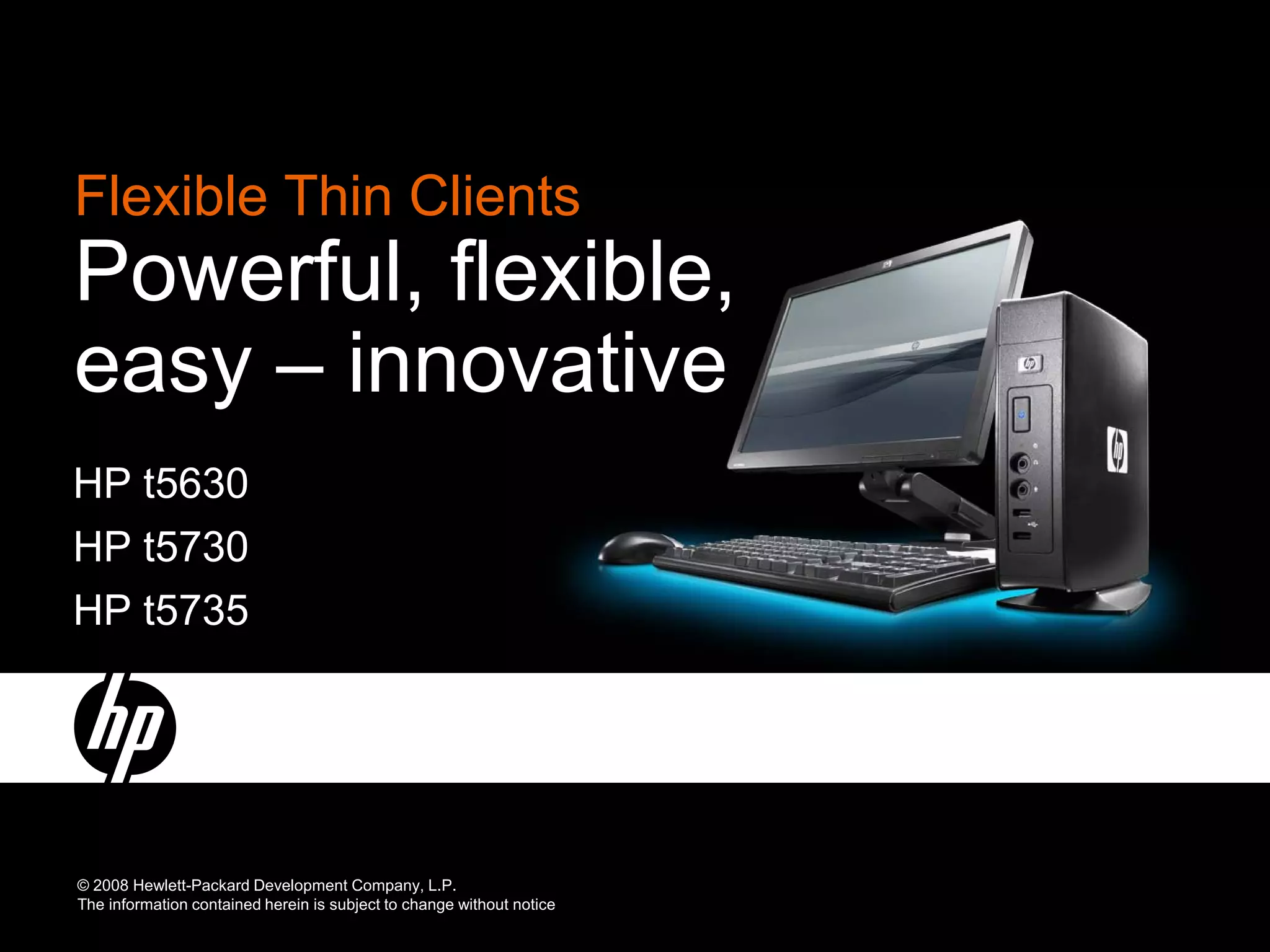
Flexible Thin Clients
Powerful, flexible,
easy – innovative
HP t5630
HP t5730
HP t5735


© 2008 Hewlett-Packard Development Company, L.P.
The information contained herein is subject to change without notice
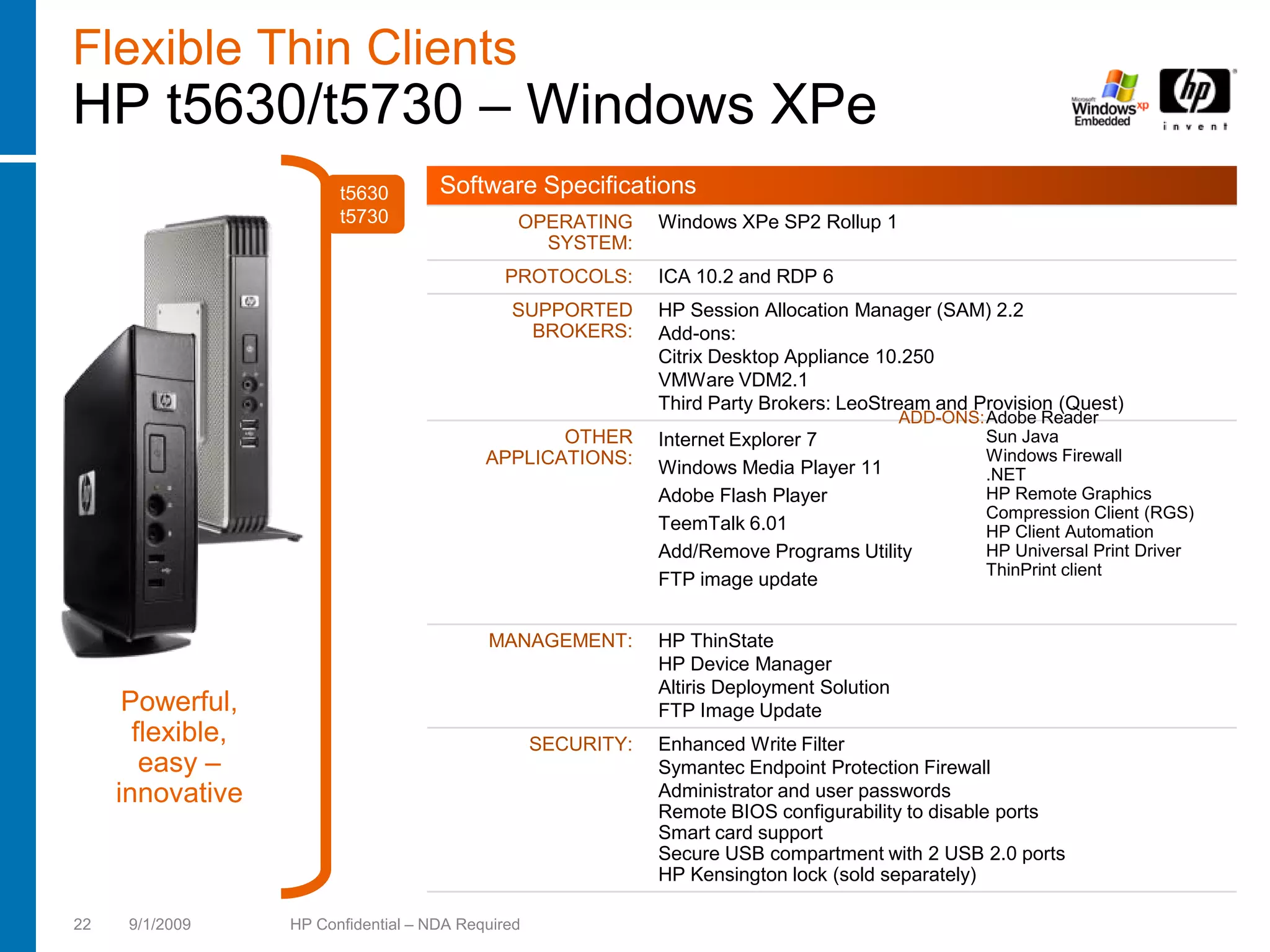
Flexible Thin Clients
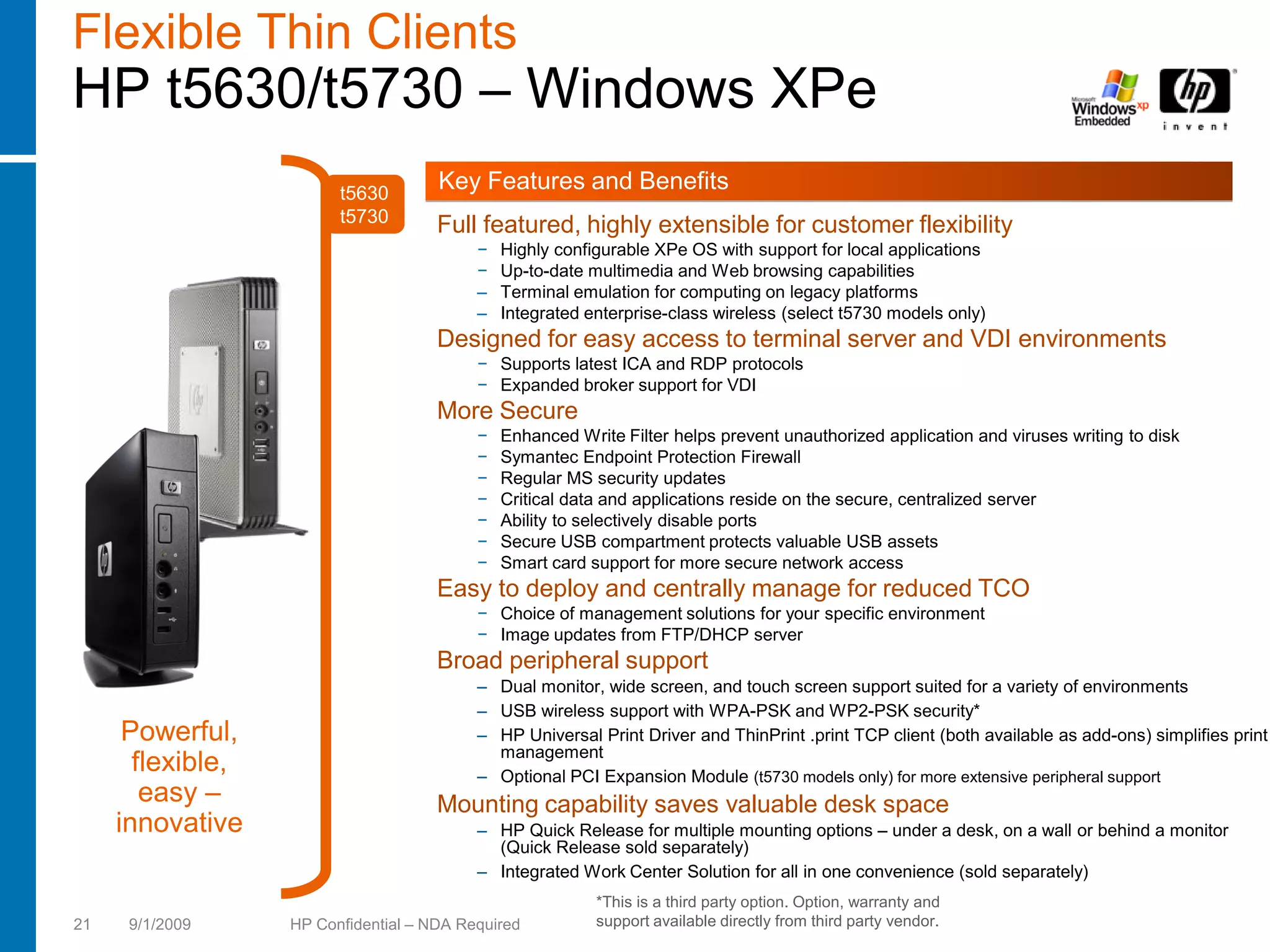
HP t5630/t5730 – Windows XPe
                         t5630
                                      Key Features and Benefits
                         t5730        Full featured, highly extensible for customer flexibility
                                           −   Highly configurable XPe OS with support for local applications
                                           −   Up-to-date multimedia and Web browsing capabilities
                                           –   Terminal emulation for computing on legacy platforms
                                           –   Integrated enterprise-class wireless (select t5730 models only)
                                      Designed for easy access to terminal server and VDI environments
                                           − Supports latest ICA and RDP protocols
                                           − Expanded broker support for VDI
                                      More Secure
                                           −   Enhanced Write Filter helps prevent unauthorized application and viruses writing to disk
                                           −   Symantec Endpoint Protection Firewall
                                           −   Regular MS security updates
                                           −   Critical data and applications reside on the secure, centralized server
                                           −   Ability to selectively disable ports
                                           −   Secure USB compartment protects valuable USB assets
                                           −   Smart card support for more secure network access
                                      Easy to deploy and centrally manage for reduced TCO
                                           − Choice of management solutions for your specific environment
                                           − Image updates from FTP/DHCP server
                                      Broad peripheral support
                                           – Dual monitor, wide screen, and touch screen support suited for a variety of environments
                                           – USB wireless support with WPA-PSK and WP2-PSK security*
      Powerful,                            – HP Universal Print Driver and ThinPrint .print TCP client (both available as add-ons) simplifies print
                                             management
       flexible,                           – Optional PCI Expansion Module (t5730 models only) for more extensive peripheral support
        easy –                        Mounting capability saves valuable desk space
     innovative                            – HP Quick Release for multiple mounting options – under a desk, on a wall or behind a monitor
                                             (Quick Release sold separately)
                                           – Integrated Work Center Solution for all in one convenience (sold separately)
                                                           *This is a third party option. Option, warranty and
21    9/1/2009     HP Confidential – NDA Required          support available directly from third party vendor.
Flexible Thin Clients
HP t5630/t5730 – Windows XPe
                         t5630        Software Specifications
                         t5730                  OPERATING       Windows XPe SP2 Rollup 1
                                                  SYSTEM:
                                               PROTOCOLS:       ICA 10.2 and RDP 6
                                               SUPPORTED        HP Session Allocation Manager (SAM) 2.2
                                                 BROKERS:       Add-ons:
                                                                Citrix Desktop Appliance 10.250
                                                                VMWare VDM2.1
                                                                Third Party Brokers: LeoStream and Provision (Quest)
                                                                                              ADD-ONS:Adobe Reader
                                                   OTHER        Internet Explorer 7                   Sun Java
                                            APPLICATIONS:                                             Windows Firewall
                                                                Windows Media Player 11               .NET
                                                                Adobe Flash Player                    HP Remote Graphics
                                                                                                      Compression Client (RGS)
                                                                TeemTalk 6.01                         HP Client Automation
                                                                Add/Remove Programs Utility           HP Universal Print Driver
                                                                                                      ThinPrint client
                                                                FTP image update


                                            MANAGEMENT:         HP ThinState
                                                                HP Device Manager
                                                                Altiris Deployment Solution
      Powerful,                                                 FTP Image Update
       flexible,                                    SECURITY:   Enhanced Write Filter
        easy –                                                  Symantec Endpoint Protection Firewall
     innovative                                                 Administrator and user passwords
                                                                Remote BIOS configurability to disable ports
                                                                Smart card support
                                                                Secure USB compartment with 2 USB 2.0 ports
                                                                HP Kensington lock (sold separately)

22    9/1/2009     HP Confidential – NDA Required
HP Thin Client Mounting Solution
HP Quick Release*

 •   Easy to use, VESA-compliant,
     mounting solution
 •   Enables uniquely flexible product
     configurations in a variety of settings
 •   Quickly and securely attach the
     client to a monitor stand, wall, or
     under a desk
 •   Failsafe "Sure-Lock" mechanism               HP Quick Release contains a
     snaps securely in place, security            display-side plate and master
     screw deters theft                           mount or wall-side piece that are
                                                  “locked” into place with the
                                                  center sliding mechanism. The
                                                  four VESA holes are visible
                                                  along the outer edges of both
                                                  sides.


                                                        *HP Quick Release sold separately

23   9/1/2009    HP Confidential – NDA Required
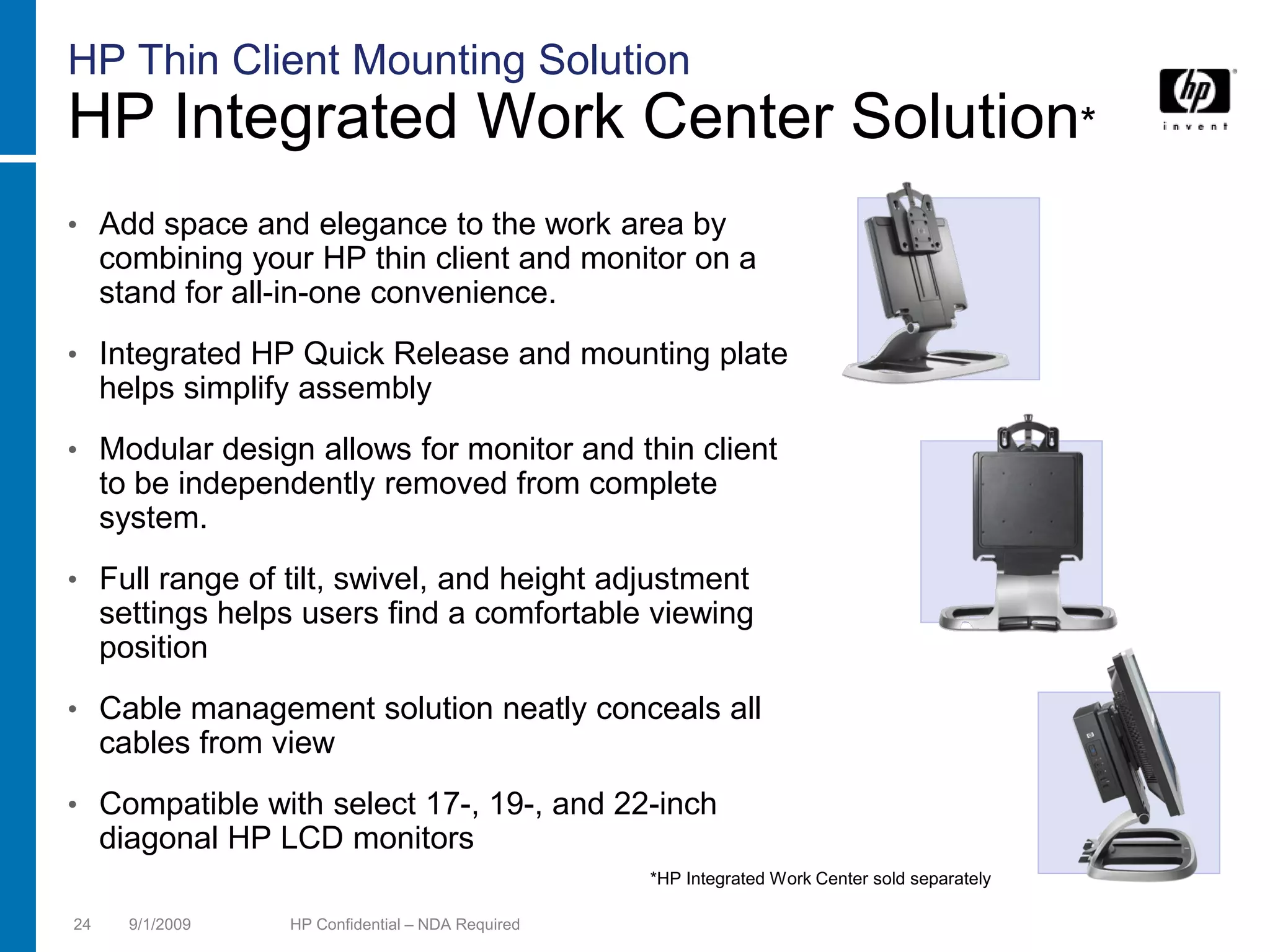
HP Thin Client Mounting Solution
HP Integrated Work Center Solution*
• Add space and elegance to the work area by
     combining your HP thin client and monitor on a
     stand for all-in-one convenience.
• Integrated HP Quick Release and mounting plate
     helps simplify assembly
• Modular design allows for monitor and thin client
     to be independently removed from complete
     system.
• Full range of tilt, swivel, and height adjustment
     settings helps users find a comfortable viewing
     position
• Cable management solution neatly conceals all
     cables from view
• Compatible with select 17-, 19-, and 22-inch
     diagonal HP LCD monitors
                                                   *HP Integrated Work Center sold separately

24     9/1/2009   HP Confidential – NDA Required
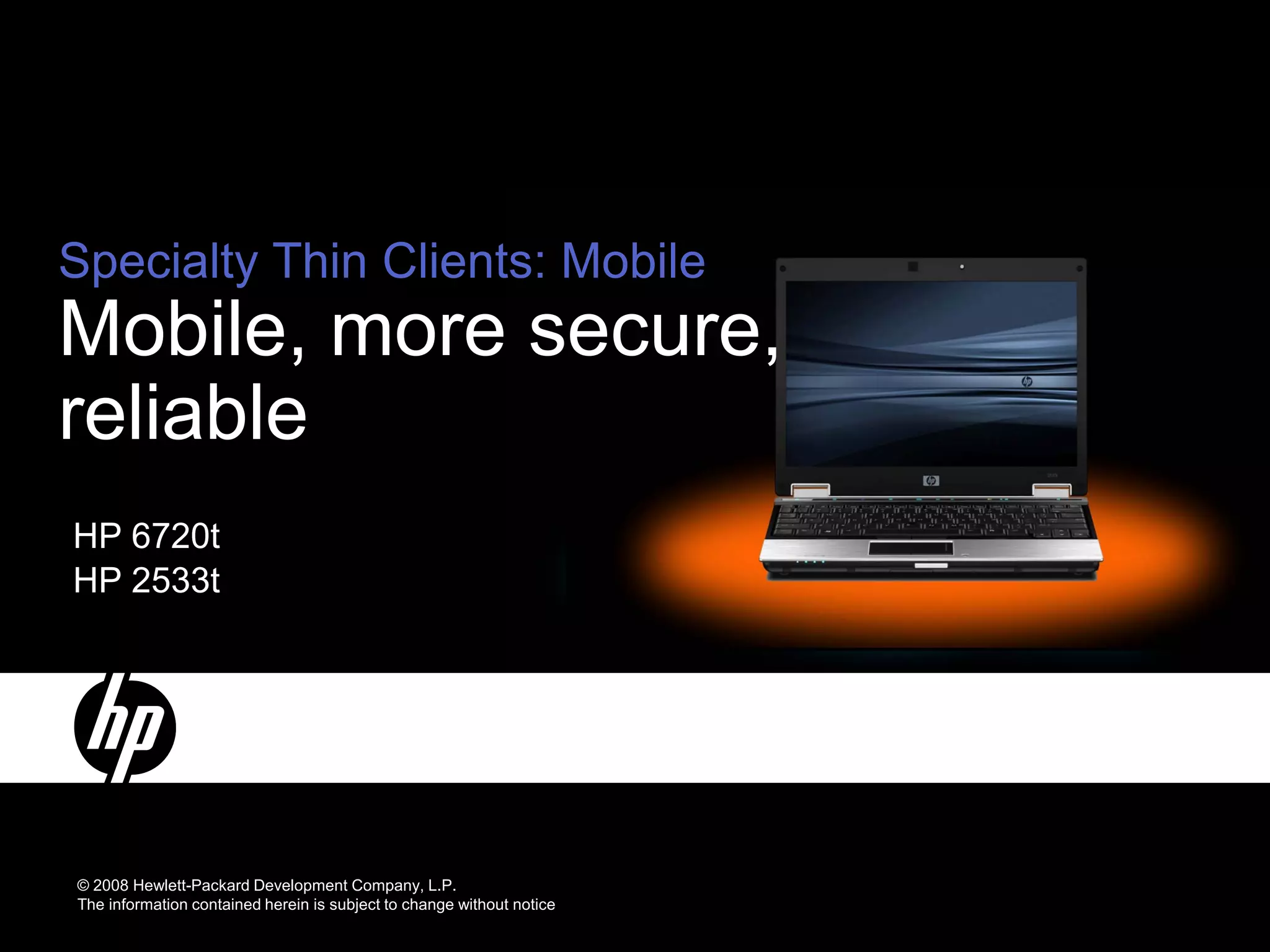
Specialty Thin Clients: Mobile
Mobile, more secure,
reliable
HP 6720t
HP 2533t


© 2008 Hewlett-Packard Development Company, L.P.
The information contained herein is subject to change without notice
Mobile Thin Clients
HP 6720t/2533t – Windows XPE
                       6720t        Key Features and Benefits
                       2533t
                                    Full featured, extensible for customer flexibility
                                         −   Highly configurable XPe OS with support for local applications
                                         −   Up-to-date full-featured Web browser
                                         –   Terminal emulation for computing on legacy platforms
                                         –   Integrated enterprise-class wireless standard
                                         –   HP Universal Print Driver (available as add-on) and ThinPrint .print TCP client simplifies
                                             print management
                                    Designed for easy access to terminal server and VDI environments
                                         − Supports latest ICA and RDP protocols
                                         − Expanded broker support for VDI
                                    Highly reliable
                                         −   HP Fast Charge* technology recharges your primary battery up to 90% in 90 minutes
                                         –   Energy-efficient HP Smart AC Adapters
                                         –   Solid state design with no moving parts
                                         –   Spill-resistant keyboard and magnesium alloy support structure
                                    More Secure
                                         −   Enhanced Write Filter helps prevent unauthorized application and viruses writing to disk
      Mobile,                            −   Microsoft Firewall
       more                              −   Critical data and applications reside on the secure, centralized server
      secure,                            −   Ability to selectively disable ports
                                         −   Optional integrated smart card reader (t2533 only) for more secure network access
      reliable
                                    Easy to manage
                                         − Choice of management solutions for your specific environment

                                                          *Fast Charge Technology recharges your battery up to 90% within 90 minutes when the system is
                                                          off. Fast Charge Technology does not apply to 12-cell Ultra-Capacity battery or 9-cell battery.

26   9/1/2009    HP Confidential – NDA Required
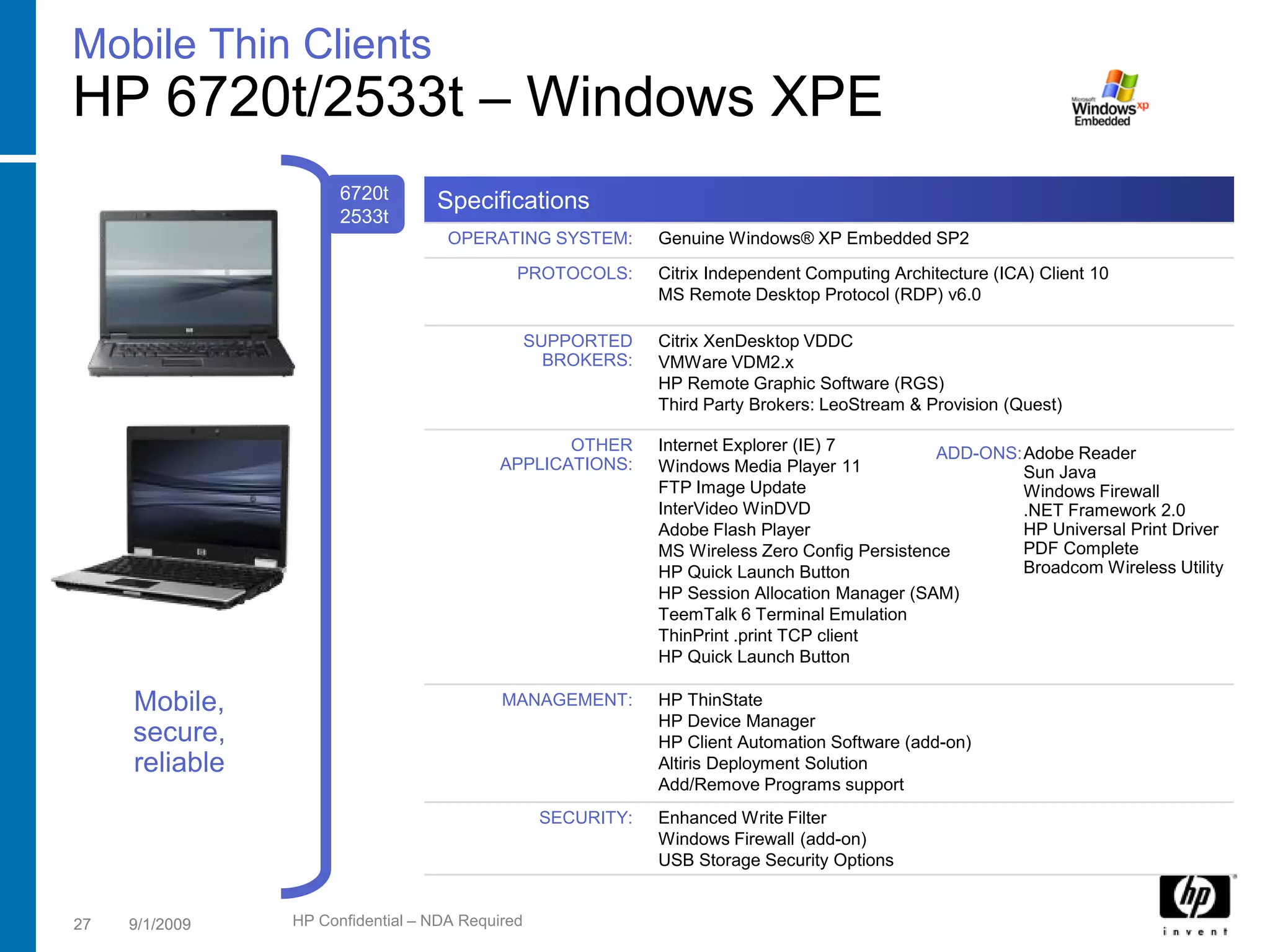
Mobile Thin Clients
HP 6720t/2533t – Windows XPE
                      6720t       Specifications
                      2533t
                                    OPERATING SYSTEM:         Genuine Windows® XP Embedded SP2
                                             PROTOCOLS:       Citrix Independent Computing Architecture (ICA) Client 10
                                                              MS Remote Desktop Protocol (RDP) v6.0

                                                 SUPPORTED    Citrix XenDesktop VDDC
                                                   BROKERS:   VMWare VDM2.x
                                                              HP Remote Graphic Software (RGS)
                                                              Third Party Brokers: LeoStream & Provision (Quest)

                                                  OTHER       Internet Explorer (IE) 7         ADD-ONS:Adobe Reader
                                           APPLICATIONS:      Windows Media Player 11                  Sun Java
                                                              FTP Image Update                         Windows Firewall
                                                              InterVideo WinDVD                        .NET Framework 2.0
                                                              Adobe Flash Player                       HP Universal Print Driver
                                                              MS Wireless Zero Config Persistence      PDF Complete
                                                              HP Quick Launch Button                   Broadcom Wireless Utility
                                                              HP Session Allocation Manager (SAM)
                                                              TeemTalk 6 Terminal Emulation
                                                              ThinPrint .print TCP client
                                                              HP Quick Launch Button

     Mobile,                               MANAGEMENT:        HP ThinState
                                                              HP Device Manager
     secure,                                                  HP Client Automation Software (add-on)
     reliable                                                 Altiris Deployment Solution
                                                              Add/Remove Programs support
                                                  SECURITY:   Enhanced Write Filter
                                                              Windows Firewall (add-on)
                                                              USB Storage Security Options


27   9/1/2009   HP Confidential – NDA Required
Mobile Thin Clients
HP 6720t – Windows XPE
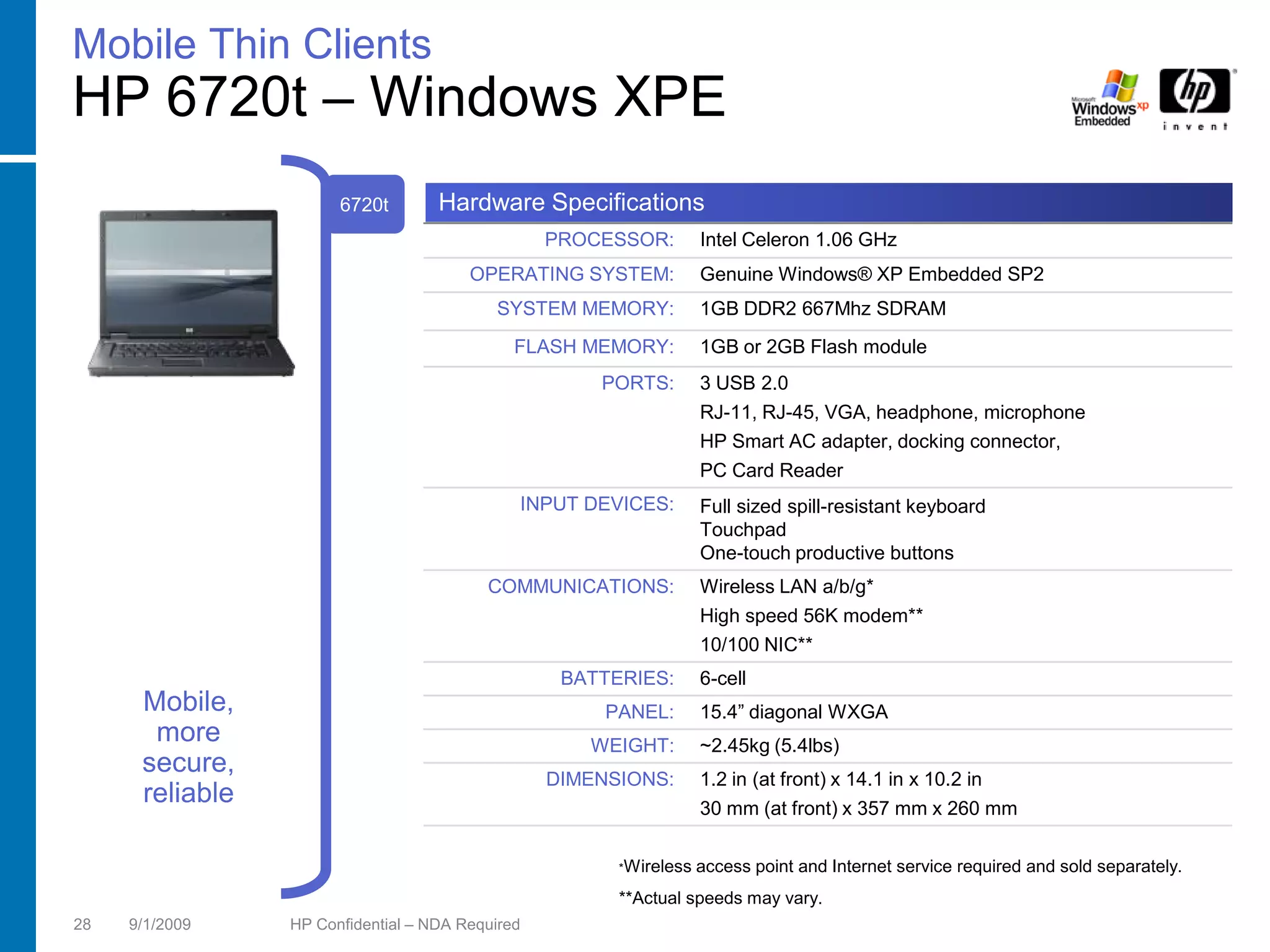
                       6720t        Hardware Specifications
                                                  PROCESSOR:        Intel Celeron 1.06 GHz
                                        OPERATING SYSTEM:           Genuine Windows® XP Embedded SP2
                                           SYSTEM MEMORY:           1GB DDR2 667Mhz SDRAM
                                              FLASH MEMORY:         1GB or 2GB Flash module
                                                      PORTS:        3 USB 2.0
                                                                    RJ-11, RJ-45, VGA, headphone, microphone
                                                                    HP Smart AC adapter, docking connector,
                                                                    PC Card Reader
                                              INPUT DEVICES:        Full sized spill-resistant keyboard
                                                                    Touchpad
                                                                    One-touch productive buttons
                                          COMMUNICATIONS:           Wireless LAN a/b/g*
                                                                    High speed 56K modem**
                                                                    10/100 NIC**
                                                   BATTERIES:       6-cell
      Mobile,                                          PANEL:       15.4” diagonal WXGA
       more                                          WEIGHT:        ~2.45kg (5.4lbs)
      secure,                                     DIMENSIONS:       1.2 in (at front) x 14.1 in x 10.2 in
      reliable                                                      30 mm (at front) x 357 mm x 260 mm

                                                        *Wireless   access point and Internet service required and sold separately.
                                                        **Actual speeds may vary.
28   9/1/2009    HP Confidential – NDA Required
Mobile Thin Clients
HP 2533t – Windows XPE
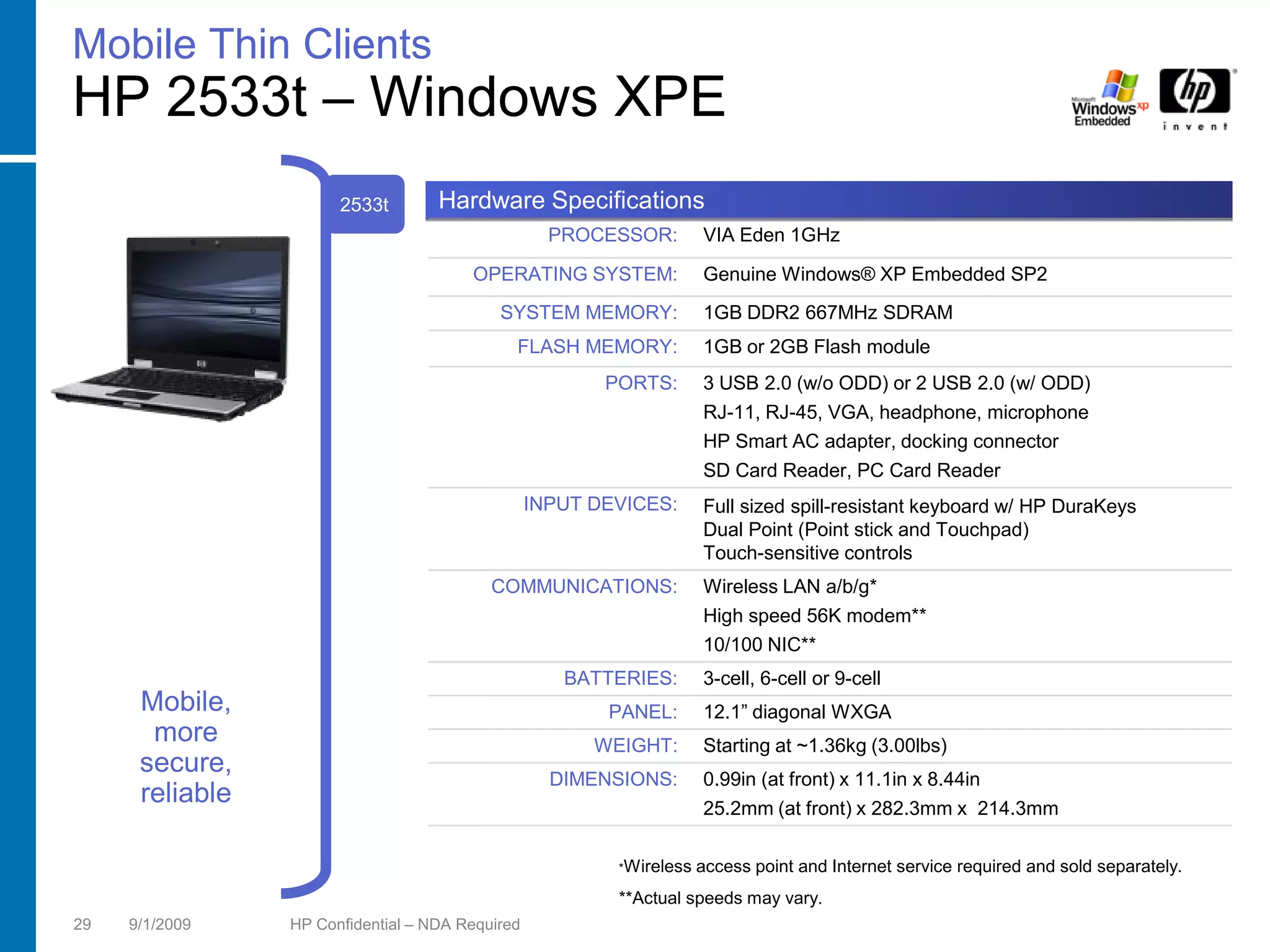
                       2533t        Hardware Specifications
                                                    PROCESSOR:        VIA Eden 1GHz

                                        OPERATING SYSTEM:             Genuine Windows® XP Embedded SP2
                                            SYSTEM MEMORY:            1GB DDR2 667MHz SDRAM
                                              FLASH MEMORY:           1GB or 2GB Flash module
                                                         PORTS:       3 USB 2.0 (w/o ODD) or 2 USB 2.0 (w/ ODD)
                                                                      RJ-11, RJ-45, VGA, headphone, microphone
                                                                      HP Smart AC adapter, docking connector
                                                                      SD Card Reader, PC Card Reader
                                                  INPUT DEVICES:      Full sized spill-resistant keyboard w/ HP DuraKeys
                                                                      Dual Point (Point stick and Touchpad)
                                                                      Touch-sensitive controls
                                           COMMUNICATIONS:            Wireless LAN a/b/g*
                                                                      High speed 56K modem**
                                                                      10/100 NIC**
                                                     BATTERIES:       3-cell, 6-cell or 9-cell
      Mobile,                                            PANEL:       12.1” diagonal WXGA
       more                                             WEIGHT:       Starting at ~1.36kg (3.00lbs)
      secure,                                       DIMENSIONS:       0.99in (at front) x 11.1in x 8.44in
      reliable                                                        25.2mm (at front) x 282.3mm x 214.3mm

                                                          *Wireless   access point and Internet service required and sold separately.
                                                          **Actual speeds may vary.
29   9/1/2009    HP Confidential – NDA Required
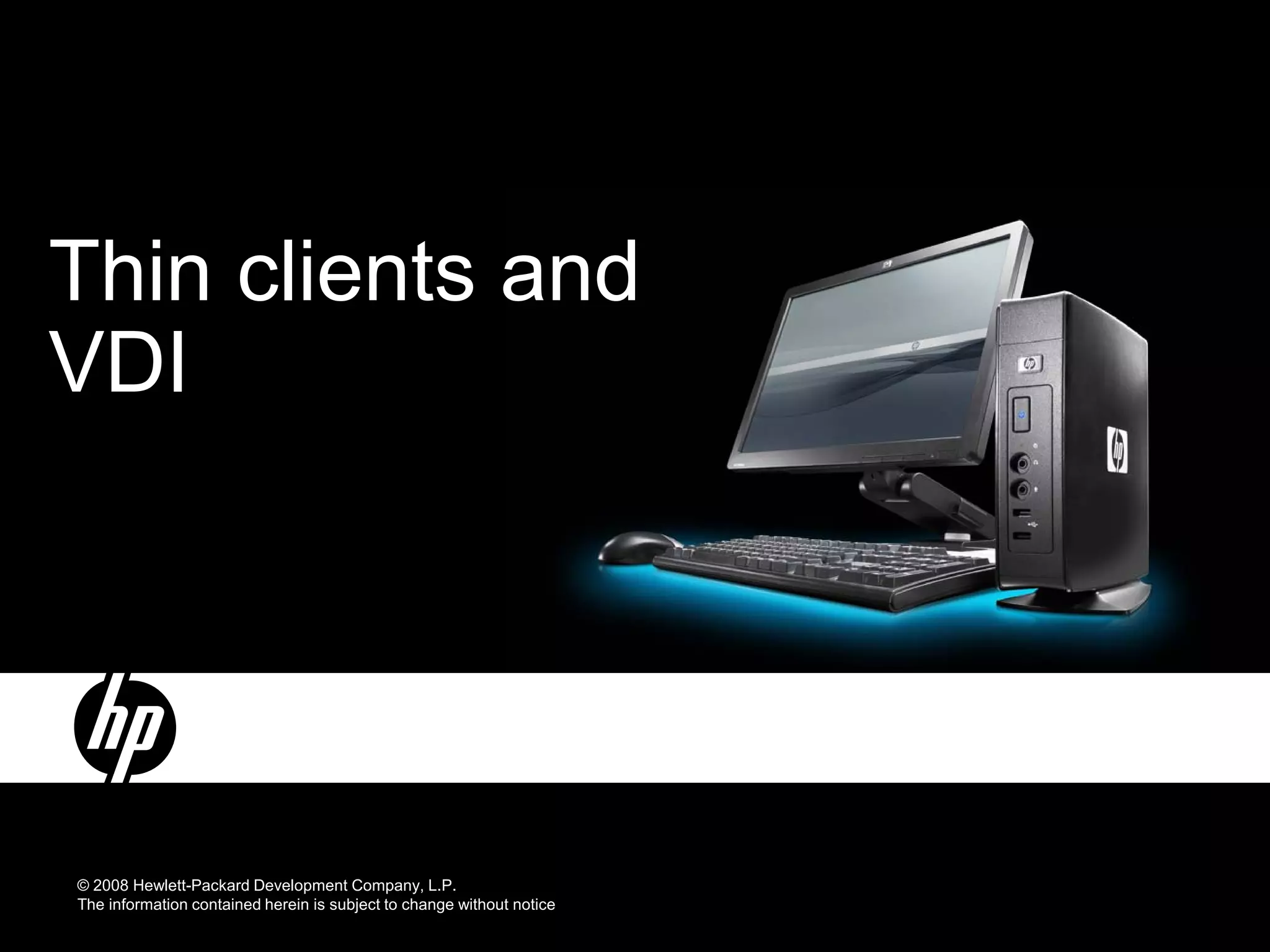
Thin clients and
VDI


© 2008 Hewlett-Packard Development Company, L.P.
The information contained herein is subject to change without notice
HP Thin Clients in VDI environments
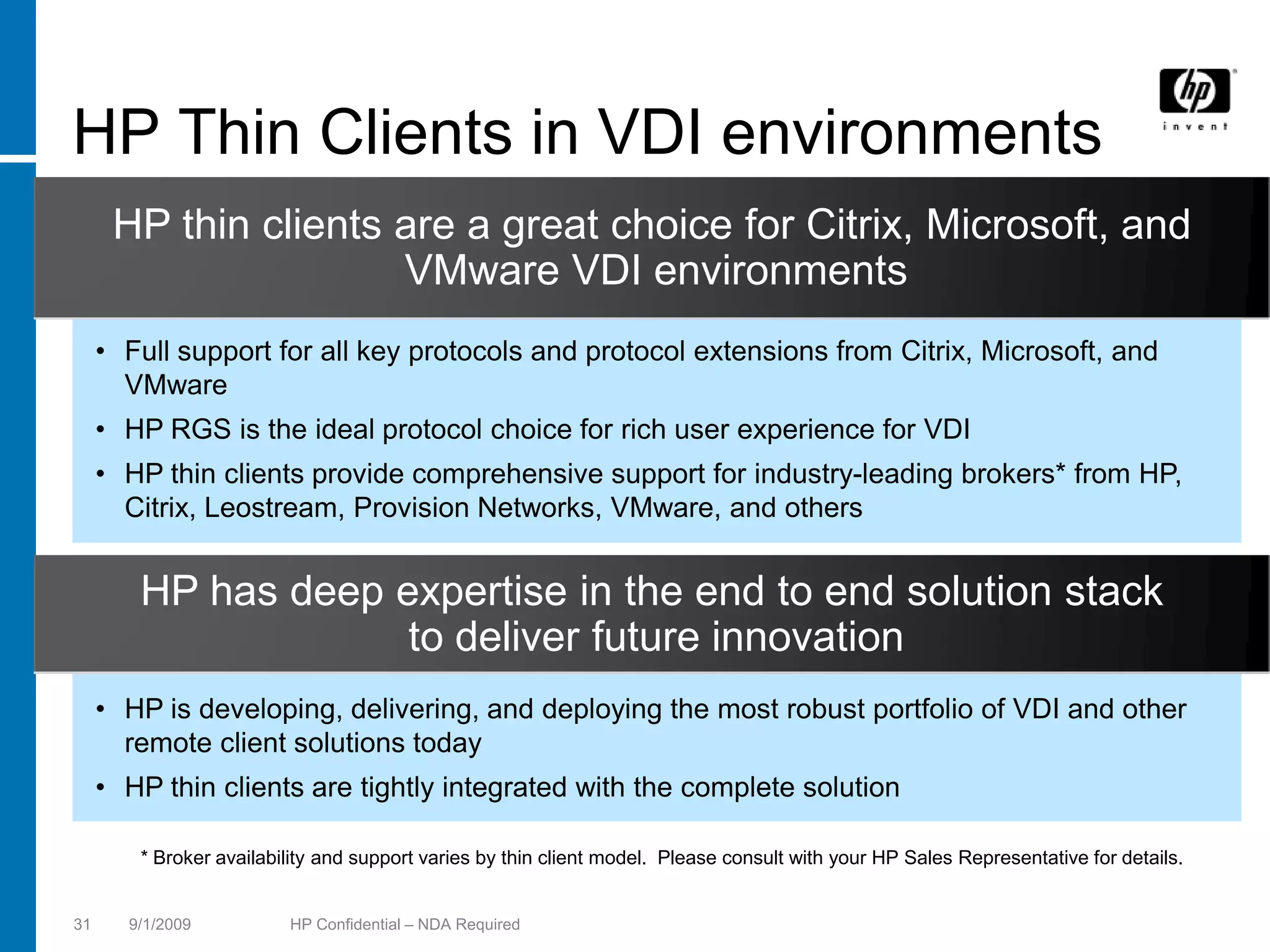
      HP thin clients are a great choice for Citrix, Microsoft, and
                      VMware VDI environments
     • Full support for all key protocols and protocol extensions from Citrix, Microsoft, and
       VMware
     • HP RGS is the ideal protocol choice for rich user experience for VDI
     • HP thin clients provide comprehensive support for industry-leading brokers* from HP,
       Citrix, Leostream, Provision Networks, VMware, and others


        HP has deep expertise in the end to end solution stack
                     to deliver future innovation
     • HP is developing, delivering, and deploying the most robust portfolio of VDI and other
       remote client solutions today
     • HP thin clients are tightly integrated with the complete solution

        * Broker availability and support varies by thin client model. Please consult with your HP Sales Representative for details.


31     9/1/2009          HP Confidential – NDA Required
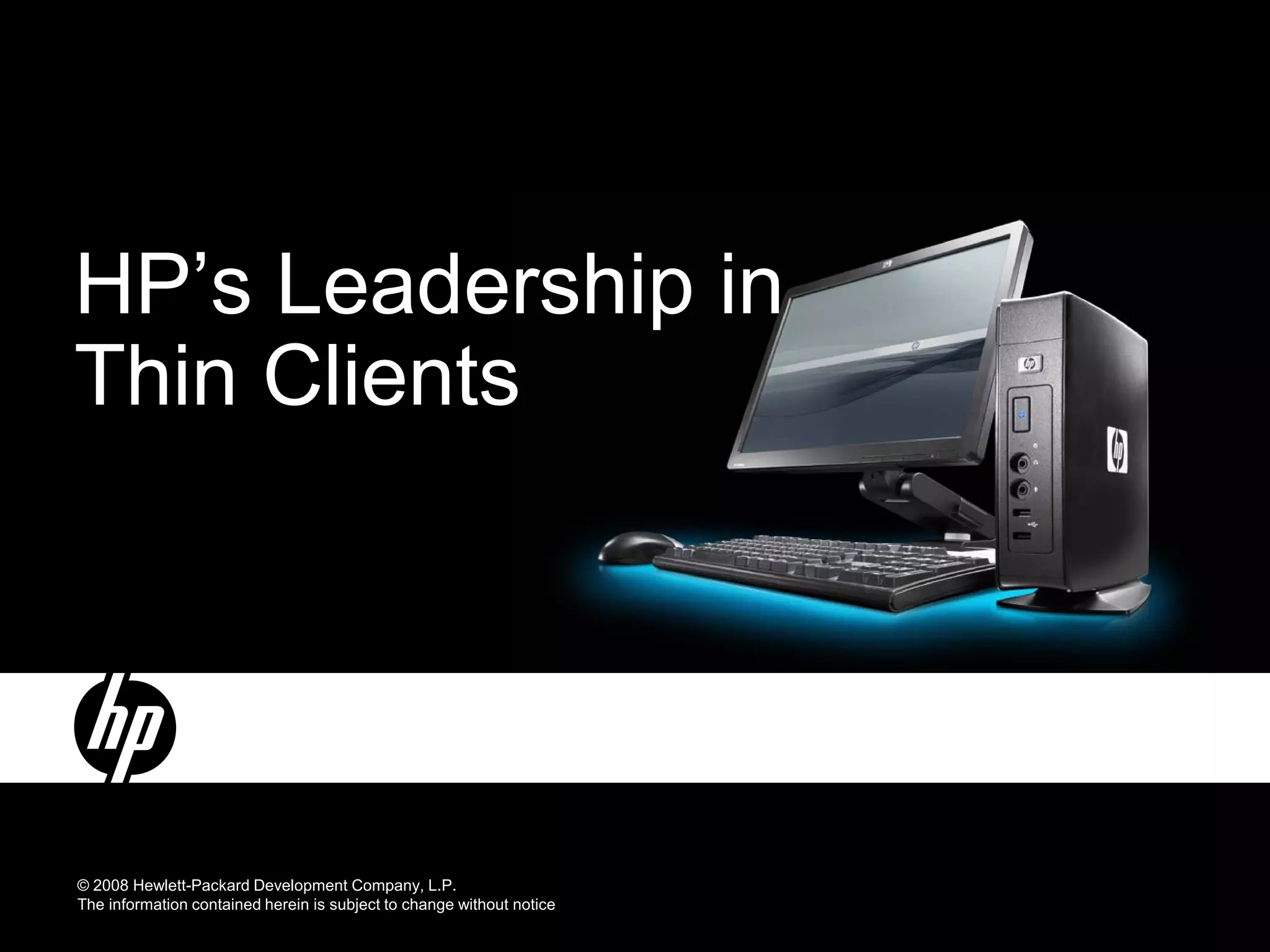
HP’s Leadership in
Thin Clients


© 2008 Hewlett-Packard Development Company, L.P.
The information contained herein is subject to change without notice
HP is committed to thin clients
     Consistent and on-going investments help deliver
          innovation and technology leadership

                                                 − Highly-acclaimed product innovations
                                                 − Growing thin client patent portfolio
                                                 − Integrated, exclusive security and firewall
                                                   features
                                                 − A broad thin client solutions portfolio
                                                 − Increased capabilities to provide customized
HP provides a complete                             images
portfolio of remote computing                    − Extend HP leadership worldwide in providing
solutions, including server-                       Windows XPe, Windows CE and Linux thin
based computing, VDI, blade                        client solutions
PCs, and blade workstations                      − Industry-leading thin client management
                                                   solutions


33   9/1/2009   HP Confidential – NDA Required
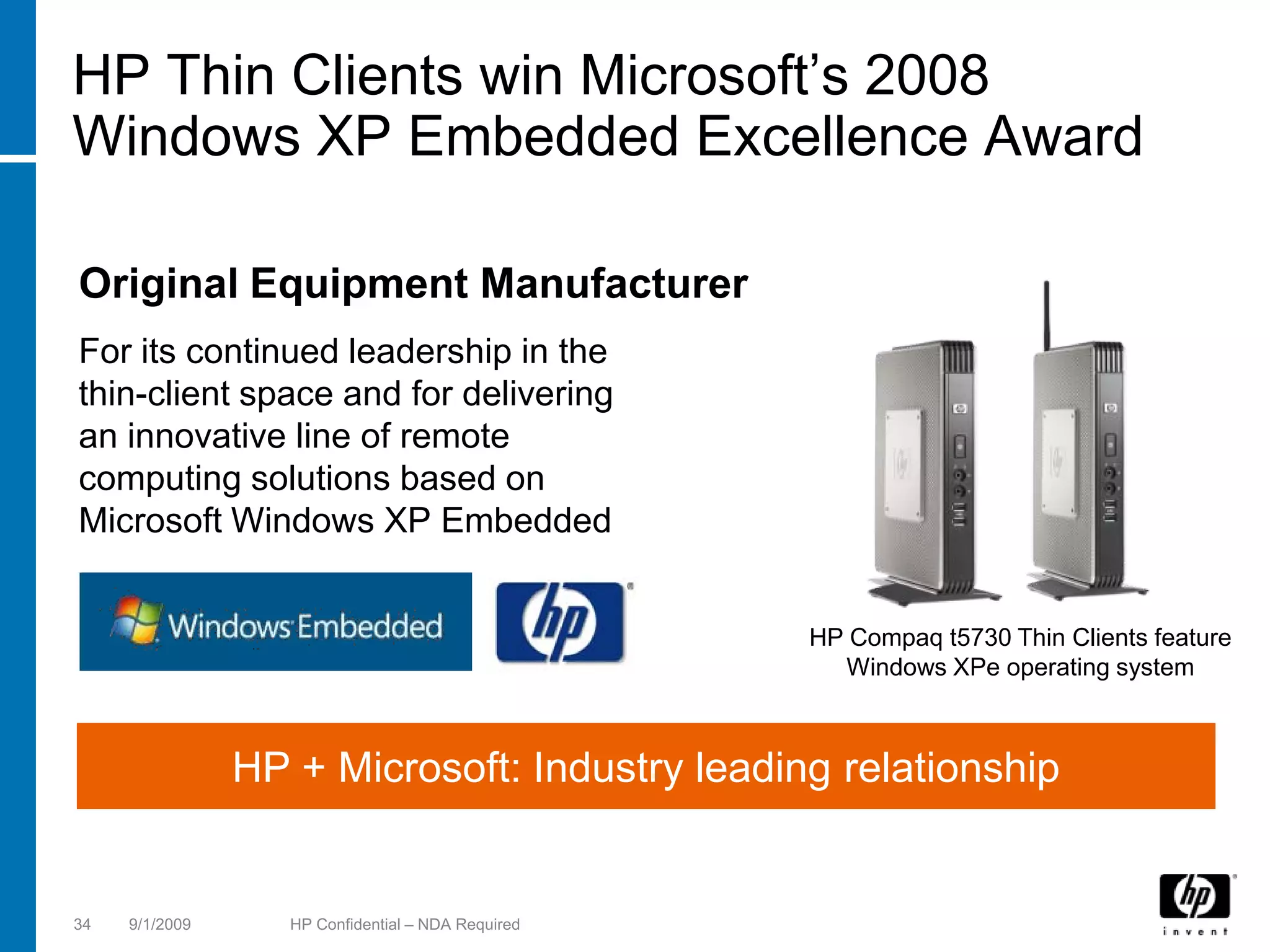
HP Thin Clients win Microsoft’s 2008
Windows XP Embedded Excellence Award

Original Equipment Manufacturer
For its continued leadership in the
thin-client space and for delivering
an innovative line of remote
computing solutions based on
Microsoft Windows XP Embedded


                                                    HP Compaq t5730 Thin Clients feature
                                                      Windows XPe operating system


                HP + Microsoft: Industry leading relationship


34   9/1/2009      HP Confidential – NDA Required
Thank You!


© 2008 Hewlett-Packard Development Company, L.P.
The information contained herein is subject to change without notice

Hp All In 1

  • 1.
    N ext generation serversand virtualization Ben Timms, Solutions Architect April 23, 2009 © 2009 Hewlett-Pa cka rd Development Compa ny, L .P. The informa tion conta ined herein is subject to cha nge without notice
  • 2.
    G6: Better performa ncefrom next-genera tion processors
  • 3.
    HP Bla deSystema nd ProL nt G6 ia Ada pt fa ster a nd sa ve cost by Fit more virtual machines per fine tuning your network square foot 50% to 100% HP Virtual Connect Flex-10 more DIMM slots Boost performance with R educe Gain new storage less power Infrastructure Pain possibilities … Next-Gen Processors Dynamic Power ProLiant Capping Onboard Shared SAS Storage Administrator LeftHand Networks 3 1 September 2 0 0 9
  • 4.
  • 5.
    Intel Xeon 55 0 0 processor new fea tures QuickPath Architecture Delivers additional performance, bandwidth, and reliability Core Core Core Core 8M Shared Cache Integrated Memory Controller Each processor now has a dedicated memory controller Memory Link Controller Controller Turbo Mode Additional processing boost during peak demand periods 2x Intel 3x DDR3 QuickPath channels interconnect Hyper-Threading Technology Enhances performance and energy efficiency 5 1 September 2 0 0 9
  • 6.
    Intel Xeon 55 0 0 Turbo Mode CPU operates at higher-than-stated frequency when operating Description below power and thermal design points 1. Off: CPU operates only at rated frequency 3 Methods 2. Automatic: OS requests higher perf state, CPU determines turbo of Control frequency (recommended) 3. Manual: − User ca n ma nua lly disa ble cores (reboot required) via BIO S − L cores mea ns more likely turbo will ha ppen ess Exa mple In response to workloa d dema nd a dds a dditiona l performa nce bins a s cores a re turned off * Frequency (F) *within power a nd therma l constra ints, depends on processor model Core Core Core Core Core Core turned off turned off O ne 4 -core processor 6 1 September 2 0 0 9
  • 7.
    DDR 3: Two memory typesto ma tch your priorities
  • 8.
    R-DIMM vs U-DIMMO verview Memory Comparison for BL460c G6 R-DIMMs U-DIMMs Greater capacity, advanced Smaller capacity, no advanced memory protection memory protection Capacity 2GB, 4GB, 8GB 1GB, 2GB Low power option  Adva nced ECC support   Adva nce memory  protection Lower Cost  DRAM support x4, x8 x8 MAX ca pa city 96 GB (12 x 8 GB) 24 GB (12 x 2 GB) 8 1 September 2 0 0 9
  • 9.
    ProL nt generation fea tures ia List of features is general guidance; some features may not be available in all products G5 G6 Intel: Front Side Bus architecture; Fully-Buffered (FB) Intel: N UMA architecture; DDR3 UDIMMs DDR2 DIMMs & RDIMMs AMD: N UMA architecture, RDDR DIMMs -2 AMD: N UMA architecture; RDDR2 DIMMs Low Power DIMM options L P ow ower DIMM options SAS 1.0 based Smart Array controllers SAS 2.0 based Smart Array controllers; SA Advanced Pack 2.5” SAS, SAT HDDs A 2.5” SAS, SAT SSD HDDs A, Integrated 1Gb Ethernet Integrated 10Gb Ethernet PCI Exp ress 1.0 PCI Express 2.0 Internal USB ports Internal USB ports & SD card slots iLO-2 iLO-2/ Intelligent Administrator Common power supplies (Rack/ C3000); TPM 9 1 September 2 0 0 9
  • 10.
    Save costs & controlnetworks with 1 0 G iga bit Ethernet & Flex-1 0
  • 11.
    N etwork connectionstoda y with tra ditiona l server bla des 8 1 Gb L M O Dua l N IC Q ua d N IC connections require 8 interconnect modules (Speeds are fixed at 1Gb/ s or 10Gb/ s) 11 1 September 2 0 0 9
  • 12.
    Flexible N IC(FlexN IC) Technology • Evolve to 10 Gb a t your own speed − Flex- 0 10 Gb N IC' s a re PCI Physica l Function devices 1 − O S independent − Server RO M recognizes them a s individua l N IC' s − Speeds ca n be set per N IC from 10 0 Mb to 10 Gb in 10 0 Mb increments Server Server E 2.5 Gb Flex 10 E 1.75 Gb E E E E E E E E E E E E E E E E E 250 Mb E 5.5 Gb 1 Gb L M O Dua l N IC Q ua d N IC 1 0 Gb L M O 12 1 September 2 0 0 9
  • 13.
    W hy 10 Gb Ethernet • The use of fa ster multi-core processors is increa sing ba ndwidth requirements per server • Customers in a broa d ra nge of a dva nced computing environments a re working with ever more complex da ta sets requiring 10 Gb ba ndwidth − High performa nce computing (HPC) − Da ta ba se clusters, iSCSI, a nd stora ge ba ckups − Grid systems a nd virtua liza tion − Server, I/ O, & fa bric consolida tion − VoIP a nd VO D • As the delta between 1 Gb a nd 10 Gb na rrows, it becomes cost effective to utilize 10 GbE switch uplinks to reduce ca bling 13 1 September 2 0 0 9
  • 14.
    Introducing Flex-1 0 ForHP Virtual Connect Configure your server when you define your Virtual Connect Server Profile! N umber of N ICs …all with the performance of real N etworks hardware network Speed interfaces! 14 1 September 2 0 0 9
  • 15.
    Introducing Flex-1 0 ForHP Virtual Connect HP Virtua l Connect Flex- 0 is the world’s first technology to 1 fine -tune network ba ndwidth a t the server edge a nd to a da pt to virtua l server workloa d dema nds on-the -fly. Flex- 0 reduces infra structure costs by brea king the ba rriers of rigid 1 network connections, speeds, a nd N IC ports providing unpa ra lleled server sca le -out, virtua liza tion a nd network efficiency in the Da ta Center. 15 1 September 2 0 0 9
  • 16.
    HP Virtua lConnect with Flex-1 0 technology is the simplest, most powerful connection to your networks • Simplify networks − Reduce ca bles up to 94 % without a dding switches to ma na ge • Simplify server connections − Ma kes system a dministra tor self-sufficient a nd frees LAN a nd SAN a dmins from common server ta sks • Cha nge servers in minutes, not da ys − Add, move a nd repla ce servers on-the -fly without a ffecting your LAN a nd SAN − Tota l control to move workloa ds fa st without impa cting L s or SAN s or the AN people who ma na ge them. Ne • T ilor network speeds ba sed on a pplica tion needs a w! − Reduce ca bles a nd network components by using up to 4 physica l N IC' s per 10 Gb server connection − Control a nd ma na ge your ba ndwidth by setting N IC speeds a t the server edge 16 1 September 2 0 0 9
  • 17.
    Expa nda bleto 4 x more N IC connections tha n a ny other server bla de Virtua l Virtua l Connect Connect Up to Flex- 0 1 Flex- 0 1 Built-in LOM Optional Mezz Card Virtua l Connect N IC Flex- 0 1 connections Optional Mezz Card ( Easy and cost effective to add more N ICs to support more virtual servers ) 17 1 September 2 0 0 9
  • 18.
    First ever toprovide precise control over ba ndwidth per N IC connection Virtua l Connect Fine -tune the speed of Flex- 0 1 ea ch network connection In 10 0 Mb increments from 100Mb to 10Gb ( So you can optimize and prioritize performance for each VM channel ) 18 1 September 2 0 0 9
  • 19.
    Reduce costs and a dd flexibility • Flex- 0 reduces infra structure costs up to 60 % 1 • Flex- 0 reduces power costs up to 56 % 1 • Flex- 0 is the most cost effective solution in the industry for 1 servers needing 4 or more N IC’s • Flex- 0 is cha nge -rea dy with a ll of the benefits of Virtua l 1 Connect plus N IC fine -tuning a t the server edge • Evolve your da ta center a t your own speed without a dditiona l infra structure costs – Flex- 0 is cha nge rea dy 1 • Ma ximize your VM environment with HP BL 495 c Bla des a nd Virtua l Connect Ethernet a nd Fibre Cha nnel modules 19 1 September 2 0 0 9
  • 20.
    Virtua l ConnectEthernet product line Virtual Connect Virtual Connect Virtual Connect Flex-10 1/ 10Gb-F 1/ 10Gb • 16 x 10Gb downlinks midplane • 16 x 1Gb downlinks midplane • 16 x 1Gb downlinks midplane • 2 x 10Gb cross connect • 1 x 10Gb cross connect • 1 x 10Gb cross connect • 1 x 10Gb copper uplinks CX-4 • 1 x 10Gb copper uplinks CX-4 • 2 x 10Gb copper uplinks CX-4 • 8 x 10Gb SR, LR, or LRM fiber • 2 x 10Gb SR or LR fiber uplinks XFP • 8 x 1Gb 1000/ 100/ 10Gb copper Network uplinks SFP+ • 2 x 1Gb SX or RJ-45 fiber uplinks SFP uplinks RJ-45 Connections • 1 management USB port • 1 management USB port • 4 x 1Gb 1000/ 100/ 10Gb copper • 1 internal interface to c-Class uplinks RJ-45 • 1 internal interface to c-Class Onboard Administrator Module • 1 management USB port Onboard Administrator Module • 1 internal interface to c-Class Onboard Administrator Module • Line Rate, full-duplex 240Gbps • Line Rate, full-duplex 62 Gbps • Line Rate, full-duplex 54 Gbps Performance bridging fabric bridging fabric bridging fabric • Less than 1ms latency • Less than 4ms latency • Less than 4ms latency Protocol Support 802.1AB, 802.1D, 802.1Q, IEEE 802.2, 802.3ad Simple and intuitive Graphical User Interface and Setup W izards Embedded SN MP v1, v2 Management Command Line Interface Any uplink port can be used as a dedicated mirrored port from the server port(s) Security LDAP, SSL, Role-based management 20 1 September 2 0 0 9
  • 21.
    HP Bla deSystemenclosures Bla de System c30 0 0 Ra ck Bla deSystem c70 0 0 a nd Tower Versions 21 1 September 2 0 0 9
  • 22.
    HP logo blueon white Technology for better business outcomes
  • 24.
    HP LeftHand P4000 SAN Solutions Overview BenTimms PSG Solutions Architect © 2009 Hewlett-Packard Development Company, L.P. The information contained herein is subject to change without notice.
  • 25.
    A brief background • Technology leader − Founded in 1999 as LeftHand Networks − A recognized leader in iSCSI SANs − More than 11,000 installations − Over 3,000 customers − Ranked as “Visionary” Gartner’s Magic Quadrant • All inclusive feature-set focus − “Pay-as-you-grow” architecture − Performance − Scalability − Availability − Simple management 3 1 September 2009
  • 26.
    HP StorageWorks arrayportfolio XP EVA HP Consolidation and Performance LeftHand XP24000 MSA2000 P4000 SAN XP20000 All-in-One Always-on availability Outstanding TCO Scalable, Clustered • Data center Low cost IP SAN • FC and iSCSI host ports consolidation and disaster recovery consolidation • FC and FATA HDD • iSCSI, 10GbE • Large-scale Oracle/ optional • Storage consolidation SAP applications Simple Unified • 4 GB FC, 1GbE iSCSI, and disaster recovery Storage and 3Gb SAS • Scalable Performance • HP-UX, Windows, SATA and SAS HDD • Simplification through and 20 more, • SAS and SATA • • iSCSI SAN and virtualization including NonStop together • Cost effective high Enhanced NAS and mainframe with integrated • Controller-based availability • HP-UX, Windows, Linux, snapshots, backup, snapshot/clone • VMware, Citrix, VMware and more replication, and • Windows, Linux, HP- Hyper-V, Windows, • Mid Market MS, Oracle and simple UX, VMware and more Linux management. SAP applications • WEB, Exchange, SQL • Windows, Linux, VMware, more. Business Continuity and Availability 4 1 September 2009
  • 27.
  • 28.
    Storage requirements Cost • All relevant features should be included. No surprises Performance • Must support dynamic workloads concurrently Scalability • Scale capacity and performance linearly • No forklift upgrades or disruption Availability • High availability to keep data online during unplanned events. No SPOF • Disaster recovery to recover data after unplanned downtime occurs. Manageability • Simple to administer 6 1 September 2009
  • 29.
    5 features withevery HP LeftHand P4000 SAN Storage • Scalable performance and capacity Clustering Network RAID • Beyond the box availability Thin • Reduce costs, increase capacity utilization Provisioning Snapshot • Data protection, tape storage reduction Remote Copy • Disaster recovery through integrated replication 7 1 September 2009
  • 30.
    HP SAN/iQ® StorageClustering True clustering brings reliability, performance, and ease of management • Storage clustering Storage Node SAS − Aggregates critical components CPU Disk − Data is load balanced NICs Cache Hardware RAID − Predictable scalability Redundant cooling • Grow on your terms Redundant power − Scale-out storage HP SAN/iQ® Software − Non-disruptive − Throttle bandwidth • Storage tiering SATA − Enhanced for type of data − Online volume migration • Simple centralized management − One step server-volume mapping − Integrated performance management Centralized Management Console 8 1 September 2009
  • 31.
    HP SAN/iQ® NetworkRAID Always on storage, data remains accessible during site failures • Beyond component redundancy SAN/iQ® Cluster − Protects data from array failure A D A D − Synchronous replication − Configure on a per-volume basis A B A B − Configure on-the-fly, no down time C B C B • High availability − Multiple disks, controllers, or arrays C D C D − Zero disruption of data access − Enables “high availability” for data • The goal for SAN availability is "no nines," or 100% availability. (Gartner,2007) • Human error and firmware bugs are the weakest links, even in properly deployed SANs. (Gartner, 2007) 9 1 September 2009
  • 32.
    HP SAN/iQ® Multi-siteSAN Real-time protection from site failure • Protect storage by: − Rack − Room HP SAN/iQ® Cluster − Floor − Building A D A D − Site A B A B • Keep data online during: HP SAN/iQ® Multi-site SAN − Facility disruption C B C B − Natural disaster − Site maintenance C D C D Volumes Remain Online 10 1 September 2009
  • 33.
    HP SAN/iQ® ThinProvisioning Raise storage utilization, increase return on investment, and reduce costs • Cost Savings Full Provisioned − Purchase only what you need today − Allocate only as data is written Allocated 200 GB Waste Available 0 GB − No reserve necessary Used 100 GB 0 GB 50 GB − Integrated with SmartClone, 50 GB written Snapshots and Remote Copy Wasted 100 150 200 GB 50 GB written • Delay Future Storage Purchases 200 GB Volume − Grow capacity as warranted Thin Provisioned • Simple to Manage − Enable/disable with radio button Allocated 0GB 100GB 50GB on per-volume basis Available Available 200GB 100GB 150GB Used 100GB 50GB 0GB 50 GB written Wasted 0GB 50 GB written 200 GB Volume 11 1 September 2009
  • 34.
    HP SAN/iQ® SmartClone™Technology Cost efficient volume copies that allow for quick provisioning • Realize cost savings through HP SAN/iQ® Cluster cloning − No duplicate data, only changes are stored − Ideal for storing system images − Instant provisioning of volume copies for test and development − Testing can be done with real data − No impact to production SmartClone Volumes 12 1 September 2009
  • 35.
    HP SAN/iQ® Snapshots Point-in-time,space-efficient snapshots for backup and recovery • Simplified Backup and Recovery SAN/iQ Cluster − Point-in-time volume copies − Scheduled, ad hoc or scripted • Functional − Volume rollback 1:00 − Recover granular data − Backup integration • Microsoft VSS • VMware VCB • Space Efficient 1:00 − Thin provisioned always 2:00 − Delta changes only − No snap reservation 3:00 13 1 September 2009
  • 36.
    HP SAN/iQ® RemoteCopy Time and space-efficient asynchronous replication for disaster recovery • Asynchronous Replication Recovery Server − Per volume basis − Scheduled or manual − Thin provisioned SAN 1 − No reserve space required SAN 2 − Incremental failback (Primary) Vol_1 • Simple to Manage (Remote (Primary Vol_1 Vol_1 − Bandwidth management ) ) − Failover/Failback Wizard 1:00 Baseline Copy 2:00 Incremental Copy 3:00 Incremental Copy 14 1 September 2009
  • 37.
    HP LeftHand P4000Replication for Remote Offices Cost effective disaster recovery, no hardware required • Replication from up to Main 10 Remote Sites − No SAN hardware at remote site − No other vendor can offer this − All other offerings are host based or require hardware at remote sites • Included for no additional Remote 1 Remote 2 Remote 3 cost with − Virtualization SAN − Multi-Site SAN • Support included with SAN/iQ® SAN/iQ® SAN/iQ® physical SAN VMware ESX Server VMware ESX Server VMware ESX Server 15 1 September 2009
  • 38.
  • 39.
    HP LeftHand P4000SANs Cost effective storage for virtualization, easy to implement HP LeftHand P4300 HP LeftHand P4300 HP LeftHand P4500 HP LeftHand P4500 Ala Carte SATA Starter SAN SAS Starter SAN Virtualization SAN Multi-Site SAN Storage Systems Disk Drives 16 - 320 16 - 320 24 - 480 48 - 960 Varies Starting Capacity 12.0 TB 7.2K SATA 4.8 TB 15K SAS 10.8 TB 15K SAS 21.6 TB 15K SAS Varies Dual Active/Active Requires Controllers     2 Nodes Dual Active/Active Site Failover  Every SAN/iQ® feature included      3 Yrs Basic Support     1 yr Basic Support HP LeftHand P4000 Replication for Optional Optional   Optional Remote Offices Site 2 Site 1 17 1 September 2009
  • 40.
    HP LeftHand P4000SANs Cost effective storage for virtualization, easy to implement HP LeftHand P4300 HP LeftHand P4300 HP LeftHand P4500 HP LeftHand P4500 Ala Carte SATA Starter SAN SAS Starter SAN Virtualization SAN Multi-Site SAN Storage Systems • Sever storage • Initial server • Mid-range server • Multi-site HA • Specific consolidation virtualization project virtualization requirement configurations, • Migrating from DAS (20-100 VMs) projects (50-150 • Sites can be rack, customers that Target VMs) • Database and email room, building require specific • Database and email disk drive types and form factors • Cost effective • Cost effective • High performance • Cost effective, • Flexibility capacity performance scalable storage high availability • Compatibility • Enterprise class • Simplified storage • Simplified storage • Data stays online feature set for small virtual for larger virtual during a site failure Key Benefits server environments server environments • Single interface • Affordable high • Affordable high mgmt availability availability • Geographic I/O preferencing HP LeftHand P4000 • Optional • Optional • 10 HP SAN/iQ® • 10 HP SAN/iQ® • Optional Replication for licenses for licenses for Remote Offices replication replication Site 2 Site 1 18 1 September 2009
  • 41.
    HP LeftHand P4000Virtual SAN Appliance Software High Availability for Server and Storage For Remote/Branch Offices • Full Featured Virtual SAN ESX ESX ESX − HP SAN/iQ® within an Server Server Server ESX virtual machine − Virtualizes ESX server’s internal disk resources VSA Win Win VSA Linux Linux VSA Win Linux − Up to 2TB per license − Only SAN appliance on VMware SAN/Storage HCL • HP SAN/iQ® cluster DAS DAS DAS within ESX HP SAN/iQ® Cluster − Highly Available storage across multiple ESX systems − Shared storage for VMs 19 1 September 2009
  • 42.
    Technology for betterbusiness outcomes
  • 43.
    HP Thin Client2009 Product Portfolio Ben Timms HP Solutions Architect, PSG © 2008 Hewlett-Packard Development Company, L.P. The information contained herein is subject to change without notice
  • 44.
    HP Thin Client2009 A Thin Client Primer Ben Timms HP Solutions Architect, PSG © 2008 Hewlett-Packard Development Company, L.P. The information contained herein is subject to change without notice
  • 45.
    Thin Clients AddressKey IT Challenges Thin clients enable centralized computing in which data and applications are deployed, managed, supported, and executed remotely $ Enhanced Easy High Designed for the Lower overall Security Manageability Reliability Environment Costs Configure in minutes Lock down USB ports using HP Device to prevent data theft Manager, Altiris or or network attack. HP ThinState Tools. Reduce facility costs Help secure all user data with lower energy in the data center with and cooling demand. traditional client-server or Blade solutions. Manage remotely using industry standard management Offsite backup. Reduce desk-side Implement data center software. support demands best practices for client and free up IT resources. devices. 3 9/1/2009 HP Confidential – NDA Required
  • 46.
    How Thin ClientsWork Processing and storage of a PC is moved to a remote location for more security, higher reliability and easier manageability The application runs remotely on a server, virtual PC, or a blade PC. Apps Install & Run on On server, virtual PC, or blade PC, the Server graphic is captured, compressed, encrypted and sent to the thin client. Screen On thin client, the keyboard and mouse Updates events are captured and transmitted to Keyboard & the server. Mouse events Brokers are used to allocate an available virtual PC or a blade PC to a Applications thin client. Brokers are not needed in Accessed server-based computing environment. From Client 4 9/1/2009 HP Confidential – NDA Required
  • 47.
    HP Remote ClientSolutions HP Thin Clients are ideal for any remote client environment Task Remote Client Infrastructure Oriented Server Hosted Thin Clients Applications End-user segments Basic (SBC, TS) Hardware Softwar Productivity ProLiant Servers e Server Hosted BladeSystem Insight Desktops (VDI) Servers Mgmt Knowledge StorageWorks Worker Dedicated Performance Remote Clients User (Blade PC/WS) HP Integration with Virtualization SW Partners 5 9/1/2009 HP Confidential – NDA Required
  • 48.
    HP Thin ClientSolution: SBC HP VDI HP Blade PC & CCI Mobile HP Blade Wkst Server Based Computing Provides remote application access to a shared, centralized desktop operating environment • Applications installed, maintained, and secured in the data center • Allows you to use existing IT infrastructure to deploy applications to all the users that need them • Screen displays, keyboard entry, and mouse clicks traverse the network • Economical solution for extending resources across low-intensity users Ideal for task oriented workers 6 9/1/2009 HP Confidential – NDA Required
  • 49.
    HP Thin ClientSolution: SBC HP VDI HP Blade PC & CCI Mobile HP Blade Wkst HP Virtual Desktop Infrastructure (VDI) Provides fully functional and personalized desktops delivered across the network • Each virtual desktop is isolated and protected in the data center • Shares physical data center resources for optimal resource allocation through virtualization • Allows IT to maximize utilization, lower costs, and increase reliability Ideal for basic office productivity applications 7 9/1/2009 HP Confidential – NDA Required
  • 50.
    HP Thin ClientSolution: SBC HP VDI HP Blade PC & CCI Mobile HP Blade Wkst Mobile Users who value high need for security, mobility, and predominately work with process-oriented applications • Designed to be more secure than traditional notebook PCs • Choice of management tools to suit your specific requirements • Longer life cycle due to no moving parts Ideal high security for mobile end-users 8 9/1/2009 HP Confidential – NDA Required
  • 51.
    HP Thin ClientSolution: SBC HP VDI HP Blade PC & CCI Mobile HP Blade Wkst Blade Workstations Provides data center and remote access capabilities for workstation-class users • Centralized control and security in the data center • Seamless workstation performance for a rich end-user experience • Ideal for specialized applications with heavy graphics • Supports professionals in multiple work locations Ideal for Engineers and Traders 9 9/1/2009 HP Confidential – NDA Required
  • 52.
    HP Manageability Products Choosethe management capabilities that are right for you • HP ThinState Our simplest imaging solution • HP Device Manager Our easy to use thin client management solution • HP Client Automation Client management integrated with Business Service Automation • Altiris DS Integrated thin client, PC and server management • Microsoft SCCM Grow our support for Microsoft management solutions to benefit HP Because easily managing clients are important for you, HP ThinState, HP Device Manager, HP Client Automation Starter and Altiris Deployment Solution are included with the purchase of every HP thin client
  • 53.
    Product Positioning – Whichtool and when? Situation Product - Customer only wants to manage thin clients - HP Device Manager should be used since it is focused on managing just thin clients. Thin State Tools can be used to complement HPDM - Customer wants to manage thin clients, PCs and - HP Client Automation Standard is the perfect choice to mobile devices manage more than just thin clients. It is a very robust management tool. HP Client Automation Enterprise could be considered if the customer wants the best in policy based management. HPCA Enterprise does require a customer to have a mature IT infrastructure and a knowledgeable enough staff to implement - Customer is currently using Altiris as their - Continue to support Altiris solutions management solution - Customer has standardized on Microsoft - Continue to support Microsoft solutions Management products (SMS or SCCM) - Customer is not sure which management tool to use - If the customer has not implemented any management tool in their environment then suggest HP Device Manager if the customer is only implementing thin clients. -If the customer also wants PC support, then HP Client Automation Starter Edition would work well. -Both solutions listed are easy to install, implement and use.
  • 54.
    2009 Thin Client Portfolio ©2008 Hewlett-Packard Development Company, L.P. The information contained herein is subject to change without notice
  • 55.
    2009 HP ThinClient Portfolio Essential Mainstream Flexible Specialty The Simplest Enhanced Features Powerful, Flexible, High performance Mobile Solution at our for Mainstream Innovative! Superb Remote More secure, Best Price Business Use Computing reliable, thin client Experience HP t5630 HP 6720t HP t5730 HP gt7725 HP 2533t HP t5735 HP ThinPro GT Windows XPe HP t5540 Windows XPe HP t5545 Debian Linux Features: Features: HP ThinPro • Superior processing • Highly configurable OS HP t5145 Features: Windows CE 6.0 power • 15.4” diag. or • Highly configurable OS o 2.3 GHz cpu 12.1” diag. WXGA HP ThinConnect • PCI Expansion o Dual Channel Features: • Support for local apps (t573x models only) memory • IE or Firefox • Native Dual Head • Write Filter & Firewall Features: • Support for local apps • PC Class IE browser browser • Write Filter & Firewall (2560x1600 per display) • Stateless mode • Terminal • Quad head avail. • Wired LAN (XPe) • ICA Emulation (1920x1200 per display) • Integrated Wireless • PC Class IE or Firefox • RDP • Media Player or • Multi-display rotation • PC Card reader browser • Support for • Ideal for VDI & blade • Optional Smart Card Price and Performance Flash Player • Integrated Wireless leading VDI • ICA (select t5730 models) environments Reader (2533t only) brokers* • Terminal Emulation • Preinstalled Remote • Terminal emulation • RDP • Essential • Windows Media Player Graphics Software • Windows Media Player • Support for (XPe) • Preinstalled Session • ICA & RDP peripheral leading VDI • ICA & RDP Allocation Manager • Support for leading VDI support brokers* • Terminal emulation brokers* • Support for leading VDI • Wide peripheral brokers* • ICA & RDP • Broad peripheral support • Broad peripheral support • Support for leading VDI support brokers* Flexibility & Functionality 13 9/1/2009 HP Confidential – NDA Required * Broker availability may vary between models
  • 56.
    Essential Thin Clients TheSimplest Solution at our Best Price HP t5145 © 2008 Hewlett-Packard Development Company, L.P. The information contained herein is subject to change without notice
  • 57.
    Essential Thin Clients HPt5145 - HP ThinConnect Linux Key Features and Benefits t5145 Simple and stateless for rapid deployment and virtually zero management − Up and running in minutes with HP ThinConnect. User interface provides easy setup and access to remote applications − Locked down computing appliance with option to run in stateless (network) mode − Power saving mode with fast wakeup Designed for easy access to terminal server and VDI environments − Supports latest ICA and RDP protocols − Expanded broker support for VDI More secure − Critical data and applications reside on the secure, centralized server − Ability to selectively disable ports − Secure USB compartment protects valuable USB assets. Ideal for USB wireless and flash devices − Smart card support for more secure network access Essential peripheral support – Dual monitor, wide screen, and touch screen support suited for a variety of environments The simplest – USB wireless with WPA-PSK and WPA2-PSK security* solution at our – ThinPrint .print TCP client offers driver-free, secure and efficient print management best price Mounting capability saves valuable desk space – HP Quick Release for multiple mounting options – under a desk, on a wall or behind a monitor (Quick Release sold separately) – Integrated Work Center Solution for all in one convenience (sold separately) *This is a third party option. Option, warranty and 15 9/1/2009 HP Confidential – NDA Required support available directly from third party vendor.
  • 58.
    Essential Thin Clients HPt5145 - HP ThinConnect Linux t5145 Specifications OPERATING SYSTEM: HP ThinConnect PROTOCOLS: ICA 10 and RDesktop 1.6 SUPPORTED BROKERS: HP Session Allocation Manager (SAM) Citrix XenDesktop DDC VMware VDM Leostream Provision (Quest) OTHER APPLICATIONS: ThinPrint .print TCP client MANAGEMENT: HP ThinState HP Device Manager Altiris Deployment Solution SECURITY: Administrator and user passwords Remote BIOS configurability to disable ports Smart card support Secure USB compartment with 2 USB 2.0 ports HP Kensington lock (sold separately) PROCESSOR: SYSTEM MEM: FLASH MEM: GRAPHICS: (Dual Monitor Support) The simplest VIA Eden 512 MB (64 MB 128 MB VIAChrome9 HC3 Graphics Max solution at our 500MHz reserved for video)* Resolution 2048 x 1536 at 32 bit best price PORTS: 6 USB 2.0, 1 serial, 1 parallel, 2PS/2, 1RJ45, 1 VGA, 1 DVI-D, 1 headphone, 1 microphone NETWORK: 10/100 Ethernet**, TCP/IP with Dynamic DNS and DHCP support, Wake on LAN, PXE * Shared video memory uses part of the total system memory for video performance. System memory dedicated to video performance is not available for other use by other programs. ** Actual speeds may vary 16 9/1/2009 HP Confidential – NDA Required
  • 59.
    Mainstream Thin Clients EnhancedFeatures for Mainstream Business HP t5540 HP t5545 © 2008 Hewlett-Packard Development Company, L.P. The information contained herein is subject to change without notice
  • 60.
    Mainstream Thin Clients HPt5540 – Windows CE Specifications t5540 OPERATING SYSTEM: Windows Embedded CE 6.0 R2 PROTOCOLS: ICA 10 and RDP 6.0 SUPPORTED BROKERS: Citrix XenDesktop DDC VMware VDM Leostream OTHER APPLICATIONS: Internet Explorer for CE Windows Media Player TeemTalk JetCet and ThinPrint .print TCP client MANAGEMENT: HP ThinState HP Device Manager Altiris Deployment Solution SECURITY: Administrator and user passwords Remote BIOS configurability to disable ports Smart card support Secure USB compartment with 2 USB 2.0 ports HP Kensington lock (sold separately) PROCESSOR: SYSTEM MEM: FLASH MEM: GRAPHICS: (Dual Monitor Support) Enhanced VIA Eden 512 MB (64 MB 128 MB VIAChrome9 HC3 Graphics Max features for 1 GHz reserved for video)* Resolution 1920 x 1440 at 32 bit mainstrea PORTS: 6 USB 2.0 ports, 1 serial, 1 parallel, 2 PS/2, 1 RJ45, 1 VGA, 1 DVI-D, 1 headphone, 1 microphone m business NETWORK: 10/100/1000 Ethernet**, Direct connection via RS-232, PPP, PPPoE, PPTP, L2TP, SNTP, DHCP with FTP option for automatic updates, Microsoft SMB, TCP/IP with DNS and DHCP support, Wake on LAN, PXE * Shared video memory uses part of the total system memory for video performance. System memory dedicated to video performance is not available for other use by other programs. 18 9/1/2009 HP Confidential – NDA Required ** Actual speeds may vary
  • 61.
    Mainstream Thin Clients HPt5545 – HP ThinPro Linux Specifications t5540 HP ThinConnect OPERATING SYSTEM: PROTOCOLS: ICA 10, RDesktop 1.6 and XDM SUPPORTED BROKERS: Citrix XenDesktop DDC VMware VDM Leostream Provision (Quest) OTHER APPLICATIONS: Firefox Browser ePDFView (PDF viewer) TeemTalk ThinPrint .print TCP client MANAGEMENT: HP ThinState HP Device Manager Altiris Deployment Solution SECURITY: Administrator and user passwords Remote BIOS configurability to disable ports Smart card support Secure USB compartment with 2 USB 2.0 ports HP Kensington lock (sold separately) Enhanced PROCESSOR: SYSTEM MEM: FLASH MEM: GRAPHICS: (Dual Monitor Support) features for VIA Eden 512 MB (64 MB 512 MB VIAChrome9 HC3 Graphics Max 1 GHz reserved for video)* Resolution 2048 x 1536 at 32 bit mainstrea m business PORTS: 6 USB 2.0 ports, 1 serial, 1 parallel, 2 PS/2, 1 RJ45, 1 VGA, 1 DVI-D, 1 headphone, 1 microphone NETWORK: 10/100/1000 Ethernet**, Direct connection via RS-232, PPP, PPPoE, PPTP, L2TP, DHCP with FTP option for automatic updates, TCP/IP with DNS and DHCP support, Wake on LAN, PXE * Shared video memory uses part of the total system memory for video performance. System memory dedicated to video performance is not available for other use by other programs. 19 9/1/2009 HP Confidential – NDA Required ** Actual speeds may vary
  • 62.
    Flexible Thin Clients Powerful,flexible, easy – innovative HP t5630 HP t5730 HP t5735 © 2008 Hewlett-Packard Development Company, L.P. The information contained herein is subject to change without notice
  • 63.
    Flexible Thin Clients HPt5630/t5730 – Windows XPe t5630 Key Features and Benefits t5730 Full featured, highly extensible for customer flexibility − Highly configurable XPe OS with support for local applications − Up-to-date multimedia and Web browsing capabilities – Terminal emulation for computing on legacy platforms – Integrated enterprise-class wireless (select t5730 models only) Designed for easy access to terminal server and VDI environments − Supports latest ICA and RDP protocols − Expanded broker support for VDI More Secure − Enhanced Write Filter helps prevent unauthorized application and viruses writing to disk − Symantec Endpoint Protection Firewall − Regular MS security updates − Critical data and applications reside on the secure, centralized server − Ability to selectively disable ports − Secure USB compartment protects valuable USB assets − Smart card support for more secure network access Easy to deploy and centrally manage for reduced TCO − Choice of management solutions for your specific environment − Image updates from FTP/DHCP server Broad peripheral support – Dual monitor, wide screen, and touch screen support suited for a variety of environments – USB wireless support with WPA-PSK and WP2-PSK security* Powerful, – HP Universal Print Driver and ThinPrint .print TCP client (both available as add-ons) simplifies print management flexible, – Optional PCI Expansion Module (t5730 models only) for more extensive peripheral support easy – Mounting capability saves valuable desk space innovative – HP Quick Release for multiple mounting options – under a desk, on a wall or behind a monitor (Quick Release sold separately) – Integrated Work Center Solution for all in one convenience (sold separately) *This is a third party option. Option, warranty and 21 9/1/2009 HP Confidential – NDA Required support available directly from third party vendor.
  • 64.
    Flexible Thin Clients HPt5630/t5730 – Windows XPe t5630 Software Specifications t5730 OPERATING Windows XPe SP2 Rollup 1 SYSTEM: PROTOCOLS: ICA 10.2 and RDP 6 SUPPORTED HP Session Allocation Manager (SAM) 2.2 BROKERS: Add-ons: Citrix Desktop Appliance 10.250 VMWare VDM2.1 Third Party Brokers: LeoStream and Provision (Quest) ADD-ONS:Adobe Reader OTHER Internet Explorer 7 Sun Java APPLICATIONS: Windows Firewall Windows Media Player 11 .NET Adobe Flash Player HP Remote Graphics Compression Client (RGS) TeemTalk 6.01 HP Client Automation Add/Remove Programs Utility HP Universal Print Driver ThinPrint client FTP image update MANAGEMENT: HP ThinState HP Device Manager Altiris Deployment Solution Powerful, FTP Image Update flexible, SECURITY: Enhanced Write Filter easy – Symantec Endpoint Protection Firewall innovative Administrator and user passwords Remote BIOS configurability to disable ports Smart card support Secure USB compartment with 2 USB 2.0 ports HP Kensington lock (sold separately) 22 9/1/2009 HP Confidential – NDA Required
  • 65.
    HP Thin ClientMounting Solution HP Quick Release* • Easy to use, VESA-compliant, mounting solution • Enables uniquely flexible product configurations in a variety of settings • Quickly and securely attach the client to a monitor stand, wall, or under a desk • Failsafe "Sure-Lock" mechanism HP Quick Release contains a snaps securely in place, security display-side plate and master screw deters theft mount or wall-side piece that are “locked” into place with the center sliding mechanism. The four VESA holes are visible along the outer edges of both sides. *HP Quick Release sold separately 23 9/1/2009 HP Confidential – NDA Required
  • 66.
    HP Thin ClientMounting Solution HP Integrated Work Center Solution* • Add space and elegance to the work area by combining your HP thin client and monitor on a stand for all-in-one convenience. • Integrated HP Quick Release and mounting plate helps simplify assembly • Modular design allows for monitor and thin client to be independently removed from complete system. • Full range of tilt, swivel, and height adjustment settings helps users find a comfortable viewing position • Cable management solution neatly conceals all cables from view • Compatible with select 17-, 19-, and 22-inch diagonal HP LCD monitors *HP Integrated Work Center sold separately 24 9/1/2009 HP Confidential – NDA Required
  • 67.
    Specialty Thin Clients:Mobile Mobile, more secure, reliable HP 6720t HP 2533t © 2008 Hewlett-Packard Development Company, L.P. The information contained herein is subject to change without notice
  • 68.
    Mobile Thin Clients HP6720t/2533t – Windows XPE 6720t Key Features and Benefits 2533t Full featured, extensible for customer flexibility − Highly configurable XPe OS with support for local applications − Up-to-date full-featured Web browser – Terminal emulation for computing on legacy platforms – Integrated enterprise-class wireless standard – HP Universal Print Driver (available as add-on) and ThinPrint .print TCP client simplifies print management Designed for easy access to terminal server and VDI environments − Supports latest ICA and RDP protocols − Expanded broker support for VDI Highly reliable − HP Fast Charge* technology recharges your primary battery up to 90% in 90 minutes – Energy-efficient HP Smart AC Adapters – Solid state design with no moving parts – Spill-resistant keyboard and magnesium alloy support structure More Secure − Enhanced Write Filter helps prevent unauthorized application and viruses writing to disk Mobile, − Microsoft Firewall more − Critical data and applications reside on the secure, centralized server secure, − Ability to selectively disable ports − Optional integrated smart card reader (t2533 only) for more secure network access reliable Easy to manage − Choice of management solutions for your specific environment *Fast Charge Technology recharges your battery up to 90% within 90 minutes when the system is off. Fast Charge Technology does not apply to 12-cell Ultra-Capacity battery or 9-cell battery. 26 9/1/2009 HP Confidential – NDA Required
  • 69.
    Mobile Thin Clients HP6720t/2533t – Windows XPE 6720t Specifications 2533t OPERATING SYSTEM: Genuine Windows® XP Embedded SP2 PROTOCOLS: Citrix Independent Computing Architecture (ICA) Client 10 MS Remote Desktop Protocol (RDP) v6.0 SUPPORTED Citrix XenDesktop VDDC BROKERS: VMWare VDM2.x HP Remote Graphic Software (RGS) Third Party Brokers: LeoStream & Provision (Quest) OTHER Internet Explorer (IE) 7 ADD-ONS:Adobe Reader APPLICATIONS: Windows Media Player 11 Sun Java FTP Image Update Windows Firewall InterVideo WinDVD .NET Framework 2.0 Adobe Flash Player HP Universal Print Driver MS Wireless Zero Config Persistence PDF Complete HP Quick Launch Button Broadcom Wireless Utility HP Session Allocation Manager (SAM) TeemTalk 6 Terminal Emulation ThinPrint .print TCP client HP Quick Launch Button Mobile, MANAGEMENT: HP ThinState HP Device Manager secure, HP Client Automation Software (add-on) reliable Altiris Deployment Solution Add/Remove Programs support SECURITY: Enhanced Write Filter Windows Firewall (add-on) USB Storage Security Options 27 9/1/2009 HP Confidential – NDA Required
  • 70.
    Mobile Thin Clients HP6720t – Windows XPE 6720t Hardware Specifications PROCESSOR: Intel Celeron 1.06 GHz OPERATING SYSTEM: Genuine Windows® XP Embedded SP2 SYSTEM MEMORY: 1GB DDR2 667Mhz SDRAM FLASH MEMORY: 1GB or 2GB Flash module PORTS: 3 USB 2.0 RJ-11, RJ-45, VGA, headphone, microphone HP Smart AC adapter, docking connector, PC Card Reader INPUT DEVICES: Full sized spill-resistant keyboard Touchpad One-touch productive buttons COMMUNICATIONS: Wireless LAN a/b/g* High speed 56K modem** 10/100 NIC** BATTERIES: 6-cell Mobile, PANEL: 15.4” diagonal WXGA more WEIGHT: ~2.45kg (5.4lbs) secure, DIMENSIONS: 1.2 in (at front) x 14.1 in x 10.2 in reliable 30 mm (at front) x 357 mm x 260 mm *Wireless access point and Internet service required and sold separately. **Actual speeds may vary. 28 9/1/2009 HP Confidential – NDA Required
  • 71.
    Mobile Thin Clients HP2533t – Windows XPE 2533t Hardware Specifications PROCESSOR: VIA Eden 1GHz OPERATING SYSTEM: Genuine Windows® XP Embedded SP2 SYSTEM MEMORY: 1GB DDR2 667MHz SDRAM FLASH MEMORY: 1GB or 2GB Flash module PORTS: 3 USB 2.0 (w/o ODD) or 2 USB 2.0 (w/ ODD) RJ-11, RJ-45, VGA, headphone, microphone HP Smart AC adapter, docking connector SD Card Reader, PC Card Reader INPUT DEVICES: Full sized spill-resistant keyboard w/ HP DuraKeys Dual Point (Point stick and Touchpad) Touch-sensitive controls COMMUNICATIONS: Wireless LAN a/b/g* High speed 56K modem** 10/100 NIC** BATTERIES: 3-cell, 6-cell or 9-cell Mobile, PANEL: 12.1” diagonal WXGA more WEIGHT: Starting at ~1.36kg (3.00lbs) secure, DIMENSIONS: 0.99in (at front) x 11.1in x 8.44in reliable 25.2mm (at front) x 282.3mm x 214.3mm *Wireless access point and Internet service required and sold separately. **Actual speeds may vary. 29 9/1/2009 HP Confidential – NDA Required
  • 72.
    Thin clients and VDI ©2008 Hewlett-Packard Development Company, L.P. The information contained herein is subject to change without notice
  • 73.
    HP Thin Clientsin VDI environments HP thin clients are a great choice for Citrix, Microsoft, and VMware VDI environments • Full support for all key protocols and protocol extensions from Citrix, Microsoft, and VMware • HP RGS is the ideal protocol choice for rich user experience for VDI • HP thin clients provide comprehensive support for industry-leading brokers* from HP, Citrix, Leostream, Provision Networks, VMware, and others HP has deep expertise in the end to end solution stack to deliver future innovation • HP is developing, delivering, and deploying the most robust portfolio of VDI and other remote client solutions today • HP thin clients are tightly integrated with the complete solution * Broker availability and support varies by thin client model. Please consult with your HP Sales Representative for details. 31 9/1/2009 HP Confidential – NDA Required
  • 74.
    HP’s Leadership in ThinClients © 2008 Hewlett-Packard Development Company, L.P. The information contained herein is subject to change without notice
  • 75.
    HP is committedto thin clients Consistent and on-going investments help deliver innovation and technology leadership − Highly-acclaimed product innovations − Growing thin client patent portfolio − Integrated, exclusive security and firewall features − A broad thin client solutions portfolio − Increased capabilities to provide customized HP provides a complete images portfolio of remote computing − Extend HP leadership worldwide in providing solutions, including server- Windows XPe, Windows CE and Linux thin based computing, VDI, blade client solutions PCs, and blade workstations − Industry-leading thin client management solutions 33 9/1/2009 HP Confidential – NDA Required
  • 76.
    HP Thin Clientswin Microsoft’s 2008 Windows XP Embedded Excellence Award Original Equipment Manufacturer For its continued leadership in the thin-client space and for delivering an innovative line of remote computing solutions based on Microsoft Windows XP Embedded HP Compaq t5730 Thin Clients feature Windows XPe operating system HP + Microsoft: Industry leading relationship 34 9/1/2009 HP Confidential – NDA Required
  • 77.
    Thank You! © 2008Hewlett-Packard Development Company, L.P. The information contained herein is subject to change without notice