MS 2010
Copy-Paste Operation
Copying and Pasting
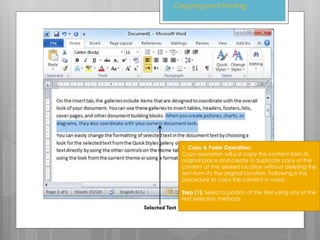
1. Copy & Paste Operation:
Copy operation will just copy the content from its
original place and create a duplicate copy of the
content at the desired location without deleting the
text from it's the original location. Following is the
procedure to copy the content in word:
Step (1): Select a portion of the text using any of the
text selection methods.
Copying and Pasting
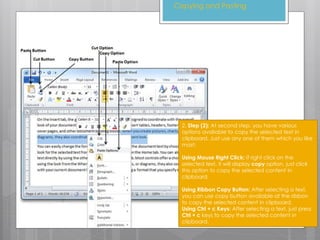
2. Step (2): At second step, you have various
options available to copy the selected text in
clipboard. Just use any one of them which you like
most:
Using Mouse Right Click: If right click on the
selected text, it will display copy option, just click
this option to copy the selected content in
clipboard.
Using Ribbon Copy Button: After selecting a text,
you can use copy button available at the ribbon
to copy the selected content in clipboard.
Using Ctrl + c Keys: After selecting a text, just press
Ctrl + c keys to copy the selected content in
clipboard.
Copying and Pasting
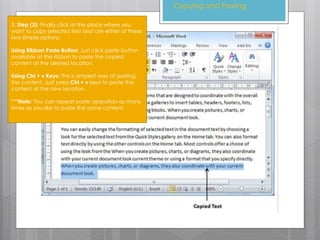
3. Step (3): Finally click at the place where you
want to copy selected text and use either of these
two simple options:
Using Ribbon Paste Button: Just click paste button
available at the ribbon to paste the copied
content at the desired location.
Using Ctrl + v Keys: This is simplest way of pasting
the content. Just press Ctrl + v keys to paste the
content at the new location.
***Note: You can repeat paste operation as many
times as you like to paste the same content.

Ms 2010 tutorial topic 4 copy and paste

  • 1.
  • 2.
    Copying and Pasting 1.Copy & Paste Operation: Copy operation will just copy the content from its original place and create a duplicate copy of the content at the desired location without deleting the text from it's the original location. Following is the procedure to copy the content in word: Step (1): Select a portion of the text using any of the text selection methods.
  • 3.
    Copying and Pasting 2.Step (2): At second step, you have various options available to copy the selected text in clipboard. Just use any one of them which you like most: Using Mouse Right Click: If right click on the selected text, it will display copy option, just click this option to copy the selected content in clipboard. Using Ribbon Copy Button: After selecting a text, you can use copy button available at the ribbon to copy the selected content in clipboard. Using Ctrl + c Keys: After selecting a text, just press Ctrl + c keys to copy the selected content in clipboard.
  • 4.
    Copying and Pasting 3.Step (3): Finally click at the place where you want to copy selected text and use either of these two simple options: Using Ribbon Paste Button: Just click paste button available at the ribbon to paste the copied content at the desired location. Using Ctrl + v Keys: This is simplest way of pasting the content. Just press Ctrl + v keys to paste the content at the new location. ***Note: You can repeat paste operation as many times as you like to paste the same content.