Moving your SharePoint Development to
Azure
Malin De Silva
SharePoint Specialist
Exilesoft
malindesilva@live.com
About Me
• Experienced with SharePoint 2007/ 2010/
2013
• Presenter at many meetups and
conferences
• A BIG Azure fan.
Let’s Get to Know
 SharePoint Developers?
 Experienced with Azure?
 Worked with Azure Virtual Machines?
 SharePoint Development Experience on Azure?
Agenda
 Introduction
 Planning infrastructure
 Azure VMs for SharePoint
 Capex vs Opex
 Cost saving tips
 Q and A
malindesilva@live.com
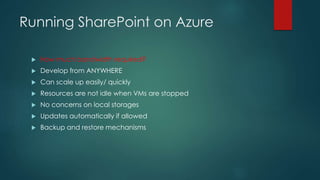
Running SharePoint on Azure
 How much bandwidth required?
 Develop from ANYWHERE
 Can scale up easily/ quickly
 Resources are not idle when VMs are stopped
 No concerns on local storages
 Updates automatically if allowed
 Backup and restore mechanisms
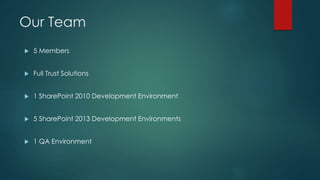
Our Team
 5 Members
 Full Trust Solutions
 1 SharePoint 2010 Development Environment
 5 SharePoint 2013 Development Environments
 1 QA Environment
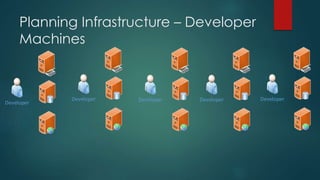
Planning Infrastructure – Developer
Machines
Developer
Developer Developer Developer Developer
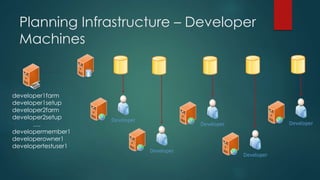
Planning Infrastructure – Developer
Machines
developer1farm
developer1setup
developer2farm
developer2setup
….
developermember1
developerowner1
developertestuser1
Developer
Developer
Developer
Developer
Developer
Demonstration
Creating a Network and a Virtual Machine
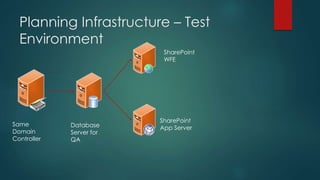
Planning Infrastructure – Test
Environment
Same
Domain
Controller
Database
Server for
QA
SharePoint
WFE
SharePoint
App Server
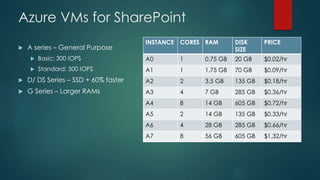
Azure VMs for SharePoint
 A series – General Purpose
 Basic: 300 IOPS
 Standard: 500 IOPS
 D/ DS Series – SSD + 60% faster
 G Series – Larger RAMs
INSTANCE CORES RAM DISK
SIZE
PRICE
A0 1 0.75 GB 20 GB $0.02/hr
A1 1 1.75 GB 70 GB $0.09/hr
A2 2 3.5 GB 135 GB $0.18/hr
A3 4 7 GB 285 GB $0.36/hr
A4 8 14 GB 605 GB $0.72/hr
A5 2 14 GB 135 GB $0.33/hr
A6 4 28 GB 285 GB $0.66/hr
A7 8 56 GB 605 GB $1.32/hr
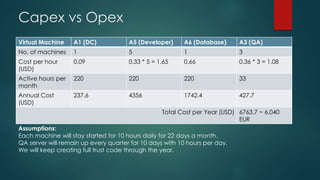
Capex vs Opex
Virtual Machine A1 (DC) A5 (Developer) A6 (Database) A3 (QA)
No. of machines 1 5 1 3
Cost per hour
(USD)
0.09 0.33 * 5 = 1.65 0.66 0.36 * 3 = 1.08
Active hours per
month
220 220 220 33
Annual Cost
(USD)
237.6 4356 1742.4 427.7
Total Cost per Year (USD) 6763.7 ~ 6,040
EUR
Assumptions:
Each machine will stay started for 10 hours daily for 22 days a month.
QA server will remain up every quarter for 10 days with 10 hours per day.
We will keep creating full trust code through the year.
Cost Saving Tips
 Auto scaling or Automation
 License mobility
 Start with Windows Server installations
Demonstration
Auto scaling, Automating
Summary
 Potentials on cloud
 Better planning for VMs
 Cost estimations
 License mobility
 Auto scaling and automating
Questions?

Moving your share point development to azure

  • 1.
    Moving your SharePointDevelopment to Azure Malin De Silva SharePoint Specialist Exilesoft malindesilva@live.com
  • 2.
    About Me • Experiencedwith SharePoint 2007/ 2010/ 2013 • Presenter at many meetups and conferences • A BIG Azure fan.
  • 3.
    Let’s Get toKnow  SharePoint Developers?  Experienced with Azure?  Worked with Azure Virtual Machines?  SharePoint Development Experience on Azure?
  • 4.
    Agenda  Introduction  Planninginfrastructure  Azure VMs for SharePoint  Capex vs Opex  Cost saving tips  Q and A malindesilva@live.com
  • 5.
    Running SharePoint onAzure  How much bandwidth required?  Develop from ANYWHERE  Can scale up easily/ quickly  Resources are not idle when VMs are stopped  No concerns on local storages  Updates automatically if allowed  Backup and restore mechanisms
  • 6.
    Our Team  5Members  Full Trust Solutions  1 SharePoint 2010 Development Environment  5 SharePoint 2013 Development Environments  1 QA Environment
  • 7.
    Planning Infrastructure –Developer Machines Developer Developer Developer Developer Developer
  • 8.
    Planning Infrastructure –Developer Machines developer1farm developer1setup developer2farm developer2setup …. developermember1 developerowner1 developertestuser1 Developer Developer Developer Developer Developer
  • 9.
    Demonstration Creating a Networkand a Virtual Machine
  • 10.
    Planning Infrastructure –Test Environment Same Domain Controller Database Server for QA SharePoint WFE SharePoint App Server
  • 11.
    Azure VMs forSharePoint  A series – General Purpose  Basic: 300 IOPS  Standard: 500 IOPS  D/ DS Series – SSD + 60% faster  G Series – Larger RAMs INSTANCE CORES RAM DISK SIZE PRICE A0 1 0.75 GB 20 GB $0.02/hr A1 1 1.75 GB 70 GB $0.09/hr A2 2 3.5 GB 135 GB $0.18/hr A3 4 7 GB 285 GB $0.36/hr A4 8 14 GB 605 GB $0.72/hr A5 2 14 GB 135 GB $0.33/hr A6 4 28 GB 285 GB $0.66/hr A7 8 56 GB 605 GB $1.32/hr
  • 12.
    Capex vs Opex VirtualMachine A1 (DC) A5 (Developer) A6 (Database) A3 (QA) No. of machines 1 5 1 3 Cost per hour (USD) 0.09 0.33 * 5 = 1.65 0.66 0.36 * 3 = 1.08 Active hours per month 220 220 220 33 Annual Cost (USD) 237.6 4356 1742.4 427.7 Total Cost per Year (USD) 6763.7 ~ 6,040 EUR Assumptions: Each machine will stay started for 10 hours daily for 22 days a month. QA server will remain up every quarter for 10 days with 10 hours per day. We will keep creating full trust code through the year.
  • 13.
    Cost Saving Tips Auto scaling or Automation  License mobility  Start with Windows Server installations
  • 14.
  • 15.
    Summary  Potentials oncloud  Better planning for VMs  Cost estimations  License mobility  Auto scaling and automating
  • 16.