SharePoint 2013 on
Windows Azure
Francesco Sodano
MVP, MCM, MCSE SharePoint.
Francesco Sodano
• Chief Executive Officer Novadia Sàrl
• Microsoft Certified Master (MCM) for SharePoint (..Jedi..)
• Most Valuable Professional (MVP) on SharePoint (4 years)
• SharePoint Architect for UN
• Technical Advisor for Office 365 and Azure for UN
• Microsoft Azure Insider
Agenda
Windows Azure
Azure Virtual Machines
SharePoint 2013 on Windows Azure
Notes from the Field
Windows Azure
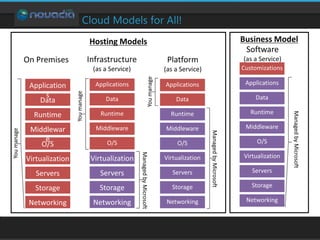
Cloud Models for All!
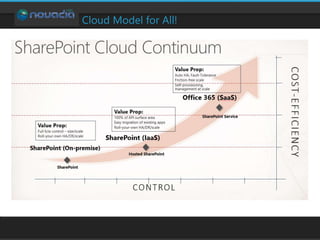
Cloud Model for All!
Windows Azure
Virtual Machines
Azure Virtual Machines
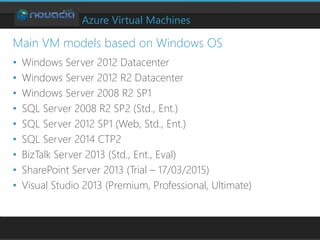
• Windows Server 2012 Datacenter
• Windows Server 2012 R2 Datacenter
• Windows Server 2008 R2 SP1
• SQL Server 2008 R2 SP2 (Std., Ent.)
• SQL Server 2012 SP1 (Web, Std., Ent.)
• SQL Server 2014 CTP2
• BizTalk Server 2013 (Std., Ent., Eval)
• SharePoint Server 2013 (Trial – 17/03/2015)
• Visual Studio 2013 (Premium, Professional, Ultimate)
Main VM models based on Windows OS
Azure Virtual Machines
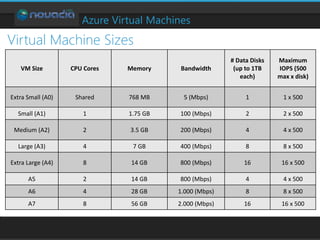
Virtual Machine Sizes
VM Size CPU Cores Memory Bandwidth
# Data Disks
(up to 1TB
each)
Maximum
IOPS (500
max x disk)
Extra Small (A0) Shared 768 MB 5 (Mbps) 1 1 x 500
Small (A1) 1 1.75 GB 100 (Mbps) 2 2 x 500
Medium (A2) 2 3.5 GB 200 (Mbps) 4 4 x 500
Large (A3) 4 7 GB 400 (Mbps) 8 8 x 500
Extra Large (A4) 8 14 GB 800 (Mbps) 16 16 x 500
A5 2 14 GB 800 (Mbps) 4 4 x 500
A6 4 28 GB 1.000 (Mbps) 8 8 x 500
A7 8 56 GB 2.000 (Mbps) 16 16 x 500
Azure Virtual Machines
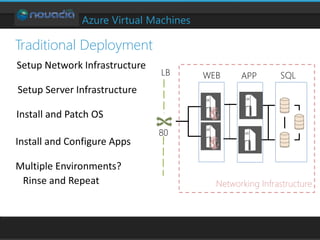
Traditional Deployment
LB WEB SQLAPP
80
Networking Infrastructure
Azure Virtual Machines
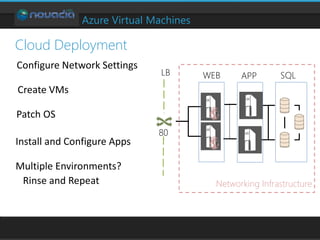
Cloud Deployment
LB WEB SQLAPP
80
Networking Infrastructure
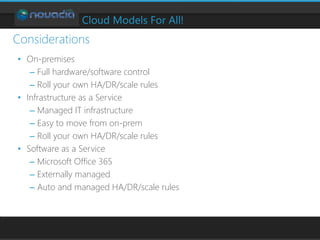
Cloud Models For All!
• On-premises
– Full hardware/software control
– Roll your own HA/DR/scale rules
• Infrastructure as a Service
– Managed IT infrastructure
– Easy to move from on-prem
– Roll your own HA/DR/scale rules
• Software as a Service
– Microsoft Office 365
– Externally managed
– Auto and managed HA/DR/scale rules
Considerations
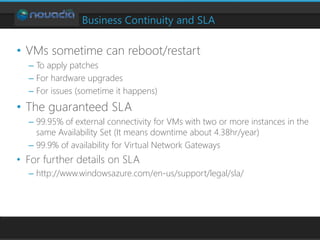
Business Continuity and SLA
• VMs sometime can reboot/restart
– To apply patches
– For hardware upgrades
– For issues (sometime it happens)
• The guaranteed SLA
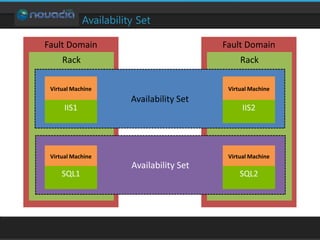
– 99.95% of external connectivity for VMs with two or more instances in the
same Availability Set (It means downtime about 4.38hr/year)
– 99.9% of availability for Virtual Network Gateways
• For further details on SLA
– http://www.windowsazure.com/en-us/support/legal/sla/
Availability Set
SharePoint 2013 on
Azure Virtual Machines
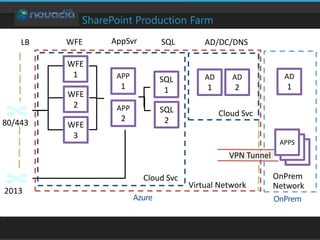
SharePoint Production Farm
AD/DC/DNSLB WFE SQLAppSvr
80/443
2013
Cloud Svc
Cloud Svc
Virtual Network
OnPrem
Network
WFE
2
WFE
3
WFE
1 APP
1
APP
2
SQL
2
SQL
1
AD
1
AD
2
AD
1
DATA
DATA
APPS
VPN Tunnel
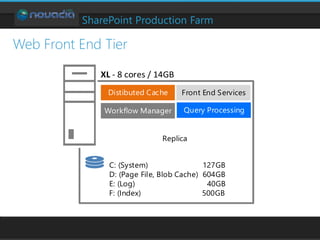
SharePoint Production Farm
Replica
Front End ServicesDistibuted Cache
Workflow Manager Query Processing
XL - 8 cores / 14GB
C: (System) 127GB
D: (Page File, Blob Cache) 604GB
E: (Log) 40GB
F: (Index) 500GB
Web Front End Tier
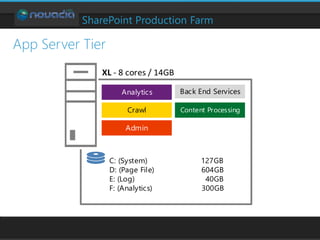
SharePoint Production Farm
App Server Tier
Content Processing
Admin
Crawl
Analytics Back End Services
C: (System) 127GB
D: (Page File) 604GB
E: (Log) 40GB
F: (Analytics) 300GB
XL - 8 cores / 14GB
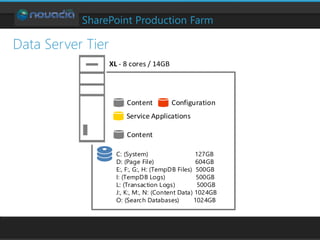
SharePoint Production Farm
Data Server Tier
Content
Content
Configuration
Service Applications
C: (System) 127GB
D: (Page File) 604GB
E:, F:, G:, H: (TempDB Files) 500GB
I: (TempDB Logs) 500GB
L: (Transaction Logs) 500GB
J:, K:, M:, N: (Content Data) 1024GB
O: (Search Databases) 1024GB
XL - 8 cores / 14GB
Notes from the fields
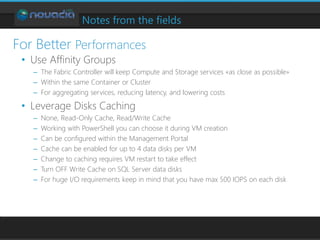
• Use Affinity Groups
– The Fabric Controller will keep Compute and Storage services «as close as possible»
– Within the same Container or Cluster
– For aggregating services, reducing latency, and lowering costs
• Leverage Disks Caching
– None, Read-Only Cache, Read/Write Cache
– Working with PowerShell you can choose it during VM creation
– Can be configured within the Management Portal
– Cache can be enabled for up to 4 data disks per VM
– Change to caching requires VM restart to take effect
– Turn OFF Write Cache on SQL Server data disks
– For huge I/O requirements keep in mind that you have max 500 IOPS on each disk
For Better Performances
Notes from the fields
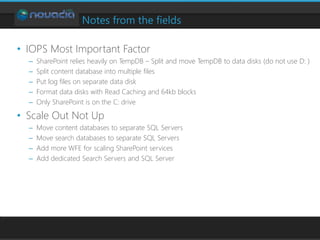
• IOPS Most Important Factor
– SharePoint relies heavily on TempDB – Split and move TempDB to data disks (do not use D: )
– Split content database into multiple files
– Put log files on separate data disk
– Format data disks with Read Caching and 64kb blocks
– Only SharePoint is on the C: drive
• Scale Out Not Up
– Move content databases to separate SQL Servers
– Move search databases to separate SQL Servers
– Add more WFE for scaling SharePoint services
– Add dedicated Search Servers and SQL Server
Notes from the fields
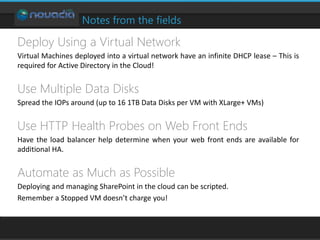
Deploy Using a Virtual Network
Virtual Machines deployed into a virtual network have an infinite DHCP lease – This is
required for Active Directory in the Cloud!
Use Multiple Data Disks
Spread the IOPs around (up to 16 1TB Data Disks per VM with XLarge+ VMs)
Use HTTP Health Probes on Web Front Ends
Have the load balancer help determine when your web front ends are available for
additional HA.
Automate as Much as Possible
Deploying and managing SharePoint in the cloud can be scripted.
Remember a Stopped VM doesn’t charge you!
Thank You!

SharePoint 2013 on Azure: Your Dedicated Farm in the Cloud

  • 1.
    SharePoint 2013 on WindowsAzure Francesco Sodano MVP, MCM, MCSE SharePoint.
  • 2.
    Francesco Sodano • ChiefExecutive Officer Novadia Sàrl • Microsoft Certified Master (MCM) for SharePoint (..Jedi..) • Most Valuable Professional (MVP) on SharePoint (4 years) • SharePoint Architect for UN • Technical Advisor for Office 365 and Azure for UN • Microsoft Azure Insider
  • 3.
    Agenda Windows Azure Azure VirtualMachines SharePoint 2013 on Windows Azure Notes from the Field
  • 4.
  • 5.
  • 6.
  • 7.
  • 8.
    Azure Virtual Machines •Windows Server 2012 Datacenter • Windows Server 2012 R2 Datacenter • Windows Server 2008 R2 SP1 • SQL Server 2008 R2 SP2 (Std., Ent.) • SQL Server 2012 SP1 (Web, Std., Ent.) • SQL Server 2014 CTP2 • BizTalk Server 2013 (Std., Ent., Eval) • SharePoint Server 2013 (Trial – 17/03/2015) • Visual Studio 2013 (Premium, Professional, Ultimate) Main VM models based on Windows OS
  • 9.
    Azure Virtual Machines VirtualMachine Sizes VM Size CPU Cores Memory Bandwidth # Data Disks (up to 1TB each) Maximum IOPS (500 max x disk) Extra Small (A0) Shared 768 MB 5 (Mbps) 1 1 x 500 Small (A1) 1 1.75 GB 100 (Mbps) 2 2 x 500 Medium (A2) 2 3.5 GB 200 (Mbps) 4 4 x 500 Large (A3) 4 7 GB 400 (Mbps) 8 8 x 500 Extra Large (A4) 8 14 GB 800 (Mbps) 16 16 x 500 A5 2 14 GB 800 (Mbps) 4 4 x 500 A6 4 28 GB 1.000 (Mbps) 8 8 x 500 A7 8 56 GB 2.000 (Mbps) 16 16 x 500
  • 10.
    Azure Virtual Machines TraditionalDeployment LB WEB SQLAPP 80 Networking Infrastructure
  • 11.
    Azure Virtual Machines CloudDeployment LB WEB SQLAPP 80 Networking Infrastructure
  • 12.
    Cloud Models ForAll! • On-premises – Full hardware/software control – Roll your own HA/DR/scale rules • Infrastructure as a Service – Managed IT infrastructure – Easy to move from on-prem – Roll your own HA/DR/scale rules • Software as a Service – Microsoft Office 365 – Externally managed – Auto and managed HA/DR/scale rules Considerations
  • 13.
    Business Continuity andSLA • VMs sometime can reboot/restart – To apply patches – For hardware upgrades – For issues (sometime it happens) • The guaranteed SLA – 99.95% of external connectivity for VMs with two or more instances in the same Availability Set (It means downtime about 4.38hr/year) – 99.9% of availability for Virtual Network Gateways • For further details on SLA – http://www.windowsazure.com/en-us/support/legal/sla/
  • 14.
  • 15.
    SharePoint 2013 on AzureVirtual Machines
  • 16.
    SharePoint Production Farm AD/DC/DNSLBWFE SQLAppSvr 80/443 2013 Cloud Svc Cloud Svc Virtual Network OnPrem Network WFE 2 WFE 3 WFE 1 APP 1 APP 2 SQL 2 SQL 1 AD 1 AD 2 AD 1 DATA DATA APPS VPN Tunnel
  • 17.
    SharePoint Production Farm Replica FrontEnd ServicesDistibuted Cache Workflow Manager Query Processing XL - 8 cores / 14GB C: (System) 127GB D: (Page File, Blob Cache) 604GB E: (Log) 40GB F: (Index) 500GB Web Front End Tier
  • 18.
    SharePoint Production Farm AppServer Tier Content Processing Admin Crawl Analytics Back End Services C: (System) 127GB D: (Page File) 604GB E: (Log) 40GB F: (Analytics) 300GB XL - 8 cores / 14GB
  • 19.
    SharePoint Production Farm DataServer Tier Content Content Configuration Service Applications C: (System) 127GB D: (Page File) 604GB E:, F:, G:, H: (TempDB Files) 500GB I: (TempDB Logs) 500GB L: (Transaction Logs) 500GB J:, K:, M:, N: (Content Data) 1024GB O: (Search Databases) 1024GB XL - 8 cores / 14GB
  • 20.
    Notes from thefields • Use Affinity Groups – The Fabric Controller will keep Compute and Storage services «as close as possible» – Within the same Container or Cluster – For aggregating services, reducing latency, and lowering costs • Leverage Disks Caching – None, Read-Only Cache, Read/Write Cache – Working with PowerShell you can choose it during VM creation – Can be configured within the Management Portal – Cache can be enabled for up to 4 data disks per VM – Change to caching requires VM restart to take effect – Turn OFF Write Cache on SQL Server data disks – For huge I/O requirements keep in mind that you have max 500 IOPS on each disk For Better Performances
  • 21.
    Notes from thefields • IOPS Most Important Factor – SharePoint relies heavily on TempDB – Split and move TempDB to data disks (do not use D: ) – Split content database into multiple files – Put log files on separate data disk – Format data disks with Read Caching and 64kb blocks – Only SharePoint is on the C: drive • Scale Out Not Up – Move content databases to separate SQL Servers – Move search databases to separate SQL Servers – Add more WFE for scaling SharePoint services – Add dedicated Search Servers and SQL Server
  • 22.
    Notes from thefields Deploy Using a Virtual Network Virtual Machines deployed into a virtual network have an infinite DHCP lease – This is required for Active Directory in the Cloud! Use Multiple Data Disks Spread the IOPs around (up to 16 1TB Data Disks per VM with XLarge+ VMs) Use HTTP Health Probes on Web Front Ends Have the load balancer help determine when your web front ends are available for additional HA. Automate as Much as Possible Deploying and managing SharePoint in the cloud can be scripted. Remember a Stopped VM doesn’t charge you!
  • 23.