INTRODUCTION TO 
Malin De Silva 
SharePoint Specialist 
Exilesoft 
malindesilva.net
OVERVIEW 
• Introduction 
• AngularJS Directives 
• Demonstrations 
• Other features
INTRODUCTION 
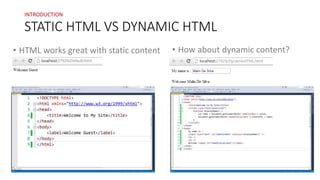
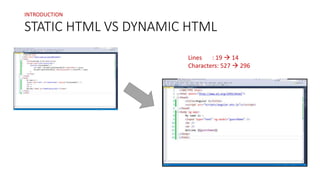
STATIC HTML VS DYNAMIC HTML 
• HTML works great with static content 
• How about dynamic content?
INTRODUCTION 
STATIC HTML VS DYNAMIC HTML 
Lines : 19  14 
Characters: 527  296
INTRODUCTION 
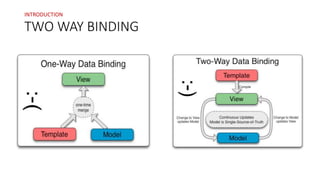
TWO WAY BINDING
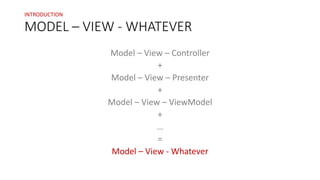
MODEL – VIEW - WHATEVER 
Model – View – Controller 
+ 
Model – View – Presenter 
+ 
Model – View – ViewModel 
+ 
… 
= 
Model – View - Whatever 
INTRODUCTION
INTRODUCTION 
SETTING UP 
• Minified and non-minified versions 
• Online and offline reference 
• Feature downloads 
• angular-mocks.js 
• angular-scenario.js 
• angular-loader.min.js 
• angular-animate.js 
• angular-cookies.js 
• angular-resource.js 
• angular-route.js 
• angular-sanitize.js 
• angular-touch.js
ANGULARJS 
Directives 
Directives are markers on a DOM element 
that tells AngularJS’s HTML Compiler to attach a 
specified behavior to that DOM element 
or even transform that DOM element and 
its children.
ANGULARJS 
Directives 
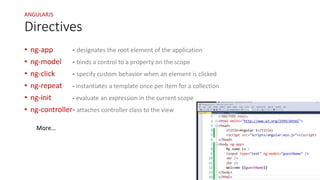
• ng-app - designates the root element of the application 
• ng-model - binds a control to a property on the scope 
• ng-click - specify custom behavior when an element is clicked 
• ng-repeat - instantiates a template once per item for a collection 
• ng-init - evaluate an expression in the current scope 
• ng-controller- attaches controller class to the view 
More…
DEMONSTRATIONS 
• Demo 1: ng-app and ng-model 
• Demo 2: ng-init and ng-repeat with ordering and filtering 
• Demo 3: Using controllers 
$scope 
• Demo 4: ng-click 
Modules 
Two-way binding
OTHER FEATURES 
• Config 
• Routes 
• Factory 
• Provider 
• Service 
• Value
$scope.Done 
Email: malindesilva@live.com

AngularJS

  • 1.
    INTRODUCTION TO MalinDe Silva SharePoint Specialist Exilesoft malindesilva.net
  • 2.
    OVERVIEW • Introduction • AngularJS Directives • Demonstrations • Other features
  • 3.
    INTRODUCTION STATIC HTMLVS DYNAMIC HTML • HTML works great with static content • How about dynamic content?
  • 4.
    INTRODUCTION STATIC HTMLVS DYNAMIC HTML Lines : 19  14 Characters: 527  296
  • 5.
  • 6.
    MODEL – VIEW- WHATEVER Model – View – Controller + Model – View – Presenter + Model – View – ViewModel + … = Model – View - Whatever INTRODUCTION
  • 7.
    INTRODUCTION SETTING UP • Minified and non-minified versions • Online and offline reference • Feature downloads • angular-mocks.js • angular-scenario.js • angular-loader.min.js • angular-animate.js • angular-cookies.js • angular-resource.js • angular-route.js • angular-sanitize.js • angular-touch.js
  • 8.
    ANGULARJS Directives Directivesare markers on a DOM element that tells AngularJS’s HTML Compiler to attach a specified behavior to that DOM element or even transform that DOM element and its children.
  • 9.
    ANGULARJS Directives •ng-app - designates the root element of the application • ng-model - binds a control to a property on the scope • ng-click - specify custom behavior when an element is clicked • ng-repeat - instantiates a template once per item for a collection • ng-init - evaluate an expression in the current scope • ng-controller- attaches controller class to the view More…
  • 10.
    DEMONSTRATIONS • Demo1: ng-app and ng-model • Demo 2: ng-init and ng-repeat with ordering and filtering • Demo 3: Using controllers $scope • Demo 4: ng-click Modules Two-way binding
  • 11.
    OTHER FEATURES •Config • Routes • Factory • Provider • Service • Value
  • 12.

Editor's Notes

  • #4 I need to display a welcome message in the site
  • #12 factory - you actually create an object inside of the factory and return it. service - you just have a standard function that uses the this keyword to define function. provider - there’s a $get you define and it can be used to get the object that returns the data. value - is just a way to get for instance a config value