Move into Drupal using
 the Migrate Module
      NYC Camp 2012
    Ashok Modi (BTMash)
Agenda
● Introduction to Migrate
● Theory
● Implementation
  ○ Hooks
  ○ Classes
    ■ Migration
    ■ Handlers
    ■ Alterations
● Commands / Demo (Time Permitting)
● Q & A (Conclusion)
Thanks
● Mike Ryan (mikeryan)
  ○ http://drupal.org/user/4420
● Moshe Weitzman (moshe weitzman)
  ○ http://drupal.org/user/23
● Frank Carey
  ○ http://drupal.org/user/112063
● Andrew Morton (drewish)
  ○ http://drupal.org/user/34869
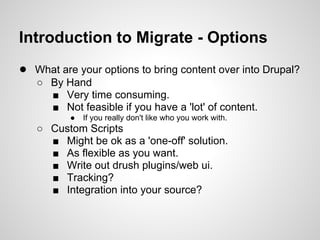
Introduction to Migrate - Options
● What are your options to bring content over into Drupal?
   ○ By Hand
     ■ Very time consuming.
     ■ Not feasible if you have a 'lot' of content.
          ●   If you really don't like who you work with.
   ○ Custom Scripts
     ■ Might be ok as a 'one-off' solution.
     ■ As flexible as you want.
     ■ Write out drush plugins/web ui.
     ■ Tracking?
     ■ Integration into your source?
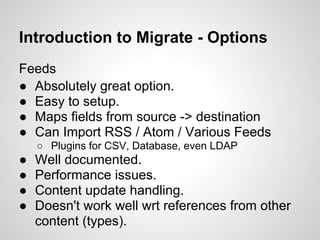
Introduction to Migrate - Options
Feeds
● Absolutely great option.
● Easy to setup.
● Maps fields from source -> destination
● Can Import RSS / Atom / Various Feeds
    ○ Plugins for CSV, Database, even LDAP
●   Well documented.
●   Performance issues.
●   Content update handling.
●   Doesn't work well wrt references from other
    content (types).
Introduction to Migrate
● Powerful object oriented framework for moving content
    into Drupal.
●   Already defined many import sources.
     ○ XML, JSON, CSV, DB, etc.
●   Support to migrate into various types of content.
     ○ users, nodes, comments, taxonomy, all core entities.
     ○ can define your own import handler.
     ○ can import into a particular table!
●   Fast.
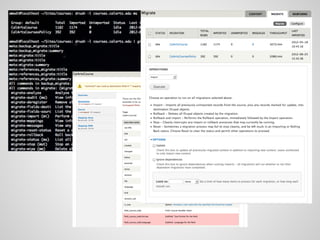
●   Minimal UI, mainly steered around drush.
●   Drush integration.
●   Steep Learning Curve.
     ○ You will write code.
Introduction to Migrate
● Drupal 6 requires autoload and dbtng
  modules. So the code is very similar in 6 and
  7.
● Migrate Extras provides support for many
  contrib modules.
  ○ Provides base class for importing to entities from
    EntityAPI.
  ○ More field modules implementing field handlers.
● The most comprehensive and up-to-date
  documentation is the beer.inc and wine.inc
  examples.
  ○ Part of the Migrate module.
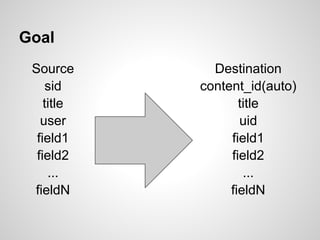
Goal
 Source       Destination
     sid    content_id(auto)
    title          title
   user            uid
  field1         field1
  field2         field2
     ...            ...
 fieldN          fieldN
Source
● Interface to your current set of data (csv,
  json, xml, db, etc).
● Provides a list of fields.
● Responsible for iterating over the rows of
  data.
Destination
● Responsible for saving specific type of
  content to Drupal (user, node, row in a
  particular table)
● Each Source record correlates to one
  Destination record.
Field Mappings
● Links a source field to destination field.
● Basic functions such as splitting into an
  array based on separators, etc.
● Can pass additional arguments (as the field
  handler implements).
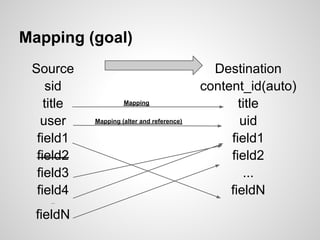
Mapping (goal)
 Source                                       Destination
     sid                                    content_id(auto)
    title            Mapping                       title
   user     Mapping (alter and reference)          uid
  field1                                         field1
  field2                                         field2
  field3                                            ...
  field4                                         fieldN
    ...


  fieldN
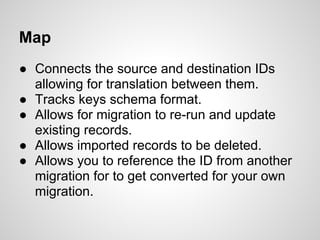
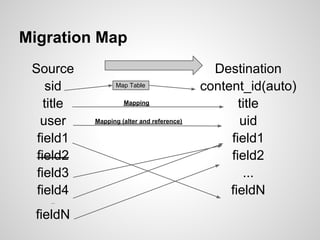
Map
● Connects the source and destination IDs
  allowing for translation between them.
● Tracks keys schema format.
● Allows for migration to re-run and update
  existing records.
● Allows imported records to be deleted.
● Allows you to reference the ID from another
  migration for to get converted for your own
  migration.
Migration Map
 Source                                       Destination
     sid          Map Table                 content_id(auto)
    title            Mapping                       title
   user     Mapping (alter and reference)          uid
  field1                                         field1
  field2                                         field2
  field3                                            ...
  field4                                         fieldN
    ...


  fieldN
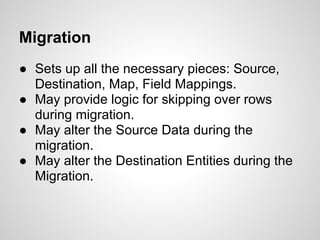
Migration
● Sets up all the necessary pieces: Source,
  Destination, Map, Field Mappings.
● May provide logic for skipping over rows
  during migration.
● May alter the Source Data during the
  migration.
● May alter the Destination Entities during the
  Migration.
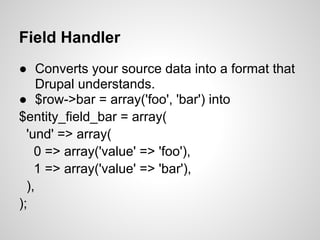
Field Handler
● Converts your source data into a format that
     Drupal understands.
● $row->bar = array('foo', 'bar') into
$entity_field_bar = array(
  'und' => array(
    0 => array('value' => 'foo'),
    1 => array('value' => 'bar'),
  ),
);
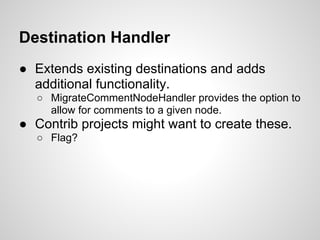
Destination Handler
● Extends existing destinations and adds
  additional functionality.
  ○ MigrateCommentNodeHandler provides the option to
    allow for comments to a given node.
● Contrib projects might want to create these.
  ○ Flag?
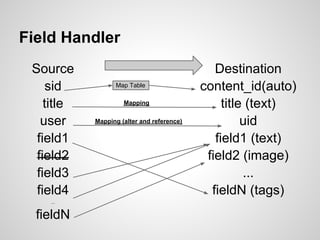
Field Handler
 Source                                        Destination
     sid          Map Table                 content_id(auto)
    title            Mapping                     title (text)
   user     Mapping (alter and reference)             uid
  field1                                       field1 (text)
  field2                                     field2 (image)
  field3                                              ...
  field4                                      fieldN (tags)
    ...


  fieldN
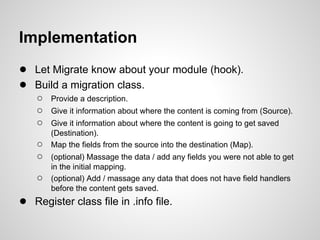
Implementation
● Let Migrate know about your module (hook).
● Build a migration class.
    ○   Provide a description.
    ○   Give it information about where the content is coming from (Source).
    ○   Give it information about where the content is going to get saved
        (Destination).
    ○   Map the fields from the source into the destination (Map).
    ○   (optional) Massage the data / add any fields you were not able to get
        in the initial mapping.
    ○   (optional) Add / massage any data that does not have field handlers
        before the content gets saved.
● Register class file in .info file.
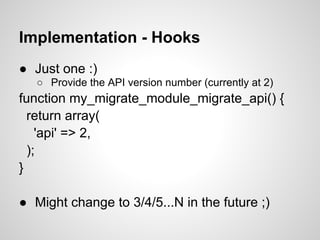
Implementation - Hooks
● Just one :)
   ○ Provide the API version number (currently at 2)
function my_migrate_module_migrate_api() {
  return array(
    'api' => 2,
  );
}

● Might change to 3/4/5...N in the future ;)
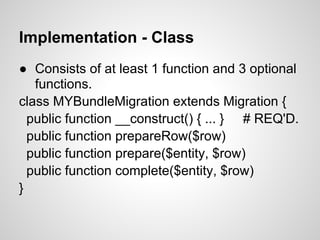
Implementation - Class
● Consists of at least 1 function and 3 optional
   functions.
class MYBundleMigration extends Migration {
  public function __construct() { ... } # REQ'D.
  public function prepareRow($row)
  public function prepare($entity, $row)
  public function complete($entity, $row)
}
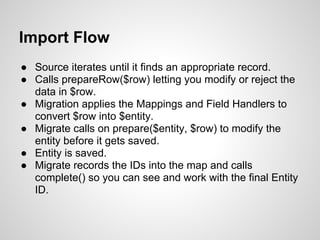
Import Flow
● Source iterates until it finds an appropriate record.
● Calls prepareRow($row) letting you modify or reject the
  data in $row.
● Migration applies the Mappings and Field Handlers to
  convert $row into $entity.
● Migrate calls on prepare($entity, $row) to modify the
  entity before it gets saved.
● Entity is saved.
● Migrate records the IDs into the map and calls
  complete() so you can see and work with the final Entity
  ID.
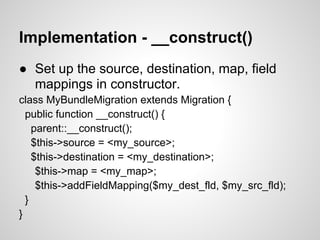
Implementation - __construct()
● Set up the source, destination, map, field
  mappings in constructor.
class MyBundleMigration extends Migration {
  public function __construct() {
    parent::__construct();
    $this->source = <my_source>;
    $this->destination = <my_destination>;
     $this->map = <my_map>;
     $this->addFieldMapping($my_dest_fld, $my_src_fld);
  }
}
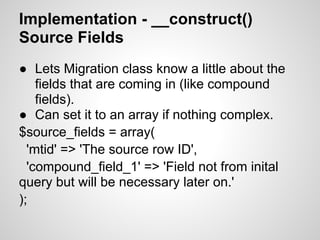
Implementation - __construct()
Source Fields
● Lets Migration class know a little about the
    fields that are coming in (like compound
    fields).
● Can set it to an array if nothing complex.
$source_fields = array(
  'mtid' => 'The source row ID',
  'compound_field_1' => 'Field not from inital
query but will be necessary later on.'
);
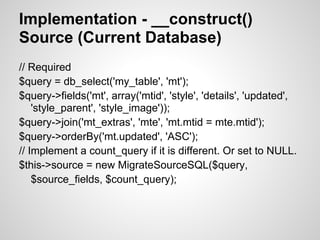
Implementation - __construct()
Source (Current Database)
// Required
$query = db_select('my_table', 'mt');
$query->fields('mt', array('mtid', 'style', 'details', 'updated',
    'style_parent', 'style_image'));
$query->join('mt_extras', 'mte', 'mt.mtid = mte.mtid');
$query->orderBy('mt.updated', 'ASC');
// Implement a count_query if it is different. Or set to NULL.
$this->source = new MigrateSourceSQL($query,
    $source_fields, $count_query);
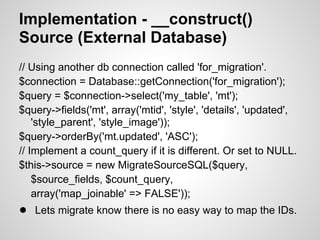
Implementation - __construct()
Source (External Database)
// Using another db connection called 'for_migration'.
$connection = Database::getConnection('for_migration');
$query = $connection->select('my_table', 'mt');
$query->fields('mt', array('mtid', 'style', 'details', 'updated',
    'style_parent', 'style_image'));
$query->orderBy('mt.updated', 'ASC');
// Implement a count_query if it is different. Or set to NULL.
$this->source = new MigrateSourceSQL($query,
    $source_fields, $count_query,
    array('map_joinable' => FALSE'));
● Lets migrate know there is no easy way to map the IDs.
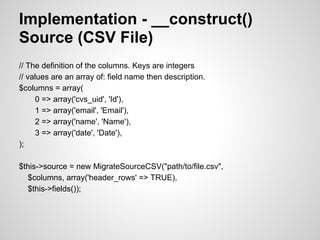
Implementation - __construct()
Source (CSV File)
// The definition of the columns. Keys are integers
// values are an array of: field name then description.
$columns = array(
      0 => array('cvs_uid', 'Id'),
      1 => array('email', 'Email'),
      2 => array('name', 'Name'),
      3 => array('date', 'Date'),
);

$this->source = new MigrateSourceCSV("path/to/file.csv",
  $columns, array('header_rows' => TRUE),
  $this->fields());
Implementation - __construct()
Source (Other Sources)
● Comes with base source migration classes
  to migrate from JSON, XML, File Directories.
● Expect to make some changes depending
  on the migration format.
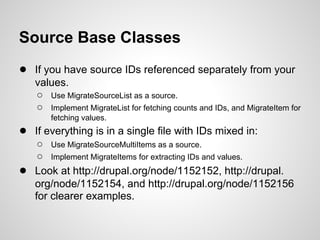
Source Base Classes
● If you have source IDs referenced separately from your
    values.
    ○ Use MigrateSourceList as a source.
    ○ Implement MigrateList for fetching counts and IDs, and MigrateItem for
        fetching values.
● If everything is in a single file with IDs mixed in:
     ○ Use MigrateSourceMultiItems as a source.
     ○ Implement MigrateItems for extracting IDs and values.
●   Look at http://drupal.org/node/1152152, http://drupal.
    org/node/1152154, and http://drupal.org/node/1152156
    for clearer examples.
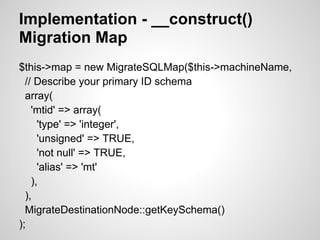
Implementation - __construct()
Migration Map
$this->map = new MigrateSQLMap($this->machineName,
  // Describe your primary ID schema
  array(
    'mtid' => array(
      'type' => 'integer',
      'unsigned' => TRUE,
      'not null' => TRUE,
      'alias' => 'mt'
    ),
  ),
  MigrateDestinationNode::getKeySchema()
);
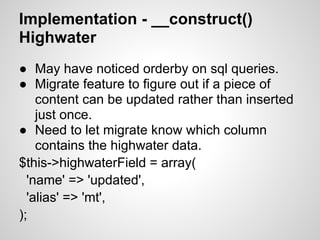
Implementation - __construct()
Highwater
● May have noticed orderby on sql queries.
● Migrate feature to figure out if a piece of
    content can be updated rather than inserted
    just once.
● Need to let migrate know which column
    contains the highwater data.
$this->highwaterField = array(
  'name' => 'updated',
  'alias' => 'mt',
);
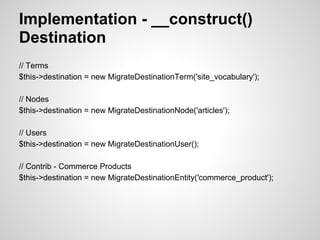
Implementation - __construct()
Destination
// Terms
$this->destination = new MigrateDestinationTerm('site_vocabulary');

// Nodes
$this->destination = new MigrateDestinationNode('articles');

// Users
$this->destination = new MigrateDestinationUser();

// Contrib - Commerce Products
$this->destination = new MigrateDestinationEntity('commerce_product');
Implementation - __construct()
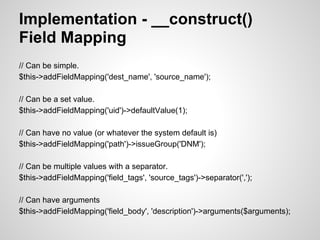
Field Mapping
// Can be simple.
$this->addFieldMapping('dest_name', 'source_name');

// Can be a set value.
$this->addFieldMapping('uid')->defaultValue(1);

// Can have no value (or whatever the system default is)
$this->addFieldMapping('path')->issueGroup('DNM');

// Can be multiple values with a separator.
$this->addFieldMapping('field_tags', 'source_tags')->separator(',');

// Can have arguments
$this->addFieldMapping('field_body', 'description')->arguments($arguments);
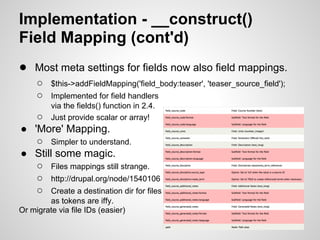
Implementation - __construct()
Field Mapping (cont'd)
● Most meta settings for fields now also field mappings.
     ○   $this->addFieldMapping('field_body:teaser', 'teaser_source_field');
     ○   Implemented for field handlers
         via the fields() function in 2.4.
   ○     Just provide scalar or array!
● 'More' Mapping.
   ○ Simpler to understand.
● Still some magic.
   ○ Files mappings still strange.
   ○ http://drupal.org/node/1540106
   ○ Create a destination dir for files
        as tokens are iffy.
Or migrate via file IDs (easier)
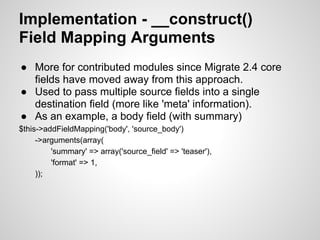
Implementation - __construct()
Field Mapping Arguments
● More for contributed modules since Migrate 2.4 core
  fields have moved away from this approach.
● Used to pass multiple source fields into a single
  destination field (more like 'meta' information).
● As an example, a body field (with summary)
$this->addFieldMapping('body', 'source_body')
     ->arguments(array(
         'summary' => array('source_field' => 'teaser'),
         'format' => 1,
     ));
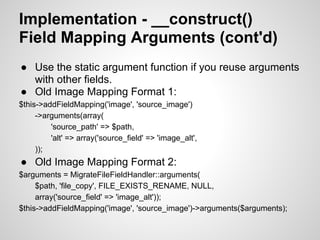
Implementation - __construct()
Field Mapping Arguments (cont'd)
● Use the static argument function if you reuse arguments
  with other fields.
● Old Image Mapping Format 1:
$this->addFieldMapping('image', 'source_image')
     ->arguments(array(
         'source_path' => $path,
         'alt' => array('source_field' => 'image_alt',
     ));
● Old Image Mapping Format 2:
$arguments = MigrateFileFieldHandler::arguments(
     $path, 'file_copy', FILE_EXISTS_RENAME, NULL,
     array('source_field' => 'image_alt'));
$this->addFieldMapping('image', 'source_image')->arguments($arguments);
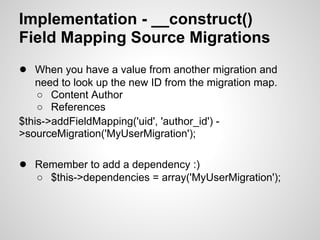
Implementation - __construct()
Field Mapping Source Migrations
● When you have a value from another migration and
   need to look up the new ID from the migration map.
    ○ Content Author
    ○ References
$this->addFieldMapping('uid', 'author_id') -
>sourceMigration('MyUserMigration');

● Remember to add a dependency :)
   ○ $this->dependencies = array('MyUserMigration');
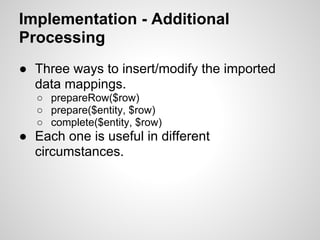
Implementation - Additional
Processing
● Three ways to insert/modify the imported
  data mappings.
   ○ prepareRow($row)
   ○ prepare($entity, $row)
   ○ complete($entity, $row)
● Each one is useful in different
  circumstances.
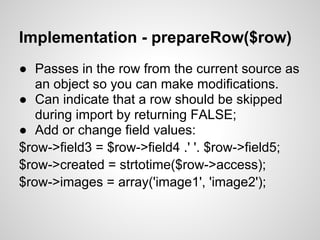
Implementation - prepareRow($row)
● Passes in the row from the current source as
   an object so you can make modifications.
● Can indicate that a row should be skipped
   during import by returning FALSE;
● Add or change field values:
$row->field3 = $row->field4 .' '. $row->field5;
$row->created = strtotime($row->access);
$row->images = array('image1', 'image2');
Implementation
prepare($entity, $row)
● Work directly with the entity object that has been
  populated with field mappings.
  ○ Arguments: the entity prior to being saved, the source row.
● Final opportunity for changes before entity gets saved.
● Must save fields in entity field format.
● Use prepare() to populate fields that do not have a field
  handler (link, relation, location as examples at time of
  writing)
$entity->field_link['und'][0]['value'] = 'http:
//drupal.org/project/migrate';
Implementation
complete($entity, $row)
● Called after entity is saved - chance to
  update any *other* records that reference
  the current entity.
● Don't use it to save the same record again...
Implementation - Dealing with
Circular Dependencies
● Implement stubs - (http://drupal.
  org/node/1013506)
● Specify a sourceMigration
  ('NodeBundleMigration') on the ID's field
  mapping.
● Add createStub($migration, $source_key) to
  NodeBundleMigration which creates an
  empty record and returns the record ID.
● Next time NodeBundleMigration runs, it will
  update the stub and fill it with proper content.
Implementation - Dealing with
Dynamic Migrations
● Some projects (like wordpress migrate /
  commerce migrate) will migrate most but not
  all content.
● Extend by creating destination migration.
  ○ Same as regular migration but in __construct you
    have to provide type of record and value of record.
    ■ $this->systemOfRecord = Migration::DESTINATION
    ■ $this->addFieldMapping('nid','nid')
          ->sourceMigration('NodeBundleMigration');
Implementation - Suggestions
● Separate your file migrations.
  ○ Migrate 2.4 now has a class to migrate your files
    separately.
  ○ Can retain structure of source file directory.
  ○ Or not (make up your own) - its just more flexible.
  ○ Or make multiple file migrations based off your
    separate content migrations and have your content
    migrations have a dependency on the file migration.
Migrate in other contributed
modules
● Creating new types of objects?
  ○ Write a destination handler.
  ○ Hopefully, you can implement your object using the
    entityapi and extend on the
    MigrateDestinationEntityAPI class.
● Create new types of fields?
  ○ Write a field handler.
References
Projects
● http://drupal.org/project/migrate
● http://drupal.org/project/migrate_extras
Drupal -> Drupal Migration Sandboxes
● http://drupal.org/sandbox/mikeryan/1234554
● http://drupal.org/sandbox/btmash/1092900
● http://drupal.org/sandbox/btmash/1492598
Documentation
● http://drupal.org/node/415260
● http://denver2012.drupal.org/program/sessions/getting-
   it-drupal-migrate
● http://btmash.com/tags/migrate
Demo / Questions / Notes
Thank you :)

Move Into Drupal Using The Migrate Module

  • 1.
    Move into Drupalusing the Migrate Module NYC Camp 2012 Ashok Modi (BTMash)
  • 2.
    Agenda ● Introduction toMigrate ● Theory ● Implementation ○ Hooks ○ Classes ■ Migration ■ Handlers ■ Alterations ● Commands / Demo (Time Permitting) ● Q & A (Conclusion)
  • 3.
    Thanks ● Mike Ryan(mikeryan) ○ http://drupal.org/user/4420 ● Moshe Weitzman (moshe weitzman) ○ http://drupal.org/user/23 ● Frank Carey ○ http://drupal.org/user/112063 ● Andrew Morton (drewish) ○ http://drupal.org/user/34869
  • 4.
    Introduction to Migrate- Options ● What are your options to bring content over into Drupal? ○ By Hand ■ Very time consuming. ■ Not feasible if you have a 'lot' of content. ● If you really don't like who you work with. ○ Custom Scripts ■ Might be ok as a 'one-off' solution. ■ As flexible as you want. ■ Write out drush plugins/web ui. ■ Tracking? ■ Integration into your source?
  • 5.
    Introduction to Migrate- Options Feeds ● Absolutely great option. ● Easy to setup. ● Maps fields from source -> destination ● Can Import RSS / Atom / Various Feeds ○ Plugins for CSV, Database, even LDAP ● Well documented. ● Performance issues. ● Content update handling. ● Doesn't work well wrt references from other content (types).
  • 6.
    Introduction to Migrate ●Powerful object oriented framework for moving content into Drupal. ● Already defined many import sources. ○ XML, JSON, CSV, DB, etc. ● Support to migrate into various types of content. ○ users, nodes, comments, taxonomy, all core entities. ○ can define your own import handler. ○ can import into a particular table! ● Fast. ● Minimal UI, mainly steered around drush. ● Drush integration. ● Steep Learning Curve. ○ You will write code.
  • 8.
    Introduction to Migrate ●Drupal 6 requires autoload and dbtng modules. So the code is very similar in 6 and 7. ● Migrate Extras provides support for many contrib modules. ○ Provides base class for importing to entities from EntityAPI. ○ More field modules implementing field handlers. ● The most comprehensive and up-to-date documentation is the beer.inc and wine.inc examples. ○ Part of the Migrate module.
  • 9.
    Goal Source Destination sid content_id(auto) title title user uid field1 field1 field2 field2 ... ... fieldN fieldN
  • 10.
    Source ● Interface toyour current set of data (csv, json, xml, db, etc). ● Provides a list of fields. ● Responsible for iterating over the rows of data.
  • 11.
    Destination ● Responsible forsaving specific type of content to Drupal (user, node, row in a particular table) ● Each Source record correlates to one Destination record.
  • 12.
    Field Mappings ● Linksa source field to destination field. ● Basic functions such as splitting into an array based on separators, etc. ● Can pass additional arguments (as the field handler implements).
  • 13.
    Mapping (goal) Source Destination sid content_id(auto) title Mapping title user Mapping (alter and reference) uid field1 field1 field2 field2 field3 ... field4 fieldN ... fieldN
  • 14.
    Map ● Connects thesource and destination IDs allowing for translation between them. ● Tracks keys schema format. ● Allows for migration to re-run and update existing records. ● Allows imported records to be deleted. ● Allows you to reference the ID from another migration for to get converted for your own migration.
  • 15.
    Migration Map Source Destination sid Map Table content_id(auto) title Mapping title user Mapping (alter and reference) uid field1 field1 field2 field2 field3 ... field4 fieldN ... fieldN
  • 16.
    Migration ● Sets upall the necessary pieces: Source, Destination, Map, Field Mappings. ● May provide logic for skipping over rows during migration. ● May alter the Source Data during the migration. ● May alter the Destination Entities during the Migration.
  • 17.
    Field Handler ● Convertsyour source data into a format that Drupal understands. ● $row->bar = array('foo', 'bar') into $entity_field_bar = array( 'und' => array( 0 => array('value' => 'foo'), 1 => array('value' => 'bar'), ), );
  • 18.
    Destination Handler ● Extendsexisting destinations and adds additional functionality. ○ MigrateCommentNodeHandler provides the option to allow for comments to a given node. ● Contrib projects might want to create these. ○ Flag?
  • 19.
    Field Handler Source Destination sid Map Table content_id(auto) title Mapping title (text) user Mapping (alter and reference) uid field1 field1 (text) field2 field2 (image) field3 ... field4 fieldN (tags) ... fieldN
  • 20.
    Implementation ● Let Migrateknow about your module (hook). ● Build a migration class. ○ Provide a description. ○ Give it information about where the content is coming from (Source). ○ Give it information about where the content is going to get saved (Destination). ○ Map the fields from the source into the destination (Map). ○ (optional) Massage the data / add any fields you were not able to get in the initial mapping. ○ (optional) Add / massage any data that does not have field handlers before the content gets saved. ● Register class file in .info file.
  • 21.
    Implementation - Hooks ●Just one :) ○ Provide the API version number (currently at 2) function my_migrate_module_migrate_api() { return array( 'api' => 2, ); } ● Might change to 3/4/5...N in the future ;)
  • 22.
    Implementation - Class ●Consists of at least 1 function and 3 optional functions. class MYBundleMigration extends Migration { public function __construct() { ... } # REQ'D. public function prepareRow($row) public function prepare($entity, $row) public function complete($entity, $row) }
  • 23.
    Import Flow ● Sourceiterates until it finds an appropriate record. ● Calls prepareRow($row) letting you modify or reject the data in $row. ● Migration applies the Mappings and Field Handlers to convert $row into $entity. ● Migrate calls on prepare($entity, $row) to modify the entity before it gets saved. ● Entity is saved. ● Migrate records the IDs into the map and calls complete() so you can see and work with the final Entity ID.
  • 24.
    Implementation - __construct() ●Set up the source, destination, map, field mappings in constructor. class MyBundleMigration extends Migration { public function __construct() { parent::__construct(); $this->source = <my_source>; $this->destination = <my_destination>; $this->map = <my_map>; $this->addFieldMapping($my_dest_fld, $my_src_fld); } }
  • 25.
    Implementation - __construct() SourceFields ● Lets Migration class know a little about the fields that are coming in (like compound fields). ● Can set it to an array if nothing complex. $source_fields = array( 'mtid' => 'The source row ID', 'compound_field_1' => 'Field not from inital query but will be necessary later on.' );
  • 26.
    Implementation - __construct() Source(Current Database) // Required $query = db_select('my_table', 'mt'); $query->fields('mt', array('mtid', 'style', 'details', 'updated', 'style_parent', 'style_image')); $query->join('mt_extras', 'mte', 'mt.mtid = mte.mtid'); $query->orderBy('mt.updated', 'ASC'); // Implement a count_query if it is different. Or set to NULL. $this->source = new MigrateSourceSQL($query, $source_fields, $count_query);
  • 27.
    Implementation - __construct() Source(External Database) // Using another db connection called 'for_migration'. $connection = Database::getConnection('for_migration'); $query = $connection->select('my_table', 'mt'); $query->fields('mt', array('mtid', 'style', 'details', 'updated', 'style_parent', 'style_image')); $query->orderBy('mt.updated', 'ASC'); // Implement a count_query if it is different. Or set to NULL. $this->source = new MigrateSourceSQL($query, $source_fields, $count_query, array('map_joinable' => FALSE')); ● Lets migrate know there is no easy way to map the IDs.
  • 28.
    Implementation - __construct() Source(CSV File) // The definition of the columns. Keys are integers // values are an array of: field name then description. $columns = array( 0 => array('cvs_uid', 'Id'), 1 => array('email', 'Email'), 2 => array('name', 'Name'), 3 => array('date', 'Date'), ); $this->source = new MigrateSourceCSV("path/to/file.csv", $columns, array('header_rows' => TRUE), $this->fields());
  • 29.
    Implementation - __construct() Source(Other Sources) ● Comes with base source migration classes to migrate from JSON, XML, File Directories. ● Expect to make some changes depending on the migration format.
  • 30.
    Source Base Classes ●If you have source IDs referenced separately from your values. ○ Use MigrateSourceList as a source. ○ Implement MigrateList for fetching counts and IDs, and MigrateItem for fetching values. ● If everything is in a single file with IDs mixed in: ○ Use MigrateSourceMultiItems as a source. ○ Implement MigrateItems for extracting IDs and values. ● Look at http://drupal.org/node/1152152, http://drupal. org/node/1152154, and http://drupal.org/node/1152156 for clearer examples.
  • 31.
    Implementation - __construct() MigrationMap $this->map = new MigrateSQLMap($this->machineName, // Describe your primary ID schema array( 'mtid' => array( 'type' => 'integer', 'unsigned' => TRUE, 'not null' => TRUE, 'alias' => 'mt' ), ), MigrateDestinationNode::getKeySchema() );
  • 32.
    Implementation - __construct() Highwater ●May have noticed orderby on sql queries. ● Migrate feature to figure out if a piece of content can be updated rather than inserted just once. ● Need to let migrate know which column contains the highwater data. $this->highwaterField = array( 'name' => 'updated', 'alias' => 'mt', );
  • 33.
    Implementation - __construct() Destination //Terms $this->destination = new MigrateDestinationTerm('site_vocabulary'); // Nodes $this->destination = new MigrateDestinationNode('articles'); // Users $this->destination = new MigrateDestinationUser(); // Contrib - Commerce Products $this->destination = new MigrateDestinationEntity('commerce_product');
  • 34.
    Implementation - __construct() FieldMapping // Can be simple. $this->addFieldMapping('dest_name', 'source_name'); // Can be a set value. $this->addFieldMapping('uid')->defaultValue(1); // Can have no value (or whatever the system default is) $this->addFieldMapping('path')->issueGroup('DNM'); // Can be multiple values with a separator. $this->addFieldMapping('field_tags', 'source_tags')->separator(','); // Can have arguments $this->addFieldMapping('field_body', 'description')->arguments($arguments);
  • 35.
    Implementation - __construct() FieldMapping (cont'd) ● Most meta settings for fields now also field mappings. ○ $this->addFieldMapping('field_body:teaser', 'teaser_source_field'); ○ Implemented for field handlers via the fields() function in 2.4. ○ Just provide scalar or array! ● 'More' Mapping. ○ Simpler to understand. ● Still some magic. ○ Files mappings still strange. ○ http://drupal.org/node/1540106 ○ Create a destination dir for files as tokens are iffy. Or migrate via file IDs (easier)
  • 36.
    Implementation - __construct() FieldMapping Arguments ● More for contributed modules since Migrate 2.4 core fields have moved away from this approach. ● Used to pass multiple source fields into a single destination field (more like 'meta' information). ● As an example, a body field (with summary) $this->addFieldMapping('body', 'source_body') ->arguments(array( 'summary' => array('source_field' => 'teaser'), 'format' => 1, ));
  • 37.
    Implementation - __construct() FieldMapping Arguments (cont'd) ● Use the static argument function if you reuse arguments with other fields. ● Old Image Mapping Format 1: $this->addFieldMapping('image', 'source_image') ->arguments(array( 'source_path' => $path, 'alt' => array('source_field' => 'image_alt', )); ● Old Image Mapping Format 2: $arguments = MigrateFileFieldHandler::arguments( $path, 'file_copy', FILE_EXISTS_RENAME, NULL, array('source_field' => 'image_alt')); $this->addFieldMapping('image', 'source_image')->arguments($arguments);
  • 38.
    Implementation - __construct() FieldMapping Source Migrations ● When you have a value from another migration and need to look up the new ID from the migration map. ○ Content Author ○ References $this->addFieldMapping('uid', 'author_id') - >sourceMigration('MyUserMigration'); ● Remember to add a dependency :) ○ $this->dependencies = array('MyUserMigration');
  • 39.
    Implementation - Additional Processing ●Three ways to insert/modify the imported data mappings. ○ prepareRow($row) ○ prepare($entity, $row) ○ complete($entity, $row) ● Each one is useful in different circumstances.
  • 40.
    Implementation - prepareRow($row) ●Passes in the row from the current source as an object so you can make modifications. ● Can indicate that a row should be skipped during import by returning FALSE; ● Add or change field values: $row->field3 = $row->field4 .' '. $row->field5; $row->created = strtotime($row->access); $row->images = array('image1', 'image2');
  • 41.
    Implementation prepare($entity, $row) ● Workdirectly with the entity object that has been populated with field mappings. ○ Arguments: the entity prior to being saved, the source row. ● Final opportunity for changes before entity gets saved. ● Must save fields in entity field format. ● Use prepare() to populate fields that do not have a field handler (link, relation, location as examples at time of writing) $entity->field_link['und'][0]['value'] = 'http: //drupal.org/project/migrate';
  • 42.
    Implementation complete($entity, $row) ● Calledafter entity is saved - chance to update any *other* records that reference the current entity. ● Don't use it to save the same record again...
  • 43.
    Implementation - Dealingwith Circular Dependencies ● Implement stubs - (http://drupal. org/node/1013506) ● Specify a sourceMigration ('NodeBundleMigration') on the ID's field mapping. ● Add createStub($migration, $source_key) to NodeBundleMigration which creates an empty record and returns the record ID. ● Next time NodeBundleMigration runs, it will update the stub and fill it with proper content.
  • 44.
    Implementation - Dealingwith Dynamic Migrations ● Some projects (like wordpress migrate / commerce migrate) will migrate most but not all content. ● Extend by creating destination migration. ○ Same as regular migration but in __construct you have to provide type of record and value of record. ■ $this->systemOfRecord = Migration::DESTINATION ■ $this->addFieldMapping('nid','nid') ->sourceMigration('NodeBundleMigration');
  • 45.
    Implementation - Suggestions ●Separate your file migrations. ○ Migrate 2.4 now has a class to migrate your files separately. ○ Can retain structure of source file directory. ○ Or not (make up your own) - its just more flexible. ○ Or make multiple file migrations based off your separate content migrations and have your content migrations have a dependency on the file migration.
  • 46.
    Migrate in othercontributed modules ● Creating new types of objects? ○ Write a destination handler. ○ Hopefully, you can implement your object using the entityapi and extend on the MigrateDestinationEntityAPI class. ● Create new types of fields? ○ Write a field handler.
  • 47.
    References Projects ● http://drupal.org/project/migrate ● http://drupal.org/project/migrate_extras Drupal-> Drupal Migration Sandboxes ● http://drupal.org/sandbox/mikeryan/1234554 ● http://drupal.org/sandbox/btmash/1092900 ● http://drupal.org/sandbox/btmash/1492598 Documentation ● http://drupal.org/node/415260 ● http://denver2012.drupal.org/program/sessions/getting- it-drupal-migrate ● http://btmash.com/tags/migrate
  • 48.
  • 49.