i
Open Education Resource: Flipping
Using Quiz and Discussion Forum in
Moodle
Work done as part of FDP201x Pedagogy for Online and Blended Teaching-Learning
Process conducted by IIT-Bombayx
Team id: 1411_016
Dr.P.Baskaran
Mr. R.Mahesh Kumar
This work on Open Education Resource: Flipping using Quiz and
Discussion forum in Moodle is licensed under the Creative Commons Attribution-
ShareAlike 4.0 International License. You are free to use, distribute and modify it,
including for commercial purposes, provided you acknowledge the source and share-
alike.
To view a copy of this license, visit http://creativecommons.org/licenses/by-sa/4.0/
ii
Table of Contents
Open Education Resource: Flipping the classroom with MOODLE ................................1
About the OER...................................................................................................................................... 1
Learning Objectives ............................................................................................................................... 2
Helpful Documentation for Tool Use..................................................................................................... 2
Section 2: Design Decisions.............................................................................................3
Nature of Decisions taken...................................................................................................................... 3
Section 3: OER Description.............................................................................................4
Active OER........................................................................................................................................... 4
Lesson Settings...................................................................................................................................... 4
How to use this OER............................................................................................................................. 9
Best Practices with Lesson Activity...................................................................................................... 13
Section 4: Evaluating Effectiveness of OER...................................................................14
Effectiveness at the student level .......................................................................................................... 14
Effectiveness at consumer level ............................................................................................................ 14
Section 5: Consolidated Log of Team Work ..................................................................15
Section 6: Building a Community of MOODLE and Flipped Classroom Adopters ........16
Possible Sources for Community Building............................................................................................ 16
Plans for Community Building............................................................................................................. 16
References and Citations................................................................................................17
Open Education Resource: Flipping Using Quiz and Discussion Forum in Moodle
Page 1
RC1411_016
Team Leader : Dr. P. Baskaran
Team Member 1 : Mr. R. Mahesh Kumar
Open Education Resource: Flipping
the classroom using Quiz and
Discussion Forum in MOODLE
About the OER
This Open Education Resource (OER) include the lessons relating to creation of quiz
and forum in Moodle. This involves educating the procedures involved in adding quiz
and creating the forum for discussion among student in Moodlecloud platform. This
quiz is an wonderful option available with moodle through which we can check and
evaluate the knowledge captured by the students from the classroom / LeDs and the
forums can enable the students’ discussions and faculty members will be able to
monitor and check the student’s track of understanding upon the lessons taught.
OER is downloadable from : https://baskaran395883847.wordpress.com/iit-
bombayx-fdp201x-open-educational-resource/
(Content is available in this webpage under title (a) Moodle – Quiz & Forum OER
(b) Learning Quiz and Discussion Forum)
Target Audience : Final year Post Graduate Students (Any Domain)
Tags : MOODLE, Quiz, Discussion, Education, Technology,
Forum.
OER is developed using Moodle
.
This resource is licensed under CC-BY-SA ver 4.0. You are free to use,
distribute and modify it, including for commercial purposes, provided you
acknowledge the source and share-alike.
To see more details about the license visit http://creativecommons.org/licenses/by-
sa/4.0/
Open Education Resource: Flipping Using Quiz and Discussion Forum in Moodle
Page 2
Learning Objectives
After using this OER, learner will be able to:
• Identify the options available in settings of quiz in Moodle.
• Develop the quiz for learning in Moodle.
• List the different type of forums in Moodle
• Demonstrate the creation of forums used for Discussions in Moodle.
Helpful Documentation for Tool Use
1. For design and development of lesson – Moodle (an Open source Tool)
2. For publishing to the learners – Wordpress.com
3. For Materials Video created by Screencast-O-mattic on Powerpoint Slideshow.
Open Education Resource: Flipping Using Quiz and Discussion Forum in Moodle
Page 3
Section 2: Design Decisions
Nature of Decisions taken
The design decisions involved in the creation of this OER were of broadly three types:
1. Content Decisions
2. Pedagogic Decisions
3. Technology Decisions
Content Decisions
The content decisions involves the following
a. Displaying the major component need to be identified in settings of
Moodle quiz and Moodle forum.
b. Showcasing the how to add the quiz option with the resource in the
moodle cloud and demonstrating the application of the same
c. Demonstrating the adding the forum for discussion based on the resource
and application of the same to stimulate teacher learner and learner-
learner interactions
Pedagogic Decisions
Any flipped class room involves Out of classroom and in Class room activity.
• Out of classroom activity involves the self observation of the material or
content given by the students and completing the LbD.
• In classroom activity involve Quiz participation and Presentations
(Demonstration) about the content learned. All the students will be
equipped with laptops with Internet Connection or WiFi Internet
Connection.
a. Cognitive level of Recall and Understand can be achieved by LbD .
b. Assessment Strategies – Multiple choice quiz, Think-pair-Share,
Classroom Presentation- For the Cognitive level Apply and Analyse.
Technology Decisions
For developing out of class activity to the students
a. As a part the students need to view the videos developed by using
screencast-o-mattic, outside the classroom
b. Participate in the quiz in Moodle cloud platform and Team Presentation
inside classroom.
Open Education Resource: Flipping Using Quiz and Discussion Forum in Moodle
Page 4
Section 3: OER Description
Active OER
For checking my active OER, it can be accessed with following credentials
URL : https://baspal.moodlecloud.com/course/view.php?id=5
User id : student
Password : student
Lesson Settings
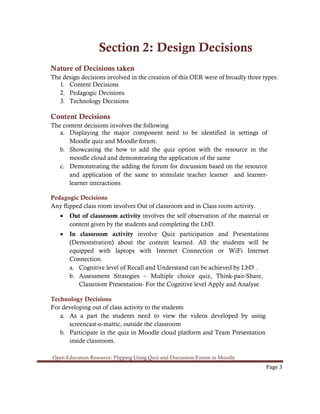
The following screenshot shows the lesson settings of my OER in the Moodlecloud.
Screenshot 1: General and Appearance setting in MOODLE – Administrator’s Screen
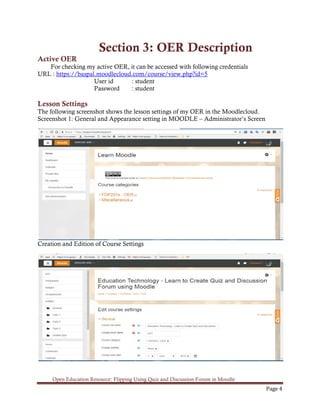
Creation and Edition of Course Settings
Open Education Resource: Flipping Using Quiz and Discussion Forum in Moodle
Page 5
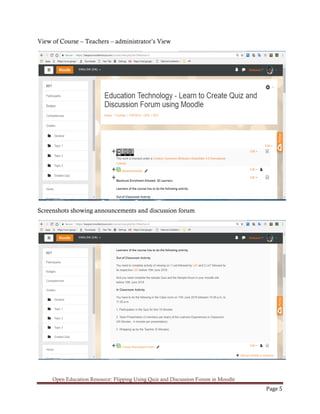
View of Course – Teachers – administrator’s View
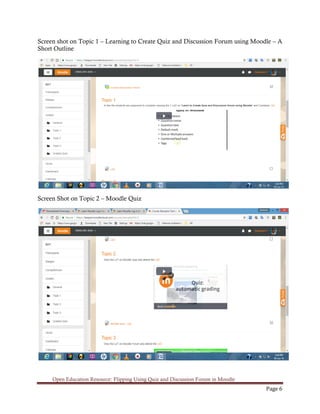
Screenshots showing announcements and discussion forum
Open Education Resource: Flipping Using Quiz and Discussion Forum in Moodle
Page 6
Screen shot on Topic 1 – Learning to Create Quiz and Discussion Forum using Moodle – A
Short Outline
Screen Shot on Topic 2 – Moodle Quiz
Open Education Resource: Flipping Using Quiz and Discussion Forum in Moodle
Page 7
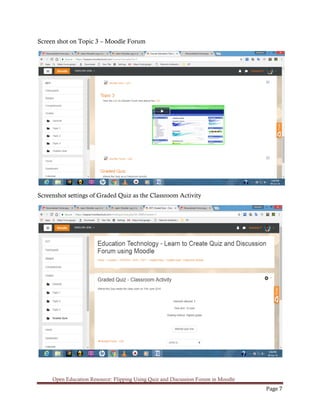
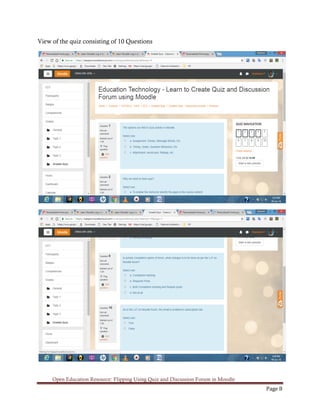
Screen shot on Topic 3 – Moodle Forum
Screenshot settings of Graded Quiz as the Classroom Activity
Open Education Resource: Flipping Using Quiz and Discussion Forum in Moodle
Page 8
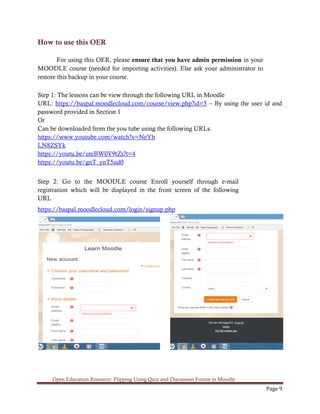
View of the quiz consisting of 10 Questions
Open Education Resource: Flipping Using Quiz and Discussion Forum in Moodle
Page 9
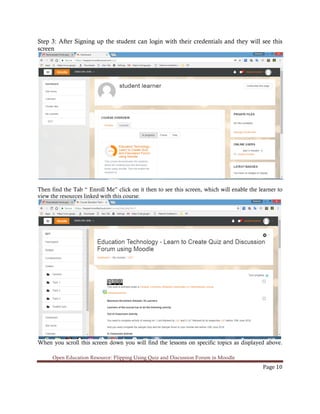
How to use this OER
For using this OER, please ensure that you have admin permission in your
MOODLE course (needed for importing activities). Else ask your administrator to
restore this backup in your course.
Step 1: The lessons can be view through the following URL in Moodle
URL: https://baspal.moodlecloud.com/course/view.php?id=5 – By using the user id and
password provided in Section 1
Or
Can be downloaded from the you tube using the following URLs.
https://www.youtube.com/watch?v=NeYh
LN8ZSYk
https://youtu.be/uteBW0V9tZs?t=4
https://youtu.be/gnT_ynT5ud0
Step 2: Go to the MOODLE course Enroll yourself through e-mail
registration which will be displayed in the front screen of the following
URL
https://baspal.moodlecloud.com/login/signup.php
Open Education Resource: Flipping Using Quiz and Discussion Forum in Moodle
Page 10
Step 3: After Signing up the student can login with their credentials and they will see this
screen
Then find the Tab “ Enroll Me” click on it then to see this screen, which will enable the learner to
view the resources linked with this course.
When you scroll this screen down you will find the lessons on specific topics as displayed above.
Open Education Resource: Flipping Using Quiz and Discussion Forum in Moodle
Page 11
Step 4: Verify that ther are three topics (1 LeD with LbD and 2 LxT with LbD) and a
graded quiz
Step 5: After verifying, post the instructions to students (Learners) to complete the lesson
activity before the next class using MOODLE forums.
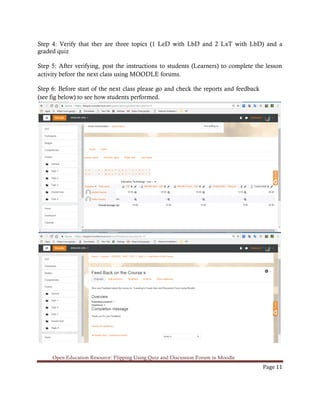
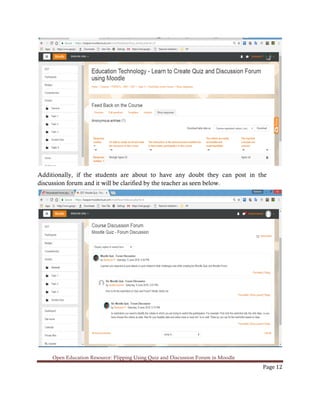
Step 6: Before start of the next class please go and check the reports and feedback
(see fig below) to see how students performed.
Open Education Resource: Flipping Using Quiz and Discussion Forum in Moodle
Page 12
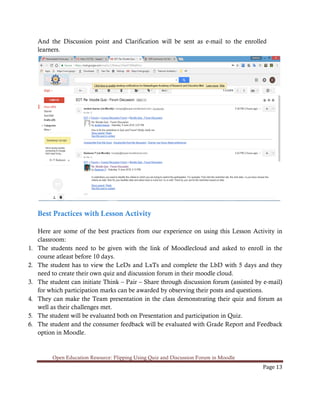
Additionally, if the students are about to have any doubt they can post in the
discussion forum and it will be clarified by the teacher as seen below.
Open Education Resource: Flipping Using Quiz and Discussion Forum in Moodle
Page 13
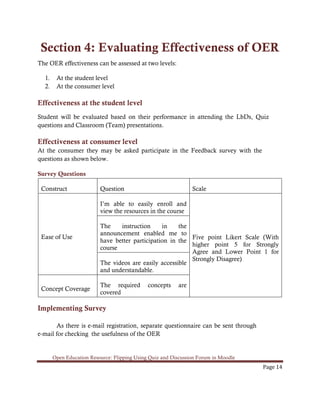
And the Discussion point and Clarification will be sent as e-mail to the enrolled
learners.
Best Practices with Lesson Activity
Here are some of the best practices from our experience on using this Lesson Activity in
classroom:
1. The students need to be given with the link of Moodlecloud and asked to enroll in the
course atleast before 10 days.
2. The student has to view the LeDs and LxTs and complete the LbD with 5 days and they
need to create their own quiz and discussion forum in their moodle cloud.
3. The student can initiate Think – Pair – Share through discussion forum (assisted by e-mail)
for which participation marks can be awarded by observing their posts and questions.
4. They can make the Team presentation in the class demonstrating their quiz and forum as
well as their challenges met.
5. The student will be evaluated both on Presentation and participation in Quiz.
6. The student and the consumer feedback will be evaluated with Grade Report and Feedback
option in Moodle.
Open Education Resource: Flipping Using Quiz and Discussion Forum in Moodle
Page 14
Section 4: Evaluating Effectiveness of OER
The OER effectiveness can be assessed at two levels:
1. At the student level
2. At the consumer level
Effectiveness at the student level
Student will be evaluated based on their performance in attending the LbDs, Quiz
questions and Classroom (Team) presentations.
Effectiveness at consumer level
At the consumer they may be asked participate in the Feedback survey with the
questions as shown below.
Survey Questions
Construct Question Scale
Ease of Use
I’m able to easily enroll and
view the resources in the course
Five point Likert Scale (With
higher point 5 for Strongly
Agree and Lower Point 1 for
Strongly Disagree)
The instruction in the
announcement enabled me to
have better participation in the
course
The videos are easily accessible
and understandable.
Concept Coverage
The required concepts are
covered
Implementing Survey
As there is e-mail registration, separate questionnaire can be sent through
e-mail for checking the usefulness of the OER
Open Education Resource: Flipping Using Quiz and Discussion Forum in Moodle
Page 15
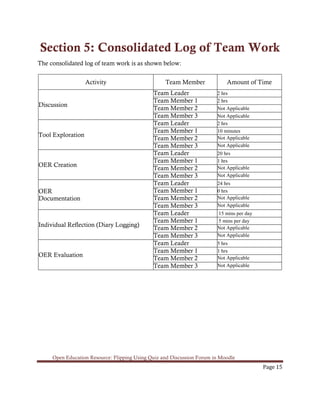
Section 5: Consolidated Log of Team Work
The consolidated log of team work is as shown below:
Activity Team Member Amount of Time
Discussion
Team Leader 2 hrs
Team Member 1 2 hrs
Team Member 2 Not Applicable
Team Member 3 Not Applicable
Tool Exploration
Team Leader 2 hrs
Team Member 1 10 minutes
Team Member 2 Not Applicable
Team Member 3 Not Applicable
OER Creation
Team Leader 20 hrs
Team Member 1 1 hrs
Team Member 2 Not Applicable
Team Member 3 Not Applicable
OER
Documentation
Team Leader 24 hrs
Team Member 1 0 hrs
Team Member 2 Not Applicable
Team Member 3 Not Applicable
Individual Reflection (Diary Logging)
Team Leader 15 mins per day
Team Member 1 5 mins per day
Team Member 2 Not Applicable
Team Member 3 Not Applicable
OER Evaluation
Team Leader 5 hrs
Team Member 1 1 hrs
Team Member 2 Not Applicable
Team Member 3 Not Applicable
Open Education Resource: Flipping Using Quiz and Discussion Forum in Moodle
Page 16
Section 6: Building a Community of
MOODLE and Flipped Classroom
Adopters
Possible Sources for Community Building
Some of the sources through which the community can be built are
• Teachers of Schools or the Faculty members of College / Higher education Institutions
who adopt Moodle for their Teaching Learning Endeavours.
• Teaching communities involved in developing Flipped Classroom Models.
Plans for Community Building
The interested people can view the website and through which they can access my moodle site and
enroll them with their e-mail.
Through the discussion forum and e-mail sharing option (in moodle site) they can be added as part
in the communities and can be strengthened through further communications relating new inclusion
in the Moodle site and the wordpress site.
Open Education Resource: Flipping Using Quiz and Discussion Forum in Moodle
Page 17
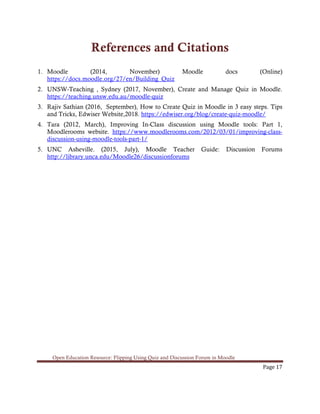
References and Citations
1. Moodle (2014, November) Moodle docs (Online)
https://docs.moodle.org/27/en/Building_Quiz
2. UNSW-Teaching , Sydney (2017, November), Create and Manage Quiz in Moodle.
https://teaching.unsw.edu.au/moodle-quiz
3. Rajiv Sathian (2016, September), How to Create Quiz in Moodle in 3 easy steps. Tips
and Tricks, Edwiser Website,2018. https://edwiser.org/blog/create-quiz-moodle/
4. Tara (2012, March), Improving In-Class discussion using Moodle tools: Part 1,
Moodlerooms website. https://www.moodlerooms.com/2012/03/01/improving-class-
discussion-using-moodle-tools-part-1/
5. UNC Asheville. (2015, July), Moodle Teacher Guide: Discussion Forums
http://library.unca.edu/Moodle26/discussionforums

Moodle quiz & forum oer

  • 1.
    i Open Education Resource:Flipping Using Quiz and Discussion Forum in Moodle Work done as part of FDP201x Pedagogy for Online and Blended Teaching-Learning Process conducted by IIT-Bombayx Team id: 1411_016 Dr.P.Baskaran Mr. R.Mahesh Kumar This work on Open Education Resource: Flipping using Quiz and Discussion forum in Moodle is licensed under the Creative Commons Attribution- ShareAlike 4.0 International License. You are free to use, distribute and modify it, including for commercial purposes, provided you acknowledge the source and share- alike. To view a copy of this license, visit http://creativecommons.org/licenses/by-sa/4.0/
  • 2.
    ii Table of Contents OpenEducation Resource: Flipping the classroom with MOODLE ................................1 About the OER...................................................................................................................................... 1 Learning Objectives ............................................................................................................................... 2 Helpful Documentation for Tool Use..................................................................................................... 2 Section 2: Design Decisions.............................................................................................3 Nature of Decisions taken...................................................................................................................... 3 Section 3: OER Description.............................................................................................4 Active OER........................................................................................................................................... 4 Lesson Settings...................................................................................................................................... 4 How to use this OER............................................................................................................................. 9 Best Practices with Lesson Activity...................................................................................................... 13 Section 4: Evaluating Effectiveness of OER...................................................................14 Effectiveness at the student level .......................................................................................................... 14 Effectiveness at consumer level ............................................................................................................ 14 Section 5: Consolidated Log of Team Work ..................................................................15 Section 6: Building a Community of MOODLE and Flipped Classroom Adopters ........16 Possible Sources for Community Building............................................................................................ 16 Plans for Community Building............................................................................................................. 16 References and Citations................................................................................................17
  • 3.
    Open Education Resource:Flipping Using Quiz and Discussion Forum in Moodle Page 1 RC1411_016 Team Leader : Dr. P. Baskaran Team Member 1 : Mr. R. Mahesh Kumar Open Education Resource: Flipping the classroom using Quiz and Discussion Forum in MOODLE About the OER This Open Education Resource (OER) include the lessons relating to creation of quiz and forum in Moodle. This involves educating the procedures involved in adding quiz and creating the forum for discussion among student in Moodlecloud platform. This quiz is an wonderful option available with moodle through which we can check and evaluate the knowledge captured by the students from the classroom / LeDs and the forums can enable the students’ discussions and faculty members will be able to monitor and check the student’s track of understanding upon the lessons taught. OER is downloadable from : https://baskaran395883847.wordpress.com/iit- bombayx-fdp201x-open-educational-resource/ (Content is available in this webpage under title (a) Moodle – Quiz & Forum OER (b) Learning Quiz and Discussion Forum) Target Audience : Final year Post Graduate Students (Any Domain) Tags : MOODLE, Quiz, Discussion, Education, Technology, Forum. OER is developed using Moodle . This resource is licensed under CC-BY-SA ver 4.0. You are free to use, distribute and modify it, including for commercial purposes, provided you acknowledge the source and share-alike. To see more details about the license visit http://creativecommons.org/licenses/by- sa/4.0/
  • 4.
    Open Education Resource:Flipping Using Quiz and Discussion Forum in Moodle Page 2 Learning Objectives After using this OER, learner will be able to: • Identify the options available in settings of quiz in Moodle. • Develop the quiz for learning in Moodle. • List the different type of forums in Moodle • Demonstrate the creation of forums used for Discussions in Moodle. Helpful Documentation for Tool Use 1. For design and development of lesson – Moodle (an Open source Tool) 2. For publishing to the learners – Wordpress.com 3. For Materials Video created by Screencast-O-mattic on Powerpoint Slideshow.
  • 5.
    Open Education Resource:Flipping Using Quiz and Discussion Forum in Moodle Page 3 Section 2: Design Decisions Nature of Decisions taken The design decisions involved in the creation of this OER were of broadly three types: 1. Content Decisions 2. Pedagogic Decisions 3. Technology Decisions Content Decisions The content decisions involves the following a. Displaying the major component need to be identified in settings of Moodle quiz and Moodle forum. b. Showcasing the how to add the quiz option with the resource in the moodle cloud and demonstrating the application of the same c. Demonstrating the adding the forum for discussion based on the resource and application of the same to stimulate teacher learner and learner- learner interactions Pedagogic Decisions Any flipped class room involves Out of classroom and in Class room activity. • Out of classroom activity involves the self observation of the material or content given by the students and completing the LbD. • In classroom activity involve Quiz participation and Presentations (Demonstration) about the content learned. All the students will be equipped with laptops with Internet Connection or WiFi Internet Connection. a. Cognitive level of Recall and Understand can be achieved by LbD . b. Assessment Strategies – Multiple choice quiz, Think-pair-Share, Classroom Presentation- For the Cognitive level Apply and Analyse. Technology Decisions For developing out of class activity to the students a. As a part the students need to view the videos developed by using screencast-o-mattic, outside the classroom b. Participate in the quiz in Moodle cloud platform and Team Presentation inside classroom.
  • 6.
    Open Education Resource:Flipping Using Quiz and Discussion Forum in Moodle Page 4 Section 3: OER Description Active OER For checking my active OER, it can be accessed with following credentials URL : https://baspal.moodlecloud.com/course/view.php?id=5 User id : student Password : student Lesson Settings The following screenshot shows the lesson settings of my OER in the Moodlecloud. Screenshot 1: General and Appearance setting in MOODLE – Administrator’s Screen Creation and Edition of Course Settings
  • 7.
    Open Education Resource:Flipping Using Quiz and Discussion Forum in Moodle Page 5 View of Course – Teachers – administrator’s View Screenshots showing announcements and discussion forum
  • 8.
    Open Education Resource:Flipping Using Quiz and Discussion Forum in Moodle Page 6 Screen shot on Topic 1 – Learning to Create Quiz and Discussion Forum using Moodle – A Short Outline Screen Shot on Topic 2 – Moodle Quiz
  • 9.
    Open Education Resource:Flipping Using Quiz and Discussion Forum in Moodle Page 7 Screen shot on Topic 3 – Moodle Forum Screenshot settings of Graded Quiz as the Classroom Activity
  • 10.
    Open Education Resource:Flipping Using Quiz and Discussion Forum in Moodle Page 8 View of the quiz consisting of 10 Questions
  • 11.
    Open Education Resource:Flipping Using Quiz and Discussion Forum in Moodle Page 9 How to use this OER For using this OER, please ensure that you have admin permission in your MOODLE course (needed for importing activities). Else ask your administrator to restore this backup in your course. Step 1: The lessons can be view through the following URL in Moodle URL: https://baspal.moodlecloud.com/course/view.php?id=5 – By using the user id and password provided in Section 1 Or Can be downloaded from the you tube using the following URLs. https://www.youtube.com/watch?v=NeYh LN8ZSYk https://youtu.be/uteBW0V9tZs?t=4 https://youtu.be/gnT_ynT5ud0 Step 2: Go to the MOODLE course Enroll yourself through e-mail registration which will be displayed in the front screen of the following URL https://baspal.moodlecloud.com/login/signup.php
  • 12.
    Open Education Resource:Flipping Using Quiz and Discussion Forum in Moodle Page 10 Step 3: After Signing up the student can login with their credentials and they will see this screen Then find the Tab “ Enroll Me” click on it then to see this screen, which will enable the learner to view the resources linked with this course. When you scroll this screen down you will find the lessons on specific topics as displayed above.
  • 13.
    Open Education Resource:Flipping Using Quiz and Discussion Forum in Moodle Page 11 Step 4: Verify that ther are three topics (1 LeD with LbD and 2 LxT with LbD) and a graded quiz Step 5: After verifying, post the instructions to students (Learners) to complete the lesson activity before the next class using MOODLE forums. Step 6: Before start of the next class please go and check the reports and feedback (see fig below) to see how students performed.
  • 14.
    Open Education Resource:Flipping Using Quiz and Discussion Forum in Moodle Page 12 Additionally, if the students are about to have any doubt they can post in the discussion forum and it will be clarified by the teacher as seen below.
  • 15.
    Open Education Resource:Flipping Using Quiz and Discussion Forum in Moodle Page 13 And the Discussion point and Clarification will be sent as e-mail to the enrolled learners. Best Practices with Lesson Activity Here are some of the best practices from our experience on using this Lesson Activity in classroom: 1. The students need to be given with the link of Moodlecloud and asked to enroll in the course atleast before 10 days. 2. The student has to view the LeDs and LxTs and complete the LbD with 5 days and they need to create their own quiz and discussion forum in their moodle cloud. 3. The student can initiate Think – Pair – Share through discussion forum (assisted by e-mail) for which participation marks can be awarded by observing their posts and questions. 4. They can make the Team presentation in the class demonstrating their quiz and forum as well as their challenges met. 5. The student will be evaluated both on Presentation and participation in Quiz. 6. The student and the consumer feedback will be evaluated with Grade Report and Feedback option in Moodle.
  • 16.
    Open Education Resource:Flipping Using Quiz and Discussion Forum in Moodle Page 14 Section 4: Evaluating Effectiveness of OER The OER effectiveness can be assessed at two levels: 1. At the student level 2. At the consumer level Effectiveness at the student level Student will be evaluated based on their performance in attending the LbDs, Quiz questions and Classroom (Team) presentations. Effectiveness at consumer level At the consumer they may be asked participate in the Feedback survey with the questions as shown below. Survey Questions Construct Question Scale Ease of Use I’m able to easily enroll and view the resources in the course Five point Likert Scale (With higher point 5 for Strongly Agree and Lower Point 1 for Strongly Disagree) The instruction in the announcement enabled me to have better participation in the course The videos are easily accessible and understandable. Concept Coverage The required concepts are covered Implementing Survey As there is e-mail registration, separate questionnaire can be sent through e-mail for checking the usefulness of the OER
  • 17.
    Open Education Resource:Flipping Using Quiz and Discussion Forum in Moodle Page 15 Section 5: Consolidated Log of Team Work The consolidated log of team work is as shown below: Activity Team Member Amount of Time Discussion Team Leader 2 hrs Team Member 1 2 hrs Team Member 2 Not Applicable Team Member 3 Not Applicable Tool Exploration Team Leader 2 hrs Team Member 1 10 minutes Team Member 2 Not Applicable Team Member 3 Not Applicable OER Creation Team Leader 20 hrs Team Member 1 1 hrs Team Member 2 Not Applicable Team Member 3 Not Applicable OER Documentation Team Leader 24 hrs Team Member 1 0 hrs Team Member 2 Not Applicable Team Member 3 Not Applicable Individual Reflection (Diary Logging) Team Leader 15 mins per day Team Member 1 5 mins per day Team Member 2 Not Applicable Team Member 3 Not Applicable OER Evaluation Team Leader 5 hrs Team Member 1 1 hrs Team Member 2 Not Applicable Team Member 3 Not Applicable
  • 18.
    Open Education Resource:Flipping Using Quiz and Discussion Forum in Moodle Page 16 Section 6: Building a Community of MOODLE and Flipped Classroom Adopters Possible Sources for Community Building Some of the sources through which the community can be built are • Teachers of Schools or the Faculty members of College / Higher education Institutions who adopt Moodle for their Teaching Learning Endeavours. • Teaching communities involved in developing Flipped Classroom Models. Plans for Community Building The interested people can view the website and through which they can access my moodle site and enroll them with their e-mail. Through the discussion forum and e-mail sharing option (in moodle site) they can be added as part in the communities and can be strengthened through further communications relating new inclusion in the Moodle site and the wordpress site.
  • 19.
    Open Education Resource:Flipping Using Quiz and Discussion Forum in Moodle Page 17 References and Citations 1. Moodle (2014, November) Moodle docs (Online) https://docs.moodle.org/27/en/Building_Quiz 2. UNSW-Teaching , Sydney (2017, November), Create and Manage Quiz in Moodle. https://teaching.unsw.edu.au/moodle-quiz 3. Rajiv Sathian (2016, September), How to Create Quiz in Moodle in 3 easy steps. Tips and Tricks, Edwiser Website,2018. https://edwiser.org/blog/create-quiz-moodle/ 4. Tara (2012, March), Improving In-Class discussion using Moodle tools: Part 1, Moodlerooms website. https://www.moodlerooms.com/2012/03/01/improving-class- discussion-using-moodle-tools-part-1/ 5. UNC Asheville. (2015, July), Moodle Teacher Guide: Discussion Forums http://library.unca.edu/Moodle26/discussionforums