Welcome to the Kick-off Webinar for the
    MoodleMeet: Screencasting 101

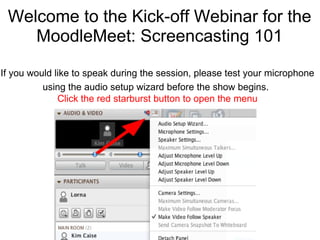
If you would like to speak during the session, please test your microphone
                                    ..
          using the audio setup wizard before the show begins.
              Click the red starburst button to open the menu
MoodleMeet Co-Presenters


   Peggy George   Lorna Costantini
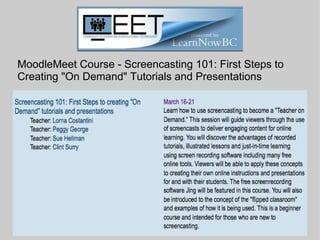
MoodleMeet Course - Screencasting 101: First Steps to
Creating "On Demand" Tutorials and Presentations
Blackboard Collaborate Overview
Recording will be posted on the home page for the
Screencasting MoodleMeet course (Kickoff Webinar)
        http://moodlemeets.learnnowbc.ca/
Poll Question 1

                               Yes    No
  
 Have you ever viewed a
 screencast?
Poll Question 2


                                Yes     No
 
Have you used screencasts
with your students?
 
Poll Question 3


                                Yes     No
 
Are you familiar with the term
"flipped classroom?"
 
First Steps: Register on CEET and Sign up for the course


             Play Lorna's teaser video here
Calendar page for the
Screencasting 101 course
webinars.
Getting Started: Introduce Yourself


      Screenshot of Introduction forum
      page
So much to learn....so little time!


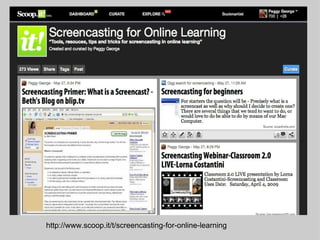
          Short web tours through Screencasting
         resources with Scoop.it and Livebinders
        (all resources available for you to explore
         any time/any place after the conference)

 http://www.scoop.it/t/screencasting-for-online-learning

http://www.livebinders.com/play/play_or_edit?id=148342
http://www.scoop.it/t/screencasting-for-online-learning
http://livebinders.com/edit?id=148342
Questions
Type in chat or raise your hand to
    request the microphone
YOU'RE INVITED! 
YEAR-ROUND Professional Development
Contact Us
       Email: live@classroom20.com
 Website: http://live.classroom20.com

Peggy George
Website: http://pgeorge.net
Twitter: @pgeorge

Lorna Costantini
Website: http://about.me/lornacostantini
Twitter: @lornacost

Kim Caise
Website: http://kimcaise.com/
Twitter: @kcaise
Special thanks -
  • CEET Moodle Meet Organizer: Sandy Hirtz
  • Our MoodleMeet co-facilitators: Sue Hellman and Clint Surry
  • Steve Hargadon, founder of Classroom 2.0, Teacher 2.0,
    Future of Education and Web 2.0 Labs Project
  • Everyone who participated in the show
  •
                Thank you for joining us on this
                      learning adventure!

Moodle meet screencasting_flipped_classroom

Editor's Notes

  • #2 Lorna will set global permissions, upload slides and start the recording.    Peggy will record the session and upload to blip.tv to post on our course as Kickoff Webinar.
  • #3 We are the co-presenters (my term) and Sue Hellman and Clint Surry are our course co-facilitators helping with the discussion forums. You can mention their names here and I also have them on the closing slide for "special thanks."
  • #4 Welcome everyone and thanks for joining us in our kick off webinar to the LearnNow BC Moodle Meet Course Screencasting 101 The course starts on Friday March 16 and goes to march 21st. change slide
  • #13 Play teaser video here:   http://youtu.be/j6IciL99Ozs
  • #15 announce calendar evengts Lorna
  • #16 Lorna Explain Introductions Forum and location for all forums to discuss course content, connect with others, ask questions
  • #17 Lorna Join the CEET Ning to collaborate with other educators and learn about upcoming MoodleMeets
  • #18 Peggy's part starts here
  • #19   Peggy's slide-will do this part in application sharing   Placeholder for doing web tour of our Scoop.it Screencasting resources. Brief explanation of scoop.it and how it works.
  • #20   Peggy's slide-will do this part in application sharing (I think I should do this in web tour so they can click on different tabs. This will be a brief tour.) Placeholder for web tour of our Livebinder Screencasting resources.
  • #21 Start app share of moodle  course content--will be fully developed when it goes live on Friday, Mar. 16.  
  • #22 Lorna will facilitate the questions/answers part and then pass it on to me to close out the session with thanks, info about classroom 2.0 live and our contact information
  • #23 Remind them of the upcoming webinar on Sat. and the tabs in our main menu--especially Calendar of upcoming events and Archives for recordings, Livebinders and links to related resources for each topic. Peggy will take over here
  • #24 Quickly tell them about our show and mention some of the topics on the Wordle. Continue the description on the next slide
  • #25 I included Kim on this slide because it is all about Classroom 2.0 LIVE.  
  • #26 Remember to stop the recording!!!!