Simulation Defined
A computer-basedmodel used to run
experiments on a real system.
Typically done on a computer.
Determines reactions to different operating rules or
change in structure.
Can be used in conjunction with traditional
statistical and management science techniques
(such as waiting line problems, when the basic
assumptions do not hold, or where problems
involve multiple phases).
3.
Differences Between
Optimization andSimulation
Optimization models
Yield decision variables as outputs
Promise the best (optimal) solution to the
model
Simulation models
Require the decision variables as inputs
Give only a satisfactory answer
4.
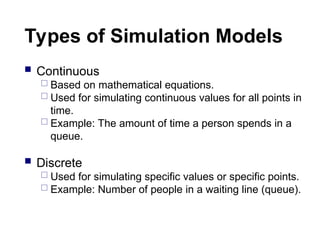
Types of SimulationModels
Continuous
Based on mathematical equations.
Used for simulating continuous values for all points in
time.
Example: The amount of time a person spends in a
queue.
Discrete
Used for simulating specific values or specific points.
Example: Number of people in a waiting line (queue).
5.
Simulation Methodology:
Estimateprobabilities of future events
Assign random number ranges to
percentages (probabilities)
Obtain random numbers
Use random numbers to “simulate” events.
6.
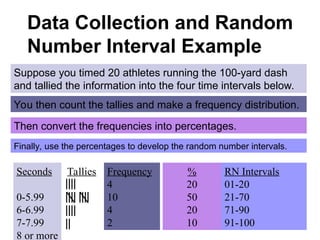
Data Collection andRandom
Number Interval Example
Suppose you timed 20 athletes running the 100-yard dash
and tallied the information into the four time intervals below.
Seconds
0-5.99
6-6.99
7-7.99
8 or more
Tallies Frequency
4
10
4
2
You then count the tallies and make a frequency distribution.
%
20
50
20
10
Then convert the frequencies into percentages.
Finally, use the percentages to develop the random number intervals.
RN Intervals
01-20
21-70
71-90
91-100
7.
Sources of EventProbabilities and
Random Numbers
Event Probabilities
From historical data (assuming the future will be like the past)
From expert opinion (if the future will be unlike the past, or no
data is available)
Random Numbers
From probability distributions that ‘fit’ the historical data or can be
assumed (use Excel functions)
From manual random number tables
From your instructor (for homework and tests, so we all get the
same answer!)
8.
Probability Distributions
A probabilitydistribution defines the behavior of a variable by
defining its limits, central tendency and nature
Mean
Standard Deviation
Upper and Lower Limits
Continuous or Discrete
Examples are:
Normal Distribution (continuous)
Binomial (discrete)
Poisson (discrete)
Uniform (continuous or discrete)
Custom (create your own!)
9.
Normal Distribution
Conditions:
Uncertain variable is symmetric about the mean
Uncertain variable is more likely to be in vicinity of the mean than
far away
Use when:
Distribution of x is normal (for any sample size)
Distribution of x is not normal, but the distribution of sample
means (x-bar) will be normally distributed with samples of size 30
or more (Central Limit Theorem)
Excel function: NORMSDIST() – returns a random number from
the cumulative standard normal distribution with a mean of zero and
a standard deviation of one [e.g., NORMSDIST(1) = .84]
10.
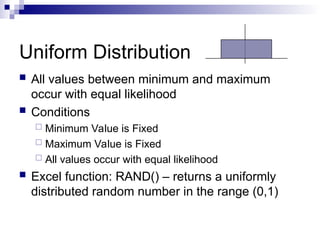
Uniform Distribution
Allvalues between minimum and maximum
occur with equal likelihood
Conditions
Minimum Value is Fixed
Maximum Value is Fixed
All values occur with equal likelihood
Excel function: RAND() – returns a uniformly
distributed random number in the range (0,1)
11.
Note on RandomNumbers in Excel
Spreadsheets
Once entered in a spreadsheet, a random
number function remains “live.” A new random
number is created whenever the spreadsheet is
re-calculated. To re-calculate the spreadsheet,
use the F9 key. Note, almost any change in the
spreadsheet causes the spreadsheet to be
recalculated!
If you do not want the random number to
change, you can freeze it by selecting: tools,
options, calculations, and checking “manual.”
12.
Evaluating Results
Conclusionsdepend on the degree to
which the model reflects the real system
The only true test of a simulation is how
well the real system performs after the
results of the study have been
implemented.
Many Computer Games
AreSimulations!
SimCity, SimFarm, SimIsle, SimCoaster, and
others in this family of games have elaborate
Monte Carlo models underlying the game
exterior. Microsoft has recently released Train
Simulator, for which there are numerous
additional scenarios available on the Internet.
Strategy games such as Civilization and Railroad
Tycoon are also based on simulation modeling.
Most of these games contain editors, in which
the user can create new scenarios, new terrain,
and even control the likelihoods of events.
15.
Advantages of Simulation
Simulation often leads to a better understanding of the
real system.
Years of experience in the real system can be
compressed into seconds or minutes.
Simulation does not disrupt ongoing activities of the
real system.
Simulation is far more general than mathematical
models.
Simulation can be used as a game for training
experience (safety!).
16.
Simulation Advantages (cont’d)
Simulation can be used when data is hard to
come by.
Simulation can provide a more realistic
replication of a system than mathematical
analysis.
Simulation can be used to analyze transient
conditions, whereas mathematical techniques
usually cannot.
Simulation considers variation and can
calculate confidence intervals of model results.
17.
Simulation Advantages (cont’d)
Simulation can model a system with multiple
phases
Simulation can model a system when it is
already in a steady-state (i.e., can initialize the
system with the beginning queue, beginning
inventory, etc.!).
Simulation can also test a “range” of inputs to
perform what-if/sensitivity analysis.
Many standard simulation software packages
are available commercially (and Excel works
fine too!).
18.
Disadvantages of Simulation
There is no guarantee that the model will, in fact,
provide good answers.
There is no way to prove reliability.
Simulation may be less accurate than
mathematical analysis because it is randomly
based.
Building a simulation model can take a great deal
of time (but if the payoff is great, then it is worth it!).
A significant amount of computer time may be
needed to run complex models (old concern - no
longer an issue!).
The technique of simulation still lacks a
standardized approach.

![Normal Distribution
Conditions:
Uncertain variable is symmetric about the mean
Uncertain variable is more likely to be in vicinity of the mean than
far away
Use when:
Distribution of x is normal (for any sample size)
Distribution of x is not normal, but the distribution of sample
means (x-bar) will be normally distributed with samples of size 30
or more (Central Limit Theorem)
Excel function: NORMSDIST() – returns a random number from
the cumulative standard normal distribution with a mean of zero and
a standard deviation of one [e.g., NORMSDIST(1) = .84]](https://image.slidesharecdn.com/montecarlosimulation-250409195117-b0515dd8/85/Monte-Carlo-Simulation-effective-ness-in-reliability-9-320.jpg)