Lauren Schaefer, Developer Advocate, MongoDB
From SQL to NoSQL—Changing Your Mindset
Lauren_Schaefer
Parks and Recreation, Season 6, Episode 14
@Lauren_Schaefer
Developer Advocate, MongoDB
From SQL to NoSQL
Changing Your Mindset
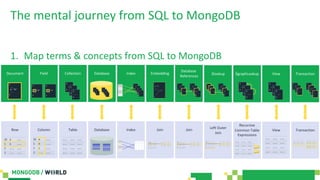
The mental journey from SQL to MongoDB
1. Map terms & concepts from SQL to MongoDB
2. Discover the 4 humongous advantages of MongoDB
3. Change your mindset in 3 key ways
The mental journey from SQL to MongoDB
1. Map terms & concepts from SQL to MongoDB
2. Discover the 4 humongous advantages of MongoDB
3. Change your mindset in 3 key ways
MongoDB stores data in documents
{
first_name: "Paul",
surname: "Miller",
cell: "447557505611",
city: "London",
location: [45.123,47.232],
profession: ["banking", "finance", "trader"],
cars: [
{
model: "Bentley",
year: 1973
},
{
model: "Rolls Royce",
year: 1965
}
]
}
MongoDB stores data in documents
{
first_name: "Paul",
surname: "Miller",
cell: "447557505611",
city: "London",
location: [45.123,47.232],
profession: ["banking", "finance", "trader"],
cars: [
{
model: "Bentley",
year: 1973
},
{
model: "Rolls Royce",
year: 1965
}
]
}
MongoDB stores data in documents
{
first_name: "Paul",
surname: "Miller",
cell: "447557505611",
city: "London",
location: [45.123,47.232],
profession: ["banking", "finance", "trader"],
cars: [
{
model: "Bentley",
year: 1973
},
{
model: "Rolls Royce",
year: 1965
}
]
}
MongoDB stores data in documents
{
first_name: "Paul",
surname: "Miller",
cell: "447557505611",
city: "London",
location: [45.123,47.232],
profession: ["banking", "finance", "trader"],
cars: [
{
model: "Bentley",
year: 1973
},
{
model: "Rolls Royce",
year: 1965
}
]
}
MongoDB stores data in documents
{
first_name: "Paul",
surname: "Miller",
cell: "447557505611",
city: "London",
location: [45.123,47.232],
profession: ["banking", "finance", "trader"],
cars: [
{
model: "Bentley",
year: 1973
},
{
model: "Rolls Royce",
year: 1965
}
]
}
MongoDB stores data in documents
{
first_name: "Paul",
surname: "Miller",
cell: "447557505611",
city: "London",
location: [45.123,47.232],
profession: ["banking", "finance", "trader"],
cars: [
{
model: "Bentley",
year: 1973
},
{
model: "Rolls Royce",
year: 1965
}
]
}
MongoDB stores data in documents
{
first_name: "Paul",
surname: "Miller",
cell: "447557505611",
city: "London",
location: [45.123,47.232],
profession: ["banking", "finance", "trader"],
cars: [
{
model: "Bentley",
year: 1973
},
{
model: "Rolls Royce",
year: 1965
}
]
}
MongoDB stores data in documents
{
first_name: "Paul",
surname: "Miller",
cell: "447557505611",
city: "London",
location: [45.123,47.232],
profession: ["banking", "finance", "trader"],
cars: [
{
model: "Bentley",
year: 1973
},
{
model: "Rolls Royce",
year: 1965
}
]
}
Modeling data in MongoDB vs SQL
{
first_name: "Paul",
surname: "Miller",
cell: "447557505611",
city: "London",
location: [45.123,47.232],
profession: ["banking", "finance", "trader"],
cars: [
{
model: "Bentley",
year: 1973
},
{
model: "Rolls Royce",
year: 1965
}
]
}
Modeling data in MongoDB vs SQL
{
first_name: "Paul",
surname: "Miller",
cell: "447557505611",
city: "London",
location: [45.123,47.232],
profession: ["banking", "finance", "trader"],
cars: [
{
model: "Bentley",
year: 1973
},
{
model: "Rolls Royce",
year: 1965
}
]
}
ID first_name surname cell city location_x location_y
1 Paul Miller 447557505611 London 45.123 47.232
Users
Modeling data in MongoDB vs SQL
{
first_name: "Paul",
surname: "Miller",
cell: "447557505611",
city: "London",
location: [45.123,47.232],
profession: ["banking", "finance", "trader"],
cars: [
{
model: "Bentley",
year: 1973
},
{
model: "Rolls Royce",
year: 1965
}
]
}
ID first_name surname cell city location_x location_y
1 Paul Miller 447557505611 London 45.123 47.232
Users
ID user_id profession
10 1 banking
11 1 finance
12 1 trader
Professions
Modeling data in MongoDB vs SQL
{
first_name: "Paul",
surname: "Miller",
cell: "447557505611",
city: "London",
location: [45.123,47.232],
profession: ["banking", "finance", "trader"],
cars: [
{
model: "Bentley",
year: 1973
},
{
model: "Rolls Royce",
year: 1965
}
]
}
ID first_name surname cell city location_x location_y
1 Paul Miller 447557505611 London 45.123 47.232
Users
ID user_id profession
10 1 banking
11 1 finance
12 1 trader
Professions
ID user_id model year
20 1 Bentley 1973
21 1 Rolls Royce 1965
Cars
Modeling data in MongoDB vs SQL
{
first_name: "Paul",
surname: "Miller",
cell: "447557505611",
city: "London",
location: [45.123,47.232],
profession: ["banking", "finance", "trader"],
cars: [
{
model: "Bentley",
year: 1973
},
{
model: "Rolls Royce",
year: 1965
}
]
}
ID first_name surname cell city location_x location_y
1 Paul Miller 447557505611 London 45.123 47.232
Users
ID user_id profession
10 1 banking
11 1 finance
12 1 trader
Professions
ID user_id model year
20 1 Bentley 1973
21 1 Rolls Royce 1965
Cars
Collections vs Tables
{
first_name: "Paul",
surname: "Miller",
cell: "447557505611",
city: "London",
location: [45.123,47.232],
profession: ["banking", "finance", "trader"],
cars: [
{
model: "Bentley",
year: 1973
},
{
model: "Rolls Royce",
year: 1965
}
]
}
{
first_name: ”Lauren",
surname: ”Schaefer",
cell: ”1235552222",
city: ”Lancaster",
profession: [”software engineer", ”developer advocate"],
}
{
first_name: ”Sydney",
surname: ”Schaefer",
city: ”Lancaster",
school: ”Daisy’s Daycare”
}
ID first_name surname cell city location_x location_y
1 Paul Miller 447557505611 London 45.123 47.232
2 Lauren Schaefer 1235552222 Lancaster NULL NULL
3 Sydney Schaefer NULL Lancaster NULL NULL
UsersUsers
Collections vs Tables
{
first_name: "Paul",
surname: "Miller",
cell: "447557505611",
city: "London",
location: [45.123,47.232],
profession: ["banking", "finance", "trader"],
cars: [
{
model: "Bentley",
year: 1973
},
{
model: "Rolls Royce",
year: 1965
}
]
}
{
first_name: ”Lauren",
surname: ”Schaefer",
cell: ”1235552222",
city: ”Lancaster",
profession: [”software engineer", ”developer advocate"],
}
{
first_name: ”Sydney",
surname: ”Schaefer",
city: ”Lancaster",
school: ”Daisy’s Daycare”
}
UsersUsers
ID first_name surname cell city location_x location_y
1 Paul Miller 447557505611 London 45.123 47.232
2 Lauren Schaefer 1235552222 Lancaster NULL NULL
3 Sydney Schaefer NULL Lancaster NULL NULL
Collections vs Tables
{
first_name: "Paul",
surname: "Miller",
cell: "447557505611",
city: "London",
location: [45.123,47.232],
profession: ["banking", "finance", "trader"],
cars: [
{
model: "Bentley",
year: 1973
},
{
model: "Rolls Royce",
year: 1965
}
]
}
{
first_name: ”Lauren",
surname: ”Schaefer",
cell: ”1235552222",
city: ”Lancaster",
profession: [”software engineer", ”developer advocate"],
}
{
first_name: ”Sydney",
surname: ”Schaefer",
city: ”Lancaster",
school: ”Daisy’s Daycare”
}
UsersUsers
ID first_name surname cell city location_x location_y
1 Paul Miller 447557505611 London 45.123 47.232
2 Lauren Schaefer 1235552222 Lancaster NULL NULL
3 Sydney Schaefer NULL Lancaster NULL NULL
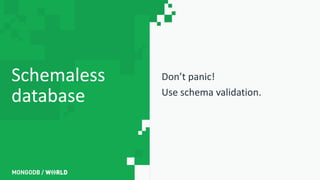
Schemaless
database
Don’t panic!
Use schema validation.
Schemaless
database
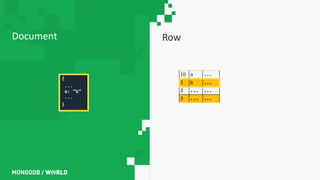
RowDocument
{
...
a: “b”
...
}
ID a ...
1 b ...
2 ... ...
3 ... ...
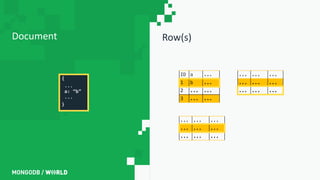
Row(s)Document
{
...
a: “b”
...
}
ID a ...
1 b ...
2 ... ...
3 ... ...
... ... ...
... ... ...
... ... ...
... ... ...
... ... ...
... ... ...
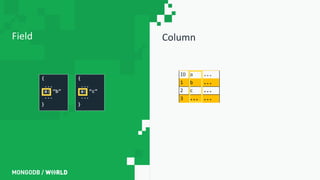
ColumnField
ID a ...
1 b ...
2 c ...
3 ... ...
{
...
a: “b”
...
}
{
...
a: “c”
...
}
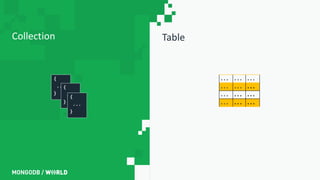
TableCollection
{
...
}
... ... ...
... ... ...
... ... ...
... ... ...
{
...
}
{
...
}
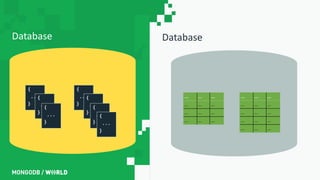
DatabaseDatabase
... ... ...
... ... ...
... ... ...
... ... ...
{
...
}
{
...
}
{
...
}
{
...
}
{
...
}
{
...
}
{
...
}
... ... ...
... ... ...
... ... ...
... ... ...
... ... ...
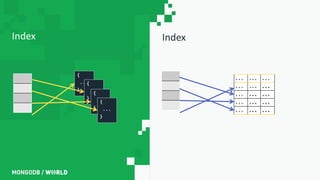
IndexIndex
{
...
}
{
...
}
{
...
}
{
...
}
... ... ...
... ... ...
... ... ...
... ... ...
... ... ...
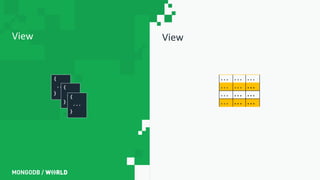
ViewView
{
...
}
... ... ...
... ... ...
... ... ...
... ... ...
{
...
}
{
...
}
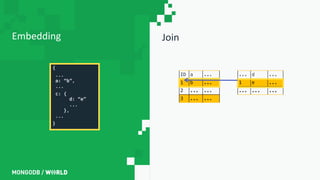
JoinEmbedding
{
...
a: “b”,
...
c: {
d: “e”
...
},
...
}
ID a ...
1 b ...
2 ... ...
3 ... ...
... d ...
1 e ...
... ... ...
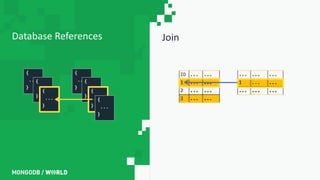
JoinDatabase References
ID ... ...
1 ... ...
2 ... ...
3 ... ...
... ... ...
1 ... ...
... ... ...
{
...
}
{
...
}
{
...
}
{
...
}
{
...
}
{
...
}
{
...
}
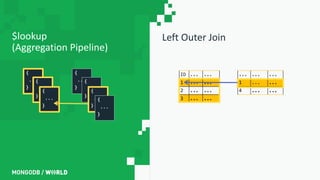
Left Outer Join$lookup
(Aggregation Pipeline)
ID ... ...
1 ... ...
2 ... ...
3 ... ...
... ... ...
1 ... ...
4 ... ...
{
...
}
{
...
}
{
...
}
{
...
}
{
...
}
{
...
}
{
...
}
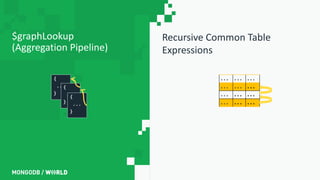
Recursive Common Table
Expressions
$graphLookup
(Aggregation Pipeline)
{
...
}
... ... ...
... ... ...
... ... ...
... ... ...
{
...
}
{
...
}
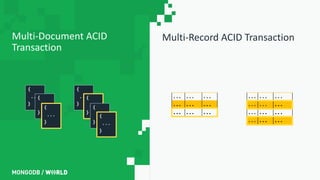
Multi-Record ACID TransactionMulti-Document ACID
Transaction
{
...
}
{
...
}
{
...
}
{
...
}
{
...
}
{
...
}
{
...
}
... ... ...
... ... ...
... ... ...
... ... ...
... ... ...
... ... ...
... ... ...
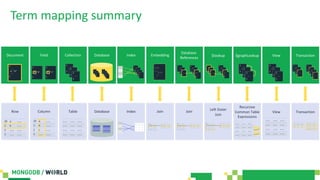
Term mapping summary
Row Column Table Database Index Join Join Left Outer
Join
Recursive
Common Table
Expressions
View Transaction
Document Field Collection Database Index Embedding
Database
References
$lookup $graphLookup View Transaction
The mental journey from SQL to MongoDB
1. Map terms & concepts from SQL to MongoDB
2. Discover the 4 humongous advantages of MongoDB
3. Change your mindset in 3 key ways
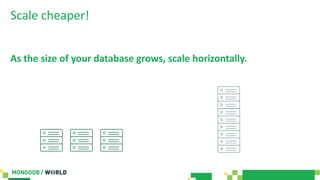
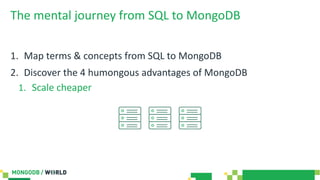
Scale cheaper!
As the size of your database grows, scale horizontally.
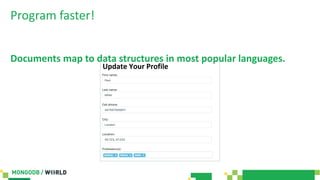
Program faster!
Documents map to data structures in most popular languages.
Update Your Profile
Program faster!
{
first_name: "Paul",
surname: "Miller",
cell: "447557505611",
city: "London",
location: [45.123,47.232],
profession: ["banking", "finance", "trader"],
}
ID first_name surname cell city location_x location_y
1 Paul Miller 447557505611 London 45.123 47.232
Users
ID user_id profession
10 1 banking
11 1 finance
12 1 trader
Professions
import pymongo
from pymongo import MongoClient
# CONNECT TO THE DB
client = MongoClient()
client =
pymongo.MongoClient("mongodb+srv://
username:password@cluster0nsdia.
mongodb.net/test?retryWrites=true")
db = client.fabapp
# THE ID OF THE USER WHOSE PROFILE WE WILL
BE RETRIEVING AND UPDATING
userId = 1
Program faster!
import mysql.connector
# CONNECT TO THE DB
mydb = mysql.connector.connect(
host="localhost",
user=”username",
passwd=”password",
database=”fabapp”
)
mycursor = mydb.cursor()
# THE ID OF THE USER WHOSE PROFILE WE WILL
BE RETRIEVING AND UPDATING
userId = 1
# GET THE USER'S PROFILE INFORMATION
### Pull the info from the Users table & put
it in the user dictionary
sql = "Select * FROM Users WHERE Users.ID=%s”
values = (userId,)
mycursor.execute(sql, values)
result = mycursor.fetchone()
user = {
"first_name": result[1],
"surname": result[2],
"cell": result[3],
"city": result[4],
"location_x": result[5],
"location_y": result[6]
}
# GET THE USER'S PROFILE INFORMATION
## We can pull all of the info from the same
document since we used embedding
user = db['Users'].find_one({"_id": userId})
Program faster!
### Pull the info from the Professions table
& put it in the user dictionary
sql = "Select * FROM Professions WHERE
Professions.user_id=%s”
values = (userId,)
mycursor.execute(sql, values)
results = mycursor.fetchall()
professions = []
for result in results:
professions.append(result[2])
user["professions"] = professions
# UPDATE THE USER DICTIONARY BASED ON USER
INPUT IN THE APP
### We'll update the user dictionary
manually for simplicity
user = {
"first_name": "NewFirst",
"surname": "NewSurname",
"cell": "123-456-7890",
"city": "NewCity",
"location": [40.762, -73.979],
"professions": [”Manager", "Engineer"]
}
Program faster!
# UPDATE THE USER DICTIONARY BASED ON USER
INPUT IN THE APP
### We'll update the user dictionary
manually for simplicity
user = {
"first_name": "NewFirst",
"surname": "NewSurname",
"cell": "123-456-7890",
"city": "NewCity",
"location_x": 40.762,
"location_y": 73.979,
"professions": [”Manager", "Engineer"]
}
# UPDATE THE USER'S PROFILE IN THE DATABASE
### First update what is stored in the Users
table
sql = "UPDATE Users SET first_name=%s,
surname=%s, cell=%s, city=%s, location_x=%s,
location_y=%s WHERE (ID=%s)"
values = (
user["first_name"],
user["surname"],
user["cell"],
user["city"],
user["location_x"],
user["location_y"],
userId)
mycursor.execute(sql, values)
mydb.commit()
# UPDATE THE USER'S PROFILE IN THE DATABASE
### Since the user's data is stored in a
single document, we only have to make one
update
result = db['Users'].update_one(
{"_id": userId}, {"$set": user})
Program faster!
### Delete existing records in Professions
table and add new ones
sql = "DELETE FROM Professions WHERE
user_id=%s”
values = (userId,)
mycursor.execute(sql, values)
mydb.commit()
if(len(user["professions"]) > 0):
sql = "INSERT INTO Professions
(user_id,profession) VALUES (%s, %s)”
values = []
for profession in user["professions"]:
values.append((userId, profession))
mycursor.executemany(sql,values)
mydb.commit()
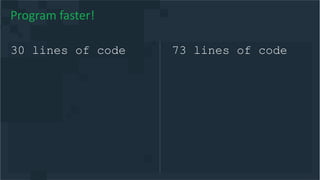
30 lines of code
Program faster!
73 lines of code
SQLMongoDB
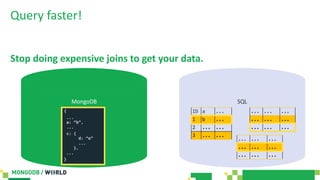
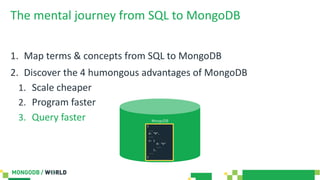
Query faster!
Stop doing expensive joins to get your data.
ID a ...
1 b ...
2 ... ...
3 ... ...
... ... ...
... ... ...
... ... ...
... ... ...
... ... ...
... ... ...
{
...
a: “b”,
...
c: {
d: “e”
...
},
...
}
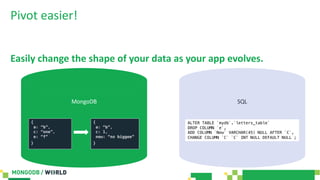
Pivot easier!
Easily change the shape of your data as your app evolves.
SQLMongoDB
{
a: “b”,
c: “one”,
e: “f”
}
{
a: “b”,
c: 1,
new: “no biggee”
}
ALTER TABLE `mydb`.`letters_table`
DROP COLUMN `e`,
ADD COLUMN `New` VARCHAR(45) NULL AFTER `C`,
CHANGE COLUMN `C` `C` INT NULL DEFAULT NULL ;
The mental journey from SQL to MongoDB
1. Map terms & concepts from SQL to MongoDB
2. Discover the 4 humongous advantages of MongoDB
3. Change your mindset in 3 key ways
Not all documents in a collection need to have the same
fields.
Not all documents in a collection need to have the same
fields.
The Polymorphic Pattern
{
first_name: "Paul",
surname: "Miller",
cell: "447557505611",
city: "London",
location: [45.123,47.232],
profession: ["banking", "finance", "trader"],
cars: [
{
model: "Bentley",
year: 1973
},
{
model: "Rolls Royce",
year: 1965
}
]
}
{
first_name: ”Lauren",
surname: ”Schaefer",
cell: ”1235552222",
city: ”Lancaster",
profession: [”software engineer", ”developer advocate"],
}
{
first_name: ”Sydney",
surname: ”Schaefer",
city: ”Lancaster",
school: ”Daisy’s Daycare”
}
Not all documents in a collection need to have the same
fields.
The Outlier Pattern
{
_id: ”Lauren_Schaefer",
displayName: ”Lauren Schaefer",
numFollowers: 1310
followers: [
“naomi_pen”,
“kenwalger”,
“mylynn”
...
]
}
{
_id: ”Nick_Offerman",
displayName: ”Nick Offerman",
numFollowers: 1730332
followers: [
“c_hotaling”,
“IAmJerdog”,
“ChloeCondon”
...
],
has_extras: true
}
{
_id: ”Nick_Offerman_1",
twitter_id: “Nick_Offerman”,
is_overflow: true,
followers: [
“StephenAtHome”,
“TheEllenShow”,
“hulu”
...
]
}
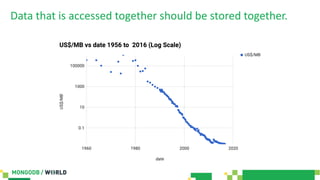
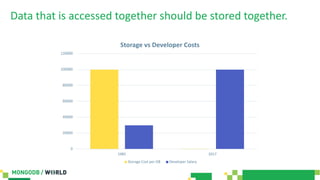
Data that is accessed together should be stored together.
1985 2017
0
20000
40000
60000
80000
100000
120000
Storage vs Developer Costs
Storage Cost per GB Developer Salary
Data that is accessed together should be stored together.
Don’t normalize your data for the sake of normalizing it.
{
a: “b”,
c: {
d: “e”
...
},
f: [“g”, “h”, “i”],
j: [
{
k: “l”
},
{
m: “n”
}
]
}
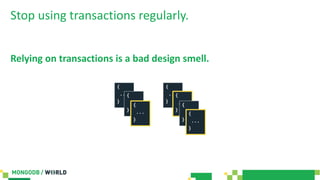
Stop using transactions regularly.
Relying on transactions is a bad design smell.
{
...
}
{
...
}
{
...
}
{
...
}
{
...
}
{
...
}
{
...
}
The mental journey from SQL to MongoDB
1. Map terms & concepts from SQL to MongoDB
Row Column Table Database Index Join Join Left Outer
Join
Recursive
Common Table
Expressions
View Transaction
Document Field Collection Database Index Embedding
Database
References
$lookup $graphLookup View Transaction
The mental journey from SQL to MongoDB
1. Map terms & concepts from SQL to MongoDB
2. Discover the 4 humongous advantages of MongoDB
The mental journey from SQL to MongoDB
1. Map terms & concepts from SQL to MongoDB
2. Discover the 4 humongous advantages of MongoDB
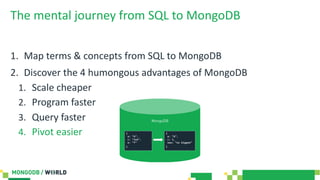
1. Scale cheaper
The mental journey from SQL to MongoDB
1. Map terms & concepts from SQL to MongoDB
2. Discover the 4 humongous advantages of MongoDB
1. Scale cheaper
2. Program faster
# UPDATE THE USER'S PROFILE IN THE DATABASE
### First update what is stored in the Users table
sql = "UPDATE Users SET first_name=%s, surname=%s, cell=%s,
city=%s, location_x=%s, location_y=%s WHERE (ID=%s)"
values = (
user["first_name"],
user["surname"],
user["cell"],
user["city"],
user["location_x"],
user["location_y"],
userId)
mycursor.execute(sql, values)
mydb.commit()
# UPDATE THE USER'S PROFILE IN THE DATABASE
### Since the user's data is stored in a single document, we only
have to make one update
result = db['Users'].update_one(
{"_id": userId}, {"$set": user})
The mental journey from SQL to MongoDB
1. Map terms & concepts from SQL to MongoDB
2. Discover the 4 humongous advantages of MongoDB
1. Scale cheaper
2. Program faster
3. Query faster
The mental journey from SQL to MongoDB
1. Map terms & concepts from SQL to MongoDB
2. Discover the 4 humongous advantages of MongoDB
1. Scale cheaper
2. Program faster
3. Query faster
4. Pivot easier
The mental journey from SQL to MongoDB
1. Map terms & concepts from SQL to MongoDB
2. Discover the 4 humongous advantages of MongoDB
3. Change your mindset in 3 key ways
The mental journey from SQL to MongoDB
1. Map terms & concepts from SQL to MongoDB
2. Discover the 4 humongous advantages of MongoDB
3. Change your mindset in 3 key ways
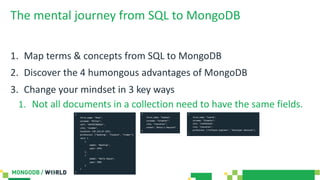
1. Not all documents in a collection need to have the same fields.
The mental journey from SQL to MongoDB
1. Map terms & concepts from SQL to MongoDB
2. Discover the 4 humongous advantages of MongoDB
3. Change your mindset in 3 key ways
1. Not all documents in a collection need to have the same fields.
2. Data that is accessed together should be stored together.
The mental journey from SQL to MongoDB
1. Map terms & concepts from SQL to MongoDB
2. Discover the 4 humongous advantages of MongoDB
3. Change your mindset in 3 key ways
1. Not all documents in a collection need to have the same fields.
2. Data that is accessed together should be stored together.
3. Stop using transactions regularly.
Don’t be Ron Swanson
(in this particular case)
Don’t be Ron Swanson
(in this particular case)
Change your mindset &
get the full value of MongoDB
Suggested Sessions
Today @11a Does Remote Work Really Work? by Me
Today @2p A Complete Methodology to Data Modeling for MongoDB by Daniel Coupal
Today @3:15p Look, Ma, No Servers! Serverless Application Development with MongoDB Stitch by me
Wednesday @10a-3p Schema Design Patterns Pod @ Builder’s Fest
Additional resources on data modeling patterns
• Advanced Schema Design Patterns (webinar)
• Building with Patterns: A Summary (blog series)
• M320: Data Modeling (MongoDB University Course -- coming
soon!)
Additional resources
• The MongoDB Docs
• JSON Schema Validation – Locking down your model the smart
way
• JSON Schema Validation - Checking Your Arrays
• M121: The MongoDB Aggregation Framework
Don’t be Ron Swanson
(in this particular case)
Change your mindset &
get the full value of MongoDB
Get the slides on my Twitter
page: @Lauren_Schaefer
MongoDB World 2019: From SQL to NoSQL -- Changing Your Mindset

MongoDB World 2019: From SQL to NoSQL -- Changing Your Mindset

  • 1.
    Lauren Schaefer, DeveloperAdvocate, MongoDB From SQL to NoSQL—Changing Your Mindset Lauren_Schaefer
  • 2.
    Parks and Recreation,Season 6, Episode 14
  • 6.
    Parks and Recreation,Season 6, Episode 14
  • 7.
  • 9.
    From SQL toNoSQL Changing Your Mindset
  • 10.
    The mental journeyfrom SQL to MongoDB 1. Map terms & concepts from SQL to MongoDB 2. Discover the 4 humongous advantages of MongoDB 3. Change your mindset in 3 key ways
  • 11.
    The mental journeyfrom SQL to MongoDB 1. Map terms & concepts from SQL to MongoDB 2. Discover the 4 humongous advantages of MongoDB 3. Change your mindset in 3 key ways
  • 12.
    MongoDB stores datain documents
  • 13.
    MongoDB stores datain documents { first_name: "Paul", surname: "Miller", cell: "447557505611", city: "London", location: [45.123,47.232], profession: ["banking", "finance", "trader"], cars: [ { model: "Bentley", year: 1973 }, { model: "Rolls Royce", year: 1965 } ] }
  • 14.
    MongoDB stores datain documents { first_name: "Paul", surname: "Miller", cell: "447557505611", city: "London", location: [45.123,47.232], profession: ["banking", "finance", "trader"], cars: [ { model: "Bentley", year: 1973 }, { model: "Rolls Royce", year: 1965 } ] }
  • 15.
    MongoDB stores datain documents { first_name: "Paul", surname: "Miller", cell: "447557505611", city: "London", location: [45.123,47.232], profession: ["banking", "finance", "trader"], cars: [ { model: "Bentley", year: 1973 }, { model: "Rolls Royce", year: 1965 } ] }
  • 16.
    MongoDB stores datain documents { first_name: "Paul", surname: "Miller", cell: "447557505611", city: "London", location: [45.123,47.232], profession: ["banking", "finance", "trader"], cars: [ { model: "Bentley", year: 1973 }, { model: "Rolls Royce", year: 1965 } ] }
  • 17.
    MongoDB stores datain documents { first_name: "Paul", surname: "Miller", cell: "447557505611", city: "London", location: [45.123,47.232], profession: ["banking", "finance", "trader"], cars: [ { model: "Bentley", year: 1973 }, { model: "Rolls Royce", year: 1965 } ] }
  • 18.
    MongoDB stores datain documents { first_name: "Paul", surname: "Miller", cell: "447557505611", city: "London", location: [45.123,47.232], profession: ["banking", "finance", "trader"], cars: [ { model: "Bentley", year: 1973 }, { model: "Rolls Royce", year: 1965 } ] }
  • 19.
    MongoDB stores datain documents { first_name: "Paul", surname: "Miller", cell: "447557505611", city: "London", location: [45.123,47.232], profession: ["banking", "finance", "trader"], cars: [ { model: "Bentley", year: 1973 }, { model: "Rolls Royce", year: 1965 } ] }
  • 20.
    MongoDB stores datain documents { first_name: "Paul", surname: "Miller", cell: "447557505611", city: "London", location: [45.123,47.232], profession: ["banking", "finance", "trader"], cars: [ { model: "Bentley", year: 1973 }, { model: "Rolls Royce", year: 1965 } ] }
  • 21.
    Modeling data inMongoDB vs SQL { first_name: "Paul", surname: "Miller", cell: "447557505611", city: "London", location: [45.123,47.232], profession: ["banking", "finance", "trader"], cars: [ { model: "Bentley", year: 1973 }, { model: "Rolls Royce", year: 1965 } ] }
  • 22.
    Modeling data inMongoDB vs SQL { first_name: "Paul", surname: "Miller", cell: "447557505611", city: "London", location: [45.123,47.232], profession: ["banking", "finance", "trader"], cars: [ { model: "Bentley", year: 1973 }, { model: "Rolls Royce", year: 1965 } ] } ID first_name surname cell city location_x location_y 1 Paul Miller 447557505611 London 45.123 47.232 Users
  • 23.
    Modeling data inMongoDB vs SQL { first_name: "Paul", surname: "Miller", cell: "447557505611", city: "London", location: [45.123,47.232], profession: ["banking", "finance", "trader"], cars: [ { model: "Bentley", year: 1973 }, { model: "Rolls Royce", year: 1965 } ] } ID first_name surname cell city location_x location_y 1 Paul Miller 447557505611 London 45.123 47.232 Users ID user_id profession 10 1 banking 11 1 finance 12 1 trader Professions
  • 24.
    Modeling data inMongoDB vs SQL { first_name: "Paul", surname: "Miller", cell: "447557505611", city: "London", location: [45.123,47.232], profession: ["banking", "finance", "trader"], cars: [ { model: "Bentley", year: 1973 }, { model: "Rolls Royce", year: 1965 } ] } ID first_name surname cell city location_x location_y 1 Paul Miller 447557505611 London 45.123 47.232 Users ID user_id profession 10 1 banking 11 1 finance 12 1 trader Professions ID user_id model year 20 1 Bentley 1973 21 1 Rolls Royce 1965 Cars
  • 25.
    Modeling data inMongoDB vs SQL { first_name: "Paul", surname: "Miller", cell: "447557505611", city: "London", location: [45.123,47.232], profession: ["banking", "finance", "trader"], cars: [ { model: "Bentley", year: 1973 }, { model: "Rolls Royce", year: 1965 } ] } ID first_name surname cell city location_x location_y 1 Paul Miller 447557505611 London 45.123 47.232 Users ID user_id profession 10 1 banking 11 1 finance 12 1 trader Professions ID user_id model year 20 1 Bentley 1973 21 1 Rolls Royce 1965 Cars
  • 26.
    Collections vs Tables { first_name:"Paul", surname: "Miller", cell: "447557505611", city: "London", location: [45.123,47.232], profession: ["banking", "finance", "trader"], cars: [ { model: "Bentley", year: 1973 }, { model: "Rolls Royce", year: 1965 } ] } { first_name: ”Lauren", surname: ”Schaefer", cell: ”1235552222", city: ”Lancaster", profession: [”software engineer", ”developer advocate"], } { first_name: ”Sydney", surname: ”Schaefer", city: ”Lancaster", school: ”Daisy’s Daycare” } ID first_name surname cell city location_x location_y 1 Paul Miller 447557505611 London 45.123 47.232 2 Lauren Schaefer 1235552222 Lancaster NULL NULL 3 Sydney Schaefer NULL Lancaster NULL NULL UsersUsers
  • 27.
    Collections vs Tables { first_name:"Paul", surname: "Miller", cell: "447557505611", city: "London", location: [45.123,47.232], profession: ["banking", "finance", "trader"], cars: [ { model: "Bentley", year: 1973 }, { model: "Rolls Royce", year: 1965 } ] } { first_name: ”Lauren", surname: ”Schaefer", cell: ”1235552222", city: ”Lancaster", profession: [”software engineer", ”developer advocate"], } { first_name: ”Sydney", surname: ”Schaefer", city: ”Lancaster", school: ”Daisy’s Daycare” } UsersUsers ID first_name surname cell city location_x location_y 1 Paul Miller 447557505611 London 45.123 47.232 2 Lauren Schaefer 1235552222 Lancaster NULL NULL 3 Sydney Schaefer NULL Lancaster NULL NULL
  • 28.
    Collections vs Tables { first_name:"Paul", surname: "Miller", cell: "447557505611", city: "London", location: [45.123,47.232], profession: ["banking", "finance", "trader"], cars: [ { model: "Bentley", year: 1973 }, { model: "Rolls Royce", year: 1965 } ] } { first_name: ”Lauren", surname: ”Schaefer", cell: ”1235552222", city: ”Lancaster", profession: [”software engineer", ”developer advocate"], } { first_name: ”Sydney", surname: ”Schaefer", city: ”Lancaster", school: ”Daisy’s Daycare” } UsersUsers ID first_name surname cell city location_x location_y 1 Paul Miller 447557505611 London 45.123 47.232 2 Lauren Schaefer 1235552222 Lancaster NULL NULL 3 Sydney Schaefer NULL Lancaster NULL NULL
  • 29.
  • 30.
    Don’t panic! Use schemavalidation. Schemaless database
  • 31.
    RowDocument { ... a: “b” ... } ID a... 1 b ... 2 ... ... 3 ... ...
  • 32.
    Row(s)Document { ... a: “b” ... } ID a... 1 b ... 2 ... ... 3 ... ... ... ... ... ... ... ... ... ... ... ... ... ... ... ... ... ... ... ...
  • 33.
    ColumnField ID a ... 1b ... 2 c ... 3 ... ... { ... a: “b” ... } { ... a: “c” ... }
  • 34.
    TableCollection { ... } ... ... ... ...... ... ... ... ... ... ... ... { ... } { ... }
  • 35.
    DatabaseDatabase ... ... ... ...... ... ... ... ... ... ... ... { ... } { ... } { ... } { ... } { ... } { ... } { ... } ... ... ... ... ... ... ... ... ... ... ... ... ... ... ...
  • 36.
    IndexIndex { ... } { ... } { ... } { ... } ... ... ... ...... ... ... ... ... ... ... ... ... ... ...
  • 37.
    ViewView { ... } ... ... ... ...... ... ... ... ... ... ... ... { ... } { ... }
  • 38.
    JoinEmbedding { ... a: “b”, ... c: { d:“e” ... }, ... } ID a ... 1 b ... 2 ... ... 3 ... ... ... d ... 1 e ... ... ... ...
  • 39.
    JoinDatabase References ID ...... 1 ... ... 2 ... ... 3 ... ... ... ... ... 1 ... ... ... ... ... { ... } { ... } { ... } { ... } { ... } { ... } { ... }
  • 40.
    Left Outer Join$lookup (AggregationPipeline) ID ... ... 1 ... ... 2 ... ... 3 ... ... ... ... ... 1 ... ... 4 ... ... { ... } { ... } { ... } { ... } { ... } { ... } { ... }
  • 41.
    Recursive Common Table Expressions $graphLookup (AggregationPipeline) { ... } ... ... ... ... ... ... ... ... ... ... ... ... { ... } { ... }
  • 42.
    Multi-Record ACID TransactionMulti-DocumentACID Transaction { ... } { ... } { ... } { ... } { ... } { ... } { ... } ... ... ... ... ... ... ... ... ... ... ... ... ... ... ... ... ... ... ... ... ...
  • 43.
    Term mapping summary RowColumn Table Database Index Join Join Left Outer Join Recursive Common Table Expressions View Transaction Document Field Collection Database Index Embedding Database References $lookup $graphLookup View Transaction
  • 44.
    The mental journeyfrom SQL to MongoDB 1. Map terms & concepts from SQL to MongoDB 2. Discover the 4 humongous advantages of MongoDB 3. Change your mindset in 3 key ways
  • 47.
    Scale cheaper! As thesize of your database grows, scale horizontally.
  • 48.
    Program faster! Documents mapto data structures in most popular languages. Update Your Profile
  • 49.
    Program faster! { first_name: "Paul", surname:"Miller", cell: "447557505611", city: "London", location: [45.123,47.232], profession: ["banking", "finance", "trader"], } ID first_name surname cell city location_x location_y 1 Paul Miller 447557505611 London 45.123 47.232 Users ID user_id profession 10 1 banking 11 1 finance 12 1 trader Professions
  • 50.
    import pymongo from pymongoimport MongoClient # CONNECT TO THE DB client = MongoClient() client = pymongo.MongoClient("mongodb+srv:// username:password@cluster0nsdia. mongodb.net/test?retryWrites=true") db = client.fabapp # THE ID OF THE USER WHOSE PROFILE WE WILL BE RETRIEVING AND UPDATING userId = 1 Program faster! import mysql.connector # CONNECT TO THE DB mydb = mysql.connector.connect( host="localhost", user=”username", passwd=”password", database=”fabapp” ) mycursor = mydb.cursor() # THE ID OF THE USER WHOSE PROFILE WE WILL BE RETRIEVING AND UPDATING userId = 1
  • 51.
    # GET THEUSER'S PROFILE INFORMATION ### Pull the info from the Users table & put it in the user dictionary sql = "Select * FROM Users WHERE Users.ID=%s” values = (userId,) mycursor.execute(sql, values) result = mycursor.fetchone() user = { "first_name": result[1], "surname": result[2], "cell": result[3], "city": result[4], "location_x": result[5], "location_y": result[6] } # GET THE USER'S PROFILE INFORMATION ## We can pull all of the info from the same document since we used embedding user = db['Users'].find_one({"_id": userId}) Program faster! ### Pull the info from the Professions table & put it in the user dictionary sql = "Select * FROM Professions WHERE Professions.user_id=%s” values = (userId,) mycursor.execute(sql, values) results = mycursor.fetchall() professions = [] for result in results: professions.append(result[2]) user["professions"] = professions
  • 52.
    # UPDATE THEUSER DICTIONARY BASED ON USER INPUT IN THE APP ### We'll update the user dictionary manually for simplicity user = { "first_name": "NewFirst", "surname": "NewSurname", "cell": "123-456-7890", "city": "NewCity", "location": [40.762, -73.979], "professions": [”Manager", "Engineer"] } Program faster! # UPDATE THE USER DICTIONARY BASED ON USER INPUT IN THE APP ### We'll update the user dictionary manually for simplicity user = { "first_name": "NewFirst", "surname": "NewSurname", "cell": "123-456-7890", "city": "NewCity", "location_x": 40.762, "location_y": 73.979, "professions": [”Manager", "Engineer"] }
  • 53.
    # UPDATE THEUSER'S PROFILE IN THE DATABASE ### First update what is stored in the Users table sql = "UPDATE Users SET first_name=%s, surname=%s, cell=%s, city=%s, location_x=%s, location_y=%s WHERE (ID=%s)" values = ( user["first_name"], user["surname"], user["cell"], user["city"], user["location_x"], user["location_y"], userId) mycursor.execute(sql, values) mydb.commit() # UPDATE THE USER'S PROFILE IN THE DATABASE ### Since the user's data is stored in a single document, we only have to make one update result = db['Users'].update_one( {"_id": userId}, {"$set": user}) Program faster! ### Delete existing records in Professions table and add new ones sql = "DELETE FROM Professions WHERE user_id=%s” values = (userId,) mycursor.execute(sql, values) mydb.commit() if(len(user["professions"]) > 0): sql = "INSERT INTO Professions (user_id,profession) VALUES (%s, %s)” values = [] for profession in user["professions"]: values.append((userId, profession)) mycursor.executemany(sql,values) mydb.commit()
  • 54.
    30 lines ofcode Program faster! 73 lines of code
  • 55.
    SQLMongoDB Query faster! Stop doingexpensive joins to get your data. ID a ... 1 b ... 2 ... ... 3 ... ... ... ... ... ... ... ... ... ... ... ... ... ... ... ... ... ... ... ... { ... a: “b”, ... c: { d: “e” ... }, ... }
  • 56.
    Pivot easier! Easily changethe shape of your data as your app evolves. SQLMongoDB { a: “b”, c: “one”, e: “f” } { a: “b”, c: 1, new: “no biggee” } ALTER TABLE `mydb`.`letters_table` DROP COLUMN `e`, ADD COLUMN `New` VARCHAR(45) NULL AFTER `C`, CHANGE COLUMN `C` `C` INT NULL DEFAULT NULL ;
  • 57.
    The mental journeyfrom SQL to MongoDB 1. Map terms & concepts from SQL to MongoDB 2. Discover the 4 humongous advantages of MongoDB 3. Change your mindset in 3 key ways
  • 60.
    Not all documentsin a collection need to have the same fields.
  • 61.
    Not all documentsin a collection need to have the same fields. The Polymorphic Pattern { first_name: "Paul", surname: "Miller", cell: "447557505611", city: "London", location: [45.123,47.232], profession: ["banking", "finance", "trader"], cars: [ { model: "Bentley", year: 1973 }, { model: "Rolls Royce", year: 1965 } ] } { first_name: ”Lauren", surname: ”Schaefer", cell: ”1235552222", city: ”Lancaster", profession: [”software engineer", ”developer advocate"], } { first_name: ”Sydney", surname: ”Schaefer", city: ”Lancaster", school: ”Daisy’s Daycare” }
  • 62.
    Not all documentsin a collection need to have the same fields. The Outlier Pattern { _id: ”Lauren_Schaefer", displayName: ”Lauren Schaefer", numFollowers: 1310 followers: [ “naomi_pen”, “kenwalger”, “mylynn” ... ] } { _id: ”Nick_Offerman", displayName: ”Nick Offerman", numFollowers: 1730332 followers: [ “c_hotaling”, “IAmJerdog”, “ChloeCondon” ... ], has_extras: true } { _id: ”Nick_Offerman_1", twitter_id: “Nick_Offerman”, is_overflow: true, followers: [ “StephenAtHome”, “TheEllenShow”, “hulu” ... ] }
  • 63.
    Data that isaccessed together should be stored together.
  • 64.
    Data that isaccessed together should be stored together.
  • 65.
    Data that isaccessed together should be stored together. 1985 2017 0 20000 40000 60000 80000 100000 120000 Storage vs Developer Costs Storage Cost per GB Developer Salary
  • 66.
    Data that isaccessed together should be stored together. Don’t normalize your data for the sake of normalizing it. { a: “b”, c: { d: “e” ... }, f: [“g”, “h”, “i”], j: [ { k: “l” }, { m: “n” } ] }
  • 67.
    Stop using transactionsregularly. Relying on transactions is a bad design smell. { ... } { ... } { ... } { ... } { ... } { ... } { ... }
  • 68.
    The mental journeyfrom SQL to MongoDB
  • 69.
    The mental journeyfrom SQL to MongoDB 1. Map terms & concepts from SQL to MongoDB Row Column Table Database Index Join Join Left Outer Join Recursive Common Table Expressions View Transaction Document Field Collection Database Index Embedding Database References $lookup $graphLookup View Transaction
  • 70.
    The mental journeyfrom SQL to MongoDB 1. Map terms & concepts from SQL to MongoDB 2. Discover the 4 humongous advantages of MongoDB
  • 71.
    The mental journeyfrom SQL to MongoDB 1. Map terms & concepts from SQL to MongoDB 2. Discover the 4 humongous advantages of MongoDB 1. Scale cheaper
  • 72.
    The mental journeyfrom SQL to MongoDB 1. Map terms & concepts from SQL to MongoDB 2. Discover the 4 humongous advantages of MongoDB 1. Scale cheaper 2. Program faster # UPDATE THE USER'S PROFILE IN THE DATABASE ### First update what is stored in the Users table sql = "UPDATE Users SET first_name=%s, surname=%s, cell=%s, city=%s, location_x=%s, location_y=%s WHERE (ID=%s)" values = ( user["first_name"], user["surname"], user["cell"], user["city"], user["location_x"], user["location_y"], userId) mycursor.execute(sql, values) mydb.commit() # UPDATE THE USER'S PROFILE IN THE DATABASE ### Since the user's data is stored in a single document, we only have to make one update result = db['Users'].update_one( {"_id": userId}, {"$set": user})
  • 73.
    The mental journeyfrom SQL to MongoDB 1. Map terms & concepts from SQL to MongoDB 2. Discover the 4 humongous advantages of MongoDB 1. Scale cheaper 2. Program faster 3. Query faster
  • 74.
    The mental journeyfrom SQL to MongoDB 1. Map terms & concepts from SQL to MongoDB 2. Discover the 4 humongous advantages of MongoDB 1. Scale cheaper 2. Program faster 3. Query faster 4. Pivot easier
  • 75.
    The mental journeyfrom SQL to MongoDB 1. Map terms & concepts from SQL to MongoDB 2. Discover the 4 humongous advantages of MongoDB 3. Change your mindset in 3 key ways
  • 76.
    The mental journeyfrom SQL to MongoDB 1. Map terms & concepts from SQL to MongoDB 2. Discover the 4 humongous advantages of MongoDB 3. Change your mindset in 3 key ways 1. Not all documents in a collection need to have the same fields.
  • 77.
    The mental journeyfrom SQL to MongoDB 1. Map terms & concepts from SQL to MongoDB 2. Discover the 4 humongous advantages of MongoDB 3. Change your mindset in 3 key ways 1. Not all documents in a collection need to have the same fields. 2. Data that is accessed together should be stored together.
  • 78.
    The mental journeyfrom SQL to MongoDB 1. Map terms & concepts from SQL to MongoDB 2. Discover the 4 humongous advantages of MongoDB 3. Change your mindset in 3 key ways 1. Not all documents in a collection need to have the same fields. 2. Data that is accessed together should be stored together. 3. Stop using transactions regularly.
  • 79.
    Don’t be RonSwanson (in this particular case)
  • 80.
    Don’t be RonSwanson (in this particular case) Change your mindset & get the full value of MongoDB
  • 81.
    Suggested Sessions Today @11aDoes Remote Work Really Work? by Me Today @2p A Complete Methodology to Data Modeling for MongoDB by Daniel Coupal Today @3:15p Look, Ma, No Servers! Serverless Application Development with MongoDB Stitch by me Wednesday @10a-3p Schema Design Patterns Pod @ Builder’s Fest
  • 82.
    Additional resources ondata modeling patterns • Advanced Schema Design Patterns (webinar) • Building with Patterns: A Summary (blog series) • M320: Data Modeling (MongoDB University Course -- coming soon!)
  • 83.
    Additional resources • TheMongoDB Docs • JSON Schema Validation – Locking down your model the smart way • JSON Schema Validation - Checking Your Arrays • M121: The MongoDB Aggregation Framework
  • 84.
    Don’t be RonSwanson (in this particular case) Change your mindset & get the full value of MongoDB Get the slides on my Twitter page: @Lauren_Schaefer