Model build ArcPy - FME
Presenter
The
Peak
of
Data
Integration
20
23
James
Botterill
Senior Consultant
1Spatial Australia
The
Peak
of
Data
Integration
20
23
Agenda
1. Species of National Significance
2. Case Study – Raster Gridding
3. Vector to Raster conversion
4. ESRI vs FME raster gridding tools
5. ArcPy within FME – featureclass processing
6. Tips & Tricks
The
Peak
of
Data
Integration
20
23
The
Peak
of
Data
Integration
20
23
Changes to the landscape and native
habitat as a result of human activity have
put many species at risk of extinction.
Ecological communities are unique and
naturally occurring groups of plants and
animals. Their presence can be
determined by factors such as soil
type, position in the landscape,
climate and water availability.
Environment Protection and Biodiversity
Act 1999 (EPBC Act) protects Australia's
native species and ecological
Biodiversity
• identification and listing of species
and ecological communities as
threatened
• development of conservation
advice and recovery plans for listed
species and ecological communities
• register of critical habitat
• recognition of key threatening
processes
• where appropriate, reducing the
impacts of these processes
through threat abatement plans and
non-statutory threat abatement
The
Peak
of
Data
Integration
20
23
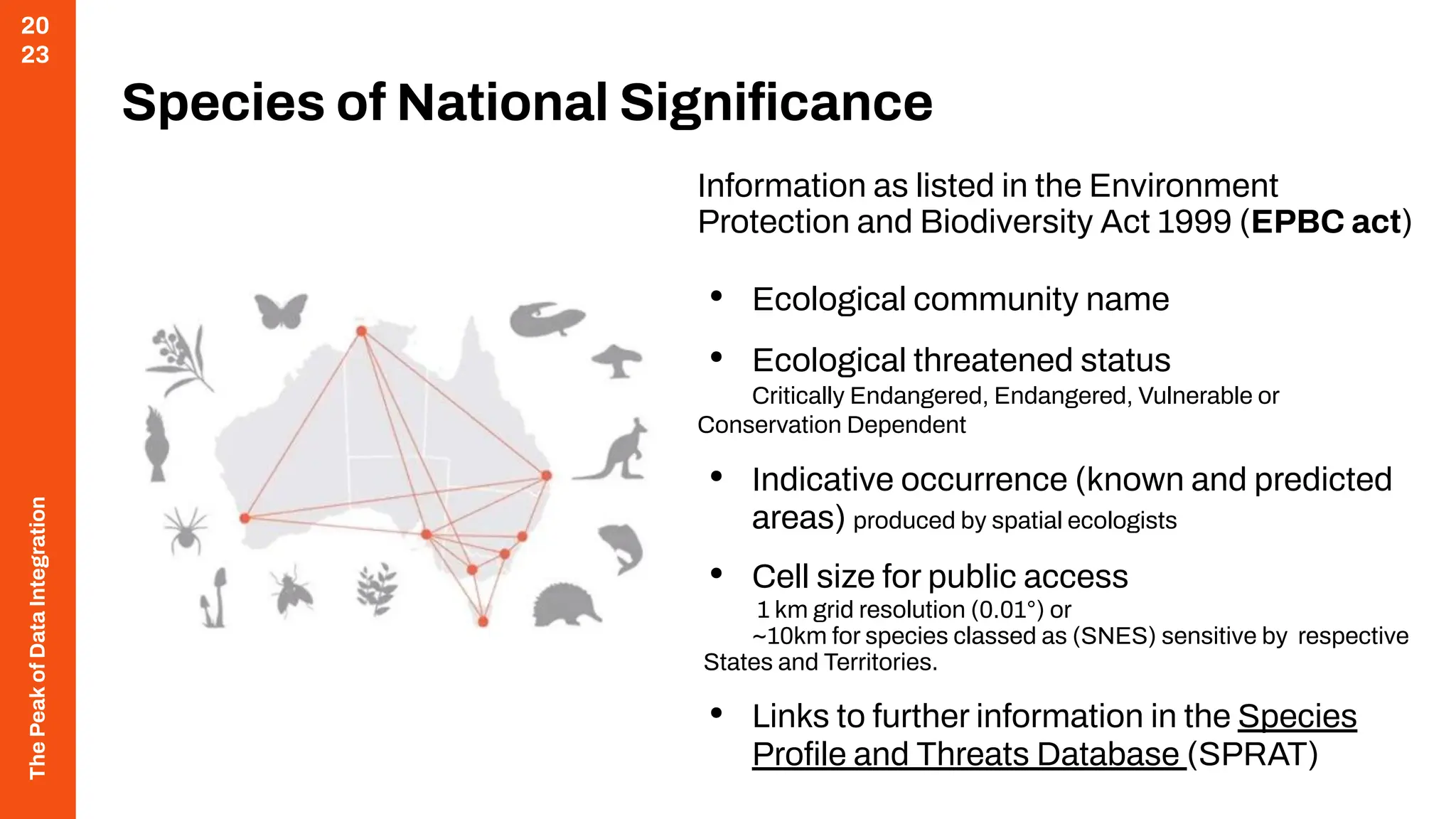
Threatened
Ecological
Communities of
Australia
(dcceew.gov.au)
The
Peak
of
Data
Integration
20
23
Threatened Species and
Ecological Communities of
National Environmental
Significance
The
Peak
of
Data
Integration
20
23
Species of National Significance
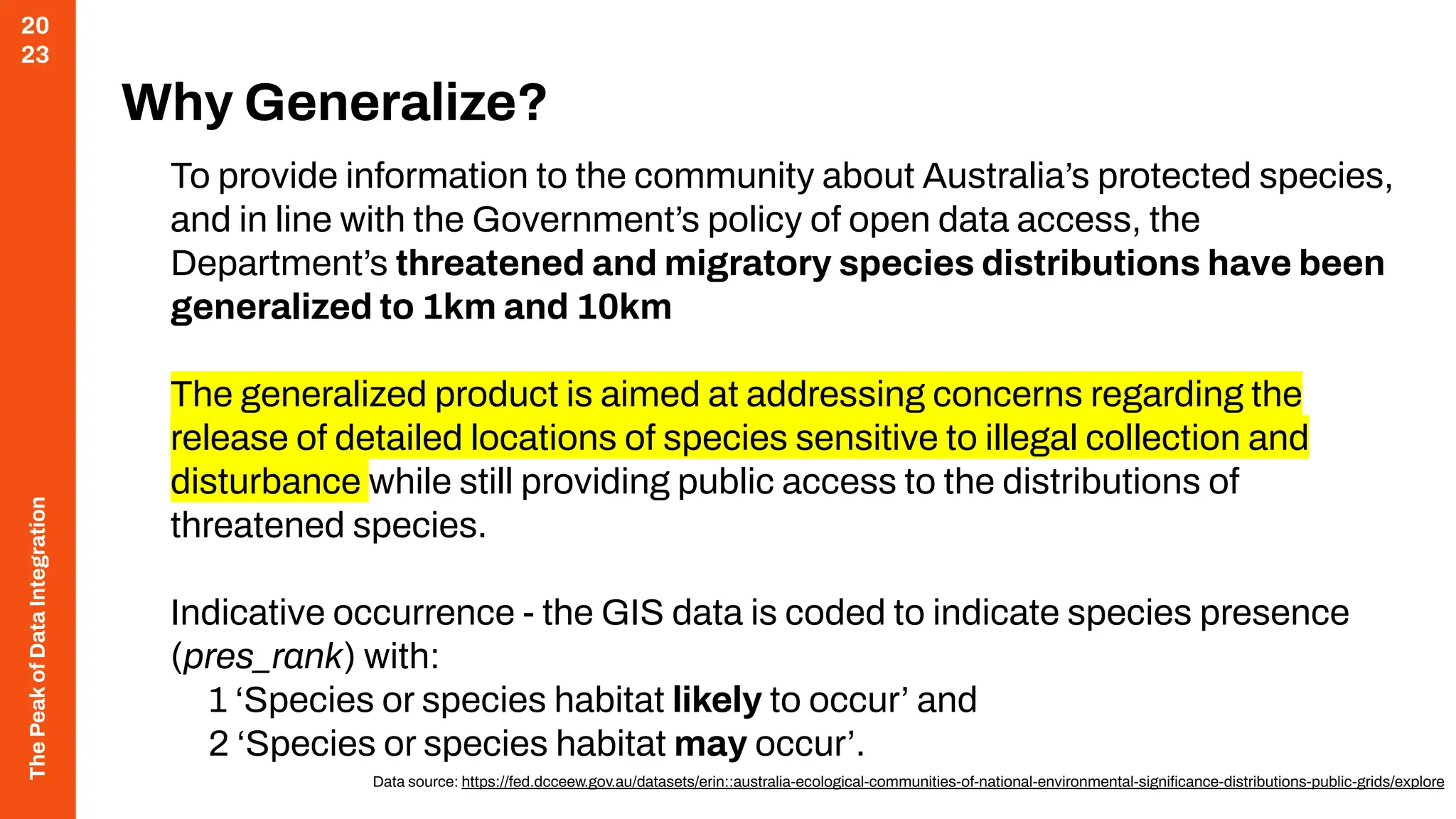
Information as listed in the Environment
Protection and Biodiversity Act 1999 (EPBC act)
• Ecological community name
• Ecological threatened status
Critically Endangered, Endangered, Vulnerable or
Conservation Dependent
• Indicative occurrence (known and predicted
areas) produced by spatial ecologists
• Cell size for public access
1 km grid resolution (0.01°) or
~10km for species classed as (SNES) sensitive by respective
States and Territories.
• Links to further information in the Species
Profile and Threats Database (SPRAT)
The
Peak
of
Data
Integration
20
23
Why Generalize?
To provide information to the community about Australia’s protected species,
and in line with the Government’s policy of open data access, the
Department’s threatened and migratory species distributions have been
generalized to 1km and 10km
The generalized product is aimed at addressing concerns regarding the
release of detailed locations of species sensitive to illegal collection and
disturbance while still providing public access to the distributions of
threatened species.
Indicative occurrence - the GIS data is coded to indicate species presence
(pres_rank) with:
1 ‘Species or species habitat likely to occur’ and
2 ‘Species or species habitat may occur’.
Data source: https://fed.dcceew.gov.au/datasets/erin::australia-ecological-communities-of-national-environmental-significance-distributions-public-grids/explore
The
Peak
of
Data
Integration
20
23
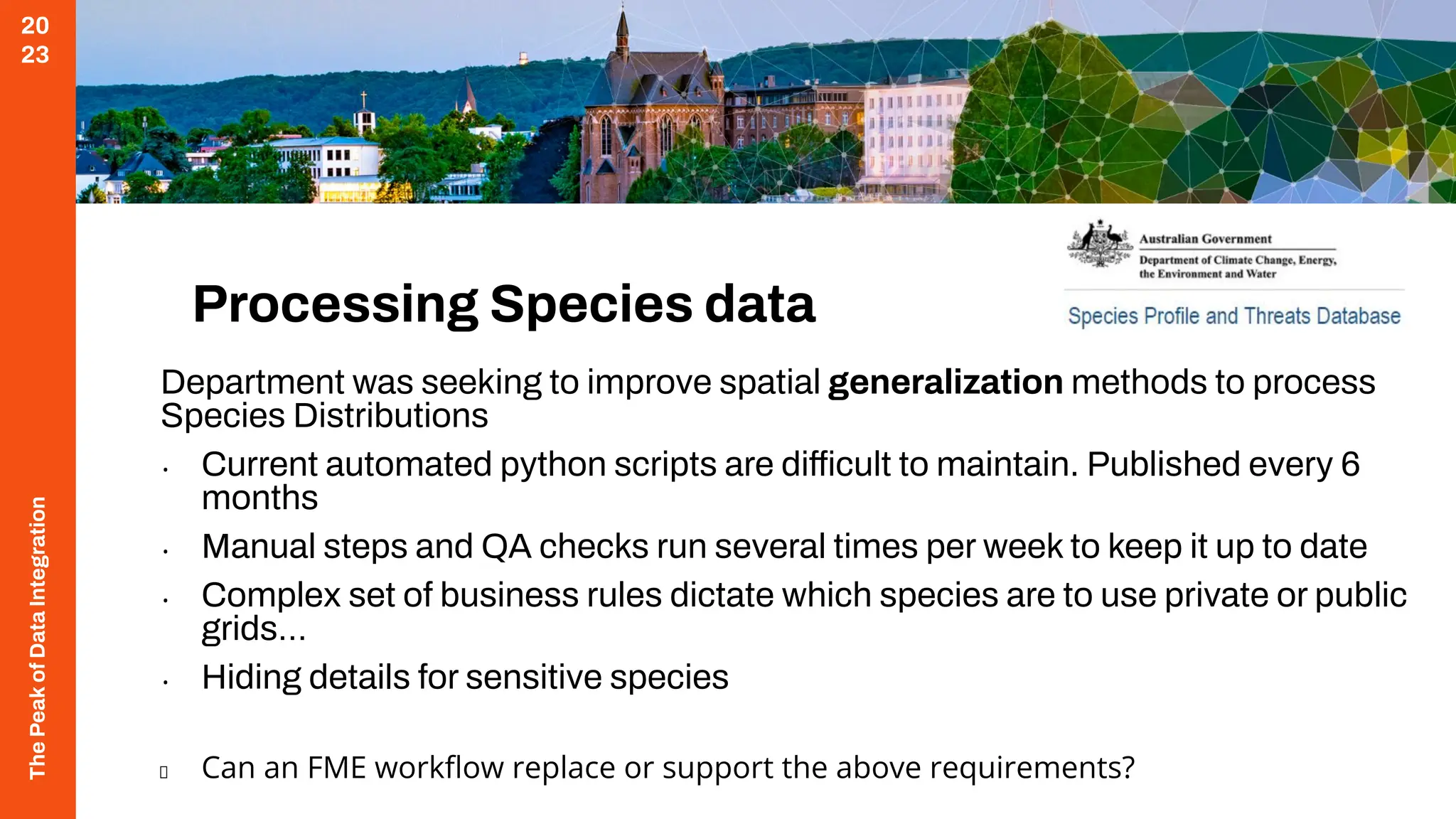
Processing Species data
Department was seeking to improve spatial generalization methods to process
Species Distributions
• Current automated python scripts are difficult to maintain. Published every 6
months
• Manual steps and QA checks run several times per week to keep it up to date
• Complex set of business rules dictate which species are to use private or public
grids…
• Hiding details for sensitive species
Can an FME workflow replace or support the above requirements?
The
Peak
of
Data
Integration
20
23
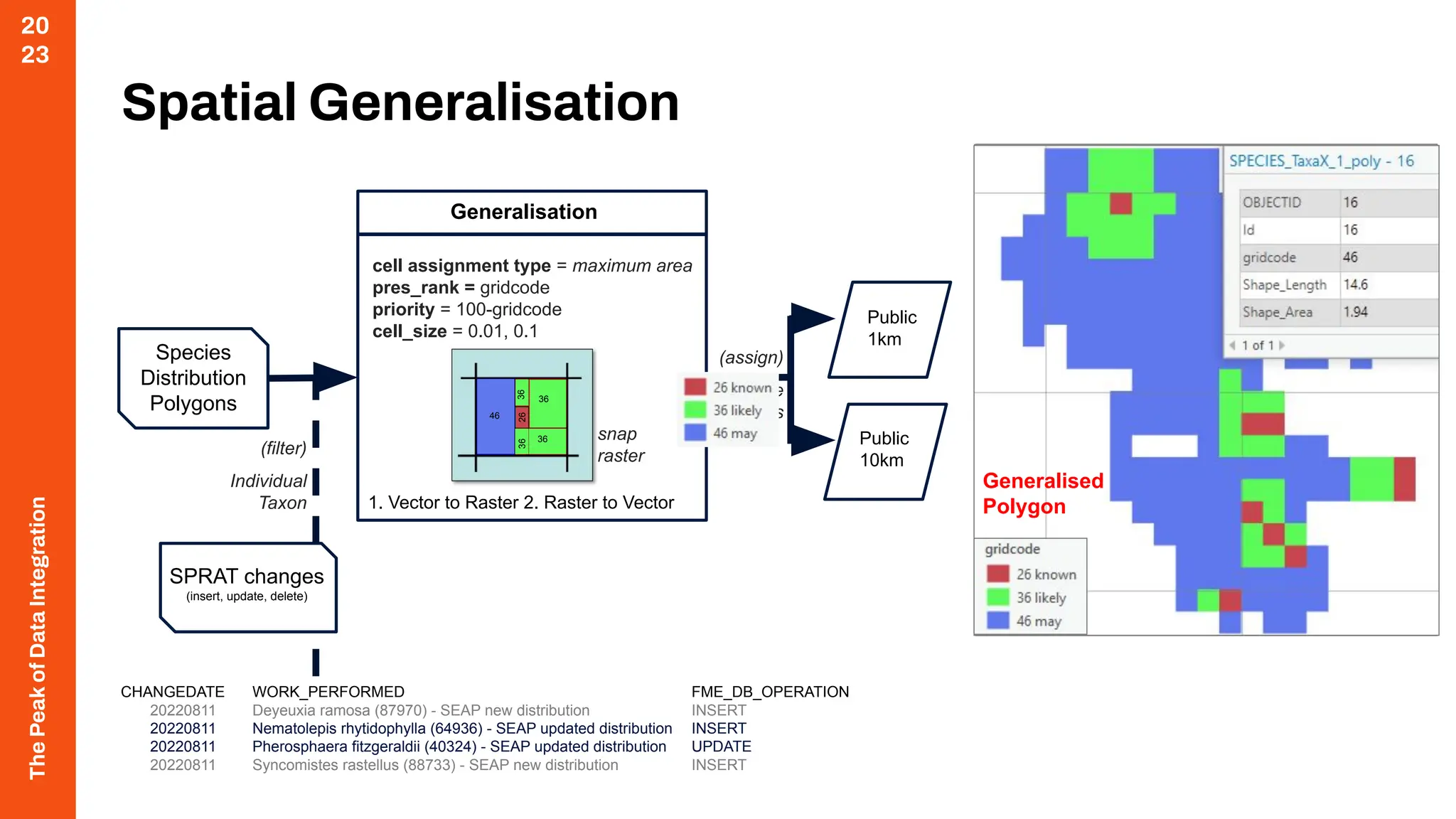
Original Polygon
Spatial Generalisation
Species
Distribution
Polygons
SPRAT changes
(insert, update, delete)
Public
1km
Public
10km
CHANGEDATE WORK_PERFORMED FME_DB_OPERATION
20220811 Deyeuxia ramosa (87970) - SEAP new distribution INSERT
20220811 Nematolepis rhytidophylla (64936) - SEAP updated distribution INSERT
20220811 Pherosphaera fitzgeraldii (40324) - SEAP updated distribution UPDATE
20220811 Syncomistes rastellus (88733) - SEAP new distribution INSERT
(filter)
Individual
Taxon
cell assignment type = maximum area
pres_rank = gridcode
priority = 100-gridcode
cell_size = 0.01, 0.1
Generalisation
1. Vector to Raster 2. Raster to Vector
snap
raster
(assign)
Sensitive
Species
46
36
36
36
36
26
26
26
1km Raster Grid
10km Raster Grid
Generalised
Polygon
The
Peak
of
Data
Integration
20
23
ArcPy within FME
The
Peak
of
Data
Integration
20
23
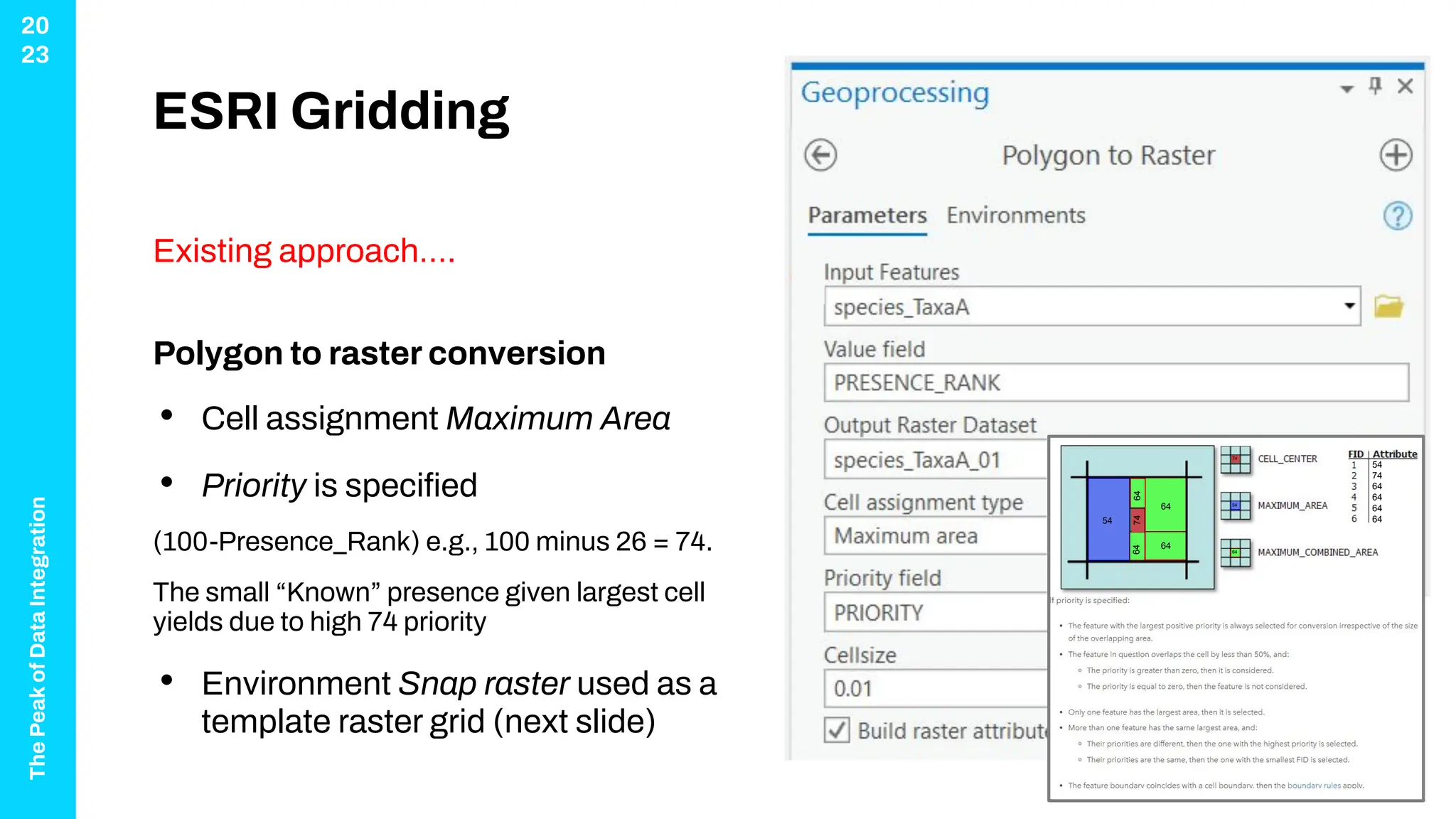
ESRI Gridding
Existing approach….
Polygon to raster conversion
• Cell assignment Maximum Area
• Priority is specified
(100-Presence_Rank) e.g., 100 minus 26 = 74.
The small “Known” presence given largest cell
yields due to high 74 priority
• Environment Snap raster used as a
template raster grid (next slide)
64
64
64
64
74
54
64
74
54
54
74
64
64
64
64
The
Peak
of
Data
Integration
20
23
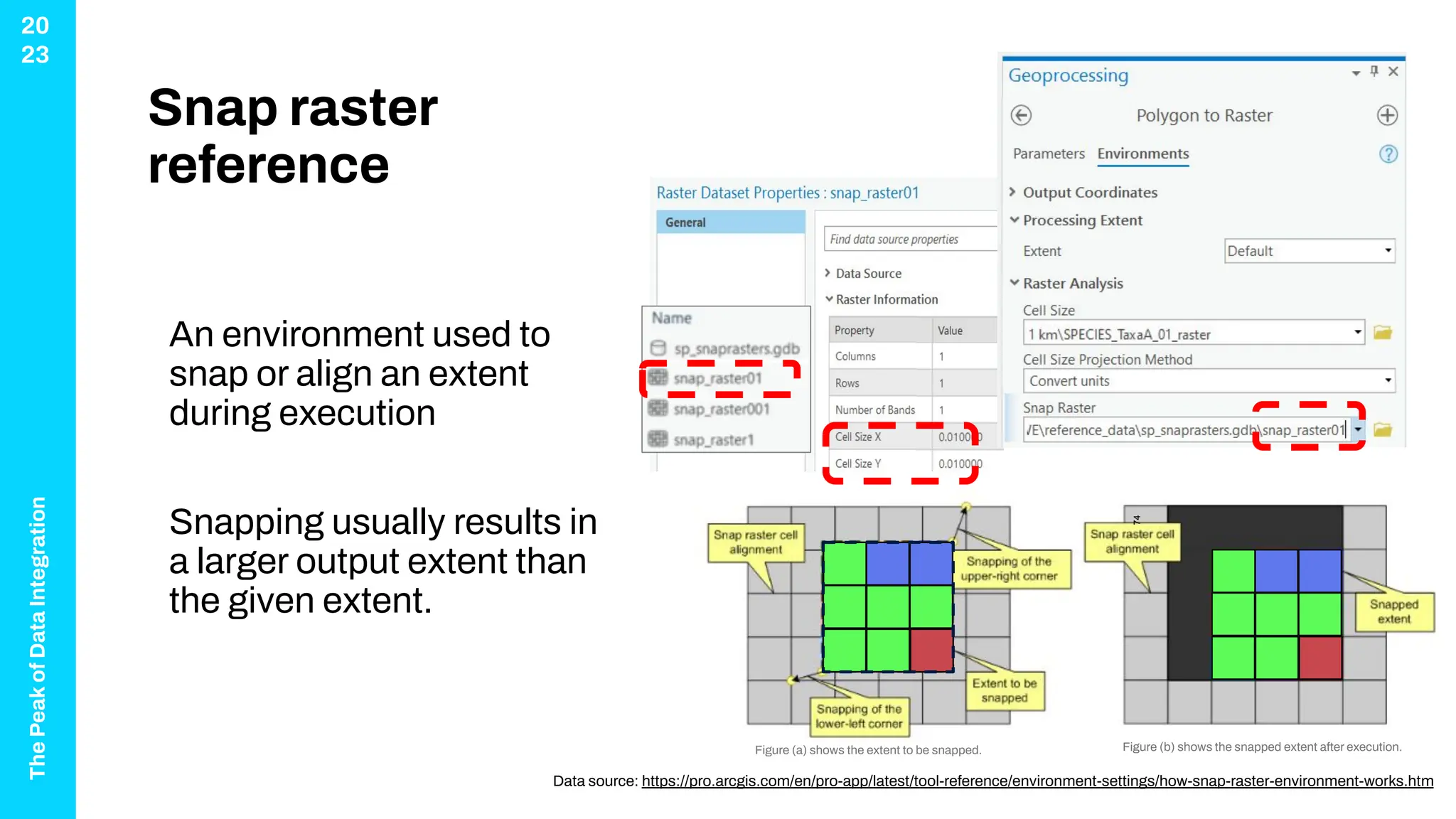
Snap raster
reference
An environment used to
snap or align an extent
during execution
Snapping usually results in
a larger output extent than
the given extent.
Data source: https://pro.arcgis.com/en/pro-app/latest/tool-reference/environment-settings/how-snap-raster-environment-works.htm
Figure (b) shows the snapped extent after execution.
Figure (a) shows the extent to be snapped.
74
The
Peak
of
Data
Integration
20
23
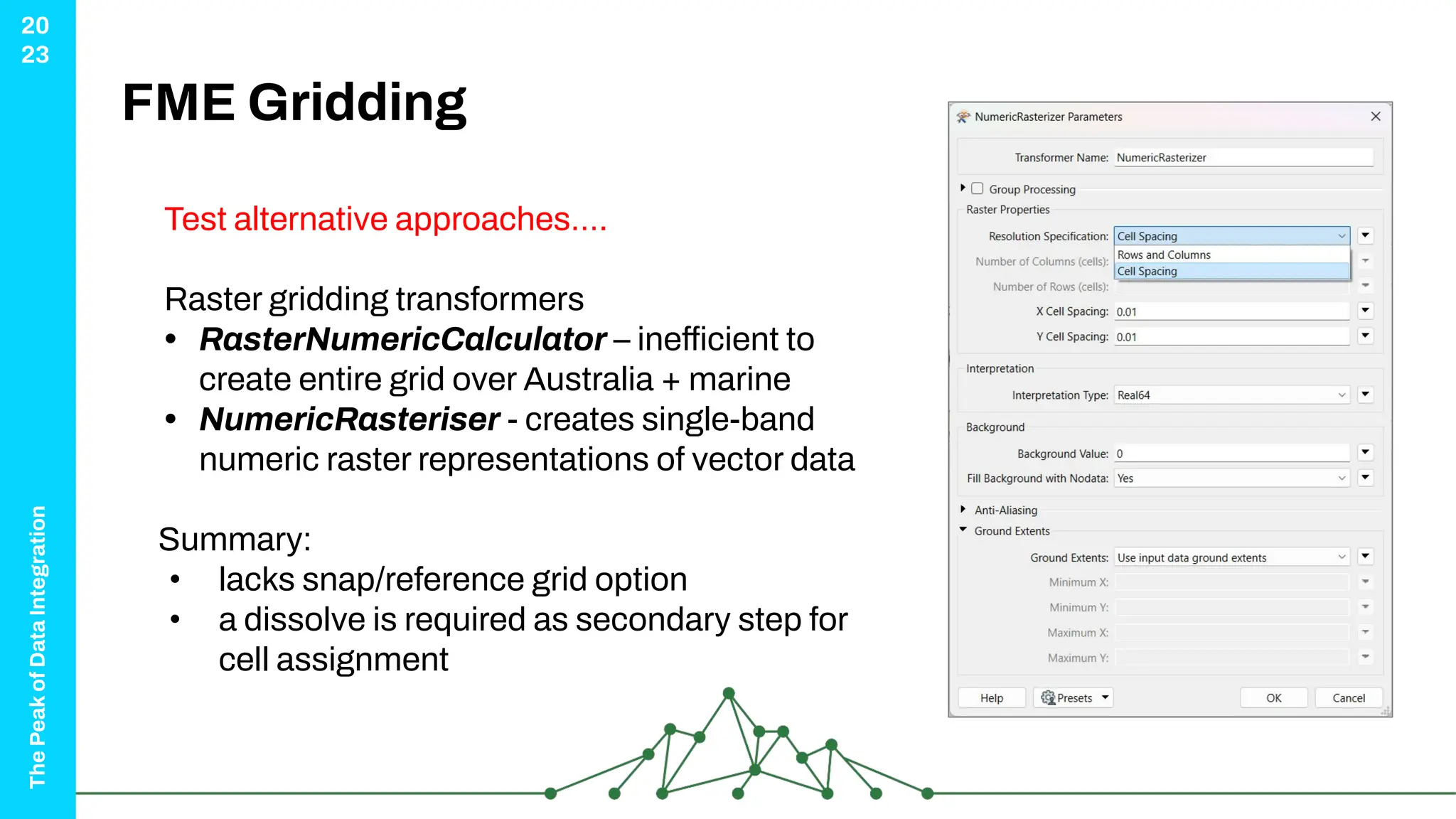
FME Gridding
Test alternative approaches….
Raster gridding transformers
• RasterNumericCalculator – inefficient to
create entire grid over Australia + marine
• NumericRasteriser - creates single-band
numeric raster representations of vector data
Summary:
• lacks snap/reference grid option
• a dissolve is required as secondary step for
cell assignment
The
Peak
of
Data
Integration
20
23
ArcPRO - Export to Python
Both model builder and the
Geoprocessing “History” have
an option to export Python script
Data Source: https://pro.arcgis.com/en/pro-app/latest/help/analysis/geoprocessing/modelbuilder/exporting-a-model-to-python.htm
The
Peak
of
Data
Integration
20
23
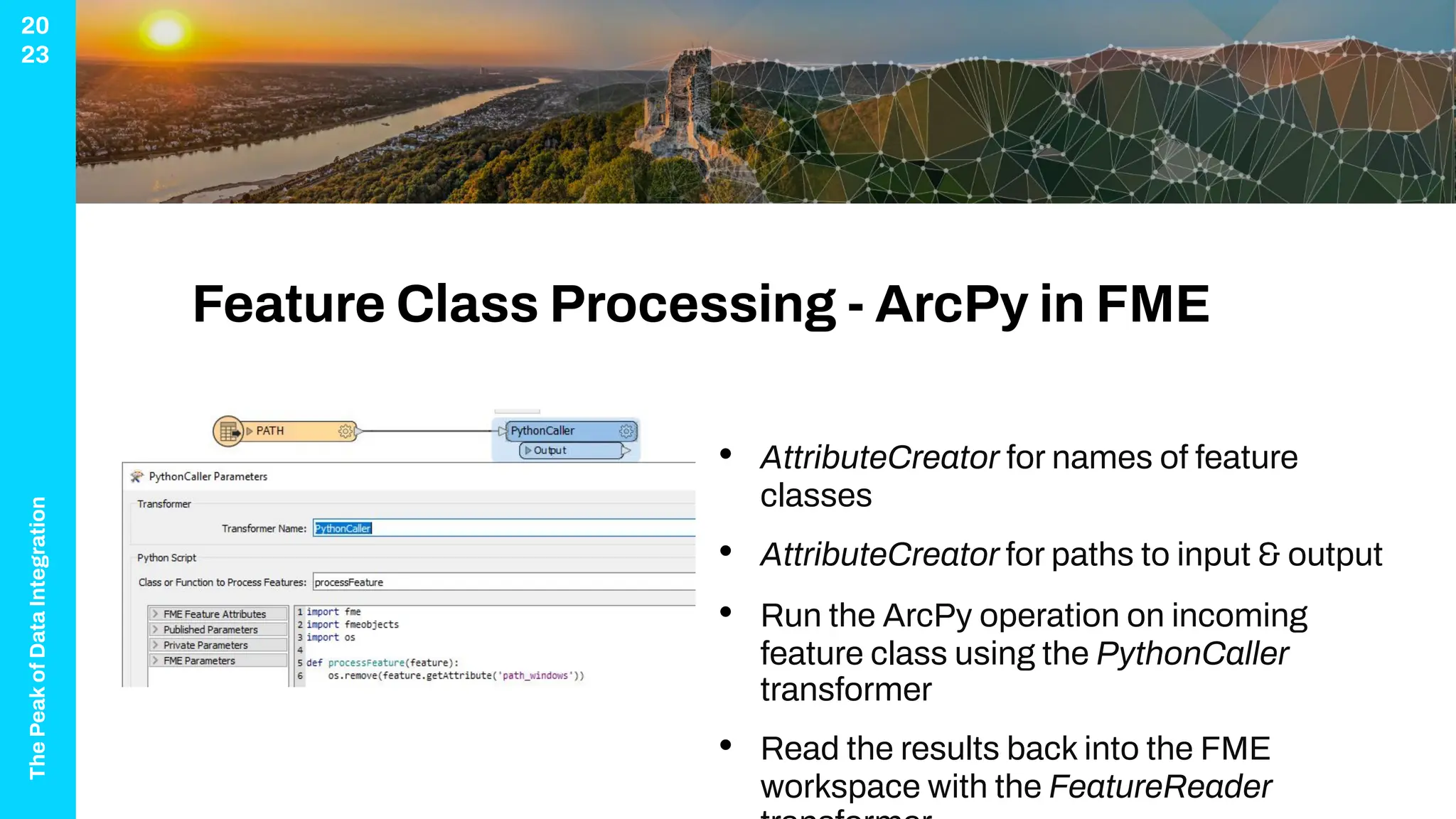
Feature Class Processing - ArcPy in FME
• AttributeCreator for names of feature
classes
• AttributeCreator for paths to input & output
• Run the ArcPy operation on incoming
feature class using the PythonCaller
transformer
• Read the results back into the FME
workspace with the FeatureReader
The
Peak
of
Data
Integration
20
23
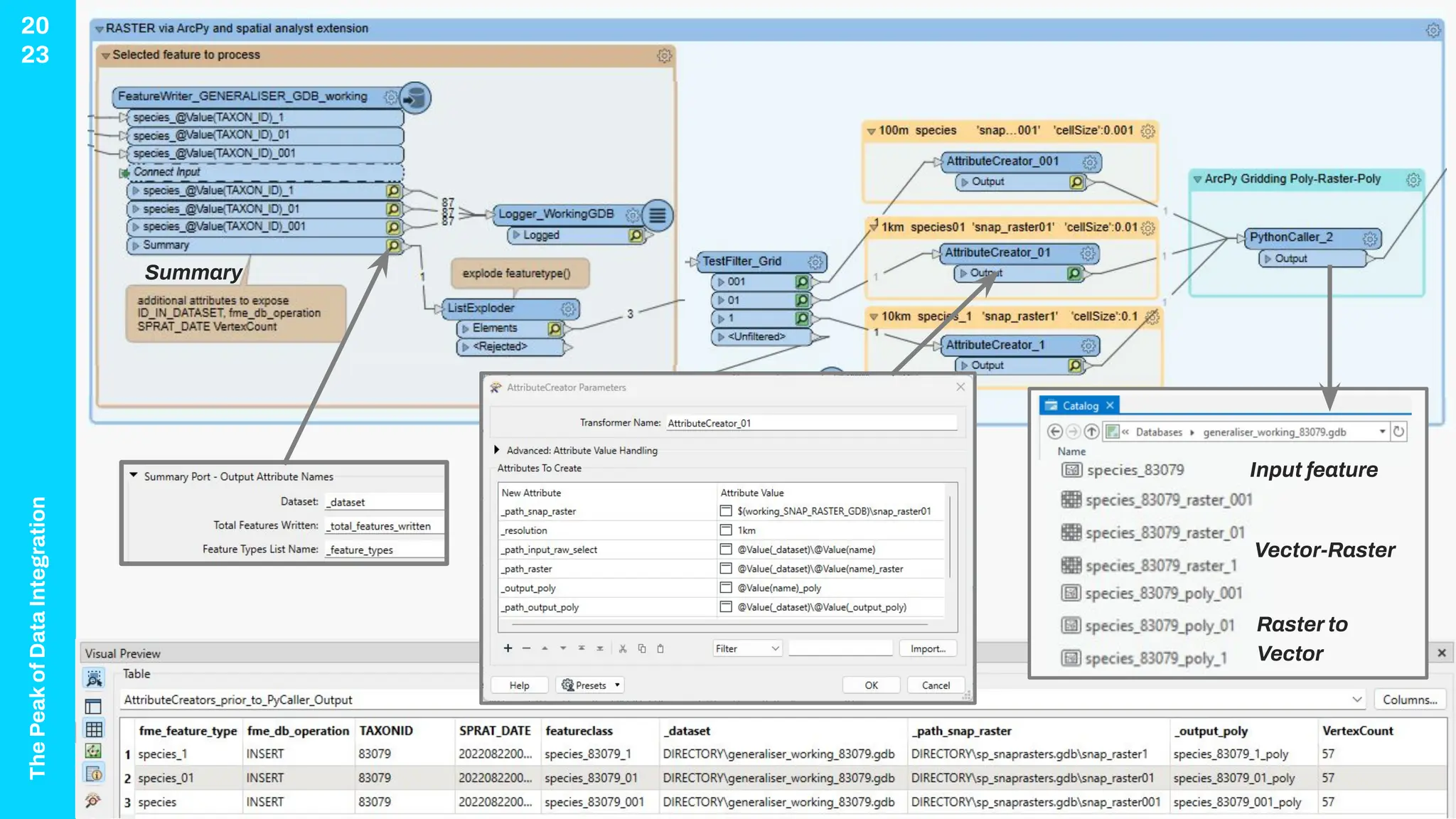
Cell size '0.1', '0.01', '0.001’
equates to 10km, 1km, 100m
Summary
Vector-Raster
Raster to
Vector
Input feature
The
Peak
of
Data
Integration
20
23
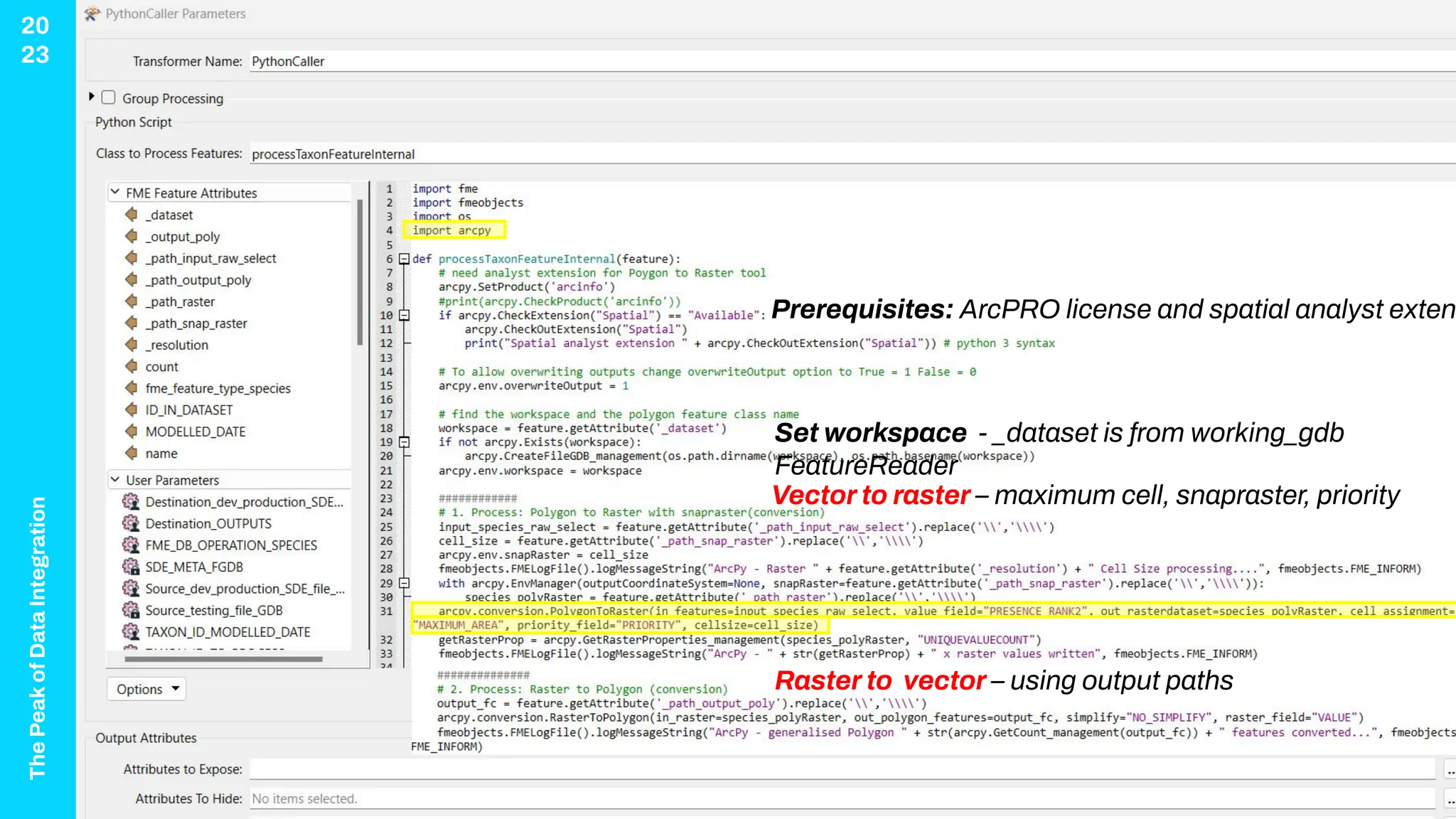
Prerequisites: ArcPRO license and spatial analyst exten
Set workspace - _dataset is from working_gdb
FeatureReader
Vector to raster – maximum cell, snapraster, priority
Raster to vector – using output paths
The
Peak
of
Data
Integration
20
23
FME Tips using
Python
• Set environments
• Variables for workspace
cell size = feature.getAttribute(‘_path%’)
arcpy.env.snapraster cell_size
• Replace(‘’, ‘’) if any spaces in paths
• FMElogfile() concatenate attributes in a notification
string and inform geoprocessing progress in the
transaction log.
• Be careful with Feature cache mode
To avoid locks, errors 160001-170000 table exists, click the
overwrite geodatabase in full
Data Source: https://community.safe.com/s/article/using-arcpy-for-fme-feature-processing
The
Peak
of
Data
Integration
20
23
Conclusion
The
Peak
of
Data
Integration
20
23
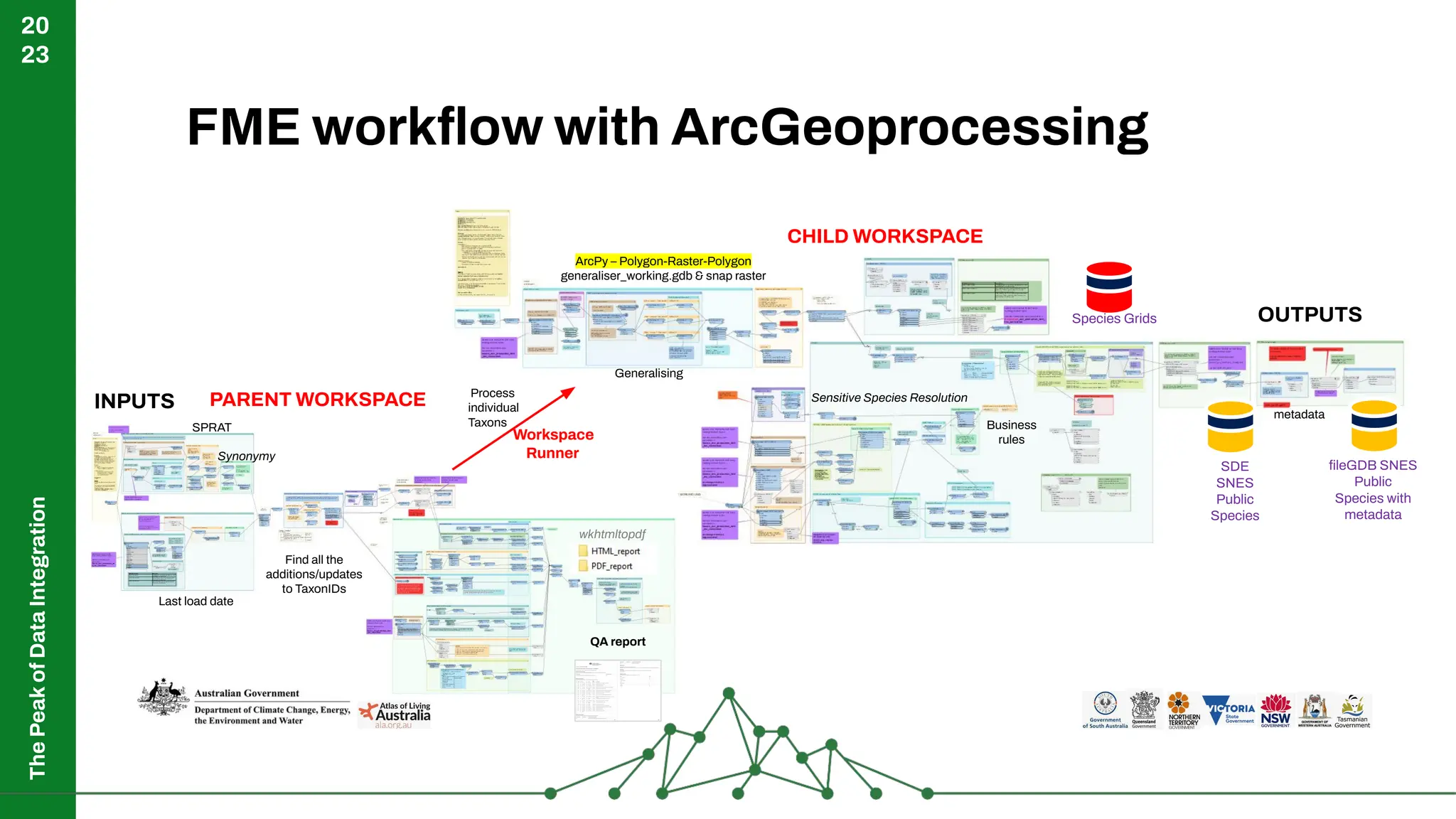
FME workflow with ArcGeoprocessing
OUTPUTS
fileGDB SNES
Public
Species with
metadata
SDE
SNES
Public
Species
QA report
CHILD WORKSPACE
INPUTS
Workspace
Runner
metadata
Last load date
SPRAT
Find all the
additions/updates
to TaxonIDs
Generalising
ArcPy – Polygon-Raster-Polygon
generaliser_working.gdb & snap raster
Process
individual
Taxons
Species Grids
Business
rules
Sensitive Species Resolution
Synonymy
wkhtmltopdf
PARENT WORKSPACE
The
Peak
of
Data
Integration
20
23
Summary
• ArcGIS gridding functionality &
approach was closer to spatial
generalization requirements for
processing species distribution grids.
• If FME transformers lack ESRI
functionality, incorporate ArcPy to do the
geoprocessing mid workflow.
• Vote up FME Ideas
The
Peak
of
Data
Integration
20
23
Vote up FME Ideas ?
Vote up FME ideas…
https://community.safe.com/s/bridea/a0r4Q00000Hd2XYQAZ/snap-raster-option-like-in-e
sri
1. Sign into FME Community
2. Vote up idea
3. Get your colleagues to vote it up!
The
Peak
of
Data
Integration
20
23
Resources
• DCCEEW
www.dcceew.gov.au/environment/biodiversity/threatened
• ESRI How Polygon To Raster works—ArcGIS Pro
• ESRI ArcPro snap raster
• FME NumericRasteriser Popularity = 167/468
• Using Arcpy for FME Feature Processing
ThankYou!
james.botterill@1spatial.com

Model Build ArcPy Into Your FME Workflows

  • 1.
  • 2.
  • 3.
    The Peak of Data Integration 20 23 Agenda 1. Species ofNational Significance 2. Case Study – Raster Gridding 3. Vector to Raster conversion 4. ESRI vs FME raster gridding tools 5. ArcPy within FME – featureclass processing 6. Tips & Tricks
  • 4.
  • 5.
    The Peak of Data Integration 20 23 Changes to thelandscape and native habitat as a result of human activity have put many species at risk of extinction. Ecological communities are unique and naturally occurring groups of plants and animals. Their presence can be determined by factors such as soil type, position in the landscape, climate and water availability. Environment Protection and Biodiversity Act 1999 (EPBC Act) protects Australia's native species and ecological Biodiversity • identification and listing of species and ecological communities as threatened • development of conservation advice and recovery plans for listed species and ecological communities • register of critical habitat • recognition of key threatening processes • where appropriate, reducing the impacts of these processes through threat abatement plans and non-statutory threat abatement
  • 6.
  • 7.
    The Peak of Data Integration 20 23 Threatened Species and EcologicalCommunities of National Environmental Significance
  • 8.
    The Peak of Data Integration 20 23 Species of NationalSignificance Information as listed in the Environment Protection and Biodiversity Act 1999 (EPBC act) • Ecological community name • Ecological threatened status Critically Endangered, Endangered, Vulnerable or Conservation Dependent • Indicative occurrence (known and predicted areas) produced by spatial ecologists • Cell size for public access 1 km grid resolution (0.01°) or ~10km for species classed as (SNES) sensitive by respective States and Territories. • Links to further information in the Species Profile and Threats Database (SPRAT)
  • 9.
    The Peak of Data Integration 20 23 Why Generalize? To provideinformation to the community about Australia’s protected species, and in line with the Government’s policy of open data access, the Department’s threatened and migratory species distributions have been generalized to 1km and 10km The generalized product is aimed at addressing concerns regarding the release of detailed locations of species sensitive to illegal collection and disturbance while still providing public access to the distributions of threatened species. Indicative occurrence - the GIS data is coded to indicate species presence (pres_rank) with: 1 ‘Species or species habitat likely to occur’ and 2 ‘Species or species habitat may occur’. Data source: https://fed.dcceew.gov.au/datasets/erin::australia-ecological-communities-of-national-environmental-significance-distributions-public-grids/explore
  • 10.
    The Peak of Data Integration 20 23 Processing Species data Departmentwas seeking to improve spatial generalization methods to process Species Distributions • Current automated python scripts are difficult to maintain. Published every 6 months • Manual steps and QA checks run several times per week to keep it up to date • Complex set of business rules dictate which species are to use private or public grids… • Hiding details for sensitive species Can an FME workflow replace or support the above requirements?
  • 11.
    The Peak of Data Integration 20 23 Original Polygon Spatial Generalisation Species Distribution Polygons SPRATchanges (insert, update, delete) Public 1km Public 10km CHANGEDATE WORK_PERFORMED FME_DB_OPERATION 20220811 Deyeuxia ramosa (87970) - SEAP new distribution INSERT 20220811 Nematolepis rhytidophylla (64936) - SEAP updated distribution INSERT 20220811 Pherosphaera fitzgeraldii (40324) - SEAP updated distribution UPDATE 20220811 Syncomistes rastellus (88733) - SEAP new distribution INSERT (filter) Individual Taxon cell assignment type = maximum area pres_rank = gridcode priority = 100-gridcode cell_size = 0.01, 0.1 Generalisation 1. Vector to Raster 2. Raster to Vector snap raster (assign) Sensitive Species 46 36 36 36 36 26 26 26 1km Raster Grid 10km Raster Grid Generalised Polygon
  • 12.
  • 13.
    The Peak of Data Integration 20 23 ESRI Gridding Existing approach…. Polygonto raster conversion • Cell assignment Maximum Area • Priority is specified (100-Presence_Rank) e.g., 100 minus 26 = 74. The small “Known” presence given largest cell yields due to high 74 priority • Environment Snap raster used as a template raster grid (next slide) 64 64 64 64 74 54 64 74 54 54 74 64 64 64 64
  • 14.
    The Peak of Data Integration 20 23 Snap raster reference An environmentused to snap or align an extent during execution Snapping usually results in a larger output extent than the given extent. Data source: https://pro.arcgis.com/en/pro-app/latest/tool-reference/environment-settings/how-snap-raster-environment-works.htm Figure (b) shows the snapped extent after execution. Figure (a) shows the extent to be snapped. 74
  • 15.
    The Peak of Data Integration 20 23 FME Gridding Test alternativeapproaches…. Raster gridding transformers • RasterNumericCalculator – inefficient to create entire grid over Australia + marine • NumericRasteriser - creates single-band numeric raster representations of vector data Summary: • lacks snap/reference grid option • a dissolve is required as secondary step for cell assignment
  • 16.
    The Peak of Data Integration 20 23 ArcPRO - Exportto Python Both model builder and the Geoprocessing “History” have an option to export Python script Data Source: https://pro.arcgis.com/en/pro-app/latest/help/analysis/geoprocessing/modelbuilder/exporting-a-model-to-python.htm
  • 17.
    The Peak of Data Integration 20 23 Feature Class Processing- ArcPy in FME • AttributeCreator for names of feature classes • AttributeCreator for paths to input & output • Run the ArcPy operation on incoming feature class using the PythonCaller transformer • Read the results back into the FME workspace with the FeatureReader
  • 18.
    The Peak of Data Integration 20 23 Cell size '0.1','0.01', '0.001’ equates to 10km, 1km, 100m Summary Vector-Raster Raster to Vector Input feature
  • 19.
    The Peak of Data Integration 20 23 Prerequisites: ArcPRO licenseand spatial analyst exten Set workspace - _dataset is from working_gdb FeatureReader Vector to raster – maximum cell, snapraster, priority Raster to vector – using output paths
  • 20.
    The Peak of Data Integration 20 23 FME Tips using Python •Set environments • Variables for workspace cell size = feature.getAttribute(‘_path%’) arcpy.env.snapraster cell_size • Replace(‘’, ‘’) if any spaces in paths • FMElogfile() concatenate attributes in a notification string and inform geoprocessing progress in the transaction log. • Be careful with Feature cache mode To avoid locks, errors 160001-170000 table exists, click the overwrite geodatabase in full Data Source: https://community.safe.com/s/article/using-arcpy-for-fme-feature-processing
  • 21.
  • 22.
    The Peak of Data Integration 20 23 FME workflow withArcGeoprocessing OUTPUTS fileGDB SNES Public Species with metadata SDE SNES Public Species QA report CHILD WORKSPACE INPUTS Workspace Runner metadata Last load date SPRAT Find all the additions/updates to TaxonIDs Generalising ArcPy – Polygon-Raster-Polygon generaliser_working.gdb & snap raster Process individual Taxons Species Grids Business rules Sensitive Species Resolution Synonymy wkhtmltopdf PARENT WORKSPACE
  • 23.
    The Peak of Data Integration 20 23 Summary • ArcGIS griddingfunctionality & approach was closer to spatial generalization requirements for processing species distribution grids. • If FME transformers lack ESRI functionality, incorporate ArcPy to do the geoprocessing mid workflow. • Vote up FME Ideas
  • 24.
  • 25.
    Vote up FMEideas… https://community.safe.com/s/bridea/a0r4Q00000Hd2XYQAZ/snap-raster-option-like-in-e sri 1. Sign into FME Community 2. Vote up idea 3. Get your colleagues to vote it up!
  • 26.
    The Peak of Data Integration 20 23 Resources • DCCEEW www.dcceew.gov.au/environment/biodiversity/threatened • ESRIHow Polygon To Raster works—ArcGIS Pro • ESRI ArcPro snap raster • FME NumericRasteriser Popularity = 167/468 • Using Arcpy for FME Feature Processing
  • 27.