Learning Management
System


 Christine Stephenson
 Ecomp 6203
SCHOOLOGY
Schoology is a Learning Management System (LMS). The ultimate way to
   manage lessons, engage students, share content, and connect with
   other educators.


 Collaboration is a key part of Schoology
 Offering education without walls
 Creates and manages tests & quizzes for you
 Helps make creating, organizing, and finding content simple
 Connects students and parents to educators and learning resources
  anytime, anywhere in a safe, secure online environment
 https://www.schoology.com/home.php
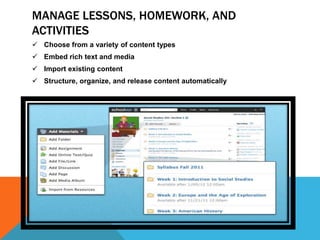
MANAGE LESSONS, HOMEWORK, AND
ACTIVITIES
 Choose from a variety of content types
 Embed rich text and media
 Import existing content
 Structure, organize, and release content automatically
ENGAGE STUDENTS – WITH TECHNOLOGY
 Embed media and post quick updates
 Engage students and encourage conversation
 Provide real-time access to academic materials
 iPhone app
 Blogs
FIND RESOURCES
Schoology makes it easy to create, organize, and find content.


 Create and organize material
 Manage grade books and attendance
 Link your Google Docs
 Share material with other educators
 Search, browse, and integrate public content
 Group workspaces for departments, PTA, etc.
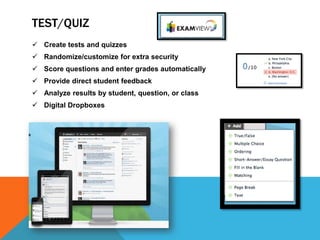
TEST/QUIZ
 Create tests and quizzes
 Randomize/customize for extra security
 Score questions and enter grades automatically
 Provide direct student feedback
 Analyze results by student, question, or class
 Digital Dropboxes
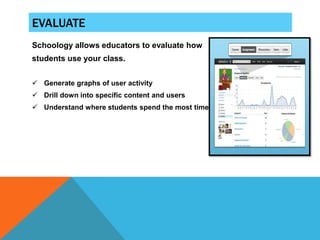
EVALUATE
Schoology allows educators to evaluate how
students use your class.


 Generate graphs of user activity
 Drill down into specific content and users
 Understand where students spend the most time
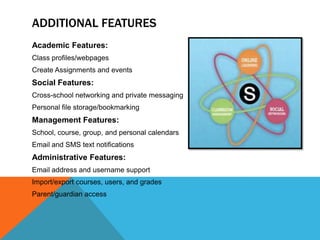
ADDITIONAL FEATURES
Academic Features:
Class profiles/webpages
Create Assignments and events
Social Features:
Cross-school networking and private messaging
Personal file storage/bookmarking
Management Features:
School, course, group, and personal calendars
Email and SMS text notifications
Administrative Features:
Email address and username support
Import/export courses, users, and grades
Parent/guardian access
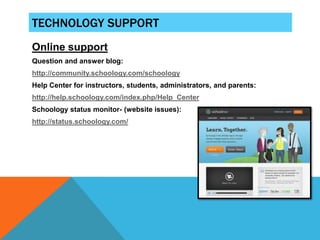
TECHNOLOGY SUPPORT
Online support
Question and answer blog:
http://community.schoology.com/schoology
Help Center for instructors, students, administrators, and parents:
http://help.schoology.com/index.php/Help_Center
Schoology status monitor- (website issues):
http://status.schoology.com/
HISTORY/COMMENTS
Schoology is a social networking service and virtual learning environment for K-
     12 school and higher education institutions that allows users to create,
     manage, and share academic content. Also known as a learning
     management system (LMS) or course management system (CMS), the cloud-
     based platform provides tools needed to manage an online classroom.
     Schoology was founded in New York, New York in 2009.
http://en.wikipedia.org/wiki/Schoology
Comments:
“It’s familiar interface (it resembles other popular social networking sites) makes
     it easy for teachers and students to feel comfortable navigating the site. “
http://mulloverthings.com/2012/01/41-schoology-review-part-1-dashboard-
     profile-blog/
More comments:
“Schoology has the lowest barrier to professional development I have ever seen
     in my 17 year career of teaching educational technology.”
https://www.schoology.com/stories.php

Mod26203pp

  • 1.
  • 2.
    SCHOOLOGY Schoology is aLearning Management System (LMS). The ultimate way to manage lessons, engage students, share content, and connect with other educators.  Collaboration is a key part of Schoology  Offering education without walls  Creates and manages tests & quizzes for you  Helps make creating, organizing, and finding content simple  Connects students and parents to educators and learning resources anytime, anywhere in a safe, secure online environment  https://www.schoology.com/home.php
  • 3.
    MANAGE LESSONS, HOMEWORK,AND ACTIVITIES  Choose from a variety of content types  Embed rich text and media  Import existing content  Structure, organize, and release content automatically
  • 4.
    ENGAGE STUDENTS –WITH TECHNOLOGY  Embed media and post quick updates  Engage students and encourage conversation  Provide real-time access to academic materials  iPhone app  Blogs
  • 5.
    FIND RESOURCES Schoology makesit easy to create, organize, and find content.  Create and organize material  Manage grade books and attendance  Link your Google Docs  Share material with other educators  Search, browse, and integrate public content  Group workspaces for departments, PTA, etc.
  • 6.
    TEST/QUIZ  Create testsand quizzes  Randomize/customize for extra security  Score questions and enter grades automatically  Provide direct student feedback  Analyze results by student, question, or class  Digital Dropboxes
  • 7.
    EVALUATE Schoology allows educatorsto evaluate how students use your class.  Generate graphs of user activity  Drill down into specific content and users  Understand where students spend the most time
  • 8.
    ADDITIONAL FEATURES Academic Features: Classprofiles/webpages Create Assignments and events Social Features: Cross-school networking and private messaging Personal file storage/bookmarking Management Features: School, course, group, and personal calendars Email and SMS text notifications Administrative Features: Email address and username support Import/export courses, users, and grades Parent/guardian access
  • 9.
    TECHNOLOGY SUPPORT Online support Questionand answer blog: http://community.schoology.com/schoology Help Center for instructors, students, administrators, and parents: http://help.schoology.com/index.php/Help_Center Schoology status monitor- (website issues): http://status.schoology.com/
  • 10.
    HISTORY/COMMENTS Schoology is asocial networking service and virtual learning environment for K- 12 school and higher education institutions that allows users to create, manage, and share academic content. Also known as a learning management system (LMS) or course management system (CMS), the cloud- based platform provides tools needed to manage an online classroom. Schoology was founded in New York, New York in 2009. http://en.wikipedia.org/wiki/Schoology Comments: “It’s familiar interface (it resembles other popular social networking sites) makes it easy for teachers and students to feel comfortable navigating the site. “ http://mulloverthings.com/2012/01/41-schoology-review-part-1-dashboard- profile-blog/ More comments: “Schoology has the lowest barrier to professional development I have ever seen in my 17 year career of teaching educational technology.” https://www.schoology.com/stories.php