Computer-generated Images
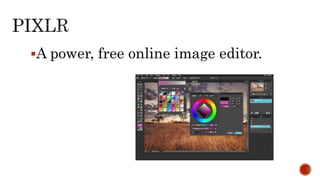
A power, free online image editor.
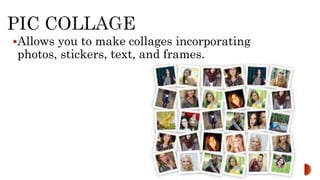
Allows you to make collages incorporating
photos, stickers, text, and frames.
A downloadable application for android for
android phones that allows you to make
collages out of images from your photo
gallery.
An I pad
application (with
free
downloadable
version) that
enables you to
“doodle” on your
images using
available
stickers.
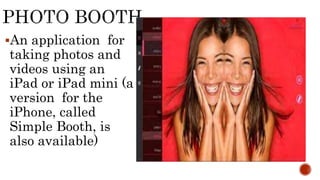
An application for
taking photos and
videos using an
iPad or iPad mini (a
version for the
iPhone, called
Simple Booth, is
also available)
An iPhone
application that
allows you to
take amusing,
distorted images,
simulating
camera effects.
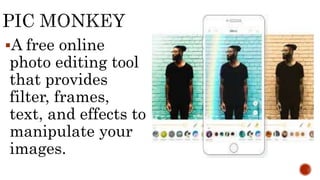
A free online
photo editing tool
that provides
filter, frames,
text, and effects to
manipulate your
images.
A downloadable
application that
allows you to “bring
your photos to life”
in short videos set to
music of your choice.
A free photo editor
and drawing
application, as well
as a social network
for you to share you
art with others.
A photo application
that enables you to
enhance, transform,
and share your photos.
A free downloadable
version for android
phones is available.
A fast and fun way to
share images with others;
snap a photo, choose from
among the available
filters, and share via
Facebook, Twitter,
Tumblr, and more.
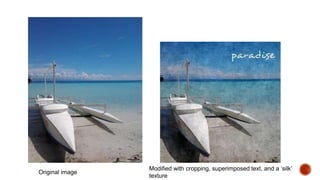
Original image
Modified with cropping, superimposed text, and a ‘silk’
texture
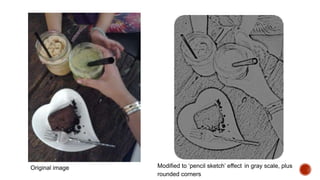
Original image Modified to ‘pencil sketch’ effect in gray scale, plus
rounded corners
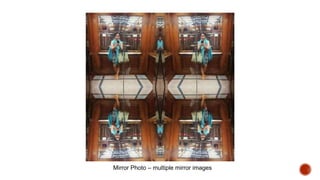
Mirror Photo – multiple mirror images
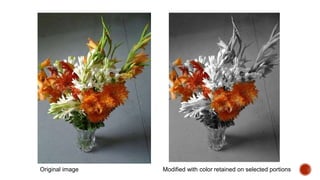
Original image Modified with color retained on selected portions
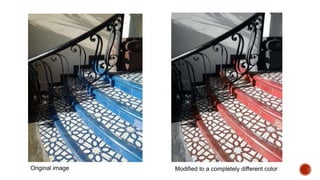
Original image Modified to a completely different color
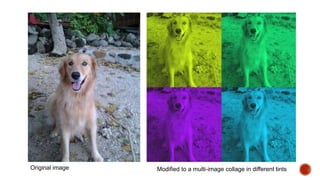
Original image Modified to a multi-image collage in different tints
1. Depending on the devices available to you, capture an image
using your cellphone camera.
2. Using any of the application installed in your available
devices, experiment with different effects and features to
modify your saved image.
3. You may try some of the following effects, as well as other
offered by the applocations you are using:
 Resize - Adjust sharpness
 Crop - Change colors
 Skew/wrap - Gray scale
 Rotate - Sepia tone
 Flip - Apply texture
 Adjust brightness - Superimpose text, trying different
fonts
 Edit out an element that you do not want to appear

Mobile phone art

  • 1.
  • 3.
    A power, freeonline image editor.
  • 4.
    Allows you tomake collages incorporating photos, stickers, text, and frames.
  • 5.
    A downloadable applicationfor android for android phones that allows you to make collages out of images from your photo gallery.
  • 6.
    An I pad application(with free downloadable version) that enables you to “doodle” on your images using available stickers.
  • 7.
    An application for takingphotos and videos using an iPad or iPad mini (a version for the iPhone, called Simple Booth, is also available)
  • 8.
    An iPhone application that allowsyou to take amusing, distorted images, simulating camera effects.
  • 9.
    A free online photoediting tool that provides filter, frames, text, and effects to manipulate your images.
  • 10.
    A downloadable application that allowsyou to “bring your photos to life” in short videos set to music of your choice.
  • 11.
    A free photoeditor and drawing application, as well as a social network for you to share you art with others.
  • 12.
    A photo application thatenables you to enhance, transform, and share your photos. A free downloadable version for android phones is available.
  • 13.
    A fast andfun way to share images with others; snap a photo, choose from among the available filters, and share via Facebook, Twitter, Tumblr, and more.
  • 14.
    Original image Modified withcropping, superimposed text, and a ‘silk’ texture
  • 15.
    Original image Modifiedto ‘pencil sketch’ effect in gray scale, plus rounded corners
  • 16.
    Mirror Photo –multiple mirror images
  • 17.
    Original image Modifiedwith color retained on selected portions
  • 18.
    Original image Modifiedto a completely different color
  • 19.
    Original image Modifiedto a multi-image collage in different tints
  • 21.
    1. Depending onthe devices available to you, capture an image using your cellphone camera. 2. Using any of the application installed in your available devices, experiment with different effects and features to modify your saved image. 3. You may try some of the following effects, as well as other offered by the applocations you are using:  Resize - Adjust sharpness  Crop - Change colors  Skew/wrap - Gray scale  Rotate - Sepia tone  Flip - Apply texture  Adjust brightness - Superimpose text, trying different fonts  Edit out an element that you do not want to appear