Mobile Maps
A labs.ericsson.com enabler
http://labs.ericsson.com/apis/mobile-maps/
Mobile Maps

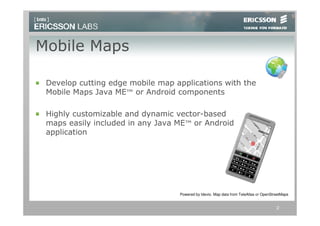
 Develop cutting edge mobile map applications with the
 Mobile Maps Java ME™ or Android components

 Highly customizable and dynamic vector-based
 maps easily included in any Java ME™ or Android
 application


                                  Powered by Idevio. Map data from TeleAtlas or OpenStreetMaps


                                                                                       2
Why Mobile Maps?
  Mobile devices are ideal for maps and location
  based applications

  Maps have high demands on usability and
  bandwidth

  Most available map API:s are developed for
  the web and adapted to mobile


Mobile Maps from Ericsson Labs is a map
solution tailored for mobile application
demands


                                                   3
Main Features of Mobile Maps
 Rendering engine for map vector data (Java ME or
 Android)
 – Compressed map data streamed from servers and
   rendered in the phone

 Customizable appearance and behavior of the maps
 – Change colors, animate, and rotate the maps to fit your
   application needs

 Flexible UI controls
 – Customize how the user interacts with the map

 Free access to map data

 Support for a wide range of handsets

                                                             4
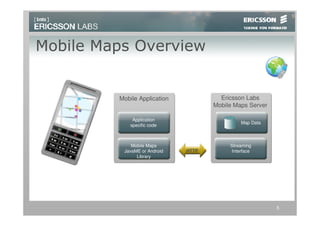
Mobile Maps Overview


         Mobile Application            Ericsson Labs
                                     Mobile Maps Server

              Application
                                              Map Data
             specific code


             Mobile Maps                  Streaming
          JavaME or Android   HTTP        Interface
               Library


                                                          5
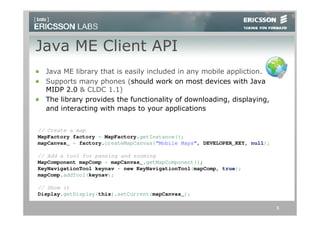
Java ME Client API
  Java ME library that is easily included in any mobile appliction.
  Supports many phones (should work on most devices with Java
  MIDP 2.0 & CLDC 1.1)
  The library provides the functionality of downloading, displaying,
  and interacting with maps to your applications


// Create a map
MapFactory factory = MapFactory.getInstance();
mapCanvas_ = factory.createMapCanvas(“Mobile Maps", DEVELOPER_KEY, null);

// Add a tool for panning and zooming
MapComponent mapComp = mapCanvas_.getMapComponent();
KeyNavigationTool keynav = new KeyNavigationTool(mapComp, true);
mapComp.addTool(keynav);

// Show it
Display.getDisplay(this).setCurrent(mapCanvas_);

                                                                            6
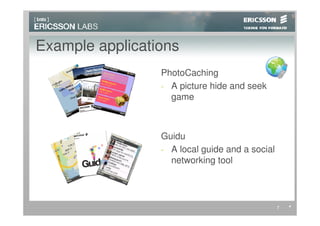
Example applications
                 PhotoCaching
                 - A picture hide and seek
                   game


                 Guidu
                 - A local guide and a social
                   networking tool


                                                7
8

Mobile Maps On Labs

  • 1.
    Mobile Maps A labs.ericsson.comenabler http://labs.ericsson.com/apis/mobile-maps/
  • 2.
    Mobile Maps Developcutting edge mobile map applications with the Mobile Maps Java ME™ or Android components Highly customizable and dynamic vector-based maps easily included in any Java ME™ or Android application Powered by Idevio. Map data from TeleAtlas or OpenStreetMaps 2
  • 3.
    Why Mobile Maps? Mobile devices are ideal for maps and location based applications Maps have high demands on usability and bandwidth Most available map API:s are developed for the web and adapted to mobile Mobile Maps from Ericsson Labs is a map solution tailored for mobile application demands 3
  • 4.
    Main Features ofMobile Maps Rendering engine for map vector data (Java ME or Android) – Compressed map data streamed from servers and rendered in the phone Customizable appearance and behavior of the maps – Change colors, animate, and rotate the maps to fit your application needs Flexible UI controls – Customize how the user interacts with the map Free access to map data Support for a wide range of handsets 4
  • 5.
    Mobile Maps Overview Mobile Application Ericsson Labs Mobile Maps Server Application Map Data specific code Mobile Maps Streaming JavaME or Android HTTP Interface Library 5
  • 6.
    Java ME ClientAPI Java ME library that is easily included in any mobile appliction. Supports many phones (should work on most devices with Java MIDP 2.0 & CLDC 1.1) The library provides the functionality of downloading, displaying, and interacting with maps to your applications // Create a map MapFactory factory = MapFactory.getInstance(); mapCanvas_ = factory.createMapCanvas(“Mobile Maps", DEVELOPER_KEY, null); // Add a tool for panning and zooming MapComponent mapComp = mapCanvas_.getMapComponent(); KeyNavigationTool keynav = new KeyNavigationTool(mapComp, true); mapComp.addTool(keynav); // Show it Display.getDisplay(this).setCurrent(mapCanvas_); 6
  • 7.
    Example applications PhotoCaching - A picture hide and seek game Guidu - A local guide and a social networking tool 7
  • 8.