Mobile Development
                       Tools and Practices
                             Arnaud Héritier
                              eXo Platform
                               @aheritier


Wednesday, December 14, 11
Our Motivation
                   •         Observations
                        •     eXo Mobile division had many difficulties to
                              stabilize applications (build failures,
                              dependencies to the development
                              environment ...),
                        •     Functional and technical feedbacks were very
                              limited because the deployment/update
                              process was complex for testers / early
                              adopters.


Wednesday, December 14, 11
Our Motivation
                   •         Prescription
                        •      Continuous build and deployment of mobile
                               applications (iOS, Android)
                              •   to speedup the feedback loop
                              •   to increase the number of testers / early
                                  adopters
                              •   to increase the quality and the stability of
                                  these applications.


Wednesday, December 14, 11
Our Motivation


                   • CI wasn't easy to setup the first time,
                             especially for iOS. The experience is worth
                             being shared.


Wednesday, December 14, 11
Webinar Schedule

                   • The development environment
                   • Setup the continuous integration
                   • Setup the continuous deployment


Wednesday, December 14, 11
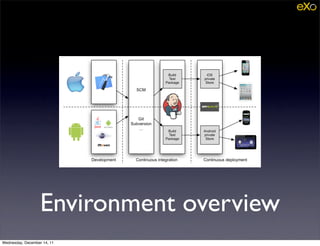
Environment overview
Wednesday, December 14, 11
The Development
                        Environment for iOS


Wednesday, December 14, 11
iOS Development
                                 Toolbox

                   • Xcode
                    • http://developer.apple.com/xcode/


Wednesday, December 14, 11
Setup a Development
                     Environment for iOS
                   • Apple documentation
                    • http://goo.gl/Ge13t
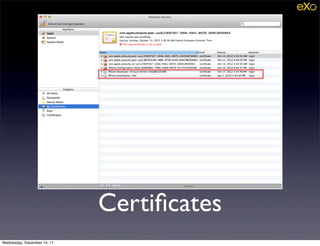
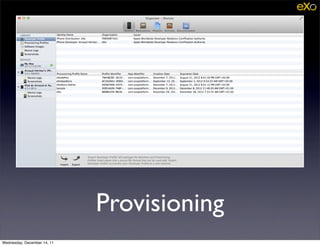
                   • The most important part is to register your
                             Apple developer account and to correctly
                             set your code signing identity


Wednesday, December 14, 11
Certificates
Wednesday, December 14, 11
Provisioning
Wednesday, December 14, 11
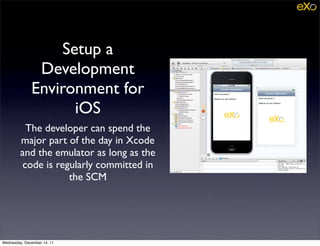
Setup a
               Development
              Environment for
                    iOS
          The developer can spend the
         major part of the day in Xcode
         and the emulator as long as the
         code is regularly committed in
                    the SCM


Wednesday, December 14, 11
The Development
                              Environment for
                                  Android


Wednesday, December 14, 11
Android Development
                         Toolbox
                   •     Java JDK
                        • http://www.oracle.com/technetwork/java/javase/downloads/index.html
                   •     Android SDK
                        •      http://developer.android.com/sdk
                   •         Eclipse 3.7 IDE for Java Developers
                        •      http://eclipse.org
                   •         Apache Maven
                        •      http://maven.apache.org/


Wednesday, December 14, 11
Setup a Development
               Environment for Android
                   •         Installation
                        •       Java JDK
                        •       Android SDK
                               •    Don’t forget to set the ANDROID_HOME environment variable
                        •       Maven 3.0.3 min
                               •    Required by the 3.0 version of the android plugin
                        •       Eclipse
                               •    Use Java Developers edition with its Maven integration (m2e)
                               •    Don’t forget to configure your Maven and ADT paths in eclipse
                                    settings.


Wednesday, December 14, 11
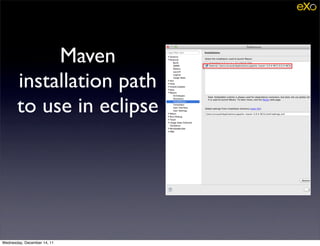
Maven
       installation path
       to use in eclipse


Wednesday, December 14, 11
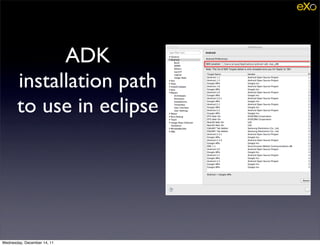
ADK
       installation path
       to use in eclipse


Wednesday, December 14, 11
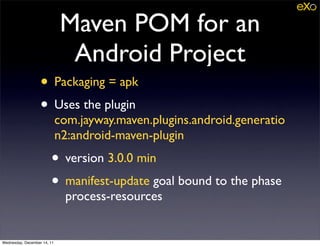
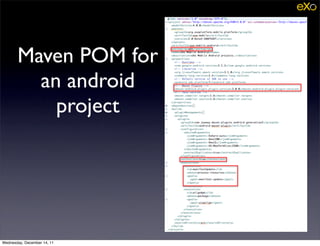
Maven POM for an
                              Android Project
                   • Packaging = apk
                   • Uses the plugin
                             com.jayway.maven.plugins.android.generatio
                             n2:android-maven-plugin
                        • version 3.0.0 min
                        • manifest-update goal bound to the phase
                              process-resources


Wednesday, December 14, 11
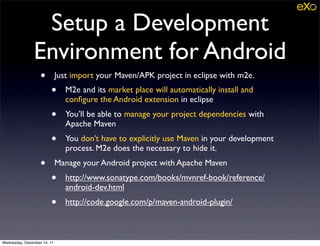
Setup a Development
               Environment for Android
                   •         Just import your Maven/APK project in eclipse with m2e.
                        •       M2e and its market place will automatically install and
                                configure the Android extension in eclipse
                        •       You’ll be able to manage your project dependencies with
                                Apache Maven
                        •       You don’t have to explicitly use Maven in your development
                                process. M2e does the necessary to hide it.
                   •         Manage your Android project with Apache Maven
                        •       http://www.sonatype.com/books/mvnref-book/reference/
                                android-dev.html
                        •       http://code.google.com/p/maven-android-plugin/


Wednesday, December 14, 11
Maven POM for
         an android
           project


Wednesday, December 14, 11
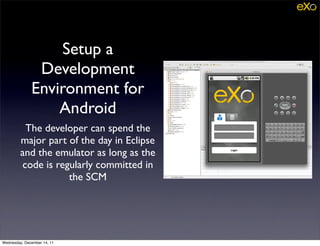
Setup a
               Development
              Environment for
                  Android
          The developer can spend the
         major part of the day in Eclipse
         and the emulator as long as the
         code is regularly committed in
                    the SCM


Wednesday, December 14, 11
Continuous Integration
                     Environment


Wednesday, December 14, 11
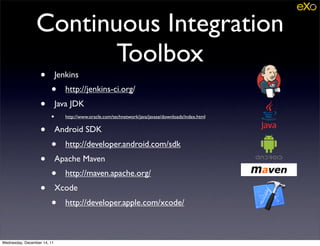
Continuous Integration
                        Toolbox
                   •         Jenkins
                        •       http://jenkins-ci.org/
                   •         Java JDK
                        •       http://www.oracle.com/technetwork/java/javase/downloads/index.html


                   •         Android SDK
                        •       http://developer.android.com/sdk
                   •         Apache Maven
                        •       http://maven.apache.org/
                   •         Xcode
                        •       http://developer.apple.com/xcode/


Wednesday, December 14, 11
Continuous Integration
                        for iOS
                   • Jenkins with the Xcode plugin
                    • https://wiki.jenkins-ci.org/display/
                               JENKINS/Xcode+Plugin
                   • Requires a MacOS platform to build (using
                             a Jenkins agent if necessary)


Wednesday, December 14, 11
Continuous Integration
                        for iOS
                   •         Configure the environment where build will be run
                             as a development environment (Xcode +
                             certificates)
                   •         Connect your Jenkins Server to an iOS agent :
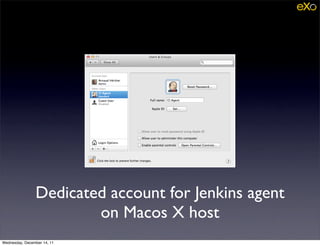
                        •      Use a dedicated user account on the agent host,
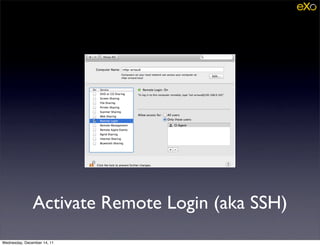
                        •      Allow Remote Login (Sharing preferences) on the
                               agent to connect to it using SSH,
                        •      Configure an SSH key on the Server that you will
                               authorize on the agent (~/.ssh/authorized_keys)


Wednesday, December 14, 11
Dedicated account for Jenkins agent
                        on Macos X host
Wednesday, December 14, 11
Activate Remote Login (aka SSH)
Wednesday, December 14, 11
Continuous Integration
                        for iOS
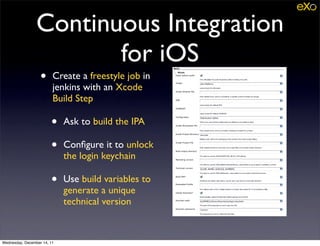
                   •     Create a freestyle job in
                         jenkins with an Xcode
                         Build Step

                        •    Ask to build the IPA

                        •    Configure it to unlock
                             the login keychain

                        •    Use build variables to
                             generate a unique
                             technical version


Wednesday, December 14, 11
Continuous Integration
                        for iOS
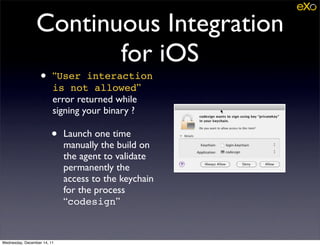
                   •     “User interaction
                         is not allowed”
                         error returned while
                         signing your binary ?

                        •    Launch one time
                             manually the build on
                             the agent to validate
                             permanently the
                             access to the keychain
                             for the process
                             “codesign”


Wednesday, December 14, 11
Continuous Integration
                      for Android
                   •         Install an Android SDK on all agents where the
                             android job can be launched
                   •         Configure in Jenkins
                        •      JDK 1.6+
                        •      Apache Maven 3.0.3+
                        •      ANDROID_HOME environment variable or define
                               the property android.sdk.path in a profile
                               activated from maven settings.xml
                               configuration file.


Wednesday, December 14, 11
Continuous Integration
                      for Android
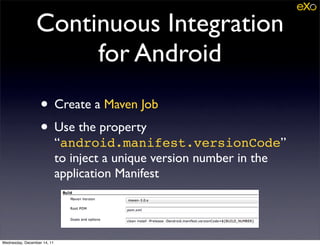
                   • Create a Maven Job
                   • Use the property
                             “android.manifest.versionCode”
                             to inject a unique version number in the
                             application Manifest


Wednesday, December 14, 11
Continuous
                             Deployment
                             Environment


Wednesday, December 14, 11
Continuous
                       Deployment Toolbox
                        • Jenkins
                         • http://jenkins-ci.org/
                        • Appaloosa Store
                         • http://appaloosa-store.com

Wednesday, December 14, 11
Private Store
                        • Appaloosa allow you to manage a private
                             store for Android or iOS devices
                        • Even if our applications are deployed in
                             public app-stores after the release we
                             rely on a private app-store to easily
                             deploy tests versions to our QA or our
                             early adopters.


Wednesday, December 14, 11
Continuous Deployment
                   with Appaloosa
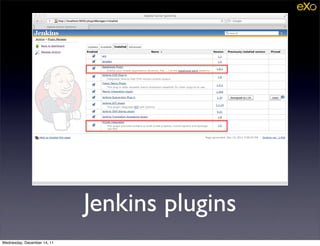
                   •         Install the appaloosa plugin in Jenkins
                        •       https://wiki.jenkins-ci.org/display/JENKINS/Appaloosa
                                +Plugin
                   •         Get the organization token in the administration panel of your
                             appaloosa store
                   •         Create a private store for each system : One for iOS and one
                             for Android
                   •         Configure in each job a post build task to deploy binaries
                        •       **/*.ipa for the iOS build
                        •       **/target/*(-aligned).apk for the android build


Wednesday, December 14, 11
Continuous Deployment
                   with Appaloosa
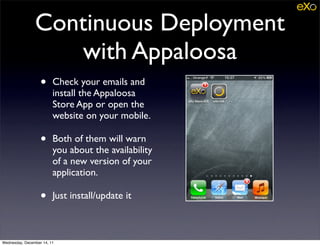
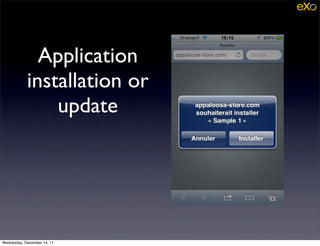
                   •     Check your emails and
                         install the Appaloosa
                         Store App or open the
                         website on your mobile.

                   •     Both of them will warn
                         you about the availability
                         of a new version of your
                         application.

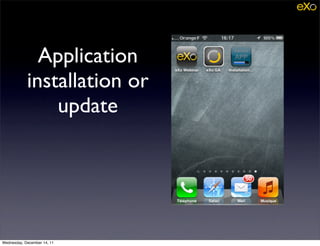
                   •     Just install/update it


Wednesday, December 14, 11
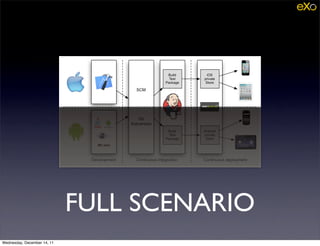
FULL SCENARIO


Wednesday, December 14, 11
FULL SCENARIO
Wednesday, December 14, 11
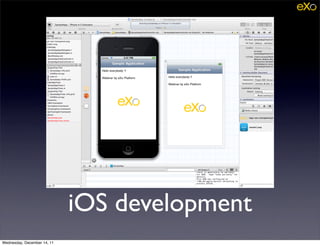
iOS development
Wednesday, December 14, 11
Jenkins plugins
Wednesday, December 14, 11
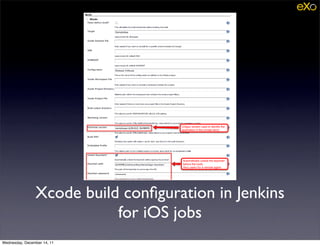
Xcode build configuration in Jenkins
                           for iOS jobs
Wednesday, December 14, 11
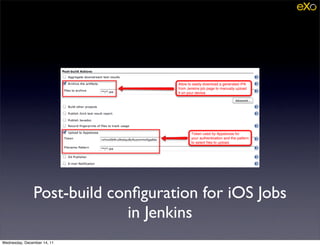
Post-build configuration for iOS Jobs
                            in Jenkins
Wednesday, December 14, 11
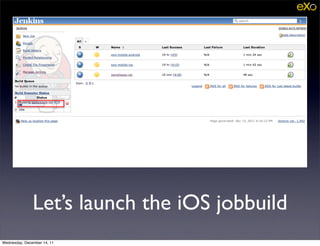
Let’s launch the iOS jobbuild
Wednesday, December 14, 11
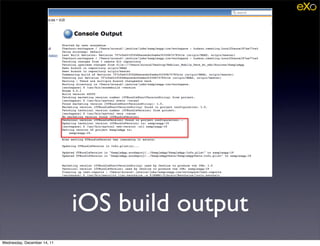
iOS build output
Wednesday, December 14, 11
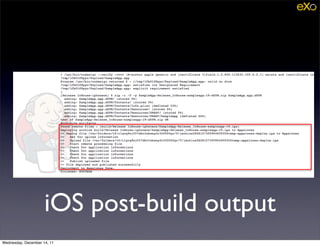
iOS post-build output
Wednesday, December 14, 11
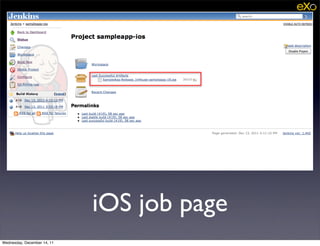
iOS job page
Wednesday, December 14, 11
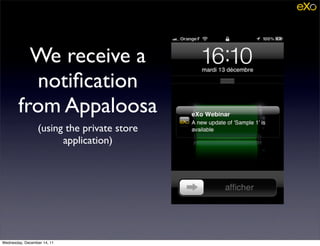
We receive a
          notification
        from Appaloosa
                 (using the private store
                       application)


Wednesday, December 14, 11
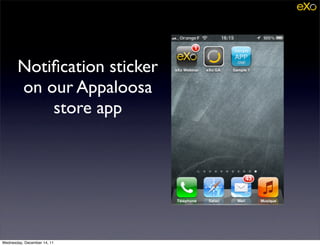
Notification sticker
       on our Appaloosa
           store app


Wednesday, December 14, 11
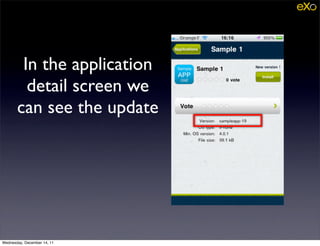
In the application
         detail screen we
       can see the update


Wednesday, December 14, 11
Application
            installation or
                update


Wednesday, December 14, 11
Application
            installation or
                update


Wednesday, December 14, 11
It’s ready !


Wednesday, December 14, 11
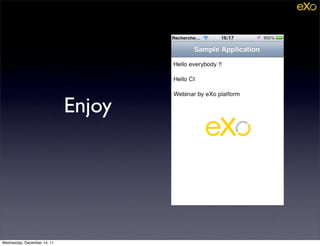
Enjoy


Wednesday, December 14, 11
Q/A ?


Wednesday, December 14, 11

Mobile developments at eXo

  • 1.
    Mobile Development Tools and Practices Arnaud Héritier eXo Platform @aheritier Wednesday, December 14, 11
  • 2.
    Our Motivation • Observations • eXo Mobile division had many difficulties to stabilize applications (build failures, dependencies to the development environment ...), • Functional and technical feedbacks were very limited because the deployment/update process was complex for testers / early adopters. Wednesday, December 14, 11
  • 3.
    Our Motivation • Prescription • Continuous build and deployment of mobile applications (iOS, Android) • to speedup the feedback loop • to increase the number of testers / early adopters • to increase the quality and the stability of these applications. Wednesday, December 14, 11
  • 4.
    Our Motivation • CI wasn't easy to setup the first time, especially for iOS. The experience is worth being shared. Wednesday, December 14, 11
  • 5.
    Webinar Schedule • The development environment • Setup the continuous integration • Setup the continuous deployment Wednesday, December 14, 11
  • 6.
  • 7.
    The Development Environment for iOS Wednesday, December 14, 11
  • 8.
    iOS Development Toolbox • Xcode • http://developer.apple.com/xcode/ Wednesday, December 14, 11
  • 9.
    Setup a Development Environment for iOS • Apple documentation • http://goo.gl/Ge13t • The most important part is to register your Apple developer account and to correctly set your code signing identity Wednesday, December 14, 11
  • 10.
  • 11.
  • 12.
    Setup a Development Environment for iOS The developer can spend the major part of the day in Xcode and the emulator as long as the code is regularly committed in the SCM Wednesday, December 14, 11
  • 13.
    The Development Environment for Android Wednesday, December 14, 11
  • 14.
    Android Development Toolbox • Java JDK • http://www.oracle.com/technetwork/java/javase/downloads/index.html • Android SDK • http://developer.android.com/sdk • Eclipse 3.7 IDE for Java Developers • http://eclipse.org • Apache Maven • http://maven.apache.org/ Wednesday, December 14, 11
  • 15.
    Setup a Development Environment for Android • Installation • Java JDK • Android SDK • Don’t forget to set the ANDROID_HOME environment variable • Maven 3.0.3 min • Required by the 3.0 version of the android plugin • Eclipse • Use Java Developers edition with its Maven integration (m2e) • Don’t forget to configure your Maven and ADT paths in eclipse settings. Wednesday, December 14, 11
  • 16.
    Maven installation path to use in eclipse Wednesday, December 14, 11
  • 17.
    ADK installation path to use in eclipse Wednesday, December 14, 11
  • 18.
    Maven POM foran Android Project • Packaging = apk • Uses the plugin com.jayway.maven.plugins.android.generatio n2:android-maven-plugin • version 3.0.0 min • manifest-update goal bound to the phase process-resources Wednesday, December 14, 11
  • 19.
    Setup a Development Environment for Android • Just import your Maven/APK project in eclipse with m2e. • M2e and its market place will automatically install and configure the Android extension in eclipse • You’ll be able to manage your project dependencies with Apache Maven • You don’t have to explicitly use Maven in your development process. M2e does the necessary to hide it. • Manage your Android project with Apache Maven • http://www.sonatype.com/books/mvnref-book/reference/ android-dev.html • http://code.google.com/p/maven-android-plugin/ Wednesday, December 14, 11
  • 20.
    Maven POM for an android project Wednesday, December 14, 11
  • 21.
    Setup a Development Environment for Android The developer can spend the major part of the day in Eclipse and the emulator as long as the code is regularly committed in the SCM Wednesday, December 14, 11
  • 22.
    Continuous Integration Environment Wednesday, December 14, 11
  • 23.
    Continuous Integration Toolbox • Jenkins • http://jenkins-ci.org/ • Java JDK • http://www.oracle.com/technetwork/java/javase/downloads/index.html • Android SDK • http://developer.android.com/sdk • Apache Maven • http://maven.apache.org/ • Xcode • http://developer.apple.com/xcode/ Wednesday, December 14, 11
  • 24.
    Continuous Integration for iOS • Jenkins with the Xcode plugin • https://wiki.jenkins-ci.org/display/ JENKINS/Xcode+Plugin • Requires a MacOS platform to build (using a Jenkins agent if necessary) Wednesday, December 14, 11
  • 25.
    Continuous Integration for iOS • Configure the environment where build will be run as a development environment (Xcode + certificates) • Connect your Jenkins Server to an iOS agent : • Use a dedicated user account on the agent host, • Allow Remote Login (Sharing preferences) on the agent to connect to it using SSH, • Configure an SSH key on the Server that you will authorize on the agent (~/.ssh/authorized_keys) Wednesday, December 14, 11
  • 26.
    Dedicated account forJenkins agent on Macos X host Wednesday, December 14, 11
  • 27.
    Activate Remote Login(aka SSH) Wednesday, December 14, 11
  • 28.
    Continuous Integration for iOS • Create a freestyle job in jenkins with an Xcode Build Step • Ask to build the IPA • Configure it to unlock the login keychain • Use build variables to generate a unique technical version Wednesday, December 14, 11
  • 29.
    Continuous Integration for iOS • “User interaction is not allowed” error returned while signing your binary ? • Launch one time manually the build on the agent to validate permanently the access to the keychain for the process “codesign” Wednesday, December 14, 11
  • 30.
    Continuous Integration for Android • Install an Android SDK on all agents where the android job can be launched • Configure in Jenkins • JDK 1.6+ • Apache Maven 3.0.3+ • ANDROID_HOME environment variable or define the property android.sdk.path in a profile activated from maven settings.xml configuration file. Wednesday, December 14, 11
  • 31.
    Continuous Integration for Android • Create a Maven Job • Use the property “android.manifest.versionCode” to inject a unique version number in the application Manifest Wednesday, December 14, 11
  • 32.
    Continuous Deployment Environment Wednesday, December 14, 11
  • 33.
    Continuous Deployment Toolbox • Jenkins • http://jenkins-ci.org/ • Appaloosa Store • http://appaloosa-store.com Wednesday, December 14, 11
  • 34.
    Private Store • Appaloosa allow you to manage a private store for Android or iOS devices • Even if our applications are deployed in public app-stores after the release we rely on a private app-store to easily deploy tests versions to our QA or our early adopters. Wednesday, December 14, 11
  • 35.
    Continuous Deployment with Appaloosa • Install the appaloosa plugin in Jenkins • https://wiki.jenkins-ci.org/display/JENKINS/Appaloosa +Plugin • Get the organization token in the administration panel of your appaloosa store • Create a private store for each system : One for iOS and one for Android • Configure in each job a post build task to deploy binaries • **/*.ipa for the iOS build • **/target/*(-aligned).apk for the android build Wednesday, December 14, 11
  • 36.
    Continuous Deployment with Appaloosa • Check your emails and install the Appaloosa Store App or open the website on your mobile. • Both of them will warn you about the availability of a new version of your application. • Just install/update it Wednesday, December 14, 11
  • 37.
  • 38.
  • 39.
  • 40.
  • 41.
    Xcode build configurationin Jenkins for iOS jobs Wednesday, December 14, 11
  • 42.
    Post-build configuration foriOS Jobs in Jenkins Wednesday, December 14, 11
  • 43.
    Let’s launch theiOS jobbuild Wednesday, December 14, 11
  • 44.
  • 45.
  • 46.
    iOS job page Wednesday,December 14, 11
  • 47.
    We receive a notification from Appaloosa (using the private store application) Wednesday, December 14, 11
  • 48.
    Notification sticker on our Appaloosa store app Wednesday, December 14, 11
  • 49.
    In the application detail screen we can see the update Wednesday, December 14, 11
  • 50.
    Application installation or update Wednesday, December 14, 11
  • 51.
    Application installation or update Wednesday, December 14, 11
  • 52.
  • 53.
  • 54.