

Mobile Accessibility


                            Silicon Valley Code Camp, 2012
                             Ted Drake, Intuit Accessibility
Saturday, October 6, 12

Police Dog, Tess, 29/1/35 / by Sam Hood http://www.flickr.com/photos/statelibraryofnsw/
3210838977/
•      Visit the Intuit booth in
                  courtyard for munchies and
                  win Bose Headphones

           •      Intuit is a GREAT place to
                  work. No Kool-Aid needed

           •      Intuit at SVCC:
                  TinyURL.com/svcc-intuit

           •      This presentation:
                  Slideshare.net/7mary4

           •      Photos from Flickr Commons


Saturday, October 6, 12

Huisvrouwengymnastiek / Gymnastics for housewives - http://www.flickr.com/photos/
nationaalarchief/4397795679/
What is Accessibility


Saturday, October 6, 12

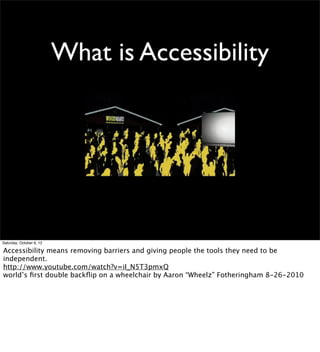
Accessibility means removing barriers and giving people the tools they need to be
independent.
http://www.youtube.com/watch?v=iI_N5T3pmxQ
world’s first double backflip on a wheelchair by Aaron “Wheelz” Fotheringham 8-26-2010
What is Accessibility


Saturday, October 6, 12

Accessibility means removing barriers and giving people the tools they need to be
independent.
http://www.youtube.com/watch?v=iI_N5T3pmxQ
world’s first double backflip on a wheelchair by Aaron “Wheelz” Fotheringham 8-26-2010
Screen Reader


Saturday, October 6, 12

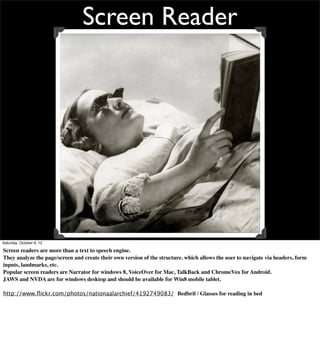
Screen readers are more than a text to speech engine.
They analyze the page/screen and create their own version of the structure. which allows the user to navigate via headers, form
inputs, landmarks, etc.
Popular screen readers are Narrator for windows 8, VoiceOver for Mac, TalkBack and ChromeVox for Android.
JAWS and NVDA are for windows desktop and should be available for Win8 mobile tablet.

http://www.flickr.com/photos/nationaalarchief/4192749083/ Bedbril / Glasses for reading in bed
Braille


Saturday, October 6, 12

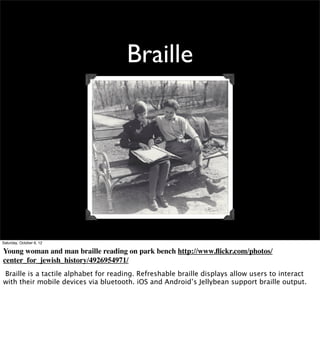
Young woman and man braille reading on park bench http://www.flickr.com/photos/
center_for_jewish_history/4926954971/
Braille is a tactile alphabet for reading. Refreshable braille displays allow users to interact
with their mobile devices via bluetooth. iOS and Android’s Jellybean support braille output.
Cognitive Disabilities


Saturday, October 6, 12
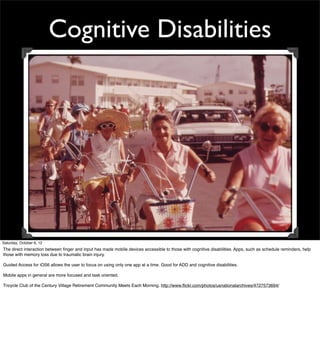
The direct interaction between finger and input has made mobile devices accessible to those with cognitive disabilities. Apps, such as schedule reminders, help
those with memory loss due to traumatic brain injury.

Guided Access for iOS6 allows the user to focus on using only one app at a time. Good for ADD and cognitive disabilities.

Mobile apps in general are more focused and task oriented.

Tricycle Club of the Century Village Retirement Community Meets Each Morning. http://www.flickr.com/photos/usnationalarchives/4727573694/
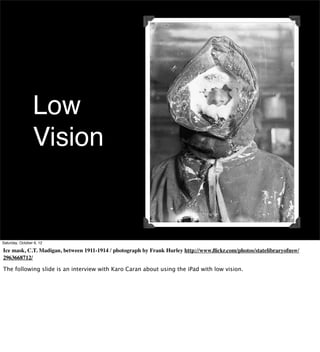
Low
                 Vision


Saturday, October 6, 12

Ice mask, C.T. Madigan, between 1911-1914 / photograph by Frank Hurley http://www.flickr.com/photos/statelibraryofnsw/
2963668712/

The following slide is an interview with Karo Caran about using the iPad with low vision.
Saturday, October 6, 12
Assistive Communication
Saturday, October 6, 12

this child uses Proloque2Go to communicate with his parents. This app uses icons to build
sentences and speak for the user. This replaces bulky, fragile equipment that can cost over
$4,000
http://www.youtube.com/watch?v=Tp2ROyyyqjo Toddler with apraxia Asking for Cheese and Cracker on Ipad with Proloquo2Go and ASL
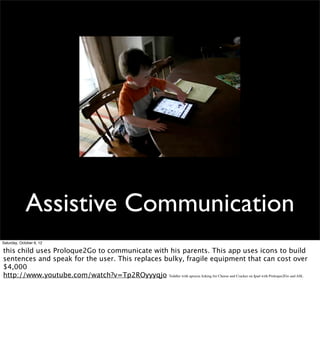
Assistive Communication
Saturday, October 6, 12

this child uses Proloque2Go to communicate with his parents. This app uses icons to build
sentences and speak for the user. This replaces bulky, fragile equipment that can cost over
$4,000
http://www.youtube.com/watch?v=Tp2ROyyyqjo Toddler with apraxia Asking for Cheese and Cracker on Ipad with Proloquo2Go and ASL
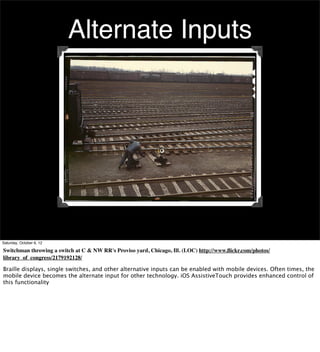
Alternate Inputs


Saturday, October 6, 12

Switchman throwing a switch at C & NW RR's Proviso yard, Chicago, Ill. (LOC) http://www.flickr.com/photos/
library_of_congress/2179192128/

Braille displays, single switches, and other alternative inputs can be enabled with mobile devices. Often times, the
mobile device becomes the alternate input for other technology. iOS AssistiveTouch provides enhanced control of
this functionality
iOS - Android - Win8 - HTML5


Saturday, October 6, 12

August 2, 1933 http://www.flickr.com/photos/nlireland/6000735003/
iOS


Saturday, October 6, 12
LSE Sports Day, Apple Bobbing, May 1932 http://www.flickr.com/photos/lselibrary/4166786914/

Accessibility features are baked into every Apple device. VoiceOver is the core engine for translating user interactions between the app and the assistive
technology.
VoiceOver


Saturday, October 6, 12

VoiceOver is more than a screen reader. It’s a layer that acts as a middle layer between the user and app. It interprets gestures and
content.

It also can be used by automated testing to replace the user with scripts. Accessibility -> automated testing

Erik Bye og Otto Nilsen i radio studio 13. mars 1958. - http://www.flickr.com/photos/national_archives_of_norway/5476890757/
Hearing


Saturday, October 6, 12
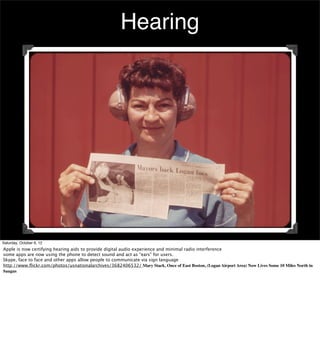
Apple is now certifying hearing aids to provide digital audio experience and minimal radio interference
some apps are now using the phone to detect sound and act as “ears” for users.
Skype, face to face and other apps allow people to communicate via sign language
http://www.flickr.com/photos/usnationalarchives/3682406532/ Mary Stack, Once of East Boston, (Logan Airport Area) Now Lives Some 10 Miles North in
Saugus
Guided Access


Saturday, October 6, 12
http://www.flickr.com/photos/uw_digital_images/4326185910/in/photostream/
Climbing guide Fairman B. Lee with a party of hikers on Nisqually Glacier, Mount Rainier

Guided Access allows the user to close off certain parts of apps to minimize distractions. This is useful for autism, ADD, and classrooms to keep people focused on
a single task and away from angry birds.
Android


Saturday, October 6, 12

Scrappo, mechanical scrap metal creation made by the Marion County salvage committee, Salem,
Oregon, 1942 http://www.flickr.com/photos/osucommons/5764957371/


http://developer.android.com/guide/topics/ui/accessibility/apps.html
Before
                   Ice Cream
                   Sandwich


Saturday, October 6, 12

http://www.flickr.com/photos/field_museum_library/3405449492/in/photostream/ Girl dressed like a bee
74% of users are still on pre-ICS phones.
Honeycomb and other pre-ICS versions have minimal accessibility support. DPad focus control is critical. Making your app
accessible fortunately helps all versions.
Ice
              Cream
              Sandwich

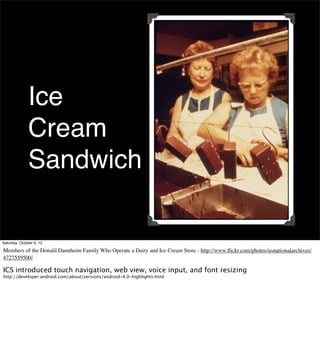
Saturday, October 6, 12

Members of the Donald Dannheim Family Who Operate a Dairy and Ice Cream Store - http://www.flickr.com/photos/usnationalarchives/
4727559500/

ICS introduced touch navigation, web view, voice input, and font resizing
http://developer.android.com/about/versions/android-4.0-highlights.html
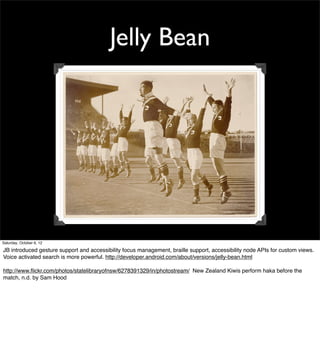
Jelly Bean


Saturday, October 6, 12

JB introduced gesture support and accessibility focus management, braille support, accessibility node APIs for custom views.
Voice activated search is more powerful. http://developer.android.com/about/versions/jelly-bean.html

http://www.flickr.com/photos/statelibraryofnsw/6278391329/in/photostream/ New Zealand Kiwis perform haka before the
match, n.d. by Sam Hood
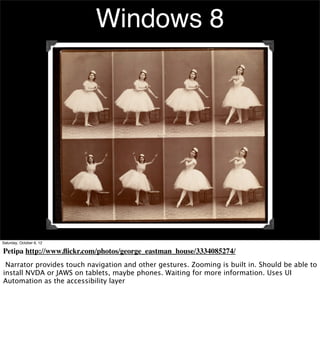
Windows 8


Saturday, October 6, 12

Petipa http://www.flickr.com/photos/george_eastman_house/3334085274/
 Narrator provides touch navigation and other gestures. Zooming is built in. Should be able to
install NVDA or JAWS on tablets, maybe phones. Waiting for more information. Uses UI
Automation as the accessibility layer
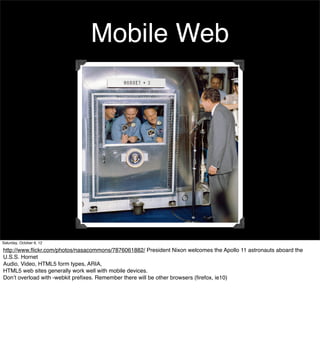
Mobile Web


Saturday, October 6, 12

http://www.flickr.com/photos/nasacommons/7876061882/ President Nixon welcomes the Apollo 11 astronauts aboard the
U.S.S. Hornet
Audio, Video, HTML5 form types, ARIA,
HTML5 web sites generally work well with mobile devices.
Don’t overload with -webkit prefixes. Remember there will be other browsers (firefox, ie10)
Get To Work
Saturday, October 6, 12

Plant : Consolidated/Convair Aircraft Factory San Diego http://www.flickr.com/photos/
sdasmarchives/5018409455/
Focus Control


Saturday, October 6, 12

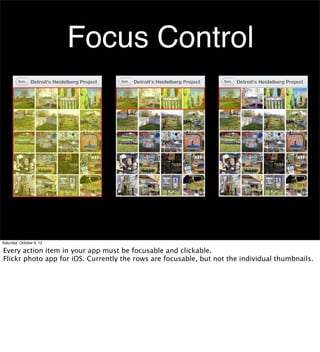
Every action item in your app must be focusable and clickable.
Flickr photo app for iOS. Currently the rows are focusable, but not the individual thumbnails.
iOS
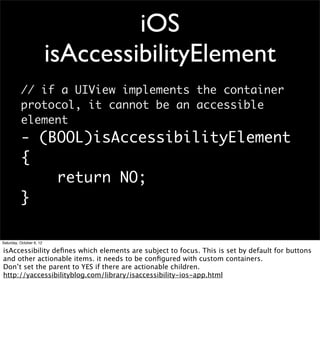
                          isAccessibilityElement
          // if a UIView implements the container
          protocol, it cannot be an accessible
          element
          - (BOOL)isAccessibilityElement
          {
              return NO;
          }

Saturday, October 6, 12

isAccessibility defines which elements are subject to focus. This is set by default for buttons
and other actionable items. it needs to be configured with custom containers.
Don’t set the parent to YES if there are actionable children.
http://yaccessibilityblog.com/library/isaccessibility-ios-app.html
Saturday, October 6, 12

This video shows the custom view used for a selector within Quickbooks Mobile. It’s the only
thing that fails in this application.
Saturday, October 6, 12

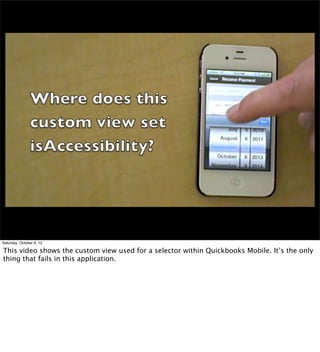
This video shows the custom view used for a selector within Quickbooks Mobile. It’s the only
thing that fails in this application.
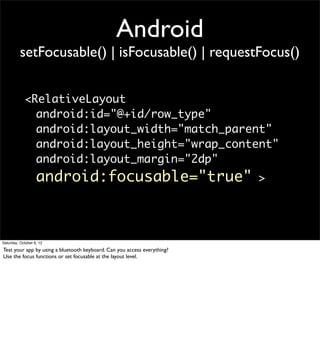
Android
          setFocusable() | isFocusable() | requestFocus()


            <RelativeLayout
              android:id="@+id/row_type"
              android:layout_width="match_parent"
              android:layout_height="wrap_content"
              android:layout_margin="2dp"
                   android:focusable="true"                               >


Saturday, October 6, 12

Test your app by using a bluetooth keyboard. Can you access everything?
Use the focus functions or set focusable at the layout level.
HTML5
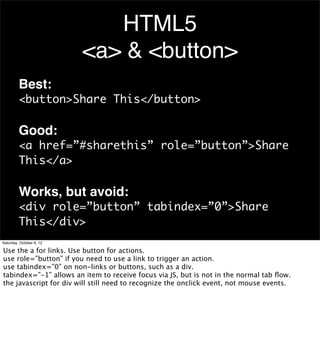
                          <a> & <button>
         Best:
         <button>Share This</button>

         Good:
         <a href=”#sharethis” role=”button”>Share
         This</a>

         Works, but avoid:
         <div role=”button” tabindex=”0”>Share
         This</div>
Saturday, October 6, 12

Use the a for links. Use button for actions.
use role=”button” if you need to use a link to trigger an action.
use tabindex=”0” on non-links or buttons, such as a div.
tabindex=”-1” allows an item to receive focus via JS, but is not in the normal tab flow.
the javascript for div will still need to recognize the onclick event, not mouse events.
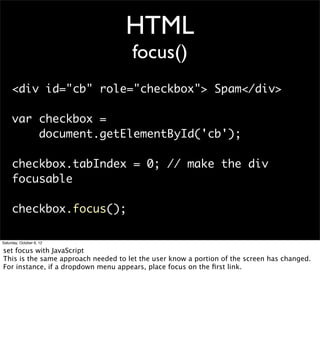
HTML
                                     focus()
     <div id="cb" role="checkbox"> Spam</div>

     var checkbox =
         document.getElementById('cb');

     checkbox.tabIndex = 0; // make the div
     focusable

     checkbox.focus();

Saturday, October 6, 12

set focus with JavaScript
This is the same approach needed to let the user know a portion of the screen has changed.
For instance, if a dropdown menu appears, place focus on the first link.
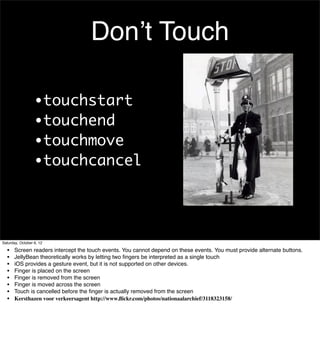
Don’t Touch

                  •touchstart
                  •touchend
                  •touchmove
                  •touchcancel


Saturday, October 6, 12

  •    Screen readers intercept the touch events. You cannot depend on these events. You must provide alternate buttons.
  •    JellyBean theoretically works by letting two fingers be interpreted as a single touch
  •    iOS provides a gesture event, but it is not supported on other devices.
  •    Finger is placed on the screen
  •    Finger is removed from the screen
  •    Finger is moved across the screen
  •    Touch is cancelled before the finger is actually removed from the screen
  •    Kersthazen voor verkeersagent http://www.flickr.com/photos/nationaalarchief/3118323158/
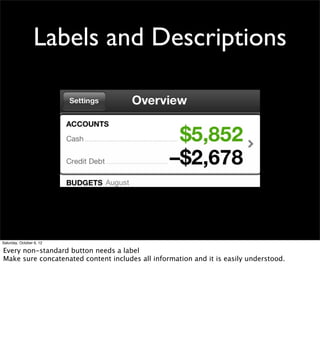
Labels and Descriptions


Saturday, October 6, 12

Every non-standard button needs a label
Make sure concatenated content includes all information and it is easily understood.
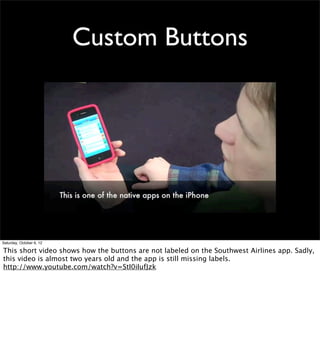
Custom Buttons


Saturday, October 6, 12

This short video shows how the buttons are not labeled on the Southwest Airlines app. Sadly,
this video is almost two years old and the app is still missing labels.
http://www.youtube.com/watch?v=StI0iIufJzk
Custom Buttons


Saturday, October 6, 12

This short video shows how the buttons are not labeled on the Southwest Airlines app. Sadly,
this video is almost two years old and the app is still missing labels.
http://www.youtube.com/watch?v=StI0iIufJzk
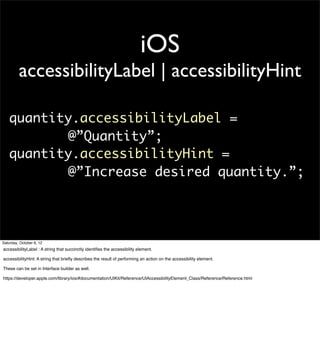
iOS
         accessibilityLabel | accessibilityHint

   quantity.accessibilityLabel =
          @”Quantity”;
   quantity.accessibilityHint =
          @”Increase desired quantity.”;


Saturday, October 6, 12
accessibilityLabel : A string that succinctly identifies the accessibility element.

accessibilityHint: A string that briefly describes the result of performing an action on the accessibility element.

These can be set in Interface builder as well.

https://developer.apple.com/library/ios/#documentation/UIKit/Reference/UIAccessibilityElement_Class/Reference/Reference.html
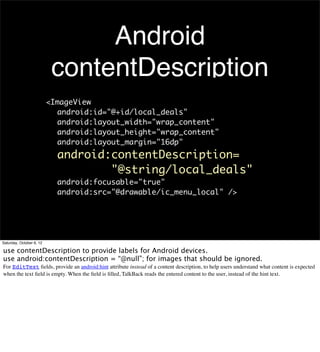
Android
                           contentDescription
                          <ImageView
                            android:id="@+id/local_deals"
                            android:layout_width="wrap_content"
                            android:layout_height="wrap_content"
                            android:layout_margin="16dp"
                            android:contentDescription=
                                    "@string/local_deals"
                            android:focusable="true"
                            android:src="@drawable/ic_menu_local" />


Saturday, October 6, 12

use contentDescription to provide labels for Android devices.
use android:contentDescription = “@null”; for images that should be ignored.
For EditText fields, provide an android:hint attribute instead of a content description, to help users understand what content is expected
when the text field is empty. When the field is filled, TalkBack reads the entered content to the user, instead of the hint text.
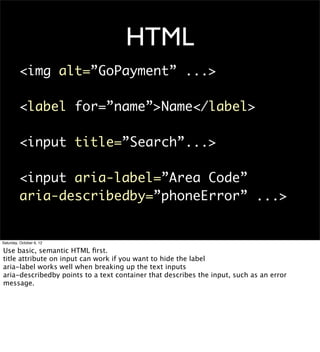
HTML
         <img alt=”GoPayment” ...>

         <label for=”name”>Name</label>

         <input title=”Search”...>

         <input aria-label=”Area Code”
         aria-describedby=”phoneError” ...>


Saturday, October 6, 12

Use basic, semantic HTML first.
title attribute on input can work if you want to hide the label
aria-label works well when breaking up the text inputs
aria-describedby points to a text container that describes the input, such as an error
message.
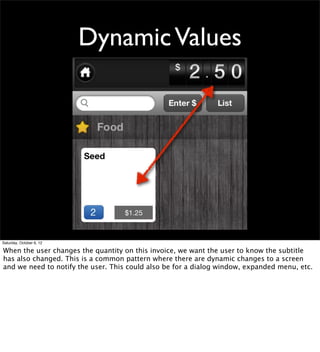
Dynamic Values


Saturday, October 6, 12

When the user changes the quantity on this invoice, we want the user to know the subtitle
has also changed. This is a common pattern where there are dynamic changes to a screen
and we need to notify the user. This could also be for a dialog window, expanded menu, etc.
iOS
                  UIAccessibilityPostNotification
       -(void)helpDidClose:(ZBEHelpView *)view
       {
            [helpView removeFromSuperview];
            helpView = nil;
            [self unease];

            UIAccessibilityPostNotification (
                 UIAccessibilityScreenChangedNotification,
                 statusView);
                 // statusView instead of nil tells this where to
       place the focus.
       }


Saturday, October 6, 12

iOS6 allows you to notify a screen has changed, and place focus on that element.
use UIAccessibilityLayoutChangedNotification for small changes

See WWDC 2012 Accessibility for iOS for the demo of this code https://developer.apple.com/videos/wwdc/2012/
#210
Android
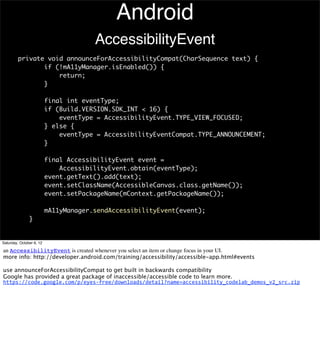
                                       AccessibilityEvent
         private void announceForAccessibilityCompat(CharSequence text) {
                if (!mA11yManager.isEnabled()) {
                    return;
                }

                          final int eventType;
                          if (Build.VERSION.SDK_INT < 16) {
                              eventType = AccessibilityEvent.TYPE_VIEW_FOCUSED;
                          } else {
                              eventType = AccessibilityEventCompat.TYPE_ANNOUNCEMENT;
                          }

                          final AccessibilityEvent event =
                              AccessibilityEvent.obtain(eventType);
                          event.getText().add(text);
                          event.setClassName(AccessibleCanvas.class.getName());
                          event.setPackageName(mContext.getPackageName());

                          mA11yManager.sendAccessibilityEvent(event);
               }


Saturday, October 6, 12

an AccessibilityEvent is created whenever you select an item or change focus in your UI.
more info: http://developer.android.com/training/accessibility/accessible-app.html#events

use announceForAccessibilityCompat to get built in backwards compatibility
Google has provided a great package of inaccessible/accessible code to learn more.
https://code.google.com/p/eyes-­‐free/downloads/detail?name=accessibility_codelab_demos_v2_src.zip
HTML
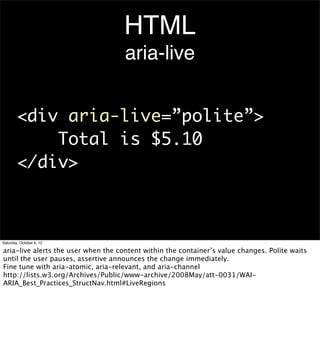
                                     aria-live


        <div aria-live=”polite”>
            Total is $5.10
        </div>


Saturday, October 6, 12

aria-live alerts the user when the content within the container’s value changes. Polite waits
until the user pauses, assertive announces the change immediately.
Fine tune with aria-atomic, aria-relevant, and aria-channel
http://lists.w3.org/Archives/Public/www-archive/2008May/att-0031/WAI-
ARIA_Best_Practices_StructNav.html#LiveRegions
More Stuff


Saturday, October 6, 12

McCall Homemaking Cover http://www.flickr.com/photos/george_eastman_house/3122870171/
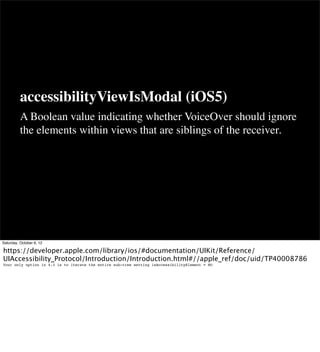
accessibilityViewIsModal (iOS5)
          A Boolean value indicating whether VoiceOver should ignore
          the elements within views that are siblings of the receiver.


Saturday, October 6, 12

https://developer.apple.com/library/ios/#documentation/UIKit/Reference/
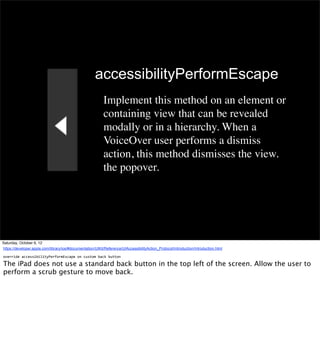
UIAccessibility_Protocol/Introduction/Introduction.html#//apple_ref/doc/uid/TP40008786
Your only option in 4.3 is to iterate the entire sub-tree setting isAccessibilityElement = NO
accessibilityPerformEscape
                                                             Implement this method on an element or
                                                             containing view that can be revealed
                                                             modally or in a hierarchy. When a
                                                             VoiceOver user performs a dismiss
                                                             action, this method dismisses the view.
                                                             the popover.


Saturday, October 6, 12
https://developer.apple.com/library/ios/#documentation/UIKit/Reference/UIAccessibilityAction_Protocol/Introduction/Introduction.html

override	
  accessibilityPerformEscape	
  on	
  custom	
  back	
  button

The iPad does not use a standard back button in the top left of the screen. Allow the user to
perform a scrub gesture to move back.
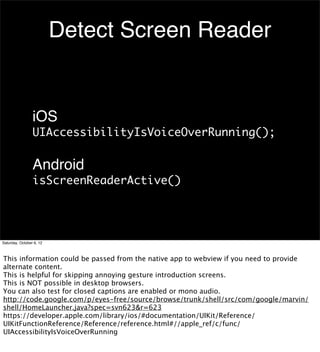
Detect Screen Reader


                 iOS
                 UIAccessibilityIsVoiceOverRunning();

                 Android
                 isScreenReaderActive()


Saturday, October 6, 12


This information could be passed from the native app to webview if you need to provide
alternate content.
This is helpful for skipping annoying gesture introduction screens.
This is NOT possible in desktop browsers.
You can also test for closed captions are enabled or mono audio.
http://code.google.com/p/eyes-free/source/browse/trunk/shell/src/com/google/marvin/
shell/HomeLauncher.java?spec=svn623&r=623
https://developer.apple.com/library/ios/#documentation/UIKit/Reference/
UIKitFunctionReference/Reference/reference.html#//apple_ref/c/func/
UIAccessibilityIsVoiceOverRunning
Saturday, October 6, 12

This video shows how to use the Android Lint tool to find accessibility problems and fix them
quickly.
on YouTube: http://youtu.be/OtwCe-YlD5k
Don’t Hide Your Fixes


Saturday, October 6, 12

Tell users when you make an improvement to accessibility in your release notes. Preferably
what part was fixed. They want to know when things are better and will tell their friends.
Ice cased Adelie penguins after a blizzard at Cape Denison / photograph by Frank Hurley http://
www.flickr.com/photos/statelibraryofnsw/2960116125/
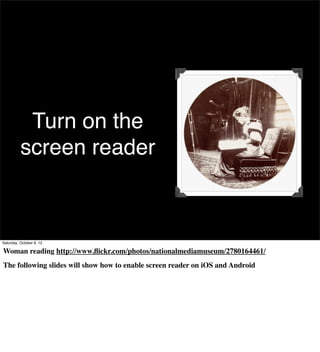
Turn on the
          screen reader


Saturday, October 6, 12

Woman reading http://www.flickr.com/photos/nationalmediamuseum/2780164461/
The following slides will show how to enable screen reader on iOS and Android
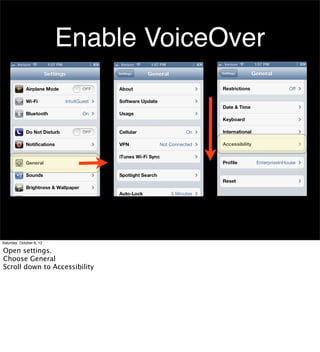
Enable VoiceOver


Saturday, October 6, 12

Open settings.
Choose General
Scroll down to Accessibility
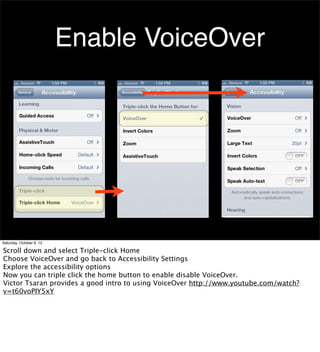
Enable VoiceOver


Saturday, October 6, 12

Scroll down and select Triple-click Home
Choose VoiceOver and go back to Accessibility Settings
Explore the accessibility options
Now you can triple click the home button to enable disable VoiceOver.
Victor Tsaran provides a good intro to using VoiceOver http://www.youtube.com/watch?
v=t60voPIY5xY
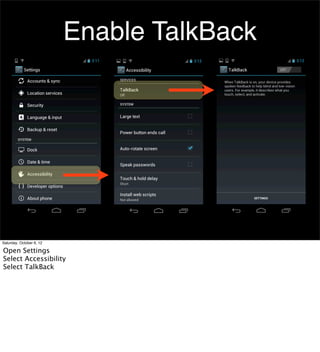
Enable TalkBack


Saturday, October 6, 12

Open Settings
Select Accessibility
Select TalkBack
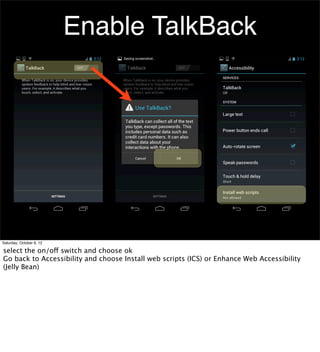
Enable TalkBack


Saturday, October 6, 12

select the on/off switch and choose ok
Go back to Accessibility and choose Install web scripts (ICS) or Enhance Web Accessibility
(Jelly Bean)
Ted Drake
                           @ted_drake
                          Last-Child.com


Saturday, October 6, 12

Mobile Accessibility - iOS, Android, Mobile Web

  • 1.
    Mobile Accessibility Silicon Valley Code Camp, 2012 Ted Drake, Intuit Accessibility Saturday, October 6, 12 Police Dog, Tess, 29/1/35 / by Sam Hood http://www.flickr.com/photos/statelibraryofnsw/ 3210838977/
  • 2.
    Visit the Intuit booth in courtyard for munchies and win Bose Headphones • Intuit is a GREAT place to work. No Kool-Aid needed • Intuit at SVCC: TinyURL.com/svcc-intuit • This presentation: Slideshare.net/7mary4 • Photos from Flickr Commons Saturday, October 6, 12 Huisvrouwengymnastiek / Gymnastics for housewives - http://www.flickr.com/photos/ nationaalarchief/4397795679/
  • 3.
    What is Accessibility Saturday,October 6, 12 Accessibility means removing barriers and giving people the tools they need to be independent. http://www.youtube.com/watch?v=iI_N5T3pmxQ world’s first double backflip on a wheelchair by Aaron “Wheelz” Fotheringham 8-26-2010
  • 4.
    What is Accessibility Saturday,October 6, 12 Accessibility means removing barriers and giving people the tools they need to be independent. http://www.youtube.com/watch?v=iI_N5T3pmxQ world’s first double backflip on a wheelchair by Aaron “Wheelz” Fotheringham 8-26-2010
  • 5.
    Screen Reader Saturday, October6, 12 Screen readers are more than a text to speech engine. They analyze the page/screen and create their own version of the structure. which allows the user to navigate via headers, form inputs, landmarks, etc. Popular screen readers are Narrator for windows 8, VoiceOver for Mac, TalkBack and ChromeVox for Android. JAWS and NVDA are for windows desktop and should be available for Win8 mobile tablet. http://www.flickr.com/photos/nationaalarchief/4192749083/ Bedbril / Glasses for reading in bed
  • 6.
    Braille Saturday, October 6,12 Young woman and man braille reading on park bench http://www.flickr.com/photos/ center_for_jewish_history/4926954971/ Braille is a tactile alphabet for reading. Refreshable braille displays allow users to interact with their mobile devices via bluetooth. iOS and Android’s Jellybean support braille output.
  • 7.
    Cognitive Disabilities Saturday, October6, 12 The direct interaction between finger and input has made mobile devices accessible to those with cognitive disabilities. Apps, such as schedule reminders, help those with memory loss due to traumatic brain injury. Guided Access for iOS6 allows the user to focus on using only one app at a time. Good for ADD and cognitive disabilities. Mobile apps in general are more focused and task oriented. Tricycle Club of the Century Village Retirement Community Meets Each Morning. http://www.flickr.com/photos/usnationalarchives/4727573694/
  • 8.
    Low Vision Saturday, October 6, 12 Ice mask, C.T. Madigan, between 1911-1914 / photograph by Frank Hurley http://www.flickr.com/photos/statelibraryofnsw/ 2963668712/ The following slide is an interview with Karo Caran about using the iPad with low vision.
  • 9.
  • 10.
  • 11.
    Assistive Communication Saturday, October6, 12 this child uses Proloque2Go to communicate with his parents. This app uses icons to build sentences and speak for the user. This replaces bulky, fragile equipment that can cost over $4,000 http://www.youtube.com/watch?v=Tp2ROyyyqjo Toddler with apraxia Asking for Cheese and Cracker on Ipad with Proloquo2Go and ASL
  • 12.
    Assistive Communication Saturday, October6, 12 this child uses Proloque2Go to communicate with his parents. This app uses icons to build sentences and speak for the user. This replaces bulky, fragile equipment that can cost over $4,000 http://www.youtube.com/watch?v=Tp2ROyyyqjo Toddler with apraxia Asking for Cheese and Cracker on Ipad with Proloquo2Go and ASL
  • 13.
    Alternate Inputs Saturday, October6, 12 Switchman throwing a switch at C & NW RR's Proviso yard, Chicago, Ill. (LOC) http://www.flickr.com/photos/ library_of_congress/2179192128/ Braille displays, single switches, and other alternative inputs can be enabled with mobile devices. Often times, the mobile device becomes the alternate input for other technology. iOS AssistiveTouch provides enhanced control of this functionality
  • 14.
    iOS - Android- Win8 - HTML5 Saturday, October 6, 12 August 2, 1933 http://www.flickr.com/photos/nlireland/6000735003/
  • 15.
    iOS Saturday, October 6,12 LSE Sports Day, Apple Bobbing, May 1932 http://www.flickr.com/photos/lselibrary/4166786914/ Accessibility features are baked into every Apple device. VoiceOver is the core engine for translating user interactions between the app and the assistive technology.
  • 16.
    VoiceOver Saturday, October 6,12 VoiceOver is more than a screen reader. It’s a layer that acts as a middle layer between the user and app. It interprets gestures and content. It also can be used by automated testing to replace the user with scripts. Accessibility -> automated testing Erik Bye og Otto Nilsen i radio studio 13. mars 1958. - http://www.flickr.com/photos/national_archives_of_norway/5476890757/
  • 17.
    Hearing Saturday, October 6,12 Apple is now certifying hearing aids to provide digital audio experience and minimal radio interference some apps are now using the phone to detect sound and act as “ears” for users. Skype, face to face and other apps allow people to communicate via sign language http://www.flickr.com/photos/usnationalarchives/3682406532/ Mary Stack, Once of East Boston, (Logan Airport Area) Now Lives Some 10 Miles North in Saugus
  • 18.
    Guided Access Saturday, October6, 12 http://www.flickr.com/photos/uw_digital_images/4326185910/in/photostream/ Climbing guide Fairman B. Lee with a party of hikers on Nisqually Glacier, Mount Rainier Guided Access allows the user to close off certain parts of apps to minimize distractions. This is useful for autism, ADD, and classrooms to keep people focused on a single task and away from angry birds.
  • 19.
    Android Saturday, October 6,12 Scrappo, mechanical scrap metal creation made by the Marion County salvage committee, Salem, Oregon, 1942 http://www.flickr.com/photos/osucommons/5764957371/ http://developer.android.com/guide/topics/ui/accessibility/apps.html
  • 20.
    Before Ice Cream Sandwich Saturday, October 6, 12 http://www.flickr.com/photos/field_museum_library/3405449492/in/photostream/ Girl dressed like a bee 74% of users are still on pre-ICS phones. Honeycomb and other pre-ICS versions have minimal accessibility support. DPad focus control is critical. Making your app accessible fortunately helps all versions.
  • 21.
    Ice Cream Sandwich Saturday, October 6, 12 Members of the Donald Dannheim Family Who Operate a Dairy and Ice Cream Store - http://www.flickr.com/photos/usnationalarchives/ 4727559500/ ICS introduced touch navigation, web view, voice input, and font resizing http://developer.android.com/about/versions/android-4.0-highlights.html
  • 22.
    Jelly Bean Saturday, October6, 12 JB introduced gesture support and accessibility focus management, braille support, accessibility node APIs for custom views. Voice activated search is more powerful. http://developer.android.com/about/versions/jelly-bean.html http://www.flickr.com/photos/statelibraryofnsw/6278391329/in/photostream/ New Zealand Kiwis perform haka before the match, n.d. by Sam Hood
  • 23.
    Windows 8 Saturday, October6, 12 Petipa http://www.flickr.com/photos/george_eastman_house/3334085274/ Narrator provides touch navigation and other gestures. Zooming is built in. Should be able to install NVDA or JAWS on tablets, maybe phones. Waiting for more information. Uses UI Automation as the accessibility layer
  • 24.
    Mobile Web Saturday, October6, 12 http://www.flickr.com/photos/nasacommons/7876061882/ President Nixon welcomes the Apollo 11 astronauts aboard the U.S.S. Hornet Audio, Video, HTML5 form types, ARIA, HTML5 web sites generally work well with mobile devices. Don’t overload with -webkit prefixes. Remember there will be other browsers (firefox, ie10)
  • 25.
    Get To Work Saturday,October 6, 12 Plant : Consolidated/Convair Aircraft Factory San Diego http://www.flickr.com/photos/ sdasmarchives/5018409455/
  • 26.
    Focus Control Saturday, October6, 12 Every action item in your app must be focusable and clickable. Flickr photo app for iOS. Currently the rows are focusable, but not the individual thumbnails.
  • 27.
    iOS isAccessibilityElement // if a UIView implements the container protocol, it cannot be an accessible element - (BOOL)isAccessibilityElement {     return NO; } Saturday, October 6, 12 isAccessibility defines which elements are subject to focus. This is set by default for buttons and other actionable items. it needs to be configured with custom containers. Don’t set the parent to YES if there are actionable children. http://yaccessibilityblog.com/library/isaccessibility-ios-app.html
  • 28.
    Saturday, October 6,12 This video shows the custom view used for a selector within Quickbooks Mobile. It’s the only thing that fails in this application.
  • 29.
    Saturday, October 6,12 This video shows the custom view used for a selector within Quickbooks Mobile. It’s the only thing that fails in this application.
  • 30.
    Android setFocusable() | isFocusable() | requestFocus() <RelativeLayout android:id="@+id/row_type" android:layout_width="match_parent" android:layout_height="wrap_content" android:layout_margin="2dp" android:focusable="true" > Saturday, October 6, 12 Test your app by using a bluetooth keyboard. Can you access everything? Use the focus functions or set focusable at the layout level.
  • 31.
    HTML5 <a> & <button> Best: <button>Share This</button> Good: <a href=”#sharethis” role=”button”>Share This</a> Works, but avoid: <div role=”button” tabindex=”0”>Share This</div> Saturday, October 6, 12 Use the a for links. Use button for actions. use role=”button” if you need to use a link to trigger an action. use tabindex=”0” on non-links or buttons, such as a div. tabindex=”-1” allows an item to receive focus via JS, but is not in the normal tab flow. the javascript for div will still need to recognize the onclick event, not mouse events.
  • 32.
    HTML focus() <div id="cb" role="checkbox"> Spam</div> var checkbox = document.getElementById('cb'); checkbox.tabIndex = 0; // make the div focusable checkbox.focus(); Saturday, October 6, 12 set focus with JavaScript This is the same approach needed to let the user know a portion of the screen has changed. For instance, if a dropdown menu appears, place focus on the first link.
  • 33.
    Don’t Touch •touchstart •touchend •touchmove •touchcancel Saturday, October 6, 12 • Screen readers intercept the touch events. You cannot depend on these events. You must provide alternate buttons. • JellyBean theoretically works by letting two fingers be interpreted as a single touch • iOS provides a gesture event, but it is not supported on other devices. • Finger is placed on the screen • Finger is removed from the screen • Finger is moved across the screen • Touch is cancelled before the finger is actually removed from the screen • Kersthazen voor verkeersagent http://www.flickr.com/photos/nationaalarchief/3118323158/
  • 34.
    Labels and Descriptions Saturday,October 6, 12 Every non-standard button needs a label Make sure concatenated content includes all information and it is easily understood.
  • 35.
    Custom Buttons Saturday, October6, 12 This short video shows how the buttons are not labeled on the Southwest Airlines app. Sadly, this video is almost two years old and the app is still missing labels. http://www.youtube.com/watch?v=StI0iIufJzk
  • 36.
    Custom Buttons Saturday, October6, 12 This short video shows how the buttons are not labeled on the Southwest Airlines app. Sadly, this video is almost two years old and the app is still missing labels. http://www.youtube.com/watch?v=StI0iIufJzk
  • 37.
    iOS accessibilityLabel | accessibilityHint quantity.accessibilityLabel = @”Quantity”; quantity.accessibilityHint = @”Increase desired quantity.”; Saturday, October 6, 12 accessibilityLabel : A string that succinctly identifies the accessibility element. accessibilityHint: A string that briefly describes the result of performing an action on the accessibility element. These can be set in Interface builder as well. https://developer.apple.com/library/ios/#documentation/UIKit/Reference/UIAccessibilityElement_Class/Reference/Reference.html
  • 38.
    Android contentDescription <ImageView android:id="@+id/local_deals" android:layout_width="wrap_content" android:layout_height="wrap_content" android:layout_margin="16dp" android:contentDescription= "@string/local_deals" android:focusable="true" android:src="@drawable/ic_menu_local" /> Saturday, October 6, 12 use contentDescription to provide labels for Android devices. use android:contentDescription = “@null”; for images that should be ignored. For EditText fields, provide an android:hint attribute instead of a content description, to help users understand what content is expected when the text field is empty. When the field is filled, TalkBack reads the entered content to the user, instead of the hint text.
  • 39.
    HTML <img alt=”GoPayment” ...> <label for=”name”>Name</label> <input title=”Search”...> <input aria-label=”Area Code” aria-describedby=”phoneError” ...> Saturday, October 6, 12 Use basic, semantic HTML first. title attribute on input can work if you want to hide the label aria-label works well when breaking up the text inputs aria-describedby points to a text container that describes the input, such as an error message.
  • 40.
    Dynamic Values Saturday, October6, 12 When the user changes the quantity on this invoice, we want the user to know the subtitle has also changed. This is a common pattern where there are dynamic changes to a screen and we need to notify the user. This could also be for a dialog window, expanded menu, etc.
  • 41.
    iOS UIAccessibilityPostNotification -(void)helpDidClose:(ZBEHelpView *)view {      [helpView removeFromSuperview];      helpView = nil;      [self unease];      UIAccessibilityPostNotification (           UIAccessibilityScreenChangedNotification,           statusView);           // statusView instead of nil tells this where to place the focus. } Saturday, October 6, 12 iOS6 allows you to notify a screen has changed, and place focus on that element. use UIAccessibilityLayoutChangedNotification for small changes See WWDC 2012 Accessibility for iOS for the demo of this code https://developer.apple.com/videos/wwdc/2012/ #210
  • 42.
    Android AccessibilityEvent private void announceForAccessibilityCompat(CharSequence text) { if (!mA11yManager.isEnabled()) { return; } final int eventType; if (Build.VERSION.SDK_INT < 16) { eventType = AccessibilityEvent.TYPE_VIEW_FOCUSED; } else { eventType = AccessibilityEventCompat.TYPE_ANNOUNCEMENT; } final AccessibilityEvent event = AccessibilityEvent.obtain(eventType); event.getText().add(text); event.setClassName(AccessibleCanvas.class.getName()); event.setPackageName(mContext.getPackageName()); mA11yManager.sendAccessibilityEvent(event); } Saturday, October 6, 12 an AccessibilityEvent is created whenever you select an item or change focus in your UI. more info: http://developer.android.com/training/accessibility/accessible-app.html#events use announceForAccessibilityCompat to get built in backwards compatibility Google has provided a great package of inaccessible/accessible code to learn more. https://code.google.com/p/eyes-­‐free/downloads/detail?name=accessibility_codelab_demos_v2_src.zip
  • 43.
    HTML aria-live <div aria-live=”polite”> Total is $5.10 </div> Saturday, October 6, 12 aria-live alerts the user when the content within the container’s value changes. Polite waits until the user pauses, assertive announces the change immediately. Fine tune with aria-atomic, aria-relevant, and aria-channel http://lists.w3.org/Archives/Public/www-archive/2008May/att-0031/WAI- ARIA_Best_Practices_StructNav.html#LiveRegions
  • 44.
    More Stuff Saturday, October6, 12 McCall Homemaking Cover http://www.flickr.com/photos/george_eastman_house/3122870171/
  • 45.
    accessibilityViewIsModal (iOS5) A Boolean value indicating whether VoiceOver should ignore the elements within views that are siblings of the receiver. Saturday, October 6, 12 https://developer.apple.com/library/ios/#documentation/UIKit/Reference/ UIAccessibility_Protocol/Introduction/Introduction.html#//apple_ref/doc/uid/TP40008786 Your only option in 4.3 is to iterate the entire sub-tree setting isAccessibilityElement = NO
  • 46.
    accessibilityPerformEscape Implement this method on an element or containing view that can be revealed modally or in a hierarchy. When a VoiceOver user performs a dismiss action, this method dismisses the view. the popover. Saturday, October 6, 12 https://developer.apple.com/library/ios/#documentation/UIKit/Reference/UIAccessibilityAction_Protocol/Introduction/Introduction.html override  accessibilityPerformEscape  on  custom  back  button The iPad does not use a standard back button in the top left of the screen. Allow the user to perform a scrub gesture to move back.
  • 47.
    Detect Screen Reader iOS UIAccessibilityIsVoiceOverRunning(); Android isScreenReaderActive() Saturday, October 6, 12 This information could be passed from the native app to webview if you need to provide alternate content. This is helpful for skipping annoying gesture introduction screens. This is NOT possible in desktop browsers. You can also test for closed captions are enabled or mono audio. http://code.google.com/p/eyes-free/source/browse/trunk/shell/src/com/google/marvin/ shell/HomeLauncher.java?spec=svn623&r=623 https://developer.apple.com/library/ios/#documentation/UIKit/Reference/ UIKitFunctionReference/Reference/reference.html#//apple_ref/c/func/ UIAccessibilityIsVoiceOverRunning
  • 48.
    Saturday, October 6,12 This video shows how to use the Android Lint tool to find accessibility problems and fix them quickly. on YouTube: http://youtu.be/OtwCe-YlD5k
  • 49.
    Don’t Hide YourFixes Saturday, October 6, 12 Tell users when you make an improvement to accessibility in your release notes. Preferably what part was fixed. They want to know when things are better and will tell their friends. Ice cased Adelie penguins after a blizzard at Cape Denison / photograph by Frank Hurley http:// www.flickr.com/photos/statelibraryofnsw/2960116125/
  • 50.
    Turn on the screen reader Saturday, October 6, 12 Woman reading http://www.flickr.com/photos/nationalmediamuseum/2780164461/ The following slides will show how to enable screen reader on iOS and Android
  • 51.
    Enable VoiceOver Saturday, October6, 12 Open settings. Choose General Scroll down to Accessibility
  • 52.
    Enable VoiceOver Saturday, October6, 12 Scroll down and select Triple-click Home Choose VoiceOver and go back to Accessibility Settings Explore the accessibility options Now you can triple click the home button to enable disable VoiceOver. Victor Tsaran provides a good intro to using VoiceOver http://www.youtube.com/watch? v=t60voPIY5xY
  • 53.
    Enable TalkBack Saturday, October6, 12 Open Settings Select Accessibility Select TalkBack
  • 54.
    Enable TalkBack Saturday, October6, 12 select the on/off switch and choose ok Go back to Accessibility and choose Install web scripts (ICS) or Enhance Web Accessibility (Jelly Bean)
  • 55.
    Ted Drake @ted_drake Last-Child.com Saturday, October 6, 12