LSMW
(Legacy System Migration Workbench)
Presented by
Thomas Michael
www.michaelmanagement.com
www.michaelmanagement.comCopyright © Michael Management Corporation - All rights reserved
What we’ll cover
• Overview
• Features & Benefits
• Availability
• Takeover Process
• Basic Interface
• Summary
• Q&A
www.michaelmanagement.comCopyright © Michael Management Corporation - All rights reserved
Overview
• LSMW not part of standard R/3 system
– Separate application
– Free of charge
– Download directly from SAP’s website
• One of the most time-intensive tasks during
implementation:
– Legacy data migration
– Accounts for 20% of project cost
– Aims at reducing implementation time & cost
www.michaelmanagement.comCopyright © Michael Management Corporation - All rights reserved
Overview
• Originally developed for data loads during initial
go-live only, but due to ease of use becoming a
popular tool for any kind of mass processing
• Access via transaction LSMW
www.michaelmanagement.comCopyright © Michael Management Corporation - All rights reserved
Overview
• In short: it’s a mass processing tool similar to
CATT (Computer Aided Test Tool) - but much
better!
• Allows you to run almost any SAP transaction in
mass update mode, i.e.
– Post G/L documents uploaded from Excel sheet
– Change cost center for hundreds of assets
– Update vendor master records for entire company
– …or any other master data or posting transaction
you can think of!
www.michaelmanagement.comCopyright © Michael Management Corporation - All rights reserved
What we’ll cover
• Overview
• Features & Benefits
• Availability
• Takeover Process
• Basic Interface
• Summary
• Q&A
www.michaelmanagement.comCopyright © Michael Management Corporation - All rights reserved
Features & Benefits
• No coding required! Generates ABAP code
automatically in background!
• Tracks data migration history
• Interfaces with Excel
• Supports flexible conversion rules
www.michaelmanagement.comCopyright © Michael Management Corporation - All rights reserved
Features & Benefits
• Supports data migration via:
– Batch input
– Direct input (direct table updates)
– BAPI (Business Application Programming Interface)
– IDOC (Intermediate Document)
• Supported by SAP via SAP Net - SAP R/3
Frontend: Component BC-SRV-DX-LSM
• Can be downloaded quickly from the SAP
Service Marketplace
www.michaelmanagement.comCopyright © Michael Management Corporation - All rights reserved
What we’ll cover
• Overview
• Features & Benefits
• Availability
• Takeover Process
• Basic Interface
• Summary
• Q&A
www.michaelmanagement.comCopyright © Michael Management Corporation - All rights reserved
LSMW Availability
• Legacy System Migration Workbench Version 4.0
– Integrated in SAP Web Application Server 6.20 and higher
• Legacy System Migration Workbench Version 3.0
– Available for SAP Web Application Server 6.10
• Legacy System Migration Workbench Version 1.8
– Available for SAP R/3 4.6
• Legacy System Migration Workbench Version 1.7
– Available for SAP R/3 4.0
– Available for SAP R/3 4.5
• Legacy System Migration Workbench Version 1.0
– Available for SAP R/3 3.0F
– Available for SAP R/3 3.1x
www.michaelmanagement.comCopyright © Michael Management Corporation - All rights reserved
What we’ll cover
• Overview
• Features & Benefits
• Availability
• Takeover Process
• Basic Interface
• Summary
• Q&A
www.michaelmanagement.comCopyright © Michael Management Corporation - All rights reserved
Takeover Process
Basic Procedure using Batch Import:
• Set up LSMW run (contains specifics about the
transaction to be run, input file structure, field
mapping, conversions, etc.)
• Compile input file on PC (Excel sheet)
• Read data from Excel into SAP LSMW
• LSMW converts to SAP format
www.michaelmanagement.comCopyright © Michael Management Corporation - All rights reserved
Takeover Process
• Review converted data in LSMW
• Create Batch Session
• Run Batch Session / Database update
www.michaelmanagement.comCopyright © Michael Management Corporation - All rights reserved
Takeover Process
LSMW
www.michaelmanagement.comCopyright © Michael Management Corporation - All rights reserved
What we’ll cover
• Overview
• Features & Benefits
• Availability
• Takeover Process
• Basic Interface
• Summary
• Q&A
www.michaelmanagement.comCopyright © Michael Management Corporation - All rights reserved
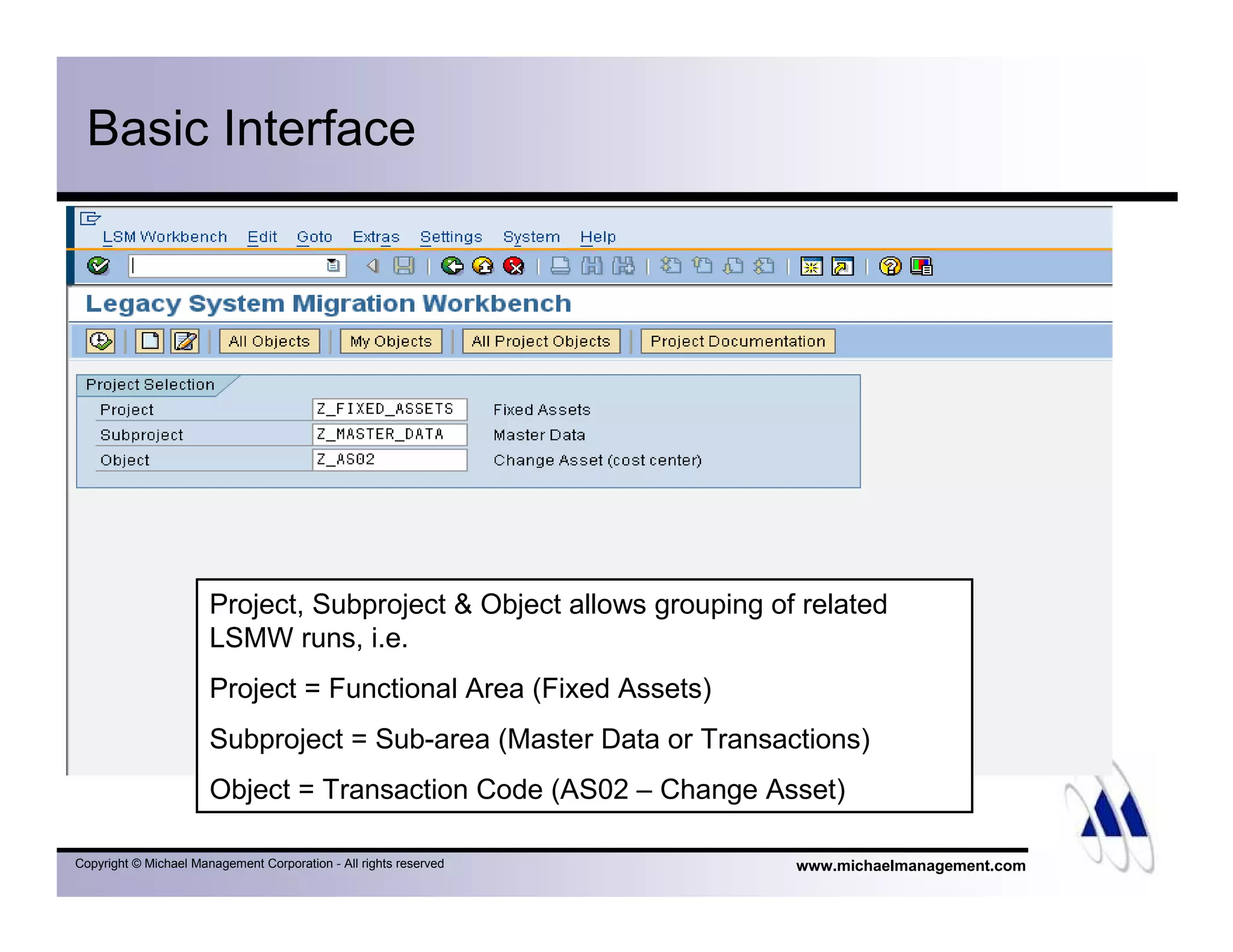
Basic Interface
Project, Subproject & Object allows grouping of related
LSMW runs, i.e.
Project = Functional Area (Fixed Assets)
Subproject = Sub-area (Master Data or Transactions)
Object = Transaction Code (AS02 – Change Asset)
www.michaelmanagement.comCopyright © Michael Management Corporation - All rights reserved
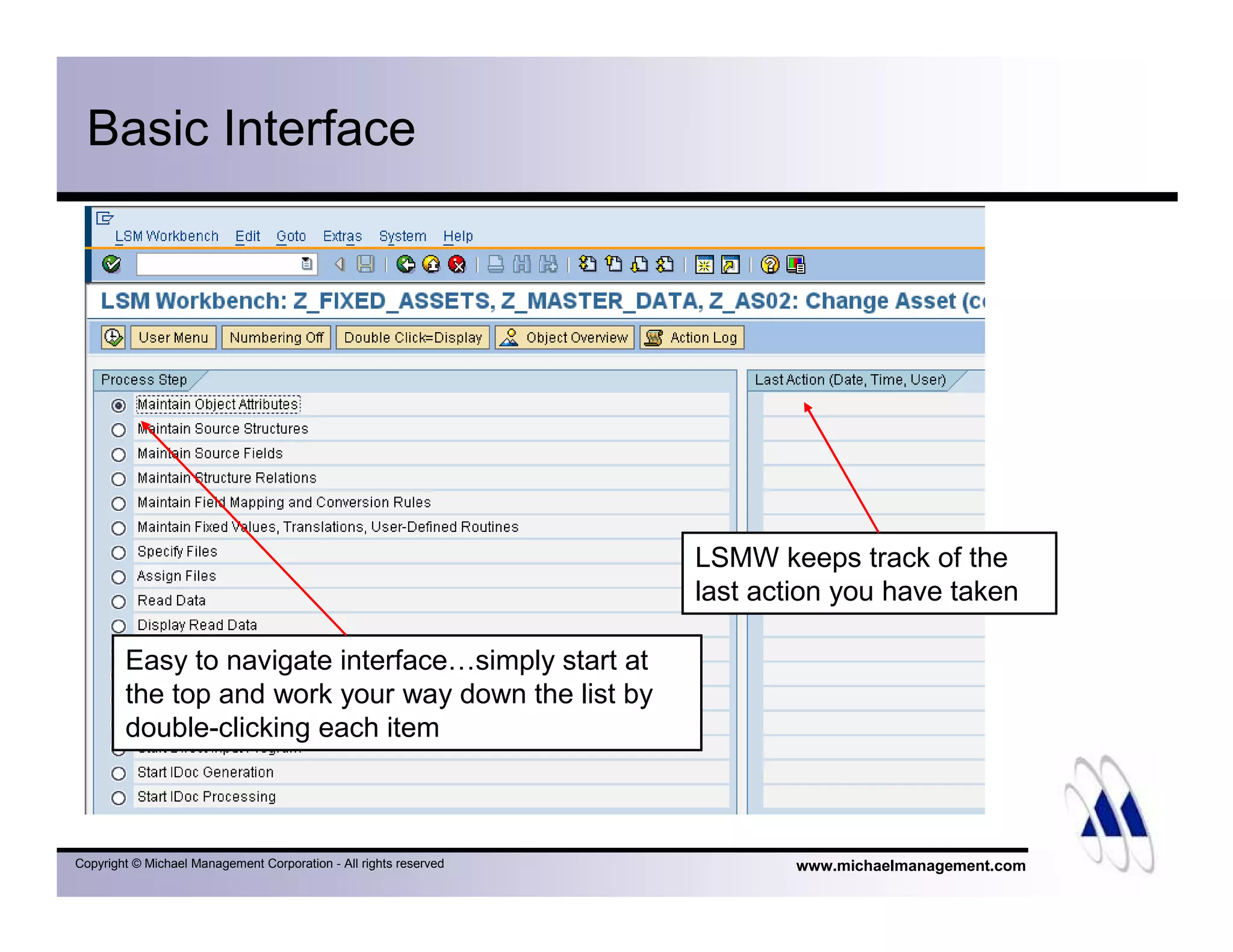
Basic Interface
Easy to navigate interface…simply start at
the top and work your way down the list by
double-clicking each item
LSMW keeps track of the
last action you have taken
www.michaelmanagement.comCopyright © Michael Management Corporation - All rights reserved
What we’ll cover
• Overview
• Features & Benefits
• Availability
• Takeover Process
• Basic Interface
• Summary
• Q&A
www.michaelmanagement.comCopyright © Michael Management Corporation - All rights reserved
Summary
• LSMW is quickly becoming the tool of choice for
– Legacy data migration
– Mass changes to master records
– Mass postings of transactions
– Mass loads for configuration (i.e. load fiscal
calendar, location code table, etc.
www.michaelmanagement.comCopyright © Michael Management Corporation - All rights reserved
Summary
• It’s FREE – download from SAP’s website
• Easy to use – no coding required!
• It’s SAP supported!
• Online LSMW training class available at
www.michaelmanagement.com/lsmw001.asp
www.michaelmanagement.comCopyright © Michael Management Corporation - All rights reserved
What we’ll cover
• Overview
• Features & Benefits
• Availability
• Takeover Process
• Basic Interface
• Summary
• Q&A
www.michaelmanagement.comCopyright © Michael Management Corporation - All rights reserved
Q&A
• Comments & Questions
• How to contact me:
Thomas Michael at
tmichael@michaelmanagement.com
Download this & more presentations at:
www.michaelmanagement.com

Mmc Lsmw Intro

  • 1.
    LSMW (Legacy System MigrationWorkbench) Presented by Thomas Michael www.michaelmanagement.com
  • 2.
    www.michaelmanagement.comCopyright © MichaelManagement Corporation - All rights reserved What we’ll cover • Overview • Features & Benefits • Availability • Takeover Process • Basic Interface • Summary • Q&A
  • 3.
    www.michaelmanagement.comCopyright © MichaelManagement Corporation - All rights reserved Overview • LSMW not part of standard R/3 system – Separate application – Free of charge – Download directly from SAP’s website • One of the most time-intensive tasks during implementation: – Legacy data migration – Accounts for 20% of project cost – Aims at reducing implementation time & cost
  • 4.
    www.michaelmanagement.comCopyright © MichaelManagement Corporation - All rights reserved Overview • Originally developed for data loads during initial go-live only, but due to ease of use becoming a popular tool for any kind of mass processing • Access via transaction LSMW
  • 5.
    www.michaelmanagement.comCopyright © MichaelManagement Corporation - All rights reserved Overview • In short: it’s a mass processing tool similar to CATT (Computer Aided Test Tool) - but much better! • Allows you to run almost any SAP transaction in mass update mode, i.e. – Post G/L documents uploaded from Excel sheet – Change cost center for hundreds of assets – Update vendor master records for entire company – …or any other master data or posting transaction you can think of!
  • 6.
    www.michaelmanagement.comCopyright © MichaelManagement Corporation - All rights reserved What we’ll cover • Overview • Features & Benefits • Availability • Takeover Process • Basic Interface • Summary • Q&A
  • 7.
    www.michaelmanagement.comCopyright © MichaelManagement Corporation - All rights reserved Features & Benefits • No coding required! Generates ABAP code automatically in background! • Tracks data migration history • Interfaces with Excel • Supports flexible conversion rules
  • 8.
    www.michaelmanagement.comCopyright © MichaelManagement Corporation - All rights reserved Features & Benefits • Supports data migration via: – Batch input – Direct input (direct table updates) – BAPI (Business Application Programming Interface) – IDOC (Intermediate Document) • Supported by SAP via SAP Net - SAP R/3 Frontend: Component BC-SRV-DX-LSM • Can be downloaded quickly from the SAP Service Marketplace
  • 9.
    www.michaelmanagement.comCopyright © MichaelManagement Corporation - All rights reserved What we’ll cover • Overview • Features & Benefits • Availability • Takeover Process • Basic Interface • Summary • Q&A
  • 10.
    www.michaelmanagement.comCopyright © MichaelManagement Corporation - All rights reserved LSMW Availability • Legacy System Migration Workbench Version 4.0 – Integrated in SAP Web Application Server 6.20 and higher • Legacy System Migration Workbench Version 3.0 – Available for SAP Web Application Server 6.10 • Legacy System Migration Workbench Version 1.8 – Available for SAP R/3 4.6 • Legacy System Migration Workbench Version 1.7 – Available for SAP R/3 4.0 – Available for SAP R/3 4.5 • Legacy System Migration Workbench Version 1.0 – Available for SAP R/3 3.0F – Available for SAP R/3 3.1x
  • 11.
    www.michaelmanagement.comCopyright © MichaelManagement Corporation - All rights reserved What we’ll cover • Overview • Features & Benefits • Availability • Takeover Process • Basic Interface • Summary • Q&A
  • 12.
    www.michaelmanagement.comCopyright © MichaelManagement Corporation - All rights reserved Takeover Process Basic Procedure using Batch Import: • Set up LSMW run (contains specifics about the transaction to be run, input file structure, field mapping, conversions, etc.) • Compile input file on PC (Excel sheet) • Read data from Excel into SAP LSMW • LSMW converts to SAP format
  • 13.
    www.michaelmanagement.comCopyright © MichaelManagement Corporation - All rights reserved Takeover Process • Review converted data in LSMW • Create Batch Session • Run Batch Session / Database update
  • 14.
    www.michaelmanagement.comCopyright © MichaelManagement Corporation - All rights reserved Takeover Process LSMW
  • 15.
    www.michaelmanagement.comCopyright © MichaelManagement Corporation - All rights reserved What we’ll cover • Overview • Features & Benefits • Availability • Takeover Process • Basic Interface • Summary • Q&A
  • 16.
    www.michaelmanagement.comCopyright © MichaelManagement Corporation - All rights reserved Basic Interface Project, Subproject & Object allows grouping of related LSMW runs, i.e. Project = Functional Area (Fixed Assets) Subproject = Sub-area (Master Data or Transactions) Object = Transaction Code (AS02 – Change Asset)
  • 17.
    www.michaelmanagement.comCopyright © MichaelManagement Corporation - All rights reserved Basic Interface Easy to navigate interface…simply start at the top and work your way down the list by double-clicking each item LSMW keeps track of the last action you have taken
  • 18.
    www.michaelmanagement.comCopyright © MichaelManagement Corporation - All rights reserved What we’ll cover • Overview • Features & Benefits • Availability • Takeover Process • Basic Interface • Summary • Q&A
  • 19.
    www.michaelmanagement.comCopyright © MichaelManagement Corporation - All rights reserved Summary • LSMW is quickly becoming the tool of choice for – Legacy data migration – Mass changes to master records – Mass postings of transactions – Mass loads for configuration (i.e. load fiscal calendar, location code table, etc.
  • 20.
    www.michaelmanagement.comCopyright © MichaelManagement Corporation - All rights reserved Summary • It’s FREE – download from SAP’s website • Easy to use – no coding required! • It’s SAP supported! • Online LSMW training class available at www.michaelmanagement.com/lsmw001.asp
  • 21.
    www.michaelmanagement.comCopyright © MichaelManagement Corporation - All rights reserved What we’ll cover • Overview • Features & Benefits • Availability • Takeover Process • Basic Interface • Summary • Q&A
  • 22.
    www.michaelmanagement.comCopyright © MichaelManagement Corporation - All rights reserved Q&A • Comments & Questions • How to contact me: Thomas Michael at tmichael@michaelmanagement.com Download this & more presentations at: www.michaelmanagement.com