How a Developer Can Troubleshoot
a SQL Performing Poorly on a
Production DB
Carlos Sierra
• Oracle Performance and SQL Tuning
• Consultant/Developer/DBA
• eDB360 and eAdam
• SQLT and SQLHC
• Exadata
Carlos Sierra
Enkitec (c) 2014 2
Motivation
• Developers might need to do SQL Tuning
• Diagnostics Collection is key for SQL Tuning
• Developers have limited access to DB server
– OEM is usually off limits
• Developers need reliable SQL Tuning tools
• Developers need to learn about these tools
11/4/2014 Enkitec © 3
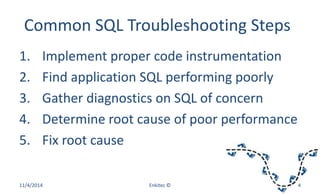
Common SQL Troubleshooting Steps
1. Implement proper code instrumentation
2. Find application SQL performing poorly
3. Gather diagnostics on SQL of concern
4. Determine root cause of poor performance
5. Fix root cause
11/4/2014 Enkitec © 4
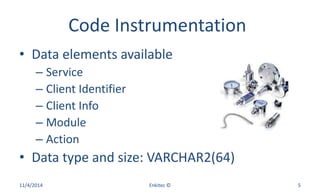
Code Instrumentation
• Data elements available
– Service
– Client Identifier
– Client Info
– Module
– Action
• Data type and size: VARCHAR2(64)
11/4/2014 Enkitec © 5
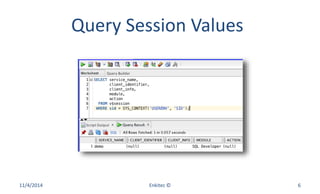
Query Session Values
11/4/2014 Enkitec © 6
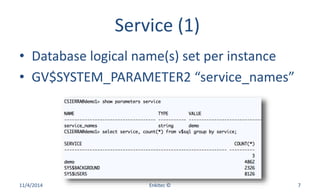
Service (1)
• Database logical name(s) set per instance
• GV$SYSTEM_PARAMETER2 “service_names”
11/4/2014 Enkitec © 7
Service (2)
• Service SYS$BACKGROUND
– Background Processes
• Service SYS$USERS
– Default when session is not associated to Service
• Package DBMS_SERVICE
– Start, stop, create, delete, modify, disconnect
11/4/2014 Enkitec © 8
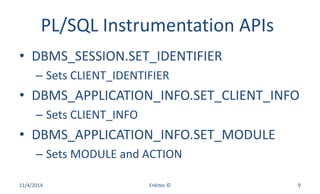
PL/SQL Instrumentation APIs
• DBMS_SESSION.SET_IDENTIFIER
– Sets CLIENT_IDENTIFIER
• DBMS_APPLICATION_INFO.SET_CLIENT_INFO
– Sets CLIENT_INFO
• DBMS_APPLICATION_INFO.SET_MODULE
– Sets MODULE and ACTION
11/4/2014 Enkitec © 9
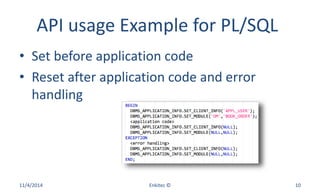
API usage Example for PL/SQL
• Set before application code
• Reset after application code and error
handling
11/4/2014 Enkitec © 10
Query V$ to finding SQL
• GV$SESSION
– Session Status
– Service, Module, Action, Client, User
• GV$SQL
– SQL Text
– Elapsed Time
11/4/2014 Enkitec © 11
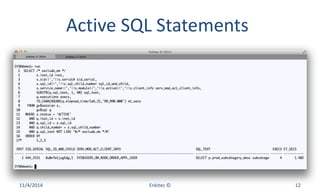
Active SQL Statements
11/4/2014 Enkitec © 12
Some “safe” Diagnostics Tools
• SQL Trace and TKPROF
• Execution Plan and DBMS_XPLAN
• planx.sql, sqlmon.sql and sqlash.sql
• snapper.sql
• SQLHC and SQLTXPLAIN
11/4/2014 Enkitec © 13
Tracing Methods
• ALTER SESSION
– SQL_TRACE parameter
– Event 10046
• DBMS_SESSION
• DBMS_MONITOR (preferred)
• ORADEBUG
– Event 10046
11/4/2014 Enkitec © 14
SQL_TRACE Syntax
• ALTER SESSION SET SQL_TRACE = TRUE;
• ALTER SESSION SET SQL_TRACE = FALSE;
• Own Session
11/4/2014 Enkitec © 15
Event 10046 Syntax
• ALTER SESSION SET EVENTS '10046 TRACE
NAME CONTEXT FOREVER, LEVEL N';
• ALTER SESSION SET EVENTS '10046 TRACE
NAME CONTEXT OFF';
• Own Session
11/4/2014 Enkitec © 16
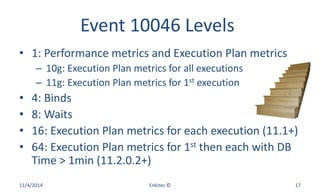
Event 10046 Levels
• 1: Performance metrics and Execution Plan metrics
– 10g: Execution Plan metrics for all executions
– 11g: Execution Plan metrics for 1st execution
• 4: Binds
• 8: Waits
• 16: Execution Plan metrics for each execution (11.1+)
• 64: Execution Plan metrics for 1st then each with DB
Time > 1min (11.2.0.2+)
11/4/2014 Enkitec © 17
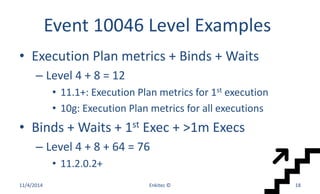
Event 10046 Level Examples
• Execution Plan metrics + Binds + Waits
– Level 4 + 8 = 12
• 11.1+: Execution Plan metrics for 1st execution
• 10g: Execution Plan metrics for all executions
• Binds + Waits + 1st Exec + >1m Execs
– Level 4 + 8 + 64 = 76
• 11.2.0.2+
11/4/2014 Enkitec © 18
DBMS_SESSION APIs
• SESSION_TRACE_ENABLE
– waits (TRUE|FALSE)
– binds (FALSE|TRUE)
– plan_stat (FIRST_EXECUTION|ALL_EXECUTIONS)
• SESSION_TRACE_DISABLE
• Own Session
11/4/2014 Enkitec © 19
DBMS_MONITOR APIs
• Enable SQL Trace
– SERV_MOD_ACT_TRACE_ENABLE
– CLIENT_ID_TRACE_ENABLE
– SESSION_TRACE_ENABLE
• ENABLE and DISABLE versions
• TRACE and STAT versions
11/4/2014 Enkitec © 20
SERV_MOD_ACT_TRACE_ENABLE
• service_name (required)
• module_name (optional)
• action_name (optional)
• waits (TRUE|FALSE)
• binds (FALSE|TRUE)
• plan_stat (FIRST_EXECUTION|ALL_EXECUTIONS)
11/4/2014 Enkitec © 21
CLIENT_ID_TRACE_ENABLE
• client_id (required)
• waits (TRUE|FALSE)
• binds (FALSE|TRUE)
• plan_stat
– FIRST_EXECUTION|ALL_EXECUTIONS
11/4/2014 Enkitec © 22
SESSION_TRACE_ENABLE
• session_id (if null then own else sid)
• serial_num (if null then use sid only)
• waits (TRUE|FALSE)
• binds (FALSE|TRUE)
• plan_stat
– FIRST_EXECUTION|ALL_EXECUTIONS
11/4/2014 Enkitec © 23
Some related Views
• Active Tracing
– DBA_ENABLED_TRACES
• Collected Statistics
– V$SERV_MOD_ACT_STATS
– V$CLIENT_STATS
– V$SESSTAT
11/4/2014 Enkitec © 24
Trace Location
• 11g
– V$DIAG_INFO
– Name = 'Diag Trace'
• 10g
– V$PARAMETER2
– Name = 'user_dump_dest'
11/4/2014 Enkitec © 25
TKPROF Syntax
• tkprof tracefile outputfile [sort=option]
• sort=prsela fchela exeela
11/4/2014 Enkitec © 26
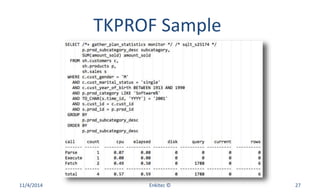
TKPROF Sample
11/4/2014 Enkitec © 27
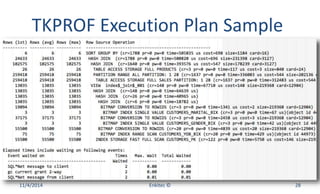
TKPROF Execution Plan Sample
11/4/2014 Enkitec © 28
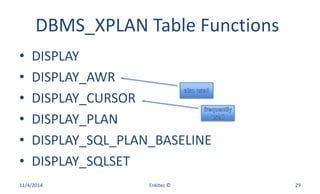
DBMS_XPLAN Table Functions
• DISPLAY
• DISPLAY_AWR
• DISPLAY_CURSOR
• DISPLAY_PLAN
• DISPLAY_SQL_PLAN_BASELINE
• DISPLAY_SQLSET
11/4/2014 Enkitec © 29
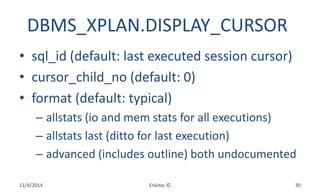
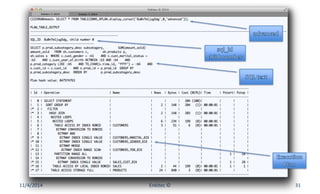
DBMS_XPLAN.DISPLAY_CURSOR
• sql_id (default: last executed session cursor)
• cursor_child_no (default: 0)
• format (default: typical)
– allstats (io and mem stats for all executions)
– allstats last (ditto for last execution)
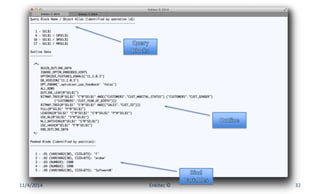
– advanced (includes outline) both undocumented
11/4/2014 Enkitec © 30
11/4/2014 Enkitec © 31
11/4/2014 Enkitec © 32
11/4/2014 Enkitec © 33
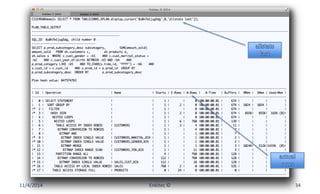
11/4/2014 Enkitec © 34
planx.sql
• Installs nothing
• 10g and 11g
• Parameters
– Oracle Diagnostics Pack License? Y | N
– SQL_ID
• Free
11/4/2014 Enkitec © 35
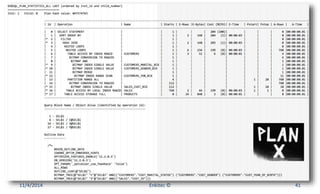
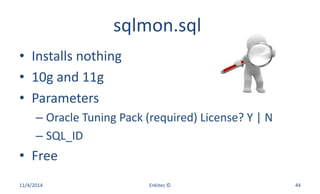
planx.sql Execution Plan
• DBMS_XPLAN.DISPLAY
– GV$SQL_PLAN_STATISTICS_ALL
– ADVANCED ALLSTATS LAST
• DBMS_XPLAN.DISPLAY_AWR
– ADVANCED
11/4/2014 Enkitec © 36
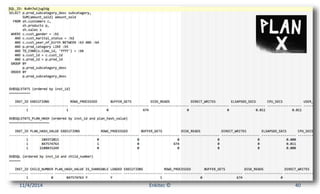
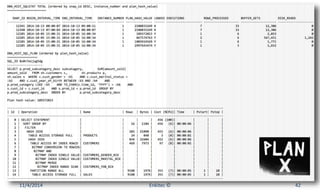
planx.sql Views (1)
• GV$SQLSTATS (extended retention)
• GV$SQLSTATS_PLAN_HASH
• GV$SQL
• GV$ACTIVE_SESSION_HISTORY
11/4/2014 Enkitec © 37
planx.sql Views (2)
• DBA_HIST_SQLSTAT
• DBA_HIST_SQL_PLAN
• DBA_HIST_ACTIVE_SESS_HISTORY
11/4/2014 Enkitec © 38
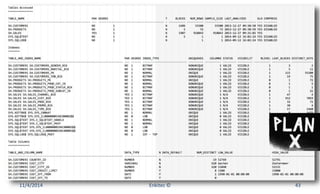
planx.sql Views (3)
• DBA_TABLES
• DBA_INDEXES
• DBA_TAB_COLS
• DBA_IND_COLS
11/4/2014 Enkitec © 39
11/4/2014 Enkitec © 40
11/4/2014 Enkitec © 41
11/4/2014 Enkitec © 42
11/4/2014 Enkitec © 43
sqlmon.sql
• Installs nothing
• 10g and 11g
• Parameters
– Oracle Tuning Pack (required) License? Y | N
– SQL_ID
• Free
11/4/2014 Enkitec © 44
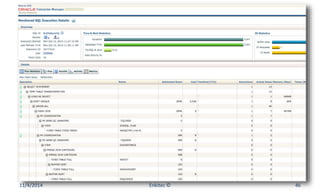
sqlmon.sql Output
• SQL Monitor Reports
– HTML
– Text
– List
– Detail
11/4/2014 Enkitec © 45
11/4/2014 Enkitec © 46
11/4/2014 Enkitec © 47
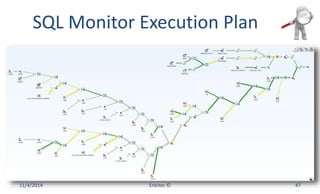
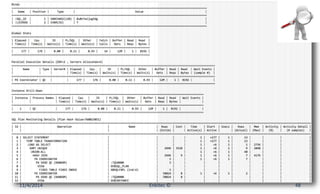
SQL Monitor Execution Plan
11/4/2014 Enkitec © 48
sqlash.sql
• Installs nothing
• 10g and 11g
• Parameters
– Oracle Diagnostics Pack (required) License? Y | N
– SQL_ID
• Free
11/4/2014 Enkitec © 49
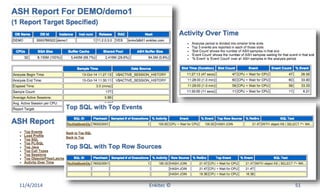
sqlash.sql Output
• ASH Reports for one SQL
– Format
• HTML
• Text
– Source
• Memory
• AWR
11/4/2014 Enkitec © 50
11/4/2014 Enkitec © 51
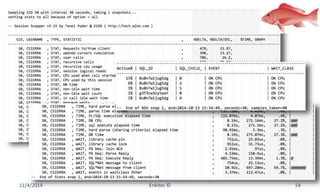
Snapper
• Session Centric
• Installs nothing
• 10g and 11g
• 4 Parameters
• Does not require Diagnostics or Tuning Pack
• Free
Enkitec © 2014 52
Snapper Syntax
• Scope (‘all’ includes ASH and Stats)
• seconds_in_snap (30 is common)
• snap_count (between 1 and 5 are common)
• sid (session id)
• Execution Sample
– @snapper.sql all 30 1 50
11/4/2014 Enkitec © 53
11/4/2014 Enkitec © 54
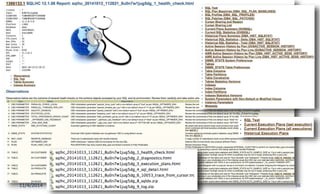
SQLHC 1366133.1
• Installs nothing
• 10g and 11g
• Parameters
– Oracle Pack License? T | D | N
– SQL_ID
• Free (requires MOS account)
11/4/2014 Enkitec © 55
11/4/2014 Enkitec © 56
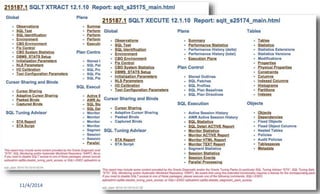
SQLTXPLAIN (SQLT) 215187.1
• Installs two schemas and many objects
• 10g and 11g
• Methods
– SQLT XTRACT (inputs SQL_ID)
– SQLT XECUTE (inputs SQL Text)
• Free (requires MOS account)
11/4/2014 Enkitec © 57
11/4/2014 Enkitec © 58
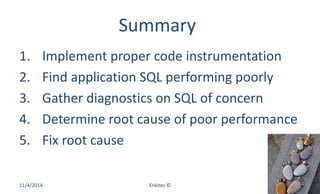
Summary
1. Implement proper code instrumentation
2. Find application SQL performing poorly
3. Gather diagnostics on SQL of concern
4. Determine root cause of poor performance
5. Fix root cause
11/4/2014 Enkitec © 59
References
• Oracle Documentation
• http://blog.tanelpoder.com/files/scripts/snap
per.sql
• http://carlos-sierra.net/ (look for cscripts)
• SQL Health-Check (SQLHC): MOS 1366133.1
• SQLXPLAIN (SQLT): MOS 215187.1
11/4/2014 Enkitec © 60
Contact Information
• carlos.sierra@enkitec.com
• carlos-sierra.net
• @csierra_usa
Enkitec (c) 2014 61

How a Developer can Troubleshoot a SQL performing poorly on a Production DB

  • 1.
    How a DeveloperCan Troubleshoot a SQL Performing Poorly on a Production DB Carlos Sierra
  • 2.
    • Oracle Performanceand SQL Tuning • Consultant/Developer/DBA • eDB360 and eAdam • SQLT and SQLHC • Exadata Carlos Sierra Enkitec (c) 2014 2
  • 3.
    Motivation • Developers mightneed to do SQL Tuning • Diagnostics Collection is key for SQL Tuning • Developers have limited access to DB server – OEM is usually off limits • Developers need reliable SQL Tuning tools • Developers need to learn about these tools 11/4/2014 Enkitec © 3
  • 4.
    Common SQL TroubleshootingSteps 1. Implement proper code instrumentation 2. Find application SQL performing poorly 3. Gather diagnostics on SQL of concern 4. Determine root cause of poor performance 5. Fix root cause 11/4/2014 Enkitec © 4
  • 5.
    Code Instrumentation • Dataelements available – Service – Client Identifier – Client Info – Module – Action • Data type and size: VARCHAR2(64) 11/4/2014 Enkitec © 5
  • 6.
  • 7.
    Service (1) • Databaselogical name(s) set per instance • GV$SYSTEM_PARAMETER2 “service_names” 11/4/2014 Enkitec © 7
  • 8.
    Service (2) • ServiceSYS$BACKGROUND – Background Processes • Service SYS$USERS – Default when session is not associated to Service • Package DBMS_SERVICE – Start, stop, create, delete, modify, disconnect 11/4/2014 Enkitec © 8
  • 9.
    PL/SQL Instrumentation APIs •DBMS_SESSION.SET_IDENTIFIER – Sets CLIENT_IDENTIFIER • DBMS_APPLICATION_INFO.SET_CLIENT_INFO – Sets CLIENT_INFO • DBMS_APPLICATION_INFO.SET_MODULE – Sets MODULE and ACTION 11/4/2014 Enkitec © 9
  • 10.
    API usage Examplefor PL/SQL • Set before application code • Reset after application code and error handling 11/4/2014 Enkitec © 10
  • 11.
    Query V$ tofinding SQL • GV$SESSION – Session Status – Service, Module, Action, Client, User • GV$SQL – SQL Text – Elapsed Time 11/4/2014 Enkitec © 11
  • 12.
  • 13.
    Some “safe” DiagnosticsTools • SQL Trace and TKPROF • Execution Plan and DBMS_XPLAN • planx.sql, sqlmon.sql and sqlash.sql • snapper.sql • SQLHC and SQLTXPLAIN 11/4/2014 Enkitec © 13
  • 14.
    Tracing Methods • ALTERSESSION – SQL_TRACE parameter – Event 10046 • DBMS_SESSION • DBMS_MONITOR (preferred) • ORADEBUG – Event 10046 11/4/2014 Enkitec © 14
  • 15.
    SQL_TRACE Syntax • ALTERSESSION SET SQL_TRACE = TRUE; • ALTER SESSION SET SQL_TRACE = FALSE; • Own Session 11/4/2014 Enkitec © 15
  • 16.
    Event 10046 Syntax •ALTER SESSION SET EVENTS '10046 TRACE NAME CONTEXT FOREVER, LEVEL N'; • ALTER SESSION SET EVENTS '10046 TRACE NAME CONTEXT OFF'; • Own Session 11/4/2014 Enkitec © 16
  • 17.
    Event 10046 Levels •1: Performance metrics and Execution Plan metrics – 10g: Execution Plan metrics for all executions – 11g: Execution Plan metrics for 1st execution • 4: Binds • 8: Waits • 16: Execution Plan metrics for each execution (11.1+) • 64: Execution Plan metrics for 1st then each with DB Time > 1min (11.2.0.2+) 11/4/2014 Enkitec © 17
  • 18.
    Event 10046 LevelExamples • Execution Plan metrics + Binds + Waits – Level 4 + 8 = 12 • 11.1+: Execution Plan metrics for 1st execution • 10g: Execution Plan metrics for all executions • Binds + Waits + 1st Exec + >1m Execs – Level 4 + 8 + 64 = 76 • 11.2.0.2+ 11/4/2014 Enkitec © 18
  • 19.
    DBMS_SESSION APIs • SESSION_TRACE_ENABLE –waits (TRUE|FALSE) – binds (FALSE|TRUE) – plan_stat (FIRST_EXECUTION|ALL_EXECUTIONS) • SESSION_TRACE_DISABLE • Own Session 11/4/2014 Enkitec © 19
  • 20.
    DBMS_MONITOR APIs • EnableSQL Trace – SERV_MOD_ACT_TRACE_ENABLE – CLIENT_ID_TRACE_ENABLE – SESSION_TRACE_ENABLE • ENABLE and DISABLE versions • TRACE and STAT versions 11/4/2014 Enkitec © 20
  • 21.
    SERV_MOD_ACT_TRACE_ENABLE • service_name (required) •module_name (optional) • action_name (optional) • waits (TRUE|FALSE) • binds (FALSE|TRUE) • plan_stat (FIRST_EXECUTION|ALL_EXECUTIONS) 11/4/2014 Enkitec © 21
  • 22.
    CLIENT_ID_TRACE_ENABLE • client_id (required) •waits (TRUE|FALSE) • binds (FALSE|TRUE) • plan_stat – FIRST_EXECUTION|ALL_EXECUTIONS 11/4/2014 Enkitec © 22
  • 23.
    SESSION_TRACE_ENABLE • session_id (ifnull then own else sid) • serial_num (if null then use sid only) • waits (TRUE|FALSE) • binds (FALSE|TRUE) • plan_stat – FIRST_EXECUTION|ALL_EXECUTIONS 11/4/2014 Enkitec © 23
  • 24.
    Some related Views •Active Tracing – DBA_ENABLED_TRACES • Collected Statistics – V$SERV_MOD_ACT_STATS – V$CLIENT_STATS – V$SESSTAT 11/4/2014 Enkitec © 24
  • 25.
    Trace Location • 11g –V$DIAG_INFO – Name = 'Diag Trace' • 10g – V$PARAMETER2 – Name = 'user_dump_dest' 11/4/2014 Enkitec © 25
  • 26.
    TKPROF Syntax • tkproftracefile outputfile [sort=option] • sort=prsela fchela exeela 11/4/2014 Enkitec © 26
  • 27.
  • 28.
    TKPROF Execution PlanSample 11/4/2014 Enkitec © 28
  • 29.
    DBMS_XPLAN Table Functions •DISPLAY • DISPLAY_AWR • DISPLAY_CURSOR • DISPLAY_PLAN • DISPLAY_SQL_PLAN_BASELINE • DISPLAY_SQLSET 11/4/2014 Enkitec © 29
  • 30.
    DBMS_XPLAN.DISPLAY_CURSOR • sql_id (default:last executed session cursor) • cursor_child_no (default: 0) • format (default: typical) – allstats (io and mem stats for all executions) – allstats last (ditto for last execution) – advanced (includes outline) both undocumented 11/4/2014 Enkitec © 30
  • 31.
  • 32.
  • 33.
  • 34.
  • 35.
    planx.sql • Installs nothing •10g and 11g • Parameters – Oracle Diagnostics Pack License? Y | N – SQL_ID • Free 11/4/2014 Enkitec © 35
  • 36.
    planx.sql Execution Plan •DBMS_XPLAN.DISPLAY – GV$SQL_PLAN_STATISTICS_ALL – ADVANCED ALLSTATS LAST • DBMS_XPLAN.DISPLAY_AWR – ADVANCED 11/4/2014 Enkitec © 36
  • 37.
    planx.sql Views (1) •GV$SQLSTATS (extended retention) • GV$SQLSTATS_PLAN_HASH • GV$SQL • GV$ACTIVE_SESSION_HISTORY 11/4/2014 Enkitec © 37
  • 38.
    planx.sql Views (2) •DBA_HIST_SQLSTAT • DBA_HIST_SQL_PLAN • DBA_HIST_ACTIVE_SESS_HISTORY 11/4/2014 Enkitec © 38
  • 39.
    planx.sql Views (3) •DBA_TABLES • DBA_INDEXES • DBA_TAB_COLS • DBA_IND_COLS 11/4/2014 Enkitec © 39
  • 40.
  • 41.
  • 42.
  • 43.
  • 44.
    sqlmon.sql • Installs nothing •10g and 11g • Parameters – Oracle Tuning Pack (required) License? Y | N – SQL_ID • Free 11/4/2014 Enkitec © 44
  • 45.
    sqlmon.sql Output • SQLMonitor Reports – HTML – Text – List – Detail 11/4/2014 Enkitec © 45
  • 46.
  • 47.
    11/4/2014 Enkitec ©47 SQL Monitor Execution Plan
  • 48.
  • 49.
    sqlash.sql • Installs nothing •10g and 11g • Parameters – Oracle Diagnostics Pack (required) License? Y | N – SQL_ID • Free 11/4/2014 Enkitec © 49
  • 50.
    sqlash.sql Output • ASHReports for one SQL – Format • HTML • Text – Source • Memory • AWR 11/4/2014 Enkitec © 50
  • 51.
  • 52.
    Snapper • Session Centric •Installs nothing • 10g and 11g • 4 Parameters • Does not require Diagnostics or Tuning Pack • Free Enkitec © 2014 52
  • 53.
    Snapper Syntax • Scope(‘all’ includes ASH and Stats) • seconds_in_snap (30 is common) • snap_count (between 1 and 5 are common) • sid (session id) • Execution Sample – @snapper.sql all 30 1 50 11/4/2014 Enkitec © 53
  • 54.
  • 55.
    SQLHC 1366133.1 • Installsnothing • 10g and 11g • Parameters – Oracle Pack License? T | D | N – SQL_ID • Free (requires MOS account) 11/4/2014 Enkitec © 55
  • 56.
  • 57.
    SQLTXPLAIN (SQLT) 215187.1 •Installs two schemas and many objects • 10g and 11g • Methods – SQLT XTRACT (inputs SQL_ID) – SQLT XECUTE (inputs SQL Text) • Free (requires MOS account) 11/4/2014 Enkitec © 57
  • 58.
  • 59.
    Summary 1. Implement propercode instrumentation 2. Find application SQL performing poorly 3. Gather diagnostics on SQL of concern 4. Determine root cause of poor performance 5. Fix root cause 11/4/2014 Enkitec © 59
  • 60.
    References • Oracle Documentation •http://blog.tanelpoder.com/files/scripts/snap per.sql • http://carlos-sierra.net/ (look for cscripts) • SQL Health-Check (SQLHC): MOS 1366133.1 • SQLXPLAIN (SQLT): MOS 215187.1 11/4/2014 Enkitec © 60
  • 61.
    Contact Information • carlos.sierra@enkitec.com •carlos-sierra.net • @csierra_usa Enkitec (c) 2014 61