MikroTik
for K-12 Schools
in Lebanon
Wi-Fi, CAPsMAN, Web Proxy
MikroTik User Meeting – MUM – 14-June-2016
Beirut - Lebanon
MikroTik Certified Trainer: Khalil Chamseddine
http://ConnectionGT.com
Khalil Chamseddine – MikroTik@ConnectionGT.com
About me, the MikroTik Certified Trainer
• Name: Khalil Chamseddine
• Experience: Software, Hardware and Networking
• Places: Lebanon, Canada, Afghanistan…
• MikroTik Trainer in Lebanon and Region: MTCNA, MTCWE,
MTCTCE, MTCUME, MTCRE and MTCINE.
• Contact:
• http://ConnectionGT.com
• E-Mail: MikroTik@ConnectionGT.com
• Phone: +961-3-892792
June-2016 MikroTik MUM Beirut 2016 - Khalil Chamseddine - ConnectionGT.com 2
Outline
• School Requirements
• Design Considerations
• CAPsMAN
• CAPs: RouterBOARDs
• Web Proxy
June-2016 MikroTik MUM Beirut 2016 - Khalil Chamseddine - ConnectionGT.com 3
School Requirements
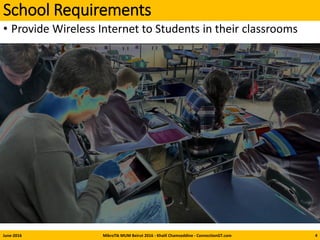
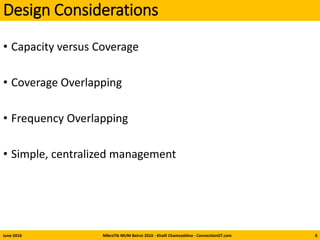
• Provide Wireless Internet to Students in their classrooms
June-2016 MikroTik MUM Beirut 2016 - Khalil Chamseddine - ConnectionGT.com 4
School Requirements
• Provide Wireless Internet to Students in their classes
• Typical, 2~3Mbps per student
• Devices used: Laptops, Tablets, iPads
• Educational Sites, Email, Some YouTube…
• Frequency Bands: Currently: 2.4GHz, Future, maybe 5Ghz
• Have the option to filter some internet traffic and some caching
• Solution should be easy to manage
• Our Typical School has “L” shape Building
• 5 floors, 50 class rooms, 20~30 devices per class
June-2016 MikroTik MUM Beirut 2016 - Khalil Chamseddine - ConnectionGT.com 5
Design Considerations
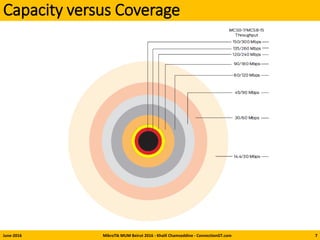
• Capacity versus Coverage
• Coverage Overlapping
• Frequency Overlapping
• Simple, centralized management
June-2016 MikroTik MUM Beirut 2016 - Khalil Chamseddine - ConnectionGT.com 6
Capacity versus Coverage
June-2016 MikroTik MUM Beirut 2016 - Khalil Chamseddine - ConnectionGT.com 7
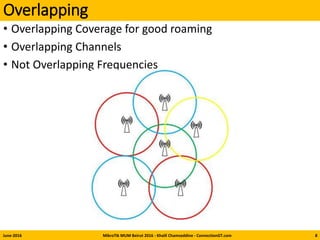
Overlapping
• Overlapping Coverage for good roaming
• Overlapping Channels
• Not Overlapping Frequencies
June-2016 MikroTik MUM Beirut 2016 - Khalil Chamseddine - ConnectionGT.com 8
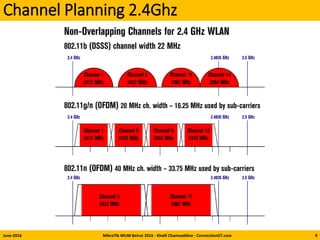
Channel Planning 2.4Ghz
June-2016 MikroTik MUM Beirut 2016 - Khalil Chamseddine - ConnectionGT.com 9
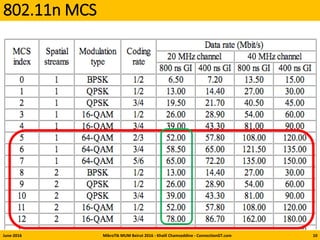
802.11n MCS
June-2016 MikroTik MUM Beirut 2016 - Khalil Chamseddine - ConnectionGT.com 10
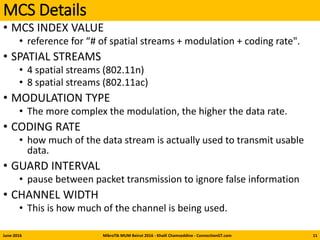
MCS Details
• MCS INDEX VALUE
• reference for “# of spatial streams + modulation + coding rate".
• SPATIAL STREAMS
• 4 spatial streams (802.11n)
• 8 spatial streams (802.11ac)
• MODULATION TYPE
• The more complex the modulation, the higher the data rate.
• CODING RATE
• how much of the data stream is actually used to transmit usable
data.
• GUARD INTERVAL
• pause between packet transmission to ignore false information
• CHANNEL WIDTH
• This is how much of the channel is being used.
June-2016 MikroTik MUM Beirut 2016 - Khalil Chamseddine - ConnectionGT.com 11
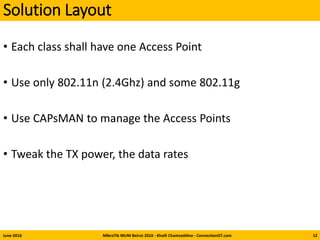
Solution Layout
• Each class shall have one Access Point
• Use only 802.11n (2.4Ghz) and some 802.11g
• Use CAPsMAN to manage the Access Points
• Tweak the TX power, the data rates
June-2016 MikroTik MUM Beirut 2016 - Khalil Chamseddine - ConnectionGT.com 12
Data Rates, Channels, TX Power, AP-Tx Limit
• Use g/n for compatibility
• 802.11n Data Rates: Select MCS-05 to MCS-14
• 802.11g Data Rates: 24MHz, 48MHz
• Channel Width 20MHz
• Long Guarded Interval
• Channels: Use only Channels 1, 5, 9, and 13 or
• Channels 1, 6, 11, if necessary
• TX Power: Start with 10dBm (for example).
• Decrease to 7dBm if necessary
• Increase to 17 dBm if necessary
• AP-TX Limit: Limit it to 3MB per client using the Access List.
• Reminder: Limit rate of data transmission to this client. Value 0 means
no limit. Value is in bits per second.
June-2016 MikroTik MUM Beirut 2016 - Khalil Chamseddine - ConnectionGT.com 13
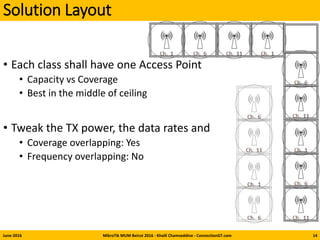
Solution Layout
• Each class shall have one Access Point
• Capacity vs Coverage
• Best in the middle of ceiling
• Tweak the TX power, the data rates and
• Coverage overlapping: Yes
• Frequency overlapping: No
June-2016 MikroTik MUM Beirut 2016 - Khalil Chamseddine - ConnectionGT.com 14
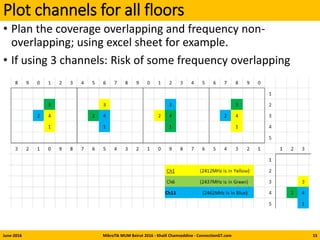
Plot channels for all floors
June-2016 MikroTik MUM Beirut 2016 - Khalil Chamseddine - ConnectionGT.com
• Plan the coverage overlapping and frequency non-
overlapping; using excel sheet for example.
• If using 3 channels: Risk of some frequency overlapping
15
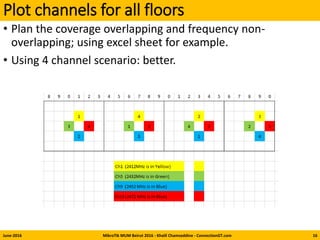
Plot channels for all floors
June-2016 MikroTik MUM Beirut 2016 - Khalil Chamseddine - ConnectionGT.com
• Plan the coverage overlapping and frequency non-
overlapping; using excel sheet for example.
• Using 4 channel scenario: better.
16
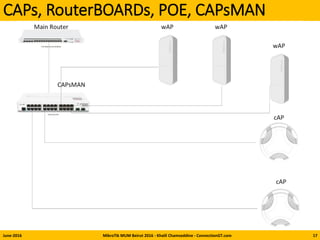
CAPs, RouterBOARDs, POE, CAPsMAN
June-2016 MikroTik MUM Beirut 2016 - Khalil Chamseddine - ConnectionGT.com 17
June-2016 MikroTik MUM Beirut 2016 - Khalil Chamseddine - ConnectionGT.com 18
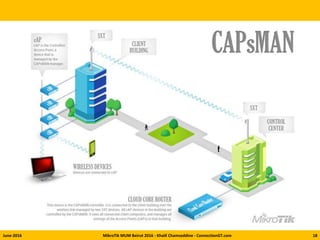
CAPsMAN for centralized management
• CAP: Controlled Access Point
• CAPsMAN: Controlled Access Point system MANager
• Centralized management of RouterOS APs
• Provisioning of Aps
• Custom configuration support
• CAPsMAN version 2:
• Improved version
• Available with latest RouterOS releases
• wireless-cm2 package on all CAPs and CAPsMAN RouterBOARDs
• Since release 6.35.2: wireless-rep package
• CAPsMAN additional settings enabled
• CAPsMAN Rates support
June-2016 MikroTik MUM Beirut 2016 - Khalil Chamseddine - ConnectionGT.com 19
Steps
• Enable CAPsMAN service
• Create Bridge interface and Add IP configuration
• Create CAPsMAN Configuration (rates, security…)
• Create Provisioning rule
• Enable CAP mode on the Aps
• Add entries to Access List
June-2016 MikroTik MUM Beirut 2016 - Khalil Chamseddine - ConnectionGT.com 20
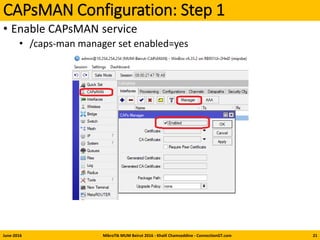
CAPsMAN Configuration: Step 1
• Enable CAPsMAN service
• /caps-man manager set enabled=yes
June-2016 MikroTik MUM Beirut 2016 - Khalil Chamseddine - ConnectionGT.com 21
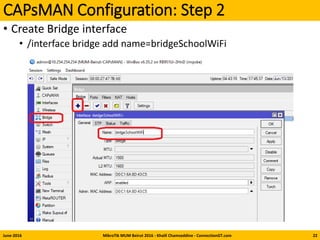
CAPsMAN Configuration: Step 2
• Create Bridge interface
• /interface bridge add name=bridgeSchoolWiFi
June-2016 MikroTik MUM Beirut 2016 - Khalil Chamseddine - ConnectionGT.com 22
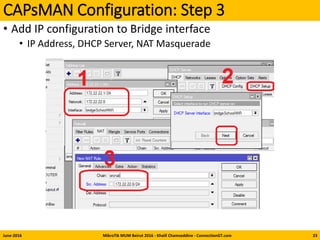
CAPsMAN Configuration: Step 3
• Add IP configuration to Bridge interface
• IP Address, DHCP Server, NAT Masquerade
June-2016 MikroTik MUM Beirut 2016 - Khalil Chamseddine - ConnectionGT.com 23
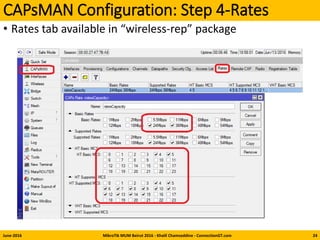
CAPsMAN Configuration: Step 4-Rates
• Rates tab available in “wireless-rep” package
June-2016 MikroTik MUM Beirut 2016 - Khalil Chamseddine - ConnectionGT.com 24
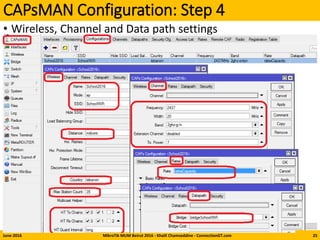
CAPsMAN Configuration: Step 4
• Wireless, Channel and Data path settings
June-2016 MikroTik MUM Beirut 2016 - Khalil Chamseddine - ConnectionGT.com 25
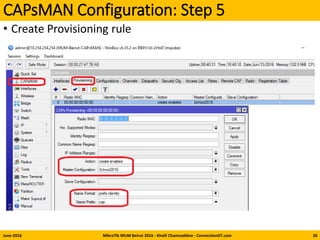
CAPsMAN Configuration: Step 5
• Create Provisioning rule
June-2016 MikroTik MUM Beirut 2016 - Khalil Chamseddine - ConnectionGT.com 26
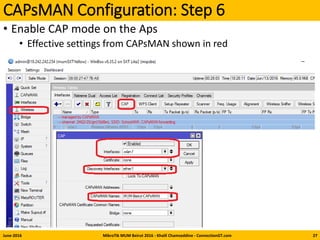
CAPsMAN Configuration: Step 6
• Enable CAP mode on the Aps
• Effective settings from CAPsMAN shown in red
June-2016 MikroTik MUM Beirut 2016 - Khalil Chamseddine - ConnectionGT.com 27
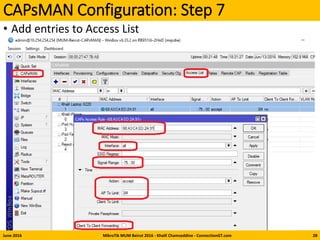
CAPsMAN Configuration: Step 7
• Add entries to Access List
June-2016 MikroTik MUM Beirut 2016 - Khalil Chamseddine - ConnectionGT.com 28
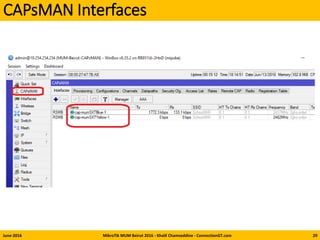
CAPsMAN Interfaces
June-2016 MikroTik MUM Beirut 2016 - Khalil Chamseddine - ConnectionGT.com 29
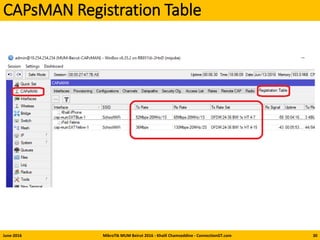
CAPsMAN Registration Table
June-2016 MikroTik MUM Beirut 2016 - Khalil Chamseddine - ConnectionGT.com 30
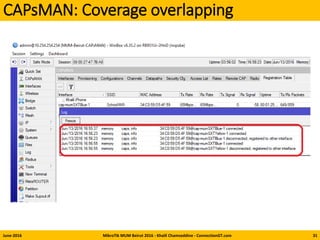
CAPsMAN: Coverage overlapping
June-2016 MikroTik MUM Beirut 2016 - Khalil Chamseddine - ConnectionGT.com 31
Web Proxy Simple Config
June-2016 MikroTik MUM Beirut 2016 - Khalil Chamseddine - ConnectionGT.com 32
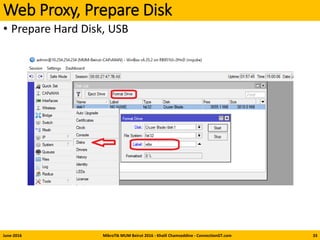
Web Proxy, Prepare Disk
• Prepare Hard Disk, USB
June-2016 MikroTik MUM Beirut 2016 - Khalil Chamseddine - ConnectionGT.com 33
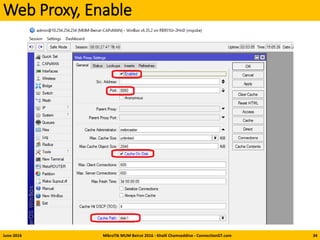
Web Proxy, Enable
June-2016 MikroTik MUM Beirut 2016 - Khalil Chamseddine - ConnectionGT.com 34
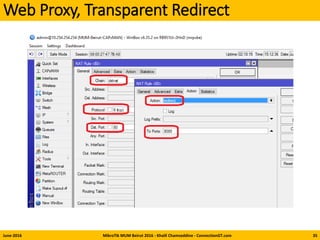
Web Proxy, Transparent Redirect
June-2016 MikroTik MUM Beirut 2016 - Khalil Chamseddine - ConnectionGT.com 35
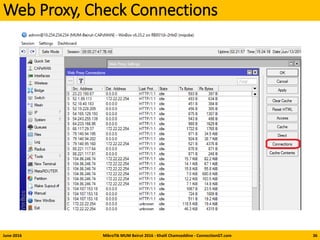
Web Proxy, Check Connections
June-2016 MikroTik MUM Beirut 2016 - Khalil Chamseddine - ConnectionGT.com 36
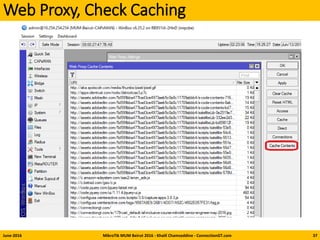
Web Proxy, Check Caching
June-2016 MikroTik MUM Beirut 2016 - Khalil Chamseddine - ConnectionGT.com 37
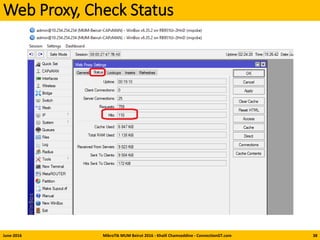
Web Proxy, Check Status
June-2016 MikroTik MUM Beirut 2016 - Khalil Chamseddine - ConnectionGT.com 38
Summary: Solution Layout
• Each class shall have one Access Point
• Use only 802.11n (2.4Ghz) and some 802.11g
• Use CAPsMAN to manage the Access Points
• Tweak the TX power, the data rates
• Increase Capacity, Decrease Coverage
• Uses CAPsMAN Access List to set conditions for connected
devices
• Use Web Proxy near the gateway to cache selected
websites.
June-2016 MikroTik MUM Beirut 2016 - Khalil Chamseddine - ConnectionGT.com 39
Thank you

Questions?
June-2016 MikroTik MUM Beirut 2016 - Khalil Chamseddine - ConnectionGT.com 40

Mikrotik MCS Modulation Mikrotik MCS Modulation

  • 1.
    MikroTik for K-12 Schools inLebanon Wi-Fi, CAPsMAN, Web Proxy MikroTik User Meeting – MUM – 14-June-2016 Beirut - Lebanon MikroTik Certified Trainer: Khalil Chamseddine http://ConnectionGT.com Khalil Chamseddine – MikroTik@ConnectionGT.com
  • 2.
    About me, theMikroTik Certified Trainer • Name: Khalil Chamseddine • Experience: Software, Hardware and Networking • Places: Lebanon, Canada, Afghanistan… • MikroTik Trainer in Lebanon and Region: MTCNA, MTCWE, MTCTCE, MTCUME, MTCRE and MTCINE. • Contact: • http://ConnectionGT.com • E-Mail: MikroTik@ConnectionGT.com • Phone: +961-3-892792 June-2016 MikroTik MUM Beirut 2016 - Khalil Chamseddine - ConnectionGT.com 2
  • 3.
    Outline • School Requirements •Design Considerations • CAPsMAN • CAPs: RouterBOARDs • Web Proxy June-2016 MikroTik MUM Beirut 2016 - Khalil Chamseddine - ConnectionGT.com 3
  • 4.
    School Requirements • ProvideWireless Internet to Students in their classrooms June-2016 MikroTik MUM Beirut 2016 - Khalil Chamseddine - ConnectionGT.com 4
  • 5.
    School Requirements • ProvideWireless Internet to Students in their classes • Typical, 2~3Mbps per student • Devices used: Laptops, Tablets, iPads • Educational Sites, Email, Some YouTube… • Frequency Bands: Currently: 2.4GHz, Future, maybe 5Ghz • Have the option to filter some internet traffic and some caching • Solution should be easy to manage • Our Typical School has “L” shape Building • 5 floors, 50 class rooms, 20~30 devices per class June-2016 MikroTik MUM Beirut 2016 - Khalil Chamseddine - ConnectionGT.com 5
  • 6.
    Design Considerations • Capacityversus Coverage • Coverage Overlapping • Frequency Overlapping • Simple, centralized management June-2016 MikroTik MUM Beirut 2016 - Khalil Chamseddine - ConnectionGT.com 6
  • 7.
    Capacity versus Coverage June-2016MikroTik MUM Beirut 2016 - Khalil Chamseddine - ConnectionGT.com 7
  • 8.
    Overlapping • Overlapping Coveragefor good roaming • Overlapping Channels • Not Overlapping Frequencies June-2016 MikroTik MUM Beirut 2016 - Khalil Chamseddine - ConnectionGT.com 8
  • 9.
    Channel Planning 2.4Ghz June-2016MikroTik MUM Beirut 2016 - Khalil Chamseddine - ConnectionGT.com 9
  • 10.
    802.11n MCS June-2016 MikroTikMUM Beirut 2016 - Khalil Chamseddine - ConnectionGT.com 10
  • 11.
    MCS Details • MCSINDEX VALUE • reference for “# of spatial streams + modulation + coding rate". • SPATIAL STREAMS • 4 spatial streams (802.11n) • 8 spatial streams (802.11ac) • MODULATION TYPE • The more complex the modulation, the higher the data rate. • CODING RATE • how much of the data stream is actually used to transmit usable data. • GUARD INTERVAL • pause between packet transmission to ignore false information • CHANNEL WIDTH • This is how much of the channel is being used. June-2016 MikroTik MUM Beirut 2016 - Khalil Chamseddine - ConnectionGT.com 11
  • 12.
    Solution Layout • Eachclass shall have one Access Point • Use only 802.11n (2.4Ghz) and some 802.11g • Use CAPsMAN to manage the Access Points • Tweak the TX power, the data rates June-2016 MikroTik MUM Beirut 2016 - Khalil Chamseddine - ConnectionGT.com 12
  • 13.
    Data Rates, Channels,TX Power, AP-Tx Limit • Use g/n for compatibility • 802.11n Data Rates: Select MCS-05 to MCS-14 • 802.11g Data Rates: 24MHz, 48MHz • Channel Width 20MHz • Long Guarded Interval • Channels: Use only Channels 1, 5, 9, and 13 or • Channels 1, 6, 11, if necessary • TX Power: Start with 10dBm (for example). • Decrease to 7dBm if necessary • Increase to 17 dBm if necessary • AP-TX Limit: Limit it to 3MB per client using the Access List. • Reminder: Limit rate of data transmission to this client. Value 0 means no limit. Value is in bits per second. June-2016 MikroTik MUM Beirut 2016 - Khalil Chamseddine - ConnectionGT.com 13
  • 14.
    Solution Layout • Eachclass shall have one Access Point • Capacity vs Coverage • Best in the middle of ceiling • Tweak the TX power, the data rates and • Coverage overlapping: Yes • Frequency overlapping: No June-2016 MikroTik MUM Beirut 2016 - Khalil Chamseddine - ConnectionGT.com 14
  • 15.
    Plot channels forall floors June-2016 MikroTik MUM Beirut 2016 - Khalil Chamseddine - ConnectionGT.com • Plan the coverage overlapping and frequency non- overlapping; using excel sheet for example. • If using 3 channels: Risk of some frequency overlapping 15
  • 16.
    Plot channels forall floors June-2016 MikroTik MUM Beirut 2016 - Khalil Chamseddine - ConnectionGT.com • Plan the coverage overlapping and frequency non- overlapping; using excel sheet for example. • Using 4 channel scenario: better. 16
  • 17.
    CAPs, RouterBOARDs, POE,CAPsMAN June-2016 MikroTik MUM Beirut 2016 - Khalil Chamseddine - ConnectionGT.com 17
  • 18.
    June-2016 MikroTik MUMBeirut 2016 - Khalil Chamseddine - ConnectionGT.com 18
  • 19.
    CAPsMAN for centralizedmanagement • CAP: Controlled Access Point • CAPsMAN: Controlled Access Point system MANager • Centralized management of RouterOS APs • Provisioning of Aps • Custom configuration support • CAPsMAN version 2: • Improved version • Available with latest RouterOS releases • wireless-cm2 package on all CAPs and CAPsMAN RouterBOARDs • Since release 6.35.2: wireless-rep package • CAPsMAN additional settings enabled • CAPsMAN Rates support June-2016 MikroTik MUM Beirut 2016 - Khalil Chamseddine - ConnectionGT.com 19
  • 20.
    Steps • Enable CAPsMANservice • Create Bridge interface and Add IP configuration • Create CAPsMAN Configuration (rates, security…) • Create Provisioning rule • Enable CAP mode on the Aps • Add entries to Access List June-2016 MikroTik MUM Beirut 2016 - Khalil Chamseddine - ConnectionGT.com 20
  • 21.
    CAPsMAN Configuration: Step1 • Enable CAPsMAN service • /caps-man manager set enabled=yes June-2016 MikroTik MUM Beirut 2016 - Khalil Chamseddine - ConnectionGT.com 21
  • 22.
    CAPsMAN Configuration: Step2 • Create Bridge interface • /interface bridge add name=bridgeSchoolWiFi June-2016 MikroTik MUM Beirut 2016 - Khalil Chamseddine - ConnectionGT.com 22
  • 23.
    CAPsMAN Configuration: Step3 • Add IP configuration to Bridge interface • IP Address, DHCP Server, NAT Masquerade June-2016 MikroTik MUM Beirut 2016 - Khalil Chamseddine - ConnectionGT.com 23
  • 24.
    CAPsMAN Configuration: Step4-Rates • Rates tab available in “wireless-rep” package June-2016 MikroTik MUM Beirut 2016 - Khalil Chamseddine - ConnectionGT.com 24
  • 25.
    CAPsMAN Configuration: Step4 • Wireless, Channel and Data path settings June-2016 MikroTik MUM Beirut 2016 - Khalil Chamseddine - ConnectionGT.com 25
  • 26.
    CAPsMAN Configuration: Step5 • Create Provisioning rule June-2016 MikroTik MUM Beirut 2016 - Khalil Chamseddine - ConnectionGT.com 26
  • 27.
    CAPsMAN Configuration: Step6 • Enable CAP mode on the Aps • Effective settings from CAPsMAN shown in red June-2016 MikroTik MUM Beirut 2016 - Khalil Chamseddine - ConnectionGT.com 27
  • 28.
    CAPsMAN Configuration: Step7 • Add entries to Access List June-2016 MikroTik MUM Beirut 2016 - Khalil Chamseddine - ConnectionGT.com 28
  • 29.
    CAPsMAN Interfaces June-2016 MikroTikMUM Beirut 2016 - Khalil Chamseddine - ConnectionGT.com 29
  • 30.
    CAPsMAN Registration Table June-2016MikroTik MUM Beirut 2016 - Khalil Chamseddine - ConnectionGT.com 30
  • 31.
    CAPsMAN: Coverage overlapping June-2016MikroTik MUM Beirut 2016 - Khalil Chamseddine - ConnectionGT.com 31
  • 32.
    Web Proxy SimpleConfig June-2016 MikroTik MUM Beirut 2016 - Khalil Chamseddine - ConnectionGT.com 32
  • 33.
    Web Proxy, PrepareDisk • Prepare Hard Disk, USB June-2016 MikroTik MUM Beirut 2016 - Khalil Chamseddine - ConnectionGT.com 33
  • 34.
    Web Proxy, Enable June-2016MikroTik MUM Beirut 2016 - Khalil Chamseddine - ConnectionGT.com 34
  • 35.
    Web Proxy, TransparentRedirect June-2016 MikroTik MUM Beirut 2016 - Khalil Chamseddine - ConnectionGT.com 35
  • 36.
    Web Proxy, CheckConnections June-2016 MikroTik MUM Beirut 2016 - Khalil Chamseddine - ConnectionGT.com 36
  • 37.
    Web Proxy, CheckCaching June-2016 MikroTik MUM Beirut 2016 - Khalil Chamseddine - ConnectionGT.com 37
  • 38.
    Web Proxy, CheckStatus June-2016 MikroTik MUM Beirut 2016 - Khalil Chamseddine - ConnectionGT.com 38
  • 39.
    Summary: Solution Layout •Each class shall have one Access Point • Use only 802.11n (2.4Ghz) and some 802.11g • Use CAPsMAN to manage the Access Points • Tweak the TX power, the data rates • Increase Capacity, Decrease Coverage • Uses CAPsMAN Access List to set conditions for connected devices • Use Web Proxy near the gateway to cache selected websites. June-2016 MikroTik MUM Beirut 2016 - Khalil Chamseddine - ConnectionGT.com 39
  • 40.
    Thank you  Questions? June-2016 MikroTikMUM Beirut 2016 - Khalil Chamseddine - ConnectionGT.com 40