MICROSOFT WORD
PREPARED BY MARIBETH Y. MANUEL
MICROSOFT WORD
•word processor developed by Microsoft. It was first
released in 1983 under the name Multi-Tool Word
for Xenix systems.
•a versatile word processing program that offers
flexibility in correcting and revising your work, as
well as a number of stylistic options to improve
your document’s presentation.
COMP100 2022
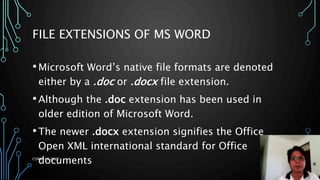
FILE EXTENSIONS OF MS WORD
•Microsoft Word’s native file formats are denoted
either by a .doc or .docx file extension.
•Although the .doc extension has been used in
older edition of Microsoft Word.
•The newer .docx extension signifies the Office
Open XML international standard for Office
documents
COMP100 2022
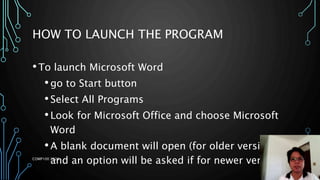
HOW TO LAUNCH THE PROGRAM
•To launch Microsoft Word
•go to Start button
•Select All Programs
•Look for Microsoft Office and choose Microsoft
Word
•A blank document will open (for older version)
and an option will be asked if for newer version.
COMP100 2022
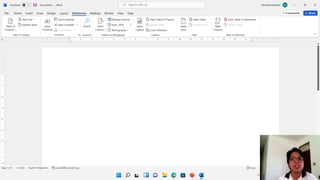
MS WORD COMPONENT
COMP100 2022
COMP100 2022
COMP100 2022
COMP100 2022
COMP100 2022
COMP100 2022
COMP100 2022
COMP100 2022
COMP100 2022
COMP100 2022
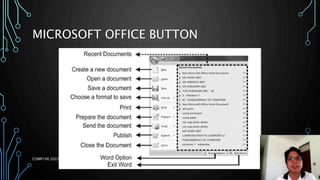
MICROSOFT OFFICE BUTTON
COMP100 2022
MS WORD SHORTCUT KEYS
DISPLAY AND USE WINDOWS
1. Switch to the next window.
2. Switch to the previous window.
3. Close the active window.
4. Restore the size of the active
window after you maximize it.
5. Move to a task pane from
another pane in the program
window (clockwise direction).
1. ALT+TAB
2. ALT+SHIFT+TAB
3. CTRL+W or CTRL+F4 ALT+F5
4. F6
5. SHIFT+F6
COMP100 2022
MS WORD SHORTCUT KEYS
DISPLAY AND USE WINDOWS
1. Move to a task pane from another
pane in the program window
(counterclockwise direction). When
more than one window is open,
switch to the next window.
2. Switch to the previous window.
3. Maximize or restore a selected
window.
4. Copy a picture of the screen to the
Clipboard.
5. Copy a picture of the selected
window to the Clipboard.
1. CTRL+F6
2. CTRL+SHIFT+F6
3. CTRL+F10
4. PRINT SCREEN
5. ALT+PRINT SCREEN
COMP100 2022
MS WORD SHORTCUT KEYS
CREATE, VIEW, AND SAVE DOCUMENTS
1. Create a new document of the
same type as the current or
most recent document.
2. Open a document.
3. Close a document.
4. Split the document window.
5. Remove the document window
split.
6. Save a document.
1. CTRL+N
2. CTRL+O
3. CTRL+W
4. ALT+CTRL+S
5. ALT+SHIFT+C
6. CTRL+S
COMP100 2022
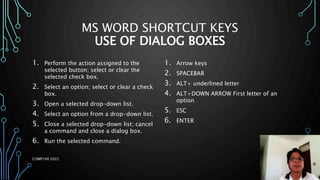
MS WORD SHORTCUT KEYS
USE OF DIALOG BOXES
1. Move from an open dialog box back
to the document, for dialog boxes
2. Move to the next option or option
group.
3. Move to the previous option or
option group.
4. Switch to the next tab in a dialog
box. Switch to the previous tab in a
dialog box.
5. Move between options in an open
drop-down list, or between options
in a group of options.
1. ALT+F6
2. TAB
3. SHIFT+TAB
4. CTRL+TAB
5. CTRL+SHIFT+TAB
COMP100 2022
MS WORD SHORTCUT KEYS
USE OF DIALOG BOXES
1. Perform the action assigned to the
selected button; select or clear the
selected check box.
2. Select an option; select or clear a check
box.
3. Open a selected drop-down list.
4. Select an option from a drop-down list.
5. Close a selected drop-down list; cancel
a command and close a dialog box.
6. Run the selected command.
1. Arrow keys
2. SPACEBAR
3. ALT+ underlined letter
4. ALT+DOWN ARROW First letter of an
option
5. ESC
6. ENTER
COMP100 2022
MS WORD SHORTCUT KEYS
COMMON TASKS
1. Create a nonbreaking space.
2. Create a nonbreaking
hyphen.
3. Make letters bold.
4. Make letters italic.
5. Make letters underline.
6. Decrease font size one
value.
1. CTRL+SHIFT+SPACEBAR
2. CTRL+HYPHEN
3. CTRL+B
4. CTRL+I
5. CTRL+U
6. CTRL+SHIFT+<
COMP100 2022
MS WORD SHORTCUT KEYS
COMMON TASKS
1. Increase font size one value.
2. Decrease font size 1 point.
3. Increase font size 1 point.
4. Remove paragraph or
character formatting.
5. Copy the selected text or
object.
6. Cut the selected text or
object.
1. CTRL+SHIFT+>
2. CTRL+[
3. CTRL+]
4. CTRL+SPACEBAR
5. CTRL+C
6. CTRL+X
COMP100 2022
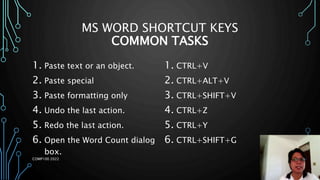
MS WORD SHORTCUT KEYS
COMMON TASKS
1. Paste text or an object.
2. Paste special
3. Paste formatting only
4. Undo the last action.
5. Redo the last action.
6. Open the Word Count dialog
box.
1. CTRL+V
2. CTRL+ALT+V
3. CTRL+SHIFT+V
4. CTRL+Z
5. CTRL+Y
6. CTRL+SHIFT+G
COMP100 2022
MS WORD SHORTCUT KEYS
FORMATTING
1. Center alignment
2. Justify alignment
3. Right alignment
4. Left alignment
5. Indent a paragraph from the
left.
1. CTRL+E
2. CTRL+J
3. CTRL+R
4. CTRL+L
5. CTRL+M
COMP100 2022
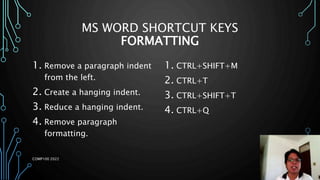
MS WORD SHORTCUT KEYS
FORMATTING
1. Remove a paragraph indent
from the left.
2. Create a hanging indent.
3. Reduce a hanging indent.
4. Remove paragraph
formatting.
1. CTRL+SHIFT+M
2. CTRL+T
3. CTRL+SHIFT+T
4. CTRL+Q
COMP100 2022

Microsoft word.pptx

  • 1.
    MICROSOFT WORD PREPARED BYMARIBETH Y. MANUEL
  • 2.
    MICROSOFT WORD •word processordeveloped by Microsoft. It was first released in 1983 under the name Multi-Tool Word for Xenix systems. •a versatile word processing program that offers flexibility in correcting and revising your work, as well as a number of stylistic options to improve your document’s presentation. COMP100 2022
  • 3.
    FILE EXTENSIONS OFMS WORD •Microsoft Word’s native file formats are denoted either by a .doc or .docx file extension. •Although the .doc extension has been used in older edition of Microsoft Word. •The newer .docx extension signifies the Office Open XML international standard for Office documents COMP100 2022
  • 4.
    HOW TO LAUNCHTHE PROGRAM •To launch Microsoft Word •go to Start button •Select All Programs •Look for Microsoft Office and choose Microsoft Word •A blank document will open (for older version) and an option will be asked if for newer version. COMP100 2022
  • 5.
  • 6.
  • 7.
  • 8.
  • 9.
  • 10.
  • 11.
  • 12.
  • 13.
  • 14.
  • 15.
  • 16.
    MS WORD SHORTCUTKEYS DISPLAY AND USE WINDOWS 1. Switch to the next window. 2. Switch to the previous window. 3. Close the active window. 4. Restore the size of the active window after you maximize it. 5. Move to a task pane from another pane in the program window (clockwise direction). 1. ALT+TAB 2. ALT+SHIFT+TAB 3. CTRL+W or CTRL+F4 ALT+F5 4. F6 5. SHIFT+F6 COMP100 2022
  • 17.
    MS WORD SHORTCUTKEYS DISPLAY AND USE WINDOWS 1. Move to a task pane from another pane in the program window (counterclockwise direction). When more than one window is open, switch to the next window. 2. Switch to the previous window. 3. Maximize or restore a selected window. 4. Copy a picture of the screen to the Clipboard. 5. Copy a picture of the selected window to the Clipboard. 1. CTRL+F6 2. CTRL+SHIFT+F6 3. CTRL+F10 4. PRINT SCREEN 5. ALT+PRINT SCREEN COMP100 2022
  • 18.
    MS WORD SHORTCUTKEYS CREATE, VIEW, AND SAVE DOCUMENTS 1. Create a new document of the same type as the current or most recent document. 2. Open a document. 3. Close a document. 4. Split the document window. 5. Remove the document window split. 6. Save a document. 1. CTRL+N 2. CTRL+O 3. CTRL+W 4. ALT+CTRL+S 5. ALT+SHIFT+C 6. CTRL+S COMP100 2022
  • 19.
    MS WORD SHORTCUTKEYS USE OF DIALOG BOXES 1. Move from an open dialog box back to the document, for dialog boxes 2. Move to the next option or option group. 3. Move to the previous option or option group. 4. Switch to the next tab in a dialog box. Switch to the previous tab in a dialog box. 5. Move between options in an open drop-down list, or between options in a group of options. 1. ALT+F6 2. TAB 3. SHIFT+TAB 4. CTRL+TAB 5. CTRL+SHIFT+TAB COMP100 2022
  • 20.
    MS WORD SHORTCUTKEYS USE OF DIALOG BOXES 1. Perform the action assigned to the selected button; select or clear the selected check box. 2. Select an option; select or clear a check box. 3. Open a selected drop-down list. 4. Select an option from a drop-down list. 5. Close a selected drop-down list; cancel a command and close a dialog box. 6. Run the selected command. 1. Arrow keys 2. SPACEBAR 3. ALT+ underlined letter 4. ALT+DOWN ARROW First letter of an option 5. ESC 6. ENTER COMP100 2022
  • 21.
    MS WORD SHORTCUTKEYS COMMON TASKS 1. Create a nonbreaking space. 2. Create a nonbreaking hyphen. 3. Make letters bold. 4. Make letters italic. 5. Make letters underline. 6. Decrease font size one value. 1. CTRL+SHIFT+SPACEBAR 2. CTRL+HYPHEN 3. CTRL+B 4. CTRL+I 5. CTRL+U 6. CTRL+SHIFT+< COMP100 2022
  • 22.
    MS WORD SHORTCUTKEYS COMMON TASKS 1. Increase font size one value. 2. Decrease font size 1 point. 3. Increase font size 1 point. 4. Remove paragraph or character formatting. 5. Copy the selected text or object. 6. Cut the selected text or object. 1. CTRL+SHIFT+> 2. CTRL+[ 3. CTRL+] 4. CTRL+SPACEBAR 5. CTRL+C 6. CTRL+X COMP100 2022
  • 23.
    MS WORD SHORTCUTKEYS COMMON TASKS 1. Paste text or an object. 2. Paste special 3. Paste formatting only 4. Undo the last action. 5. Redo the last action. 6. Open the Word Count dialog box. 1. CTRL+V 2. CTRL+ALT+V 3. CTRL+SHIFT+V 4. CTRL+Z 5. CTRL+Y 6. CTRL+SHIFT+G COMP100 2022
  • 24.
    MS WORD SHORTCUTKEYS FORMATTING 1. Center alignment 2. Justify alignment 3. Right alignment 4. Left alignment 5. Indent a paragraph from the left. 1. CTRL+E 2. CTRL+J 3. CTRL+R 4. CTRL+L 5. CTRL+M COMP100 2022
  • 25.
    MS WORD SHORTCUTKEYS FORMATTING 1. Remove a paragraph indent from the left. 2. Create a hanging indent. 3. Reduce a hanging indent. 4. Remove paragraph formatting. 1. CTRL+SHIFT+M 2. CTRL+T 3. CTRL+SHIFT+T 4. CTRL+Q COMP100 2022